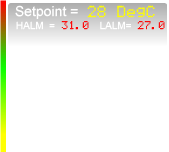
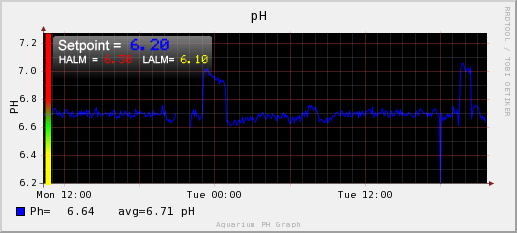
The scale overlay is only one image....It had to be saved as a png file so that
the transparency effect worked.  The scale was larger than the trend file in
size so it made my website page twice as large to load.  imagemagick combined
the two files as per the sizes below...
RRDtrend (22k) + Scale  (39k) = rob.png 34k

The scale was a pain if I wanted to adjust the actual alarm limits as I would
have to modify the image to display.  Now I think I can combine just the
vertical scale (shaded area) and write directly onto the image with the alarm
limits that are set.  That way alarm limits can be dynamically set and
displayed which is really cool  (I email on high / low alarm from a script).

I have uploaded just the scale
http://img.photobucket.com/albums/v319/rjconway/tempscale.png

  I will look for some forums on imagemagick as I want to create a bar graph
(outlined rectangle) whose fill level can change based upon an integer.  I
notice it can also rotate, this feature should get circular dials and even
arced gauges working.


Christian this is GREAT !  although not directly about owfs and the subject
line is also bad for others.   I think we should gather this info under the
owfs site re: visualisation....

cheers

rob


  ----- Original Message -----
  From: Christian Magnusson
  To: [email protected]
  Sent: Wednesday, August 29, 2007 5:55 AM
  Subject: Re: [Owfs-developers] Error trap works great on NSLU2 with owfs


  Nice image.


  Is it only two images you combined to that rob.png?  One rrdtool image and
one handmade image with text+background?


  /Christian


  From: [EMAIL PROTECTED] [mailto:[EMAIL PROTECTED] On Behalf Of Rob Conway
  Sent: den 28 augusti 2007 14:13
  To: [email protected]
  Subject: Re: [Owfs-developers] Error trap works great on NSLU2 with owfs


  Christian


  Visualisation of data onto a graphic display is now very easily achieved for
me....I can now create a true SCADA / RTU application with rich graphic
displays and trend overlays.  Thank you again for sharing this information with
us and creating the packages for the various platforms.


  From the following link I think you will find that I am very happy with the
outcome


  http://img.photobucket.com/albums/v319/rjconway/rob.png


  I just combine two images I already had as the test.  I used to have to use
layers in my web page and had each image loaded into a layer with hide/show
layer controls,however now can combine these into one image.  >From what I have
found it is quite quick to combine these images ~4 seconds


  It took probably 5 minutes to finalise the combine command and work out how
gravity works to create the image above...

  # convert -composite -gravity west -geometry +45-7 /website/ph1d.png
/website/images/phscale.png /website/rob.png

  If you have any tips on control from a web page through cgi scripts into owfs
that would be great.


  cheers


  rob Australia
-------------------------------------------------------------------------
This SF.net email is sponsored by: Splunk Inc.
Still grepping through log files to find problems?  Stop.
Now Search log events and configuration files using AJAX and a browser.
Download your FREE copy of Splunk now >>  http://get.splunk.com/
_______________________________________________
Owfs-developers mailing list
[email protected]
https://lists.sourceforge.net/lists/listinfo/owfs-developers