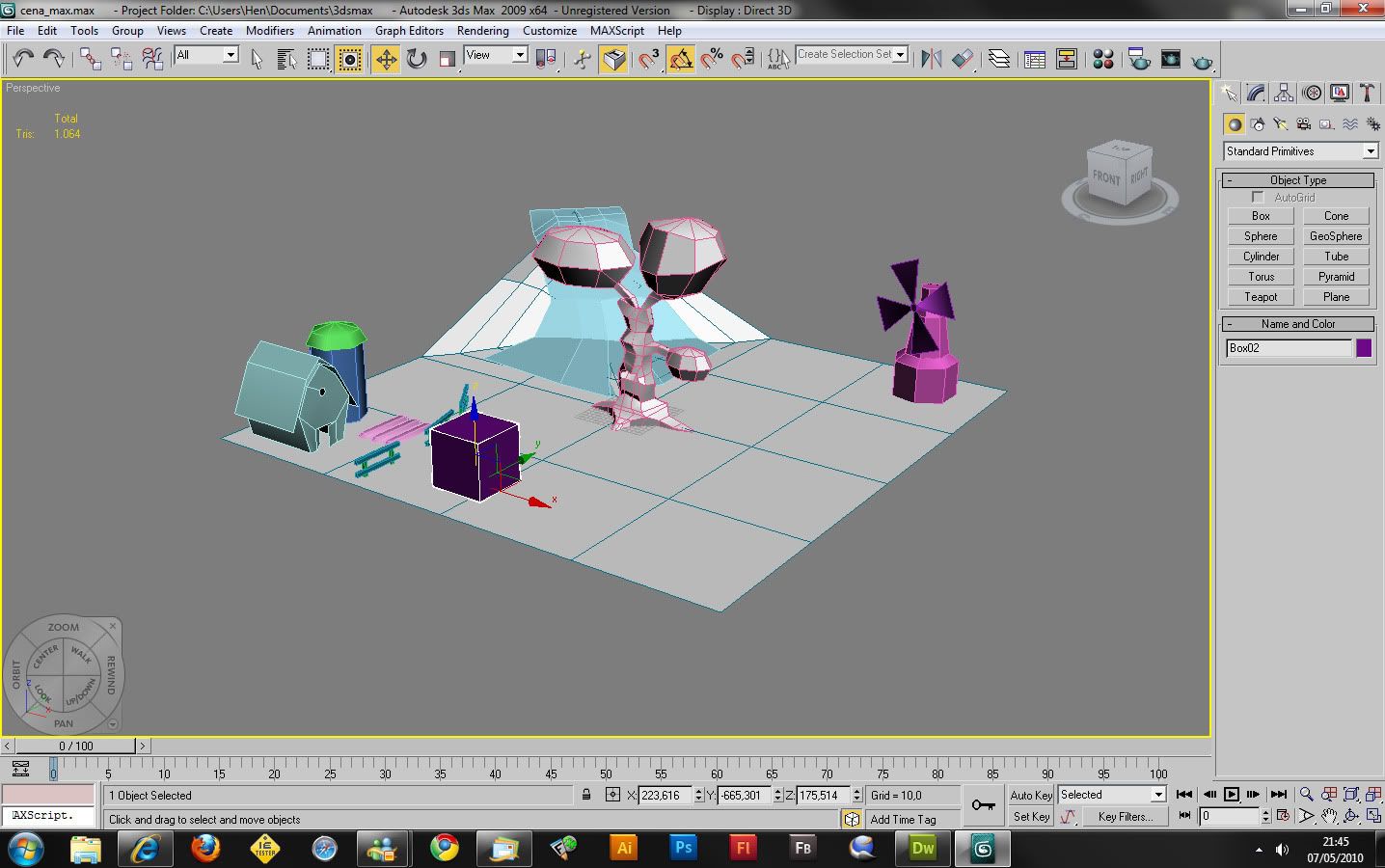
Actually for now was just tests..  I changed the x,y,z position on Max..
Also.. I put a bend to animate it
This image show you my idea:
http://img.photobucket.com/albums/v165/amonra/img.jpg

Its a Website for kids where I wanna teach ecology things..

I didnt make the animations yet, cause I dont know if they will be
possible.. But I dont need any bones.. cause it will not be a game.. I just
wanted animate somethings on max.

My first try, was using MD2. I used a plugin for Max called "Qtip".  The
animation worked Perfect!  But md2 is problematic.. It doesnt let me export
the textures right.. just pretty small textures.. Since I read Collada
everywhere when I try to learn Away3D I though it was better. For texture
and other things it works perfect.. But now I need the animation..

So do you have any idea I how I could animate on max.. like I said.. just
changing some vertex position and other simple animations directly to Away3D
?

Thank again :)


2010/5/7 Michael Iv <[email protected]>

>  As far as I know Away supports only bone animation from Collada
>
> Sent from my iPhone
>
> On May 8, 2010, at 1:06 AM, Rob Bateman <[email protected]> wrote:
>
>  Hey Henrique
>
> how are you animating the objects in collada? if you are not using bones
> then you may have problems importing - the current collada importer looks
> for those when parsing the collada file. best thing to do is submit an
> example file for testing, would that be possible?
>
> cheers
>
> Rob
>
> On Fri, May 7, 2010 at 10:22 AM, Henrique <[email protected]> wrote:
>
>> Hello people, this is my first post, but Im having problems with a
>> collada animation.
>>
>> 1) I made an animation on Max, changing the object position, also
>> bending alitlle bit the object with 30 frames.
>>
>> 2) I selected and exported as "arvore.dae" using OpenCollada [Bake
>> Matrixes, normals, triangulate and (animation) enable export]
>>
>>
>> But I have no idea how to see the animation, I tried many things.. I
>> tried to find some help on google, but I just saw people using Bones..
>> I dont have any bones, I just made the animations on Max.
>>
>> Can you help me?
>>
>> Code:
>> -------
>> package
>> {
>>
>>
>>        //----
>>        // Imports
>>        //----
>>        import away3d.animators.Animator;
>>        import away3d.animators.VertexAnimator;
>>        import away3d.animators.data.SkinVertex;
>>        import away3d.cameras.HoverCamera3D;
>>        import away3d.cameras.TargetCamera3D;
>>        import away3d.containers.ObjectContainer3D;
>>        import away3d.containers.Scene3D;
>>        import away3d.containers.View3D;
>>        import away3d.core.base.Mesh;
>>        import away3d.core.clip.RectangleClipping;
>>        import away3d.core.math.Number3D;
>>        import away3d.core.utils.Cast;
>>        import away3d.loaders.Collada;
>>        import away3d.loaders.Loader3D;
>>        import away3d.loaders.data.AnimationData;
>>        import away3d.loaders.utils.AnimationLibrary;
>>        import away3d.materials.BitmapMaterial;
>>        import away3d.primitives.Cube;
>>        import away3d.primitives.Skybox6;
>>
>>        import flash.display.Bitmap;
>>        import flash.display.Stage;
>>        import flash.events.Event;
>>        import flash.events.MouseEvent;
>>        import flash.media.Camera;
>>        import flash.utils.getTimer;
>>
>>        public class conceito3d
>>        {
>>
>>                //
>>                // General
>>                //
>>                var cena:Scene3D;
>>                var vista:View3D;
>>                var camera:TargetCamera3D;
>>                var clipping:RectangleClipping;
>>
>>
>>                // 3d objects
>>                var nvElementoTerreno:Collada;
>>                var carregadorTerreno:Loader3D;
>>                var nvElementoArvore:Collada;
>>                var carregadorArvore:Loader3D;
>>                var ceu:Skybox6;
>>
>>                //Simple Variables
>>                var rot:int = 0;
>>                var sta:Stage;
>>
>>                var lastPanAngle:Number;
>>                var lastTiltAngle:Number;
>>                var lastMouseX:Number;
>>                var lastMouseY:Number;
>>                var move:Boolean;
>>
>>                //Animation
>>                var anim:SkinVertex;
>>                var skinAnimation:SkinVertex;
>>
>>                public function conceito3d(st)
>>                {
>>                        sta = st;
>>
>>                        //Starting Objects
>>                        cena = new Scene3D();
>>                        vista =  new View3D();
>>                        camera = new TargetCamera3D();
>>
>>                        //Clipping
>>                        clipping = new RectangleClipping();
>>                        clipping.minX = -920;
>>                        clipping.minY = -480;
>>                        clipping.maxX = 920;
>>                        clipping.maxY = 480;
>>
>>                        //View
>>                        vista.scene = cena;
>>                        vista.camera = camera;
>>                        vista.clipping = clipping;
>>                        st.addChild(vista);
>>
>>                        //Camera
>>                        camera.z = 500;
>>                        camera.x = 0;
>>                        camera.y = 500;
>>                        camera.zoom = 10;
>>                        camera.focus = 40;
>>
>>                                               //SKY
>>                        ceu = new Skybox6(new
>> BitmapMaterial(Cast.bitmap(SkyImage3)));
>>                        ceu.quarterFaces();
>>                        cena.addChild(ceu);
>>
>>                        //Material
>>                        var bt:BitmapMaterial = new
>> BitmapMaterial(Cast.bitmap(textura_chao));
>>
>>                        //Objects
>>                        nvElementoTerreno = new Collada();
>>                        nvElementoTerreno.scaling = 1;
>>                        nvElementoTerreno.material = bt;
>>                        carregadorTerreno = new Loader3D();
>>
>>  carregadorTerreno.loadGeometry('terreno.dae',nvElementoTerreno);
>>                        carregadorTerreno.addOnSuccess(sucessoTerreno);
>>
>>                        nvElementoArvore = new Collada();
>>                        nvElementoArvore.scaling = 1;
>>                        nvElementoArvore.material = bt;
>>                        carregadorArvore = new Loader3D();
>>
>>  carregadorArvore.loadGeometry('arvore.dae',nvElementoArvore);
>>                        carregadorArvore.addOnSuccess(sucessoArvore);
>>
>>                        vista.x = sta.stageWidth / 2;
>>                        vista.y = sta.stageHeight / 2;
>>
>>                }
>>
>>                public function renderizar(){
>>                        if(skinAnimation){
>>                             //Maybe play() the animation?
>>                        }
>>
>>                        camera.lookAt(carregadorArvore.handle.position);
>>                        vista.render();
>>
>>
>>                }
>>
>>
>>
>>                private function sucessoTerreno(e:Event) : void
>>                {
>>                        var mesh:Mesh = carregadorTerreno.handle as Mesh;
>>                        vista.scene.addChild(mesh);
>>                }
>>
>>                private function sucessoArvore(event:Event) : void
>>                {
>>
>>                        var mesh:Mesh = carregadorArvore.handle as Mesh;
>>                        vista.scene.addChild(mesh);
>>
>>                        if
>> (carregadorArvore.handle.animationLibrary["default"]){
>>
>>                                                      //My 3D object
>> animated, now sure how handle the animation..
>>
>>                        }
>>
>>                }
>>
>>
>>        }
>> }
>> ---
>>
>>
>> Really thank you!
>>
>
>
>
> --
> Rob Bateman
> Flash Development & Consultancy
>
> [email protected]
> www.infiniteturtles.co.uk
> www.away3d.com
>
>