Look at BSPHitest class.
you will not get standard for perf reason all the data you need to identify a
given mesh.
however the HitTest class does this on demand, either check a hit from a ray
with simple return of intersection.
the second method, "getUVIntersectPosition", returns you an array, with
position, meshname, uvs and map of the hitted face.
you can also envoke and not use the array by simply ask after you invoked the
HitTest.lastHittedMeshName;

the names are to be compared with your known mesh names, obviously that will be
only for the meshes added to the tree.

Fabrice


On Aug 31, 2010, at 1:56 PM, bebensiganteng wrote:

> hi guys,
>
> i have another question regarding with the collision, is it possible
> to assign an event listener to the mesh where i can listen for any
> collision event which comes from either the BSP mesh or an added mesh
> (such as the chair)
>
> something like this perhaps?
>
> myMesh.collider = true;
> tree.addChild(myMesh);
> myMesh.addEventListener(Event.COLLIDED, onCollided);
>
> again thanks for the wonderful support and ingenious tool :D
>
>
> myMesh.collider = true;
> tree.addChild(myMesh);
>
> On Aug 26, 5:02 pm, Fabrice3D <[email protected]> wrote:
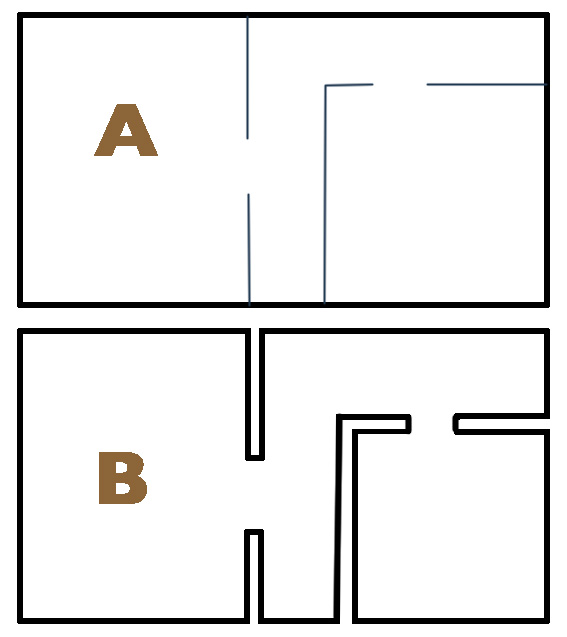
>> That's case "A" shown on my jpg.
>> To say it another way: everything that you can name "wall", "ceiling",
>> "floor" should be builded using case B (using no evil cubes)
>> Stuff like doors, furnitures should be addChilded to tree.
>>
>> Fabrice
>>
>> On Aug 26, 2010, at 1:45 PM, le_unam wrote:
>>
>>> When i create a cube which represents the outer walls, the ground and
>>> the top of my house and export this as my house. then i create the
>>> walls and export them as a bundle and add them as mesh.collider to the
>>> tree .... would it work?
>>
>>> On 26 Aug., 12:40, David Lenaerts <[email protected]> wrote:
>>>> Also, what Fabrice hasn't mentioned (I think), is that you can't just add a
>>>> bunch of cubes together and hand it over to the BSP generator. "Solid"
>>>> regions (the inside of walls, the outside of the world, etc) can't contain
>>>> anything, so you can't stack intersecting cubes as walls: For
>>>> example:http://derschmale.com/bspInters.jpg
>>
>>>> Then one more thing, imagine being "outside the world". So if you have a
>>>> house, and that's your only region. Now imagine being outside the house.
>>>> You
>>>> can't have any outside walls there. Walls basically give the bsp system the
>>>> signal that "hey, where I'm pointing, the player can go" (so only  the
>>>> region between the outer and inner wall would be considered "solid"). In
>>>> other words, since that creates a link between solid space and (albeit
>>>> unintended) non-solid space: that's a leak and will cause errors.
>>
>>>> Hope that helps,
>>>> David
>>
>>>> On Thu, Aug 26, 2010 at 11:51 AM, le_unam <[email protected]> wrote:
>>>>> oh yes fabrice thats it ... the picture explains excatly what i did
>>>>> wrong ... thank you!
>>
>>>>> On 26 Aug., 10:59, Fabrice3D <[email protected]> wrote:
>>>>>>> hmmm i guess the bsp/vps doesnt recognize oter walls of a cube ...
>>
>>>>>> Would be lots of work just to support Cube collision don't you think???
>>>>>  :))
>>
>>>>>> Of course it does. All outputs straight from Prefab are with active
>>>>> collision detection.
>>>>>> If you have played with tree booleans values, its indeed possible you
>>>>> have set it off.
>>>>>> but seeing the examples and reading the messages I think its simply
>>>>> because you do not set the collision on.
>>
>>>>>>> Problems come when i try to add walls into this room.
>>
>>>>>> K, lets let first start by the beginning.
>>
>>>>>> You need to have a model perfectly enclosed, the cube is an example I
>>>>> gave you to make you understand you need a perfectly enclosed "solid"
>>>>> model.
>>>>>> You indeed can build a room by making a simple cube and add elements to
>>>>> it... that was an example to help you understand.
>>
>>>>>> if you want to set collision detection per added elements, do like this:
>>
>>>>>> myMesh.collider = true;
>>>>>> tree.addChild(myMesh);
>>
>>>>>> To build a series of rooms, you need proceed otherway... Just made this
>>>>> little image to clarify a bit more.
>>>>> http://www.closier.nl/playground/bsproom.jpg
>>>>>> What you are doing is the A case, while you should build as the B case.
>>
>>>>>> The art is to keep the tree as simple as possible, so you add elements
>>>>> such as tables, chairs etc later on as dynamic objects.
>>>>>> Sometimes it can be wize to merge some element into the main tree.
>>
>>>>>> Hope it helps a bit.
>>
>>>>>> Fabrice
>>
>>>>>> On Aug 26, 2010, at 8:54 AM, le_unam wrote:
>>
>>>>>>> hmmm i guess the bsp/vps doesnt recognize oter walls of a cube ...
>>>>>>> only the inner ones, so that we have to build our terrain in many
>>>>>>> cubes where we walk in ... you know what i mean? maybe it is wrong but
>>>>>>> its a guess ^^
>>
>>>>>>> On 26 Aug., 07:56, bebensiganteng <[email protected]> wrote:
>>>>>>>> i have the same problem
>>
>>>>>>>> http://labs.bebensiganteng.com/flash/prefab/
>>
>>>>>>>> if you see the environment i can walk through the buildings, anybody
>>>>>>>> knows why?
>>
>>>>>>>> On Aug 25, 6:40 pm, le_unam <[email protected]> wrote:
>>
>>>>>>>>> When trying to create my building for Prefab BSP/VPS something goes
>>>>>>>>> wrong everytime. An easy room existing from only one cube with
>>>>>>>>> invertedfaces is no problem. Problems come when i try to add walls
>>>>>>>>> into this room. Fabrice showed me a link from derschmale with the
>>>>>>>>> "rules" and its okay i think i understand them, but problems are
>>>>>>>>> coming although i was following these rules. Shell i create the walls
>>>>>>>>> inside with cubes or with planes? I tried both and nothing works with
>>>>>>>>> collision detection. They are shown but i can walk trhough. Hmm maybe
>>>>>>>>> someone can give me some more guidelines.
>>
>>>>>>>>> Thank you!
>>
>>>> --
>>>> David Lenaerts
>>>> Flash platform developerhttp://www.derschmale.com