res,

Yeah, I'm green on this subject, and is something I'd like to learn myself.
LDD ( Linux Device Drivers ) by O'Reilly would probably be a good source of
information. Also free for download , just google the name + "PDF" you'll
find multiple sources. Latest edition is 3RD edition. But you could
probably wade through some code, for various aspects of i2cset, and get an
idea of whats going on.
The only reason why I commented was that I remember another person talking
about communicating with / setting the PMIC through uboot. Which is to say
I'm assuming there is no kernel / user mode. Just kernel mode, or something
akin to it.

http://lwn.net/Kernel/LDD3/

Also

https://www.kernel.org/doc/Documentation/filesystems/sysfs.txt


On Tue, Nov 25, 2014 at 6:27 PM, <[email protected]> wrote:

> Hi William,
>
> I have worked a little with codec drivers which allows you to access some
> features from user space. for example, you can change the microphone
> impedance, bias voltage etc by Alsamixer on the fly (I think is called hot
> swap). some have suggested to  access the driver thru kernel interfaces
> like sysfs. If i can find a good tutorial or example on this I will
> implement it. But, for now I am waiting for some good advice or starting
> point.
>
>
> -Regards,
>
>
>
> On Tuesday, November 25, 2014 4:58:13 PM UTC-8, William Hermans wrote:
>>
>> Ah ok my mistake I misread your post initially as I did not read the
>> whole thing sorry.
>>
>> So yes, I would think you would have to write your own kernel module, or
>> modify the existing I2C bus utils. Recompile, etc.
>>
>> On Tue, Nov 25, 2014 at 5:52 PM, William Hermans <[email protected]>
>> wrote:
>>
>>> *>  i2cdetect -l*
>>>> *> on Beaglebone Black it will give you:*
>>>> *i2c-0   unknown         OMAP I2C adapter                        N/A*
>>>> *i2c-1   unknown         OMAP I2C adapter                        N/A*
>>>>
>>>
>>> Ok, so I2C to the PMIC does work. A person on the group got this working
>>> from within uboot and posted about it over a month ago.
>>>
>>> When i asked, "ok great, but how does that translate to this working
>>> while under linux?" He / she replied: something to the effect of "I'm
>>> unsure".
>>>
>>> Anyway, the point is it is possible to control the PMIC, or at minimum
>>> communicate with it via software + I2C. I am however not a Linux kernel
>>> expert / guru, but I *would* assume this would require a kernel level
>>> driver to work.
>>>
>>>
>>> On Tue, Nov 25, 2014 at 2:31 PM, <[email protected]> wrote:
>>>
>>>> Hi liyaoshi,
>>>>
>>>> So how can I measure the charge percentage left in the battery? Is
>>>> there an example that I can use? TPS65217 does not allow us to read the
>>>> battery voltage if I am right or at least I cannot find it in datasheet.
>>>> what voltage are you talking about?
>>>>
>>>> I did some progress with controlling PMIC and I can use i2c utilities
>>>> to read and write to it. However I have to use -f to force it since kernel
>>>> is using the I2C interface. How can I do this cleanly from user space
>>>> without forcing it? One way would be to expand the driver to add extra
>>>> features. Does anyone know a good example that I can use as starting point?
>>>> Is there a better/easier way to do this?
>>>> my procedure is as follow:
>>>>
>>>>  i2cdetect -l
>>>> on Beaglebone Black it will give you:
>>>>
>>>> i2c-0   unknown         OMAP I2C adapter                        N/A
>>>>
>>>> i2c-1   unknown         OMAP I2C adapter                        N/A
>>>>
>>>>
>>>> For reading status register of TPS65217. device is at 0x25 and status
>>>> register is 0x0a on I2C0
>>>>
>>>> i2cget [-f] [-y] i2cbus chip-address [data-address [mode]]
>>>>
>>>>
>>>> sudo i2cdet -f 0 0c24 0x0a
>>>>
>>>> WARNING! This program can confuse your I2C bus, cause data loss and
>>>> worse!
>>>>
>>>> I will read from device file /dev/i2c-0, chip address 0x24, data
>>>> address
>>>>
>>>> 0x0a, using read byte data.
>>>>
>>>> Continue?
>>>> [Y/n]
>>>> 0x88
>>>>
>>>>
>>>> To set battery charging voltage to 4.2V
>>>>
>>>> i2cset [-f] [-y] [-m mask] [-r] i2cbus chip-address data-address [value
>>>> ] ... [mode]
>>>> sudo i2cset -f -m 0x30 0 0x24 0x05 0x20
>>>>
>>>> WARNING! This program can confuse your I2C bus, cause data loss and
>>>> worse!
>>>>
>>>> I will write to device file /dev/i2c-0, chip address 0x24, data address
>>>>
>>>> 0x05, data 0x20 (masked), mode byte.
>>>>
>>>> Continue? [Y/n]
>>>>
>>>> Old value 0x80, write mask 0x30: Will write 0xa0 to register 0x05
>>>>
>>>> Continue? [Y/n]
>>>>
>>>>
>>>> Thanks a lot
>>>>
>>>>
>>>>
>>>> On Monday, November 24, 2014 6:08:45 PM UTC-8, liyaoshi wrote:
>>>>>
>>>>> As I know , if only 2 wires , you can not access the Li+battery status
>>>>> , you can just get voltage value from PMU
>>>>>
>>>>> There always another 1 wire to get the communication with MCU in
>>>>> battery module
>>>>>
>>>>> 2014-11-25 8:52 GMT+08:00 <[email protected]>:
>>>>>
>>>>>> Hi All,
>>>>>>
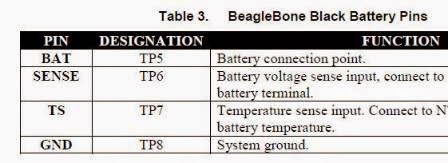
>>>>>> I connected a rechargeable Li+ battery to my BBB TP5, TP6, TP7, and
>>>>>> TP8. I shorted TP5 and TP6 and added a 10uF decoupling capacitor. In
>>>>>> addition, I connected TS to GND with a 9K resistor which is 10K || 75K
>>>>>> according to the datasheet and the board boots fine from battery.
>>>>>> Now my question is that how can I monitor the battery status(how much
>>>>>> they are charged) or change the setting of PMIC, TPS65127C from shell.
>>>>>> For
>>>>>> instance, I would like to set the charging voltage to 4.2 rather than the
>>>>>> default 4.1V. Or I would like to turn on/off WLED etc. Is there a tool,
>>>>>> like Alsamixer, for this? if not what would be the best approach for
>>>>>> controlling PMIC from shell? I posted it here because PMIC uses I2C
>>>>>> interface to talk to AM335x.
>>>>>>
>>>>>>
>>>>>> <https://lh4.googleusercontent.com/-E-wdJPfnG5U/VHPNaDDU9WI/AAAAAAAAAAo/tEjegAyAzAM/s1600/bbb-batt-srm.jpg>
>>>>>>
>>>>>>
>>>>>> <https://lh3.googleusercontent.com/-d7FQ9BVS6J4/VHPNtiSxI4I/AAAAAAAAAAw/3_g2aL5Q2K4/s1600/bbb-batt1.jpg>
>>>>>>
>>>>>> Thanks for your time and consideration.
>>>>>>
>>>>>>  --
>>>>>> For more options, visit http://beagleboard.org/discuss
>>>>>> ---
>>>>>> You received this message because you are subscribed to the Google
>>>>>> Groups "BeagleBoard" group.
>>>>>> To unsubscribe from this group and stop receiving emails from it,
>>>>>> send an email to [email protected].
>>>>>> For more options, visit https://groups.google.com/d/optout.
>>>>>>
>>>>>
>>>>>  --
>>>> For more options, visit http://beagleboard.org/discuss
>>>> ---
>>>> You received this message because you are subscribed to the Google
>>>> Groups "BeagleBoard" group.
>>>> To unsubscribe from this group and stop receiving emails from it, send
>>>> an email to [email protected].
>>>> For more options, visit https://groups.google.com/d/optout.
>>>>
>>>
>>>
>>  --
> For more options, visit http://beagleboard.org/discuss
> ---
> You received this message because you are subscribed to the Google Groups
> "BeagleBoard" group.
> To unsubscribe from this group and stop receiving emails from it, send an
> email to [email protected].
> For more options, visit https://groups.google.com/d/optout.
>

--
For more options, visit http://beagleboard.org/discuss
---
You received this message because you are subscribed to the Google Groups
"BeagleBoard" group.
To unsubscribe from this group and stop receiving emails from it, send an email
to [email protected].
For more options, visit https://groups.google.com/d/optout.