Oh, and a git for the source:

https://github.com/groeck/i2c-tools
On Mon, Dec 1, 2014 at 8:38 PM, William Hermans <[email protected]> wrote:

> res,
>
> Yeah, I'm green on this subject, and is something I'd like to learn
> myself. LDD ( Linux Device Drivers ) by O'Reilly would probably be a good
> source of information. Also free for download , just google the name +
> "PDF" you'll find multiple sources. Latest edition is 3RD edition. But you
> could probably wade through some code, for various aspects of i2cset, and
> get an idea of whats going on.
>
> The only reason why I commented was that I remember another person talking
> about communicating with / setting the PMIC through uboot. Which is to say
> I'm assuming there is no kernel / user mode. Just kernel mode, or something
> akin to it.
>
> http://lwn.net/Kernel/LDD3/
>
> Also
>
> https://www.kernel.org/doc/Documentation/filesystems/sysfs.txt
>
>
>
> On Tue, Nov 25, 2014 at 6:27 PM, <[email protected]> wrote:
>
>> Hi William,
>>
>> I have worked a little with codec drivers which allows you to access some
>> features from user space. for example, you can change the microphone
>> impedance, bias voltage etc by Alsamixer on the fly (I think is called hot
>> swap). some have suggested to  access the driver thru kernel interfaces
>> like sysfs. If i can find a good tutorial or example on this I will
>> implement it. But, for now I am waiting for some good advice or starting
>> point.
>>
>>
>> -Regards,
>>
>>
>>
>> On Tuesday, November 25, 2014 4:58:13 PM UTC-8, William Hermans wrote:
>>>
>>> Ah ok my mistake I misread your post initially as I did not read the
>>> whole thing sorry.
>>>
>>> So yes, I would think you would have to write your own kernel module, or
>>> modify the existing I2C bus utils. Recompile, etc.
>>>
>>> On Tue, Nov 25, 2014 at 5:52 PM, William Hermans <[email protected]>
>>> wrote:
>>>
>>>> *>  i2cdetect -l*
>>>>> *> on Beaglebone Black it will give you:*
>>>>> *i2c-0   unknown         OMAP I2C adapter                        N/A*
>>>>> *i2c-1   unknown         OMAP I2C adapter                        N/A*
>>>>>
>>>>
>>>> Ok, so I2C to the PMIC does work. A person on the group got this
>>>> working from within uboot and posted about it over a month ago.
>>>>
>>>> When i asked, "ok great, but how does that translate to this working
>>>> while under linux?" He / she replied: something to the effect of "I'm
>>>> unsure".
>>>>
>>>> Anyway, the point is it is possible to control the PMIC, or at minimum
>>>> communicate with it via software + I2C. I am however not a Linux kernel
>>>> expert / guru, but I *would* assume this would require a kernel level
>>>> driver to work.
>>>>
>>>>
>>>> On Tue, Nov 25, 2014 at 2:31 PM, <[email protected]> wrote:
>>>>
>>>>> Hi liyaoshi,
>>>>>
>>>>> So how can I measure the charge percentage left in the battery? Is
>>>>> there an example that I can use? TPS65217 does not allow us to read the
>>>>> battery voltage if I am right or at least I cannot find it in datasheet.
>>>>> what voltage are you talking about?
>>>>>
>>>>> I did some progress with controlling PMIC and I can use i2c utilities
>>>>> to read and write to it. However I have to use -f to force it since kernel
>>>>> is using the I2C interface. How can I do this cleanly from user space
>>>>> without forcing it? One way would be to expand the driver to add extra
>>>>> features. Does anyone know a good example that I can use as starting
>>>>> point?
>>>>> Is there a better/easier way to do this?
>>>>> my procedure is as follow:
>>>>>
>>>>>  i2cdetect -l
>>>>> on Beaglebone Black it will give you:
>>>>>
>>>>> i2c-0   unknown         OMAP I2C adapter                        N/A
>>>>>
>>>>> i2c-1   unknown         OMAP I2C adapter                        N/A
>>>>>
>>>>>
>>>>> For reading status register of TPS65217. device is at 0x25 and status
>>>>> register is 0x0a on I2C0
>>>>>
>>>>> i2cget [-f] [-y] i2cbus chip-address [data-address [mode]]
>>>>>
>>>>>
>>>>> sudo i2cdet -f 0 0c24 0x0a
>>>>>
>>>>> WARNING! This program can confuse your I2C bus, cause data loss and
>>>>> worse!
>>>>>
>>>>> I will read from device file /dev/i2c-0, chip address 0x24, data
>>>>> address
>>>>>
>>>>> 0x0a, using read byte data.
>>>>>
>>>>> Continue?
>>>>> [Y/n]
>>>>> 0x88
>>>>>
>>>>>
>>>>> To set battery charging voltage to 4.2V
>>>>>
>>>>> i2cset [-f] [-y] [-m mask] [-r] i2cbus chip-address data-address [
>>>>> value] ... [mode]
>>>>> sudo i2cset -f -m 0x30 0 0x24 0x05 0x20
>>>>>
>>>>> WARNING! This program can confuse your I2C bus, cause data loss and
>>>>> worse!
>>>>>
>>>>> I will write to device file /dev/i2c-0, chip address 0x24, data
>>>>> address
>>>>>
>>>>> 0x05, data 0x20 (masked), mode byte.
>>>>>
>>>>> Continue? [Y/n]
>>>>>
>>>>> Old value 0x80, write mask 0x30: Will write 0xa0 to register 0x05
>>>>>
>>>>> Continue? [Y/n]
>>>>>
>>>>>
>>>>> Thanks a lot
>>>>>
>>>>>
>>>>>
>>>>> On Monday, November 24, 2014 6:08:45 PM UTC-8, liyaoshi wrote:
>>>>>>
>>>>>> As I know , if only 2 wires , you can not access the Li+battery
>>>>>> status , you can just get voltage value from PMU
>>>>>>
>>>>>> There always another 1 wire to get the communication with MCU in
>>>>>> battery module
>>>>>>
>>>>>> 2014-11-25 8:52 GMT+08:00 <[email protected]>:
>>>>>>
>>>>>>> Hi All,
>>>>>>>
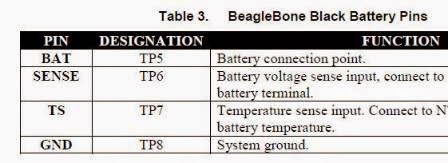
>>>>>>> I connected a rechargeable Li+ battery to my BBB TP5, TP6, TP7, and
>>>>>>> TP8. I shorted TP5 and TP6 and added a 10uF decoupling capacitor. In
>>>>>>> addition, I connected TS to GND with a 9K resistor which is 10K || 75K
>>>>>>> according to the datasheet and the board boots fine from battery.
>>>>>>> Now my question is that how can I monitor the battery status(how
>>>>>>> much they are charged) or change the setting of PMIC, TPS65127C from
>>>>>>> shell.
>>>>>>> For instance, I would like to set the charging voltage to 4.2 rather
>>>>>>> than
>>>>>>> the default 4.1V. Or I would like to turn on/off WLED etc. Is there a
>>>>>>> tool,
>>>>>>> like Alsamixer, for this? if not what would be the best approach for
>>>>>>> controlling PMIC from shell? I posted it here because PMIC uses I2C
>>>>>>> interface to talk to AM335x.
>>>>>>>
>>>>>>>
>>>>>>> <https://lh4.googleusercontent.com/-E-wdJPfnG5U/VHPNaDDU9WI/AAAAAAAAAAo/tEjegAyAzAM/s1600/bbb-batt-srm.jpg>
>>>>>>>
>>>>>>>
>>>>>>> <https://lh3.googleusercontent.com/-d7FQ9BVS6J4/VHPNtiSxI4I/AAAAAAAAAAw/3_g2aL5Q2K4/s1600/bbb-batt1.jpg>
>>>>>>>
>>>>>>> Thanks for your time and consideration.
>>>>>>>
>>>>>>>  --
>>>>>>> For more options, visit http://beagleboard.org/discuss
>>>>>>> ---
>>>>>>> You received this message because you are subscribed to the Google
>>>>>>> Groups "BeagleBoard" group.
>>>>>>> To unsubscribe from this group and stop receiving emails from it,
>>>>>>> send an email to [email protected].
>>>>>>> For more options, visit https://groups.google.com/d/optout.
>>>>>>>
>>>>>>
>>>>>>  --
>>>>> For more options, visit http://beagleboard.org/discuss
>>>>> ---
>>>>> You received this message because you are subscribed to the Google
>>>>> Groups "BeagleBoard" group.
>>>>> To unsubscribe from this group and stop receiving emails from it, send
>>>>> an email to [email protected].
>>>>> For more options, visit https://groups.google.com/d/optout.
>>>>>
>>>>
>>>>
>>>  --
>> For more options, visit http://beagleboard.org/discuss
>> ---
>> You received this message because you are subscribed to the Google Groups
>> "BeagleBoard" group.
>> To unsubscribe from this group and stop receiving emails from it, send an
>> email to [email protected].
>> For more options, visit https://groups.google.com/d/optout.
>>
>
>

--
For more options, visit http://beagleboard.org/discuss
---
You received this message because you are subscribed to the Google Groups
"BeagleBoard" group.
To unsubscribe from this group and stop receiving emails from it, send an email
to [email protected].
For more options, visit https://groups.google.com/d/optout.