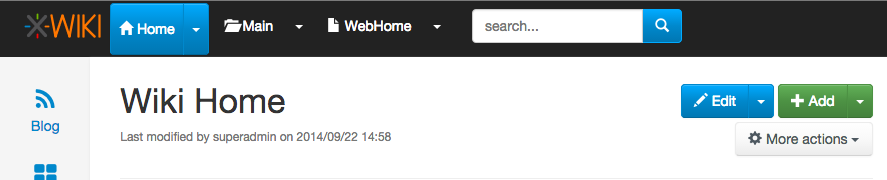
Hi all,

I kind of liked this solution as well, I think, I sort of ended up getting
used to it. Indeed maybe the button needs to be more obviously a button.
The big disadvantage of hover is that people don't realise that the menu is
clickable by itself. I have seen a lot of users trying to choose something
from the submenu, not even trying to click on the top of the menu because
they don't realize the menu is clickable itself as well. This is also valid
for the edit menu, but a bit less bothering because regular users in
general don't have a submenu for the edit menu.

So, if I was to choose now, then maybe the 6.2.1 version would be "the
one", but with an improvement of the arrow to make it look more like an
extra clickable button to unpack more options.
Also, maybe a combination of the 2: clickable menu and an extra option to
go to the space in the menu if the user unpacks it.

I would be curious of Vincent's experience, which started this change in
the first place (the fact that people don't figure out that they can unpack
the menu or that they click the whole item to unpack the menu).

Thanks,
Anca

On Tue, Oct 21, 2014 at 3:43 PM, Guillaume Lerouge <[email protected]>
wrote:

> Hi,
>
> on this topic, I liked this intermediary solution a lot for the desktop
> mode:
>
>    - *Nothing happening on hover*
>       - I actually think removing the on hover behavior is great in the top
>       bar
>       - I've seen it generate confusion / frustration in the wild,
>       especially when there's a menu, (for which on hover behavior makes
> sense)
>       underneath
>
>
>    - *Entity name is a link to the wiki home / space home / page*
>
>
>    - *Clicking on the arrow button displays the menu*
>       - Maybe the actual issue is to make the arrow more prominent as a
>       clickable button?
>
> Thanks,
>
> Guillaume
>
> On Tue, Oct 21, 2014 at 11:33 AM, [email protected] <[email protected]>
> wrote:
>
> > It's hard to disagree with this and I also agree it would be a pity to
> > have a suboptimal desktop experience because of touch devices :)
> >
> > Remaining questions:
> >
> > * How much work is it to maintain 2 versions of the menus (one for touch
> > devices and one for Desktop)?
> > * Is it natural/ok for users to have the Colibri behavior when using
> > boostrap menus/buttons?
> >
> > Thanks
> > -Vincent
> >
> >
> > On 21 Oct 2014 at 11:00:48, Anca Luca ([email protected](mailto:
> > [email protected])) wrote:
> >
> > > On Thu, Oct 9, 2014 at 5:59 PM, [email protected]
> > > wrote:
> > >
> > > >
> > > >
> > > >
> > > >
> > > >
> > > > On 9 Oct 2014 at 17:57:46, Jeremie BOUSQUET (
> > [email protected]
> > > > (mailto:[email protected])) wrote:
> > > >
> > > > > Hi,
> > > > >
> > > > > In fact, colibri top-menu was better than bootstrap buttons ! :D
> > > > >
> > > > > Why not putting back old ways of interacting ?
> > > > > - re-add display of dropdown menu on hover [1]
> > > > > - re-add underlining on hover of links in menu text
> > > >
> > > > The reason we changed that was for mobiles. We could decide to have
> > > > different behaviors on mobile and desktops but not sure it’s best.
> > WDYT?
> > > >
> > >
> > >
> > > I think it's not bad to have a slightly different behaviour for desktop
> > and
> > > mobile. I don't have much experience with this but I think that we
> should
> > > not ruin desktop experience because it has to work on mobile. If
> > different
> > > behaviour is the solution, let's do it.
> > >
> > > I think the old behaviour with the hover was quite natural, and the
> fact
> > > that bootstrap does not have those buttons by default is because it's
> > > mobile first. But, as much as we'd want it, XWiki is not yet mobile
> first
> > > (I would say most of the usage of XWiki today is still desktop, but
> > since I
> > > don't have statistics I cannot prove it. I can only use my personal
> > > statistic, from my experience and the cases I know).
> > >
> > > 2 clicks feels completely unnatural on desktop, especially when coming
> > from
> > > colibri.
> > >
> > > I would not want to let Bootstrap kill our UI choices, I think it's the
> > bad
> > > reason to say that "we won't do it because bootstrap does not have a
> > > default component for it".
> > >
> > > Thanks,
> > > Anca
> > >
> > >
> > >
> > > >
> > > > Thanks
> > > > -Vincent
> > > >
> > > > > Problem I feel is for second item as it seems bootstrap won't
> easily
> > > > allow
> > > > > you to hover on something (for dropdown) and click on it (to do
> > something
> > > > > else than show dropdown). Also I suppose there are impacts on
> mobile
> > > > > version.
> > > > >
> > > > > I don't think the new flamingo way is bad, but visually it looks
> very
> > > > > similar to colibri (a text + a little triangle), but when you hover
> > > > nothing
> > > > > happens, and you have no visual clue that something different may
> > happen
> > > > if
> > > > > you click on the text or on the triangle. For example take the
> "New"
> > > > button
> > > > > in Outlook 2007 which is exactly a dropdown button, when I hover on
> > it I
> > > > > see a clear separation between the "New" text, and the arrow, so I
> > can
> > > > > assume that both lead to different results.
> > > > >
> > > > > With the "Add" and "Edit" buttons it's completely different, you
> see
> > the
> > > > > separation, and on hoovering the color changes (of the text OR of
> the
> > > > arrow
> > > > > background). You are prepared to the fact that something different
> > will
> > > > > occur.
> > > > > But doing the same in top menu would clearly not fit expected
> > look&feel
> > > > of
> > > > > this beautiful skin...
> > > > >
> > > > > BR,
> > > > > Jeremie
> > > > >
> > > > > [1] - http://cameronspear.com/demos/bootstrap-hover-dropdown/
> > > > >
> > > > > 2014-10-09 16:02 GMT+02:00 [email protected] :
> > > > >
> > > > > >
> > > > > >
> > > > > >
> > > > > >
> > > > > >
> > > > > > On 9 Oct 2014 at 14:23:49, Eduard Moraru ([email protected]
> > (mailto:
> > > > > > [email protected])) wrote:
> > > > > >
> > > > > > > On Thu, Oct 9, 2014 at 3:15 PM, [email protected]
> > > > > > > wrote:
> > > > > > >
> > > > > > > >
> > > > > > > >
> > > > > > > >
> > > > > > > >
> > > > > > > >
> > > > > > > > On 9 Oct 2014 at 14:02:05, Eduard Moraru (
> [email protected]
> > > > (mailto:
> > > > > > > > [email protected])) wrote:
> > > > > > > >
> > > > > > > > > Folks, you speak of consistency and then come up with this
> > > > > > solution...
> > > > > > > > >
> > > > > > > > > So we have a problem with "non-standard bootstrap dropdown
> > > > buttons"
> > > > > > that
> > > > > > > > > our users (whoever they may be) have a problem with
> > understanding
> > > > > > that
> > > > > > > > > there is either an action or a dropdown involved in the
> same
> > > > button,
> > > > > > like
> > > > > > > > > they can encounter in other interfaces along their computer
> > usage
> > > > > > > > history.
> > > > > > > > >
> > > > > > > > > Our solution is to stop using the mixed mode, and only use
> > the
> > > > > > "standard
> > > > > > > > > bootstrap dropdown buttons" that have their first action in
> > the
> > > > > > submenu
> > > > > > > > the
> > > > > > > > > thing that would have happened in the past when the users
> > clicked
> > > > > > > > directly
> > > > > > > > > the action part of the "mixed button" we were using.
> > > > > > > > >
> > > > > > > > > Ok, we implement this solution, but we only do it for the
> top
> > > > > > > > navigational
> > > > > > > > > elements. We completely ignore the "Add" and the "Edit"
> > buttons
> > > > that
> > > > > > > > > "suffer" from exactly the same "problem".
> > > > > > > > >
> > > > > > > > > My question is: why?
> > > > > > > > >
> > > > > > > > > If we do/did decide that this is the way to go, we should
> at
> > > > least be
> > > > > > > > > consistent and do it everywhere in the UI, otherwise it
> just
> > > > causes
> > > > > > > > > frustrations.
> > > > > > > >
> > > > > > > > There’s a difference. For the Edit/Add button click the
> button
> > > > will do
> > > > > > > > what the user wants. Click the arrow is only for advanced
> > featurs.
> > > > > > > >
> > > > > > >
> > > > > > > "It seems they either don’t understand the little triangles and
> > what
> > > > it’s
> > > > > > > about (submenu?) or they click on the menu itself and go to
> > another
> > > > page
> > > > > > > when they were expecting some menu to drop down, or.."
> > > > > > >
> > > > > > > There is no difference from the "problem" you have mentioned in
> > the
> > > > OP.
> > > > > > The
> > > > > > > user sees an arrow and clicks on the button to expand the menu,
> > but
> > > > > > instead
> > > > > > > ends up reloading the page (either to edit mode or to view
> mode,
> > same
> > > > > > > thing). You will say that he wanted to edit anyway, yes, but
> > maybe
> > > > he did
> > > > > > > not want to edit in the default mode, so the user's "intent"
> (as
> > you
> > > > > > > defined it in the OP) is still not respected.
> > > > > > >
> > > > > > > We either do it one way, or the other, all I ask for is
> > consistency.
> > > > Do
> > > > > > we
> > > > > > > want to introduce yet another compromise in this young skin?
> > > > > >
> > > > > > The problem I saw is that users were not clicking the arrow but
> the
> > > > main
> > > > > > button part (thus navigating instead of having the main options).
> > > > > >
> > > > > > What we want is that it’s the simplest possible for the user for
> > his
> > > > use
> > > > > > case at hand:
> > > > > > - When I click Edit or Add (not the arrow, the button) it’s the
> > > > simplest
> > > > > > possible. Edit will choose the good default mode and add will
> add a
> > > > page
> > > > > > - When I click the wiki/space/page button (not the arrow) I want
> > the
> > > > > > actions to be displayed rather than the navigation since
> > navigation is
> > > > a
> > > > > > secondary use case for these buttons
> > > > > >
> > > > > > At least that’s how I view it.
> > > > > >
> > > > > > Forcing the user to have 2 clicks to do the main action on a
> button
> > > > would
> > > > > > be a pity.
> > > > > >
> > > > > > Now you’re going to say that we could keep the arrow for the
> > > > > > wiki/space/page buttons to navigate. We could, but it doesn’t
> feel
> > > > natural.
> > > > > >
> > > > > > What do you suggest?
> > > > > >
> > > > > > Thanks
> > > > > > -Vincent
> > > > > >
> > > > > > > Thanks,
> > > > > > > Eduard
> > > > > > >
> > > > > > > >
> > > > > > > > Thanks
> > > > > > > > -Vincent
> > > > > > > >
> > > > > > > > > Thanks,
> > > > > > > > > Eduard
> > > > > > > > >
> > > > > > > > > On Fri, Oct 3, 2014 at 4:21 PM, Ecaterina Moraru (Valica)
> > >
> > > > wrote:
> > > > > > > > >
> > > > > > > > > > On Wed, Sep 24, 2014 at 5:25 PM, Ecaterina Moraru
> (Valica)
> > <
> > > > > > > > > > [email protected]> wrote:
> > > > > > > > > >
> > > > > > > > > > > Hi,
> > > > > > > > > > >
> > > > > > > > > > > Some background:
> > > > > > > > > > > * Colibri
> > > > > > > > > > > ** menus displayed on hover
> > > > > > > > > > > ** custom menu JS
> > > > > > > > > > > ** menu entries could be
> > icon+label+separator+link+whatever
> > > > > > > > > > >
> > > > > > > > > > > * Flamingo
> > > > > > > > > > > ** menus displayed on click
> > > > > > > > > > > ** menu component from Bootstrap
> > > > > > > > > > > ** it expects simple links or menu dropdown containers
> > (not
> > > > both
> > > > > > > > > > functions)
> > > > > > > > > > >
> > > > > > > > > > > Theoretically Bootstrap doesn't support our use case
> and
> > > > cannot
> > > > > > > > replicate
> > > > > > > > > > > by default the Colibri's behavior.
> > > > > > > > > > > Any change we want to make to the menu Bootstrap
> > component
> > > > means
> > > > > > we
> > > > > > > > are
> > > > > > > > > > > branching from the default behavior and we will create
> a
> > > > custom
> > > > > > one.
> > > > > > > > > > > We really need to listen to clicks and not hover state,
> > > > since we
> > > > > > > > need to
> > > > > > > > > > > be mobile compatible.
> > > > > > > > > > >
> > > > > > > > > > > It's normal that the users feel a bit confused since
> > they are
> > > > > > used
> > > > > > > > with a
> > > > > > > > > > > certain behavior and we tried to mix them in order to
> > have
> > > > both
> > > > > > menu
> > > > > > > > and
> > > > > > > > > > > navigation use cases.
> > > > > > > > > > > And I think the reason is a bit confusing is that the
> > > > separation
> > > > > > > > between
> > > > > > > > > > > the link and the arrow is invisible, compared with the
> > > > btn-groups
> > > > > > > > used
> > > > > > > > > > for
> > > > > > > > > > > Edit or Add. For example, I think that making the
> > separation
> > > > more
> > > > > > > > clean,
> > > > > > > > > > > like in this screenshot
> > > > > > > > > > >
> > http://jira.xwiki.org/secure/attachment/28807/btn-group.png
> > > > > > would
> > > > > > > > > > improve
> > > > > > > > > > > a bit the things, but would need visual improvements
> and
> > is
> > > > not
> > > > > > > > default
> > > > > > > > > > > also. Maybe we could think of a better solution if we
> > were
> > > > to go
> > > > > > on
> > > > > > > > this
> > > > > > > > > > > path.
> > > > > > > > > > >
> > > > > > > > > > > Behavior like double clicking a certain element will
> be a
> > > > hidden
> > > > > > > > > > > interaction for the users. Double clicking is not a Web
> > > > behavior
> > > > > > and
> > > > > > > > you
> > > > > > > > > > > cannot expect users to know on which links to simple
> > click
> > > > vs. on
> > > > > > > > which
> > > > > > > > > > to
> > > > > > > > > > > double click. In the usability testing sessions users
> > had a
> > > > hard
> > > > > > > > time to
> > > > > > > > > > > double click on uploading image in the WYSIWYG popup,
> so
> > I'm
> > > > not
> > > > > > sure
> > > > > > > > > > about
> > > > > > > > > > > this approach's success.
> > > > > > > > > > >
> > > > > > > > > > > Regarding the IntelliJ IDEA screenshot, we already
> > discuss
> > > > about
> > > > > > this
> > > > > > > > > > idea
> > > > > > > > > > > and even made a similar proposal some long time ago,
> see
> > > > > > > > > > >
> > > > > > > >
> > > > > >
> > > >
> > http://design.xwiki.org/xwiki/bin/view/Improvements/ActionMenuNavigation
> > > > > > > > > > > Although this proposal is a nice idea and I would like
> to
> > > > have
> > > > > > it, I
> > > > > > > > > > don't
> > > > > > > > > > > see how this would 'simplify' the current
> implementation.
> > > > IMO it
> > > > > > will
> > > > > > > > > > make
> > > > > > > > > > > it even more complex and we would certainly need a
> custom
> > > > menu.
> > > > > > Also
> > > > > > > > I
> > > > > > > > > > see
> > > > > > > > > > > this as a new feature, than a solution to our current
> > > > problem.
> > > > > > > > > > >
> > > > > > > > > > > When we implemented the current solution we discussed
> if
> > the
> > > > > > > > navigation
> > > > > > > > > > > should be put on the text or on the icon, see
> > > > > > > > > > > http://jira.xwiki.org/browse/XWIKI-10449 . The main
> > problem
> > > > is
> > > > > > the
> > > > > > > > > > > findability of this functionality. Users might never
> > press
> > > > that
> > > > > > icon
> > > > > > > > > > (this
> > > > > > > > > > > problem applies to the solution brainstorming and the
> > > > breadcrumb
> > > > > > > > > > proposal).
> > > > > > > > > > >
> > > > > > > > > > > So I think the idea to have an entry with "Go to ..."
> > could
> > > > be a
> > > > > > > > solution
> > > > > > > > > > > and to keep the menus interact with the default
> behavior
> > > > > > (removing
> > > > > > > > the
> > > > > > > > > > > navigation from the dropdown activator).
> > > > > > > > > > > Removing triangles is not an option. That is a default
> > menu
> > > > > > marker
> > > > > > > > caret.
> > > > > > > > > > >
> > > > > > > > > > > So what are the next steps? We do a issue with the "Go
> to
> > > > ..."
> > > > > > > > solution?
> > > > > > > > > > >
> > > > > > > > > >
> > > > > > > > > > http://jira.xwiki.org/browse/XWIKI-11166
> > > > > > > > > >
> > > > > > > > > >
> > > > > > > > > > > Thanks,
> > > > > > > > > > > Caty
> > > > > > > > > > >
> > > > > > > > > > > On Wed, Sep 24, 2014 at 11:55 AM, Guillaume
> "Louis-Marie"
> > > > > > Delhumeau <
> > > > > > > > > > > [email protected]> wrote:
> > > > > > > > > > >
> > > > > > > > > > >> Hi.
> > > > > > > > > > >>
> > > > > > > > > > >> I am happy that this topic is coming back.
> > > > > > > > > > >>
> > > > > > > > > > >> 2014-09-24 10:04 GMT+02:00 [email protected] :
> > > > > > > > > > >>
> > > > > > > > > > >> > Hi devs,
> > > > > > > > > > >> >
> > > > > > > > > > >> > I’ve had a few persons tell me that they don’t like
> > the
> > > > small
> > > > > > > > arrow in
> > > > > > > > > > >> the
> > > > > > > > > > >> > top level menu in Flamingo. It seems they either
> don’t
> > > > > > understand
> > > > > > > > the
> > > > > > > > > > >> > little triangles and what it’s about (submenu?) or
> > they
> > > > click
> > > > > > on
> > > > > > > > the
> > > > > > > > > > >> menu
> > > > > > > > > > >> > itself and go to another page when they were
> expecting
> > > > some
> > > > > > menu
> > > > > > > > to
> > > > > > > > > > drop
> > > > > > > > > > >> > down, or...
> > > > > > > > > > >> >
> > > > > > > > > > >>
> > > > > > > > > > >> I don't like it neither. It is not consistent with
> other
> > > > > > projects
> > > > > > > > (such
> > > > > > > > > > as
> > > > > > > > > > >> JIRA). It is not consistent with what we are planning
> > to do
> > > > > > about
> > > > > > > > the UI
> > > > > > > > > > >> language (see:
> > > > > > > > > > >>
> > > > > > > > > > >>
> > > > > > > > > >
> > > > > > > >
> > > > > >
> > > >
> >
> http://design.xwiki.org/xwiki/bin/download/Proposal/InterfaceAndContentLanguageSeparation/1.1Preview.png
> > > > > > > > > > >> ).
> > > > > > > > > > >> It is harder to use on mobiles, and people are
> > surprised by
> > > > what
> > > > > > > > occurs
> > > > > > > > > > >> when they click on it.
> > > > > > > > > > >>
> > > > > > > > > > >>
> > > > > > > > > > >> >
> > > > > > > > > > >> > In addition we’re still missing a solution to easily
> > > > navigate
> > > > > > the
> > > > > > > > wiki
> > > > > > > > > > >> > from any page (there’s the ctrl+G solution but this
> is
> > > > more
> > > > > > like a
> > > > > > > > > > >> shortcut
> > > > > > > > > > >> > to know and we need something more).
> > > > > > > > > > >> >
> > > > > > > > > > >> > So here are some ideas:
> > > > > > > > > > >> >
> > > > > > > > > > >> > * For the top level menu, make it simpler by having
> > the
> > > > drop
> > > > > > down
> > > > > > > > > > >> display
> > > > > > > > > > >> > when you click anywhere in the menu (the whole width
> > of
> > > > it)
> > > > > > and
> > > > > > > > only
> > > > > > > > > > >> > navigate when you double click (there are actually
> few
> > > > > > reasons to
> > > > > > > > need
> > > > > > > > > > >> to
> > > > > > > > > > >> > navigate with the other idea below so we could also
> > not
> > > > do the
> > > > > > > > double
> > > > > > > > > > >> click
> > > > > > > > > > >> > thing)
> > > > > > > > > > >> >
> > > > > > > > > > >>
> > > > > > > > > > >> +1
> > > > > > > > > > >>
> > > > > > > > > > >>
> > > > > > > > > > >> >
> > > > > > > > > > >> > * In the breadcrumb OR in the top level menu OR in
> > both
> > > > (to be
> > > > > > > > > > decided)
> > > > > > > > > > >> > use something like this (screenshot taken from
> > IntelliJ
> > > > IDEA):
> > > > > > > > > > >> >
> > > > > > > > > > >> >
> > > > > > > > > > >>
> > > > > > > > > >
> > > > > > > >
> > > > > >
> > > >
> >
> https://www.evernote.com/shard/s119/sh/20e99ab3-2991-4aa8-a7b5-93088aad4944/aa6d10a258c9c4c7c69ede4fd45a1254
> > > > > > > > > > >> >
> > > > > > > > > > >> > This means when you click at a given level you get
> to
> > see
> > > > all
> > > > > > > > sibling
> > > > > > > > > > >> > elements in the wiki for element you’re currently on
> > > > > > (document,
> > > > > > > > space,
> > > > > > > > > > >> > wiki).
> > > > > > > > > > >> >
> > > > > > > > > > >> > For example clicking on the “Home” wiki would show:
> > > > > > > > > > >> > - A filter box allowing you to type and it would
> auto
> > > > suggest
> > > > > > as
> > > > > > > > you
> > > > > > > > > > >> type,
> > > > > > > > > > >> > completing with wiki names
> > > > > > > > > > >> > - An icon would be displayed on the left (or on the
> > > > right) of
> > > > > > the
> > > > > > > > > > filter
> > > > > > > > > > >> > box and if you click on it you’ll go the index page
> > (Wiki
> > > > > > Index in
> > > > > > > > > > this
> > > > > > > > > > >> > case)
> > > > > > > > > > >> > - A list of the first 10 wikis (an improvement would
> > be to
> > > > > > list
> > > > > > > > first
> > > > > > > > > > >> the
> > > > > > > > > > >> > wiki that you’ve last navigated to)
> > > > > > > > > > >> >
> > > > > > > > > > >> > Same would apply for spaces and pages.
> > > > > > > > > > >> >
> > > > > > > > > > >> > We could even imagine that when you’re on a user
> > profile
> > > > page,
> > > > > > > > > > clicking
> > > > > > > > > > >> on
> > > > > > > > > > >> > it would display other user pages and the filter
> would
> > > > filter
> > > > > > on
> > > > > > > > user
> > > > > > > > > > >> > pages. Actually we could imagine to when the current
> > page
> > > > has
> > > > > > > > XObjects
> > > > > > > > > > >> in
> > > > > > > > > > >> > it, it would be possible to list all other pages in
> > the
> > > > wiki
> > > > > > > > having
> > > > > > > > > > the
> > > > > > > > > > >> > same XClass. And if there are several XObjects, then
> > > > somehow
> > > > > > in
> > > > > > > > the UI
> > > > > > > > > > >> > allow selecting which one to consider as the filter
> > > > criteria.
> > > > > > > > > > >> >
> > > > > > > > > > >> > * Note 1: The breadcrumb is currently not displayed
> > on all
> > > > > > pages
> > > > > > > > (it’s
> > > > > > > > > > >> not
> > > > > > > > > > >> > on the home page for example) and thus if we
> implement
> > > > this
> > > > > > idea
> > > > > > > > in
> > > > > > > > > > the
> > > > > > > > > > >> > breadcrumb only then there’s no solution for
> > navigating
> > > > on the
> > > > > > > > home
> > > > > > > > > > >> page.
> > > > > > > > > > >> >
> > > > > > > > > > >>
> > > > > > > > > > >> This is a behaviour that I have put because I thought
> it
> > > > was not
> > > > > > > > pretty
> > > > > > > > > > to
> > > > > > > > > > >> have a useless breadcrumb on the home page. It can be
> > > > changed.
> > > > > > > > > > >>
> > > > > > > > > > >>
> > > > > > > > > > >> >
> > > > > > > > > > >> > * Note 2: If we were to implement this idea on the
> top
> > > > level
> > > > > > menu,
> > > > > > > > > > then
> > > > > > > > > > >> we
> > > > > > > > > > >> > still need to display the actions too. Several
> > options:
> > > > > > > > > > >> > - a) Display the actions first and the navigation
> list
> > > > after
> > > > > > > > separated
> > > > > > > > > > >> by
> > > > > > > > > > >> > a -----
> > > > > > > > > > >> > - b) Have a first entry in the drop down that says
> > > > > > “Actions...”
> > > > > > > > and
> > > > > > > > > > when
> > > > > > > > > > >> > you move the mouse over it a secondary menu with all
> > > > actions
> > > > > > are
> > > > > > > > > > >> displayed.
> > > > > > > > > > >> > Note that the alternative is possible too: Display
> the
> > > > > > actions and
> > > > > > > > > > have
> > > > > > > > > > >> a
> > > > > > > > > > >> > “Go to..." menu entry. We would just need to choose
> to
> > > > display
> > > > > > > > what we
> > > > > > > > > > >> > think is the most used default (actions or
> navigation)
> > > > > > > > > > >> >
> > > > > > > > > > >>
> > > > > > > > > > >> +1
> > > > > > > > > > >>
> > > > > > > > > > >>
> > > > > > > > > > >> >
> > > > > > > > > > >> > WDYT?
> > > > > > > > > > >> >
> > > > > > > > > > >> > Personally I would do this:
> > > > > > > > > > >> > - implement this idea for the breadcrumb
> > > > > > > > > > >> >
> > > > > > > > > > >>
> > > > > > > > > > >> +0, I need to think more about it
> > > > > > > > > > >>
> > > > > > > > > > >>
> > > > > > > > > > >> > - add “Go to wiki...”, “Go to space...", “Go to
> > page..."
> > > > menu
> > > > > > > > entries
> > > > > > > > > > in
> > > > > > > > > > >> > the Wiki/Space/Page top level menus
> > > > > > > > > > >> >
> > > > > > > > > > >>
> > > > > > > > > > >> +1
> > > > > > > > > > >>
> > > > > > > > > > >>
> > > > > > > > > > >> > - expand the menu selection to the whole width for
> > > > displaying
> > > > > > the
> > > > > > > > drop
> > > > > > > > > > >> > down (and not just above the small arrow)
> > > > > > > > > > >> >
> > > > > > > > > > >>
> > > > > > > > > > >> +1
> > > > > > > > > > >>
> > > > > > > > > > >>
> > > > > > > > > > >> > - either support double-click or simply add the
> > > > possibility to
> > > > > > > > > > navigate
> > > > > > > > > > >> to
> > > > > > > > > > >> > that element in the “Go to xxx...” submenu
> > > > > > > > > > >> >
> > > > > > > > > > >>
> > > > > > > > > > >> +1
> > > > > > > > > > >>
> > > > > > > > > > >>
> > > > > > > > > > >> >
> > > > > > > > > > >> > Thanks
> > > > > > > > > > >> > -Vincent
> > > > > > > > > > >> >
> > > > > > > > > > >> >
> > > > > > > > > > >> > _______________________________________________
> > > > > > > > > > >> > devs mailing list
> > > > > > > > > > >> > [email protected]
> > > > > > > > > > >> > http://lists.xwiki.org/mailman/listinfo/devs
> > > > > > > > > > >> >
> > > > > > > > > > >>
> > > > > > > > > > >>
> > > > > > > > > > >>
> > > > > > > > > > >> --
> > > > > > > > > > >> Guillaume Delhumeau ([email protected])
> > > > > > > > > > >> Research & Development Engineer at XWiki SAS
> > > > > > > > > > >> Committer on the XWiki.org project
> >
> _______________________________________________
> devs mailing list
> [email protected]
> http://lists.xwiki.org/mailman/listinfo/devs
>
_______________________________________________
devs mailing list
[email protected]
http://lists.xwiki.org/mailman/listinfo/devs