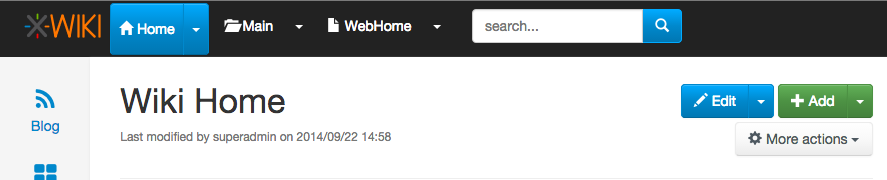
It's hard to disagree with this and I also agree it would be a pity to have a
suboptimal desktop experience because of touch devices :)
Remaining questions:

* How much work is it to maintain 2 versions of the menus (one for touch
devices and one for Desktop)?
* Is it natural/ok for users to have the Colibri behavior when using boostrap
menus/buttons?

Thanks
-Vincent


On 21 Oct 2014 at 11:00:48, Anca Luca ([email protected](mailto:[email protected]))
wrote:

> On Thu, Oct 9, 2014 at 5:59 PM, [email protected]
> wrote:
>
> >
> >
> >
> >
> >
> > On 9 Oct 2014 at 17:57:46, Jeremie BOUSQUET ([email protected]
> > (mailto:[email protected])) wrote:
> >
> > > Hi,
> > >
> > > In fact, colibri top-menu was better than bootstrap buttons ! :D
> > >
> > > Why not putting back old ways of interacting ?
> > > - re-add display of dropdown menu on hover [1]
> > > - re-add underlining on hover of links in menu text
> >
> > The reason we changed that was for mobiles. We could decide to have
> > different behaviors on mobile and desktops but not sure it’s best. WDYT?
> >
>
>
> I think it's not bad to have a slightly different behaviour for desktop and
> mobile. I don't have much experience with this but I think that we should
> not ruin desktop experience because it has to work on mobile. If different
> behaviour is the solution, let's do it.
>
> I think the old behaviour with the hover was quite natural, and the fact
> that bootstrap does not have those buttons by default is because it's
> mobile first. But, as much as we'd want it, XWiki is not yet mobile first
> (I would say most of the usage of XWiki today is still desktop, but since I
> don't have statistics I cannot prove it. I can only use my personal
> statistic, from my experience and the cases I know).
>
> 2 clicks feels completely unnatural on desktop, especially when coming from
> colibri.
>
> I would not want to let Bootstrap kill our UI choices, I think it's the bad
> reason to say that "we won't do it because bootstrap does not have a
> default component for it".
>
> Thanks,
> Anca
>
>
>
> >
> > Thanks
> > -Vincent
> >
> > > Problem I feel is for second item as it seems bootstrap won't easily
> > allow
> > > you to hover on something (for dropdown) and click on it (to do something
> > > else than show dropdown). Also I suppose there are impacts on mobile
> > > version.
> > >
> > > I don't think the new flamingo way is bad, but visually it looks very
> > > similar to colibri (a text + a little triangle), but when you hover
> > nothing
> > > happens, and you have no visual clue that something different may happen
> > if
> > > you click on the text or on the triangle. For example take the "New"
> > button
> > > in Outlook 2007 which is exactly a dropdown button, when I hover on it I
> > > see a clear separation between the "New" text, and the arrow, so I can
> > > assume that both lead to different results.
> > >
> > > With the "Add" and "Edit" buttons it's completely different, you see the
> > > separation, and on hoovering the color changes (of the text OR of the
> > arrow
> > > background). You are prepared to the fact that something different will
> > > occur.
> > > But doing the same in top menu would clearly not fit expected look&feel
> > of
> > > this beautiful skin...
> > >
> > > BR,
> > > Jeremie
> > >
> > > [1] - http://cameronspear.com/demos/bootstrap-hover-dropdown/
> > >
> > > 2014-10-09 16:02 GMT+02:00 [email protected] :
> > >
> > > >
> > > >
> > > >
> > > >
> > > >
> > > > On 9 Oct 2014 at 14:23:49, Eduard Moraru ([email protected](mailto:
> > > > [email protected])) wrote:
> > > >
> > > > > On Thu, Oct 9, 2014 at 3:15 PM, [email protected]
> > > > > wrote:
> > > > >
> > > > > >
> > > > > >
> > > > > >
> > > > > >
> > > > > >
> > > > > > On 9 Oct 2014 at 14:02:05, Eduard Moraru ([email protected]
> > (mailto:
> > > > > > [email protected])) wrote:
> > > > > >
> > > > > > > Folks, you speak of consistency and then come up with this
> > > > solution...
> > > > > > >
> > > > > > > So we have a problem with "non-standard bootstrap dropdown
> > buttons"
> > > > that
> > > > > > > our users (whoever they may be) have a problem with understanding
> > > > that
> > > > > > > there is either an action or a dropdown involved in the same
> > button,
> > > > like
> > > > > > > they can encounter in other interfaces along their computer usage
> > > > > > history.
> > > > > > >
> > > > > > > Our solution is to stop using the mixed mode, and only use the
> > > > "standard
> > > > > > > bootstrap dropdown buttons" that have their first action in the
> > > > submenu
> > > > > > the
> > > > > > > thing that would have happened in the past when the users clicked
> > > > > > directly
> > > > > > > the action part of the "mixed button" we were using.
> > > > > > >
> > > > > > > Ok, we implement this solution, but we only do it for the top
> > > > > > navigational
> > > > > > > elements. We completely ignore the "Add" and the "Edit" buttons
> > that
> > > > > > > "suffer" from exactly the same "problem".
> > > > > > >
> > > > > > > My question is: why?
> > > > > > >
> > > > > > > If we do/did decide that this is the way to go, we should at
> > least be
> > > > > > > consistent and do it everywhere in the UI, otherwise it just
> > causes
> > > > > > > frustrations.
> > > > > >
> > > > > > There’s a difference. For the Edit/Add button click the button
> > will do
> > > > > > what the user wants. Click the arrow is only for advanced featurs.
> > > > > >
> > > > >
> > > > > "It seems they either don’t understand the little triangles and what
> > it’s
> > > > > about (submenu?) or they click on the menu itself and go to another
> > page
> > > > > when they were expecting some menu to drop down, or.."
> > > > >
> > > > > There is no difference from the "problem" you have mentioned in the
> > OP.
> > > > The
> > > > > user sees an arrow and clicks on the button to expand the menu, but
> > > > instead
> > > > > ends up reloading the page (either to edit mode or to view mode, same
> > > > > thing). You will say that he wanted to edit anyway, yes, but maybe
> > he did
> > > > > not want to edit in the default mode, so the user's "intent" (as you
> > > > > defined it in the OP) is still not respected.
> > > > >
> > > > > We either do it one way, or the other, all I ask for is consistency.
> > Do
> > > > we
> > > > > want to introduce yet another compromise in this young skin?
> > > >
> > > > The problem I saw is that users were not clicking the arrow but the
> > main
> > > > button part (thus navigating instead of having the main options).
> > > >
> > > > What we want is that it’s the simplest possible for the user for his
> > use
> > > > case at hand:
> > > > - When I click Edit or Add (not the arrow, the button) it’s the
> > simplest
> > > > possible. Edit will choose the good default mode and add will add a
> > page
> > > > - When I click the wiki/space/page button (not the arrow) I want the
> > > > actions to be displayed rather than the navigation since navigation is
> > a
> > > > secondary use case for these buttons
> > > >
> > > > At least that’s how I view it.
> > > >
> > > > Forcing the user to have 2 clicks to do the main action on a button
> > would
> > > > be a pity.
> > > >
> > > > Now you’re going to say that we could keep the arrow for the
> > > > wiki/space/page buttons to navigate. We could, but it doesn’t feel
> > natural.
> > > >
> > > > What do you suggest?
> > > >
> > > > Thanks
> > > > -Vincent
> > > >
> > > > > Thanks,
> > > > > Eduard
> > > > >
> > > > > >
> > > > > > Thanks
> > > > > > -Vincent
> > > > > >
> > > > > > > Thanks,
> > > > > > > Eduard
> > > > > > >
> > > > > > > On Fri, Oct 3, 2014 at 4:21 PM, Ecaterina Moraru (Valica) > >
> > wrote:
> > > > > > >
> > > > > > > > On Wed, Sep 24, 2014 at 5:25 PM, Ecaterina Moraru (Valica) <
> > > > > > > > [email protected]> wrote:
> > > > > > > >
> > > > > > > > > Hi,
> > > > > > > > >
> > > > > > > > > Some background:
> > > > > > > > > * Colibri
> > > > > > > > > ** menus displayed on hover
> > > > > > > > > ** custom menu JS
> > > > > > > > > ** menu entries could be icon+label+separator+link+whatever
> > > > > > > > >
> > > > > > > > > * Flamingo
> > > > > > > > > ** menus displayed on click
> > > > > > > > > ** menu component from Bootstrap
> > > > > > > > > ** it expects simple links or menu dropdown containers (not
> > both
> > > > > > > > functions)
> > > > > > > > >
> > > > > > > > > Theoretically Bootstrap doesn't support our use case and
> > cannot
> > > > > > replicate
> > > > > > > > > by default the Colibri's behavior.
> > > > > > > > > Any change we want to make to the menu Bootstrap component
> > means
> > > > we
> > > > > > are
> > > > > > > > > branching from the default behavior and we will create a
> > custom
> > > > one.
> > > > > > > > > We really need to listen to clicks and not hover state,
> > since we
> > > > > > need to
> > > > > > > > > be mobile compatible.
> > > > > > > > >
> > > > > > > > > It's normal that the users feel a bit confused since they are
> > > > used
> > > > > > with a
> > > > > > > > > certain behavior and we tried to mix them in order to have
> > both
> > > > menu
> > > > > > and
> > > > > > > > > navigation use cases.
> > > > > > > > > And I think the reason is a bit confusing is that the
> > separation
> > > > > > between
> > > > > > > > > the link and the arrow is invisible, compared with the
> > btn-groups
> > > > > > used
> > > > > > > > for
> > > > > > > > > Edit or Add. For example, I think that making the separation
> > more
> > > > > > clean,
> > > > > > > > > like in this screenshot
> > > > > > > > > http://jira.xwiki.org/secure/attachment/28807/btn-group.png
> > > > would
> > > > > > > > improve
> > > > > > > > > a bit the things, but would need visual improvements and is
> > not
> > > > > > default
> > > > > > > > > also. Maybe we could think of a better solution if we were
> > to go
> > > > on
> > > > > > this
> > > > > > > > > path.
> > > > > > > > >
> > > > > > > > > Behavior like double clicking a certain element will be a
> > hidden
> > > > > > > > > interaction for the users. Double clicking is not a Web
> > behavior
> > > > and
> > > > > > you
> > > > > > > > > cannot expect users to know on which links to simple click
> > vs. on
> > > > > > which
> > > > > > > > to
> > > > > > > > > double click. In the usability testing sessions users had a
> > hard
> > > > > > time to
> > > > > > > > > double click on uploading image in the WYSIWYG popup, so I'm
> > not
> > > > sure
> > > > > > > > about
> > > > > > > > > this approach's success.
> > > > > > > > >
> > > > > > > > > Regarding the IntelliJ IDEA screenshot, we already discuss
> > about
> > > > this
> > > > > > > > idea
> > > > > > > > > and even made a similar proposal some long time ago, see
> > > > > > > > >
> > > > > >
> > > >
> > http://design.xwiki.org/xwiki/bin/view/Improvements/ActionMenuNavigation
> > > > > > > > > Although this proposal is a nice idea and I would like to
> > have
> > > > it, I
> > > > > > > > don't
> > > > > > > > > see how this would 'simplify' the current implementation.
> > IMO it
> > > > will
> > > > > > > > make
> > > > > > > > > it even more complex and we would certainly need a custom
> > menu.
> > > > Also
> > > > > > I
> > > > > > > > see
> > > > > > > > > this as a new feature, than a solution to our current
> > problem.
> > > > > > > > >
> > > > > > > > > When we implemented the current solution we discussed if the
> > > > > > navigation
> > > > > > > > > should be put on the text or on the icon, see
> > > > > > > > > http://jira.xwiki.org/browse/XWIKI-10449 . The main problem
> > is
> > > > the
> > > > > > > > > findability of this functionality. Users might never press
> > that
> > > > icon
> > > > > > > > (this
> > > > > > > > > problem applies to the solution brainstorming and the
> > breadcrumb
> > > > > > > > proposal).
> > > > > > > > >
> > > > > > > > > So I think the idea to have an entry with "Go to ..." could
> > be a
> > > > > > solution
> > > > > > > > > and to keep the menus interact with the default behavior
> > > > (removing
> > > > > > the
> > > > > > > > > navigation from the dropdown activator).
> > > > > > > > > Removing triangles is not an option. That is a default menu
> > > > marker
> > > > > > caret.
> > > > > > > > >
> > > > > > > > > So what are the next steps? We do a issue with the "Go to
> > ..."
> > > > > > solution?
> > > > > > > > >
> > > > > > > >
> > > > > > > > http://jira.xwiki.org/browse/XWIKI-11166
> > > > > > > >
> > > > > > > >
> > > > > > > > > Thanks,
> > > > > > > > > Caty
> > > > > > > > >
> > > > > > > > > On Wed, Sep 24, 2014 at 11:55 AM, Guillaume "Louis-Marie"
> > > > Delhumeau <
> > > > > > > > > [email protected]> wrote:
> > > > > > > > >
> > > > > > > > >> Hi.
> > > > > > > > >>
> > > > > > > > >> I am happy that this topic is coming back.
> > > > > > > > >>
> > > > > > > > >> 2014-09-24 10:04 GMT+02:00 [email protected] :
> > > > > > > > >>
> > > > > > > > >> > Hi devs,
> > > > > > > > >> >
> > > > > > > > >> > I’ve had a few persons tell me that they don’t like the
> > small
> > > > > > arrow in
> > > > > > > > >> the
> > > > > > > > >> > top level menu in Flamingo. It seems they either don’t
> > > > understand
> > > > > > the
> > > > > > > > >> > little triangles and what it’s about (submenu?) or they
> > click
> > > > on
> > > > > > the
> > > > > > > > >> menu
> > > > > > > > >> > itself and go to another page when they were expecting
> > some
> > > > menu
> > > > > > to
> > > > > > > > drop
> > > > > > > > >> > down, or...
> > > > > > > > >> >
> > > > > > > > >>
> > > > > > > > >> I don't like it neither. It is not consistent with other
> > > > projects
> > > > > > (such
> > > > > > > > as
> > > > > > > > >> JIRA). It is not consistent with what we are planning to do
> > > > about
> > > > > > the UI
> > > > > > > > >> language (see:
> > > > > > > > >>
> > > > > > > > >>
> > > > > > > >
> > > > > >
> > > >
> > http://design.xwiki.org/xwiki/bin/download/Proposal/InterfaceAndContentLanguageSeparation/1.1Preview.png
> > > > > > > > >> ).
> > > > > > > > >> It is harder to use on mobiles, and people are surprised by
> > what
> > > > > > occurs
> > > > > > > > >> when they click on it.
> > > > > > > > >>
> > > > > > > > >>
> > > > > > > > >> >
> > > > > > > > >> > In addition we’re still missing a solution to easily
> > navigate
> > > > the
> > > > > > wiki
> > > > > > > > >> > from any page (there’s the ctrl+G solution but this is
> > more
> > > > like a
> > > > > > > > >> shortcut
> > > > > > > > >> > to know and we need something more).
> > > > > > > > >> >
> > > > > > > > >> > So here are some ideas:
> > > > > > > > >> >
> > > > > > > > >> > * For the top level menu, make it simpler by having the
> > drop
> > > > down
> > > > > > > > >> display
> > > > > > > > >> > when you click anywhere in the menu (the whole width of
> > it)
> > > > and
> > > > > > only
> > > > > > > > >> > navigate when you double click (there are actually few
> > > > reasons to
> > > > > > need
> > > > > > > > >> to
> > > > > > > > >> > navigate with the other idea below so we could also not
> > do the
> > > > > > double
> > > > > > > > >> click
> > > > > > > > >> > thing)
> > > > > > > > >> >
> > > > > > > > >>
> > > > > > > > >> +1
> > > > > > > > >>
> > > > > > > > >>
> > > > > > > > >> >
> > > > > > > > >> > * In the breadcrumb OR in the top level menu OR in both
> > (to be
> > > > > > > > decided)
> > > > > > > > >> > use something like this (screenshot taken from IntelliJ
> > IDEA):
> > > > > > > > >> >
> > > > > > > > >> >
> > > > > > > > >>
> > > > > > > >
> > > > > >
> > > >
> > https://www.evernote.com/shard/s119/sh/20e99ab3-2991-4aa8-a7b5-93088aad4944/aa6d10a258c9c4c7c69ede4fd45a1254
> > > > > > > > >> >
> > > > > > > > >> > This means when you click at a given level you get to see
> > all
> > > > > > sibling
> > > > > > > > >> > elements in the wiki for element you’re currently on
> > > > (document,
> > > > > > space,
> > > > > > > > >> > wiki).
> > > > > > > > >> >
> > > > > > > > >> > For example clicking on the “Home” wiki would show:
> > > > > > > > >> > - A filter box allowing you to type and it would auto
> > suggest
> > > > as
> > > > > > you
> > > > > > > > >> type,
> > > > > > > > >> > completing with wiki names
> > > > > > > > >> > - An icon would be displayed on the left (or on the
> > right) of
> > > > the
> > > > > > > > filter
> > > > > > > > >> > box and if you click on it you’ll go the index page (Wiki
> > > > Index in
> > > > > > > > this
> > > > > > > > >> > case)
> > > > > > > > >> > - A list of the first 10 wikis (an improvement would be to
> > > > list
> > > > > > first
> > > > > > > > >> the
> > > > > > > > >> > wiki that you’ve last navigated to)
> > > > > > > > >> >
> > > > > > > > >> > Same would apply for spaces and pages.
> > > > > > > > >> >
> > > > > > > > >> > We could even imagine that when you’re on a user profile
> > page,
> > > > > > > > clicking
> > > > > > > > >> on
> > > > > > > > >> > it would display other user pages and the filter would
> > filter
> > > > on
> > > > > > user
> > > > > > > > >> > pages. Actually we could imagine to when the current page
> > has
> > > > > > XObjects
> > > > > > > > >> in
> > > > > > > > >> > it, it would be possible to list all other pages in the
> > wiki
> > > > > > having
> > > > > > > > the
> > > > > > > > >> > same XClass. And if there are several XObjects, then
> > somehow
> > > > in
> > > > > > the UI
> > > > > > > > >> > allow selecting which one to consider as the filter
> > criteria.
> > > > > > > > >> >
> > > > > > > > >> > * Note 1: The breadcrumb is currently not displayed on all
> > > > pages
> > > > > > (it’s
> > > > > > > > >> not
> > > > > > > > >> > on the home page for example) and thus if we implement
> > this
> > > > idea
> > > > > > in
> > > > > > > > the
> > > > > > > > >> > breadcrumb only then there’s no solution for navigating
> > on the
> > > > > > home
> > > > > > > > >> page.
> > > > > > > > >> >
> > > > > > > > >>
> > > > > > > > >> This is a behaviour that I have put because I thought it
> > was not
> > > > > > pretty
> > > > > > > > to
> > > > > > > > >> have a useless breadcrumb on the home page. It can be
> > changed.
> > > > > > > > >>
> > > > > > > > >>
> > > > > > > > >> >
> > > > > > > > >> > * Note 2: If we were to implement this idea on the top
> > level
> > > > menu,
> > > > > > > > then
> > > > > > > > >> we
> > > > > > > > >> > still need to display the actions too. Several options:
> > > > > > > > >> > - a) Display the actions first and the navigation list
> > after
> > > > > > separated
> > > > > > > > >> by
> > > > > > > > >> > a -----
> > > > > > > > >> > - b) Have a first entry in the drop down that says
> > > > “Actions...”
> > > > > > and
> > > > > > > > when
> > > > > > > > >> > you move the mouse over it a secondary menu with all
> > actions
> > > > are
> > > > > > > > >> displayed.
> > > > > > > > >> > Note that the alternative is possible too: Display the
> > > > actions and
> > > > > > > > have
> > > > > > > > >> a
> > > > > > > > >> > “Go to..." menu entry. We would just need to choose to
> > display
> > > > > > what we
> > > > > > > > >> > think is the most used default (actions or navigation)
> > > > > > > > >> >
> > > > > > > > >>
> > > > > > > > >> +1
> > > > > > > > >>
> > > > > > > > >>
> > > > > > > > >> >
> > > > > > > > >> > WDYT?
> > > > > > > > >> >
> > > > > > > > >> > Personally I would do this:
> > > > > > > > >> > - implement this idea for the breadcrumb
> > > > > > > > >> >
> > > > > > > > >>
> > > > > > > > >> +0, I need to think more about it
> > > > > > > > >>
> > > > > > > > >>
> > > > > > > > >> > - add “Go to wiki...”, “Go to space...", “Go to page..."
> > menu
> > > > > > entries
> > > > > > > > in
> > > > > > > > >> > the Wiki/Space/Page top level menus
> > > > > > > > >> >
> > > > > > > > >>
> > > > > > > > >> +1
> > > > > > > > >>
> > > > > > > > >>
> > > > > > > > >> > - expand the menu selection to the whole width for
> > displaying
> > > > the
> > > > > > drop
> > > > > > > > >> > down (and not just above the small arrow)
> > > > > > > > >> >
> > > > > > > > >>
> > > > > > > > >> +1
> > > > > > > > >>
> > > > > > > > >>
> > > > > > > > >> > - either support double-click or simply add the
> > possibility to
> > > > > > > > navigate
> > > > > > > > >> to
> > > > > > > > >> > that element in the “Go to xxx...” submenu
> > > > > > > > >> >
> > > > > > > > >>
> > > > > > > > >> +1
> > > > > > > > >>
> > > > > > > > >>
> > > > > > > > >> >
> > > > > > > > >> > Thanks
> > > > > > > > >> > -Vincent
> > > > > > > > >> >
> > > > > > > > >> >
> > > > > > > > >> > _______________________________________________
> > > > > > > > >> > devs mailing list
> > > > > > > > >> > [email protected]
> > > > > > > > >> > http://lists.xwiki.org/mailman/listinfo/devs
> > > > > > > > >> >
> > > > > > > > >>
> > > > > > > > >>
> > > > > > > > >>
> > > > > > > > >> --
> > > > > > > > >> Guillaume Delhumeau ([email protected])
> > > > > > > > >> Research & Development Engineer at XWiki SAS
> > > > > > > > >> Committer on the XWiki.org project
> > > > > > > > >> _______________________________________________
> > > > > > > > >> devs mailing list
> > > > > > > > >> [email protected]
> > > > > > > > >> http://lists.xwiki.org/mailman/listinfo/devs
> > > > > > > > >>
> > > > > > > > >
> > > > > > > > >
> > > > > > > > _______________________________________________
> > > > > > > > devs mailing list
> > > > > > > > [email protected]
> > > > > > > > http://lists.xwiki.org/mailman/listinfo/devs
> > > > > > > >
> > > > > > > _______________________________________________
> > > > > > > devs mailing list
> > > > > > > [email protected]
> > > > > > > http://lists.xwiki.org/mailman/listinfo/devs
> > > > > > _______________________________________________
> > > > > > devs mailing list
> > > > > > [email protected]
> > > > > > http://lists.xwiki.org/mailman/listinfo/devs
> > > > > >
> > > > > _______________________________________________
> > > > > devs mailing list
> > > > > [email protected]
> > > > > http://lists.xwiki.org/mailman/listinfo/devs
> > > > _______________________________________________
> > > > devs mailing list
> > > > [email protected]
> > > > http://lists.xwiki.org/mailman/listinfo/devs
> > > >
> > > _______________________________________________
> > > devs mailing list
> > > [email protected]
> > > http://lists.xwiki.org/mailman/listinfo/devs
> > _______________________________________________
> > devs mailing list
> > [email protected]
> > http://lists.xwiki.org/mailman/listinfo/devs
> >
> _______________________________________________
> devs mailing list
> [email protected]
> http://lists.xwiki.org/mailman/listinfo/devs

_______________________________________________
devs mailing list
[email protected]
http://lists.xwiki.org/mailman/listinfo/devs