>Hi,
>
>I have just dowloaded Gimp 2.8.16 and installed it on my Windows 10 -
>64 bit PC. However, the user interface with all the icons and texts
>are too small for me and it is very hard to read what is on the
>screen. My monitor size is 3440 X 1440. Of course I can change the
>size of everything on the screen by using the Display settings in
>Windows 10 and set the slider to, say, 150%. But then ALL applications
>and windows on the screen get bigger, even if I do not want them to.
>
>Is there a way to customize the size of textlabels, toobars, icons etc
>in the user interface of GIMP?
>
>Thanks!
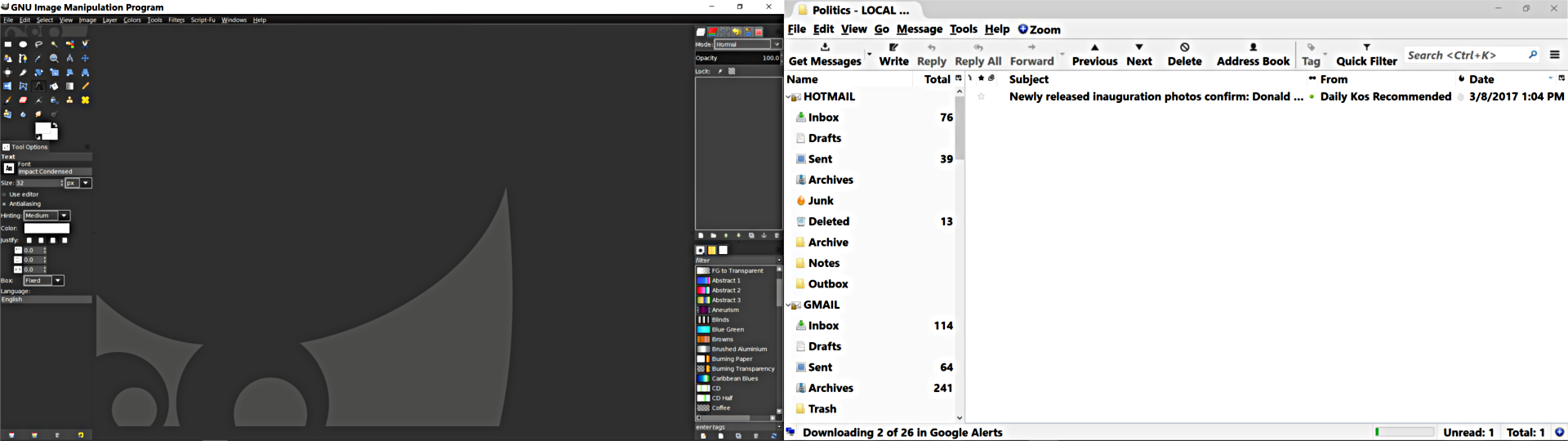
I've been searching for a solution to this for several releases and still no
joy. Gimp DOES NOT follow Windows scaling or text size convention no matter what
scale or text size. I have to work in Gimp with the Magnifyer and still my eyes
are bleeding after a few minutes. My resolution is 1920x1080, the screenshot
below is with Windows (10) scaling at 125% (I've tried them all) and the font
size is set to 14. You can see the results in Thunderbird on the right following
Windows but Gimp on the left does not. I've tried all the themes I can find and
none of them are larger fonts either.

Attachments:
*
http://www.gimpusers.com/system/attachments/504/original/Gimp_font_screenshot.png

--
MJHig (via www.gimpusers.com/forums)
_______________________________________________
gimp-user-list mailing list
List address:    [email protected]
List membership: https://mail.gnome.org/mailman/listinfo/gimp-user-list
List archives:   https://mail.gnome.org/archives/gimp-user-list