>I'm working with the last gimp version 2.10. I need to make circle
>selection with the ellipse tool, I need the circle selection to be
>with defined diameter size (for example 20 mm)
>What steps I should take to achieve the result?
First of all, Gimp is a raster (bitmap) editor and works in **pixels** although
it can show equivalents as long as you realise these are tied to the printing
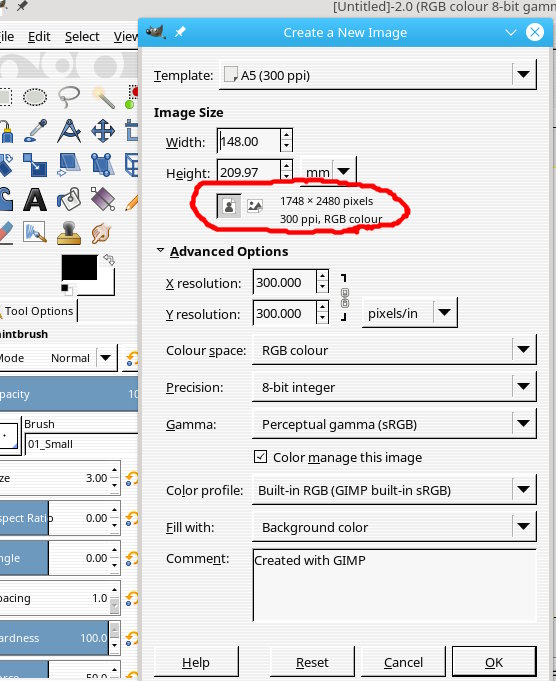
resolution. An example is the standard template for A5(300ppi) which is set up
in mm. see screenshot.

..but it can be any-old canvas size/resolution.

To make a circular selection of a given size (in millimetres)

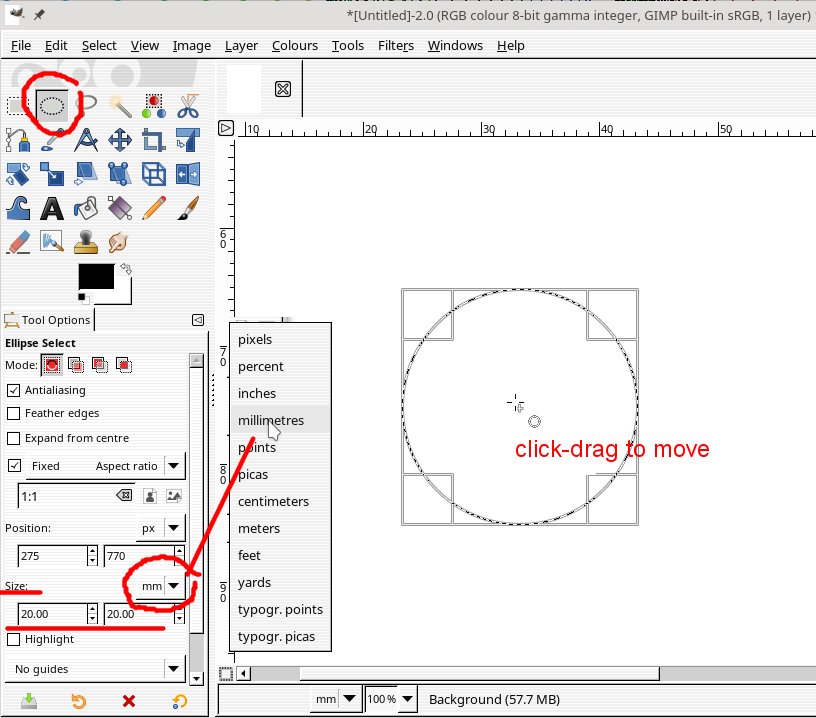
You can set a fixed size but that is in pixels so the most direct way is see:
screenshot

1. In the elliptical select tool options set the size units to mm from the drop
down menu.

2. Draw any selection in the canvas.

3. Manually enter the size in the two height / width of selection boxes.

4. Click and drag the selection to the required position

5. Hit enter to fix the selection

rich: www.gimp-forum.net

Attachments:
* http://www.gimpusers.com/system/attachments/902/original/01-circle.jpg
* http://www.gimpusers.com/system/attachments/903/original/02-circle.jpg

--
rich404 (via www.gimpusers.com/forums)
_______________________________________________
gimp-user-list mailing list
List address:    [email protected]
List membership: https://mail.gnome.org/mailman/listinfo/gimp-user-list
List archives:   https://mail.gnome.org/archives/gimp-user-list