>Thanks I created the circles - and now I have other question -I want
>to distribute them evenly-with the same space between then.I chose the
>align tool and shift+click on all the circles. I clicked on distribute
>evenly in the horizontal-but it distribute the circles with even space
>- As you can see on the picture attached. What can be done to
>distribute with even space?
You want even spaces between the circles.

>From your image, using the Gimp align tool, the centers are evenly spaced.
>Could
do it by hand but using a plugin.

1. You need each circle on its own layer, and each layer autocropped to minimum
size.

2. The plugin arrange-layers-0.2.py comes from

http://sourceforge.net/projects/gimp-tools/files/scripts/  down the page look
for the date 2012-11-30

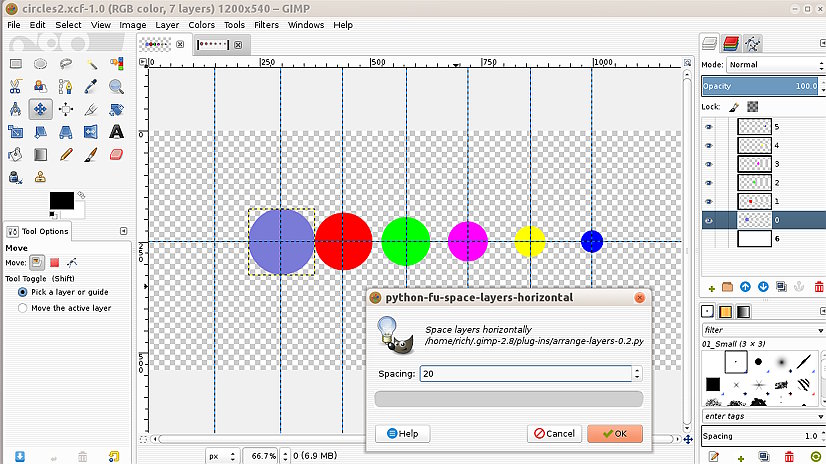
3. Find it bottom of the image menu Image -> Arrange layers -> Space ->
Horizontally see screenshot

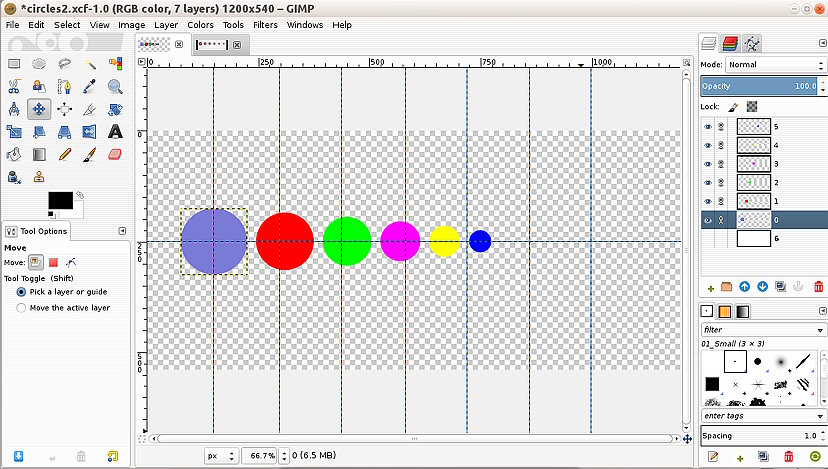
4. You will probably need to move back into position, link layers and use the
move tools. see: screenshot

rich: www.gimp-forum.net

Attachments:
* http://www.gimpusers.com/system/attachments/906/original/01-aligned.jpg
* http://www.gimpusers.com/system/attachments/907/original/02-spaced.jpg

--
rich404 (via www.gimpusers.com/forums)
_______________________________________________
gimp-user-list mailing list
List address:    [email protected]
List membership: https://mail.gnome.org/mailman/listinfo/gimp-user-list
List archives:   https://mail.gnome.org/archives/gimp-user-list