>Although Gimp 2.10 uninstalls Gimp 2.8 there are parts left behind.
>The Gimp 2.8 profile remains and if any third-party plugins/add-ons
>were added in the past to the main Gimp 2.8 installation, they will
>remain.
>
>What you can try is:
>
>1. Use the windows uninstaller to uninstall Gimp 2.10
>
>2. If any of C:\Program Files\GIMP 2\ remains delete it.
>
>3. Disable the Gimp 2.8 profile, rename or move out to a backup
>folder.
>
>4. Now install Gimp 2.10, run it to make a default Gimp 2.10 profile.
>
>If that does not work then consider a different Gimp 2.10 package,
>maybe the one from www.partha.com
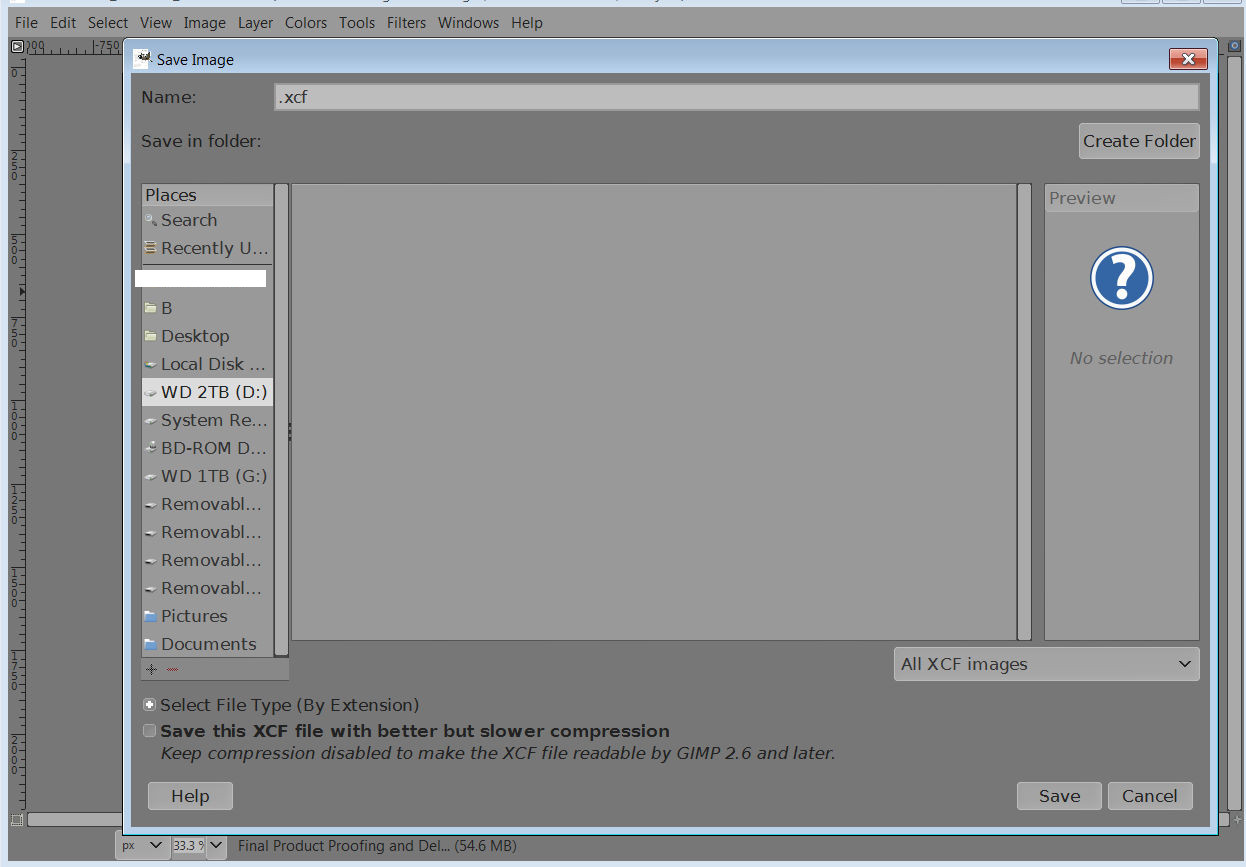
I'm having the same problem.  I did  a clean install of Gimp 2.10 and deleted
the previous 2.8 install directory before the new installation.  When I click on
my different hard drives and directories in the Save As dialog the only files or
folders shown are in Pictures, Documents and the current User directory, all of
the hard drives show blank and I cannot navigate them.  It's hard to imagine
that one would need to install a different package other than the official Gimp
one to get something as simple as save directories to show up when trying to
save.  Any help would be appreciated, thank you.

Attachments:
* http://www.gimpusers.com/system/attachments/908/original/Untitled1.jpg

--
Poptop (via www.gimpusers.com/forums)
_______________________________________________
gimp-user-list mailing list
List address:    [email protected]
List membership: https://mail.gnome.org/mailman/listinfo/gimp-user-list
List archives:   https://mail.gnome.org/archives/gimp-user-list