Thanks Elle! Yes, that is it.

When I rebuild to answer Ell on the other bug, I'll check out 2.56.2. In
the meantime, yes, you have to downgrade to 2.53.x which is why my build
doesn't exhibit this issue.
On Sat, May 12, 2018 at 11:04 AM Elle Stone <[email protected]>
wrote:

> Is this bug report relevant? If so, the fix might be in glib 2.56.2.
>
> https://github.com/Alexpux/MINGW-packages/issues/3584
> Since last updates gtk filechooser appears broken.
>
> Steps:
>
>      run gedit
>      Open -> Other documents ...
>      Dialog shows, try to change drive to "Label (D:)"
>      No content to bowse
>
>
> On 05/12/2018 10:14 AM, Partha Bagchi wrote:
> > This is a problem with glib. You have to downgrade to 2.53.1 I had to do
> > that when I ran into this problem with RC2.
> >
> > On Sat, May 12, 2018 at 10:11 AM Poptop <[email protected]> wrote:
> >
> >>> Although Gimp 2.10 uninstalls Gimp 2.8 there are parts left behind.
> >>> The Gimp 2.8 profile remains and if any third-party plugins/add-ons
> >>> were added in the past to the main Gimp 2.8 installation, they will
> >>> remain.
> >>>
> >>> What you can try is:
> >>>
> >>> 1. Use the windows uninstaller to uninstall Gimp 2.10
> >>>
> >>> 2. If any of C:\Program Files\GIMP 2\ remains delete it.
> >>>
> >>> 3. Disable the Gimp 2.8 profile, rename or move out to a backup
> >>> folder.
> >>>
> >>> 4. Now install Gimp 2.10, run it to make a default Gimp 2.10 profile.
> >>>
> >>> If that does not work then consider a different Gimp 2.10 package,
> >>> maybe the one from www.partha.com
> >>
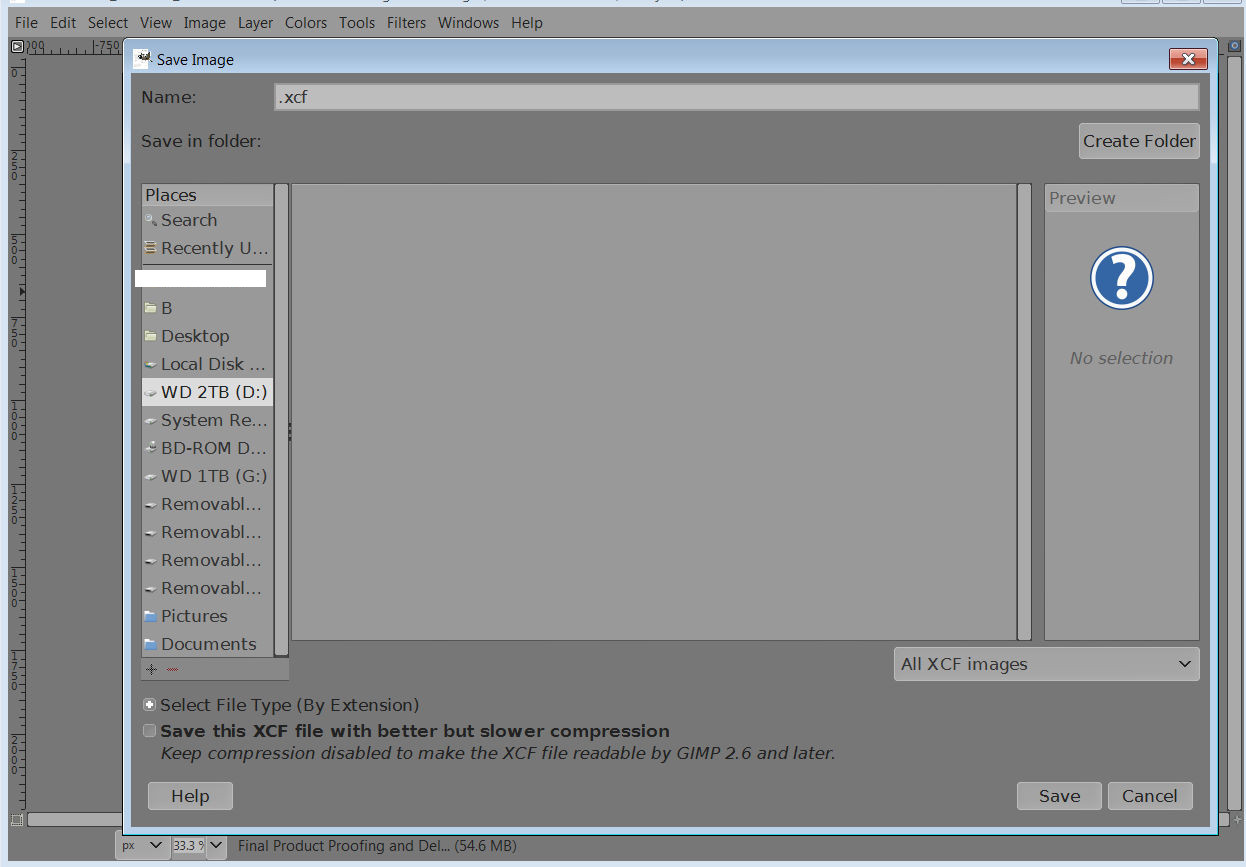
> >> I'm having the same problem.  I did  a clean install of Gimp 2.10 and
> >> deleted
> >> the previous 2.8 install directory before the new installation.  When I
> >> click on
> >> my different hard drives and directories in the Save As dialog the only
> >> files or
> >> folders shown are in Pictures, Documents and the current User directory,
> >> all of
> >> the hard drives show blank and I cannot navigate them.  It's hard to
> >> imagine
> >> that one would need to install a different package other than the
> official
> >> Gimp
> >> one to get something as simple as save directories to show up when
> trying
> >> to
> >> save.  Any help would be appreciated, thank you.
> >>
> >> Attachments:
> >> *
> http://www.gimpusers.com/system/attachments/908/original/Untitled1.jpg
> >>
> >> --
> >> Poptop (via www.gimpusers.com/forums)
> >> _______________________________________________
> >> gimp-user-list mailing list
> >> List address:    [email protected]
> >> List membership: https://mail.gnome.org/mailman/listinfo/gimp-user-list
> >> List archives:   https://mail.gnome.org/archives/gimp-user-list
> >>
> > _______________________________________________
> > gimp-user-list mailing list
> > List address:    [email protected]
> > List membership: https://mail.gnome.org/mailman/listinfo/gimp-user-list
> > List archives:   https://mail.gnome.org/archives/gimp-user-list
> >
>
>
> --
> Elle Stone
> https://ninedegreesbelow.com
> Color management and free/libre photography
>
_______________________________________________
gimp-user-list mailing list
List address:    [email protected]
List membership: https://mail.gnome.org/mailman/listinfo/gimp-user-list
List archives:   https://mail.gnome.org/archives/gimp-user-list