On Wednesday, April 16, 2014 5:38:59 PM UTC+2, [email protected] wrote:
>
> Hello All
>
> I installed GIT (Git-1.9.2-preview20140411.exe and
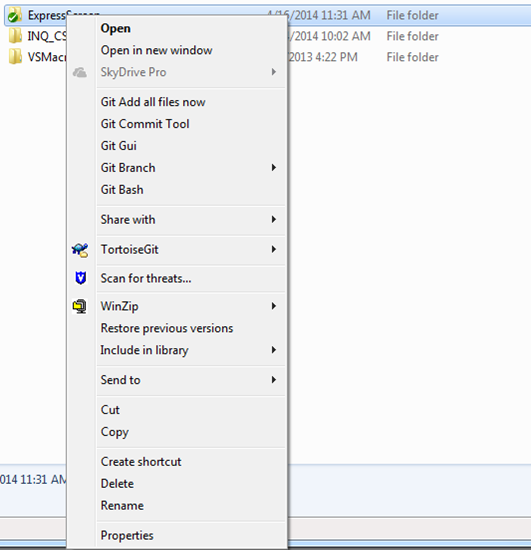
> TortoiseGit-1.7.14.0-64bit.msi) on Windows 7 enterprise and I am not able
> to see the Git clone icon displayed on explorer. See picture below.
>
If you can't see the attachment, it's available
here:
https://05366209103699368849.googlegroups.com/attach/f69f348bfc06caa5/git%20clone.png?part=4&view=1&vt=ANaJVrGNLspZuYV8ed-rvKHkec4UcAZM6vcMR-cXjxpEWwPJpOw_8SIyYnRCC5NL6Pops9CfQrTa_W0RNomhDtOm1vk-8dLuUzz7jWuiZrikeWzGPgEKeJQ
> I wonder if anyone has seen this issue before in the installation process.
>
I assume you are looking for something in Git for Windows' Explorer
extension (Git-Cheetah, as it is called).

Looking at what I think is the source of this menu, I can't find anything
that looks like Git
clone:
https://github.com/msysgit/Git-Cheetah/blob/33f73c533b38cc7079a0634d428424a85e835f4d/common/cheetahmenu.c

Are you sure there's supposed to be a Git Clone in that menu?

If you want to clone using TortoiseGit, you have to activate the
TortoiseGit sub-menu.

--
You received this message because you are subscribed to the Google Groups "Git
for human beings" group.
To unsubscribe from this group and stop receiving emails from it, send an email
to [email protected].
For more options, visit https://groups.google.com/d/optout.