Hello,

I'm trying to get a map to display under the address for a business
listing when a "Map It" link is clicked (opening a hidden div), and I
currently have it working properly in IE.  However, it is broken in
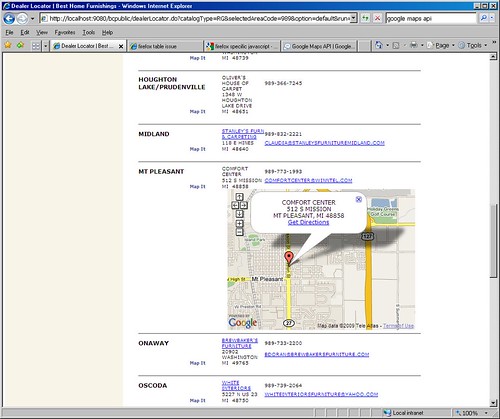
Firefox.  I have images for the problem.  First the working IE model:
http://farm4.static.flickr.com/3335/3488442547_b30cbfbc77.jpg And then the broken Firefox model. I have turned on in this image some block-level outlining tools, so you can see that despite it being all twisted around, there does seem to be a container of sorts being drawn with map controls and the Google logo inside it. http://farm4.static.flickr.com/3299/3488442647_91aca111d7_o.jpg Unfortunately, I cannot link to a "working site" due to limitations here at my work. However, below is all my map-related javascript, the "firing link" and the div tag. Any suggestions on why this isn't working would be great. Thanks, -Terri Javascript: <script type="text/javascript"> // ksa/sld google map var mapRow = 0; function showHideMap(tagId) { document.getElementById(tagId).style.display='none'; } </script> <script src="http://maps.google.com/maps? file=api&v=2&key=<bean:write name="dealerLocatorForm" property="googleKey" filter="false" />" type="text/javascript"></script> <script type="text/javascript"> var map = new Array(); var geocoder; if (GBrowserIsCompatible()) { geocoder = new GClientGeocoder(); } var directionsPanel; var directions; var WINDOW_HTML_TXT; var gmarkers = []; var htmls = []; var to_htmls = []; var from_htmls = []; var i=0; var addrStr; function initialize() { <logic:iterate id="output" name="dealerLocatorForm" property="dealers" indexId="index"> <logic:present name="output"> showHideMap('map_canvas<bean:write name="index"/>') </logic:present> </logic:iterate> } function initializeMap() { <logic:notEqual name="dealerLocatorForm" property="option" value="default" > if (GBrowserIsCompatible()) { map[mapRow] = new GMap2(document.getElementById ("map_canvas"+mapRow)); //getting map center from database. map[mapRow].setCenter(new GLatLng(40.00000,-95.00000), 3); map[mapRow].addControl(new GSmallMapControl()); map[mapRow].checkResize(); geocoder = new GClientGeocoder(); } </logic:notEqual> } // initializeMap // addAddressToMap() is called when the geocoder returns an // answer. It adds a marker to the map with an open info window // showing the nicely formatted version of the address and the country code. function addAddressToMap(response, html) { var htm=html map[mapRow].clearOverlays(); if (!response || response.Status.code != 200) { // hide previously opened map document.getElementById ("map_canvas"+mapRow).style.display='none'; if (response && response.Status.code == 500) alert("Sorry, Google Maps found a server error. Please call the dealer for more information."); else alert("Sorry, we were unable to map that address.\rPlease call the dealer for more information."); } else { place = response.Placemark[0]; point = new GLatLng(place.Point.coordinates[1], place.Point.coordinates[0]); var marker = new GMarker(point); GEvent.addListener(marker, "click", function() { map[mapRow].openInfoWindowHtml(point, WINDOW_HTML_TXT); }); map[mapRow].setCenter(point, 13); map[mapRow].addOverlay(marker); map[mapRow].enableDoubleClickZoom(); map[mapRow].checkResize(); map[mapRow].addControl(new GSmallMapControl()); map[mapRow].openInfoWindowHtml(point, WINDOW_HTML_TXT); } } // showLocation() is called when you click on the Search button // in the form. It geocodes the address entered into the form // and adds a marker to the map at that location. function showLocation(x, row) { var address = x; // hide previously openedmap document.getElementById ("map_canvas"+mapRow).style.display='none'; mapRow = row; initializeMap(); geocoder.getLocations(address, addAddressToMap); // open curent map document.getElementById ("map_canvas"+mapRow).style.display='inline'; } // populateInfo() is called when you click on the map it link // it passes the value of infotxt to the global variable of // WINDOW_HTML_TXT so that it can be displayed on the map. function populateInfo(srN, srA1, srC , srS, srZ) { addrStr = escape(srA1)+",%20"+escape(srC)+",%20"+escape(srS)+", %20"+escape(srZ); WINDOW_HTML_TXT = unescape(srN)+ "<br>"+srA1+"<br>"; WINDOW_HTML_TXT = WINDOW_HTML_TXT + srC +", "+srS+" "+srZ; WINDOW_HTML_TXT = WINDOW_HTML_TXT + "<br>"; WINDOW_HTML_TXT = WINDOW_HTML_TXT + "<a href=http:// maps.google.com/maps?daddr="+addrStr+" target=_blank class=maplink>Get Directions</a>"; } // findLocation() is used to enter the sample addresses into the form. function findLocation(address) { document.forms[0].q.value = address; showLocation(); } </script> Body tag: <body onload="initialize()" onunload="GUnload()"> Firing link: <a href="#" onClick="showLocation('<%=address%> <%=city%>, <%=state%> < %=zip%>',<bean:write name="index"/>);populateInfo('<%=name%>','< %=address%>','<%=city%>','<%=state%>','<%=zip%>');return false;" class="link">Map It</a> Table row with div tag: <tr><td align="center" colspan="2"> </td><td align="center" colspan="3"><div id="map_canvas<bean:write name="index"/>" style="width: 400px; height: 300px; z-index:0"></div></td></tr> --~--~---------~--~----~------------~-------~--~----~ You received this message because you are subscribed to the Google Groups "Google Maps API" group. To post to this group, send email to [email protected] To unsubscribe from this group, send email to [email protected] For more options, visit this group at http://groups.google.com/group/Google-Maps-API?hl=en -~----------~----~----~----~------~----~------~--~---