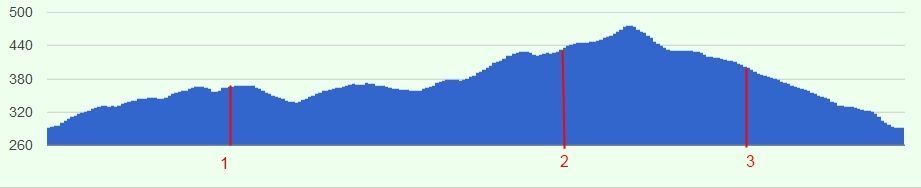
ohohooooo!! :)
thank you very mutch!!

2013. január 3., csütörtök 17:33:25 UTC+1 időpontban asgallant a következőt
írta:
>
> X-axis labels are determined by the domain column (the first column in the
> DataTable typically).  Use a "string" type column, with the custom labels
> for all your data rows where you want axis labels.  All of the rows where
> you don't want labels should have an empty string in this column.  Making
> some bars a different color is possible under certain circumstances, but
> more difficult to implement (you must have some way to distinguish which
> bars you want to change color in the DataTable; this becomes easier if you
> want all of the labelled bars to be a different color).  Here's an example:
> http://jsfiddle.net/asgallant/hcALL/
>
> On Thursday, January 3, 2013 3:43:18 AM UTC-5, [email protected] wrote:
>>
>> hi,
>>
>> I'm new in google api, and not expert in programming :)
>> I find some examples and I've created a working "corechart".
>>
>> How can I change some bar's color, and how can I add custom labels to the
>> H-axis for this bars?
>> Here is a picture what I want to create:
>>
>> thank's for any help
>>
>>
>> <https://lh5.googleusercontent.com/-01NNGev9KEc/UOVEUAtTCdI/AAAAAAAABFY/b76b8AavCZA/s1600/corechart_example.jpg>
>>
>
--
You received this message because you are subscribed to the Google Groups
"Google Visualization API" group.
To view this discussion on the web visit
https://groups.google.com/d/msg/google-visualization-api/-/mOZEr-B4-coJ.
To post to this group, send email to [email protected].
To unsubscribe from this group, send email to
[email protected].
For more options, visit this group at
http://groups.google.com/group/google-visualization-api?hl=en.