John Summerfield wrote:
Shawn Wells wrote:
Honestly, this may be more of a "sendmail vs postfix" issue than "SLES
vs RHEL."  But I am glad the process was easy.
Not really. I used to use sendmail (OS/2 and Linux). I now choose to use
postfix, though I can take care of sendmail if needs be.

Without the m4 macros, postfix is way easier to configure. It's easy to
maintain, and there's no need to put things that administrators need
care about in strange places.
I'd argue you just proved my point:  The *configuration* issues of the
service have little to do with RHEL or SLES, and more to do with the
actual service itself.
In general, SuSE is a more strongly GUI'ish system, and Redhat is
heavily command line, with individual GUI tools if you happen to know
how to find them.
Out of curiosity, where do you (and ultimately, everyone else on the
list) turn to for this information?  Are you familiar with Red Hat's
Knowledge Base (http://kbase.redhat.com) and Novell's support center
(http://www.novell.com/support/microsites/microsite.do)?
I've been criticising Red Hat's approach to configuration tools for
years. After trying out SUSE, I discovered YAST addresses one of my
concerns, the ease of finding and using configuration tools.
Hence the naming scheme of the Red Hat config tools:  system-config-*

Yes, they're not in a YaST-ish tool, but at least they're all named the
same.

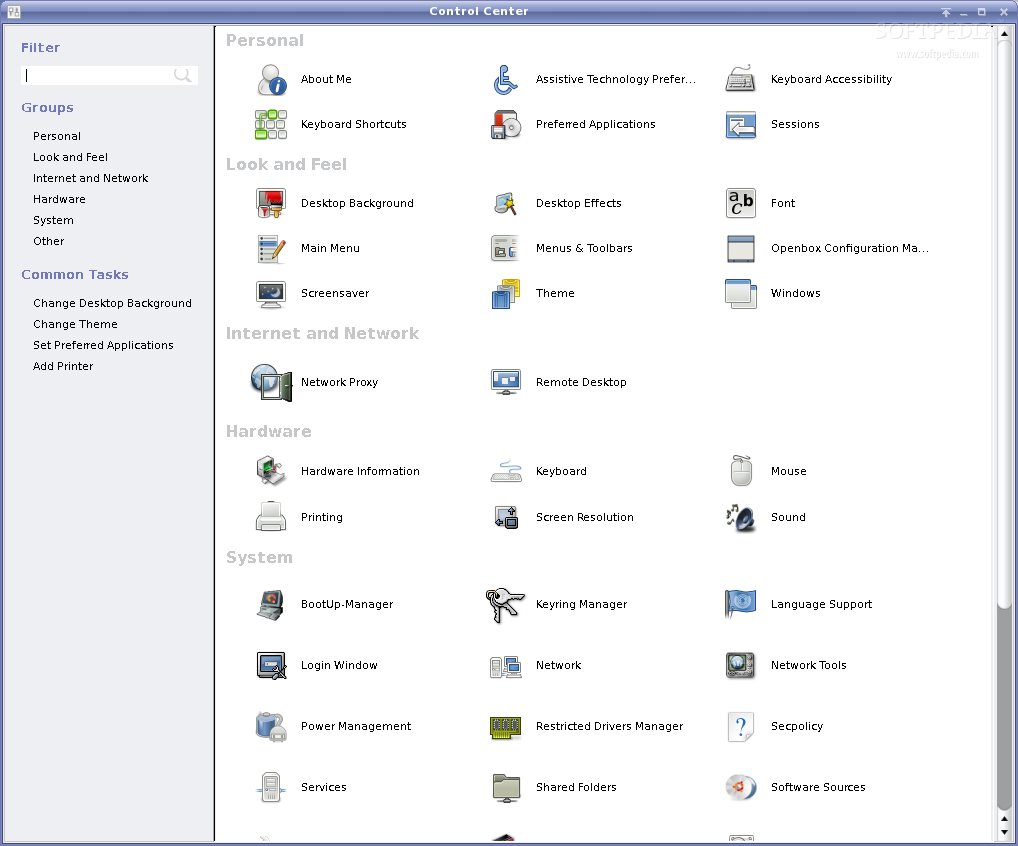
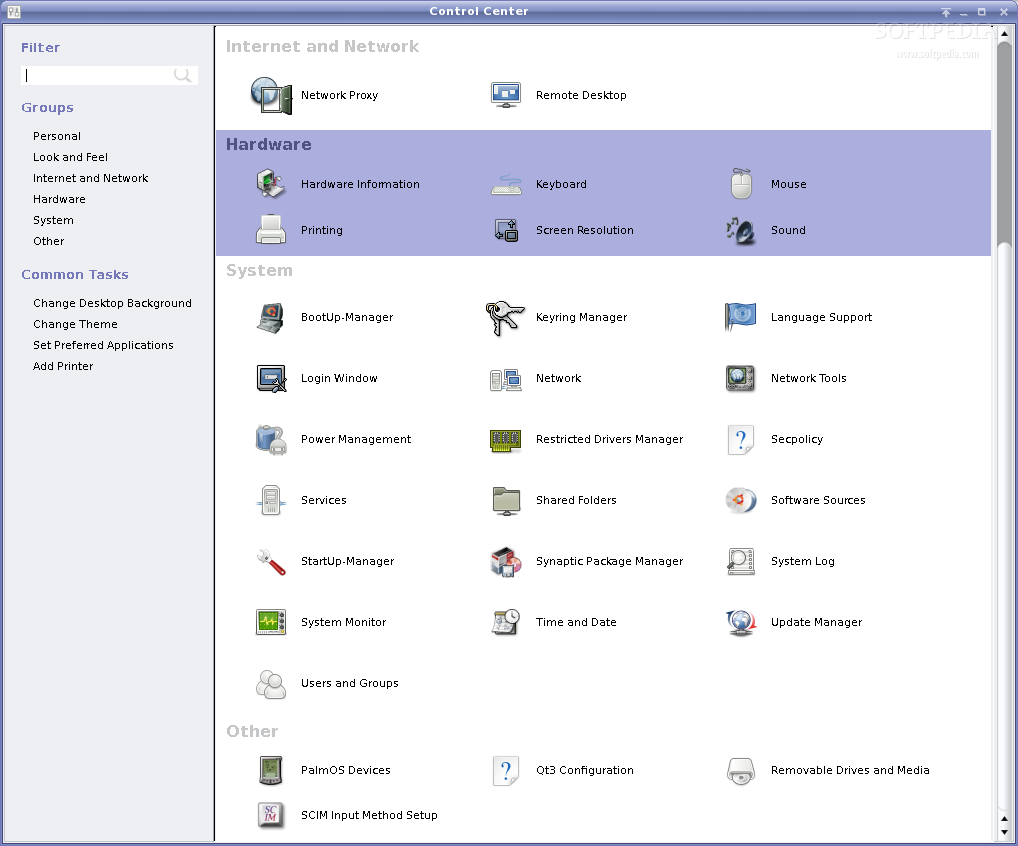
In the future there's been some talk about integrating the
system-config-* tools into GnomeControlCenter.  It's already in RHEL and
Fedora, some screen shots:

http://linux.softpedia.com/screenshots/Gnome-Control-Center_1.png
http://linux.softpedia.com/screenshots/Gnome-Control-Center_2.png
http://linux.softpedia.com/screenshots/Gnome-Control-Center_3.png
On the other hand, something that's been a big adjustment - SELinux in
redhat 5.  It seems like none of the vendors out there support running
under SELinux.  For example, for both our monitoring product and backup
solution I've had to craft custom SELinux policy exceptions.

I don't really blame Redhat for this, but I'm pissed as all h*** at the
vendors.  Follow me on this as I descend into ranting for the rest of
this post, or perhaps not, to preserve your sanity :-)
I'm pretty keen on hearing more about this.  While switching your system
into Strict or MLS mode _will unquestionably break things_, leaving it
in the stock Targeted mode shouldn't be to much of a hassle.  What apps
did you run into problems with?
I'm not a Zed user, but I do manage a few Linux systems. On one, I like
to symlink into an ISO image to get it mounted view autofs.

The idea was to loop-mount the ISO image when I want to do an http
install.

Here is one example line from my /etc/auto.misc:
fc5     -fstype=iso9660,ro,nosuid,nodev,noexec,loop
:/var/local/mirrors/linux/Fedora/5/i386/ISO/FC-5-i386-DVD.iso


I serve from a directory under /var/local/mirrors, and it had been my
practice to symlink the install tree like this:
/var/local/mirrors/linux/CentOS/5.1/os/i386 -> /misc/C5

Unfortunately, I've not been able ti divine the magic incantation to get
it mounted and accessible to Apache.

The system's adequately isolated from the ungodly, but the only way I
have to make this work is to turn selinux off, and this irks.
I'll start a new thread to answer this question & provide a detailed
answer.  I'm opposed to thread jacking this and turning it into a
SELinux conversation, as I'm sure there may be more questions ;)
The amount of packages installed is completely customizable.  Don't
install cups if you don't need it.
I think the wish it to install an absolute minimum of packages. People
have been asking for this for years.
It's been available in both distributions for a large amount of time.
I've been a user of RHEL since the mid 90s, and I recall the option
being available then.  I've only casually played with SLES, but I do
recall them having a similar capability.  For RHEL we define things in
Package Groups.

If you're using the GUI installer, you'll see a screen like this:
http://www.redhat.com/docs/manuals/enterprise/RHEL-4-Manual/x8664-multi-install-guide/figs/pkgselection/pkg-group.png

In it you can select/deselect major package groups, such as GNOME, KDE,
Server Tools, etc.  Near the bottom is an option that says "Minimal,"
which will *only* install the base packages needed for a working
system.  Screen shot @
http://www-128.ibm.com/developerworks/eserver/library/es-rhel-coexist/rh3.jpg

For those of you *not* using the GUI install (i.e. kickstart), the
package group is @Base.

Note that in YUM you can also do a "yum groupinstall" and a "yum
groupremove".  A fairly complete list of current package groups are:
The discussions around yum-updated have been long internally to RHT.  I
don't know what the history is there, other than I'm in no position to
change it.  And I do agree with you on that point, especially for
enterprise servers.
My wife is a mere mortal Fedora user. She should not be getting nagged
about updates. If something breaks (and Fedora is well able to bork a
system), she's competely incapable of fixing it.
Conflicts between programs, unresolved dependencies, and broken systems
all await those who avail themselves of over-ambitious upgrades. The
mailing lists of just about every distribution are full of the
lamentations of the reckless who have trashed their systems through
unwary upgrades. The truth is, except for security updates and fixes for
specific problems, the average desktop user is likely to have fewer
difficulties with an "if it ain't broke, don't fix it" philosophy.

Ultimately, if you don't like auto-update, simply turn it off ;)

In RHEL note that you *can* tell your systems what kind of updates you
want to pull in.  On a production Online Banking system I _never_ want
"feature enhancements," however I _do want_ security patches so that I
remain compliant with my IT Auditing guidelines.

For those of you on the RHEL5-series, you may want to check out
"yum-security," which limits updates to only security errata.  A good
article on this is
http://www.redhatmagazine.com/2008/01/16/tips-and-tricks-yum-security/

To apply all security-related updates only:

yum update --security

To apply all updates related to bugzilla bug 410101:

yum update --bz 410101

To apply all updates related to the CVE ID CVE-2007-5707 and updates
related to the Red Hat advisory ID RHSA-2007:1082-5:

yum update --cve CVE-2007-5707 --advisory RHSA-2007:1082-5

Personally, I love the --security update ability.

I'm note sure what the SLES method for this is.  In googling I found
http://www.novell.com/coolsolutions/tip/17267.html, which appears to
take care of the issue.


I don't want to turn this into a "RHEL has this, SLES has that" but I'm
obviously happy to address any questions.

-Shawn


----------------------------------------------------------------------
For LINUX-390 subscribe / signoff / archive access instructions,
send email to [EMAIL PROTECTED] with the message: INFO LINUX-390 or visit
http://www.marist.edu/htbin/wlvindex?LINUX-390