Having last touched the EQs I just wanted to add a few things.  First off
be aware that the EQs currently take up the most processing time of
anything in Mixxx, I specifically thought about doing fully parametric EQs
but the library that did it wasn't fast enough.  This will be your biggest
hurdle.
Secondly, make sure you consider what happens when you change sample
rates.  This is currently a bug where the frequencies will shift if its
not 44.1Khz, any new implementations should take this into account.

And finally, if you decide to go with anything other than the shelving EQs
we have now (most DJ mixers are built this way), you will need to change
how the audio is routed.  Currently we split the hi/mid/lo signals and
amplify each by their EQ setting and then add them back together, you will
have to switch to the add/subtract model if you want to have the EQs found
on PA mixers.

I don't want to sound discouraging, just giving a heads up on things you
will need to think about.

Also some links you might be interested in:
http://uazu.net/fidlib/ - Fidlib is the library that does the adjustable EQs
http://www-users.cs.york.ac.uk/~fisher/mkfilter/ - mkfilter is what
generated Mixxx's original EQs.  fidlib is based off that.

-John

> Sean M. Pappalardo wrote:
>>
>> Nick Guenther wrote:
>>> The harder parts will be working out how to dynamically add controls
>>> at runtime nicely. Mixxx is pretty static about its skins and things..
>>
>> Would it be easier to turn it into a parametric EQ? That way you need
>> three "knobs" per EQ point (for a total of 9 with three EQs) and you can
>> create many different curves. The knobs are gain/level/amplitude,
>> (center) frequency, and bandwidth/Q. (See
>> http://en.wikipedia.org/wiki/Equalization )
>
> I just want to throw in my two cents here...  I think a parametric EQ
> on the main interface might be too much clutter.  I don't think I've
> ever seen a parametric EQ on a DJ mixer, even not the high end, it's
> more something for a PA or studio console.  A fourth EQ knob might be
> ok, like the suggested mid-low dial, or maybe a frequency sweep for
> the mid EQ channel.
>
> On the other hand, being able to fully configure the EQs would be
> pretty nifty.  I see in the preferences there's already a simple
> option, the "high & low shelf EQ" to adjust the top or bottom of the
> frequency range for resp. LOW and HIGH.
>
> Just FYI, I'll say something about the equalizers of the Ecler EVO5
> hardware mixer.  Maybe it can give some inspiration.
>
> The EVO5 has the typical basic LOW/MID/HI knobs, but the EQ curves can
> be fully configured from the settings menu.  Changing the settings can
> be done while playing, and has an immediate effect so you can hear the
> result of your adjustments.
>
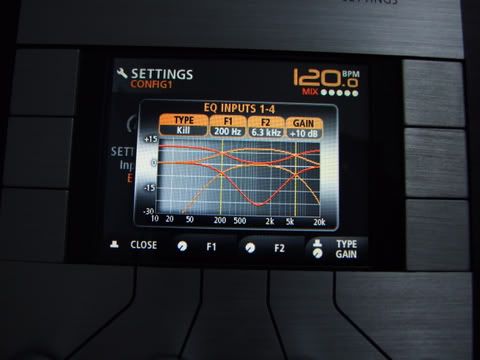
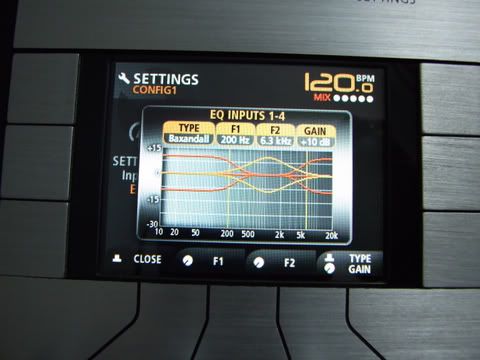
> There are 4 parameters.  First of all, you chose between a "kill" (to
> cut out frequency ranges) or a more smooth "Baxandall" curve (see
> screenshots below).  Then you adjust the gain (+3dB to +12dB) and pick
> two frequency points (50Hz to 2kHz and 1kHz to 10kHz).  Defaults are
> "kill," +10dB, 200Hz and 6.3kHz.  The two frequency points are the
> "border" between LOW and MID, and between MID and HI, not the "middle"
> frequency like with a parametric EQ.  The two points are shown on the
> screen as two vertical yellow lines.
>
> Screenshots:
> Kill:
> http://i210.photobucket.com/albums/bb60/eclerfan/recenzja/DSCF0636.jpg
> Baxandall:
> http://i210.photobucket.com/albums/bb60/eclerfan/recenzja/DSCF0637.jpg
>
> When using the "kill" curve and the default +10dB gain setting, you
> get a +10dB/-30dB boost/cut at high and low frequencies, and +10/-25dB
> at the mid range.  The negative numbers stay the same when adjusting
> the gain setting.  With the "Baxandall" curve the gain setting changes
> both the positive and negative values, so you get from +3/-3dB up to
> +12/-12dB boost/cut for all three frequency ranges.
>
>> If you want to get fancy, have it pop up a graphical display of the
>> current EQ settings when the EQ controls are clicked or moved. (And make
>> it automatically disappear when the mouse is moved away from the EQ
>> section.)
>
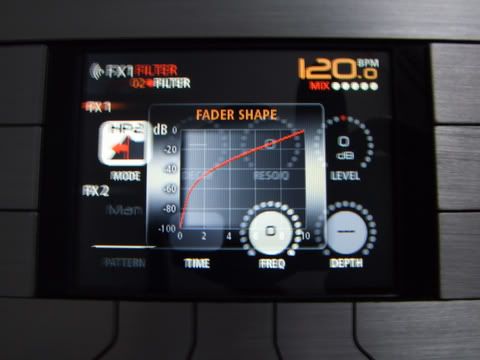
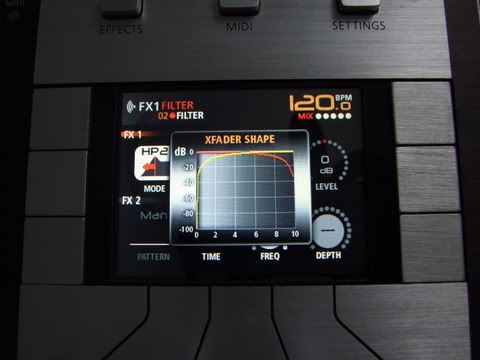
> That would be pretty cool.  To come back to the EVO5 for a moment, it
> also pops up graphs when you are e.g. adjusting the fader or
> crossfader shape.
> http://i210.photobucket.com/albums/bb60/eclerfan/recenzja/DSCF0653.jpg
> http://i210.photobucket.com/albums/bb60/eclerfan/recenzja/DSCF0657.jpg
>
>
> Bye,
>
> |_emming.
>
> --
> Tycho Brahe (Penny Arcade) on World Of Warcraft: "They have set
> up a system that allows me to rent my friends on a monthly basis."
>
> -------------------------------------------------------------------------
> This SF.Net email is sponsored by the Moblin Your Move Developer's
> challenge
> Build the coolest Linux based applications with Moblin SDK & win great
> prizes
> Grand prize is a trip for two to an Open Source event anywhere in the
> world
> http://moblin-contest.org/redirect.php?banner_id=100&url=/
> _______________________________________________
> Mixxx-devel mailing list
> [email protected]
> https://lists.sourceforge.net/lists/listinfo/mixxx-devel
>


-------------------------------------------------------------------------
This SF.Net email is sponsored by the Moblin Your Move Developer's challenge
Build the coolest Linux based applications with Moblin SDK & win great prizes
Grand prize is a trip for two to an Open Source event anywhere in the world
http://moblin-contest.org/redirect.php?banner_id=100&url=/
_______________________________________________
Mixxx-devel mailing list
[email protected]
https://lists.sourceforge.net/lists/listinfo/mixxx-devel