Thanks Martin for quick answer. Note that I'm very newbie in MSEGUI
but I'm familiar with concept because I often use fpGUI
> MSEgui has TTextEdit which must be placed in a TWidgetGrid. The MSEide source
> editor uses that combination. TTextEdit supports formatted text but no
> images. The best probably would be to make a MSEgui widget which uses an
> external HTML engine/library. This is already on todo-list. Do you have
> suggestions?

Well, I tried port LCL native HTML renders (like TIpHTMLPanel) to
fpGUI but it is too much painful. Too much LCL dependencies. Except
TKMemo from http://www.tkweb.eu/en/delphicomp/ which is my latest
discover. Pure RTF render "written from scratch" accepting images,
blocks etc. Looked at the code, very nice written HTML structure based
on FPC class nodes.
About external render. Long time ago (Delphi 7) I used HTMLayout  from
http://www.terrainformatica.com . But it is deprecated and they
created next generation Sciter which is multiplatform (
http://sciter.com ). The possibilities are amazing, just look at
portfolio (ESET, Norton, Avast, Comodo). On windows they use GDI but
on linux GTK3, too bad that not pure X :/ .
Other multiplatform HTML renders which I have on my TODO to test is:
- NetSurf (http://www.netsurf-browser.org)
- Servo (https://servo.org)
- litehtml (https://github.com/litehtml/litehtml) - this one is
interesting. It only render HTML to blocks. Contents (images, text)
are drawed by callbacks. So it parse HTML, calculate blocks position
and rest is drawed by MSEgui canvas. No socks, no dependencies. Just
check these callbacks:
https://github.com/litehtml/litehtml/wiki/document_container


> > 2. Handle fontawesome icons ( https://fortawesome.github.io/Font-Awesome/ )
> > . They are icons colection based on true type font (.ttf, .otf). In LCL I
> > used TFreeTypeFont, TIntfFreeTypeDrawer and TLazIntfImage. In fpGUI -
> > TAgg2D

I'm still learning MSEGui. I don't know yet how it manage
icons/glyphs. The goal is just use fontawesome icons in button glyphs
and tree/listviews. In Lazarus I have this function:

class function TImgManager.CreateFAIcon(constref ACode: String; AColor: TColor;
  ASize: Byte): TBitmap;
var
  img: TLazIntfImage;
  d: TIntfFreeTypeDrawer;
  f: TFreeTypeFont;
begin
  img := TLazIntfImage.Create(0,0, [riqfRGB, riqfAlpha]);
  d := TIntfFreeTypeDrawer.Create(img);
  f := TFreeTypeFont.Create;
  Result := TBitmap.Create;
  try
    f.Name := TdmMain.GetLibsDir+'FontAwesome.ttf';
    f.SizeInPixels := ASize;
    f.Hinted := true;
    f.ClearType := true;
    f.Quality := grqHighQuality;
    f.SmallLinePadding := false;
    img.SetSize(ASize,ASize);

    d.FillPixels(colTransparent);
    d.DrawTextRect(ACode, f, 1, 0, ASize, ASize,
TColorToFPColor(ColorToRGB(AColor)), [ftaCenter]);
    Result.LoadFromIntfImage(img);

  finally
    f.Free;
    d.Free;
    img.Free;
  end;
end;

And example usage:
CreateFAIcon(#239#129#187, clRed, 16);

Such bitmap is assigned to TSpeedButton.Glyph or added into TImageList
connected to TListView. What unit should I use in MSEGui?

> Quick explanation:
> Every TWidget has the properties TWidget.Frame and TWidget.Face.
> If they are not used the only resource they need is a single nil-pointer.
> TFrame defines the border of the widget, TFace the client area, please see
> Michaels explanation on Wiki:
> http://wiki.freepascal.org/Reference:_MSEgui/TFrame
> http://wiki.freepascal.org/Reference:_MSEgui/TFace
>
> TFrame and TFace both have the property "Template" which links to TFrameComp
> and TFaceComp respectively. T*Comp broadcast their property settings to all
> connected frames and faces. There is also TFont.Template and TFontComp.
> TSkinController sets the "Template" properties, colors and other widget
> specific properties of created widgets based on the property settings of
> TSkinController, please see the skin of MSEide in apps/ide/guitemplates.pas
> for an example.
> Alexandre made the "skin center" application in order to simplify the
> management of skins:
> http://thread.gmane.org/gmane.comp.ide.mseide.user/32140
> He also made an application which generates the imagelist for pixmap based
> frames.

Thanks for links. Very helpful. I need to study it first. The goal is
to create slightly rounded buttons and edits with smooth gradients.
Just like modern UI like GNOME.
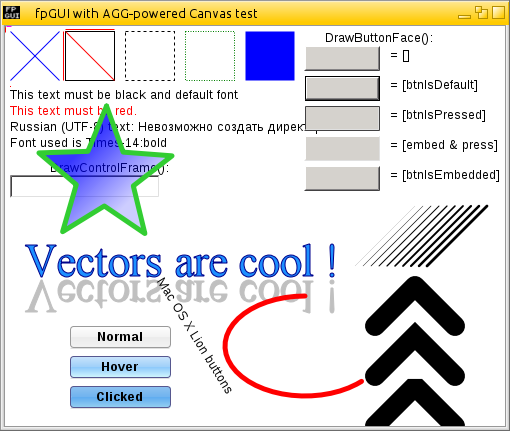
Second goal is more fancy button. Like this Mac OS:
http://fpgui.sourceforge.net/images/full/fpgui_agg-powered.png . Seems
that everything can be done using FrameImage.
BTW: Do you know how to get system colors at runtime of MSE
application on KDE/GNOME/XFCE etc? On windows it is simply, on unix
based not really.

> MSEgui uses TWidget.Anchors, TSpacer, TSplitter, TLayouter and code in
> OnLayout event for layout purpose.
> Explanation probably is best done by a concrete example, please write what you
> want to achieve.

I just want to know how to start. Then I'll learn by analyzing source.
I see that MSE widgets don't have Align property. So let say that I
would like to have panel ontop main form. Inside this panel 3 buttons
"Add", "Edit", "Delete" aligned on left side in one row. There should
be 4 pixels space between each button and they should handle autosize
correctly in case of translations. In this panel is also TEdit aligned
to right side. On main form resize, buttons should be anchored to left
side, edit to the right.
Second example is more complicated. Floating panel. One big panel (in
fact, scrolled window) contain e.g. 100 small panels, 40x40px each.
Now when, main panel is resizing, panels are arranged as grid, but if
there is no space for panel in row, it should break line and start
from new one and so one. Only vertical scrollbar can be visible

> TTreeItemEdit placed in a TWidgetGrid. TWidgedGrid (component palette
> tab 'Edit') is a grid widget where inserted edit widgets build data columns.
> That means it is possible to combine a TreeItemEdit column with a text-, a
> datatime, an image and a button column for example. The inserted widgets with
> all their properties and events are fully working. Examples of TTreeItemEdit
> are here:
> https://gitlab.com/mseide-msegui/mseuniverse/tree/master/attic/msedocumenting/mse/trunk/help/tutorials/widgets/treeview
> For flat data items there is TItemEdit (also placed in a TWidgetGrid). There
> is also TListView (tab 'Widget') for a flat list of items showed in a
> rectangular area.

Thanks, I'll check this.

> Do you mean OS X? Porting MSEgui to OS X by using X11 probably is no big
> effort. I would prefer to make a Quartz backend. I fear that MAC people will
> not accept anything which is not 200% Apple-like.

Yes I mean OS X. I also think that apple users are accustomed to native look.

------------------------------------------------------------------------------
Transform Data into Opportunity.
Accelerate data analysis in your applications with
Intel Data Analytics Acceleration Library.
Click to learn more.
http://pubads.g.doubleclick.net/gampad/clk?id=278785351&iu=/4140
_______________________________________________
mseide-msegui-talk mailing list
[email protected]
https://lists.sourceforge.net/lists/listinfo/mseide-msegui-talk