On Friday 25 March 2016 16:57:27 Krzysztof wrote:
>
> > MSEgui has TTextEdit which must be placed in a TWidgetGrid. The MSEide
> > source editor uses that combination. TTextEdit supports formatted text
> > but no images. The best probably would be to make a MSEgui widget which
> > uses an external HTML engine/library. This is already on todo-list. Do
> > you have suggestions?
>
> Well, I tried port LCL native HTML renders (like TIpHTMLPanel) to
> fpGUI but it is too much painful. Too much LCL dependencies. Except
> TKMemo from http://www.tkweb.eu/en/delphicomp/ which is my latest
> discover. Pure RTF render "written from scratch" accepting images,
> blocks etc. Looked at the code, very nice written HTML structure based
> on FPC class nodes.
> About external render. Long time ago (Delphi 7) I used HTMLayout  from
> http://www.terrainformatica.com . But it is deprecated and they
> created next generation Sciter which is multiplatform (
> http://sciter.com ). The possibilities are amazing, just look at
> portfolio (ESET, Norton, Avast, Comodo). On windows they use GDI but
> on linux GTK3, too bad that not pure X :/ .
> Other multiplatform HTML renders which I have on my TODO to test is:
> - NetSurf (http://www.netsurf-browser.org)
> - Servo (https://servo.org)
> - litehtml (https://github.com/litehtml/litehtml) - this one is
> interesting. It only render HTML to blocks. Contents (images, text)
> are drawed by callbacks. So it parse HTML, calculate blocks position
> and rest is drawed by MSEgui canvas. No socks, no dependencies. Just
> check these callbacks:
> https://github.com/litehtml/litehtml/wiki/document_container
>
What do you think about WebKit?
> > > 2. Handle fontawesome icons (
> > > https://fortawesome.github.io/Font-Awesome/ ) . They are icons
> > > colection based on true type font (.ttf, .otf). In LCL I used
> > > TFreeTypeFont, TIntfFreeTypeDrawer and TLazIntfImage. In fpGUI - TAgg2D
>
Can you render the icons to png's and then load them into a TImageList at
design time?
If not I'll take a look how to do the job with TFontCache and friends. Once
the glyphs are in a TImageList they can be selected in many MSEgui widgets.
TFace and TFrame also have the possibility to show pixmaps so actually every
TWidget can show an icon.

[...]

> Thanks for links. Very helpful. I need to study it first. The goal is
> to create slightly rounded buttons and edits with smooth gradients.
> Just like modern UI like GNOME.
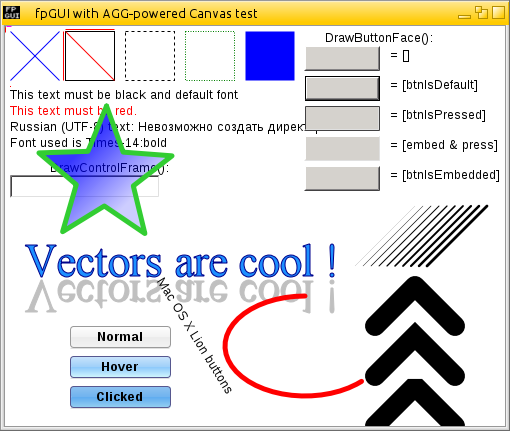
> Second goal is more fancy button. Like this Mac OS:
> http://fpgui.sourceforge.net/images/full/fpgui_agg-powered.png . Seems
> that everything can be done using FrameImage.

Most likely. For example this application has been made with MSEgui:
http://almin-soft.ru/index.php?multimedia/xelplayer/xelplayer-screenshots

> BTW: Do you know how to get system colors at runtime of MSE
> application on KDE/GNOME/XFCE etc? On windows it is simply, on unix
> based not really.
>
I don't know if there is a standard. Probably not. Does anybody know?

> > MSEgui uses TWidget.Anchors, TSpacer, TSplitter, TLayouter and code in
> > OnLayout event for layout purpose.
> > Explanation probably is best done by a concrete example, please write
> > what you want to achieve.
>
> I just want to know how to start. Then I'll learn by analyzing source.
> I see that MSE widgets don't have Align property.

MSEgui widgets often use the "Anchors" property:
http://wiki.lazarus.freepascal.org/Reference:_MSEgui/TWidget#Anchors

> So let say that I
> would like to have panel ontop main form. Inside this panel 3 buttons
> "Add", "Edit", "Delete" aligned on left side in one row. There should
> be 4 pixels space between each button and they should handle autosize
> correctly in case of translations. In this panel is also TEdit aligned
> to right side. On main form resize, buttons should be anchored to left
> side, edit to the right.

I'll make a demo.

> Second example is more complicated. Floating panel. One big panel (in
> fact, scrolled window) contain e.g. 100 small panels, 40x40px each.
> Now when, main panel is resizing, panels are arranged as grid, but if
> there is no space for panel in row, it should break line and start
> from new one and so one. Only vertical scrollbar can be visible
>
For this task a TListView from tab 'Widget' probably is the most efficient
solution. Another option is to use a 'TScrollBox' and to arrange the children
in TScrollBox.OnLayoutChanged.

Martin

------------------------------------------------------------------------------
Transform Data into Opportunity.
Accelerate data analysis in your applications with
Intel Data Analytics Acceleration Library.
Click to learn more.
http://pubads.g.doubleclick.net/gampad/clk?id=278785351&iu=/4140
_______________________________________________
mseide-msegui-talk mailing list
[email protected]
https://lists.sourceforge.net/lists/listinfo/mseide-msegui-talk