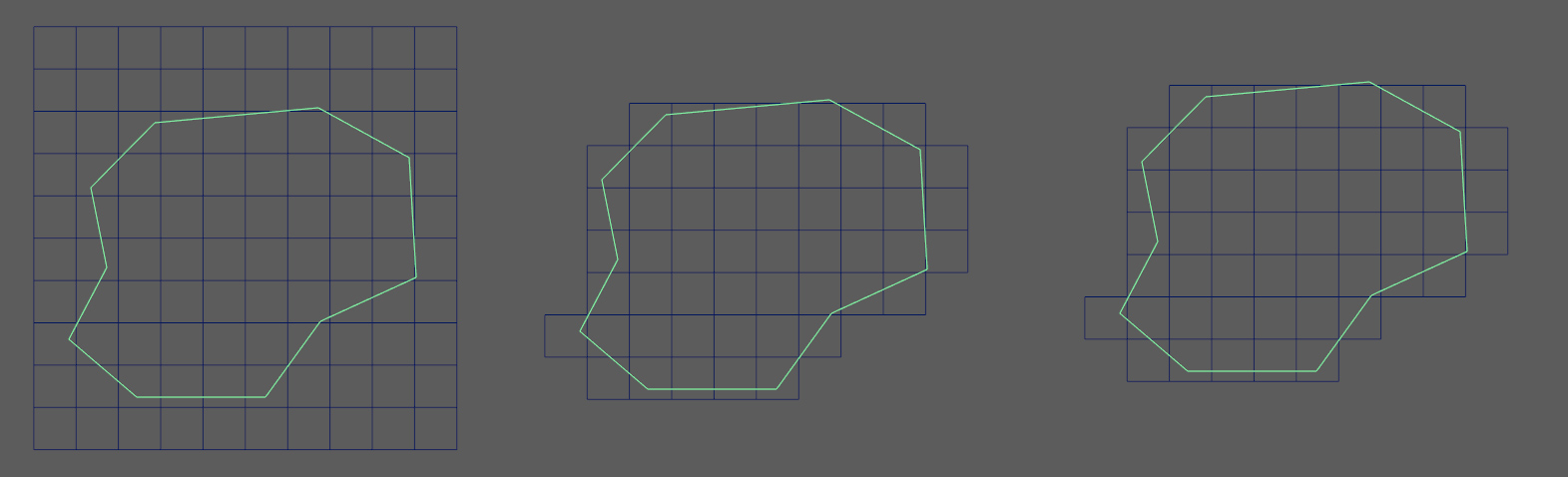
There is no direct pre fabricated solution for this in the API so you'll
have to do it all by yourself. One way is to make a grid mesh like a
subdivided plane.
Search for the faces that's outside the mesh. Remove those faces, than snap
the outer boundary vertices to the closest border edge. This will only work
with planar faces or meshes that are constrained to a 2D plane though.
<https://lh3.googleusercontent.com/-OW9OZglLKaM/Vn52L0dItPI/AAAAAAAAF4Y/NgpdXtWo9DE/s1600/gridifyMesh.jpg>

Greets,
Janos


On Tuesday, December 15, 2015 at 8:52:55 AM UTC+1, Dilen Shah wrote:
>
> Hey Ollarin,
>
> Thats a great idea, i did that too actually with planar trim and nurb
> tessalate to control the number of polygons. But i cant find any solution
> in API for it. may be i just need to look harder but let me know if you
> find something in API.
>
> Thanks.
>
> D.
>
> On Tuesday, December 15, 2015 at 3:44:03 AM UTC+1, Ollarin wrote:
>>
>> Just off the top of my head. The quickest way would be to extract the
>> border edge into a curve. Then do a surface>planar with polygon as the
>> output?
>>
>> It's a combination of the planarTrimSurface and nurbsTessellate nodes.
>> Which is cool. Since you'll have interactive control over your density and
>> such.
>>
>> You might be able to recreate that behavior via the API?
>>
>>

--
You received this message because you are subscribed to the Google Groups
"Python Programming for Autodesk Maya" group.
To unsubscribe from this group and stop receiving emails from it, send an email
to [email protected].
To view this discussion on the web visit
https://groups.google.com/d/msgid/python_inside_maya/d67e4ce8-4348-4ad5-b247-d35799421c8a%40googlegroups.com.
For more options, visit https://groups.google.com/d/optout.