On 08/30/2017 11:49 AM, [email protected] wrote:
On Tuesday, August 29, 2017 at 7:16:16 PM UTC-4, steve.coleman wrote:
If your laptop contains an active TPM and a TCG Opal 2.0 compliant SED
(SSD or spinning platter) drive, then you can create a range, install
the bootstrap/OS, and then mark that range as read-only.
After doing that *nothing* will be able to write to that area without
the password unlocking that range first, even Dom0 root user, but then
it will also need to be unlocked using that same password at the
appropriate moment during any update to the bootstrap/Xen code during
appropriate Dom0 updates. This same range can also protect the partition
table, MBR, and boot menu, etc. Multiple ranges can be set with
different attributes/encryption keys.

The tool you would need for doing this is "msed" (name given in my
fedora distro) or "sedutil" (from the drive trust alliance) which allows
you to talk to the drive via sata (not usb afaik) to encrypt or protect
defined ranges that you set up.

Just be careful to learn/test on a test system, because if you create an
encrypted range everything previously there disappears instantly,
including partitions. Its the world fastest way I know to completely
wipe a drive, flip one bit in the key, poof. Like magic. You can always
reset back to the factory default erasing everything on the drive.

Calculate your ranges, partition, setup encryption ranges, and install
stuff, then finally mark your /boot range as read-only. Don't encrypt
your /boot or you will need to install Pre-Boot-Authentication (PBA) and
supply a password at boot time.

Sedutil source and docs
https://github.com/Drive-Trust-Alliance
This is interesting. I suppose this would be a way to secure your system, and
then you could add AEM over it? That way you are using the security features of
the hardware, but not trusting them.
As far as "trusting" the drive, you first need a TPM for this to even
work, so not all the apples are in one basket. The key itself is not
stored anywhere on the drive, but only a partial entropy seed value
which when combined with the users password the drive can then generate
the required key on the fly.
If used for encrypting your data, all that work is done within the drive
hardware thus freeing up your host cpu for other things. If you are the
paranoid belt and suspenders kind you can also encrypt your data before
it goes to the drive where it gets encrypted yet again automatically.
Layers of security are always better.
It is possible to have the drive bound and unlocked by a specific
TPM/PCR value generated during a trusted boot process. That way not only
is your drive not writable by the adversary, but the drive itself must
be physically in that specific machine/TPM otherwise it remains as
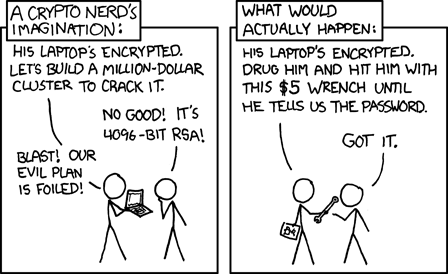
useful to the adversary as a paperweight. In the context of xkcd, even
beating you over the head for a password won't help if its not in a
correctly booted known state of that specific machine/TPM combination.
http://imgs.xkcd.com/comics/security.png
For the ultra-ultra-ultra paranoid you can even have a hidden partition
table such that it exposes the real drive partitioning only after the
drive is unlocked (aka. the 'done bit is set' to expose the shadow MBR).
This way you can boot readonly into a stripped down ISO image OS with
AEM/trusted boot to check for any extra devices connected, then use the
PCR magic hash to finally unlock and expose the real partition table,
and then boot again into the actual R/W OS partition. That's the
use-case that I'm working on for a pet project of mine.
I would think that Whonix devs might like to play with that kind of
scenario for providing absolute "plausible deniability" when that
subsystem is not in use. When you don't need it, you could not even tell
that the partition exists, just unallocated sectors on the drive with
(encrypted) garbage bytes in it.
Lots of creative things can be done with it, and if you buy a current
model SSD it likely comes with Opal 2.0 for free.
--
You received this message because you are subscribed to the Google Groups
"qubes-users" group.
To unsubscribe from this group and stop receiving emails from it, send an email
to [email protected].
To post to this group, send email to [email protected].
To view this discussion on the web visit
https://groups.google.com/d/msgid/qubes-users/8b31845f-cc21-fd9e-f180-43fc5bdd802c%40jhuapl.edu.
For more options, visit https://groups.google.com/d/optout.