Tuesday, April 26, 2011

Tip of the Day - Customizing RBEdit Structure Toolbar Options
Product: R:BASE eXtreme 9.1 (32/64)
Update.: 3
Build..: 9.1.3.10414 or higher http://www.rupdates.com
Section: RBEdit [R:BASE Editor] Structure and Output
Did you know that you can customize the R:BASE Editor (RBEdit)
Structure Toolbar settings to include custom structure options
when editing or analyzing your application or command file?

Here's how:

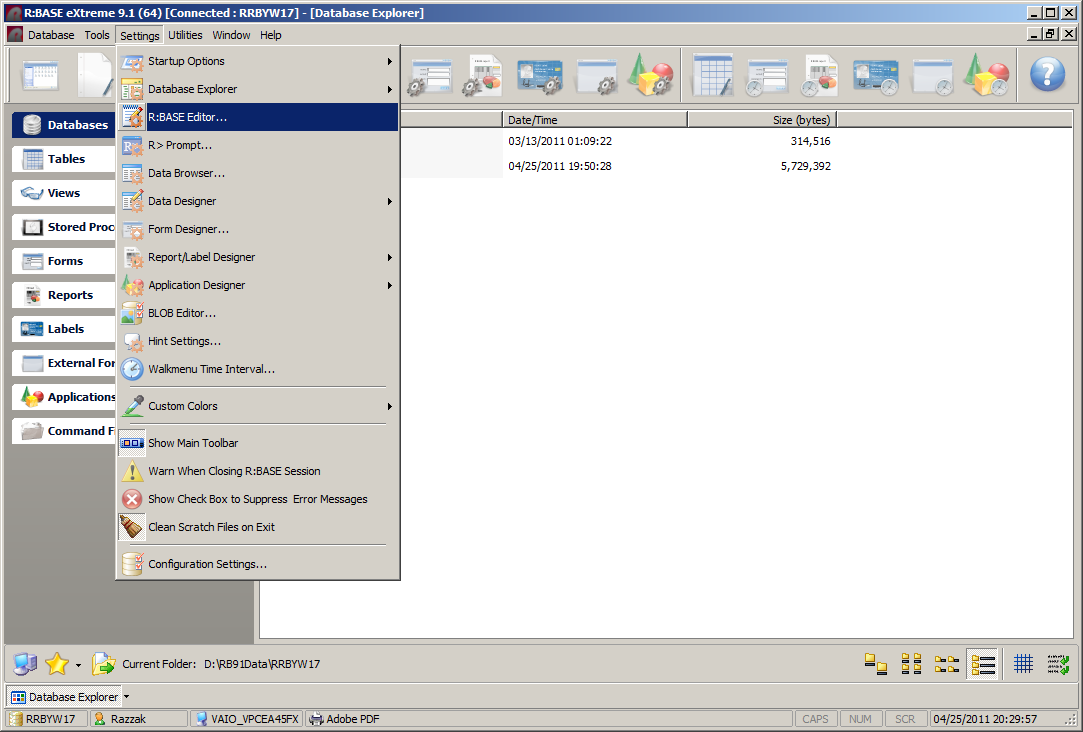
Database Explorer | Main Menu | Settings | R:BASE Editor ...
http://www.razzak.com/tips/RBEdit_Setting.png

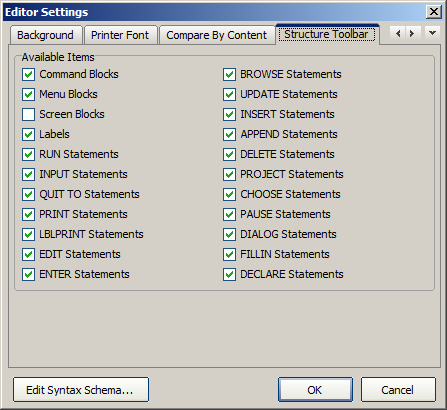
Editor Settings | Structure Toolbar

Once you check all appropriate options accordingly, click on OK
button to save your custom settings.

http://www.razzak.com/tips/RBEdit_Setting_Structure_Toolbar.png

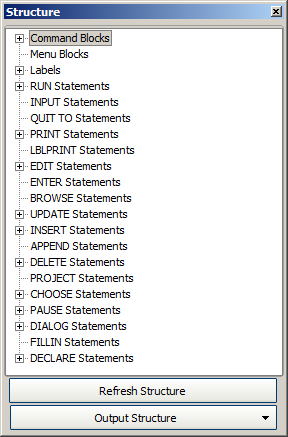
Now when editing your application or command file, clicking on
the [Refresh Structure] with document all selected options.

http://www.razzak.com/tips/RBEdit_Refresh_Structure.png

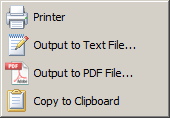
Clicking on [Output Structure] button will let you save the
entire structure with all details as follows:

. Printer
. Text File
. PDF File
. Copy to Clipboard

http://www.razzak.com/tips/RBEdit_Output_Structure.png

Have fun taking advantage of Expanded Structure as well as Output
options in R:BASE eXtreme 9.1 (32/64).

Very Best R:egards,

Razzak.

--- RBASE-L
================================================
TO POST A MESSAGE TO ALL MEMBERS:
Send a plain text email to [email protected]

(Don't use any of these words as your Subject:
INTRO, SUBSCRIBE, UNSUBSCRIBE, SEARCH,
REMOVE, SUSPEND, RESUME, DIGEST, RESEND, HELP)
================================================
TO SEE MESSAGE POSTING GUIDELINES:
Send a plain text email to [email protected]
In the message SUBJECT, put just one word: INTRO
================================================
TO UNSUBSCRIBE:
Send a plain text email to [email protected]
In the message SUBJECT, put just one word: UNSUBSCRIBE
================================================
TO SEARCH ARCHIVES:
Send a plain text email to [email protected]
In the message SUBJECT, put just one word: SEARCH-n
(where n is the number of days). In the message body,
place any
text to search for.
================================================