Brute Force Hacking the TKR-820  / 720 Series

Hey, these make great little repeaters. They also are becoming fairly
common on the surplus market as companies are caving into the idea
that digital cellular is a better alternative to NBFM. Well anyway I
am sure you bought one for cheap or acquired one by some other means
with the thoughts that you could drag it into the ham band.
So lets begin. First lets make sure the repeater works. Start by
connecting a watt meter with dummy load to the TX port (Or the antenna
port on models with the built in duplexer). Use the 25W 200-500 or
400-1000 slug are the closest thing you have. Loosen the squelch until
the repeater goes into transmit mode, remember to press the repeat
button on the front panel. Won’t do it? Turn the unit off pull the
covers and remove the 93C46 EEPROM from the controller board (This is
the little board that is about 3X5 and sits above the radio chassis’).
This sets the DPL/PL combination and without it the repeater will
activate on COS. Turn it back on and it should repeat. Got RF power?
Good. Set this little bastard aside as we will deal with him later.

Next step is to take write down the voltage on the from the test
points besides the VCOs. The VCOs are located under the metal tray
that the controller sits on. This should be some where around 4 volts
DC.

Now we have to come up with a way to change the data that sets the
frequency of the repeater. For some reason the chip that does this is
on the circuit board on the front panel of the repeater.

I was originally told that “Either a KPT-20 or KPT-50 is need to
program those. No way around it.” That sounds like a wager to me. Sure
if you have a Kenwood dealer around that you can borrow one from or
willing to spend more than you bought the repeater for this is a sure
fire method. Oh, you will also need the KPG-21D software, but it will
not allow operation into the ham bands and has some serious
compatibility issues running on modern hardware.

Unsolder the 93C46 EEPROM from the front panel board. Use what ever
method you like, I prefer my trusty static free Soldapult. Be careful
not to rip and leads off the package when removing it. Place an 8 pin
DIP socket in the hole that you got the EEPROM out of and solder it
down.

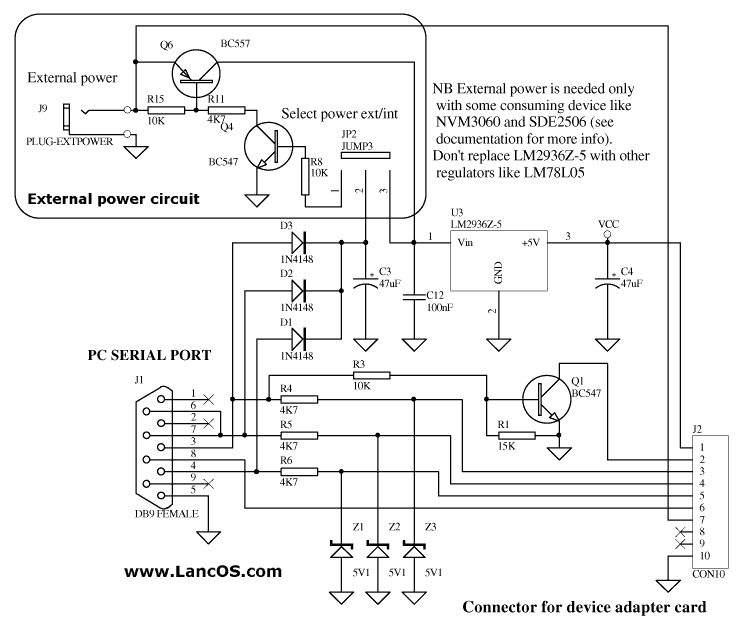
Now we get the data out of the chip. I built a serial port to EEPROM
interface found here: http://www.lancos.com/e2p/siprog_base.png and
http://www.lancos.com/e2p/si-prog-v2_2.pdf in order to be used with
the device programming software “Pony Prog”
http://www.lancos.com/prog.html. You have to build the base board and
then the socket for the device you wish to program. I replaced the
LM2936Z-5 in the schematics with a 5.1 V Zener diode fed with a 330
ohm resistor to generate the +5 needed, and BC547 is the European
equivalent of a 2N3904. This way all parts can be obtained from your
local Radio Shack, or your parts box depending on how much home brew
you do so well.

So once you have the interface built and running you can read the
EEPROM contents. The settings take a little while to get used to. All
you want it to output to is a raw binary dump with no header
information saved.

Open the dump with a hex editor. I like XVI32,
http://www.chmaas.handshake.de/delphi/freeware/xvi32/xvi32.htm .
Pretty hard to beat free. Now for some reason the Pony Prog spit out
information that is interleaved. This is evident by the way the data
is arranged at &H7A, Which on my dumps is 8R021N. On a Kenwood KPG-21D
generated image this should say R820N. Anyway, it makes the hex coding
easier to understand when doing the channels. If you are using a
different chip program that did it right you will have to swap the
bytes around, i.e C884 to 84C8. It should be obvious when you do the
calculations and your frequency is in the 650MHz region.

Receiver frequency data starts at &H00 and it 2 bytes long. In my
binary image I have &H8338. Open up the windows calculator and place
it in scientific mode (Or you can use a decent calculator that will
convert Hex to decimal such as the TI-36X.). Press the “Hex” button
and enter in the data that you have. Then press “Dec”.

&H8338 = 33592.

Now we multiply this by the channel stepping. 12.5 for the TKR-820 and
5 for the VHF 720.

33592 * 12.5 = 419900.

Now we add the IF frequency

419900 + 21400 = 441300

441.300MHz. You still with me? Good.

The transmit side is the exact same thing, but starts at &H02. I find
this odd that both the transmit side and the receive side use IF
frequencies on the synthesizers, but what ever.

Now that you have reverse engineered what channels the repeater is on,
Stick that chip back in there. You get to do…. More testing.

If you have the internal duplexer now would be a good time to bypass
it and go straight into a watt meter and dummy load.

If you are satisfied with the repeaters performance you may continue
to changing the frequency.

Figure out the target frequency you want and we will go from there.

443.400MHz RX

443400 – 21400 = 422000
442000 / 12.5 = 33760
33760 = &H83E0


448.400MHz TX

448400 – 21400 = 427000
427000 / 12.5 = 34160
34168 = &H8570

Make a copy of the original binary file and we will edit the copy.

Starting at the first address enter the data

“83 E0 85 70 FF FF FF FF FF”……

“FF” signifies no data and should fill the contents to the EEPROM
until address &H7A which is “38 52 30 32 31 4E” (8R021N)

Now get the chip back out of the repeater and place it in your
programmer and fire the new binary file into it. Place it back into
the repeater.

If you did a large frequency jump your repeater will be “Bricked”.
Don’t worry. You will need to adjust the trimmers on the VCO cans so
that the test point voltage is either the voltage you wrote down in
step 1 or as close to 4.0 volts as possible, which ever way you want
to do it. Also there are some helical coils for the receiver’s
pre-selector, feel free to adjust these for maximum sensitivity.

As long as you have a service monitor out, now would be a good time to
retune your duplexer. Remove the duplexer out of the bottom of the
repeater if so equipped and follow the instructions here:
http://www.repeater-builder.com/rbtip/notchduptuning.html


Moving on to the bastard…

The PL data starts at the same locations as the synthesizer data &H00
is RX and &H02 is TX.

After pulling out some hair and then sitting over a chart with some
hot chocolate, I came to the conclusion that the frequency formula is
this:

&HC2E9 – &HC000 = &H02E9
&H02E9 = 670
670 / 10 = 67.0
67.0Hz

123.0Hz
123.0 * 10 = 1230
1230 = &H04CE
&H04CE + &HC000 = &HC4CE

“FF FF” is what you would program if you want carrier access.

So, “C4 CE C4 CE”…. Would be what you put in to the EEPROM from the
controller board. What?!? You don’t like 123.0Hz? Too bad, it is part
of the master plan to make all repeaters in the world carrier access
or 123.0, muhahahaha…. Oh wait…

Looks like everything from 67.0 to 250 can be generated this way. The
board also supports Digital Quiet Tone, but it looks way complicated
to figure out what is what and I have no motivation to pursue it as I
do not have DQT radios to experiment with. It may be a better option
for you to install a PL board such as a TS-32 as this only works with
the internal controller, and without any way to ID makes it pretty
useless. But you should be able to tap the logic out of the PL section
to run an external controller so this is another thing that is
entirely up to your preferences.

On Tue, May 4, 2010 at 7:35 AM, Steve <[email protected]> wrote:
> I'm looking for information on how to program and edit binary files for the 2
> EEPROMS in the Kenwood TKR-820 UHF repeater without using the KPT-50. I have
> IC programmers available through work.
> Thanks,
> Steve AB5ID
>
>
>
>
> ------------------------------------
>
>
>
> Yahoo! Groups Links
>
>
>
>


------------------------------------


Yahoo! Groups Links

<*> To visit your group on the web, go to:
    http://groups.yahoo.com/group/Repeater-Builder/

<*> Your email settings:
    Individual Email | Traditional

<*> To change settings online go to:
    http://groups.yahoo.com/group/Repeater-Builder/join
    (Yahoo! ID required)

<*> To change settings via email:
    [email protected]
    [email protected]

<*> To unsubscribe from this group, send an email to:
    [email protected]

<*> Your use of Yahoo! Groups is subject to:
    http://docs.yahoo.com/info/terms/