Excellent tutorial! Thank very much!
-Steve
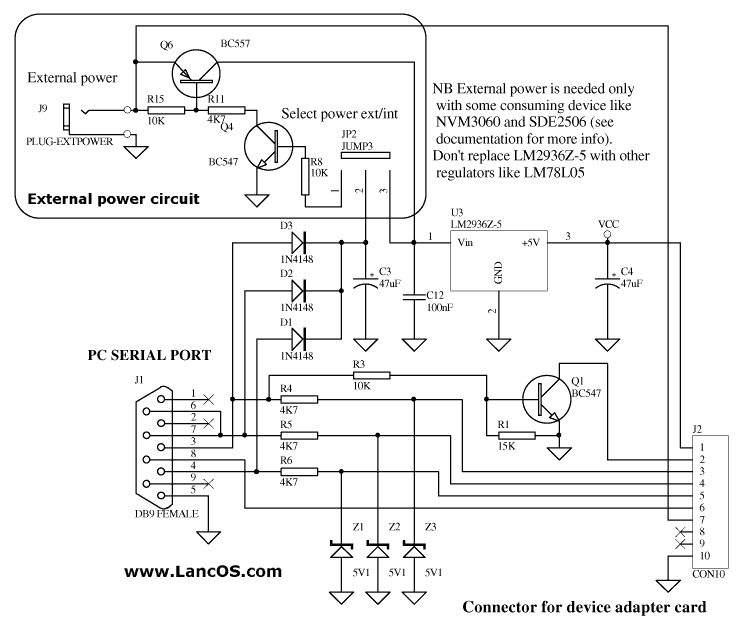
--- In [email protected], DCFluX <dcf...@...> wrote: > > Brute Force Hacking the TKR-820 / 720 Series > > Hey, these make great little repeaters. They also are becoming fairly > common on the surplus market as companies are caving into the idea > that digital cellular is a better alternative to NBFM. Well anyway I > am sure you bought one for cheap or acquired one by some other means > with the thoughts that you could drag it into the ham band. > > So lets begin. First lets make sure the repeater works. Start by > connecting a watt meter with dummy load to the TX port (Or the antenna > port on models with the built in duplexer). Use the 25W 200-500 or > 400-1000 slug are the closest thing you have. Loosen the squelch until > the repeater goes into transmit mode, remember to press the repeat > button on the front panel. Won't do it? Turn the unit off pull the > covers and remove the 93C46 EEPROM from the controller board (This is > the little board that is about 3X5 and sits above the radio chassis'). > This sets the DPL/PL combination and without it the repeater will > activate on COS. Turn it back on and it should repeat. Got RF power? > Good. Set this little bastard aside as we will deal with him later. > > Next step is to take write down the voltage on the from the test > points besides the VCOs. The VCOs are located under the metal tray > that the controller sits on. This should be some where around 4 volts > DC. > > Now we have to come up with a way to change the data that sets the > frequency of the repeater. For some reason the chip that does this is > on the circuit board on the front panel of the repeater. > > I was originally told that "Either a KPT-20 or KPT-50 is need to > program those. No way around it." That sounds like a wager to me. Sure > if you have a Kenwood dealer around that you can borrow one from or > willing to spend more than you bought the repeater for this is a sure > fire method. Oh, you will also need the KPG-21D software, but it will > not allow operation into the ham bands and has some serious > compatibility issues running on modern hardware. > > Unsolder the 93C46 EEPROM from the front panel board. Use what ever > method you like, I prefer my trusty static free Soldapult. Be careful > not to rip and leads off the package when removing it. Place an 8 pin > DIP socket in the hole that you got the EEPROM out of and solder it > down. > > Now we get the data out of the chip. I built a serial port to EEPROM > interface found here: http://www.lancos.com/e2p/siprog_base.png and > http://www.lancos.com/e2p/si-prog-v2_2.pdf in order to be used with > the device programming software "Pony Prog" > http://www.lancos.com/prog.html. You have to build the base board and > then the socket for the device you wish to program. I replaced the > LM2936Z-5 in the schematics with a 5.1 V Zener diode fed with a 330 > ohm resistor to generate the +5 needed, and BC547 is the European > equivalent of a 2N3904. This way all parts can be obtained from your > local Radio Shack, or your parts box depending on how much home brew > you do so well. > > So once you have the interface built and running you can read the > EEPROM contents. The settings take a little while to get used to. All > you want it to output to is a raw binary dump with no header > information saved. > > Open the dump with a hex editor. I like XVI32, > http://www.chmaas.handshake.de/delphi/freeware/xvi32/xvi32.htm . > Pretty hard to beat free. Now for some reason the Pony Prog spit out > information that is interleaved. This is evident by the way the data > is arranged at &H7A, Which on my dumps is 8R021N. On a Kenwood KPG-21D > generated image this should say R820N. Anyway, it makes the hex coding > easier to understand when doing the channels. If you are using a > different chip program that did it right you will have to swap the > bytes around, i.e C884 to 84C8. It should be obvious when you do the > calculations and your frequency is in the 650MHz region. > > Receiver frequency data starts at &H00 and it 2 bytes long. In my > binary image I have &H8338. Open up the windows calculator and place > it in scientific mode (Or you can use a decent calculator that will > convert Hex to decimal such as the TI-36X.). Press the "Hex" button > and enter in the data that you have. Then press "Dec". > > &H8338 = 33592. > > Now we multiply this by the channel stepping. 12.5 for the TKR-820 and > 5 for the VHF 720. > > 33592 * 12.5 = 419900. > > Now we add the IF frequency > > 419900 + 21400 = 441300 > > 441.300MHz. You still with me? Good. > > The transmit side is the exact same thing, but starts at &H02. I find > this odd that both the transmit side and the receive side use IF > frequencies on the synthesizers, but what ever. > > Now that you have reverse engineered what channels the repeater is on, > Stick that chip back in there. You get to do . More testing. > > If you have the internal duplexer now would be a good time to bypass > it and go straight into a watt meter and dummy load. > > If you are satisfied with the repeaters performance you may continue > to changing the frequency. > > Figure out the target frequency you want and we will go from there. > > 443.400MHz RX > > 443400 21400 = 422000 > 442000 / 12.5 = 33760 > 33760 = &H83E0 > > > 448.400MHz TX > > 448400 21400 = 427000 > 427000 / 12.5 = 34160 > 34168 = &H8570 > > Make a copy of the original binary file and we will edit the copy. > > Starting at the first address enter the data > > "83 E0 85 70 FF FF FF FF FF" > > "FF" signifies no data and should fill the contents to the EEPROM > until address &H7A which is "38 52 30 32 31 4E" (8R021N) > > Now get the chip back out of the repeater and place it in your > programmer and fire the new binary file into it. Place it back into > the repeater. > > If you did a large frequency jump your repeater will be "Bricked". > Don't worry. You will need to adjust the trimmers on the VCO cans so > that the test point voltage is either the voltage you wrote down in > step 1 or as close to 4.0 volts as possible, which ever way you want > to do it. Also there are some helical coils for the receiver's > pre-selector, feel free to adjust these for maximum sensitivity. > > As long as you have a service monitor out, now would be a good time to > retune your duplexer. Remove the duplexer out of the bottom of the > repeater if so equipped and follow the instructions here: > http://www.repeater-builder.com/rbtip/notchduptuning.html > > > > Moving on to the bastard > > The PL data starts at the same locations as the synthesizer data &H00 > is RX and &H02 is TX. > > After pulling out some hair and then sitting over a chart with some > hot chocolate, I came to the conclusion that the frequency formula is > this: > > &HC2E9 &HC000 = &H02E9 > &H02E9 = 670 > 670 / 10 = 67.0 > 67.0Hz > > 123.0Hz > 123.0 * 10 = 1230 > 1230 = &H04CE > &H04CE + &HC000 = &HC4CE > > "FF FF" is what you would program if you want carrier access. > > So, "C4 CE C4 CE" . Would be what you put in to the EEPROM from the > controller board. What?!? You don't like 123.0Hz? Too bad, it is part > of the master plan to make all repeaters in the world carrier access > or 123.0, muhahahaha . Oh wait > > Looks like everything from 67.0 to 250 can be generated this way. The > board also supports Digital Quiet Tone, but it looks way complicated > to figure out what is what and I have no motivation to pursue it as I > do not have DQT radios to experiment with. It may be a better option > for you to install a PL board such as a TS-32 as this only works with > the internal controller, and without any way to ID makes it pretty > useless. But you should be able to tap the logic out of the PL section > to run an external controller so this is another thing that is > entirely up to your preferences. > > On Tue, May 4, 2010 at 7:35 AM, Steve <wxfr...@...> wrote: > > I'm looking for information on how to program and edit binary files for the > > 2 EEPROMS in the Kenwood TKR-820 UHF repeater without using the KPT-50. I > > have IC programmers available through work. > > Thanks, > > Steve AB5ID > > > > > > > > > > ------------------------------------ > > > > > > > > Yahoo! Groups Links > > > > > > > > >