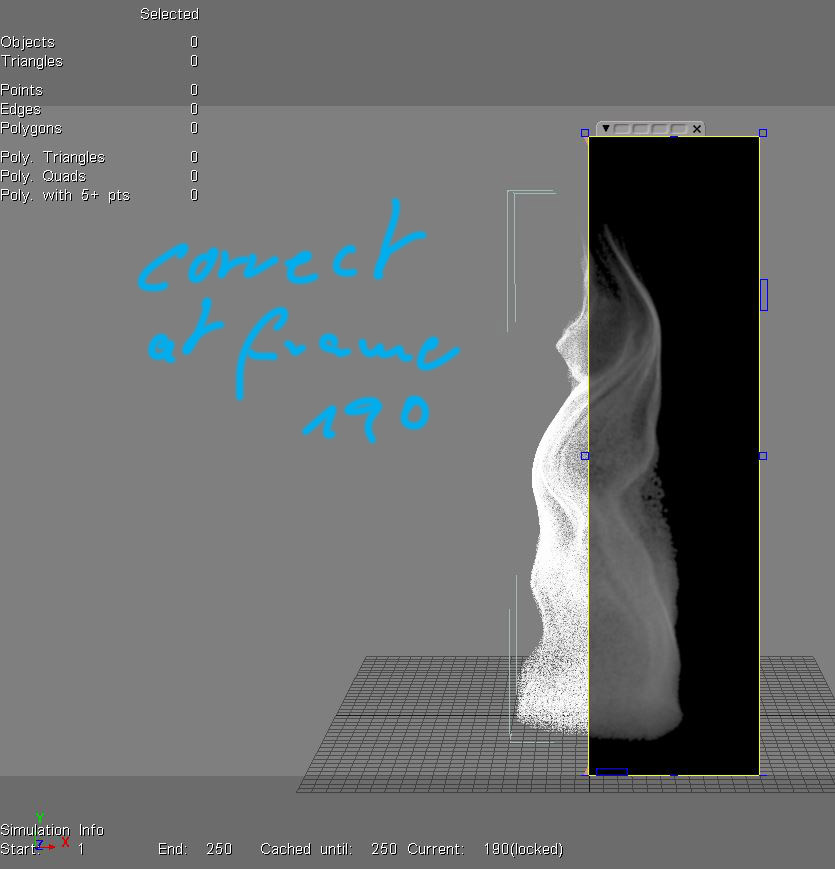
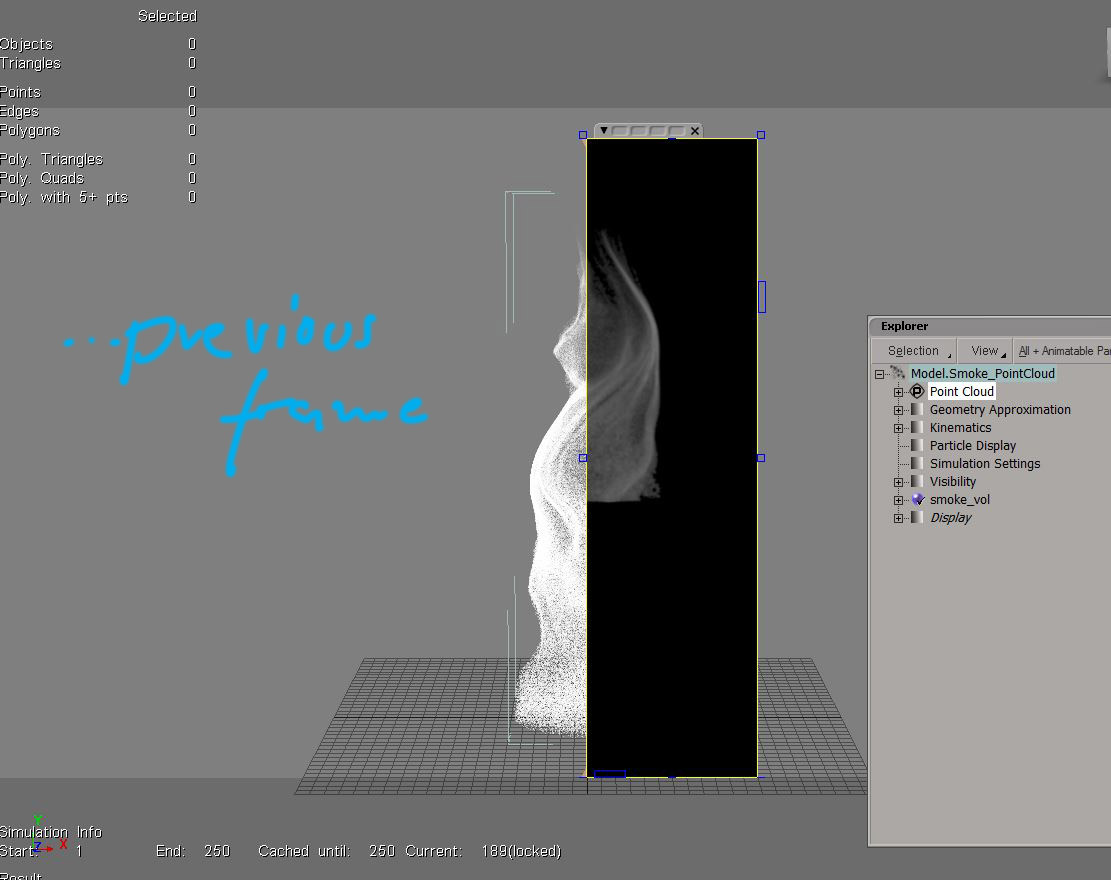
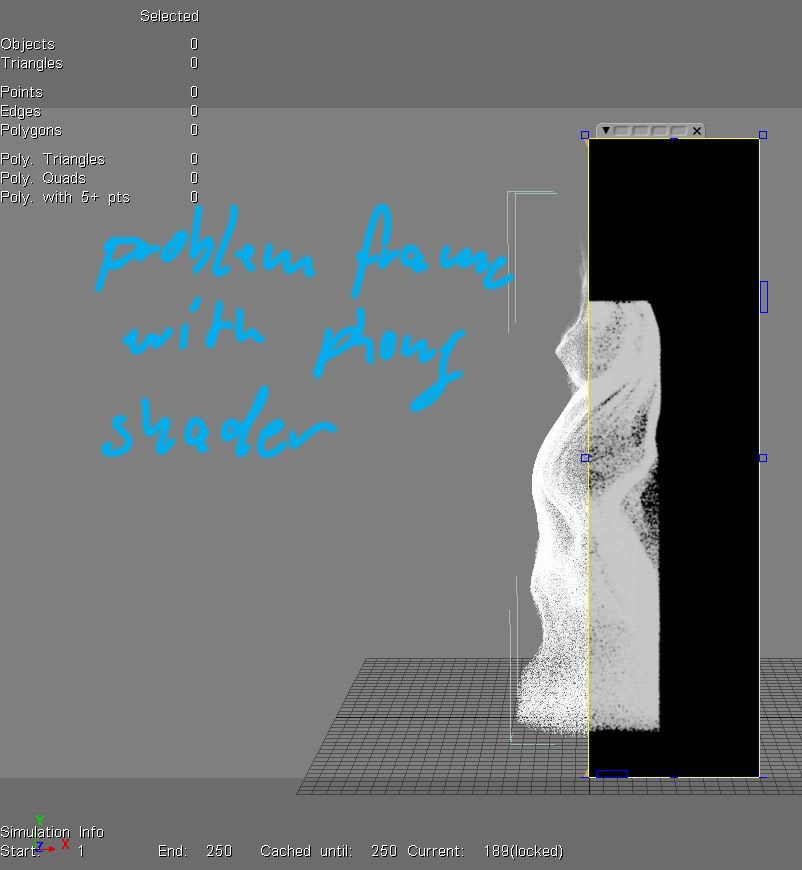
I tried with different cameras. Rotated and translated both cam and point
cloud.  The missing particles stays the same even if rendered from different
angles. Like a boolean cut.
Seems I found out whats causing it even I have no idea why it should. The ICE
tree contains a 'Surface Deform'node. When disconnected everything renders ok.
There was a post on the list some time ago (ICE and Mental Ray - seen anything
like this?) from Chris Marshall, talking about render problems with the Slide
on Surface node. The 'Surface Deform' compound I used, contains this node as
well.
I may test with a demo of Arnold. But since the client wants a more stylised
look, I dumped the particle approach anyway.

Thanks everyone.
sven

-----Original Message-----
From: [email protected]
[mailto:[email protected]] On Behalf Of [email protected]
Sent: Wednesday, November 23, 2016 8:56 PM
To: [email protected]
Subject: Re: Particle volume rendering problem

I've seen this sort of behavior as well.
In my case it had to do with having camera and cube perfectly aligned -both
with orientations zeroed out, or 90 degrees for instance- or the camera being
close to one side of the cube, looking straight at it. Same when going from
outside to inside a volume, at the moment you are intersecting the side. It's a
situation you easily run into in a test setup, or when rigging the camera in
certain ways.
I think MR is trying to be smart and cull a few triangles intermittently
(despite render settings), which messes with the volume - but that's just my
interpretation.
In any case, adding a very small rotation to either cube or camera, say .001 on
some axis, eliminated the problem for me. It's worth a shot.
(With a particle cloud the bounding box is always aligned with the world axis -
so you'd have to rotate the camera)


-----Original Message-----
From: Morten Bartholdy
Sent: Monday, November 21, 2016 10:28 AM
To: [email protected]
Subject: RE: Particle volume rendering problem

I don't know what is going on, but it could look like bounding box issues.
In Arnold and Redshift if the bounds are not set correctly for volumetrics, I
get something similar, only very consistently and not random.

MB


> Den 18. november 2016 klokken 20:36 skrev Sven Constable
> <[email protected]>:
>
>
> sorry, broken links
>
>
>
> http://www.imagefront.de/tmp/correct_frame.JPG
>
> http://www.imagefront.de/tmp/problem_frame.JPG
>
> http://www.imagefront.de/tmp/problem_frame_w_phong.JPG
>
>
>
>
>
> From: [email protected]
> [mailto:[email protected]] On Behalf Of Sven
> Constable
> Sent: Friday, November 18, 2016 8:33 PM
> To: [email protected]
> Subject: RE: Particle volume rendering problem
>
>
>
> Did some more tests and it looks like it's not even the shader.
> Problem accours also with a standard phong. Interestingly the shape of
> the cloud
> changes(!) when rendered with a phong shader.
>
>
>
> some pics:
> http://www.imagefront.de/tmp/correct_frame.JPG
> <http://www.imagefront.de/tmp/steam_BTY.mp4>
>
> http://www.imagefront.de/tmp/problem_frame.JPG
> <http://www.imagefront.de/tmp/steam_BTY.mp4>
>
> http://www.imagefront.de/tmp/problem_frame_w_phong.JPG
> <http://www.imagefront.de/tmp/steam_BTY.mp4>
>
>
>
> Maybe I'll check with another renderer when I have time.
>
> sven
>
>
>
> From: [email protected]
> [mailto:[email protected]] On Behalf Of
> Schoenberger
> Sent: Friday, November 18, 2016 11:32 AM
> To: [email protected]
> Subject: RE: Particle volume rendering problem
>
>
>
> Please reduce the lookup table size of the shader.
>
> See "Lookup Table" and "Setting up Lookup table":
>
> http://softimage.wiki.softimage.com/xsidocs/particles_shaders_Particle
> Volume
> ICE.htm
>
>
>
>
>
>
>
>
>
> Holger Schönberger
> technical director
> The day has 24 hours, if that does not suffice, I will take the night
>
>
>
>
>
>
>   _____
>
>
> From: [email protected]
> [mailto:[email protected]] On Behalf Of Sven
> Constable
> Sent: Friday, November 18, 2016 1:57 AM
> To: [email protected]
> Subject: Particle volume rendering problem
>
> Hey list,
>
>
>
> I did some tests for an upcoming project and rendering doesn't work as
> expected. Just basic ICE particles with built-in nodes and some
> deformers on the pointcloud. Rendered with mental ray.
> As you can see in the vid, there are render problems. Sometimes it
> looks like missing tiles in the rendering but mostly it seems to be
> missing particles in the cloud itself. In this video there are all
> missing at the bottom but in other tests it happened also at the top
> and sometime at the sides of the point cloud. Never inside the cloud.
> And it only happens at render time. No particles are missing in the viewport.
>
>
>
> http://www.imagefront.de/tmp/steam_BTY.mp4
>
>
>
> What I tried so far:
>
>
>
> Eliminated render farm problems: Rendered it locally on the workstation.
>
>
>
> Possible caching problem? Rendered it on a workstation on the fly
> without any caching.
>
>
>
> Tried playback caching as well as the manual 'write cache' via the
> cache manager. (unlikely since it also happens with no caching at all)
>
>
>
> Put the point cloud to global zero with no offsets in SRT.
>
>
>
> Changed most of the MR render settings. Including switching to BSP1.
> Disabled On Disk Framebuffer.
>
>
>
> Changed settings of the volume shader ( specially the bounding box
> size for the voxel computation. Set it to manual instead of Auto
> because the missing parts always appeared at the perimeter of the
> cloud). I also changed most of the other settings that possibly could
> have an effect.
>
>
>
> Tried both built-in particle volume shaders, 'Particle Volume Cloud'
> and the basic 'Particle Renderer'. (btw. the volume cloud shader by
> Holger Schoenberger is amazing) However,  it gave me the same
> problems.
>
>
>
> Reduzed the particle rate (this is the video showing different
> particle counts but it happens in all versions as you can see).
>
>
>
>
>
> I'm pretty much out of ideas. Anyone?
>
>
>
> Thanks,
>
> sven
>
>
>
>
>
> ------
> Softimage Mailing List.
> To unsubscribe, send a mail to [email protected]
> with "unsubscribe" in the subject, and reply to confirm.

------
Softimage Mailing List.
To unsubscribe, send a mail to [email protected] with
"unsubscribe" in the subject, and reply to confirm.

------
Softimage Mailing List.
To unsubscribe, send a mail to [email protected] with
"unsubscribe" in the subject, and reply to confirm.


------
Softimage Mailing List.
To unsubscribe, send a mail to [email protected] with
"unsubscribe" in the subject, and reply to confirm.