Hi Fabio,

I can confirm this is a bug, and I'm very sorry for it!
As part of a big refactoring we did to improve how Spyder is connected
to our IPython consoles, I forgot to reconnect the Working Directory
toolbar to them. I opened an issue about it
https://github.com/spyder-ide/spyder/issues/3561

which I plan to fix this weekend and release it in 3.0.2 next week.


Cheers,
Carlos

El 19/10/16 a las 12:45, [email protected] escribió:
Hi Jitse,
Thank you for your reply and the link with the discussion; it does
clarify things, and the new behaviour does makes sense - except that
it doesn't work on my Spyder installations :P
I've just tried changing the directory on my office machine (Ubuntu
16.04) and on my personal laptop (Win 8), both running Spyder from a
reasonably recent Anaconda install; on both systems I tried changing
the working directory through the file explorer inside Spyder and
checking for corresponding changes on the console using "%pwd", but on
neither system the output of "%pwd" changed from the starting folder
to the folder set through the file explorer. I should also mention
that the output of "%pwd" seems to be the correct one; I told Python
to create a simple figure and save it, and the figure was saved in
that directory (and not the one shown in the file explorer). Strangely
enough, however, I can successfully change the working folder through
the console using "cd" on both systems; not ideal for teaching, but at
least it still works!
I'd be grateful if other people could confirm if this affects them as
well; in any case, we have another class on Friday and I can also test
the University computers to see if this bug affects them too. Please
let me know if there are any other tests you'd like me to do!
Many thanks :)
Fabio

On Wednesday, October 19, 2016 at 6:00:25 PM UTC+1, Jitse Niesen wrote:

    Hello,

    With Spyder 3, the directory in the IPython console is
    automatically updated after you change the directory in the
    toolbar (to the left of the "folder" icon). The "Set Console
    Working Directory" was then removed because it was not so useful.
    Does that make sense to you? It's important to me that Spyder is
    reasonably intuitive especially for beginners.

    There is some discussion at
    https://github.com/spyder-ide/spyder/issues/2910
    <https://github.com/spyder-ide/spyder/issues/2910> .

    The screenshot on the Spyder GitHub page does not show Spyder 3. I
    guess we should update it.

    Hope this helps,
    Jitse


    On Tuesday, 18 October 2016 20:23:05 UTC+1, [email protected] wrote:

        Hi all,

        I'm not sure if this is an issue with Spyder or with Anaconda,
        but here it goes; I raised this same question on Stack
        Overflow <http://stackoverflow.com/q/39905258/4118153> a few
        days ago, so I'm just gonna copy the same text here.

        I've been using Spyder 2 as my default Python IDE for a couple
        of years already, and while preparing a class on Signal
        Processing I've stumbled upon the new Spyder 3 on Anaconda and
        decided to see what it looks like.

        First, I've updated the Anaconda distribution on my Ubuntu
        16.04 office computer to the newest version (i.e. I had a
        previous version already installed), and then got quite
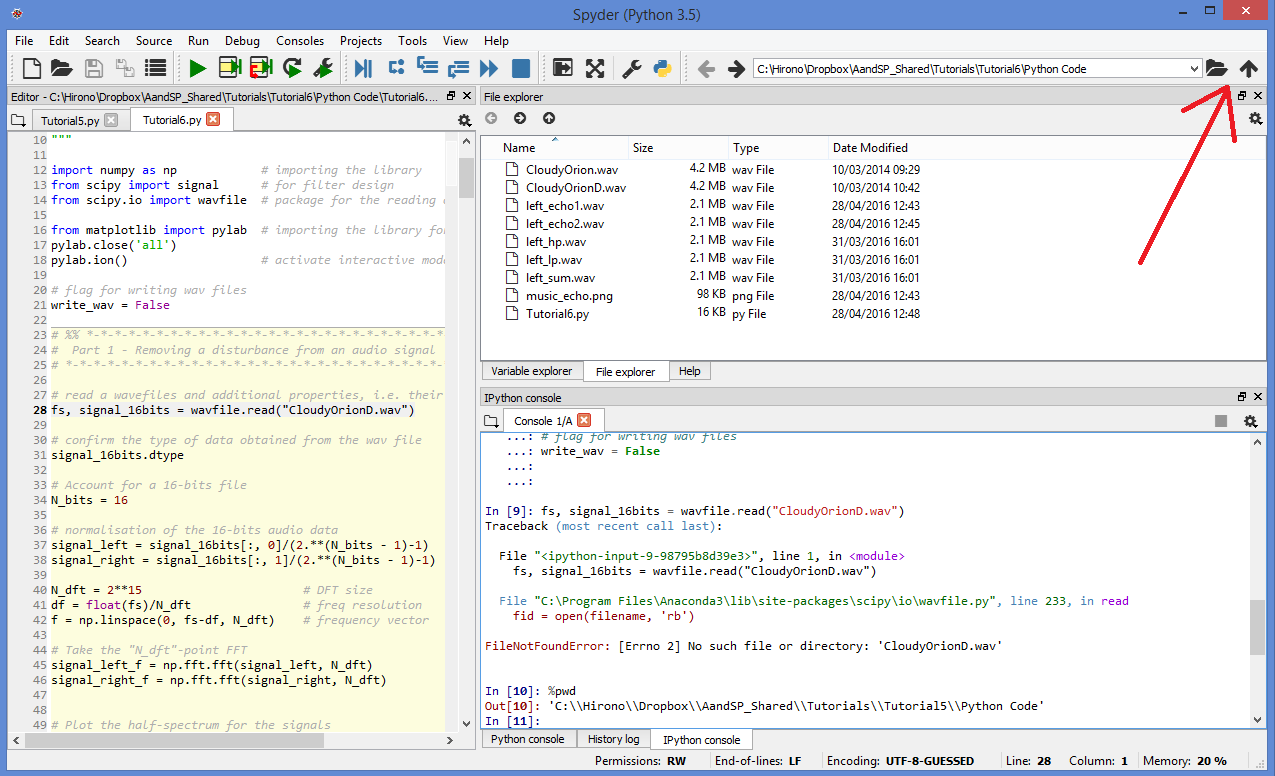
        surprised when the button for "Set Console Working Directory"
        on the File Explorer (top right, between the "folder" icon and
        the "up arrow" icon) was missing. I can still change the
        working directory manually on the IPython console, but it's
        impractical and certainly won't motivate the students!

        Thinking it could be a bug with the conda update, I've then
        decided to give it a go at downloading and installing the
        Anaconda for Windows on my home laptop (which is probably what
        most of the students will do), and it also does not have the
        "Set Console Working Directory" button.

        By then I was thinking the new Spyder version might have
        abandoned it, but strangely enough, the Spyder GitHub page has
        a screenshot <https://github.com/spyder-ide/spyder> of the new
        Spyder 3 that HAS this exact same button (again: top right,
        between the "folder" icon and the "up arrow" icon)!

        EDIT: here <http://i.stack.imgur.com/eDHih.png>'s a screenshot
        of how my Spyder looks like in Windows (the big red arrow is
        pointing towards where the icon should be).

        Does anyone knows if there is a setting option that hides the
        "Set console working directory" button, or if this is a bug in
        the more recent Anaconda version that doesn't show it?

        Many thanks!

--
You received this message because you are subscribed to the Google
Groups "spyder" group.
To unsubscribe from this group and stop receiving emails from it, send
an email to [email protected]
<mailto:[email protected]>.
To post to this group, send email to [email protected]
<mailto:[email protected]>.
Visit this group at https://groups.google.com/group/spyderlib.
For more options, visit https://groups.google.com/d/optout.
--
You received this message because you are subscribed to the Google Groups
"spyder" group.
To unsubscribe from this group and stop receiving emails from it, send an email
to [email protected].
To post to this group, send email to [email protected].
Visit this group at https://groups.google.com/group/spyderlib.
For more options, visit https://groups.google.com/d/optout.