This is not my experience Jitse.

If I use the bold folder and up-arrow icons
<https://lh3.googleusercontent.com/-kB9a-FADjEc/WHuOfKL2DvI/AAAAAAAAAPA/1bjGFS65C_Iy_nwtW9NRbYOyzB_4MOxPACLcB/s1600/bold%2Bbuttons.png>
to change the path, the working directory changes with it.

But if I select folders in the file explorer or use the small up-arrow icons
<https://lh3.googleusercontent.com/-lhKPqNydoGI/WHuOsUrFqXI/AAAAAAAAAPE/7xAv-8lmqKQl3PMhNKXeP_ccriz7RH4hgCLcB/s1600/small%2Bbuttons.png>


to change the path, the working directory does not follow.

Just updated to Spyder 3.0.2

On Wednesday, October 19, 2016 at 11:00:25 AM UTC-6, Jitse Niesen wrote:
>
> Hello,
>
> With Spyder 3, the directory in the IPython console is automatically
> updated after you change the directory in the toolbar (to the left of the
> "folder" icon). The "Set Console Working Directory" was then removed
> because it was not so useful. Does that make sense to you? It's important
> to me that Spyder is reasonably intuitive especially for beginners.
>
> There is some discussion at
> https://github.com/spyder-ide/spyder/issues/2910 .
>
> The screenshot on the Spyder GitHub page does not show Spyder 3. I guess
> we should update it.
>
> Hope this helps,
> Jitse
>
>
> On Tuesday, 18 October 2016 20:23:05 UTC+1, [email protected] wrote:
>>
>> Hi all,
>>
>> I'm not sure if this is an issue with Spyder or with Anaconda, but here
>> it goes; I raised this same question on Stack Overflow
>> <http://stackoverflow.com/q/39905258/4118153> a few days ago, so I'm
>> just gonna copy the same text here.
>>
>> I've been using Spyder 2 as my default Python IDE for a couple of years
>> already, and while preparing a class on Signal Processing I've stumbled
>> upon the new Spyder 3 on Anaconda and decided to see what it looks like.
>>
>> First, I've updated the Anaconda distribution on my Ubuntu 16.04 office
>> computer to the newest version (i.e. I had a previous version already
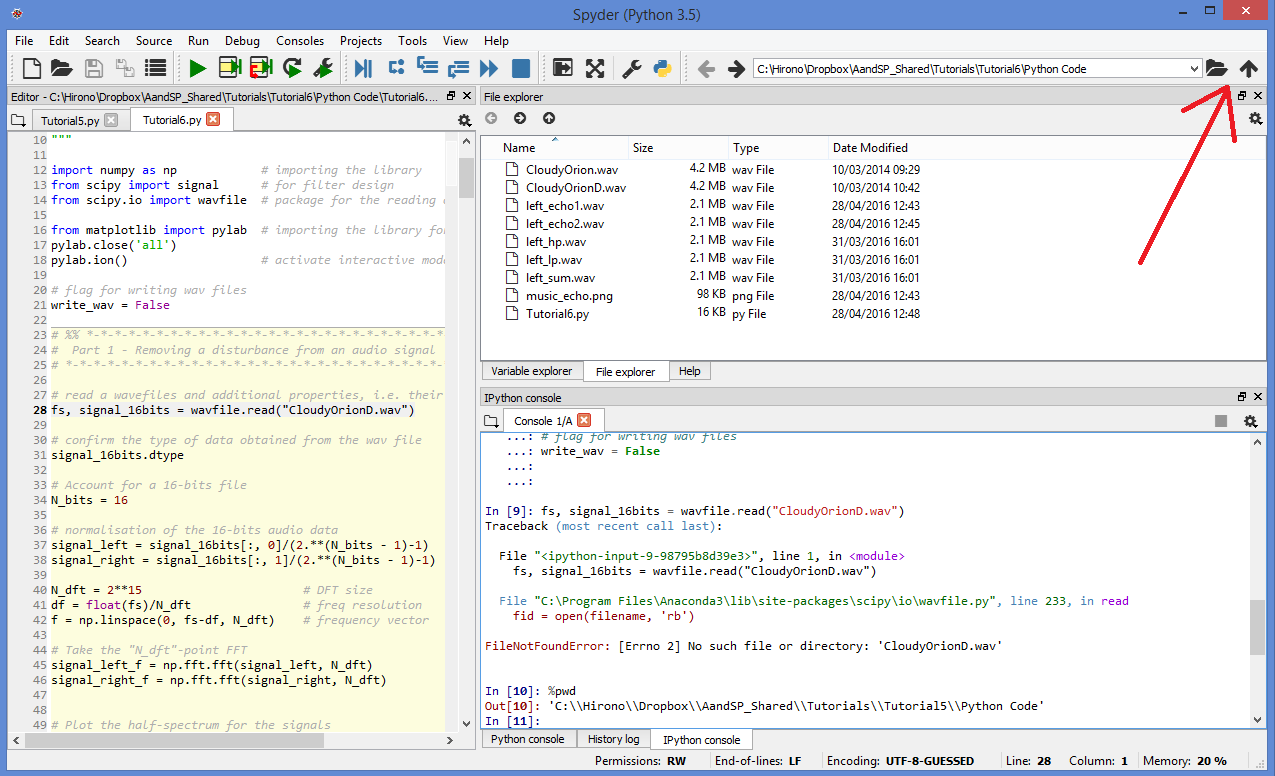
>> installed), and then got quite surprised when the button for "Set Console
>> Working Directory" on the File Explorer (top right, between the "folder"
>> icon and the "up arrow" icon) was missing. I can still change the working
>> directory manually on the IPython console, but it's impractical and
>> certainly won't motivate the students!
>>
>> Thinking it could be a bug with the conda update, I've then decided to
>> give it a go at downloading and installing the Anaconda for Windows on my
>> home laptop (which is probably what most of the students will do), and it
>> also does not have the "Set Console Working Directory" button.
>>
>> By then I was thinking the new Spyder version might have abandoned it,
>> but strangely enough, the Spyder GitHub page has a screenshot
>> <https://github.com/spyder-ide/spyder> of the new Spyder 3 that HAS this
>> exact same button (again: top right, between the "folder" icon and the "up
>> arrow" icon)!
>>
>> EDIT: here <http://i.stack.imgur.com/eDHih.png>'s a screenshot of how my
>> Spyder looks like in Windows (the big red arrow is pointing towards where
>> the icon should be).
>>
>> Does anyone knows if there is a setting option that hides the "Set
>> console working directory" button, or if this is a bug in the more recent
>> Anaconda version that doesn't show it?
>>
>> Many thanks!
>>
>

--
You received this message because you are subscribed to the Google Groups
"spyder" group.
To unsubscribe from this group and stop receiving emails from it, send an email
to [email protected].
To post to this group, send email to [email protected].
Visit this group at https://groups.google.com/group/spyderlib.
For more options, visit https://groups.google.com/d/optout.