TidBITS#909/07-Jan-08
=====================
  Issue link: <http://db.tidbits.com/issue/909>
  Happy New Year! Although we took our yearly holiday hiatus, that
  didn't stop us from keeping up with the Mac world. In this issue,
  Rich Mogull questions Intuit's commitment (or even interest) in the
  Mac platform following a series of QuickBooks bugs that permanently
  deleted some users' data. Adam weighs in on the settlement between
  Apple and Think Secret, speculating on why Think Secret chose to
  shut down. He also passes along advice on adjusting dates in iPhoto
  calendars, captures a rare Googlewackblatt, and shares the
  TidBITS-related events at the upcoming Macworld Expo in San
  Francisco. In other news, we note the releases of Security Update
  2007-009 1.1, the "MacBook, MacBook Pro Software Update 1.1," and a
  set of MacTech benchmarks that compare the performance of Parallels
  Desktop and VMware Fusion. Lastly, Glenn travels back in time to
  receive groceries via the Web, not with the failed Webvan but with a
  Seattle startup called Amazon.com.

Articles
    Security Update 2007-009 1.1 Released with Important Fixes
    Update Fixes Unresponsive Laptop Keyboards
    MacTech Benchmarks Parallels Desktop and VMware Fusion
    TidBITS Events at Macworld SF 2008
    Think Secret Shuts Down in Wake of Apple Settlement
    Intuit Alienates Mac Users With QuickBooks Fiasco
    The iPhone and the Googlewhackblatt
    The Trick to Adjusting Dates in iPhoto Calendars
    Amazon Delivers Like It's 1999
    Hot Topics in TidBITS Talk/07-Dec-08


------------ This issue of TidBITS sponsored in part by: --------------

* READERS LIKE YOU! Support TidBITS with a contribution today!
  <http://www.tidbits.com/about/support/contributors.html>
  Special thanks this week to John O'Shaughnessy, Bob Dolan,
  Robin S. Armstrong, and David M. Douds for their generous support!

* GET FETCH 5 FOR FREE! Fetch Softworks makes Fetch, the original
  Macintosh FTP client, free for educational and charitable use.
  Fetch 5.3 includes a new look and Leopard technology support.
  Apply today at <http://fetchsoftworks.com/edapply>!

* WebCrossing Neighbors Creates Private Social Networks
  Create a complete social network with your company or group's
  own look. Scalable, extensible and extremely customizable.
  Take a guided tour today <http://www.webcrossing.com/tour>

* Yojimbo 1.5 from Bare Bones Software: Your effortless, reliable
  information organizer for Mac OS X. It will change your life,
  without changing the way you work. Download the demo or buy it
  today! <http://www.barebones.com/products/yojimbo/>

* MARK/SPACE, INC: The Missing Sync provides the very best in
  synchronization for Mac users with BlackBerry, Palm OS, or
  Windows Mobile devices. Integrates with Address Book, iCal,
  Entourage, iPhoto, and iTunes. <http://www.markspace.com/bits>

* VMware Fusion. The most seamless way to run Windows on your Mac.
  Backed by nearly a decade of proven virtualization technology.
  Try VMware Fusion today for free, or order online for only $79.
  Visit: <http://www.tidbits.com/about/support/vmware-fusion.html>

* StuffIt Deluxe 12: breakthrough compression of MP3 files, PDFs,
  iWork and MS Office files! Reduce JPEG file sizes with no loss in
  quality, burn to CD/DVD, back up archives to iDisk and more. Buy
  today for only $59.99! <http://www.stuffit.com/mac/deluxe/tb/>

* Freeverse, Inc.'s SOUND STUDIO 3.5.5 - Sound Studio is for anyone
  who needs to record or edit audio with a professional tool, but at
  a consumer price. Perfect for Podcasts, Music, More! Now updated
  for OS X 10.5 Leopard. <http://www.freeverse.com/soundstudio>

* DealBITS: Get the word out about your product AND generate sales!
  It's easy: give away a few copies and offer a discount to entrants.
  A DealBITS drawing is quick to set up and can easily pay for itself.
  For more info and rates, visit <http://www.tidbits.com/dealbits/>.

---------- Help support TidBITS by supporting our sponsors ------------


Security Update 2007-009 1.1 Released with Important Fixes
----------------------------------------------------------
  by Rich Mogull <[EMAIL PROTECTED]>
  article link: <http://db.tidbits.com/article/9369>

  Shortly before the end of the year, Apple released Security Update
  2007-009 to patch 41 vulnerabilities in Mac OS X 10.4.11 and 10.5.1.
  Many of these vulnerabilities can allow an attacker to take over
  your computer by simply sending you a malicious file or having you
  visit a malicious Web site. The affected applications and services
  include Address Book, CUPS (the printing service), and Quick Look.

  (A few days after the initial Security Update 2007-009 was posted,
  Apple released version 1.1, which corrected a problem with Safari
  introduced in the prior update.)

  Be aware that the Quick Look update will block any Quick Look
  plug-ins. We suspect this is a temporary fix and Apple will safely
  re-enable plug-ins in the (hopefully near) future.

  A full listing of the updates can be found in Apple's security
  release notes. It's available through Software Update and in
  stand-alone form for Leopard (a 35.6 MB download) and Tiger
  (Universal) (a 27.4 MB download) or Tiger (PowerPC) (a 15.9 MB
  download).

<http://docs.info.apple.com/article.html?artnum=307179>
<http://www.apple.com/support/downloads/securityupdate2007009111051.html>
<http://www.apple.com/support/downloads/securityupdate20070091110411universal.html>
<http://www.apple.com/support/downloads/securityupdate20070091110411ppc.html>

  This is an extremely important update fixing multiple critical
  vulnerabilities. You should apply this as soon as possible, since
  many of these are the kinds of vulnerabilities favored by Internet
  attackers.


Update Fixes Unresponsive Laptop Keyboards
------------------------------------------
  by Mark H. Anbinder <[EMAIL PROTECTED]>
  article link: <http://db.tidbits.com/article/9373>

  If you think your recent Mac laptop has decided to slack off, an
  update released at the end of 2007 might be the solution. For
  Intel-based laptop owners, the MacBook, MacBook Pro Software Update
  1.1, fixes a problem wherein the keyboard occasionally stops
  responding for a minute or longer. (I've wondered what that was all
  about!) This update requires that the Mac OS X 10.5.1 update be
  installed first. (No word on whether the problem can affect 10.4
  users.) The update is less than 1 MB and can be downloaded from
  Software Update or the Apple Web site.

<http://www.apple.com/support/downloads/macbookmacbookprosoftwareupdate11.html>


MacTech Benchmarks Parallels Desktop and VMware Fusion
------------------------------------------------------
  by Adam C. Engst <[EMAIL PROTECTED]>
  article link: <http://db.tidbits.com/article/9370>

  Our friends over at MacTech have taken on the laborious task of
  running benchmarks on the popular virtualization programs Parallels
  Desktop and VMware Fusion, comparing them against each other,
  running both Windows XP and Windows Vista, against Apple's Boot
  Camp, and against a standard PC laptop.

<http://www.mactech.com/articles/mactech/Vol.24/24.02/VirtualizationBenchmark/>

  MacTech's tests included real-world activities in each of the main
  Microsoft Office 2007 applications (Outlook, Word, Excel, and
  PowerPoint), along with tests for network and filesystem I/O,
  Internet Explorer, and cross-platform tasks that involve working
  with the host operating system (like viewing a PDF attachment to an
  Outlook email message in Apple's Preview).

  The full MacTech article makes for a fascinating read, but it seems
  to boil down to the following conclusions.

* Windows XP outperforms Windows Vista by 17 to 30 percent in
  virtualization, so if you want the fastest Windows performance,
  stick with Windows XP.

* When running Windows XP, Parallels Desktop was somewhat faster than
  VMware Fusion, and even a bit faster than Boot Camp.

* If you want to run Windows Vista, VMware Fusion provides noticeably
  better performance than Parallels Desktop on all tasks involving raw
  processing, whereas Parallels Desktop offers significantly better
  integration with Mac OS X (and thus real-world performance) for all
  cross-platform tasks.

  Keep in mind that these conclusions are relevant only for the things
  MacTech tested, which did not include gaming (where Boot Camp
  probably has the edge over both virtualization options) or
  applications that can use multiple processors (where VMware Fusion
  would probably outperform Parallels Desktop).

  If you want to analyze MacTech's results further, you can download
  an Excel spreadsheet containing all the test data.


TidBITS Events at Macworld SF 2008
----------------------------------
  by Adam C. Engst <[EMAIL PROTECTED]>
  article link: <http://db.tidbits.com/article/9380>

  We're gearing up for our annual trip to Macworld Expo in San
  Francisco, a significant part of which is trying to find time to see
  the show floor among a slew of meetings and presentations. Here's
  our current schedule, and please do come by and say hello! Note that
  Macworld Expo takes place in both the new Moscone West and the old
  Moscone South, so plan for some walking time between the two and pay
  attention to booth numbers.

<http://www.macworldexpo.com/>


**Monday, January 14th** -- Tonya and I, along with a host of other
  Mac luminaries, will be at the Apple User Group Advisory Board's
  Wine and Cheese Reception at 4 PM at the Westin (formerly the
  Argent). Alas, this event has sold out, so you're out of luck if you
  haven't already registered.

<http://www.mugcenter.com/macworld-expo-2007-apple-user-group-wine-and-cheese-reception/>


**Tuesday, January 15th** -- We don't have any public appearances on
  Tuesday, largely so we can cover the keynote in the morning and get
  a chance to see some of the show floor in the afternoon. If you see
  us, make sure to point us in the direction of interesting booths.


**Wednesday, January 16th** -- At 11 AM, Tonya will be giving a Users
  Conference session called "Get Smart about the Leopard Finder," all
  about making the most of the functionality Apple added to the Finder
  in Leopard. Then, at 1:15 PM, I'll be talking about "Collaborative
  Editing Tools and Techniques," again in a Users Conference session.

<http://www.macworldexpo.com/node/21323>
<http://www.macworldexpo.com/conference_program/users-conference/collaborative-editing-tools-and-techniques>

  At 3 PM at the Macworld Podcast Studio in Moscone West, Tonya and I
  will join Ted Landau and Chuck Joiner for a MacNotables roundtable
  discussion about the show (and whatever we can sidetrack Chuck into
  talking about). A short time later, at 3:45, I'll dash over to the
  Peachpit booth (S-1026) to talk about my favorite new aspects of
  iPhoto '08, as covered in my "iPhoto '08: Visual QuickStart Guide."

<http://www.macnotables.com/wordpress/the-macnotables-at-macworld-expo-2008/>
<http://www.takecontrolbooks.com/iphoto7-vqs.html>


**Thursday, January 17th** -- At 11 AM, Tonya and I will be discussing
  our picks of the show in the User Group Lounge, which is Room 250 on
  the Mezzanine level of Moscone South. Then at 3 PM, we'll meet up
  with Chuck Joiner again at the Macworld Podcast Studio in Moscone
  West for another MacNotables session. And at 3:30, we'll bring Glenn
  Fleishman and possibly a new TidBITS face on stage with us for a
  MacVoices podcast with Chuck (we think he puts on different hats for
  each one).

<http://www.mugcenter.com/macworld-conference-expo-2008-user-group-lounge/>

  At 6 PM, we'll be meeting at the top of the Moscone South escalators
  in preparation for the annual Netter's Dinner. At 6:30, we'll all
  walk to the Hunan at Sansome and Broadway, where the hot and spicy
  Chinese dinner (vegetarian dishes are available) costs $18. You must
  register in advance by Tuesday, January 15th, via Kagi; the link has
  all the details. Jon Pugh is back to host this year, so I can once
  again enjoy the food and conversation.

<http://www.seanet.com/~jonpugh/nettersdinner.html>


**Friday, January 18th** -- If you're still around at 3 PM, head over
  to the Macworld Podcast Studio in Moscone West one last time for
  Shawn King's Your Mac Life Expo Wrap Up Session, where you'll see
  me, Jason Snell of Macworld, and Leo Laporte in an exhaustion-fueled
  trip through the events of the week. It was a heck of a time last
  year, and I'm sure it will be again.

<http://www.yourmaclifeshow.com/>


**Even More** -- Looking for more to do? First, check out the Macworld
  Show Highlights, and then be sure to skim through all the events in
  Ilene Hoffman's annual Hess Memorial Macworld Expo Events List, now
  updated for 2008.

<http://www.macworldexpo.com/about/show_highlights>
<http://www.ilenesmachine.com/partylist.shtml>


Think Secret Shuts Down in Wake of Apple Settlement
---------------------------------------------------
  by Adam C. Engst <[EMAIL PROTECTED]>
  article link: <http://db.tidbits.com/article/9371>

  The long-running legal battle between Apple and rumor site Think
  Secret is now over, with the two agreeing to what's described as an
  "amicable settlement" that "results in a positive solution for both
  sides."

<http://thinksecret.com/news/settlement.html>

  For Apple the positive solution can be only that Think Secret will
  stop publishing. For Think Secret publisher Nick Ciarelli, the
  positive solution is likely that Apple stops suing him. It's
  entirely possible there are other terms to the settlement, but the
  only other public detail is that Ciarelli says he never revealed his
  sources.

  On the downside, Apple comes off looking like a bully, particularly
  given that at the time the suit was filed, Ciarelli was a
  19-year-old Harvard student. And unless Ciarelli was looking to get
  out of Mac rumor mongering anyway, being forced to shut down a site
  receiving over 300,000 monthly visitors (according to Quantcast)
  wouldn't seem like a good thing.

<http://www.quantcast.com/thinksecret.com>

  According to CNet, Apple originally sued Think Secret three years
  ago to get an injunction against the further release of trade
  secrets and to learn the site's sources for an article (via the
  Wayback Machine) that revealed details about the Mac mini in advance
  of its Macworld Expo release two weeks later. The suit likely hinged
  on whether Apple could prove that Think Secret knew its source was
  violating an NDA, that Think Secret had induced the source to reveal
  confidential information, and that Think Secret's actions caused the
  source to breach his or her NDA with Apple. That may have been tough
  to prove, or even impossible, but the fact that the suit dragged on
  as long as it did shows that it wasn't clear cut on either side.
  Think Secret was defended by Terry Gross of Gross & Belsky LLP.

<http://www.news.com/Apple-suit-foreshadows-coming-products/2100-1047_3-5513582.html>
<http://web.archive.org/web/20041231014822/http://thinksecret.com/news/0412expo2.html>

  Response to the settlement announcement among Web publications ran
  nearly universally to damning Apple and lionizing Nick Ciarelli. For
  instance, Mike Masnick, on the Techdirt blog said, "It's really a
  shame that Apple even decided to pursue this vendetta, and the fact
  that it ends with Think Secret being shut down completely is a
  travesty." And on TechCrunch, Duncan Riley praised Ciarelli for
  taking the moral high ground of refusing to reveal his sources.

<http://techdirt.com/articles/20071220/013343.shtml>
<http://www.techcrunch.com/2007/12/20/oh-my-god-apple-killed-thinksecret-those-bastards/>

  I'm of two minds about the entire situation. With regard to the
  specific case, I distinctly agree that a company shouldn't be able
  to compel a journalist to reveal sources. And although it may have
  been less obvious back in 2005, I strongly believe that bloggers and
  purely Internet-based publications should receive the same
  protections as traditional reporters (at least under California law;
  a U.S. federal shield law protecting journalists is still before
  Congress). So on principle alone, it's too bad Ciarelli agreed to
  the settlement.

<http://www.washingtonpost.com/wp-dyn/content/article/2007/10/07/AR2007100701273_pf.html>

  On the other hand, Apple has all the right in the world to be angry
  about widely disseminated rumors about forthcoming products, whether
  the rumors are correct or not. If the rumor is right, customers stop
  buying the current product to wait for what's coming. (That's a
  perfectly rational thing to do as an individual customer, but
  clearly harmful to Apple when spread to tens of thousands of
  potential customers.) Incorrect rumors also damage Apple by setting
  false expectations that the company then "fails" to live up to.
  (That's what happened back in 2004 when rumor sites, including Think
  Secret, pegged the price of what would be released as the iPod mini
  at about $100. When Apple released the 4 GB iPod mini at $249, the
  higher price generated negative publicity that may have affected
  early adoption of the iPod mini.)

  Ideally, Apple would have figured out a more effective approach to
  solving the problem with leaked information than suing Think Secret,
  given the reputation hit the suit caused. But at the same time, it's
  hard to feel sorry for Think Secret. By revealing Apple's trade
  secrets, Nick Ciarelli was playing with fire, and he now has the
  scorched fingertips to prove it.


Intuit Alienates Mac Users With QuickBooks Fiasco
-------------------------------------------------
  by Rich Mogull <[EMAIL PROTECTED]>
  article link: <http://db.tidbits.com/article/9378>

  On 04-Jan-08, Intuit released a patch for QuickBooks Pro for Mac
  2006 to resolve a widely reported problem where all files on a
  user's Desktop, including subdirectories, could be permanently
  deleted if automatic updates were enabled. Instructions for manually
  updating QuickBooks are available from Intuit. All QuickBooks users
  should immediately apply this patch, even if you manually disabled
  automatic updates.

<http://www.quickbooksgroup.com/webx/forums/mac/1965/0>


**The QuickBooks Fiasco** -- Several weeks ago, just as we (and many
  others) were starting to wrap up for the holidays, some users of
  QuickBooks Pro for Mac 2006 experienced failed automatic updates
  that deleted the Desktop folder and its contents. The update would
  fail partway through the process, alerting the user that "There is
  not enough space to install." The updater would then delete the
  Desktop folder. The files were permanently deleted, not moved to the
  Trash. Only QuickBooks 2006 users lost any data; QuickBooks 2007
  users merely had extraneous folders placed in their user directory
  when the update failed. Intuit issued an initial patch on 18-Dec-07,
  but it was still possible to download the bad patch accidentally
  under certain circumstances. The new patch (version R5) disables the
  automatic update mechanism.

  More information is available from Macworld and the QuickBooks user
  forum, which is filled with hundreds of angry QuickBooks users.

<http://www.macworld.com/article/131397/2008/01/quickbooks.html>
<http://quickbooksgroup.com/webx/forums/mac/1917>

  Intuit reportedly responded slowly to the problem at first, but
  later sent an email message to at least some affected users offering
  assistance in recovering files using Prosoft's $99 Data Rescue II.
  Users near an Apple Store were directed to the Genius Bar for help,
  and those who couldn't visit an Apple Store were provided with
  instructions for using Data Rescue II, with both groups being
  reimbursed for the software. (If you're still dealing with this
  situation, contact Intuit at [EMAIL PROTECTED])

<mailto:[EMAIL PROTECTED]>

  Unfortunately, data recovery isn't always easy or even possible
  after file deletion, depending largely on whether the computer was
  used after the deletion happened. In some situations, users have
  been forced to resort to professional data recovery services such as
  DriveSavers that can cost hundreds or even thousands of dollars.
  Intuit's public statements haven't discussed whether or not the
  company will reimburse users for such expenses; they merely say, "If
  you have already performed a data recovery activity before this
  email was sent, please inform us at [EMAIL PROTECTED] so that we
  can work with you on a one-on-one basis."

  As always, remember that the best protection against unexpected data
  loss is not data recovery software, but regular backups. There's a
  reason why Joe Kissell's "Take Control of Mac OS X Backups" and
  "Take Control of Easy Backups in Leopard" ebooks are so popular.

<http://www.takecontrolbooks.com/backup-macosx.html?14@@!pt=TB909>
<http://www.takecontrolbooks.com/leopard-easy-backup.html?14@@!pt=TB909>


**Should Mac Users Support Intuit?** Intuit has had a tumultuous
  relationship with the Macintosh community ever since dropping, then
  reviving, support for Macs in 1998 (see "Intuit Drops Quicken for
  Macintosh", 1998-04-20). QuickBooks Pro for Mac 2007 lacks many
  features of its Windows-based cousin, including critical features
  like credit card processing support. While Intuit offers an
  online-only version of the product (QuickBooks Online Edition), it
  too runs only with current versions of Internet Explorer on Windows.

<http://db.tidbits.com/article/4830>

  While software updates that introduce additional bugs are more
  common than we'd all like, issuing an update that permanently
  deletes unrelated user data is absolutely inexcusable. It's
  mind-boggling that this update passed through Intuit's quality
  assurance process.

  Speaking as a small business owner who runs his business on Macs, I
  have yet to find an accounting solution I'm satisfied with. When I
  started my business in August 2007, I enrolled with QuickBooks
  Online Edition, which I access by running Windows in Parallels
  Desktop. It initially appeared to meet my accounting and payroll
  needs, but I recently ran into an obstacle that's forcing me to look
  at other options. QuickBooks Online Edition does not support any
  type of file import - not even Intuit's own widely used data
  exchange formats. Since my corporate credit card isn't supported by
  a direct online link within QuickBooks, I must manually enter all
  transactions even though my credit card provider offers
  QuickBooks-compatible downloads.

  Since I'd rather spend my time writing TidBITS articles than
  hand-entering receipts for every snack I pick up at the airport, I
  started the process to export my data out of QuickBooks Online
  Edition and into a desktop version of QuickBooks. The limitations of
  the Mac version gave me pause, and I was about to purchase the
  Windows version when this update problem became public.

  Being a firm believer of putting my money where my mouth is, I've
  reconsidered supporting any Intuit product and am downloading an
  evaluation version of MYOB FirstEdge. [For what it's worth, we've
  long used MYOB AccountEdge for the TidBITS business accounting.
  -Adam] I'm open-minded, and may consider returning to Intuit in the
  future if they improve the quality and reliability of their Mac
  products, but for now it's time to explore options from companies
  that treat their Mac users better.

<http://www.myob-us.com/firstedge/>
<http://www.myob-us.com/accountedge/>


The iPhone and the Googlewhackblatt
-----------------------------------
  by Adam C. Engst <[EMAIL PROTECTED]>
  article link: <http://db.tidbits.com/article/9372>

  As much as I want an iPhone, it's hard to justify the cost when I
  pay roughly the same per year to Virgin Mobile as the low-end iPhone
  plan costs per month. In commenting on this fact in a private
  mailing list posting, I realized that I had no idea what the word
  for "twelve times" is. Two times is double, three times is triple,
  four times is quadruple, but what's twelve times?

  A bit of research on Wikipedia turned up the entry for "tuple" (a
  finite sequence of objects) with names for tuples of specific
  lengths, but alas, it didn't include twelve. So I looked up "twelve"
  in Wikipedia, and discovered that a group of twelve things is a
  "duodecad." Jamming the two words together, I came up with
  "duodecaduple," which looks funny but turns out to be absolutely
  wonderful to say: duo-deca-duple. Try it a few times. Bonus points
  to anyone who can work it into a conversation.

<http://en.wikipedia.org/wiki/Tuple>
<http://en.wikipedia.org/wiki/12_%28number%29>

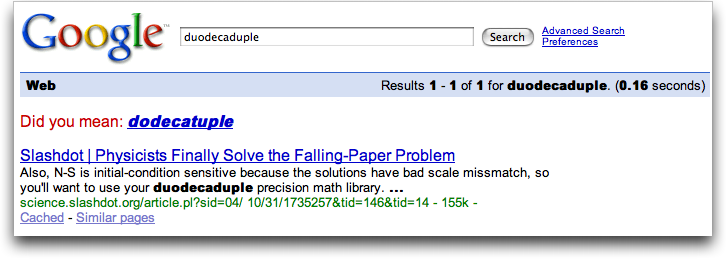
  Curious to see if I had gotten it right, I did a Google search, and
  was shocked and amazed to discover that my word appeared only once
  in the entire Google index, in a comment on a Slashdot story that,
  interestingly enough, was about some research performed at Cornell
  University here in Ithaca. I include the image below as
  documentation that there were no other instances of duodecaduple
  when I wrote this.

<http://www.tidbits.com/resources/2007-12/Slashdot-usage.png>

  For those who missed it, there's a game to find pairs of words that
  appear only once in Google, and such a finding is called a
  "Googlewhack." But Googlewhacks must contain two words, and mine was
  only a single word. While reading the Wikipedia entry for
  Googlewhack, I learned that a single-word Googlewhack is called a
  "Googlewhackblatt."

<http://en.wikipedia.org/wiki/Googlewhack>

  There's a problem with Googlewhackblatts, as I'm sure you've just
  realized. Publishing the existence of one destroys it as soon as
  Google crawls your site, since it then exists in at least two
  places. I agonized about this, since I wanted to preserve my
  Googlewhackblatt, but I'll bet that there are Googlewhackblatt
  vandals out there who delight in ruining Googlewhackblatts, even
  when they've been protected by writing them backward and viewing
  through elgooG (a site that mirrors Google not by replicating it,
  but by reflecting it). Amusingly, if you type "Engst" and press
  Return to activate the "ykcuL gnileeF m'I" button, elgooG promptly
  displays the search results for Tsgne .C Mada, my 1997 April Fools
  issue alter-ego.

<http://elgoog.rb-hosting.de/>

  In the end, I decided that a Googlewhackblatt has meaning only in
  disappearing, that it doesn't truly exist until it's shared, even
  though the act of sharing  will almost certainly result in its
  destruction. Thus, the joy in the Googlewhackblatt is like blowing a
  dandelion's seeds. Fly free, little duodecaduple!

  Of course, as you can see in the screenshot, Google helpfully
  suggests that perhaps the word I want is actually "dodecatuple,"
  which appears several thousand times in the Google index.
  Dodecatuple uses the same stem that gives us "dodecagon" (a polygon
  with twelve sides and twelve angles) and "dodecahedron" (a
  polyhedron with twelve faces). But some further poking reveals that
  "duodecagon" and "duodecahedron" are also perfectly reasonable, if
  older, variants of those words.

  So I'm sticking with my version, and if you ask me at Macworld Expo
  why I still don't have an iPhone, it's because I'd duodecaduple my
  yearly cell bill.


The Trick to Adjusting Dates in iPhoto Calendars
------------------------------------------------
  by Adam C. Engst <[EMAIL PROTECTED]>
  article link: <http://db.tidbits.com/article/9374>

  Put yourself in my shoes for a moment. You spent a bunch of time in
  June designing and laying out a calendar in iPhoto as an anniversary
  present, complete with photos on the blank dates for each month and
  birthdays and anniversaries imported from iCal for everyone in your
  family. It's gorgeous, your wife loves it, and she wants to give
  copies of it with a few different events to her relatives for
  holiday presents. That's a great idea, so you head off into iPhoto
  to make the changes and... that's when your troubles begin.

  Although iPhoto makes it fairly easy to create a calendar from
  scratch, making a near-duplicate of a calendar you've already
  created comes with some gotchas, ranging from losing photos you
  placed on dates to reimported event text coming in with incorrect
  styles. But with the process I outline here, you should be able to
  create a near-duplicate calendar with relatively little fuss.

  (You might wonder why I have you duplicating the calendar below,
  rather than just modifying it. My experience is that it's always
  best to work on a copy, just in case something gets messed up, since
  then you can toss the copy and start again on another copy. It's
  also useful to keep finished calendars around in case you discover
  some days later you want to order another copy.)


**Duplicate the Calendar** -- First off, I assume you to want your
  second calendar to contain different or additional events, and if
  you made the original calendar with unusual start and end dates
  (June 2007 to May 2008, in my case), you need to change the date
  range too. But don't blithely modify the date range on your existing
  calendar, because when you do that, iPhoto removes all the photos
  you've placed in date boxes. Curses! So follow these steps to reduce
  the effort of remembering which photos go where:

  1. Select your calendar in the Source pane's Projects list, choose
  File > Print, and in the Print dialog, click Preview. This causes
  iPhoto to create a PDF and display it in Preview; you'll need this
  PDF to refer to as you replace photos in Step 4. Obviously, if you
  have the paper copy of the calendar handy, you could also just refer
  to it.

  2. Right-click your calendar in the Source pane, and choose
  Duplicate from the contextual menu. Rename the new calendar so you
  can differentiate it from the original.

  3. Click the Settings button, and in the Calendar view, change the
  dates as desired. Don't worry about importing new iCal calendars
  just yet. Click OK.

  4. Now comes the truly tedious step. Referring back to the PDF or
  paper copy of your original calendar, drag any photos from the
  available photos list to the desired date boxes on the calendar. I
  like to fill up all the blank boxes at the start and end of each
  month's grid.


**Fix Dates** -- Now is a good time to check your calendar events in
  iCal and make sure they're correct and up-to-date. For instance, we
  welcomed new nephews on either side of the family in November, so I
  had to add their birthdays. Since we want separate iPhoto calendars
  for our respective sides of the family, we've created two iCal
  calendars, one for Tonya's family's birthdays and anniversaries, and
  one for mine. Of course, some events are duplicated.

  (Even if you don't normally use iCal as your calendaring software,
  which I don't, it makes a lot more sense to create these calendars
  in iCal than to enter events manually in iPhoto. That way you can
  use the same iCal calendars next year, and take advantage of iCal's
  smarts for events like Thanksgiving, which takes place on the fourth
  Thursday of November.)

  It's also important to make sure you have the appropriate holidays
  in iCal, which turns out to be trickier than I had hoped. I was
  unimpressed with iPhoto's built-in list of U.S. holidays, so I went
  looking for a more complete list. The best I found was the U.S.
  Holidays calendar at iCalShare; you can find lots of other calendars
  at iCalShare as well. Using it as a base, I copied those events I
  wanted to a new calendar of my own, and then I added a variety of
  other events from the Year 2008 Holidays Calendar, from Wikipedia's
  List of Commemorative Days, from Wikipedia's International
  Observances, and by going through a commercial calendar I had around
  to see which holidays they chose. How else would you find Towel Day,
  the Chinese New Year (Year of the Rat!), and Wright Brothers Day?

<http://iCalShare.com/article.php?story=20020912105939521>
<http://www.calendardate.com/year2008_holidays.php>
<http://en.wikipedia.org/wiki/List_of_commemorative_days>
<http://en.wikipedia.org/wiki/International_observance>


**Reimport Events** -- It would seem straightforward to reimport your
  updated iCal calendars, but that wasn't my experience. The problem
  was that in the Big Dates theme (and possibly others), clicking the
  Reimport button in the Calendar view of the Settings dialog brought
  in the events, but at least some of them came in with incorrect
  styles. This was particularly glaring in the Big Dates theme when
  the new events and their dates had black text, rather than the red
  text normally used for special dates. You can manually change the
  color of text you enter in iPhoto, but not the color of the date
  numbers.

  It's possible that other themes don't suffer from this problem, but
  here's the workaround I discovered. The downside of this approach is
  that changing themes may cause you to lose text entered on the photo
  pages (though I didn't see that happen in my testing). Perform these
  steps:

  1. Click the Themes button and switch to another theme.

  2. Click the Settings button, and in the Calendar view, select the
  desired iCal calendars and click Reimport. This ensures that you
  have the latest events.

  3. Click the Settings button again, switch to the Styles view, click
  Restore Defaults, and click OK. This clears any custom formatting
  you might have done (or that iPhoto may think you've done; I suspect
  this is the culprit when styles aren't correct upon reimport).

  4. Click the Themes button again, and switch back to the desired
  theme.

  5. Go through every page and visually verify that all the events
  came in properly and are styled properly. When I did this, one photo
  with a description somehow had that description entered as a caption
  in the calendar, even though I hadn't set that. And on one occasion,
  all the events in November and December had the wrong styles even
  still; running through these steps again fixed the problem.

  That's it! If, like me, you actually want yet another calendar with
  different events (I wanted another version to give as Christmas
  presents for my side of the family), duplicate your new calendar
  again, select different iCal calendars, and, if necessary, run
  through the Reimport Events steps again.


Amazon Delivers Like It's 1999
------------------------------
  by Glenn Fleishman <[EMAIL PROTECTED]>
  article link: <http://db.tidbits.com/article/9356>

  Seventy-five percent of my family recently suffered an awful virus:
  emesis, to be polite about it, followed by fever which laid low
  first our toddler Ben, then our baby Rex, then yours truly. My wife
  Lynn was initially untouched - the fever eventually hit her after
  I'd recovered - and so had to minister to a lot of sickos.

  The cupboard was already a bit bare, and she was trying to sort out
  how to get some more food in the house even with Ben (now well) back
  in childcare - she didn't want to take the baby out in public and
  expose others, and I wasn't well enough to look after him on my own.
  Despite my addled state, I recalled that we could get groceries
  delivered via a new Amazon.com service in testing in Seattle: Amazon
  Fresh. (Lynn fortunately didn't think I was having hallucinations
  that flashed me back to the dotcom era.)

<https://fresh.amazon.com/>

  Your first thought, like mine, is probably, "Great. They're taking
  an idea that failed dramatically several years ago and throwing more
  money at it." (See "Groceries in Our Midst" for TidBITS coverage of
  HomeGrocer, Webvan, and other grocery delivery services.) But I
  think Amazon occupies a unique position in the marketplace that
  could allow them to succeed where Webvan and others failed. Amazon
  already ships millions of items a day.

<http://db.tidbits.com/series/1184>

  It's not that strange to think that instead of using UPS, USPS, and
  other shippers, Amazon could direct some of the shipping to their
  own operations by throwing groceries into the mix. Grocery stores
  have extremely thin margins, as little as 1 to 2 percent, and
  require huge volume to produce any reasonable return.

  If you can add in the high-margin items that Amazon already sells,
  conserve shipping through internal operations (thus shifting the few
  dollars an item from shipping companies to your own trucking fleet),
  and add grocery to provide regular neighborhood stops and a tiny
  margin, you might have a winning model.

  It's also worth noting that there are still many grocery delivery
  services, often run by major chains, that typically charge a fee for
  deliveries of any size. The idea became more widespread but less
  interesting after Webvan's spectacular crash. One of the crummier
  supermarket chains, Albertson's, has online ordering for home
  delivery in several cities, for instance.

<https://www.albertsons.com/delivery.asp?>

  Amazon could combine some of the best aspects of its own massive
  warehousing of products, of Kozmo (a totally ridiculous snack and
  small-item delivery service that I loved; ironically, Kozmo was
  funded in part by Amazon), and grocery delivery. Consider ordering a
  DVD and having it delivered along with broccoli later the same day.
  That's not a new idea, but it requires a lot of scale and
  infrastructure to carry out with the potential of profit.

<http://en.wikipedia.org/wiki/Kozmo>

  In this test phase of Amazon Fresh, the company offers three
  delivery options: unattended delivery before 6 AM or between 7 PM
  and 10 PM; attended delivery in one-hour blocks between 7 AM and 10
  PM; and pick-up service at a few limited locations, many of which
  are currently within corporations like Google, available only to
  employees.

  The unattended service has a $25 minimum purchase to avoid a $9.95
  service charge; attended service requires $50 or more in an order
  for free delivery; pick-up service is always free. You can place an
  order for attended delivery or pre-dawn delivery by midnight the
  night before; for after-dinner delivery by noon the same day; and
  for pick up as little as four hours in advance.

  We placed an order in the afternoon for delivery in the 8 to 9 AM
  slot the next day. The driver arrived in a spiffy new truck around
  8:10 AM. He offered to bring the bags in, but with Lynn and the baby
  asleep and the miasma of virus, I suggested he leave them on the
  porch.

<http://farm3.static.flickr.com/2326/2103914058_bb94f044f6.jpg>
<http://farm3.static.flickr.com/2082/2103912616_bfe1efd0dd.jpg>

  Pricing is comparable to Whole Foods, which many people also call
  "Whole Paycheck." Whole Foods tends to have the highest prices for
  foods we buy regularly; we often cycle through Trader Joe's, QFC (a
  division of Kroger), and PCC, a local food co-op, to get the best
  deals. Unless Amazon is more competitive on pricing, we'll use it
  only in a pinch.

  Now, I can't predict if Amazon really will shift shipping to its own
  trucks, or whether this isn't just a small-scale test that they'll
  never roll out. All I know is that with a house full of sick people,
  I'm glad to be living in what seems to be the past with the promise
  of the future.


Hot Topics in TidBITS Talk/07-Dec-08
------------------------------------
  by Jeff Carlson <[EMAIL PROTECTED]>
  article link: <http://db.tidbits.com/article/9379>

**Word 2004 Crashing Bug Squashed** -- After applying the latest
  Microsoft Office update, some of the applications themselves aren't
  actually updated; you need to check the versions of the Office
  components. (5 messages)

<http://emperor.tidbits.com/TidBITS/Talk/1730/>


**Recovery from Disk Utility Erase** -- What tools will work to
  recover a drive that was accidentally erased using Disk Utility? (5
  messages)

<http://emperor.tidbits.com/TidBITS/Talk/1731/>


**QuickTime 7.3.1 Fixes RTSP Vulnerability** -- When trying to
  download the latest version of QuickTime, a reader finds that Apple
  is trying to be too smart: he can't grab the Mac version from a
  Windows browser. (4 messages)

<http://emperor.tidbits.com/TidBITS/Talk/1734/>


**Open source replacement for Text Expander, Typeit4me and
  Typinator...** For someone who works on multiple computers
  throughout the day, would an open-source version of these powerful
  auto-complete programs be a good solution? (3 messages)

<http://emperor.tidbits.com/TidBITS/Talk/1735/>


**Think Secret Shuts Down in Wake of Apple Settlement** -- A reader
  speculates that Apple may have bought out Think Secret in order to
  end the lawsuit between the two parties. (1 message)

<http://emperor.tidbits.com/TidBITS/Talk/1736/>


**Digital voice recorder that works with the Mac** -- With several USB
  voice recorders available, which of them easily transfer the digital
  audio to the Mac? (9 messages)

<http://emperor.tidbits.com/TidBITS/Talk/1738/>


**Wake Up, Little Keyboard** -- Running a recent update seems to have
  messed up other components of Mac OS X for some people. (2 messages)

<http://emperor.tidbits.com/TidBITS/Talk/1740/>


**Books for a new user** -- Did the holidays bring a new Mac to you or
  someone you know? Readers share their suggestions for books that a
  new user would find helpful. (6 messages)

<http://emperor.tidbits.com/TidBITS/Talk/1741/>


**Library Donations** -- Where does money raised by libraries go? (Not
  exactly a Mac-related thread, but interesting for the book-minded
  people on this list!) (5 messages)

<http://emperor.tidbits.com/TidBITS/Talk/1743/>


**Powerpoint from Office Vx crashes under Leopard** -- Could corrupted
  fonts be the source of trouble with PowerPoint under Leopard? (3
  messages)

<http://emperor.tidbits.com/TidBITS/Talk/1744/>


**[ANN] The Entourage Help Blog: Entourage and Time Machine** --
  Readers discuss the merits and shortcomings of how Entourage stores
  all of its data in one large database file. (25 messages)

<http://emperor.tidbits.com/TidBITS/Talk/1745/>


**Permissions repair** -- Some people are having trouble with
  permissions under Mac OS X 10.5, with several possible fixes
  mentioned. (6 messages)

<http://emperor.tidbits.com/TidBITS/Talk/1746/>


**Buy Office Mac test drive by Jan 14 to get upgrade?** In
  anticipation of the release of Microsoft Office for Mac 2008 next
  week, readers discuss the best ways to upgrade. (8 messages)

<http://emperor.tidbits.com/TidBITS/Talk/1748/>


**Conversions of a Twitter Revert** -- Glenn decided that he wanted to
  be productive or something, so he stopped checking his Twitter feed
  using Twitterific. Some readers agree with the move, while others
  still see value in Twitter. (4 messages)

<http://emperor.tidbits.com/TidBITS/Talk/1750/>


**Automator Help** -- A reader runs into what turns out to be a
  well-established bug in the new version of Automator. (2 messages)

<http://emperor.tidbits.com/TidBITS/Talk/1751/>


$$

This is TidBITS, a free weekly technology newsletter providing timely
news, insightful analysis, and in-depth reviews to the Macintosh and
Internet communities. Feel free to forward to friends; better still,
please ask them to subscribe!

Non-profit, non-commercial publications and Web sites may reprint or
link to articles if full credit is given. Others please contact us. We
do not guarantee accuracy of articles. Caveat lector. Publication,
product, and company names may be registered trademarks of their
companies. TidBITS ISSN 1090-7017.

Copyright 2008 TidBITS: Reuse governed by Creative Commons license.

Contact us at:    <[EMAIL PROTECTED]>
TidBITS Web site: <http://www.tidbits.com/>
License terms:    <http://www.tidbits.com/terms/>
Full text search: <http://www.tidbits.com/search/>
Subscriptions:    <http://www.tidbits.com/about/list.html>
Account help:     <http://www.tidbits.com/about/account-help.html>


--
If you want to unsubscribe or change your address, use this link
http://emperor.tidbits.com/webx?unsub@@.3c557dc4!u=306a67f9