TidBITS#911/21-Jan-08
=====================
  Issue link: <http://db.tidbits.com/issue/911>
  Apple promised "something in the air" for last week's Macworld Expo
  and delivered the MacBook Air, a super-thin (and fairly aerodynamic
  if you want to test its moniker) laptop that relies heavily on
  wireless networking. We're back from the show and cover the MacBook
  Air as well as the new Time Capsule wireless backup device
  (including why some Mac users are upset about it), iTunes movie
  rentals, the Apple TV 2.0 update, and changes to the iPhone and iPod
  touch software. If you weren't in San Francisco, Glenn put together
  a podcast interviewing industry notables and friends of TidBITS,
  Tonya noticed an increase in women attendees, and Adam looks at how
  this year's expo marks a change in how vendors are operating within
  the Mac market. We also cover the important QuickTime 7.4 security
  update (and how it still needs more work), and the releases of
  iMovie 7.1.1 and Front Row 2.1.2. And in non-Expo news, Joe Kissell
  offers an AppleScript solution to pasting unformatted text in Word
  2008.

Articles
    QuickTime 7.4 Improves Security, but Not Enough
    iMovie 7.1.1 and Front Row 2.1.2 Released
    Taste of Macworld Keynote Day Podcast
    DealBITS Drawing: Win a Copy of the MathMagic Equation Editor
    MacBook Air Introduced as World's Thinnest Notebook
    iTunes Movie Rentals and Apple TV, Take 2
    Time Capsule Bundles AirPort Base Station and Backup Disk
    Time Capsule and Its Associated Rage Factor
    iPhone and iPod touch Become Self-Aware
    More Women at Macworld Expo?
    Mac Industry Marching to a Different Beat
    Word 2008 and the Paste Plain Text Dance
    Hot Topics in TidBITS Talk/21-Jan-08


------------ This issue of TidBITS sponsored in part by: --------------

* READERS LIKE YOU! Support TidBITS with a contribution today!
  <http://www.tidbits.com/about/support/contributors.html>
  Special thanks this week to James Robertson, Michael Delfiner,
  Eric Mendelsohn, and Michael Shumate for their generous support!

* Fetch Softworks: Fetch 5.3 has WebView, the easy way
  to view files in a browser and copy Web addresses from Fetch.
  Also a new look for Leopard, droplet shortcuts, and more.
  Download your free trial version! <http://fetchsoftworks.com/>

* WebCrossing Neighbors Creates Private Social Networks
  Create a complete social network with your company or group's
  own look. Scalable, extensible and extremely customizable.
  Take a guided tour today <http://www.webcrossing.com/tour>

* Yojimbo 1.5 from Bare Bones Software: Your effortless, reliable
  information organizer for Mac OS X. It will change your life,
  without changing the way you work. Download the demo or buy it
  today! <http://www.barebones.com/products/yojimbo/>

* MARK/SPACE, INC: The Missing Sync provides the very best in
  synchronization for Mac users with BlackBerry, Palm OS, or
  Windows Mobile devices. Integrates with Address Book, iCal,
  Entourage, iPhoto, and iTunes. <http://www.markspace.com/bits>

* Seamlessly run Windows on your Mac with VMware Fusion! Run
  Windows, Linux, and Solaris simultaneously without rebooting.
  Customizable toolbars, easy to manage virtual packages, and more.
  VMware Fusion: $69.99! <http://www.allume.com/mac/vmware/tb/>

* Freeverse, Inc.'s SOUND STUDIO 3.5.5 - Sound Studio is for anyone
  who needs to record or edit audio with a professional tool, but at
  a consumer price. Perfect for Podcasts, Music, More! Now updated
  for OS X 10.5 Leopard. <http://www.freeverse.com/soundstudio>

* Used to working with Microsoft Office Visio on a PC but have a Mac?
  ConceptDraw 7 is professional technical drawing and business
  graphics software. It supports Leopard and can import MS Visio
  files.
  TidBITS readers save $50! <http://www.conceptdraw.com/tb>

* DealBITS: Get the word out about your product AND generate sales!
  It's easy: give away a few copies and offer a discount to entrants.
  A DealBITS drawing is quick to set up and can easily pay for itself.
  For more info and rates, visit <http://www.tidbits.com/dealbits/>.

---------- Help support TidBITS by supporting our sponsors ------------


QuickTime 7.4 Improves Security, but Not Enough
-----------------------------------------------
  by Jeff Carlson <[EMAIL PROTECTED]>
  article link: <http://db.tidbits.com/article/9411>

  Apple updated its media workhorse QuickTime to version 7.4 last
  week, fixing bugs and adding support for new iTunes features such as
  downloadable movie rentals. But the more important news is that this
  version squashes a handful of security holes that could allow remote
  attacks. However, a serious vulnerability discovered shortly before
  Macworld Expo demonstrates that Apple's engineers need to remain
  hard at work.

<http://docs.info.apple.com/article.html?artnum=307301>

  The QuickTime 7.4 update is available for Leopard (a 55 MB
  download), Tiger (a 51 MB download), Panther (a 50 MB download), and
  Windows (both XP and Vista, a 22 MB download).

<http://www.apple.com/support/downloads/quicktime74forleopard.html>
<http://www.apple.com/support/downloads/quicktime74fortiger.html>
<http://www.apple.com/support/downloads/quicktime74forpanther.html>
<http://www.apple.com/support/downloads/quicktime74forwindows.html>

  The most recent exploit, not addressed in QuickTime 7.4, takes
  advantage of a hole in QuickTime's RTSP (Real Time Streaming
  Protocol) that could open a computer to a denial-of-service attack
  or possible remote code execution. (RTSP is not a new target; see
  "Protect Yourself from the QuickTime RTSP Vulnerability,"
  2007-09-07.) Because QuickTime is the underlying technology of
  iTunes, Macs and Windows computers running QuickTime are vulnerable.
  Anyone who uses iTunes or owns an iPod should update.

<http://www.kb.cert.org/vuls/id/112179>
<http://db.tidbits.com/article/9333>


iMovie 7.1.1 and Front Row 2.1.2 Released
-----------------------------------------
  by Jeff Carlson <[EMAIL PROTECTED]>
  article link: <http://db.tidbits.com/article/9410>

  While the keynote address at Macworld Expo garners all the
  attention, Apple usually pushes out a few other updates at the same
  time that aren't as exciting. (The 802.11n AirPort Extreme Base
  Station wasn't mentioned at all last year; see  "AirPort Extreme
  Updated," 2007-09-07.) This year, Front Row and iMovie received the
  silent update treatment.

<http://db.tidbits.com/article/8813>

  According to Apple, iMovie 7.1.1 "addresses issues when publishing
  movies to a .Mac Web Gallery, improves overall stability, and
  addresses a number of other minor issues." The update is available
  via Software Update or as a 16 MB download.

<http://www.apple.com/support/downloads/imovie711.html>

  Front Row 2.1.2 receives even less description, noting only that the
  update includes bug fixes and improved compatibility with iTunes
  (presumably to handle movie rentals). The update is also available
  via Software Update or as a 16.8 MB download.

<http://www.apple.com/support/downloads/frontrow212.html>


Taste of Macworld Keynote Day Podcast
-------------------------------------
  by Glenn Fleishman <[EMAIL PROTECTED]>
  article link: <http://db.tidbits.com/article/9406>

  Have you ever thought of attending Macworld Expo in San Francisco,
  but decided that the price of airfare, hotel, and admission (cheap
  for the exhibit hall, high for conference tracks) wasn't in your
  budget? Our coverage will provide most of the high-level details you
  need to know what went on, but it won't give you the feel for what
  it's like to be at the show. This year we tried something a little
  different, and you can get a taste of what Macworld is like through
  the associated podcast - click Listen to hear about 25 minutes of
  discussions and jocularity before and after the keynote, as I spoke
  to friends and colleagues.

<http://www.tidbits.com/podcasts/9406.mp3>

  The list of notables, in order, includes:

* John Moltz, Crazy Apple Rumors Site

<http://www.crazyapplerumors.com/>

* John Gruber, Daring Fireball

<http://daringfireball.net/>

* Rich Mogull, security guru, TidBITS Security Editor

<http://securosis.com/>

* Dan Moren and Derik DeLong, MacUser

<http://www.macuser.com/>

* Dan Lyons, Fake Steve Jobs and Forbes

<http://fakesteve.blogspot.com/>

* Julio Ojeda-Zapata, St. Paul Pioneer Press

<http://yourtech.typepad.com/>

* Randy Newman, a fair-use bit of "You've Got a Friend in Me"

<http://www.randynewman.com/>

* Rich Mogull again with Tonya Engst and Adam Engst, the illustrious
  editor in chief and publisher of TidBITS, respectively

* John Nemerovski, MyMac.com

<http://www.mymac.com/>

* John Moltz, again, outside the Macworld Podcast studio


DealBITS Drawing: Win a Copy of the MathMagic Equation Editor
-------------------------------------------------------------
  by Adam C. Engst <[EMAIL PROTECTED]>
  article link: <http://db.tidbits.com/article/9412>

  Do you need to create equations for papers, reports, or other
  publications? If so, you'll want to enter this week's DealBITS
  drawing to win one of three copies of InfoLogic's MathMagic Personal
  Edition 5.65, which enables you to create complex equations and
  export them in TeX, EPS, GIF, JPEG, and PICT format for use with
  word processors, presentation programs, and graphics software.
  MathMagic Personal Edition (with two years of free upgrades) is a
  $119.95 value. Entrants who aren't among our lucky winners will
  receive a discount on MathMagic Personal Edition, so be sure to
  enter at the DealBITS page. All information gathered is covered by
  our comprehensive privacy policy. Remember too, that if someone you
  refer to this drawing wins, you'll receive the same prize as a
  reward for spreading the word.

<http://www.mathmagic.com/product/pe.html>
<http://www.tidbits.com/dealbits/mathmagic2/>
<http://www.tidbits.com/about/privacy.html>


MacBook Air Introduced as World's Thinnest Notebook
---------------------------------------------------
  by TidBITS Staff <[EMAIL PROTECTED]>
  article link: <http://db.tidbits.com/article/9405>

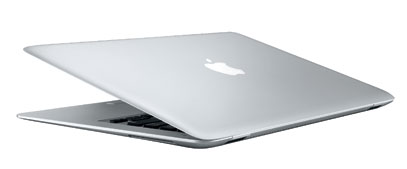
  Billing it as the world's thinnest notebook computer, Apple
  announced the MacBook Air, a 3-pound Mac that fills out the
  company's portable line between the inexpensive MacBook at the low
  end and the powerful MacBook Pro at the high end. During his keynote
  address at Macworld Expo, Steve Jobs demonstrated the new machine's
  slim profile by sliding it out of a standard interoffice manila
  envelope (a trick that also appears in a new television ad). The
  slightly wedge-shaped computer ranges in thickness from 0.76 inches
  (19.3mm) on the hinge side to a mere 0.16 inches (4mm) at the front.

<http://www.apple.com/macbookair/>
<http://www.apple.com/macbookair/#ad>
<http://www.tidbits.com/resources/2008-01/macbookair.jpg>

  The MacBook Air offers many whizzy features that you'd expect from a
  new Apple laptop: a full-size, backlit keyboard with an ambient
  light sensor; a built-in iSight camera; 802.11n and Bluetooth 2.1 +
  EDR (Enhanced Data Rate) wireless support; a magnetic latch; and a
  45 watt power adapter with a MagSafe connector (note that the
  MagSafe connector is slightly different from previous MagSafe
  connectors). Its "generously sized" trackpad borrows gesture support
  from the iPhone's multi-touch display, meaning that with various
  combinations of finger movements you can zoom, pan, rotate photos,
  move windows, and perform other actions without having to worry
  about the exact location of your mouse pointer or manipulating tiny
  on-screen controls. The gestures can be turned off and on in the
  Trackpad view of the Keyboard & Mouse preference pane.

  Apart from the power connector, the only physical interfaces on the
  MacBook Air (all hidden beneath a small flip-down door) are a single
  USB 2.0 port, a micro-DVI video port, and a headphone jack. Notably
  absent is an Ethernet port, although Apple offers a $29
  USB-to-Ethernet adapter as an option. In addition, the MacBook Air
  is the first Apple computer since 2000 not to include any form of
  FireWire port, and it lacks even a slot for a security cable (a real
  pity given how tempting it will be to swipe one of these machines).
  Another interesting omission is that of an Apple Remote, though
  users can purchase one for an additional $19.

  The MacBook Air features a glossy 13.3-inch, 1280-by-800-pixel
  display with LED backlighting - the same physical size and
  resolution as the existing MacBook's display. At Apple's request,
  Intel created a special version of the Core 2 Duo CPU for the
  MacBook Air; the processor is 60 percent smaller than those in
  Apple's other laptops. It's also slower, with the base model
  clocking in at only 1.6 GHz, plus an option to switch to a 1.8 GHz
  processor. The computer comes standard with 2 GB of RAM, which is
  not upgradeable.

  In order to save space, the MacBook Air uses a 1.8 inch hard drive
  (the same size found in some iPod models). The standard
  configuration features an 80 GB, 4200-rpm drive. However, Apple also
  offers, for the first time, a 64 GB solid-state drive, which is
  somewhat faster - especially compared to the relatively slow
  1.8-inch drive - and enormously more shock-resistant, and has
  slightly lower power requirements (though at a significantly higher
  price). (Reportedly, the 160 GB drive found in the high-end iPod
  Classic - which uses two platters for storage - is too tall to fit
  into the MacBook Air's svelte case.)

  Apple claims 5 hours of battery life for the MacBook Air, even with
  wireless networking active; Apple told us that battery life could be
  increased slightly by disabling Wi-Fi and Bluetooth. Although one
  would suspect that figure would increase with the solid-state drive
  option, Apple said in a briefing that the difference is negligible.
  It's a good thing the battery life is so long, too, since the
  battery is not removable - another first in an Apple laptop. It can
  be replaced at an Apple Store for $129 without being sent in for
  service, Apple said. The battery, like that of the iPhone, is
  expected to retain at least 80 percent of its capacity after
  hundreds of complete recharge cycles.

  The machine has no optical drive, though an external USB SuperDrive
  is available for $99. However, Apple thinks most users won't need
  one, thanks to a new technology called Remote Disc, which enables
  the MacBook Air to mount CDs and DVDs inserted in other computers -
  even Windows PCs - with the permission of the computer's owner. A
  preference can also be set to allow automatic mounting.

  Remote Disc even allows network-based installation and upgrade of
  Mac OS X through a network boot, a feature previously found only in
  Mac OS X Server, meant as a tool for network administrators. This
  feature requires a choice at startup - probably holding down certain
  keys as with the server-based Net Install - that we were unable to
  determine by publication time.

  Remote Disc can share discs on any Tiger, Leopard, Windows XP, or
  Windows Vista system. However, Apple told us that Remote Disc would
  work for mounting only on a MacBook Air. We hope Apple expands the
  availability of the feature - likely requiring firmware changes in
  other models - as an additional option for flexibility and disaster
  recovery for other Mac owners.

  Steve Jobs made a special point of enumerating the environmentally
  friendly features of the MacBook Air. It has a fully recyclable
  aluminum case; a mercury-free display with arsenic-free glass;
  circuit boards that are BFR-free and PVC-free; and retail packaging
  that occupies 56 percent less volume than that of the existing
  MacBook. These changes were well-received by the audience, though
  Greenpeace is still pushing Apple to go even further, perhaps to a
  fully compostable Mac.

<http://www.greenpeace.org/usa/news/green-apple-not-quite-ripe>

  Apple is now accepting pre-orders for the MacBook Air, which Jobs
  said would begin shipping two weeks following the announcement. The
  base model, with an 80 GB hard drive and a 1.6 GHz processor, costs
  $1,799. Swapping the hard drive for the 64 GB solid state drive adds
  a whopping $999 to the price, while upgrading to a 1.8 GHz processor
  adds $300.


iTunes Movie Rentals and Apple TV, Take 2
-----------------------------------------
  by TidBITS Staff <[EMAIL PROTECTED]>
  article link: <http://db.tidbits.com/article/9403>

  Furthering Apple's expansion into consumer electronics and
  entertainment, Steve Jobs announced at Macworld Expo a significant
  change to the iTunes Store business model - movie rentals.
  Interestingly, Jobs introduced the movie rentals by talking first
  about the iTunes Store successes - 4 billion songs and 125 million
  TV shows sold - before admitting that the company wasn't happy about
  selling only 7 million movies so far. By adding the movie rental
  business to the iTunes Store, Apple was able to sign up all the
  major movie studios along with a number of smaller ones, a feat that
  had previously eluded the company.

<http://www.apple.com/itunes/store/movies.html>

  By the end of February 2008, Apple plans to have 1,000 movies
  available for rental in the United States (with an international
  release of the program slated for later this year), and new releases
  will appear in the iTunes Store for rental 30 days after the DVD
  availability. The movies will be available in DVD quality (at
  roughly 640 x 480 resolution, depending on the movie's aspect
  ratio). Older movies cost $2.99; new releases are $3.99. Once you've
  rented a movie, you have 30 days to watch it, and you must finish
  watching within 24 hours after you start. (This is comparable to the
  viewing restrictions on movies rented via Amazon Unbox, which only
  supports TiVo DVRs and Windows computers.) You can still purchase
  some movies, but many are available only for rent.

  Movies can, of course, be watched on Macs and PCs in iTunes, on the
  current generation of iPods, and on the iPhone. But as Jobs noted,
  most people watch movies on large screen TVs, and in another burst
  of humility, he admitted that the Apple TV has been disappointing,
  associating it with failed efforts from numerous other companies.
  That served as the springboard for the next announcement, of a
  significant software update to the Apple TV that enables users to
  rent movies directly from the iTunes Store without the need for any
  computer. The Apple TV update, which will be a free software update
  available for all owners two weeks following the announcement,
  features a redesigned user interface that also provides access to
  audio and video podcasts, can display photos from Flickr and .Mac,
  plays videos from YouTube, and lets users purchase music and TV
  shows from the iTunes Store for direct playback and syncing to
  computers.

<http://www.apple.com/appletv/>

  The revised Apple TV is also capable of renting high-definition
  movies, with Dolby 5.1 surround sound, from the iTunes Store for $1
  more than the DVD-quality versions; older movies cost $3.99 and new
  releases cost $4.99. Other devices, even Macs running monitors
  capable of viewing high-def content, are excluded from HD rentals.

  Jobs also announced that the price for the 40 GB Apple TV,
  previously $299, would drop to $229; the 160 GB model dropped from
  $399 to $329. It would have been more interesting had Apple
  seriously slashed the price, say to $99, in an attempt to drive a
  vast number of purchases and associated movie rentals.


Time Capsule Bundles AirPort Base Station and Backup Disk
---------------------------------------------------------
  by TidBITS Staff <[EMAIL PROTECTED]>
  article link: <http://db.tidbits.com/article/9402>

  Time Machine backups from Leopard can now fly through the air with
  the greatest of ease, not just over a Wi-Fi network to another Mac
  running Leopard, but to a new "backup appliance" called Time
  Capsule. According to Steve Jobs, the Time Capsule is a "full
  802.11n AirPort Extreme Base Station with all the ports in the
  back." Showing a slide with a laptop connected to an external drive,
  Jobs bemoaned the annoyance of connecting and disconnecting the
  cable.

<http://www.apple.com/timecapsule/>

  Time Capsule, which looks like a larger version of the square
  AirPort Extreme Base Station shipped in 2007 (7.7 inches or 197mm
  versus 6.5 inches or 165mm), is intended to back up multiple Macs -
  for instance, all Macs in a household or small office workgroup -
  and it includes either 500 GB or 1 TB of storage. The new device
  costs $299 or $499, depending on drive capacity, which puts the 1 TB
  model at a bit of a premium in comparison to the average prices of
  raw drives.

  Time Machine currently cannot back up to a NAS (network-attached
  storage) drive, such as one that you might attach via USB to an
  AirPort Extreme Base Station. Apple originally promised Leopard
  would include AirPort Disk backups to AirPort Extreme-connected
  drives, but that feature was dropped prior to Leopard's release.

  While 802.11n can offer speeds as fast as 90 Mbps when using the
  less widely used 5 GHz band, it also supports the slower 802.11g
  (roughly 20 Mbps at best) and 802.11b (5 Mbps) standards - supported
  by the original AirPort Extreme and the original AirPort. Backing up
  over 802.11g or 802.11b could be painfully slow and clog the rest of
  the network.

  Given that Jobs announced software updates to other hardware
  devices, such as Apple TV and the iPod touch, at the keynote, the
  lack of an announcement about the existing 802.11n AirPort Extreme
  Base Stations would seem to indicate that Apple does not have an
  update for them that will enable Time Machine support for NAS
  drives. That's strange, since it would seem that the technical
  problems that reportedly caused AirPort Disk support to be dropped
  from Time Machine would also afflict the Time Capsule, so perhaps a
  future update will offer that promised functionality. Apple also
  gave no indication when Time Machine will fully support FileVault
  encrypted user accounts, another important feature for
  security-conscious mobile users.

  Time Capsule also works as a NAS volume, along with any additional
  drives you attach via USB to Time Capsule.

  In the years we've written about backups at TidBITS - starting with
  floppies; moving through early, middle, and late tape systems; and
  continuing now with hard drives - we've consistently complained
  about the lack of a simple, configuration-free software and hardware
  offering that would pair with a Mac. Now we have it.

  For those who haven't already settled on a serious backup strategy
  or invested in backup drives, the Time Capsule may prove to be a
  popular device, especially for backing up multiple 802.11n-enabled
  Macs on the same network. For a single Mac, if you can cope with the
  horror of a cable, a regular external drive is a significantly
  cheaper option. Further, Time Capsule seems best for those who don't
  already have older gear or an established backup strategy: those who
  already have NAS drives and AirPort Extreme base stations may be
  frustrated at the apparent lack of an upgrade path, and those
  backing up Macs with slower 802.11 standards will likely find that
  Time Machine backs up too slowly to be usable. However, in shipping
  Time Capsule, Apple has further emphasized how serious they are
  about Time Machine as a core feature in Leopard.


Time Capsule and Its Associated Rage Factor
-------------------------------------------
  by Glenn Fleishman <[EMAIL PROTECTED]>
  article link: <http://db.tidbits.com/article/9407>

  Time Capsule is rather cool. The new hardware device from Apple,
  introduced at Macworld Expo last week in San Francisco, combines a
  complete AirPort Extreme Base Station with gigabit Ethernet (the
  model released late in the second quarter of 2007) and an internal
  hard drive at a reasonable price for the combination. That AirPort
  Extreme Base Station by itself costs $179, making the $299 price for
  500 GB and $499 price for 1 TB a decent deal. (See "Time Capsule
  Bundles AirPort Base Station and Backup Disk," 2008-01-15.)

<http://www.apple.com/timecapsule/backup.html>
<http://db.tidbits.com/article/9402>

  The Time Capsule is designed to act as a Time Machine backup drive
  for a network, offering a capability that otherwise requires a
  networked Mac running file sharing in Mac OS X 10.5 Leopard to act
  as the backup destination. The Time Capsule drive can also be
  mounted like a network-attached storage (NAS) server.

  (Before you ask: Time Capsule really is just a hard drive in a case
  combined with the current AirPort Extreme base station hardware.
  There are no extra features, unless you count the absence of a power
  brick. Unlike the regular AirPort Extreme, Time Capsule has an
  internal AC-to-DC converter and needs only a supplied power cord.)

  But this simple device has produced a lot of anger. All week I heard
  people asking the question and then getting somewhat mad at the
  answer: "Can I now plug a regular drive into an older AirPort
  Extreme via USB and use that with Time Machine?" No, dear readers,
  no.

  I've now heard from many people with connections to Apple engineers
  that the Time Machine support for NAS volumes on the AirPort Extreme
  was pulled from Leopard before the operating system shipped because
  of reliability issues. (Roughly Drafted published email from a
  reader explaining this back in November 2007; Joe Kissell discussed
  overall Time Machine problems, including this one, in "Time Machine:
  The Good, the Bad, and the Missing Features," 2007-10-28.)

<http://www.roughlydrafted.com/2007/11/08/why-leopards-time-machine-doesnt-support-airport-disks/>
<http://db.tidbits.com/article/9270>

  But if Apple can now reliably write backups to a hard drive
  connected via Serial ATA, why can't it handle a drive connected via
  USB? And what does it say about the NAS support if backups can't be
  reliably written?

  It's a mystery, but I have a sneaking suspicion that the answer will
  be a firmware upgrade for the current AirPort Extreme Base Station
  that accompanies the actual release of the Time Capsule next month.
  Hopefully that upgrade will be free, because many people bought an
  AirPort Extreme for the express purpose of using Time Machine with
  it.


iPhone and iPod touch Become Self-Aware
---------------------------------------
  by TidBITS Staff <[EMAIL PROTECTED]>
  article link: <http://db.tidbits.com/article/9404>

  Last year's Macworld Expo was devoted almost exclusively to the
  iPhone, and despite speculation of a hardware refresh to a 3G
  iPhone, this year's keynote delivered a few welcome software
  improvements available at no cost to the 4 million iPhone owners who
  bought one in the first 200 days of sales. The iPod touch was also
  brought into greater software parity with the iPhone, but existing
  owners must pay $20 to get the goods.


**Google Maps Improvements** -- Google's Maps application is truly one
  of the killer apps of the iPhone, but one limitation has been
  especially maddening: it doesn't know where you are (even though by
  law your iPhone, and all recent cell phones, can roughly determine
  your location for emergency calls). We find ourselves having to
  enter "espresso seattle" or "cupcakes 98103" to tell Maps where to
  narrow the search.

  Now, however, the iPhone gains the capability to triangulate its
  position using a combination of accessible cellular tower locations
  and the locations of recognizable Wi-Fi access points. Apple said
  that Google provides the cell tower location data, while Skyhook
  Wireless provides the Wi-Fi locations.

<http://skyhookwireless.com/>

  Skyhook Wireless has trucks constantly driving the largest cities in
  the United States and many cities worldwide, matching the unique
  identifiers of all Wi-Fi networks (not just public hotspots) against
  coordinates retrieved from a GPS receiver on the truck. Jobs said
  that Skyhook has 25 million networks recorded - but Skyhook probably
  has billions of snapshots that match each network with a point on
  the globe. (For more about Skyhook's service, see "Loki Here,"
  2007-06-18, which focused on their Loki toolbar. Also see a
  competing approach in "Glimpse of GPS Future in iPhone Hack,"
  2007-09-21.)

<http://db.tidbits.com/article/9017>
<http://db.tidbits.com/article/9197>

  It's unclear whether the iPhone must be connected to a Wi-Fi network
  to find the current location because the iPhone has the EDGE network
  for data connections, too. The iPhone could scan the current Wi-Fi
  network environment and send a query with those locations over EDGE,
  but it's possible you have to be on a Wi-Fi network to obtain a
  location via Wi-Fi. Skyhook Wireless had previously told Glenn about
  a several megabyte database that could provide cached information
  that would be updated over time. The iPod touch, without a cell
  radio, clearly has to make a Wi-Fi-based Internet connection, and
  may also use a local database.

  Once Maps shows you on a map where you are, you can ask it for
  directions to where you'd like to go. You can also use a virtual pin
  to bookmark locations. The pin is new, too: there was no good way in
  previous versions of the iPhone firmware to mark arbitrary locations
  (such as where you parked your car, to use Apple's example) in the
  Maps application.


**Home Screen Customization** -- In advance of the anticipated
  software development kit for the iPhone in "late February," the new
  iPhone software allows users to customize the home screens of their
  iPhones. Being able to rearrange, add, and subtract icons from the
  home screen is welcome: simply tap and hold on the home screen,
  which makes the application icons wiggle like kids on a sugar high.
  You can then drag the icons to whatever location you like, even
  moving them to the iPhone's dock.

  Even more welcome is the addition of eight more customizable home
  screens - it looks a bit like Spaces on the iPhone. Drag an icon to
  the left or right side of the screen to slide into the next space;
  the dock remains constant on every screen.


**Web Clips** -- When Web bookmarks aren't good enough, the new Web
  Clips feature can jump in. Web Clips lets you save a Web site as a
  button on the iPhone or iPod touch home screen. Tap the Plus button
  (now relocated to the bottom of the screen) to share the page, and
  choose Add to Home Screen.

  The advantage of Web Clips, however, is that you can save just a
  portion of a Web page as a clip by zooming in and panning to a
  particular spot and creating the bookmark. You could zoom in on the
  Most Popular Articles sidebar on the TidBITS home page and get back
  to just that information in the future, for example.


**SMS for Multiple People** -- With this new feature, you can send a
  single SMS message to several people at once. Apple has added a
  simple plus-sign button to the To: field of the New Message screen
  that enables you to add multiple people from your contact list, just
  as you would add people to a mail message.

  A cynic would note that SMS is among the most profitable service of
  any kind ever developed. The iPhone service plans include 200
  messages per month as part of a basic plan, while $10 extra gets you
  1,500 messages, and $20 extra gets you unlimited messages. That
  extra $10 or $20 per month (or 15 cents per message for exceeding
  your monthly limit) is almost entirely profit, and each additional
  party to whom you send a message counts against your total.


**Improved iPod** -- Also new in the iPhone 1.1.3 update is support
  for chapters, subtitles, and multiple languages in videos, and
  support for displaying lyrics on top of cover art when music tracks
  are playing.


**Enhanced iPod touch** -- The $20 iPod touch update, available
  through the iTunes Store, adds five of the iPhone's core
  applications - Mail, Maps, Stocks, Notes, and Weather. The update
  also includes Web Clips and home-screen customization, as well as
  the iPod features mentioned above. With this update, Apple has moved
  the iPod touch much closer to the iPhone, making it less of a
  hobbled also-ran. The only things missing are the camera,
  microphone, and cellular access (and the monthly phone bill!).

  New iPod touches will come with the software update, but if you are
  shopping in the near term, make sure you know what you are getting.
  There's no word yet on whether Apple is providing a grace period for
  devices just purchased, or currently on store shelves, that have the
  older firmware installed. (The $20 charge may be due to an
  accounting issue, which came up with the 802.11n enabler upgrade for
  Macs sold with 802.11n chips in late 2006 and early 2007 that wasn't
  enabled; see "Two Bucks for 100 Mbps 802.11n Enabler," 2007-09-07.
  Features that are beyond what's promised in a sale have to be
  accounted for separately. Apple could have revised its earnings and
  eaten the cost, too; that's equally legitimate. That said, the
  software update for Apple TV is available for free, even though it
  clearly offers new features.)

<http://db.tidbits.com/article/8819>


**Other Changes** -- A few smaller updates have also appeared in the
  new software update. Support for IMAP mail via Google is now
  incorporated into the Mail application, and you can now purchase
  songs from the iTunes Wi-Fi Store using gift codes.


**A Healthy Market** -- Jobs shared some market statistics on the
  iPhone, noting that the most recent numbers provided by research
  firm Gartner covered only the third quarter of 2007 in the United
  States, so this doesn't reflect what were apparently stronger sales
  later in the year due to the iPhone's European introduction. The
  iPhone had garnered 19.5 percent of the U.S. smartphone market,
  behind only RIM's 39 percent share for its BlackBerry series of
  devices. The iPhone's share was roughly equivalent to the sum of the
  next three vendors - Palm at 9.8 percent, Motorola at 7.4 percent,
  and Nokia at 1.3 percent - and to the large "Other" segment at 20.2
  percent. (The Windows Mobile OS was part of the Other and Motorola
  figure, and not broken out.)


More Women at Macworld Expo?
----------------------------
  by Tonya Engst <[EMAIL PROTECTED]>
  article link: <http://db.tidbits.com/article/9409>

  From what I could see, a lot of women attended Macworld Expo this
  year. While the wait to use one of the more popular restrooms was
  sometimes annoying, it was wonderful to see so many women at the
  usually male-dominated Expo. Kathryn Vercillo shared this
  observation in her Mac-Forums blog post, "The Women of Macworld,"
  where she particularly noted the appearance of more women speaking
  in the conference tracks.

<http://www.mac-forums.com/macworldexpo/the-women-of-macworld/>

  Paul Kent, General Manager for Macworld Conference & Expo, said that
  most of the Macworld Expo staff are taking a few well-deserved days
  off after the show, so he didn't yet have statistics on the number
  of female show-goers to share. However, he did comment,
  "Subjectively, the audience this year seemed particularly energized,
  diverse, and enthusiastic. There was a lot of growth (15 to 20
  percent more attendees), so I'm thinking we'll be sharing a lot of
  'new' participants at the show. I sincerely hope that female
  participation maps accordingly."

  Strikingly, options for buying laptop bags with more feminine
  touches - many from woman-run companies - were also on the upswing,
  with choices ranging from classy leathers to light-hearted fabrics
  that went far beyond the usual basic black. We'll be running a
  photo-infused TidBITS article about bags at the show shortly, so
  stay tuned. Regrettably, as is so often the case for us women, form
  took the lead over function, and I spotted only one backpack case
  with a feminine design.

  Women are usually welcomed at Macworld Expo, a sentiment supported
  by a recent Joy of Tech poll, where readers were asked, "What
  category of Mac celebrity do you like the best?" and the winner - by
  a significant margin - was "It's all about the Mac chicks... sure
  you might be a geek, you've still got that old need to breed."
  However, the people - likely single guys - who responded to the Joy
  of Tech survey seem to have missed the memo about the best way to
  make women feel welcome. While we women at Macworld Expo do know how
  to wield chic-looking laptop bags, whether we're out to hook up with
  a Mac geek is another question entirely. When it comes to women in
  the industry these days (apologies to ZZ Top), we've got Macs, and
  we know how to use them.

<http://www.geekculture.com/joyoftech/joyarchives/1056poll.html>


Mac Industry Marching to a Different Beat
-----------------------------------------
  by Adam C. Engst <[EMAIL PROTECTED]>
  article link: <http://db.tidbits.com/article/9413>

  The Macintosh industry continues to grow and gain steam, but it's no
  longer purely following in Apple's footsteps, a significant new
  trend that became evident at last week's Macworld Expo in San
  Francisco. The last few years of the show have all been upbeat,
  energetic, and increasingly large, and this year was no exception.
  But where this year's Expo diverged was in the extent to which the
  exhibitors are capitalizing on the overall success of the Mac and
  the iPhone but showing products and services in areas that Apple has
  left more or less untouched.

  As a starting point, consider Apple's own keynote announcements. The
  updates to the iPhone, iPod touch, and Apple TV all underscored
  Apple's ever-increasing focus on consumer electronics, and the
  addition of movie rentals to the iTunes Store was the latest salvo
  in Apple's battle to maintain its position as the dominant provider
  of online entertainment. The MacBook Air, on the other hand,
  supports Apple's core Macintosh business and may prove more
  influential than its somewhat anemic specs would indicate due to the
  attraction sub-notebooks have for travelling executives. Time
  Capsule is interesting mostly in the way it aids Time Machine
  backups; it supports the Apple backup story in ways few third-party
  developers have been able to do so far.

  But despite the numerous vendors showing iPod and iPhone cases at
  Macworld Expo, and a wide variety of iPod-compatible speaker
  systems, numerous companies exhibited products that have little to
  do with Apple's primary markets.

  For instance, there was much speculation before the show that Apple
  would announce a tablet Mac or scaled-up iPod touch, but not only
  did that not happen, another company - Axiotron - finally shipped
  their long-simmering ModBook (announced at last year's Macworld
  Expo), which converts a standard MacBook into the much-desired
  tablet Mac. Perhaps Apple considers the tablet Mac market too much
  of a niche, but the crowds around the Axiotron booth clearly wanted
  to get their hands on one.

<http://axiotron.com/index.php?id=modbook>

  Enterprise companies like Iron Mountain (organization-wide backup)
  and IBM (corporate databases) were out in force at the show, despite
  Apple's focus on the consumer world. The Iron Mountain rep told me
  that the company didn't have any particular intention of creating a
  Macintosh client for their backup system until their enterprise
  customers started buying Apple laptops and asking to have them
  backed up with the rest of the company's Windows-based computers. In
  the past, companies would get into the Macintosh space because they
  were passionate about the Mac; now we're seeing companies almost
  forced to create Mac products purely because there is a customer
  base to satisfy and money to be made.

<http://www.ironmountain.com/>
<http://www-128.ibm.com/developerworks/blogs/page/idsteam?entry=report_from_macworld>

  We even saw companies like Polar Bear Farm showing iPhone
  applications in advance of Apple's release of the iPhone software
  development kit (SDK). This is a company that can't even use the
  iPhone without jailbreaking and unlocking it, since Apple doesn't
  sell the iPhone in New Zealand yet. The company was demonstrating
  applications that can't be purchased, based on a business model -
  how Apple will allow iPhone applications to be sold - that remains
  unknown. (And no, there are no polar bears native to New Zealand -
  they live only in the northern hemisphere.)

<http://www.polarbearfarm.com/>

  Other companies showed products that were even further afield.
  CodeFlare's TileStack.com makes it possible to create Web
  applications from old HyperCard stacks; the company's HyperTalk
  compiler also enables the creation of entirely new Web applications.
  (For those who haven't been using the Mac as long as we've been
  writing about it, HyperCard was an innovative "software erector set"
  created by Bill Atkinson and distributed for a time with every Mac;
  we published TidBITS in HyperCard format for the first two years.
  Apple never understood the utility and popularity of HyperCard and
  let it fade away many years ago despite impassioned pleas from the
  HyperCard developer community.) Another company, reQall, was showing
  a technology that enables you to create to-dos by voice recognition
  on a toll-free telephone number (you could also use a Web site); it
  could then remind you of your tasks via email, instant message, SMS,
  RSS, or a Web interface. The only connection with Apple was that you
  could use reQall on an iPhone - that's pretty tenuous.

<http://www.tilestack.com/>
<http://www.reqall.com/>

  The industry's different beat extends to the traditional Macworld
  Expo schedule as well. Although the show date has been known for at
  least a year and was even a week later than normal this year, a
  surprising number of companies were showing products that weren't
  shipping. EMC was perhaps the most notable among this group, showing
  only screenshots of Retrospect X and promising a public beta for the
  third quarter of 2008. There were also plenty of other examples:
  Parallels Server and VMware Fusion Server, which enable users to
  virtualize multiple copies of Leopard Server, were in beta and
  preview releases, respectively. DisplayLink's product for adding up
  to four monitors to any Mac via USB 2.0 clearly worked, but was far
  too slow for actual usage; the company anticipates a usable release
  in the first half of 2008. The iTornado device for easily
  transferring data between Macs and PCs (or between two Macs) is
  slated to ship in March 2008. Now Software's Nighthawk update to Now
  Up-to-Date & Contact is now slated for release by the middle of
  2008. Iron Mountain is beta testing their Connected Backup Mac
  client. And so on...

<http://forums.dantz.com/ubbthreads/showflat.php/Cat/0/Number/105537>
<http://parallelsvirtualization.blogspot.com/2008/01/parallels-server-open-beta-launches.html>
<http://www.displaylink.com/ces08/blog/2008/01/displaylink-mac-ready.html>
<http://www.datadrivethru.com/press/iTornado(01-08-08).pdf>
<http://www.nowsoftware.com/nighthawkSubsite/>
<http://www.ironmountain.com/digital/pc/connected.asp>

  Clearly, appearing at Macworld Expo was deemed important enough to
  justify the significant cost and effort, but seemingly not
  sufficiently important to ensure that the products were ready in
  time to be purchased at the show. Perhaps, and I realize I may be
  stretching to make a point here, just as we're seeing the Mac
  industry exerting an increasing independence from Apple, we're also
  seeing the industry treat Macworld Expo more as face time than as
  the drop-dead date for shipping new products.

  In the end, seeing all these companies extending the Macintosh (and
  iPhone) platform in ways that Apple hasn't is indication of the
  ever-increasing strength of the industry. It has been many years
  since I've seen such a broad representation of companies at
  Macworld, and that's good for everyone involved: users, developers,
  and even Apple itself.


Word 2008 and the Paste Plain Text Dance
----------------------------------------
  by Joe Kissell <[EMAIL PROTECTED]>
  article link: <http://db.tidbits.com/article/9408>

  Don't get me started on Word 2008. Suffice it to say that it's about
  what I expected, which is not saying much. In any case, one of the
  significant changes we all saw coming was the loss of VBA (Visual
  Basic for Applications) scripting. I had a few VBA macros, but
  wasn't losing any sleep over the change, since I figured I could
  always find another way to automate my work, or at worst switch back
  to Word 2004 when needed. However, after only a few hours of using
  Word 2008 I discovered how much I'd been relying on one particular
  macro: a simple script that pastes whatever's on the clipboard as
  plain text, without any style information.

<http://alt.cc/jk/2007/08/03/a-few-words-about-the-new-office-2008-ship-date/>

  It is, of course, unforgivable that Word lacks a built-in Paste
  Plain Text (or Paste and Match Style) command - even TextEdit has
  one. What Microsoft expects you to do, in the event that you want
  pasted text to adopt the style of the surrounding text, is to choose
  Edit > Paste Special, select Unformatted Text, and click OK. If I
  had to do that only once a day, it might not be too bad, but it's
  something I happen to do very often, and my fingers had become
  accustomed to pressing Command-Shift-V to run my little macro. The
  code for that VBA macro, for anyone interested, was this:

    Sub PastePlainText()
        Selection.PasteSpecial Link:=False, DataType:=wdPasteText, Placement:= _
            wdInLine, DisplayAsIcon:=False
    End Sub

  Of course, I never actually learned any VBA; back in 2003, in the
  days of Word X, I created my macro simply by telling Word to start
  recording my actions, choosing the Paste Special menu command,
  selecting Unformatted Text, and clicking the Stop button; I then
  assigned a keyboard shortcut to the resulting macro. (Incidentally,
  doing the same thing in Word 2004 results in a macro that does not
  in fact paste unformatted text, though you can write one that does
  or use one created in an older version of Word.)

  Now, in Word 2008, my goal was to reproduce that functionality using
  AppleScript. Word 2008 does have pretty good AppleScript support,
  after all. Unfortunately, it doesn't support recording one's actions
  as I'd done previously, so I had to figure out how to write the
  actual code. I assumed that wouldn't be a huge problem since I'm a
  fair hand (though certainly no expert) at AppleScript, but it took
  me an hour of fiddling with Word's odd implementation of this
  already odd scripting language to get to the point where I thought
  I'd solved the problem. I had a short script that seemed to work,
  using the AppleScript command for Word's Paste Special feature, and
  I even figured out how to assign a keystroke to it. Then I noticed
  that whenever I used the command, it left my insertion point at the
  beginning of the pasted text, rather than at the end where it should
  be. Ugh. Back to the drawing board.

  To make an increasingly long story somewhat shorter, the script I
  ended up with after another hour's fiddling, which does in fact work
  exactly the way I wanted it to, is this (copy and paste this into
  Script Editor, or better yet, just download the completed script):

<http://emperor.tidbits.com/TidBITS/resources/2008-01/PastePlainText.zip>

    tell application "Microsoft Word"
      tell selection
        set theClip to string of (the clipboard as record)
        set newPoint to (selection start + (length of theClip))
        set content of text object to theClip
        set selection start to newPoint
        set selection end to newPoint
      end tell
    end tell

  It works around the insertion-point-placement problem, somewhat
  awkwardly, by determining where the insertion point is (or where the
  selection begins, as the case may be) before you paste, counting the
  number of characters on the clipboard, and then moving the insertion
  point that number of characters forward after pasting. I have a hard
  time believing this is the easiest or most efficient way to
  accomplish this task, though, and it could well be the case that a
  more elegant solution exists. If you know of one (and have tested it
  to make sure it actually works in Word 2008), drop me a line and
  I'll update this article accordingly. (And yes, I know there are
  oodles of third-party clipboard and macro utilities that can do this
  too, but my preference was for a solution that required no extra
  software.) Meanwhile, the above macro has functioned perfectly in my
  testing so far, and if you're looking for an easy way to paste plain
  text in Word 2008, enjoy it with my compliments.

  The final step is to get this thing working via a keyboard command.
  To do this, I saved the script in ~/Documents/Microsoft User
  Data/Word Script Menu Items/ and gave it a name with special
  characters on the end to indicate what keyboard shortcut I wanted it
  to use (my old favorite, Command-Shift-V). The name I selected was
  "Paste Plain Text\smV.scpt". The \s indicates that whatever
  characters follow are to be interpreted as a shortcut. The m means
  "Command" (I could have used other options, too, like c for
  "Control"), and the capital V means Shift-V. Et voilà. Without even
  having to restart Word, Command-Shift-V once again pastes plain text
  at the insertion point, and I only had to waste two hours of my life
  to make it happen! (I'm now wondering how many times I'll have to
  use that command in the future so that the cumulative gain turns out
  to be worth it. But even if I never actually recoup that investment,
  I'll be less irritated every time I use Word, and that counts for
  something!)


**Script Suggestions** -- Are there other common, everyday tasks in
  Word that you previously accomplished with a VBA script and are
  looking to recreate in AppleScript? Whether or not you already have
  a solution, let me know (by sending a note to [EMAIL PROTECTED]). I'm
  sure that if we put our collective heads together we can solve even
  more of these pesky problems.


Hot Topics in TidBITS Talk/21-Jan-08
------------------------------------
  by Jeff Carlson <[EMAIL PROTECTED]>
  article link: <http://db.tidbits.com/article/9414>

**Eudora vs. Mac's Mail** -- A lack of authentication is the likely
  culprit for a reader who can't get Eudora to work outside his home
  network. (3 messages)

<http://emperor.tidbits.com/TidBITS/Talk/1769/>


**When is a Warranty Not a Warranty?** Mark Anbinder's experience with
  a failed hard drive and subsequent frustration leads to a discussion
  of warranty repairs (and related horror stories). (7 messages)

<http://emperor.tidbits.com/TidBITS/Talk/1771/>


**Dock Icons Not Default** -- For some reason, icons on a reader's
  Dock have shifted. Perhaps the icon caches have become corrupted? (4
  messages)

<http://emperor.tidbits.com/TidBITS/Talk/1772/>


**Monochrome Laser MFC to share Mac/Windows?** Readers share their
  experiences with multi-function printers (don't forget to consider
  the costs of toner replacements!). (9 messages)

<http://emperor.tidbits.com/TidBITS/Talk/1773/>


**New Mac User (not until I get my Mac)** -- A person interested in
  switching to the Mac is contemplating a Mac mini. Has the compact
  Mac been abandoned by Apple, or is it still a worthwhile machine?
  (22 messages)

<http://emperor.tidbits.com/TidBITS/Talk/1775/>


**Broadband Internet w/o DSL or Cable** -- A reader sets up EVDO
  Internet service in a house that is out of range of DSL or cable
  service. (2 messages)

<http://emperor.tidbits.com/TidBITS/Talk/1776/>


**Lost Finder sounds in Leopard** -- The sound effects in Leopard's
  Finder have disappeared for a few readers. Where did they go? (4
  messages)

<http://emperor.tidbits.com/TidBITS/Talk/1777/>


**multi-touch trackpad** -- The new multi-touch trackpad found on the
  MacBook Air is impressive, but will that functionality cross over
  into other Mac laptops? Are the features just in software, or does
  the new trackpad include special hardware not found in other models?
  (7 messages)

<http://emperor.tidbits.com/TidBITS/Talk/1778/>


**MacBook Air** -- The MacBook Air comes with a cleaning cloth,
  presumably because it has a glossy screen. Other recent Macs with
  glossy screens have also included similar cloths. (14 messages)

<http://emperor.tidbits.com/TidBITS/Talk/1779/>


**An iPod Touch question** -- The new applications available for the
  iPod touch could be enough to compel a reader to finally ditch his
  Palm handheld. Also, people discuss ways of storing secure passwords
  on the iPhone and iPod touch. (14 messages)

<http://emperor.tidbits.com/TidBITS/Talk/1780/>


**So, how is Time Capsule different from an Airport Extreme + Drive?**
  Readers discuss Time Capsule's disk mode as well as the lack of
  support for Time Machine backup functionality to a hard disk
  attached to a regular AirPort Extreme. (11 messages)

<http://emperor.tidbits.com/TidBITS/Talk/1781/>


**iTunes Movie Rentals and Apple TV Take 2** -- A reader disputes our
  idea that a $99 Apple TV would be a good idea. (1 message)

<http://emperor.tidbits.com/TidBITS/Talk/1782/>


**Movie rentals** -- Do the new terms of service of iTunes movie
  rentals prohibit watching movies stored on an iPod from playing on a
  connected television? Or is the Apple TV the only route to the TV?
  (1 message)

<http://emperor.tidbits.com/TidBITS/Talk/1783/>


**Folder actions** -- A reader tries to use a folder action to sort a
  folder's icons, but the solution may lie in just setting that
  folder's view preferences. (2 messages)

<http://emperor.tidbits.com/TidBITS/Talk/1784/>


**Sharing security** -- Are connections made between Macs secure? We
  look at AFP and Screen Sharing, and discuss the merits of public key
  authentication. (8 messages)

<http://emperor.tidbits.com/TidBITS/Talk/1785/>


**No CableCard for the Apple TV** -- Putting a CableCard into the
  Apple TV would convince one reader to ditch his DVR, but Apple
  clearly doesn't want to play along with the cable industry. (12
  messages)

<http://emperor.tidbits.com/TidBITS/Talk/1787/>


**Time Capsule and Its Associated Rage Factor** -- Several people
  bought AirPort Extreme base stations and external USB hard drives in
  anticipation of Time Machine, but that feature was pulled before
  Leopard's release. Is Time Capsule a worthy replacement? (5
  messages)

<http://emperor.tidbits.com/TidBITS/Talk/1790/>


**The new Cube?** Stunning design, less power, and a price premium: is
  the MacBook Air the next Power Mac G4 Cube? (20 messages)

<http://emperor.tidbits.com/TidBITS/Talk/1792/>


**AVCHD support** -- Final Cut Express 4 can only import AVCHD video
  on an Intel-based Mac, but a program called Voltaic can do the
  necessary conversion on PowerPC-based Macs as well. (3 messages)

<http://emperor.tidbits.com/TidBITS/Talk/1793/>


**Word 2008 and the Paste Plain Text Dance** -- Readers offer
  suggestions for utilities that can paste unformatted text. (4
  messages)

<http://emperor.tidbits.com/TidBITS/Talk/1794/>


$$

This is TidBITS, a free weekly technology newsletter providing timely
news, insightful analysis, and in-depth reviews to the Macintosh and
Internet communities. Feel free to forward to friends; better still,
please ask them to subscribe!

Non-profit, non-commercial publications and Web sites may reprint or
link to articles if full credit is given. Others please contact us. We
do not guarantee accuracy of articles. Caveat lector. Publication,
product, and company names may be registered trademarks of their
companies. TidBITS ISSN 1090-7017.

Copyright 2008 TidBITS: Reuse governed by Creative Commons license.

Contact us at:    <[EMAIL PROTECTED]>
TidBITS Web site: <http://www.tidbits.com/>
License terms:    <http://www.tidbits.com/terms/>
Full text search: <http://www.tidbits.com/search/>
Subscriptions:    <http://www.tidbits.com/about/list.html>
Account help:     <http://www.tidbits.com/about/account-help.html>


--
If you want to unsubscribe or change your address, use this link
http://emperor.tidbits.com/webx?unsub@@.3c557dc4!u=306a67f9