TidBITS#914/11-Feb-08
=====================
  Issue link: <http://db.tidbits.com/issue/914>
  News related to the iPhone once again grabbed our attention this
  week. For starters, Apple released new iPhone and iPod touch models
  with more RAM (and higher prices to match). On the other hand,
  iPhone users in the UK can now get more minutes and text messages
  for less money, thanks to changes by O2. Meanwhile, Glenn Fleishman
  discusses AT&T's recent announcement about their continuing rollout
  of a 3G cellular network in the United States that will affect users
  of future iPhone models. Back in the Mac world, Guy Kawasaki's
  latest venture, Alltop, provides a one-stop listing of recent
  headlines from all the major Mac news sites (including TidBITS,
  natch). Adam explains how he persuaded iPhoto to format text to his
  liking when creating his holiday cards, and speculates as to why the
  iTunes Store is still without DRM-free tracks from three of the four
  major labels, while Rich Mogull shares his impressions of Macworld
  Expo as a first-time attendee. Adam also reviews a book called "Bit
  Literacy" and finds it lacking. We also note two software updates
  from Apple: QuickTime 7.4.1, which fixes a serious security flaw,
  and iPhoto 7.1.2, which improves security and makes several other
  minor improvements. Lastly, please welcome our newest junior
  staffer, Eliana Wren Carlson!


Articles
    16 GB iPhone and 32 GB iPod touch Released
    QuickTime 7.4.1 Fixes Zero-Day Vulnerability
    iPhoto 7.1.2 Blocks Security Vulnerability
    iPhoto Print Products Available in Australia and New Zealand
    O2 Tweaks UK Monthly iPhone Plans
    Scan Mac News Headlines at Alltop
    Please Welcome Eliana Wren Carlson
    DealBITS Discount: Save 20% on Sound Studio 3
    Tips for Better iPhoto Cards
    More Mileposts Along Road to 3G iPhone
    Apple Punished for iTunes Success
    My First Macworld Expo
    Get Bit Literate, with a Buggy Whip
    Hot Topics in TidBITS Talk/11-Feb-08


------------ This issue of TidBITS sponsored in part by: --------------

* READERS LIKE YOU! Support TidBITS with a contribution today!
  <http://www.tidbits.com/about/support/contributors.html>
  Special thanks this week to Holmes F. Boroughf, Joel Smith,
  Leonard D. Schloff, and John Knefel for their generous support!

* GET FETCH 5 FOR FREE! Fetch Softworks makes Fetch, the original
  Macintosh FTP client, free for educational and charitable use.
  Fetch 5.3 includes a new look and Leopard technology support.
  Apply today at <http://fetchsoftworks.com/edapply>!

* WebCrossing Neighbors Creates Private Social Networks
  Create a complete social network with your company or group's
  own look. Scalable, extensible and extremely customizable.
  Take a guided tour today <http://www.webcrossing.com/tour>

* MARK/SPACE, INC: The Missing Sync provides the very best in
  synchronization for Mac users with BlackBerry, Palm OS, or
  Windows Mobile devices. Integrates with Address Book, iCal,
  Entourage, iPhoto, and iTunes. <http://www.markspace.com/bits>

* VMware Fusion. The most seamless way to run Windows on your Mac.
  Backed by nearly a decade of proven virtualization technology.
  Try VMware Fusion today for free, or order online for only $79.
  Visit: <http://www.tidbits.com/about/support/vmware-fusion.html>

* StuffIt Deluxe 12: breakthrough compression of MP3 files, PDFs,
  iWork and MS Office files! Reduce JPEG file sizes with no loss in
  quality, burn to CD/DVD, back up archives to iDisk and more. Buy
  today for only $59.99! <http://www.stuffit.com/mac/deluxe/tb/>

* Freeverse, Inc.'s SOUND STUDIO 3.5.5 - Sound Studio is for anyone
  who needs to record or edit audio with a professional tool, but at
  a consumer price. Perfect for Podcasts, Music, More! Now updated
  for OS X 10.5 Leopard. <http://www.freeverse.com/soundstudio>

* Used to working with Microsoft Office Visio on a PC but have a Mac?
  ConceptDraw 7 is professional technical drawing and business
  graphics software. It supports Leopard and can import Visio files.
  TidBITS readers save $50! <http://www.conceptdraw.com/tb>

* DealBITS: Get the word out about your product AND generate sales!
  It's easy: give away a few copies and offer a discount to entrants.
  A DealBITS drawing is quick to set up and can easily pay for itself.
  For more info and rates, visit <http://www.tidbits.com/dealbits/>.

---------- Help support TidBITS by supporting our sponsors ------------


16 GB iPhone and 32 GB iPod touch Released
------------------------------------------
  by Adam C. Engst <[EMAIL PROTECTED]>
  article link: <http://db.tidbits.com/article/9444>

  Apple has released new models of the iPhone and iPod touch that
  offer twice the memory of the previous largest models, 16 GB for the
  iPhone and 32 GB for the iPod touch, both priced at $499 and
  available immediately. The current lineup now looks like this:

<http://www.apple.com/iphone/>
<http://www.apple.com/ipodtouch/>

     8 GB iPhone: $399
    16 GB iPhone: $499

     8 GB iPod touch: $299
    16 GB iPod touch: $399
    32 GB iPod touch: $499

  Apple made no mention of any other changes, making it likely that
  these updates are the equivalent of a Mac's speed bump upgrade where
  the only difference between the old and new models is the clock
  speed of the CPU.

  It's good to see Apple refreshing the iPhone and iPod touch lineups
  with the addition of these more-capacious models, but the additional
  memory doesn't come for free, as CPU speed bumps usually do. Doing
  so after dropping the iPhone price in September 2007 could have
  resulted in customer unrest among those who had just purchased an
  iPhone or iPod touch during the holiday season (see "Apple
  Introduces iPod touch, Wi-Fi iTunes Store, and New iPods,"
  2007-09-10).

<http://db.tidbits.com/article/9152>

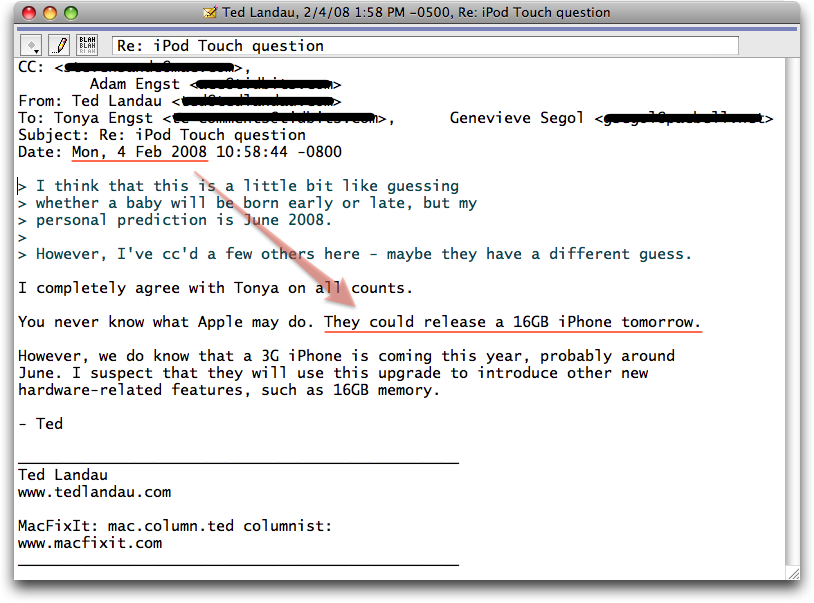
  Ironically, just a day before the announcement, a reader asked us
  when we expected to see an iPod touch with more memory, and we all
  answered that our bets were on June 2008, basing that on a likely
  release date for the second-generation iPhone, which will almost
  certainly feature 3G cellular data networking and, one hopes, a few
  other neat additions that could work their way into the iPod touch
  too. However, Ted Landau, while hedging his bets, called it on the
  nose, saying, "They could release a 16GB iPhone tomorrow." The proof
  is in the screenshot.

<http://www.tidbits.com/resources/2008-02/ipod-prediction.png>


QuickTime 7.4.1 Fixes Zero-Day Vulnerability
--------------------------------------------
  by Rich Mogull <[EMAIL PROTECTED]>
  article link: <http://db.tidbits.com/article/9450>

  Apple has released QuickTime 7.4.1, a critical security update all
  users should apply immediately. It is available via Software Update
  and as a direct download for Leopard, Tiger, Panther, and Windows
  systems.

<http://www.apple.com/support/downloads/quicktime741forleopard.html>
<http://www.apple.com/support/downloads/quicktime741fortiger.html>
<http://www.apple.com/support/downloads/quicktime741forpanther.html>
<http://www.apple.com/support/downloads/quicktime741forwindows.html>

  This update patches a month-old zero-day vulnerability in the
  QuickTime streaming protocol (RTSP) that could allow an attacker to
  take over your computer if you visit a malicious Web site or receive
  an email with a malicious link. In security parlance, we call this
  "remote execution of arbitrary code," using a vulnerability for
  which no patch exists (the "zero-day" part). This is similar to a
  previous vulnerability in RTSP that Apple patched in the QuickTime
  7.3.1 update (see "QuickTime 7.3.1 Fixes RTSP Vulnerability,"
  2007-12-14).

<http://db.tidbits.com/article/9363>

  As usual, release notes are a sparse "addresses security issues and
  improves compatibility with third-party applications." A separate
  security note provides more details, but the security information
  isn't even referenced by the release notes on the download page,
  although they do appear on the security updates page.

<http://docs.info.apple.com/article.html?artnum=307407>
<http://www.apple.com/support/downloads/>
<http://docs.info.apple.com/article.html?artnum=61798>

  Since this vulnerability has been in the wild with sample exploits
  for nearly a month, it is absolutely critical to apply the patch as
  quickly as possible.


iPhoto 7.1.2 Blocks Security Vulnerability
------------------------------------------
  by Adam C. Engst <[EMAIL PROTECTED]>
  article link: <http://db.tidbits.com/article/9447>

  Apple has released iPhoto 7.1.2 (also known as iPhoto '08 7.1.2, to
  be clear) via Software Update and as a 14.2 MB standalone download.
  The unhelpful release notes say only: "This update addresses issues
  when publishing photos to a .Mac Web Gallery, improves overall
  stability, and fixes a number of other minor issues." However,
  there's also a link to Apple's Security Updates Web page, where a
  link explains that iPhoto 7.1.2 also fixes a vulnerability related
  to subscribing to a maliciously crafted photocast.

<http://www.apple.com/support/downloads/iphoto712.html>
<http://docs.info.apple.com/article.html?artnum=307398>


iPhoto Print Products Available in Australia and New Zealand
------------------------------------------------------------
  by Adam C. Engst <[EMAIL PROTECTED]>
  article link: <http://db.tidbits.com/article/9451>

  A mere six years after introducing iPhoto, Apple has finally made
  print products available in Australia and New Zealand. Now Mac users
  in Australia and New Zealand can purchase iPhoto books, cards,
  calendars, and prints in exactly the same way that users in the
  United States, Canada, Europe, and Japan can. Pricing includes GST
  (Goods and Services Tax) in both countries, making them rather
  comparable to the U.S. and Canadian pricing. Previously, iPhoto
  users in those countries had to use a U.S. billing and shipping
  address, and get a friend to forward things on.

<http://www.apple.com/au/ilife/iphoto/printproducts.html>
<http://www.apple.com/nz/ilife/iphoto/printproducts.html>

  For those still using iPhoto 6 or earlier, sorry, but it appears
  that you must update to iPhoto '08 7.1.2, the latest version of the
  program, to be able to order print products.

  I assume, but have been unable to confirm, that Apple relies on
  Kodak for all of iPhoto's print products; at least in the United
  States, iPhoto claims that prints come from the Kodak Print Service.

  Although most other reports have focused on the snazzy hardcover
  iPhoto books, I'm personally much fonder of iPhoto's cards and
  calendars. We created our holiday cards in iPhoto this year (see
  "Tips for Better iPhoto Cards," 2008-01-08), and I'm a big fan of
  the calendars as gifts that are guaranteed to be displayed for an
  entire year (see "The Trick to Adjusting Dates in iPhoto Calendars,"
  2008-12-26). My experience is that the books are looked at a few
  times and then put on the shelf.

<http://db.tidbits.com/article/9383>
<http://db.tidbits.com/article/9374>

  Amusingly, our Australian friend Peter Lewis just asked what paper
  we had used for our holiday card, assuming we had printed it
  ourselves. I was pleased to tell him that not only had we not
  printed it ourselves, but he could now order cards from Apple as
  well.


O2 Tweaks UK Monthly iPhone Plans
---------------------------------
  by Adam C. Engst <[EMAIL PROTECTED]>
  article link: <http://db.tidbits.com/article/9445>

  In response to complaints from customers and the media, UK iPhone
  carrier O2 announced that it would be upgrading iPhone plans with
  more minutes and text messages for less money. Those on the £35 per
  month plan will now receive 600 minutes and 500 text messages, up
  from 200 minutes and 200 text messages. Those who were paying £45
  per month get 1,200 minutes per month and 500 text messages, and
  people on the £55 per month plan will simply pay £45. All UK
  customers will be switched automatically to the new plans by
  mid-March; O2 says it will notify customers by text message when the
  switch is complete. There's also a new £75 plan that offers 3,000
  minutes and 500 text messages. (For those in the United States, the
  exchange rate is currently about $2 to £1, so you can double O2's
  prices to see how they compare to AT&T's.)

<http://02.co.uk/iphone/o2tariffsforiphone/existingcustomers>

  All plans come with unlimited data, though that's subject to O2's
  excessive use policy, which they have now stated explicitly ("iPhone
  Launch Set for UK and Germany, with Murky Data Plan," 2007-09-20).
  It reads:

<http://db.tidbits.com/article/9189>

    Your O2 tariff for iPhone allows you unlimited use of O2 UK's EDGE/GPRS
networks and The Cloud's UK Wireless LAN network, for personal internet use,
email and Visual Voicemail (VVM) on your iPhone only.

    All usage must be for your private, personal and non-commercial purposes.
You may not use your SIM Card in any other device, or use your SIM Card or
iPhone to allow the continuous streaming of any audio/video content, enable
Voice over Internet (VoIP), P2P or file sharing or use them in such a way that
adversely impacts the service to other customers of O2 or The Cloud.

    If O2 reasonably suspect you are not acting in accordance with this policy
O2 reserves the right to impose further charges or disconnect your tariff at
any time, having attempted to contact you first.

  O2 is on top of the release of the new 16 GB iPhone, providing
  instructions for moving from an older iPhone to a new one and
  allowing customers to buy one and use it for the remainder of their
  existing contract, rather than requiring a new contract.

<http://02.co.uk/iphone/o2tariffsforiphone/existingcustomers/activatingyournew16gbiphone>


Scan Mac News Headlines at Alltop
---------------------------------
  by Adam C. Engst <[EMAIL PROTECTED]>
  article link: <http://db.tidbits.com/article/9452>

  Guy Kawasaki is at it again, with a new site called Alltop that,
  among other topics, provides a single-page, easily scanned
  aggregation of the main Macintosh news sites. After helping to
  create Truemors, a site that lets people post short 350-character
  comments about interesting things, Guy and his team discovered that
  a significant percentage of the Truemors traffic was coming from
  Popurls, a single-page aggregation site that brings together
  headlines from the RSS feeds of news and tech Web sites. That got
  them thinking about aggregation of other types of sites, and, with
  Guy involved, Macintosh news was of course among the topics they
  chose for their launch.

<http://mac.alltop.com/>
<http://truemors.com/>
<http://popurls.com/>

  There's nothing particularly new about the concept of headline
  aggregation, but Alltop has a spare, elegant interface that shows
  the most recent five headlines from each site, displays a pop-up
  preview when you mouse over a headline, and lets you click through
  to read full articles. So hey, if you're not already using a Mac
  news aggregation site, check out the Mac-specific Alltop page, which
  will even alert you to the latest articles from TidBITS. And if you
  sneak over to another Alltop site to scan headlines about
  celebrities, fashion, sports, or science, we won't tell.

<http://alltop.com/>


Please Welcome Eliana Wren Carlson
----------------------------------
  by Jeff Carlson <[EMAIL PROTECTED]>
  article link: <http://db.tidbits.com/article/9454>

  The TidBITS staff has grown quite a bit over the last year, with Joe
  Kissell and Rich Mogull joining the ranks, and now I'm thrilled to
  announce our latest junior staffer: Eliana Wren Carlson, born early
  in the morning on 05-Feb-08 in Seattle. Kim and I are incredibly
  happy and proud, and after a faster-than-expected labor, I'm
  convinced that my wife is an absolute superhero.

<http://www.tidbits.com/resources/2008-02/elliecarlson.jpg>
<http://www.flickr.com/photos/jeffcarlson/2250054314/>


DealBITS Discount: Save 20% on Sound Studio 3
---------------------------------------------
  by Adam C. Engst <[EMAIL PROTECTED]>
  article link: <http://db.tidbits.com/article/9439>

  Congratulations to Donald Schaefer of sisna.com and Keith Olson of
  mac.com, whose entries were chosen randomly in last week's DealBITS
  drawing and who received a copy of the $79.99 Sound Studio 3, along
  with Bruce Hobbs, who referred Keith to DealBITS (this is the second
  drawing in a row where a winner was referred by a friend). If you
  didn't win, don't fret, because you can save 20 percent on Sound
  Studio 3; it's only $63.99 through 20-Feb-08 if you use coupon code
  "SS3Bits" when ordering from Freeverse. Thanks to the 942 people who
  entered this DealBITS drawing, and we hope you'll continue to
  participate in the future!

<http://db.tidbits.com/article/9438>
<http://www.freeverse.com/soundstudio>


Tips for Better iPhoto Cards
----------------------------
  by Adam C. Engst <[EMAIL PROTECTED]>
  article link: <http://db.tidbits.com/article/9383>

  While working on our holiday card this year, I became annoyed by the
  fact that the body text in the Year In Review theme was centered,
  making it ugly and hard to read. I spent a few minutes searching and
  found an iPhoto Hot Tips page from Apple that gave me the answer.

<http://www.apple.com/support/iphoto/hottips/>

  If you format text in TextEdit (or presumably many other word
  processors), you can paste that fully formatted text into the card's
  text field in iPhoto and have the card retain all your original
  formatting. This is true even of fancier formatting options like
  line spacing and text alignment, and you can also set and use tab
  stops. So for my card, I simply copied the text out of iPhoto,
  pasted it into TextEdit, changed it to left alignment, copied it
  again, and pasted back into iPhoto.

  The same trick works for text in iPhoto books, so there's no need to
  be frustrated by text formatting options there either.

  The iPhoto Hot Tips told me something else I didn't know, which is
  that you can Option-choose a background color from the Background
  pop-up menu to set the color of the inside of a card to be different
  from the outside. I don't see myself needing this often, but it
  could come in handy.

  The rest of the tips on that page, save one, are pretty much obvious
  from looking at iPhoto's interface. The one remaining non-obvious
  tip is that Apple recommends using the Sharpness slider in the
  Adjust panel as the last thing you do, in order to end up with the
  best image quality. No explanation is given for why this is the
  case; my only caveat is that you want to use the Reduce Noise slider
  as nearly the last thing because it's so CPU-intensive that further
  edits can become sluggish.


More Mileposts Along Road to 3G iPhone
--------------------------------------
  by Glenn Fleishman <[EMAIL PROTECTED]>
  article link: <http://db.tidbits.com/article/9448>

  AT&T has announced that they will put their flavor of
  third-generation (3G) cellular data networking in 80 more cities in
  the United States in 2008, for a total of 350 "leading markets."
  They're also finishing an upgrade for better upstream speeds that
  will be complete this year, and have restated commitment to the path
  to 4G, which will offer extremely high broadband speeds, faster than
  today's cable networks.

<http://www.att.com/gen/press-room?pid=4800&cdvn=news&newsarticleid=25146>

  This clearly moves the timetable for a 3G iPhone further along,
  because two constraints kept Apple and AT&T from releasing such a
  phone. One was battery life and chip size, problems which are
  clearly either solved or on their way to being solved. The other was
  service. AT&T's little secret is that compared with competing 3G
  networks run by Verizon and Sprint Nextel, they had a smaller
  footprint and a lower speed. These upgrades should put them on par
  with those two firms. (T-Mobile has no 3G service yet; just EDGE.
  They bought additional spectrum at auction that should result in 3G
  services starting this year.)

  It would be a little embarrassing to deploy a 3G iPhone that could
  transfer data at only EDGE speeds in large parts of the United
  States, especially since sales of the current 2.5G iPhone show that
  the device will spread far and wide, beyond just major cities. The
  further AT&T rollout removes that marketing dilemma.

  Verizon and Sprint Nextel use CDMA technology for voice and data;
  CDMA is used primarily in the United States and in parts of Asia,
  although not exclusively in any country. AT&T and T-Mobile chose
  GSM, a standard used by a vastly larger population, including
  Europe.

  The 3G version of CDMA chosen by Verizon and Sprint Nextel is known
  as EVDO (Evolution Data Only), and the latest revision - Rev. A -
  can provide average speeds of 450 to 800 Kbps downstream and 300 to
  400 Kbps upstream. Peak rates are technically 3.1 Mbps downstream
  and 1.8 Mbps upstream, but that includes network overhead. It's not
  unusual to have a 2 Mbps downstream burst when downloading a large
  file, however. A future, planned Rev. B would boost raw rates by 50
  percent, and would work even faster if larger swaths of frequency
  were devoted to it than are used today.

  GSM's path is to High Speed Packet Access (HSPA), often called
  either HSDPA - D for downlink - or HSUPA - U for uplink. AT&T's
  announcement today included the news that they would have HSUPA fuly
  rolled out in 2008. This will let them claim 600 Kbps to 1.4 Mbps
  downstream and 500 to 800 Kbps upstream. The raw speed for AT&T's
  HSPA is 3.6 Mbps downstream and about 1.5 Mbps upstream. In Europe,
  a 7.2 Mbps HSDPA flavor has already started to appear, too, and
  future flavors will ramp up to 14 Mbps and higher, although more
  frequencies than currently used would be required, as well.

  Another interesting part of AT&T's announcement is that they
  restated that they are on the path to use Long Term Evolution (LTE)
  as the basis of their future 4G network. While LTE is perhaps three
  years away from deployment, it's become the standard of choice. In
  the United States, AT&T, T-Mobile, _and_ Verizon are committed to
  it. That's right - Verizon has decided to opt out of future CDMA
  improvements and switch camps. This has something to do with a
  minority ownership stake by Vodafone, a European GSM carrier, but
  it's also a notable technology choice for them.

  Sprint Nextel remains the odd duck out, having chosen WiMax for its
  4G network, but being in the interesting position of starting to
  roll out WiMax this year, giving them what they hope is a leg up on
  speed and network quality.

  I'm sure that Apple knows they are one of the engines pushing AT&T's
  growth in data use - Wired recently reported that data use in cities
  like San Francisco tripled on AT&T's network after the iPhone
  appeared - and seeing a completed and ugpraded 3G network must make
  them more confident in releasing a new phone.


Apple Punished for iTunes Success
---------------------------------
  by Adam C. Engst <[EMAIL PROTECTED]>
  article link: <http://db.tidbits.com/article/9449>

  A few weeks ago, in "Amazon MP3 Scores DRM-Free Music: What About
  Apple, 2008-01-10" I called Apple on Steve Jobs's claim that Apple
  expected to see more than half of the songs on iTunes in versions
  that were free of all digital rights management (DRM) by the end of
  2007. I was hoping that Jobs would pull a DRM-free rabbit out of his
  hat during the Macworld Expo keynote address, but that obviously
  didn't happen. Other than tracks from EMI, music in the iTunes Store
  remains wrapped in Apple's FairPlay DRM.

<http://db.tidbits.com/article/9394>

  Of course, the ability to offer DRM-free downloads from the iTunes
  Store isn't something over which Apple has any direct control;
  that's up to the major music labels that control the rights to the
  music that Apple sells. And therein lies the rub: the labels are
  unhappy that the iTunes Store has become the dominant player in the
  online music world, and they're desperately trying to help Amazon
  MP3 become a viable competitor. To that end, all four major labels
  have signed deals with Amazon for DRM-free tracks, whereas Apple
  hasn't been able to negotiate similar terms from the Universal Music
  Group, Warner Music Group, or Sony BMG.

  The problems the recording industry has with the iTunes Store don't
  stop with the fact that Apple is the dominant player and showing no
  signs of weakness. Jobs's approach with his "Thoughts on Music" open
  letter (see "Steve Jobs Blasts DRM," 2007-02-12), while perhaps
  effective at outlining Apple's position and drawing a line in the
  sand, didn't make him any friends with the major labels. Some of the
  iTunes Store policies, such as charging a flat $0.99 price for all
  tracks, regardless of popularity, and refusing to sell album-only
  albums, have also been ill-received within the industry.

<http://db.tidbits.com/article/8856>

  Is there any wrongdoing going on here? Initially, I wondered if
  there might be collusion among the labels, but my buddy Fred von
  Lohmann over at the EFF set me straight. Even if there were some
  agreement among Universal, Warner, and Sony to keep DRM-free tracks
  away from Apple, consumers aren't being harmed because they can
  purchase a better (in the sense of DRM-free), lower-priced product
  from Amazon MP3. And the fact that EMI has already licensed DRM-free
  tracks to Apple suggests there's no general agreement anyway.

  So, unfortunately for those who prefer the iTunes user experience,
  it seems that what we have here is megacorps playing hardball with
  one another. Apple negotiated good terms - from the user perspective
  - when it started the iTunes Music Store, and the labels are
  regretting aspects of those agreements now that iTunes has become
  the leading online music retailer. Arguably, the terms Apple
  negotiated back then may have been a significant factor in the
  success of the iTunes Store, but the labels see Apple's - and users'
  - desire for DRM-free music as a powerful negotiating chip.

  The question is what Apple will have to do to get DRM-free tracks:
  return a higher percentage of the profits to the labels, abandon
  flat-rate pricing, or offer a subscription service. Or perhaps Apple
  will come up with another solution along the lines of using movie
  rentals in the iTunes Store to make up for disappointing movie sales
  and a limited selection - if life hands you lemons, rent a lemonade
  stand.


My First Macworld Expo
----------------------
  by Rich Mogull <[EMAIL PROTECTED]>
  article link: <http://db.tidbits.com/article/9443>

  Never underestimate the power of the Reality Distortion Field. Its
  cold tendrils begin slithering across the land from their amorphous
  center in Cupertino weeks before Macworld. It hugs the lowlands,
  flowing past the hills of California, keeping to crevasses and
  shadows as it slips under the doors and through the cracked windows
  of the Mac faithful. Always reaching, touching, and waiting. Then,
  on the morning of the "Jobsnote" it flashes to life with a bright
  energy that captures even the coldest hearts of the media, now
  centered in San Francisco. Judgment wanes, inhibitions collapse, and
  Macworld begins.

  Perhaps I'm taking a little literary license, but as someone who
  attends sometimes dozens of technology conferences in a year I can
  definitely report that Macworld is unique. It's a strange
  combination of enterprise IT conference, serious end user
  conference, and enthusiast gathering. Some people attend to catch up
  with old friends, others to learn new skills for their personal
  platform of choice, some for serious business, and many just to
  check out the latest gizmos.

  Still others attend to report on the happenings and gather content
  for future articles, never expecting they'd walk home with a
  distinctly disapproved-of iPhone sitting in their pocket. Thus is
  the power of the RDF.

  Although I've been writing here at TidBITS for a few months and
  consider myself a Mac enthusiast, I'm a relative newcomer to the
  Apple scene and far from a zealot. I've always wanted to attend
  Macworld and see it for myself, and now that a fraction of my income
  derives from writing about Apple it finally seemed justified. A few
  months ago I asked Adam if I could reference TidBITS to apply for a
  freelance press pass, and instead he offered me a staff position.

  It seems the RDF plans ahead.

  The heart of Macworld is obviously Steve Jobs's opening keynote on
  Tuesday morning. Whatever your beliefs about Apple and Jobs, his
  keynotes far exceed the usual drivel from most CEO-driven talks. As
  a professional presenter I studied his talks before I even bought my
  first Mac, attempting to pick up some extra stage skills. The
  morning of the keynote I woke up excited, a rarity even when I'm the
  one presenting. After meeting up with Glenn and a few other Mac
  notables in the press area, we headed in. I was immediately amused
  as the conference Wi-Fi, AT&T service, and Twitter all collapsed
  under the load of keynote-inspired traffic.

  Although I didn't find the announcements all that exciting, Jobs's
  presence and skill were everything I hoped to see. He works the
  crowd as well as any stage artist. Rushing from the stage to the
  media room to write up the announcements, it's clear that the RDF is
  so powerful after the keynote that even jaded media find themselves
  being a tad less critical than under normal circumstances. Other
  CEOs should learn from Jobs; those first few articles often frame
  the rest of the coverage. Apple combines entertainment with
  marketing and product announcements not to show off, but to
  influence those first critical press pieces.

  Joining with the other staff members to simultaneously write up our
  coverage in a SubEthaEdit article was the highlight of my week. As
  an independent consultant and writer it's not often I get to
  experience such real-time teamwork anymore. We divided up coverage
  of each major product announcement, and those without a specific
  assignment edited in real time. We don't liveblog the keynote here
  at TidBITS; rather, we try to publish thoughtful, analytical
  articles within two hours of the close of the keynote.

  I spent the rest of the week in a blur wandering the Expo floor,
  trying to keep up with Adam and Tonya (no easy feat), and attending
  various breakfasts, lunches, and evening events. The Expo floor is
  an interesting beast in and of itself. One second I found myself
  grilling a major enterprise software vendor on their upcoming Mac
  support, the next I'm laying out my credit card for a deal on a pair
  of earphones. Most technology events are divided into "user" and
  "enterprise," but Macworld is one of the few meeting grounds where
  casual enthusiasts and serious enterprise users share the floor.

  The former analyst in me noticed a few interesting trends. The most
  compelling is how Macs are slowly infecting the enterprise. Apple's
  products appeal to us as consumers; and it's only natural to want to
  use the same tools at work and at home. The traditional enterprise
  response is to block non-standard systems (and phones), but it's
  clear this is a battle they can't win as more and more knowledge
  workers demand to use their own tools. We call this trend "the
  consumerization of IT," and Apple is clearly benefiting from the
  early waves of technology workers bringing Macs to work - even
  against corporate policy. The vendors that support the corporate
  environment see opportunities, and we saw some surprising faces with
  new and upcoming products to support enterprise Mac users.

  It was also interesting to see the growing interest in security
  among Mac users. When I first starting talking about security issues
  for Macs a few years ago, I was mostly met with blank faces or
  accusations that I was a Microsoft spy out to destroy Apple. These
  days the response is far more measured. People are interested in
  understanding what the issues are and if they are safe. Everyone
  seems to have a sense that as the popularity of Macs rises the
  security risk will grow, but no one seems to know exactly what that
  means. There was no shortage of security vendors on the Expo floor,
  but some offered little more than snake oil, while others understood
  they will be challenged since the current risk to the average Mac
  user is still pretty low. Needless to say, I won't have any shortage
  of security material to cover here at TidBITS.

  Overall I quite enjoyed my week at Macworld. It was my first chance
  to meet many in the Mac community face to face (including Adam,
  Tonya, and Glenn), and it gave me a sense of the Mac world and major
  trends in a way that's difficult to achieve without physical
  interaction. I also learned two valuable lessons. First, whenever
  possible leave the laptop in the hotel room, so as not to end up
  lugging it around all day, something that's seldom a concern at
  security conferences. And second, leave unnecessary credit cards at
  home in case Apple ships something you really shouldn't buy without
  first waiting for the RDF to dissipate. Not that I don't love my new
  location-aware iPhone.


Get Bit Literate, with a Buggy Whip
-----------------------------------
  by Adam C. Engst <[EMAIL PROTECTED]>
  article link: <http://db.tidbits.com/article/9422>

  Do you feel as though you're struggling to keep your head above a
  fast-rising flood of digital data - email, photos, Web sites,
  instant messages - that threatens to inundate you? You're not alone,
  and that shared pain has given birth to any number of systems, Web
  sites, and books that promise an organized life and enhanced
  productivity, along with much more. The latest entry in the
  productivity porn genre is Mark Hurst's self-published "Bit
  Literacy," which offers a few nuggets of utility. But despite
  gushing quotes from luminaries like Richard Saul Wurman, Seth Godin,
  David Bodanis, and Craig Newmark, I found the book ultimately
  unsatisfying.

<http://www.amazon.com/dp/0979368103/?tag=tidbitselectro00>

  "Bit Literacy" echoes nothing so much as an earnest educational film
  from the 1950s. Hurst is entirely confident that his suggestions for
  managing email, photos, media sources, and so on are correct for
  everyone, regardless of profession, personality, or preferences.
  Plus, underlying the entire book is an almost Luddite-like distrust
  of the functionality inherent in special-purpose software and of
  computers in general, accompanied by frequent jabs at software
  developers for making programs that Hurst feels are designed to lock
  in market share at the expense of serving the user. Instead, Hurst
  paternalistically entreats the reader to buckle down and behave in
  highly specific, almost robotic ways, with the overall goal being to
  let bits go as much as possible. "Just follow my simple rules, kids,
  and you won't suffer the ill effects of information overload!"

  With email, Hurst recommends the "inbox zero" approach, which isn't
  inherently problematic. But he encourages exporting individual
  messages to text files and filing them in normal folders using a
  specific naming scheme (initials-date-topic.extension). That's
  because he doesn't trust an email program not to lose mail and
  because he wants everything related to a project to be in one folder
  (with no or few sub-folders). So rather than rely on a program
  that's designed to make common email tasks easy - reading
  discussions, filing, searching, replying, and so on - Hurst would
  have you fall back on simple, generic tools that require
  significantly more manual interaction. He says - deep in an appendix
  - that there are no "bit-literate" email programs available, though
  he never specifies what features such a program would have.

  Similarly, no to-do programs meet Hurst's requirements, except -
  surprise! - the one he developed, a Web-based system called Gootodo
  that costs $18 per six months (nothing is said about whether Gootodo
  locks users into the site like the tools Hurst constantly
  criticizes). His criteria for a to-do manager are:

<http://www.gootodo.com/>

* Each to-do is associated with a particular day.

* Users can create new to-dos for any particular day via email.

* Each to-do has a priority ranking within its day.

* Each to-do contains a detail field as well as a summary.

  The only interesting point above is the capability to create new
  to-dos via email, scheduling them by sending or forwarding them to a
  particular address at Gootodo - that is indeed uncommon and likely
  useful. But Gootodo, accessible only on the Web (forget about
  syncing to an iPod, iPhone, or even iCal) seems overly simple and
  clearly won't scale for anyone with more than a handful of to-do
  items per day. Hurst dismisses such criticisms by saying that people
  with too many to-do items shouldn't expect a to-do manager to help
  with that problem. But that's why we're reading your book, Mark!

  A footnote in the to-do chapter shows what Hurst thinks of modern
  technologies: "Still other requested features [for Gootodo] include
  AJAX, RSS, and other faddish acronyms that are only understood by
  techies and the journalists who love them." That's inanity - AJAX
  can enable far better online interfaces that don't require constant
  page reloads, and support for RSS lets people access content in ways
  that work well for them. There may be legitimate reasons to avoid
  AJAX and RSS, but faddishness is not one of them.

  Where Hurst makes the most sense is in talking about managing
  incoming media. He recommends limiting the onslaught of published
  material by separating media sources to a "lineup" and a set of
  "tryouts." Within your lineup, he says you should have a very few
  "stars" that you read in their entirety regularly, a number of
  "scans" that you dip into mostly for interesting or useful pieces,
  and "targets" that you read only for a single targeted use. With
  tryouts, you're encouraged to be discerning, know why you're trying
  it out and for how long the tryout will last, and realize that any
  tryout may have to replace something in your lineup.

  This essentially reasonable advice is somewhat undercut by Hurst's
  use of the "media diet" terminology. Little is more faddish than
  diets, and they're nearly impossible to maintain over any
  significant period of time. I'd worry that the same will prove true
  of Hurst's advice with regard to media, depending as it does on
  constant vigilance and self-denial.

  I did find some other bits worthwhile. Along with the suggestion for
  a media diet, Hurst makes some excellent points about how to write
  email and Web pages for better comprehension and easier scanning. In
  particular he points out that it's best to state the most important
  idea in a message right off, followed by the information that
  supports the main idea. Other suggestions to avoid confusion and
  ambiguity include stating the obvious and using absolute dates in
  favor of easily misinterpreted relative dates like "today,"
  "tomorrow," and "next week."

  But the many problems obscure such bright spots. Another short
  chapter enables Hurst to explain exactly how he organizes his
  photos, though this section is particularly misguided. He would have
  you create one iPhoto Library per year and some other set (likely an
  album) for each event in each month. He acknowledges that iPhoto
  could do this in a single iPhoto Library but dismisses the
  possibility because it's possible that photo dates could be
  incorrect. That can and does happen infrequently, but incorrect
  dates can also be changed easily. There are good reasons to create
  and switch among multiple iPhoto Libraries, but having more than a
  year's worth of photos in an iPhoto Library is not one of them. All
  it will do is make searching more cumbersome, as you try to remember
  which iPhoto Library to look through.

  Other aspects of "Bit Literacy" that bothered me include:

* Hurst believes that sent mail somehow causes significant stress and
  should thus be deleted every week or so, with important pieces of
  sent mail BCC'd back to you and saved - outside your email program -
  as a text file. There's no reason sent mail can't be nicely out of
  sight and out of mind... until such time that you want to refer to
  it, something I've found valuable on many occasions.

* Instant messaging is treated in only a paragraph or two, with no
  acknowledgment that it serves an entirely different communication
  purpose than email and may contain content worth archiving.

* For backup, Hurst recommends (very briefly) manual copying of
  important files and folders every week or two. This advice borders
  on the criminally negligent, since most people have no idea of
  exactly where all their important data actually resides on a modern
  computer. Being forced to restore from Hurst's backup strategy would
  result in potentially massive data loss and huge amounts of wasted
  time.

* Hurst would have us name all files using an
  initials-date-topic.extension approach. He admits the author
  initials are pointless for personal files, but defends putting the
  date in the file name on the grounds that he doesn't trust the
  filesystem not to mess up date metadata. This obscures the real name
  of the file - the topic - at the end of the file and ensures that
  different versions don't sort together. In contrast, when we at
  TidBITS work on versioned files with multiple people, our naming
  scheme is topic-version-initials.extension to force different
  versions of a given file to sort together, in sequential order.

  In general, little acknowledgment is made of the very real issue
  that people use computers in wildly different ways today. Advice
  that makes sense for an engineering professor collaborating on
  research projects with colleagues around the world may have nothing
  of utility for an in-house graphic designer at a large manufacturing
  company or a freelance marketing consultant working with numerous
  clients in a small city.

  Also, I found myself constantly bothered by Hurst's exhortations to
  let go of bits at all times. Yes, we're all accumulating increasing
  amounts of data, whether in the form of photos, email, or iChat
  transcripts. But attempting to eliminate those bits, whether by
  deleting photos, trashing email, or refusing to use iChat, will both
  require more immediate effort and result in future frustration from
  lost information. The popularity of services like Google shows that
  what people really want are tools to manage and sort through all
  that data automatically. The price of disk space drops all the time,
  and Moore's law ensures that we have ample CPU power; what we need
  are more and better tools to extract meaningful results quickly from
  our oceans of information.

  Lastly, despite occasional references to modern tools like Google
  Docs, nearly everything in "Bit Literacy" could have been written 10
  years ago when Hurst started his professional career. That in itself
  is not a criticism, but because of this outdated mindset, it feels
  as though Hurst has never revisited any of his thinking to determine
  whether new tools could in fact make any of these tasks easier.
  Whether it's with file names or photo organization, the scripted
  behaviors he recommends are exactly the kinds of repetitive tasks
  that computers were supposed to handle for us. Computers are the
  reason we're so inundated with digital data; to focus on approaches
  that require us to act more like machines seems to be heading in the
  wrong direction.


Hot Topics in TidBITS Talk/11-Feb-08
------------------------------------
  by Joe Kissell <[EMAIL PROTECTED]>
  article link: <http://db.tidbits.com/article/9453>

**For Want of a File, an Operating System Was Lost** -- A reader
  comments on Glenn's article about a problematic Setup Assistant
  file. (1 message)

<http://emperor.tidbits.com/TidBITS/Talk/1821>


**Linksys Router Problem** -- A new Linksys router seems to work but
  requires a manual reset every few hours. Is there a solution? (1
  message)

<http://emperor.tidbits.com/TidBITS/Talk/1822>


**Lin/Win text editors** -- BBEdit may be the gold standard for GUI
  text editors on the Mac, but what's the nearest alternative if
  you're forced to run Windows or Linux? (14 messages)

<http://emperor.tidbits.com/TidBITS/Talk/1823>


**3 Net cables broken by coincidence** -- Undersea network cables
  break, disrupting Internet access in several Middle East countries.
  Coincidence or conspiracy? (11 messages)

<http://emperor.tidbits.com/TidBITS/Talk/1824>


**PC equivalent to iWeb** -- Is there an easy-to-use HTML editor for
  Windows comparable to iWeb on the Mac? (6 messages)

<http://emperor.tidbits.com/TidBITS/Talk/1825>


**Fonts increasing in size with each reply Entourage 2008** -- If
  you're encountering this annoying bug in Entourage, there's a way to
  report it directly to the developer. (1 message)

<http://emperor.tidbits.com/TidBITS/Talk/1826>


**WD My Book Pro Question** -- Readers weigh in on the reliability and
  compatibility of Western Digital MyBook hard drives. (6 messages)

<http://emperor.tidbits.com/TidBITS/Talk/1827>


**Quick Fix for a Mac Typing in the Wrong Language** -- Readers
  discuss the odd problem of Apple assigning the same keyboard
  shortcut to two entirely different functions. (3 messages)

<http://emperor.tidbits.com/TidBITS/Talk/1828>


**Shutting down on UPS power** -- What exactly happens with modal
  alerts on your Mac when a UPS decides it needs to shut the computer
  down? (2 messages)

<http://emperor.tidbits.com/TidBITS/Talk/1829>


**2 Days with the Air** -- A reader reports impressions of a new
  MacBook Air and asks for advice on squeezing everything onto its
  small SSD drive. (5 messages)

<http://emperor.tidbits.com/TidBITS/Talk/1830>


**Citrix on the Mac in a PC network** -- How easy is it to transfer
  files between Windows PCs and Macs using the Mac version of Citrix?
  (3 messages)

<http://emperor.tidbits.com/TidBITS/Talk/1831>


**Remote file access and transfer for Xserve? Help!** -- Remote GUI
  access to an Xserve is not always as simple as it appears. What are
  the best options for a MacBook Air user on the go? (4 messages)

<http://emperor.tidbits.com/TidBITS/Talk/1832>


**AirPort Extreme administration** -- How do you change the indicator
  light setting on an AirPort Extreme after the initial run of the
  setup assistant? (2 messages)

<http://emperor.tidbits.com/TidBITS/Talk/1833>


**AirPort Express to Sound Amplifier** -- A reader asks for help
  solving a problem with a malfunctioning AirPort Express. (1 message)

<http://emperor.tidbits.com/TidBITS/Talk/1834>


$$

This is TidBITS, a free weekly technology newsletter providing timely
news, insightful analysis, and in-depth reviews to the Macintosh and
Internet communities. Feel free to forward to friends; better still,
please ask them to subscribe!

Non-profit, non-commercial publications and Web sites may reprint or
link to articles if full credit is given. Others please contact us. We
do not guarantee accuracy of articles. Caveat lector. Publication,
product, and company names may be registered trademarks of their
companies. TidBITS ISSN 1090-7017.

Copyright 2008 TidBITS: Reuse governed by Creative Commons license.

Contact us at:    <[EMAIL PROTECTED]>
TidBITS Web site: <http://www.tidbits.com/>
License terms:    <http://www.tidbits.com/terms/>
Full text search: <http://www.tidbits.com/search/>
Subscriptions:    <http://www.tidbits.com/about/list.html>
Account help:     <http://www.tidbits.com/about/account-help.html>


--
If you want to unsubscribe or change your address, use this link
http://emperor.tidbits.com/webx?unsub@@.3c557dc4!u=306a67f9