TidBITS#935/30-Jun-08
=====================
  Issue link: <http://db.tidbits.com/issue/935>
  Are you concerned about the safety and security of your data? We
  are, and this week's issue proves it. First, defense: Rich Mogull
  tells you how to protect yourself from new Mac OS X Trojan horses
  that have recently appeared. Next, offense: Joe Kissell, having just
  released major updates to his best-selling "Take Control of Mac OS X
  Backups" and "Take Control of Easy Backups in Leopard" ebooks, looks
  at the surprisingly robust state of backup software - 90-plus
  programs! - and discovers first-hand how that preparation is useful
  after his MacBook Pro dies. In other news, we cover the appearance
  of Mac OS X 10.5.4, critical updates for Microsoft Office 2008 and
  Office 2004, and the release of Mac configuration software for
  Linksys gateways. In the TidBITS Watchlist, we note the releases of
  Apple's Pro Applications Update 2008-02 and Final Cut Server Update
  1.1, Mars Edit 2.1.4, Keyboard Maestro 3.2, Dejal Simon 2.4.1, and
  Adobe Acrobat 9 Pro. Lastly, Adam and Tonya decide to try this
  "vacation" thing their friends have been raving about, so our next
  issue will be 14-Jul-08, though we'll keep publishing on our Web
  site.

Articles
    TidBITS Issue Hiatus for 07-Jul-08
    Mac OS X 10.5.4 and Security Update 2008-004 Fix Bugs
    Critical Updates for Microsoft Office 2008 and 2004
    Linksys Gateways Gain Mac Configuration Software
    Take Control News: Better Backups with New Ebooks and Free Content
    The Hole in My Backup Plan
    How to Protect Yourself from the New Mac OS X Trojans
    The Evolving World of Mac Backup Software
    TidBITS Watchlist: Notable Software Updates for 30-Jun-08
    Bonus Stories for 30-Jun-08
    Hot Topics in TidBITS Talk/30-Jun-08


------------ This issue of TidBITS sponsored in part by: --------------

* READERS LIKE YOU! Support TidBITS with a contribution today!
  <http://www.tidbits.com/about/support/contributors.html>
  Special thanks this week to Howard Turetzky, Jim Carr,
  Mark Franklin, and Jerry Keller for their generous support!

* Fetch Softworks: Fetch 5.3 makes FTP and SFTP easy!
  Upload, download, mirror, and manage your Web site. Dozens of
  new features to make file transfers easier and more reliable.
  Get your free trial version at <http://fetchsoftworks.com/>!

* WebCrossing Neighbors Creates Private Social Networks
  Create a complete social network with your company or group's
  own look. Scalable, extensible and extremely customizable.
  Take a guided tour today <http://www.webcrossing.com/tour>

* MARK/SPACE, INC: Take it with you! The Missing Sync makes
  it easy to synchronize contacts, calendars, notes, photos
  and more from your Mac to your BlackBerry, Palm OS, or
  Windows Mobile phone. <http://www.markspace.com/bits>

* VMware Fusion. The most seamless way to run Windows on your Mac.
  Backed by nearly a decade of proven virtualization technology.
  Try VMware Fusion today for free, or order online for only $79.
  Visit: <http://www.tidbits.com/about/support/vmware-fusion.html>

* Make friends and influence people by sponsoring TidBITS!
  Put your company and products in front of tens of thousands of
  savvy, committed Macintosh users who actually buy stuff.
  More information: <http://db.tidbits.com/advertising.html>

---------- Help support TidBITS by supporting our sponsors ------------


TidBITS Issue Hiatus for 07-Jul-08
----------------------------------
  by Adam C. Engst <[EMAIL PROTECTED]>
  article link: <http://db.tidbits.com/article/9677>

  Although the other hard-working members of the TidBITS staff will
  continue to be writing and editing articles over the next few weeks,
  Tonya and I will be taking some time for - gasp! - a summer
  vacation. We've heard that these "vacations" are all the rage, and
  we've been curious to see what they're like, so we'll be wrapping up
  this week and then spending the next few weeks peregrinating around
  in the UK. We'll mostly be visiting castles in Wales, since Tristan
  is a major Welsh castle buff and has planned much of our itinerary
  around his favorites, with a few days in Portsmouth to see Admiral
  Nelson's ship HMS Victory. (Several years ago, when he was engrossed
  in naval history, Tristan dressed as Admiral Nelson for Halloween, a
  costume that required constant explanation, given how few Americans
  know of Nelson's victory at the Battle of Trafalgar.)

<http://www.castlewales.com/>
<http://en.wikipedia.org/wiki/HMS_Victory>
<http://en.wikipedia.org/wiki/Horatio_Nelson%2C_1st_Viscount_Nelson>
<http://en.wikipedia.org/wiki/Battle_of_trafalgar>

  The practical upshot of this family vacation is that there will be
  no email issue of TidBITS on 07-Jul-08, since I'll be on a plane,
  and Glenn and Joe and Jeff can use a break from the extra effort of
  putting out the issue after all the ebooks they've written and
  edited over the last few weeks. They'll still be posting articles on
  our Web site, though, and assuming all goes well, the next email
  issue should appear on 14-Jul-08. Tonya and I should have sporadic
  email access while we're away, but don't expect much in the way of
  quick replies until the week of July 21st, when I'll start digging
  out.


Mac OS X 10.5.4 and Security Update 2008-004 Fix Bugs
-----------------------------------------------------
  by Jeff Carlson <[EMAIL PROTECTED]>
  article link: <http://db.tidbits.com/article/9679>

  Apple released Mac OS X 10.5.4 today, a bug-fix update that touches
  on several areas. Recent security updates are included (though the
  recent ARDAgent vulnerability has not yet been addressed; see "How
  to Protect Yourself from the New Mac OS X Trojans," 2008-06-25). If
  you want to take advantage of the security updates without
  installing the operating system update, you can download Security
  Update 2008-004 for Intel (128 MB) and PowerPC (80 MB); security
  updates for Mac OS X 10.5 Server are also available for Intel (165
  MB) and PowerPC (127 MB).

<http://support.apple.com/kb/HT1994>
<http://db.tidbits.com/article/9665>
<http://www.apple.com/support/downloads/securityupdate2008004intel.html>
<http://www.apple.com/support/downloads/securityupdate2008004ppc.html>
<http://www.apple.com/support/downloads/securityupdate2008004serverintel.html>
<http://www.apple.com/support/downloads/securityupdate2008004serverppc.html>

  Designers will be relieved to discover that a problem with saving
  and reopening Adobe Creative Suite 3 files located on remote servers
  has been resolved. A pair of AirPort fixes deal with reliability of
  5 GHz networks and poor performance when using Logic Studio or
  MainStage.

  According to Apple's release notes, iCal sees the most improvements,
  such as resolving problems when deleting events, copying and pasting
  attendees between events, and reliability of shared meetings. Fixes
  in Safari center on improving performance and solving problems
  loading secure Web pages. Apple is still grappling with the way
  Spaces operates, fixing a problem where the Finder would become the
  active application when switching to a space instead of the program
  residing in that space, as well as an issue dealing with assigning
  applications to spaces in the Spaces preference pane.

  This update also includes a number of new security fixes, including
  major updates to patch recent vulnerabilities discovered in the Ruby
  programming language. Two fixes close holes that could allow an
  attacker to take over your computer if you were to visit a malicious
  Web site using Safari. One of those vulnerabilities is exploitable
  only if you have the Safari preference to "Open 'safe' files after
  downloading" set - this is a valuable reminder to disable that
  preference in Safari's General preference pane.

  The Mac OS X 10.5.4 update also adds raw format support for more
  cameras, fixes a problem where X11 may not be completely installed,
  and improves L2TP VPN client reliability.

  The update is available via Software Update or as standalone
  downloads: Mac OS X 10.5.4 Update (88 MB); Mac OS X 10.5.4 Combo
  Update (561 MB); Mac OS X Server 10.5.4 Update (133 MB); Mac OS X
  Server Combo 10.5.4 Update (677 MB).

<http://www.apple.com/support/downloads/macosx1054update.html>
<http://www.apple.com/support/downloads/macosx1054comboupdate.html>
<http://www.apple.com/support/downloads/macosxserver1054.html>
<http://www.apple.com/support/downloads/macosxservercombo1054.html>


Critical Updates for Microsoft Office 2008 and 2004
---------------------------------------------------
  by Adam C. Engst <[EMAIL PROTECTED]>
  article link: <http://db.tidbits.com/article/9667>

  We've been waiting for these! The just-released Microsoft Office
  2008 for Mac 12.1.1 Update fixes a variety of troublesome bugs, some
  introduced in the previous update. And, the Microsoft Office 2004
  for Mac 11.5.0 Update fixes some crashing bugs, improves
  compatibility with Mac OS X 10.5 Leopard, and includes all the
  updates previously released for Office 2004, so new installations of
  Office 2004 don't have to be updated 19 times to be brought up to
  date.

<http://support.microsoft.com/kb/953822>
<http://support.microsoft.com/kb/953824>


**Office 2008 Changes** -- Most notably (from my perspective, anyway),
  Word and Excel documents downloaded from the Web or attached to
  email messages will now open when double-clicked. Yay! This has been
  driving me bonkers whenever I tried to open a Word file attached to
  an email message in Eudora.

  Also fixed in Word 2008 is a bug that would cause spaces to be lost
  when opening a document created in or saved by Word 2008 or Word
  2007 in Windows - I didn't run into that one, thankfully. Other
  fixes preserve items in Notebook Layout documents when the document
  is converted from .docx to .doc, preserve font size settings for
  text in tables, and address a problem in saving .doc documents that
  contain an Area or Filled Radar chart.

  Excel 2008 also features numerous improvements, including accepting
  international decimal separators for error bars, no longer
  duplicating embedded movies when workbooks are saved in .xls format,
  and improving PivotTable reports. Excel's reliability has been
  enhanced in a variety of situations, such as when chart data is
  updated, when you reference or link to a sheet name that resembles a
  cell reference, and at times when you calculate or edit a formula.

  PowerPoint 2008 and Entourage 2008 see fewer changes. This update
  fixes a problem that would cause PowerPoint to take a long time to
  open presentations that use certain fonts, and also fixes a nasty
  bug that would cause Entourage to crash when you wake the Mac from
  sleep.

  The Microsoft Office 2008 for Mac 12.1.1 Update requires Mac OS X
  10.4.9 or later, and that you have already installed the Microsoft
  Office 2008 for Mac Service Pack 1 (see "Microsoft Fixes Office 2008
  Bugs, Announces VBA Return," 2008-05-19). It's a 153.3 MB download,
  and is available from Microsoft's Web site or via the Microsoft
  AutoUpdate utility launched by choosing Check for Updates from any
  Office 2008 application. Once again, kudos to Microsoft for
  excellent release notes.

<http://db.tidbits.com/article/9622>
<http://www.microsoft.com/downloads/details.aspx?FamilyId=C75DB26D-D3BC-49A4-8951-DE27AE58B5A1>


**Office 2004 Changes** -- For Office 2004, which Microsoft appears to
  be maintaining more actively than is usual for a previous release,
  the 11.5.0 update improves compatibility with documents in the Open
  XML format used by Office 2008 and Office 2007 in Windows, and it
  also fixes a problem whereby the installer would find copies of
  Office backed up by Time Machine.

  In Word 2004, Microsoft fixed a number of crashing bugs, including
  several that could occur during typical operation, one that could
  happen when you pasted content from an Office 2008 document into
  Word 2004, and one that kicked in when getting the properties of a
  hyperlink via AppleScript. Other fixes include improved text display
  when you change the size of table columns and cosmetic improvements
  to the Page Setup dialog in Leopard.

  Similarly, Excel 2004 receives fixes for errors when pasting data
  from Excel 2008; for crashing bugs related to opening workbooks
  containing a shape, a SmartArt graphic, or a text box created in
  Excel 2008 or Excel 2007; for saving paper sizes for documents saved
  in both Excel 2004 and Excel 2008; and for the inability to open
  Excel 2007 documents via the Open dialog.

  Finally, the update fixes a problem in PowerPoint 2004 that could
  cause crashes when opening presentations with a large number of
  slides, or when pasting content from an open Office 2008 application
  running on an Intel-based Mac into a PowerPoint 2004 presentation.

  The Microsoft Office 2004 for Mac 11.5.0 Update requires Mac OS X
  10.2.8 or later, and as I noted previously, includes all previous
  Office 2004 updates. It's a 58.9 MB update, and is available either
  via the Office 2004 version of Microsoft AutoUpdate or as a
  standalone download.

<http://www.microsoft.com/downloads/details.aspx?FamilyId=B6D69814-0995-490D-909A-5EC6AE6F64F0>


Linksys Gateways Gain Mac Configuration Software
------------------------------------------------
  by Glenn Fleishman <[EMAIL PROTECTED]>
  article link: <http://db.tidbits.com/article/9671>

  Long-time Wi-Fi and broadband gateway maker Linksys, a division of
  Cisco, has finally started to embrace Mac users fully. The company
  announced that it has released its Linksys EasyLink Advisor (LELA)
  for Mac OS X 10.4 and 10.5. I've used this software under Windows,
  and it's a huge improvement over the alternative for Mac users:
  setting up a Linksys router through its Web-based configuration
  system.

<http://www.linksys.com/mac/>

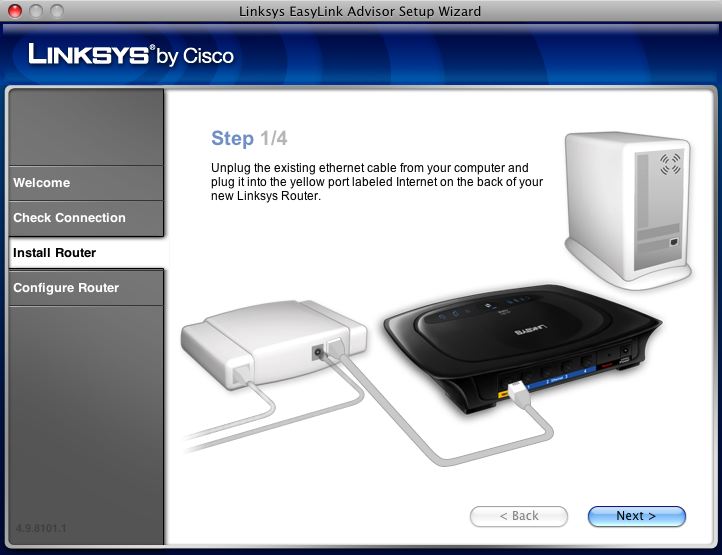
  With LELA, you install the software, launch it, and it walks you
  through the steps necessary to set up an administrative password to
  control access to the router's configuration, a Wi-Fi password to
  control access to the network, and any ISP-related details needed
  for Internet connectivity.

<http://tidbits.com/resources/2008-06/lela_advisor.jpg>

  Initially, LELA works only with a handful of Linksys's most popular
  current and new Wi-Fi gateways, such as the 802.11g-based WRT54G2
  and the dual-band WRT600N. The WRT600N can serve traffic
  simultaneously over 2.4 and 5 GHz Wi-Fi connections using any
  combination of 802.11a, b, g, and n, with gigabit Ethernet for
  backhaul. The full list of currently supported devices is:

* WRT54G2 Wireless-G Broadband Router
* WRT110 RangePlus Wireless Router
* WRT160N Ultra RangePlus Wireless-N Broadband Router
* WRT310N Wireless-N Gigabit Router
* WRT600N Dual-Band Wireless-N Gigabit Router with Storage Link

  If you own one of these routers, visit the LELA page, find your
  product, follow the link for "Setup Wizard (Mac OS 10.4 or higher)"
  under the More Information area of the product page, and download
  LELA. You may also need to download the software if you buy a router
  in the near future and don't find the Mac software on the included
  CD-ROM.

<http://www.linksys.com/mac/>


Take Control News: Better Backups with New Ebooks and Free Content
------------------------------------------------------------------
  by Adam C. Engst <[EMAIL PROTECTED]>
  article link: <http://db.tidbits.com/article/9670>

  When Joe Kissell set out to revise "Take Control of Mac OS X
  Backups" to create a third edition that would cover both Mac OS X
  10.4 Tiger and 10.5 Leopard, he realized that he faced the Herculean
  task of listing all known Mac backup programs, along with notes
  about their features. The category of Mac backup applications has
  exploded of late: what had been a long appendix became impossible to
  keep updated long enough to produce an ebook and call it
  "up-to-date." We have solved that problem by posting the information
  for free on our Web site, creating what has to be the largest
  compilation of Mac backup applications - currently 90 different
  programs. Because the information is in HTML on the Web, rather than
  in PDF, Joe should stand a chance at keeping it reasonably updated.
  We also posted about 20 book pages of instructions for working with
  the current version of Retrospect, still one of the most
  feature-rich backup programs available (but slated for replacement
  by a rewritten version later this year).

<http://www.takecontrolbooks.com/resources/0014/index.html?14@@!pt=TB935>

  If you want a comprehensive look at all that's changed in the backup
  world recently, turn to the third edition of our best-selling "Take
  Control of Mac OS X Backups," in which Joe helps readers go beyond
  the false security of turning on Time Machine or copying a few files
  to CD. You'll find an at-a-glance comparison of different backup
  strategies (low-cost, easy, safest), along with extra advice for
  backing up digital photos and massive video projects. You'll learn
  the pros and cons of each type of backup media, including hard disk,
  Time Capsule, Internet backup service, optical disc, and more;
  discover how to pick the best backup software for your needs; and
  find time-tested recommendations for setting up, testing, and
  maintaining backups, complete with essential instructions for
  restoring after a crash. Covers Tiger and Leopard. 186 pages. $15.

<http://www.takecontrolbooks.com/backup-macosx.html?14@@!pt=TB935>

  For those overwhelmed by all the backup possibilities, version 1.1
  of Joe's "Take Control of Easy Backups in Leopard" teaches you the
  fastest and easiest way to create a complete Leopard backup system -
  including archives, an all-important bootable duplicate, and an
  offsite backup - from which you can restore your data after an
  accident or disaster. Joe helps you identify the backup hardware
  that best matches your needs and budget (including a look at Time
  Capsule - Apple's new backup appliance), and he provides
  instructions for using Time Machine as well as alternatives for
  eight cases where Time Machine won't provide the backups you need.
  Joe walks you through every step of the way, from setting up your
  backup drive or Time Capsule to explaining how to recover your
  precious data in case of a deleted or corrupted file, a dead drive,
  or a stolen laptop. 96 pages. $10.

<http://www.takecontrolbooks.com/leopard-easy-backup.html?14@@!pt=TB935>

  If you've already purchased one of these titles, check your email or
  open your existing PDF and click Check for Updates on the cover for
  information about upgrade discounts or free downloads.


The Hole in My Backup Plan
--------------------------
  by Joe Kissell <[EMAIL PROTECTED]>
  article link: <http://db.tidbits.com/article/9676>

  A couple of weeks ago, my 17-inch MacBook Pro, which has been my
  primary computer for the last year, stopped working. I know a thing
  or two about troubleshooting, and I tried all the tricks I could
  think of, but the problem appeared not to involve the hard disk,
  RAM, NVRAM, PMU, or any other component my ministrations could
  affect. My Mac was showing the signs of having a logic board defect,
  and since I couldn't even boot from a CD without a kernel panic, it
  was necessary to put my Mac in the hands of professionals for
  repair.

<http://www.takecontrolbooks.com/troubleshooting-mac.html?14@@!pt=TB935>

  The timing couldn't have been worse, as I was simultaneously pushing
  to meet several major writing deadlines, trying to spend time with
  family visiting from out of town, and preparing to move to a new
  apartment! And this little crisis has highlighted a deficiency - or
  maybe a few deficiencies - in what I thought was an excellent backup
  plan. Being without my main computer this long (I hope to get it
  back this week) has been excruciating, and as a public service I'd
  like to explain why that is.

  First, I want to be very clear about the fact that I follow my own
  advice. Of course I have multiple backups of my data, including a
  bootable duplicate. I also have AppleCare for this laptop, so even
  though it was a couple of weeks past the end of its standard 1-year
  warranty, I knew that any potentially expensive repairs would be
  covered. (And yes, that coverage extends here to France even though
  I bought the computer in the United States.) I also have two other
  Macs here (and my wife has a third), so there are other Macs I can
  use in the interim.

  However, apart from all the hours I've had to spend troubleshooting
  and dealing with the repair, the biggest problem has been that none
  of these other Macs comes close giving me the capabilities of my
  MacBook Pro, which has a 2.4 GHz Intel Core 2 Duo processor, 4 GB of
  RAM, a 250 GB hard disk, and a 1920-by-1200-pixel display. The other
  Macs I have at my disposal are two PowerBook G4s (including the 1
  GHz TiBook on which I'm now typing this) and the Intel-based Mac
  mini that's our media server (and whose only display is a
  standard-definition TV). All of these have significant problems as
  backup machines, but I'd never realized this was the case because
  I'd never had to rely on them completely.

  Here's what I found:

* Given my line of work, I regularly rely on software that runs only
  on Intel-based Macs (such as virtualization programs). That fact
  alone means I can't get some of my crucial work done on either of
  the PowerBooks. And even some universal binary applications, like
  Microsoft Office 2008, are at times painfully slow on a G4.

* Although my Mac mini has an Intel processor, it's slow and has half
  the RAM of my MacBook Pro - it's better than nothing, but still not
  enough. (It's also normally busy doing other important tasks, such
  as functioning as a backup server, so it's problematic to switch to
  it for any length of time.)

* Because there's no stand-alone, high-resolution monitor in the
  house, I'm also constrained to working with a much smaller screen
  than I'm accustomed to, and that seriously reduces my productivity.

* Much of my work involves testing software - which means I need to be
  able to have a reliable Mac to use for writing and other essential
  tasks, while testing risky or time-consuming programs and procedures
  on a less-critical computer. Having my most reliable and useful
  computer disappear from the mix is debilitating.

* Apart from the issue of sheer processor speed, the limited RAM in my
  other computers makes it impractical to run as many applications at
  once as I normally do, further reducing my efficiency.

* I hadn't installed all my important software separately on the
  PowerBook or Mac mini or synchronized my most essential files (as
  there had never been a need to do so), meaning that I had to jump
  through some extra hoops just to get back to work. To be sure, I
  could boot one of our other Macs from the duplicate of my MacBook
  Pro's drive. But for a variety of reasons, that makes my work
  awkward, especially since the capabilities and configuration of the
  MacBook Pro are so much different from those of the other Macs.

  So what's the lesson to be learned from all this? Honestly, I'm not
  yet entirely sure. It would be easy enough to say I should have had
  a backup computer with as much (or nearly as much) oomph as my main
  computer, but I can't afford that, and for the 99 percent of my time
  that my main Mac is working, it would be overkill. I'd like to make
  the argument that we now clearly _need_ a high-definition TV - you
  know, just so we have a decent monitor to use in emergencies! - but
  that could cost more than a new Mac. I'm leaning toward the opinion
  that, at the very least, I should buy new Macs a _bit_ more
  frequently (again, finances permitting) so that my previous computer
  is still recent enough to do real, demanding work.

  Needless to say, your mileage may vary. You may suffer much less
  inconvenience, or much more, to be without your main Mac - or your
  only Mac - for a couple of weeks. I can't make a good
  general-purpose suggestion about having a backup Mac available, but
  this experience has made me aware of an entirely new set of issues
  to think about when considering what's needed to stay up and running
  when trouble strikes.


How to Protect Yourself from the New Mac OS X Trojans
-----------------------------------------------------
  by Rich Mogull <[EMAIL PROTECTED]>
  article link: <http://db.tidbits.com/article/9665>

  [Editor's note: this article initially recommended changing the
  permissions of ARDAgent to block the vulnerability, an approach that
  has been proposed by other sites as well. Our testing revealed that
  this approach may be insufficient, so we only recommend removing the
  ARDAgent as detailed below.]

  One of the downsides of increased attention to computer security is
  that whenever a new vulnerability or attack technique appears, we,
  the humble users, face an onslaught of hyperbole from the press,
  security vendors, and bad guys themselves. This is especially true
  with Apple products, where we face the triple threat of security
  vendors trying to sell products to a disinterested community that
  usually doesn't need them, a press always eager to knock Apple down
  a notch, and bad guys looking to build their reputations at Apple's
  expense. In such a maelstrom of information it is often difficult
  for average users to separate the truth from the hype, evaluate
  their personal risk, and take defensive actions.

  We watched this cycle kick into full gear during the past couple of
  weeks, starting with the announcement of a new Mac OS X
  vulnerability on 18-Jun-08 over at Slashdot. Soon after the
  unpatched vulnerability was disclosed the major Mac antivirus
  vendors updated their products and issued press releases to draw
  attention to the problem. It's an unfortunate truth that fear and
  bad news are effective sales tools for security products. By the
  next day, the first reports of this vulnerability being used in
  exploits appeared, followed by various news stories, additional
  alerts from security vendors, and new exploits from the bad guys.
  But what's the real risk to users?

<http://it.slashdot.org/article.pl?sid=08/06/18/1919224>

  The good news is, based on the nature of the vulnerability, the risk
  is low - but the bad news is that this kind of attack could become
  more serious. As usual, Apple will need to patch this one quickly.

  This particular vulnerability is what we call "local privilege
  escalation." It enables a user of a system to escalate their rights
  to "root," which allows full control over the system. Thus, even if
  you are running as a regular user or in a guest account, exploiting
  this vulnerability allows you to escalate your rights to run without
  restriction. In this case, the Apple Remote Desktop agent (ARDAgent)
  uses a technique called SUID to run things as root. It's a common
  programming technique on Unix systems, but one that often creates
  security problems. In this case, ARDAgent supports AppleScript,
  including the command to run other programs, which then run as root.
  Simply running the AppleScript command

    osascript -e 'tell app "ARDAgent" to do shell script "reallybadstuff"'

  runs "reallybadstuff" as root, without asking you for your password.

  When this first appeared, I wasn't really worried. The attacker
  still needs to get you to run something on your system in the first
  place, and there are some simple things you can do to protect
  yourself (see Matasano Security's excellent blog post for more
  technical information and how to disable the attack). Privilege
  escalation attacks are typically used in two situations. The first
  is if someone has physical or remote access to your computer. He
  uses the attack to become root and install whatever software he
  wants, or otherwise messes around on your system.

<http://www.matasano.com/log/1069/apple-ships-suids-with-applescript-dictionaries-hilarity-ensues/>

  The other scenario is more serious - the attacker exploits a
  vulnerability that gives them access to your user account, then he
  uses privilege escalation to take over your system as root, often
  installing additional malicious software. These combined attacks are
  common, although we don't see them often on Macs (in fact, I've
  never seen one on Mac OS X). The attacker will use something like a
  Web browser vulnerability to get his foot in the door, followed by
  the privilege escalation to, well, drive an invisible school bus
  into your house. We call that school bus a "Trojan horse" since,
  like the Trojan Horse, it conceals nasty stuff within a somewhat
  innocuous package.

<http://en.wikipedia.org/wiki/Trojan_horse_(computing)>

  In other words, Trojans aren't like viruses and worms. They don't
  break into your system, but they conceal a nasty payload that does
  something malicious once you execute them.

  The first major Trojan to leverage the ARDAgent vulnerability is
  called "PokerStealer" (identified by antivirus vendor Intego).
  Rather than using some sort of attack to get on your system, it
  pretends to be a poker game. When it's run, it uses the ARDAgent
  vulnerability to escalate its rights (without asking for your
  password) and installs malicious software like a keystroke capture
  program.

<http://www.intego.com/news/ism0803.asp>
<http://www.intego.com/>

  A more serious problem is that, as reported by Brian Krebs at the
  Washington Post, some bad guys developed a tool to bundle a package
  of malicious software into any downloadable Mac application. It uses
  the ARDAgent vulnerability to run these pieces without your
  interaction, like PokerStealer. The program needs to run only once,
  then it embeds itself in your system. Interestingly enough, Krebs
  reports that this tool was in development since May 2008. We can
  expect the bad guys to use all sorts of social engineering tricks
  (like writing little games) to get us to run their software on our
  systems.

<http://blog.washingtonpost.com/securityfix/2008/06/new_trojan_leverages_unpatched.html>

  To protect yourself, if you don't use (or plan on using) Apple
  Remote Desktop (which is different from Screen Sharing), you can go
  to /System/Library/CoreServices/RemoteManagement/ in the Finder,
  copy ARDAgent.app to your Desktop, right-click and compress it, and
  move the file someplace like your Documents folder. Then delete the
  original file. That way you just need to unzip and reinstall the
  file if you ever need ARDAgent down the road.

  I almost avoided writing this story since I hate to add to the hype
  of low-risk threats like this. While I don't doubt for a second that
  we'll see serious Mac (and iPhone) security threats in the future,
  this one is low on the list of things to worry about, especially if
  you don't make a practice of downloading random software from
  unknown developers. But unlike many other Mac vulnerabilities, this
  one has already been weaponized and is starting to appear in the
  wild. It's clear the bad guys are slowly paying more attention to
  Mac OS X, although we've avoided any serious mass attacks so far.
  With all the hype, it's worth taking the time to raise our security
  awareness and understand the risks and how to protect ourselves
  without having to buy and maintain products that would likely
  provide only a false sense of security.


The Evolving World of Mac Backup Software
-----------------------------------------
  by Joe Kissell <[EMAIL PROTECTED]>
  article link: <http://db.tidbits.com/article/9639>

  Because I write so much about backups, I try to keep on top of all
  the programs one can use to back up a Mac, and their ever-changing
  feature sets. While working on the recently released version 3.0 of
  "Take Control of Mac OS X Backups," I realized that the appendix in
  which I provided feature-comparison checklists was badly out of
  date, and that trying to update it as I'd done in the past was a
  lost cause - it would just be obsolete again a day later. So
  instead, I've put that information on a Web page, where I can update
  it much more quickly and easily than revising an ebook.

<http://www.takecontrolbooks.com/backup-macosx.html?14@@!pt=TB935>
<http://www.takecontrolbooks.com/resources/0014/index.html?14@@!pt=TB935>

  At the moment, this online appendix provides feature comparisons of
  90 Mac OS X backup programs (not counting seven enterprise-oriented
  programs that I mention but don't describe in detail) - and I
  wouldn't be at all surprised if my list is still incomplete. Think
  about that for a moment. Nearly 100 different Mac programs that
  claim to have some type of backup capability. Incredible. To be
  sure, not all of them meet _my_ criteria for a backup program, which
  is to say that some of them are incapable of producing either an
  additive incremental archive or a bootable duplicate - that makes
  them, essentially, "merely" synchronization programs (useful, just
  not the same thing as a backup). But still, when I saw that number I
  was truly astounded.

  I'm all in favor of choice, but seriously... Mac users do not need
  _this_ many backup options! Who has time to sort through them all,
  test them, figure out which program uses which terminology to mean
  what, and come up with a meaningful evaluation of what's actually
  useful? (Yes, I know, that's what _I_ get paid to do, but I was
  speaking rhetorically.) What we need is a small number of excellent
  options. And yet, although my list of 90-plus programs includes some
  that are very good, there isn't a single one to which I'd give a
  perfect 10-out-of-10 rating, or even 9 out of 10. In my professional
  judgment, every backup program I've tried has room to improve - in
  some cases, _significant_ room.

  It is by no means my intention to diss all the world's Mac backup
  software. In fact, I can confidently say that, all things
  considered, the range of options available today is vastly better
  than what was available a year or two ago. All I'm saying is,
  despite the quantitative and qualitative increases we've seen
  recently, we haven't reached Backup Nirvana yet, and I'd rather see
  more work on the quality side than a greater number of so-so
  choices.


**Backups Redux** -- Still, what strikes me more than anything else
  about my revised list of Mac backup programs is how much activity
  (new programs and updates released) has occurred _since the release
  of Mac OS X 10.5 Leopard_. When Apple announced Time Machine, a lot
  of people worried that it would spell the end of third-party backup
  software for the Mac. On the contrary, just the opposite seems to
  have happened. The buzz surrounding Time Machine has helped to
  educate Mac users about the importance of good backups, and that has
  increased the interest in backup software generally. Inevitably,
  some people discover that Time Machine isn't what they need (or
  isn't _all_ they need) and search for alternatives or supplements,
  and developers seem happy to jump on that bandwagon.

  The people who create backup software are being more creative, too.
  Previously, I had divided my feature-comparison list into three main
  sections: programs that create archives, programs that create
  duplicates, and programs that do both; later on I listed things like
  synchronization utilities, version control software, and Internet
  backup services, which were outside the scope of what I considered
  core backup options. But developers, it seems, have not made it
  their top priority to preserve the tidiness of my lists. With wanton
  disregard for my carefully considered classification system and the
  number of table cells that can reasonably fit on a page, they've
  added novel features left and right, created programs that
  intertwingle categories in ways I'd never imagined, and otherwise
  altered the rules for creating backups. As a result, I've had to do
  a considerable amount of extra typing, copying, and pasting, with
  more undoubtedly to come. _Thanks a lot, guys!_


**Current Trends** -- It's still useful to think about archives and
  duplicates as separate, and essential, backup tasks. But beyond
  that, the range of ways in which backups can function is becoming
  much more interesting. I'd like to highlight a few of the recent
  trends I've noticed:

* Block-level incremental updates. Most backup software copies an
  entire set of files on its first run, and then on subsequent runs,
  incrementally updates your backup with just those files that have
  been added or changed since the last time. However, this can be a
  problem when the files are quite large (think of the disk images
  used by virtualization programs like Parallels Desktop and VMware
  Fusion, or Entourage's database file); because the _whole_ file must
  be copied every time even a tiny bit changes, backups can take a
  long time and chew up tons of disk space. The effect is more serious
  if you're backing up over a slow network, or paying by the gigabyte
  for online storage. But now, a number of programs (including
  CrashPlan, MozyHome, and QRecall) can copy just the _portions_ of
  files that have changed on subsequent runs - what's known as
  _block-level_ updates. These can run much faster than file-level
  updates, and occupy far less storage space. The downside is that you
  absolutely, positively must be able to retrieve every single piece
  of a file, in perfect condition, when the time comes to restore it.
  If any corruption occurred during transfer or storage, or if the
  backup engine is unable to correctly reassemble the pieces for any
  reason, you could be completely out of luck.

<http://www.crashplan.com/>
<http://mozy.com/mac>
<http://www.qrecall.com/>

* Duplicate filtering. Retrospect has offered this for years, but now
  more developers are catching on. To save even more time and storage
  space when creating archives, some backup programs (in general, the
  same ones that offer block-level incremental updates) check to make
  sure no data is duplicated at the destination. So, if you have two
  copies of a file on your computer, it stores just one (but remembers
  where both copies were). If you back up two or more computers to the
  same archive, and the same file appears on more than one, again,
  only one is stored. Some programs take this concept even further,
  eliminating duplicate data not just at the file level but within
  files - for example, if you have two files that have a 90 percent
  overlap in their data, only the different 10 percent of the second
  one will be stored.

<http://emcinsignia.com/products/smb/retroformac/>

* Schedule-free backups. What I'm now beginning to think of as
  old-fashioned backup software runs only on a fixed schedule (every
  morning at 3:00 AM, for example). Increasingly, backup programs do
  their thing continuously (or at least frequently) in the background,
  without requiring you to set up anything, and with very little
  system overhead. Time Machine, of course, runs every hour. CrashPlan
  Pro can detect when files change and back them up immediately (or
  after a delay you specify, such as 15 minutes). MozyHome lets you
  choose automatic backups, scheduled backups, or both. NTI Shadow
  lets you archive files every time they change, at a fixed interval
  (such as every 10 minutes), or as infrequently as once a week.
  Retrospect has a mode (called Backup Server) in which it runs as
  often as needed. Numerous other programs offer variations on this
  theme.

<http://www.ntius.com/shadow.asp>

* Smarter scanning. When a backup runs, actually copying the files is
  only part of the process. Before the copying starts, most backup
  programs scan all the files you want to back up, comparing them with
  what's already in your archive to see what's changed, how much space
  will be needed, and so on. That scanning can take a long time, which
  in turn means the backup itself takes longer. One way to avoid
  scanning (or at least to speed it up considerably) is to use
  Leopard's FSEvents (file system events) notification system to
  determine which files have changed recently without a full,
  brute-force scan. Time Machine, Synchronize Pro X, and Synk (Backup,
  Standard, and Pro editions), for instance, all do this. Other
  programs, including SuperDuper, scan and copy in a single pass for
  greater efficiency.

<http://arstechnica.com/reviews/os/mac-os-x-10-5.ars/7>
<http://www.qdea.com/pages/pages-sprox/sprox1.html>
<http://www.decimus.net/>
<http://www.shirt-pocket.com/SuperDuper/SuperDuperDescription.html>

* Hard links. Time Machine makes use of a clever Unix construct called
  a hard link to make a file (or folder) appear to be in many places
  at once without each copy taking up lots of space. With hard links,
  each incremental update can look and act exactly like a full copy of
  your files, even if only a few changed. Long before Time Machine
  existed, the command-line tool rsync (and its graphical variant for
  Mac OS X, RsyncX) could do the same thing. Now other backup
  programs, such as Intego's Personal Backup X5, are joining the party
  too.

<http://archive.macosxlabs.org/rsyncx/rsyncx.html>
<http://www.intego.com/personalbackup/>

* Online sync. Lots of backup programs (including CrashPlan, MozyHome,
  and steekUP) can send your data over the Internet to secure servers.
  But a new breed of programs is starting to combine online backups
  with multi-computer file synchronization and even online file
  sharing. Of course, .Mac members have always been able to use an
  iDisk for online storage and file sharing (albeit without the
  benefit of an encrypted connection), optionally adding backups using
  Apple's Backup or another program. Now, though, the landscape is
  changing even more. DropBox, still in beta testing, syncs local
  folders to online storage space. You can access your files -
  including old and deleted versions! - from any other computer, using
  the DropBox software or a Web browser. SugarSync also offers online
  syncing (prices start at $4.99 per month for 30 GB), but without
  storing old and deleted files. However, you could get the same end
  result by sharing the external disk on which your conventional
  archives are stored.

<http://www.steekup.com/>
<http://www.getdropbox.com/>
<http://www.sugarsync.com/>


**Trends I'd Like to See** -- As delighted as I am to see progress and
  innovation in the world of Mac backup software, I'd like to see
  still more. In particular, there are a few areas that have received
  too little attention, and developers of backup software would do
  well to give them serious consideration.

* Amazon S3 support. Amazon.com's S3 (Simple Storage Service) offers
  capacious, secure, and reasonably priced online storage - ideal for
  backups. But Amazon doesn't supply any software. Although a few Mac
  FTP programs (such as Cyberduck, Interarchy, and Transmit) can
  access S3 storage space, the only serious option at the moment for
  backups to S3 is JungleDisk. Not only can JungleDisk mount your S3
  storage space as a volume (which, in turn, another backup program
  could access), it's a full-featured archiving program in its own
  right. And, with the optional $1-per-month JungleDisk Plus service,
  it can even do block-level updates and resume interrupted transfers.
  (A program called Super Flexible File Synchronizer (SFFS), still at
  beta 1, also supports S3, though I can't yet tell how good it will
  be as a backup tool.) But whereas JungleDisk supports online backups
  _only_, I'd like to have a choice. I'd like to see existing
  conventional backup software upgraded to let users choose S3 as
  their destination as easily as they can now choose a hard disk or
  mounted network server.

<http://www.amazon.com/s3/>
<http://cyberduck.ch/>
<http://nolobe.com/interarchy/>
<http://www.panic.com/transmit/>
<http://www.jungledisk.com/>
<http://www.superflexible.com/mac.htm>

* Better metadata support. Almost every Mac backup program can handle
  common pieces of metadata such as resource forks, file permissions,
  and Finder labels. But metadata comes in many shapes and sizes. What
  about access control lists (ACLs), or HFS+ extended attributes? And
  what about hard links, including those for folders (introduced in
  Leopard)? More than a dozen varieties of metadata can be set for a
  given file, and lots of current backup software ignores a good bit
  of it. The result is that what _appears_ to be a perfect duplicate
  of your data might in fact be missing some important attributes.
  I've been using a command-line tool written by Nate Gray called
  Backup Bouncer to automate the testing of how well various programs
  handle these many sorts of metadata. Backup Bouncer doesn't yet
  evaluate every possible type of metadata, and arguably some kinds of
  metadata it does check are completely irrelevant in terms of
  backups, but it's still been tremendously helpful to have this
  automated testing tool. Note that, in response to some feedback I've
  received, I've recently modified the way my tables present the
  "scores" for metadata support. A much-less-than-perfect score is not
  necessarily a cause for concern, though programs with an "A" or "A+"
  (including, as you might expect, Carbon Copy Cloner and SuperDuper)
  do merit increased confidence for bootable duplicates.

<http://www.n8gray.org/code/backup-bouncer/>
<http://www.bombich.com/software/ccc.html>
<http://www.shirt-pocket.com/SuperDuper/>

* Better optical media support. All things being equal, I think it's
  usually best to back up to a hard disk rather than to a recordable
  CD or DVD. But optical media can be useful in some situations, such
  as when you're traveling, or when your budget doesn't permit the
  purchase of hard drives. Most Mac backup software has only minimal
  support for optical media - specifically, it usually can't split a
  backup across more than one disc (pretty important if you have
  individual files that are too big to fit on a single disc) or record
  multiple sessions on a given disc (even if there's lots of free
  space). Retrospect can do both of these things; so can Data Backup 3
  (though it supports multisession recording only for CDs, not DVDs).
  A handful of other programs (including BRU LE, Get Backup, and
  Personal Backup X5), support disc spanning but not multisession
  recording. (In some situations, you can work around the lack of
  multisession support using a 15 euro [about $23] utility called
  BurnAgain FS that lets you add data to CD-R, CD-RW, DVD-RW, and
  DVD+RW discs in the Finder.) I'd love to see much more thorough and
  pervasive support for optical media in Mac backup software,
  including, naturally, full compatibility with Blu-ray drives
  available from FastMac and MCE.

<http://www.prosofteng.com/products/data_backup.php>
<http://www.bru.com/products/macosx/le/>
<http://www.belightsoft.com/products/getbackup/>
<http://freeridecoding.com/burnagainfs/>
<http://fastmac.com:16080/slim_bluray.php>
<http://www.mcetech.com/blu-ray/>

* Better user interface. Whatever you may think of Time Machine's
  limited customizability or its 3-D outer space animation, it's at
  least clear that Apple put a great deal of thought into making a
  very complex process extraordinarily simple to set up and operate.
  At the other extreme, and without naming names, one of the most
  recent additions to my list has such an astonishingly complicated
  user interface, it makes Retrospect look like SuperDuper. The
  program in question is undeniably very powerful, but getting it to
  do anything interesting requires many highly unintuitive manual
  steps that almost make me feel as though I'm programming my own
  backup software from scratch. Far too often, a program's user
  interface is a mere afterthought, and in many cases, what you end up
  with is something that makes sense to engineers but not to ordinary
  folk. (That's true of all software, of course - not just backup
  software.) A good backup program need not look anything like Time
  Machine or SuperDuper, but as a user, I deeply appreciate any and
  all efforts to make software self-explanatory and obvious, to
  provide plain-English explanations and error messages, and to limit
  the amount of clicking I must do to accomplish simple tasks.
  Developers, if UI design is not your forte, hire a good designer,
  and have an outside firm conduct usability tests with, say, your
  parents as test subjects. You'll be amazed at what you learn. (This
  goes double for companies with cross-platform Java software, which
  tends to look pretty bad under Mac OS X.)

* Better logging and feedback. Adam Engst reminded me of another issue
  that afflicts many otherwise good backup programs. Anyone who's used
  Time Machine, for example, has probably noticed that sometimes the
  "Preparing Backup" and "Finishing Backup" stages of each hourly run
  take an inordinately long time, and that sometimes a lot more data
  is copied than we have any recollection of changing. Why? What
  _exactly_ is going on behind the scenes? And when an error occurs,
  what's the problem, and how can I fix it? Figuring out what your
  backup software is doing shouldn't require advanced forensic
  investigation (see Matt Neuburg's "Time Machine Exposed!",
  2008-05-08). Backup programs should provide clear, unambiguous
  feedback as to what they are currently doing (and how long it's
  expected to take), and log files should be both detailed and easily
  human-readable.

<http://db.tidbits.com/article/9607>

  I have no idea how long my list of Mac backup programs will
  eventually grow, though I truly hope not to see too many more
  additions. On the other hand, at the risk of sounding like I'm
  encouraging feature creep, I also hope very much to see some of the
  existing programs evolve to be more powerful and flexible under the
  hood, while at the same time acquiring simpler, more intuitive user
  interfaces. And developers: bonus points if you can do all this
  without messing up my tables again!


TidBITS Watchlist: Notable Software Updates for 30-Jun-08
---------------------------------------------------------
  by Adam C. Engst <[EMAIL PROTECTED]>
  article link: <http://db.tidbits.com/article/9668>

* Adobe Acrobat 9 Pro updates Adobe's PDF manipulation software with
  improved creation and management of forms, support for Flash,
  document reviewing, and security. A new PDF Portfolio feature
  enables combining of several PDF files into one file using templates
  for displaying the information. This version also provides the
  capability to remove redacted information from files instead of just
  covering it up (a problem companies and government agencies have run
  into recently when such redacted information has become public).
  Unsurprisingly, the Mac version lags behind the Windows version.
  Microsoft Office integration has been removed, and Mac users can
  purchase only the $449 Pro version whereas Windows users can also
  choose Acrobat 9 Pro Extended or the less expensive Acrobat 9
  Standard. ($449 new, $159 upgrade)

<http://www.adobe.com/products/acrobatpro/>

* Pro Applications Update 2008-02 from Apple fixes problems in Final
  Cut Pro 6.0.4 and Compressor 3.0.3 related to installation,
  compatibility, general performance, and overall stability. (Free
  update, 138 MB)

<http://www.apple.com/support/downloads/proapplicationsupdate200802.html>

* Final Cut Server Update 1.1 from Apple addresses problems with the
  check in/check out process for Final Cut Pro projects and
  double-byte character sets, and generally improves the reliability
  of the asset management and workflow automation software. ($999 new,
  free update, 50.1 MB)

<http://www.apple.com/support/downloads/finalcutserverupdate11.html>

* MarsEdit 2.1.4 from Red Sweater Software is a minor update to the
  popular blog posting software. Changes include a dock menu item for
  creating a new post; uploading to a specific Picasa album for
  Blogger users; and fixes for crashes related to bad URLs, the
  display of tags in the main window preview, and inadvertent loading
  of URLs dragged to the preview window. ($29.95 new, free update from
  2.x or $9.95 from 1.0, 3.5 MB)

<http://www.red-sweater.com/marsedit/>

* Keyboard Maestro 3.2 from Stairways Software enhances the macro
  utility with more options for macro groups, including secondary key
  activation of macros within a group and both temporary and permanent
  palettes showing the contained macros. The secondary key activation
  is particularly interesting, since it lets you activate a group, and
  then execute a particular macro within the group using a single key.
  So you could press Command-Control-M to activate a group of
  text-munging macros (remember that Keyboard Maestro can apply BBEdit
  Text Factories to clipboard text), and then press Q to activate a
  quote-cleanup macro. Other new features include an Alert action with
  a Stop/Continue dialog, macros without direct triggers, and
  remembered window size and position for script result windows.
  Keyboard Maestro 3.2 also adds triggers based on scripts, wake
  events, and login. ($36 new, free upgrade, 7.1 MB)

<http://www.keyboardmaestro.com/>
<http://www.keyboardmaestro.com/documentation/3/whatsnew>

* Dejal Simon 2.4.1 from Dejal Systems fixes several bugs in the
  server monitoring tool with the Port plug-in and adds a pair of
  hidden preferences to log debug information for the Port and Ping
  plug-in helpers. ($29.95 to $195 new, free upgrade, 10.8 MB)

<http://www.dejal.com/simon/>


Bonus Stories for 30-Jun-08
---------------------------
  by Adam C. Engst <[EMAIL PROTECTED]>
  article link: <http://db.tidbits.com/article/9678>

**Microsoft Needs to Empty Windows Trash, Reboot** -- Mr. Ballmer,
  tear down this operating system! Seriously: you have virtualization
  software. Vista is bloated, but not bad. Don't make Windows 7
  continue to carry the water for 15 years of old, sometimes bad
  decisions. Just a suggestion. (Glenn Fleishman, 2008-06-29)

<http://db.tidbits.com/article/9674>


**Discovering Sparse Bundle Disk Images** -- A new disk image format
  introduced in Leopard is backup-friendly, because it doesn't require
  huge files to be backed up when only a small change has occurred.
  Now we just need more developers to catch on. (Joe Kissell,
  2008-06-27)

<http://db.tidbits.com/article/9673>


**Print Custom Text & Photo M&M's** -- Who knew you could now print
  photos on custom M&M's? Well, you do now, but good luck getting a
  photo to print well in half the size of a dime. (Adam C. Engst,
  2008-06-27)

<http://db.tidbits.com/article/9672>


**Vanity Spreads to Top-Level Domain Names** -- Have you ever wanted
  to see your name in dot-lights? The group that oversees domain names
  will allow vanity and corporate top-level domain registration. Are
  .coke, .pepsi, and .7up in our future? (Glenn Fleishman, 2008-06-26)

<http://db.tidbits.com/article/9669>


**Symbian Smartphone Platform Goes Free, Partly Open Source** -- Nokia
  buys out its partners in Symbian, the world's most popular
  smartphone platform by far, and may change the whole nature of
  competition for these intelligent communicators by making it even
  more accessible to more handset makers. It's a shot across the bow
  for Apple, RIM, Microsoft, and Google, but it won't reach fruition
  until 2010. (Glenn Fleishman, 2008-06-24)

<http://db.tidbits.com/article/9666>


**Get More From the iPhone's Text Widget** -- Texting on the iPhone is
  fun and useful, but it also can be expensive and may not work all
  the time. Discover how to track and reduce your bill, and find tips
  on solving problems with the Text widget. (Ted Landau, 2008-04-24)

<http://db.tidbits.com/article/9582>


**Solve More Word 2008 Problems with AppleScript** -- A pair of
  articles I wrote for Macworld provide several AppleScripts that
  address common complaints in Word 2008. (Joe Kissell, 2008-04-22)

<http://db.tidbits.com/article/9578>


Hot Topics in TidBITS Talk/30-Jun-08
------------------------------------
  by Jeff Carlson <[EMAIL PROTECTED]>
  article link: <http://db.tidbits.com/article/9675>

**Car Bluetooth Hands Free Units** -- Readers provide suggestions for
  Bluetooth in-car speakers for talking on the phone hands-free while
  driving. (5 messages)

<http://emperor.tidbits.com/TidBITS/Talk/2055>


**Making AppleCare Worthwhile: MacBook Pro Battery Replacement** --
  Jeff Carlson's experience getting a replacement battery is echoed by
  some readers, while others debate the merits of AppleCare. (19
  messages)

<http://emperor.tidbits.com/TidBITS/Talk/2056>


**Firefox feature sought** -- Firefox's add-on capability opens the
  door for features that aren't included in the program itself. (11
  messages)

<http://emperor.tidbits.com/TidBITS/Talk/2057>


**How to Protect Yourself From The New Mac OS X Trojans** -- Readers
  discuss possible workarounds for the latest security
  vulnerabilities. (14 messages)

<http://emperor.tidbits.com/TidBITS/Talk/2059>


**Firefox 3 Bounds Forward** -- People are reporting mixed experiences
  running the newest version of Firefox following Adam's article. (4
  messages)

<http://emperor.tidbits.com/TidBITS/Talk/2060>


**Critical Update for Microsoft Office 2008** -- The latest Office
  update apparently does not fix an issue where the modification date
  is changed on PowerPoint files just by opening them. However, a few
  workarounds are suggested. (2 messages)

<http://emperor.tidbits.com/TidBITS/Talk/2061>


$$

This is TidBITS, a free weekly technology newsletter providing timely
news, insightful analysis, and in-depth reviews to the Macintosh and
Internet communities. Feel free to forward to friends; better still,
please ask them to subscribe!

Non-profit, non-commercial publications and Web sites may reprint or
link to articles if full credit is given. Others please contact us. We
do not guarantee accuracy of articles. Caveat lector. Publication,
product, and company names may be registered trademarks of their
companies. TidBITS ISSN 1090-7017.

Copyright 2008 TidBITS: Reuse governed by Creative Commons license.

Contact us at:    <[EMAIL PROTECTED]>
TidBITS Web site: <http://www.tidbits.com/>
License terms:    <http://www.tidbits.com/terms/>
Full text search: <http://www.tidbits.com/search/>
Subscriptions:    <http://www.tidbits.com/about/list.html>
Account help:     <http://www.tidbits.com/about/account-help.html>


--
If you want to unsubscribe or change your address, use this link
http://emperor.tidbits.com/webx?unsub@@.3c557dc4!u=306a67f9