TidBITS#936/14-Jul-08
=====================
  Issue link: <http://db.tidbits.com/issue/936>
  Some of us spent a long, hot Friday standing in line and all we have
  to show for it are our new iPhone 3Gs. Rich Mogull offers his
  first-weekend impressions of the 3G and iPhone 2.0 software, while
  Jeff Carlson examines why people would spend hours in line for a
  cellular phone. Plus, Jeff discovers a way to send SMS text messages
  from the iPhone for free using the new AIM application. Apple, not
  content to overwhelm its servers with those releases, also activated
  the MobileMe service in fits and starts; Glenn Fleishman looks at
  how Apple nearly scuttled the job, but seem to have righted the
  ship. In news not related to the iPhone, the U.S. Justice Department
  ends its investigation into Apple and Steve Jobs over backdating the
  company's shares (which still leaves open civil and SEC suits), Joe
  Kissell explains how sparse bundle disk images are the wave of the
  storage future, and Adam teases his sweet tooth with custom-printed
  M&M candies.

Articles
    Print Custom Text and Photo M&M's
    Backdating Investigation on Apple Shares Ends
    First Impressions of the iPhone 3G and iPhone 2.0
    MobileMe Fails to Launch Well, But Finally Launches
    Send SMS for Free via AIM on iPhone
    iPhone 3G: On the Line in Seattle
    Discovering Sparse Bundle Disk Images
    TidBITS Watchlist: Notable Software Updates for 14-Jul-08
    Hot Topics in TidBITS Talk/14-Jul-08


------------ This issue of TidBITS sponsored in part by: --------------

* READERS LIKE YOU! Support TidBITS with a contribution today!
  <http://www.tidbits.com/about/support/contributors.html>
  Special thanks this week to Alfred R. Ford, Emko Witteveen,
  Tatsuo Iwata, and Robert G. Dalsemer for their generous support!

* GET FETCH 5 FOR FREE! Fetch Softworks makes Fetch, the original
  Macintosh FTP client, free for educational and charitable use.
  Fetch 5.3 includes a new look and Leopard technology support.
  Apply today at <http://fetchsoftworks.com/edapply>!

* WebCrossing Neighbors Creates Private Social Networks
  Create a complete social network with your company or group's
  own look. Scalable, extensible and extremely customizable.
  Take a guided tour today <http://www.webcrossing.com/tour>

* Bare Bones Software's BBEdit 8.7 -- Latest version offers a
  major interface overhaul, new prefs, text clippings, improved
  JavaScript, new Ruby/SQL/YAML/Markdown support, code folding.
  Over 160 new features in all! <http://www.barebones.com/>.

* MARK/SPACE, INC: If you have a smartphone, we can sync it!
  Sync your address book, calendar, notes, music, pictures, and
  more from your BlackBerry, Windows Mobile or Palm OS mobile
  phone to your Mac. <http://www.markspace.com/bits>

* VMware Fusion. The most seamless way to run Windows on your Mac.
  Backed by nearly a decade of proven virtualization technology.
  Try VMware Fusion today for free, or order online for only $79.
  Visit: <http://www.tidbits.com/about/support/vmware-fusion.html>

* Microsoft's MacBU: Supporting Mac users with Office 2008.
  Straighten up your Office with the latest updates to Word,
  Excel, PowerPoint, and Entourage. Update today at Mactopia!
  <http://www.microsoft.com/mac/downloads.mspx>

---------- Help support TidBITS by supporting our sponsors ------------


Print Custom Text and Photo M&M's
---------------------------------
  by Adam C. Engst <[EMAIL PROTECTED]>
  article link: <http://db.tidbits.com/article/9672>

  Too cool. I just saw in the Photojojo newsletter that you can print
  text and - this part is new - photos on M&M's, the little
  candy-covered chocolates from Mars. This doesn't mean you can run an
  M&M through your HP inkjet, amusing as that is to imagine; instead
  you design your M&M's on the My M&M's Web site. For any order, you
  can create up to four designs - two photos and two text messages.
  Photos should look good when printed in black food-grade ink at a
  size of about 1 centimeter, and if you think Twitter's 140 character
  limit is tight, try getting your message across in two lines of 8
  characters each. Going beyond the obvious may be a bit tricky, since
  Mars is persnickety about what you're allowed to put on an M&M, so
  no "inappropriate" images, objectionable words or phrases, business
  or product names, drug references, or single letters. It's not
  cheap, needless to say, with a 7 ounce (198 gram) bag costing
  $11.99, and you have to buy at least three bags at a time.

<http://photojojo.com/>
<http://www.mymms.com/customprint_faces/>
<http://www.mymms.com/pricing/pricing_popup.asp>


Backdating Investigation on Apple Shares Ends
---------------------------------------------
  by Glenn Fleishman <[EMAIL PROTECTED]>
  article link: <http://db.tidbits.com/article/9687>

  The Wall Street Journal reports that the Justice Department has
  ended its criminal investigation into whether Apple executives broke
  the law when they backdated some options without proper accounting
  and disclosure. Neither Apple nor the Justice Department has made a
  statement confirming that the investigation is over, but lawyers
  representing some of those under a cloud told the Journal that they
  were informed the probe is finished. A civil action by the SEC and
  private lawsuits are still underway, however.

<http://online.wsj.com/article/SB121565603712141637.html>

  The SEC looked into Apple's revelation that they had issued stock
  options to a variety of employees, including Steve Jobs and other
  executives, that tied the options to a date prior to that on which
  the options were granted, so called _backdating_. Stock options are
  the right, but not the obligation, to purchase stock at a specific
  price no matter the current price.

  By backdating options, a company can assure a windfall to the
  recipients. Companies may backdate options in many circumstances,
  but must account for them as a higher expense than merely granting
  current-dated options, as there's a negative effect on the equity of
  a firm's shareholders. An academic researcher and The Wall Street
  Journal blew the lid off this widespread and long-running practice;
  executives at other firms were indicted, sued by shareholders,
  fired, or all three. (For more background on backdating, see "Apple
  Reports on Options Backdating Problems," 2006-10-06.)

<http://db.tidbits.com/article/8699>

  The investigation has lasted nearly two years. A parallel SEC
  examination led to civil charges filed against two former Apple
  executives. Former chief financial officer Fred Anderson, who did
  not admit to wrongdoing or any of the charges, settled them almost
  immediately, giving up $3.7 million in gains, interest, and
  penalties (see "Former Apple Employees Charged in Stock Option
  Backdating," 2007-04-30). Anderson, who had left his job as CFO at
  Apple on good terms in 2004, resigned from Apple's board the day it
  released its first report on backdating in October 2006.

<http://db.tidbits.com/article/8963>

  Nancy Heinen, Apple's former general counsel, was also charged and
  still faces civil action by the SEC, according to her lawyer as
  quoted in the Journal. The charges against Anderson and Heinen
  centered on options granted to Steve Jobs, which were canceled
  before they were exercised, and replaced with 10 million properly
  restricted stock grants that were properly accounted for. (Jobs sold
  about $300 million of those shares when the restrictions ended in
  2006 to pay the tax due. He still holds 5.5 million shares worth
  nearly $1 billion.)

<http://quote.yahoo.com/q/ir?s=AAPL>

  Apple released its own report on the matter back in January 2007
  from an internal committee headed by former Vice President Al Gore,
  a board member (see "Apple Releases Stock Option Backdating Report,"
  2007-01-08). That report will likely stand as the public accounting
  unless Heinen's case goes to trial and additional facts are
  revealed.

<http://db.tidbits.com/article/8803>

  The apparent end of this Justice Department probe also means an end
  to the speculation that Jobs would face a trial or be forced to
  resign as part of a settlement. While in recent months this issue
  seemed to be in abeyance, this probably relaxes the stock market and
  analysts who speculated on an abrupt change in who would be running
  Apple.

  The backdating kerfuffle in part led to Daniel Lyons's blog, The
  Secret Diary of Steve Jobs, written by Lyons's nom-de-blog Fake
  Steve Jobs. Lyons wrote a book called oPtion$ that fictionalized and
  satirized the minor scandal (see "My Real Breakfast with Fake Steve
  Jobs," 2007-10-24).

<http://fakesteve.blogspot.com/>
<http://www.amazon.com/dp/0306815842/?tag=tidbitselectro00>
<http://db.tidbits.com/article/9259>

  Lyons recently announced on his Fake Steve blog that he was
  discontinuing writing in a faux Jobs style. Lyons was recently hired
  away from his current employer, Forbes, to take over Steven Levy's
  technology beat at Newsweek. (Levy had previously left Newsweek for
  Wired.)

<http://fakesteve.blogspot.com/2008/07/i-am-so-friggin-high-its-not-funny.html>

  The timing was suspicious - how did Lyons know that his story arc
  was at an end? Perhaps...an investigation will be launched.


First Impressions of the iPhone 3G and iPhone 2.0
-------------------------------------------------
  by Rich Mogull <[EMAIL PROTECTED]>
  article link: <http://db.tidbits.com/article/9692>

  Evaluating a product is always one of the more difficult tasks for a
  writer. Everyone has their own individual preferences, and the
  reviewer is forced to pool these together, stir them up, and distill
  a complex personal experience down to a few paragraphs someone will
  use to decide where to place their hard earned dollars.

  Apple didn't make this any easier by combining the release of the
  iPhone 3G and iPhone 2.0 software for first generation iPhones over
  the course of two days. Well, it was supposed to be a single day,
  but Apple's server overload disrupted that plan. Even so, the
  company reported today that 1 million iPhone 3Gs were sold worldwide
  between Friday and Sunday, and more than 10 million applications
  were downloaded from the App Store during the same period. (To quote
  Red Sweater Software's Daniel Jalkut, "If I ever sell a million of
  something in 3 days, I expect to see some infrastructural problems,
  too.")

<http://www.apple.com/pr/library/2008/07/14iphone.html>
<http://www.apple.com/pr/library/2008/07/14appstore.html>
<http://twitter.com/danielpunkass/statuses/858111951>

  Rather than write a comprehensive review of the iPhone 3G and the
  iPhone 2.0 update - which were released on Friday - these are just
  my first impressions.


**The Hardware** -- Although the iPhone 3G is only slightly wider, the
  design of the bevel makes it feel overall thinner and wider than it
  actually is. Aesthetically it's an improvement, but this is like
  comparing two supermodels. The 3G is definitely sleeker in feel, and
  the metal buttons (power, volume, and ring mode) in the black
  plastic are a nice touch with a really great feel. The speakers on
  the bottom are smaller, but with metal grills rather than the usual
  tiny holes punched in plastic.

  In subjective testing, the volume of the 3G is probably equal to the
  original iPhone, but with better sound reproduction. At full volume
  it sounded less tinny and more like regular speakers, but it still
  won't shake down the walls of the house. The camera is the same
  resolution (2 megapixels), but photos seem slightly better on the
  3G, although they still lag higher resolution options.

  The much-lauded non-recessed headphone jack is exactly what you'd
  expect, and it's nice not to have to carry a little adapter around
  for workouts or car connections anymore. The plastic case is pretty
  tough, surviving an accidental drop test with just a small scratch
  when it slipped out of my pocket during a movie.


**3G and GPS** -- The star attractions of the iPhone 3G are its
  increased data speed and inclusion of a built-in GPS (global
  positioning system) chip. The 3G connection is noticeably faster
  than EDGE, and the overall reception of the phone seems better.
  Testing in areas with spotty reception shows the 3G holds better
  signals - something we frequently get to test thanks to AT&T's
  network. Web browsing is easily double the speed of EDGE so far in
  my testing. It doesn't match Wi-Fi performance, of course, but it's
  still quite satisfying.

  The iPhone 3G is now location-aware thanks to the GPS, which, in
  combination with cellular triangulation and location information
  from Skyhook (which maps Wi-Fi networks) is truly outstanding. (The
  first-generation iPhone uses only cellular triangulation and Skyhook
  to establish location.) When you switch to the Maps application, you
  quickly get a large ring with your general location, followed within
  seconds by a pulsing blue dot at your exact position.

  Early reports suggested the GPS wasn't accurate enough for
  turn-by-turn directions, but I found it to be both surprisingly
  accurate and much faster than starting up a traditional GPS device.
  One of the worries about GPS is where to put the phone in order to
  get the best reception, but the iPhone 3G managed to hold an
  accurate position even while being handheld in the car, where GPS
  signals are notoriously weak. It appears accurate enough to feed
  audible turn-by-turn directions should Apple authorize a third party
  navigation application; Apple's developer agreement stipulates that
  developers cannot create such an application.

  One of the best features of the 3G radio is the capability to make
  phone calls and use the Internet at the same time. Aside from
  letting you look up movie times while chatting with your friends,
  you can now use the GPS and Maps while talking on the phone. That's
  perhaps not the safest thing to do while you're driving, but at
  least you'll know exactly which lake you just ran your car into
  while being distracted.

  On the downside, as Apple warned, the 3G radio consumes  a lot more
  power than EDGE, leading to a noticeable decline in battery life. I
  tend to travel a lot and really pushed the battery on my first
  generation iPhone, but could usually make it through a business day.
  After a couple of days of testing, it was clear I'll need a portable
  battery pack to survive my trips with the iPhone 3G. (I ordered the
  APC UPB10, which looks compact enough to carry in my bag, and unlike
  some other external batteries can directly recharge the iPhone.)

<http://www.apc.com/resource/include/techspec_index.cfm?base_sku=UPB10>


**The iPhone 2.0 Software** -- Having tested the iPhone 2.0 firmware
  on both a first-generation iPhone and the iPhone 3G, the performance
  appears completely equal aside from network performance. Apart from
  MobileMe and the App Store, many of the changes are small, but
  welcome. You can finally bulk-delete or move mail messages; a
  Contacts application takes you to the same contact list used by the
  Phone application; the Calculator application becomes a scientific
  calculator when you turn the iPhone into its horizontal position;
  Calendar finally supports multiple calendars from iCal (although
  strangely the colors you assign to calendars in iCal aren't
  honored); pressing the Home and power buttons simultaneously
  captures a screenshot and saves it to the Photos application. Two
  much desired features, cut-and-paste and support for iCal to-do
  items, are still noticeably lacking.

  The App Store application is well designed, making it easy to move
  between different categories and find software. (The App Store also
  appears in iTunes.) Application user ratings are included right in
  the store (although, oddly enough, not when browsing applications in
  iTunes). One really nice touch is that the App Store checks for
  software updates to your installed applications; the App Store icon
  on the home screen will indicate how many software updates are
  available. Purchasing titles is easy, and fortunately requires your
  iTunes account password before you're charged or before a free
  application is downloaded. The new application's icon immediately
  appears on the home screen with a little status bar showing the
  installation progress.

  The downside of the App Store is that not all applications are
  created equal. Many applications, such as AIM or The New York Times
  reader, seem plagued with early performance issues and frequent
  crashes. Some of the location-aware applications in particular seem
  to lock up or crash location services, requiring a system reboot to
  regain use of Maps. There's also no shortage of... marginal
  applications.

  But complaining about a few bad applications and the occasional
  crash seems almost selfish once you realize how game changing third
  party application support really is. Want to find a movie? Load up
  BoxOffice and see times for anything within a 5 (or 10, or whatever)
  mile radius of your current location. Don't know where the theater
  is? You're only one tap away from directions and the GPS-enabled
  Maps. Traveling, have no idea where you are, and need the weather?
  Weatherbug will give you the forecast for your current location.
  Want to race prehistoric cars or cute monkeys in bubbles? Stream
  Internet radio? Dictate a to-do item and have it transcribed to text
  and added to your calendar? The App Store has you covered. (The
  links here go to the iTunes Store.)

<http://phobos.apple.com/WebObjects/MZStore.woa/wa/viewSoftware?id=284939567&mt=8>
<http://phobos.apple.com/WebObjects/MZStore.woa/wa/viewArtist?id=281940295>

  Spending just a few days with the 2.0 update and the App Store
  really gives you a taste of the future of augmented reality - where
  the phone becomes far more than a communications device or
  occasional portable game machine. And remember, all these
  capabilities, except for the pinpoint location provided by GPS, are
  available to anyone with a first-generation iPhone or iPod touch.


**Final Impressions** -- Overall, if you compare an iPhone 3G with its
  first generation predecessor, the user experience is very similar.
  Many first generation users will be more than satisfied with their
  2.0 update, which is where most of the changes are. You'll still
  have full use of the App Store and even location services (although
  without the same accuracy).

  But for heavy data users or frequent - and directionally impaired -
  travelers, the iPhone 3G is a welcome upgrade. Internet access is
  materially faster, and the GPS is accurate, useful, and well
  integrated into various third party applications. If you have a
  first generation iPhone and are happy, there's no need to upgrade,
  but the 3G is still a worthy second version of an exceptional
  product.


MobileMe Fails to Launch Well, But Finally Launches
----------------------------------------------------
  by Glenn Fleishman <[EMAIL PROTECTED]>
  article link: <http://db.tidbits.com/article/9689>

  MobileMe, Apple's replacement for its long-running .Mac service,
  kicked off to a rocky start last week following what was supposed to
  be an overnight transition. (For an overview of what's changed
  between the two services, see ".Mac Morphs into MobileMe,"
  2008-06-09.) The crush of activity on Apple's servers during the
  iPhone 3G launch and release of the iPhone 2.0 software further
  crippled the service, but its performance appears to have
  stabilized.

<http://me.com/>
<http://db.tidbits.com/article/9649>

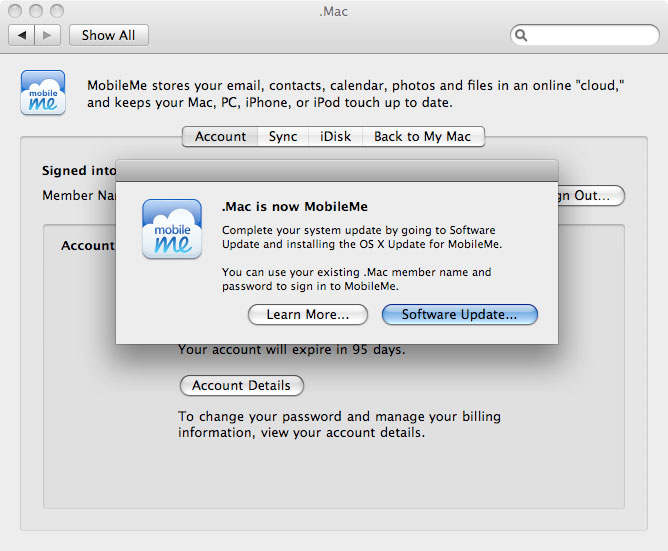
  If you're wondering just how to update to MobileMe, there's a trick
  - it doesn't automatically appear in Software Update, nor is it
  available as a download from Apple's downloads support page (at
  least, at the time I wrote this article). Instead, go to System
  Preferences and click the .Mac preference pane, where you will be
  prompted to download the update. After you apply it, simply close
  System Preferences and open it again to find the MobileMe preference
  pane in place of .Mac; you don't need to restart the Mac.

<http://www.apple.com/support/downloads/>
<http://www.tidbits.com/resources/2008-07/mobileme_update2.jpg>


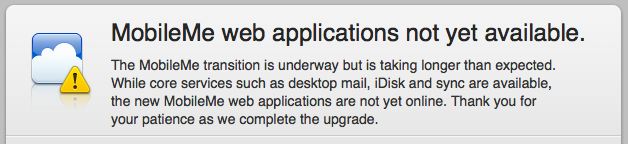
**Bumpy Rollout** -- Users were greeted for most of Thursday with a
  routine message with few details; on Friday, the message was
  upgraded with slightly more useful information, but no apology nor
  estimated time until the service would be usable again:

<http://www.tidbits.com/resources/2008-07/mobileme_maintenance.jpg>

  "The MobileMe transition is underway but is taking longer than
  expected. While core services such as desktop mail, iDisk and sync
  are available, the new MobileMe web applications are not yet online.
  Thank you for your patience as we complete the upgrade."

  While MobileMe wasn't slated to launch until Friday, July 11th,
  Apple planned to perform some heavy lifting on Wednesday night, with
  a plan to finish in the wee hours of Thursday.

  The service finally launched at me.com sometime between Friday night
  and Saturday morning. MobileMe's Web 2.0 applications were briefly
  available at times on Friday.

  Apple made no other public comments on the matter, according to
  several Mac industry and mainstream articles. This is what is known
  as an "epic fail," to use a phrase common for its terseness in
  Twitter: a transition key to the company's relationship with its
  individual users has gone horribly wrong.


**Hoping for a Smooth Road Ahead** -- The good news is that the ease
  of use of the new system is extraordinarily high. Apple has managed
  to instill the feeling of a desktop application into a Web-based
  one; it's about the best I've seen. The Mail screen, for instance,
  is far more polished and interactive than Google's Gmail, which has
  been under development for years. You can make contiguous and
  non-contiguous selections, drag and drop, and use Control plus
  various keys for menu selection or actions. In iCal, for instance,
  you press Control-right arrow to move forward a week in the week
  view.

  .Mac synchronization has been the bane of my life for years, with it
  working erratically, duplicating entries, and working magically
  without intervention for periods of time. During the MobileMe
  transition, my laptop Address Book locked up, and despite all
  efforts won't synchronize at all even when it says it has. (I've
  deleted its data store, reset the sync, and repaired disk
  permissions. The error log for "dotmacsynclient" persistently shows
  obscure errors that I can't find via Google; Apple's message boards
  have search disabled due to high load.)

  My office desktop Mac restored hundreds of entries I'd deleted on
  multiple computers, many of them duplicates of existing entries, and
  which must have been cached at .Mac. I went through and reculled my
  contacts. My iPhone initially had problems picking up changes from
  my desktop Mac via MobileMe, but ultimately appears to be handling
  the new push service just fine. It's awfully nice to be able to
  change a contact's phone number or update a calendar entry and have
  it flow through everywhere.

  How did Apple get in this mess? Obviously by leaving themselves too
  little time, and deciding to do a full power-off/power-on
  switchover, which is a known method of producing epic failures. The
  more intelligent move would have been to delay the MobileMe launch,
  and open it up to current subscribers to move in small numbers,
  offering a "transition" button that would have converted data stores
  from .Mac to MobileMe. The architecture certainly would have allowed
  that.

  But Apple had a lot staked on having a successful iPhone 3G launch,
  and wanted iPhone 2.0 software, MobileMe, and the new phone to
  appear simultaneously for the biggest bang. Well, they got a bang;
  no one can deny that.


Send SMS for Free via AIM on iPhone
-----------------------------------
  by Jeff Carlson <[EMAIL PROTECTED]>
  article link: <http://db.tidbits.com/article/9690>

  I expected that iPhone 3G service from AT&T would be more expensive
  compared to the original iPhone - $30 per month for data on top of
  voice service, a $10 increase), but the telco slipped in a poison
  profit pill by removing SMS text messaging from the plan. Instead,
  you can pay $5 per month for 200 messages (the amount included in
  the original iPhone plan); $15 per month for 1500 messages, or $20
  per month for unlimited messages. If you sign up for a FamilyTalk
  plan, your choices are either $30 per month for unlimited or $0.20
  per message.

<http://www.wireless.att.com/cell-phone-service/specials/iphone-info.jsp>

  Text messaging is already one of the great bamboozlements of the
  technology age, given the prices charged for what amounts to a
  miniscule amount of data transferred. Making the service an extra
  fee for a smartphone is just cruel.

<http://gthing.net/the-true-price-of-sms-messages/>

  With the release of the iPhone 2.0 software, you can send SMS
  messages from your iPhone for free. (To clarify, this appears to
  work only in the United States; Joe Kissell, who lives in France,
  reports that the following technique does not work with the "+33"
  designation there.) The secret is a capability that already exists
  on your Mac: send it via iChat/AIM. (This technique works on the
  iPod touch, too, but I'll just use "iPhone" from here on out to
  avoid writing "iPhone or iPod touch" over and over.) Here's how:

  1. From the App Store, either in iTunes or on an iPhone, download
  and install the free AIM client for iPhone (link goes to the iTunes
  store).

<http://phobos.apple.com/WebObjects/MZStore.woa/wa/viewSoftware?id=281704574&mt=8>

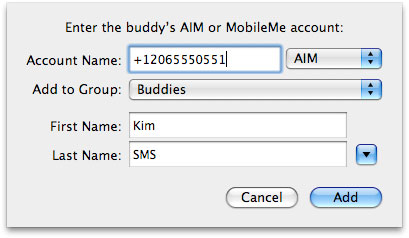
  2. In iChat (or whichever instant messaging software you use),
  create a new contact whose AIM address is a plus sign and the mobile
  number of a friend, such as "+12065551212".

<http://www.tidbits.com/resources/2008-07/sms_new_buddy2.jpg>

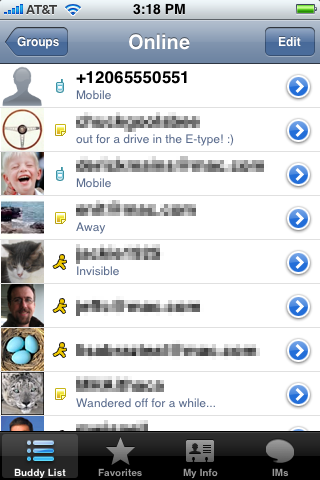
  3. On the iPhone, launch AIM. Your buddy list is stored on AIM's
  servers, so connecting to the service reveals your new buddy.

<http://www.tidbits.com/resources/2008-07/sms_aim_iphone.png>

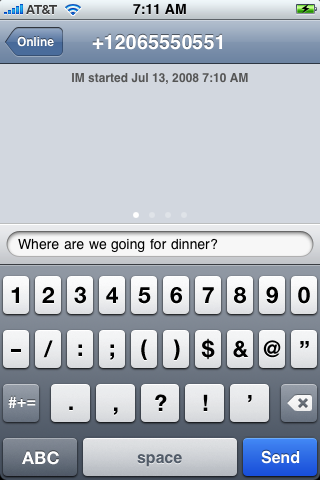
  4. Tap the buddy name, compose a text message, and tap Send.

<http://www.tidbits.com/resources/2008-07/sms_compose_msg.png>

  When the other person receives the message and writes a reply, the
  return message appears in AIM (though the other person will have
  then paid to send an SMS).

  This approach is a bit more work, and if you're a frequent text
  message user it may be worth paying AT&T (or whomever your provider
  is; plans vary widely around the world) for the convenience of just
  using the SMS application. But if you need to dash off a quick
  message without wondering if you're getting your $0.20 worth, AIM is
  a good alternative. It also helps lessen the pain of getting gouged
  by greedy telcos.


iPhone 3G: On the Line in Seattle
---------------------------------
  by Jeff Carlson <[EMAIL PROTECTED]>
  article link: <http://db.tidbits.com/article/9691>

  My sister called my cell phone out of the blue on Friday. "Hey, did
  Apple release something today?" she asked. "There's a huge line at
  University Village."

  "Yes, the iPhone 3G. I'm _in_ that line!" I replied.

  This chance encounter was one of the highlights of a long day spent
  in line at the launch of the iPhone 3G at Seattle's University
  Village Apple Store.

<http://www.apple.com/retail/universityvillage/>

  Glenn Fleishman and I debated whether there would be a big turnout
  for Apple's revamped phone. Last year, the first iPhone seemed like
  a much bigger deal: not just a brand new product from Apple, but a
  smartphone that appeared to eclipse other cellular phones on several
  fronts. This time around, the changes are more modest, with improved
  3G data speed and built-in GPS. The new software features are great,
  but they're available to anyone who owns a first-generation iPhone.
  Surely there wouldn't be the same kind of interest on opening day.

  The approximately 400 people in line proved us wrong.


**Activation Woes** -- I arrived at 8:00 AM, just as the doors opened
  and the first five customers were let into the store. Those hardy
  (crazy?) folks started lining up Thursday at 5:30 PM.

  While the crowd size seemed similar to last year's launch, the time
  it took to get an iPhone was certainly different. The original
  experience was genius from the customer's point of view: you bought
  an iPhone, took it home, plugged it into your computer, and
  activated it through iTunes. The disadvantage, from Apple's and
  AT&T's points of view, was that people could purchase iPhones and
  never sign up for AT&T's two-year service commitment, instead
  reselling the phone to other markets or unlocking the phone using
  "jailbreak" software to use with other providers. Under that
  arrangement, both AT&T and Apple lost out on monthly service fees,
  since Apple received a percentage of each subscriber's monthly fee.

  This time around, AT&T is subsidizing the cost of the iPhone's
  price, Apple only gets a cut when the phone is sold (or buyers later
  purchase software from the iPhone App Store), and buyers must sign
  up for a service plan and activate the phone at purchase. And with
  potentially a million people worldwide buying the iPhone 3G on
  Friday as it went on sale in 21 countries, activation proved to be
  glacial.

  Almost 40 minutes passed before the first iPhone 3G came out,
  carried by a sleepy-looking man who seemed startled that a
  television cameraman, two photographers, and reporters from the big
  daily papers wanted to take his picture and get his opinion.

<http://www.tidbits.com/resources/2008-07/iphone_3g_first_buyer.jpg>

  I assumed the problem lay in AT&T's servers, which crumpled under
  the load last year. According to an anonymously sourced quote in the
  Seattle Times, however, the problem had more to do with Apple's
  servers. Despite the advance word that all activation would happen
  in store, the iPhone 3G needs to be first registered on AT&T's
  systems and network, and then activated through an Apple process
  that uses the iTunes Store. By the time the west coast began selling
  iPhones at 8:00 AM, the rest of the country had been hammering
  Apple's servers for hours. But that was likely just a fraction of
  the load, thanks to Apple's decision to simultaneously release the
  iPhone 2.0 software for existing iPhones (which led to many people
  temporarily owning upgraded but unusable devices for much of the
  day).

<http://seattletimes.nwsource.com/html/businesstechnology/2008047588_iphone12.html>

  Trying to buy an iPhone 3G at an AT&T store proved to be no relief.
  Several AT&T stores sold out of supplies early - one person near me
  in line said that the first store he visited sold out in 20 minutes.
  Another guy spent three hours in line at a different AT&T store
  before being turned away.


**Awesome Apple Employees** -- I don't mean to disparage AT&T, but
  here's why I never considered buying an iPhone 3G anywhere but at an
  Apple Store: the employees at the University Village store - and I
  presume elsewhere - bent over backwards for their patient customers.

  Throughout the day, the employees gave out free bottled water (and
  collected empty bottles for recycling), wandered along the line
  offering to answer any and all questions, and made sure we all
  understood the limitations that could scuttle a purchase. (If your
  phone is paid for by your company, or you have some discount that
  would apply, you need to deal with AT&T directly. One Apple
  specialist pointed out that he wasn't able to buy a new iPhone at
  the store because Apple is a corporate customer of AT&T.) As time
  passed, a pair of employees arrived with a cart full of free
  cookies. And as the sun rose in the sky, they came bearing sunblock
  and large umbrellas. [Editor's note: I walked by the same Apple
  Store on Sunday, mid-day, and saw a line of about 50 people in the
  80-degree F weather, and Apple Store employees handing out water and
  snacks, while making sure new additions to the line were up to speed
  on policies. -gf]

  Throughout the long day, in fact, I never once saw anyone get angry
  or frustrated. Several people got tired of waiting, or had other
  commitments and couldn't stay, but they exited with a hearty "good
  luck" to those of us who stuck with it.


**Captive Audience** -- The smarter retailers in the University
  Village complex recognized the opportunity to pitch their wares at
  hundreds of potential customers who weren't going anywhere fast.
  Jamba Juice was giving out free samples of their blended smoothie
  drinks; Fran's Chocolates had a plate of hazlenut chocolate
  truffles; and The Ram, the restaurant next door to the Apple Store,
  was giving out menus and offering to bring orders out to people in
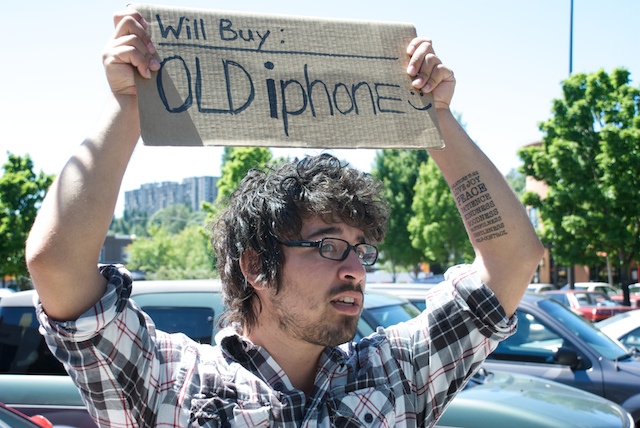
  line. One fellow, tired of waiting in line, offered to buy someone's
  first-generation iPhone (though I saw him exit the store at the end
  of the day with an iPhone 3G after all).

<http://www.jambajuice.com/>
<http://www.franschocolates.com/>
<http://www.tidbits.com/resources/2008-07/will_buy-old_iphone.jpg>

  Some of the marketing didn't go over as well, such as the
  chiropractor handing out postcards or the Verizon van cruising
  through the parking lot. One woman crossed the line ahead of me
  saying, "Who wants a high-five for Verizon?" She wasn't giving out
  information, and we couldn't tell if she was a Verizon employee or
  just someone having fun at our expense. But when someone asked why
  they should high-five for Verizon, she replied, "Well, no one is
  high-fiving for AT&T." I guess she had a point.

  A local developer, Nathan Hunley of Igloo Games, was handing out
  cards to publicize Dizzy Bee, the iPhone game he had finished and
  uploaded to Apple the night before. Dizzy Bee uses the iPhone's
  motion sensor to control a bee who bounces around maze-like levels
  attempting to free captured fruit. (Despite that description, Nathan
  appeared to be as sane as one would expect a sleep-deprived
  developer to be.)

<http://igloo-games.com/db/Dizzy_Bee.html>


**At Last, Activation** -- I ended up spending only a few minutes in
  the Apple Store itself. Once inside, an Apple specialist introduced
  me to one of the Apple geniuses who would be my own personal iPhone
  shopper for the day. I told him that I wanted a black 16 GB model
  (all three configurations were in stock) and no accessories.
  "Great," he said, "I'll go get one and meet you outside."

  At a table under an umbrella, we activated the phone wirelessly. He
  plugged my information into the Symbol handheld device each employee
  uses - the concept of going to a register to pay for your purchases
  is almost extinct at Apple Stores; you can buy what you need
  anywhere on the floor from an employee.

  He wasn't able to answer my one question about the AT&T plan. The
  iPhone 3G is actually my wife's birthday present - I'm keeping my
  first generation iPhone for now - and I didn't know how the addition
  of another iPhone would affect our FamilyTalk plan. Would the 200
  text messages included on my monthly plan go away? The information
  at AT&T's Web site lists only two options for FamilyTalk plans: $30
  per month for unlimited messages or a $0.20 per-message charge. To
  my surprise, the system gave me the option of choosing the
  individual plan options for my wife's line. He pointed out that if
  the billing got messed up, I'd have to work it out with AT&T
  separately. (Checking my account at AT&T's Web site so far reveals
  that we're paying $30 more per month for the iPhone 3G, plus the $5
  fee for 200 messages, which I chose because that's the easiest route
  for her; note that it _is_ possible to send SMS messages at no cost
  using AIM.)

<http://db.tidbits.com/article/9690>


**The First-Day Appeal** -- So how long did I wait in line for an
  iPhone 3G? Did I turn out to be one of the crazy ones? To be fair, I
  probably would have bailed early on and come back when the initial
  enthusiasm died down if I wasn't covering the iPhone 3G and the
  event as a journalist. Instead, I held out - for _8 hours_.

  But here's the funny thing about standing in line with like-minded
  folks: 1 hour becomes 3 hours becomes 5 hours becomes 7 hours (that
  eighth hour was a bit much, honestly). It wasn't a party, but it
  wasn't a slog, either. The novelty of having one of the first iPhone
  3G units will wear off quickly, but the experience of doing
  something out of the ordinary with a lot of people, like watching a
  live concert instead of just listening to an album of the same
  music, is worth doing on occasion. I joked in line that someday we
  could tell our grandchildren about the time we stood in line for
  hours to get an iPhone, and a fellow next to me pointed out that our
  grandkids will probably just have implants and not understand the
  concept of a "phone."


Discovering Sparse Bundle Disk Images
-------------------------------------
  by Joe Kissell <[EMAIL PROTECTED]>
  article link: <http://db.tidbits.com/article/9673>

  In the latest releases of both my ebooks on backups ("Take Control
  of Mac OS X Backups" and "Take Control of Easy Backups in Leopard"),
  I include sidebars titled "(Sparse) Bundles of Joy," in which I
  describe Leopard's new sparse bundle disk image format, used by Time
  Machine for network backups. Because this format is quite
  interesting, has potentially broad application, and hasn't received
  much attention, I'd like to say a bit more about it here.

<http://www.takecontrolbooks.com/backup-macosx.html>
<http://www.takecontrolbooks.com/leopard-easy-backup.html>


**Managing Your Image** -- By way of review, a disk image is a special
  file that can also behave like a disk - that is, if you double-click
  the image, a new volume appears in the Finder; this volume can
  contain any number of files and folders, and you can open or copy
  them just as you would do with the contents of any other volume.
  Disk images typically have the extension .dmg and are often used to
  distribute software. Unlike ordinary folders, disk images can be
  compressed, encrypted, and/or made read-only, and can be opened on
  any Mac, all without the use of any third-party software. If you
  want to distribute a whole set of files and be sure that they remain
  perfectly intact on the other end, using a disk image is an
  excellent way to do so.

  Over the years, Apple has created a variety of different formats for
  disk images. The sparse image (extension .sparseimage), for example,
  was an improvement over the .dmg format in that it could grow
  automatically in size as needed (up to a preset maximum). Prior to
  Leopard, Mac OS X used sparse images for things like local copies of
  your iDisk (if you have iDisk Sync turned on in the MobileMe pane of
  System Preferences) and FileVault (which used an encrypted sparse
  image). In both cases, the images could begin relatively small,
  rather than occupying lots of unused space on your disk even when
  they contained little data.

  But sparse images, like .dmg images, had a problem. Making any
  change to their contents marked the entire image file as changed. If
  you were doing incremental backups that included a large disk image
  file, say, this meant that even the tiniest change would result in
  the entire file having to be backed up again. For example, I used to
  store private documents on a 10 GB  encrypted .dmg disk image. But I
  couldn't back up the disk image file itself, because it changed
  every day and I'd rapidly run out of disk space if I kept backing it
  up. So instead, I had to separately back up the _contents_ of the
  mounted image to an encrypted archive, which was an inconvenience.


**Bundle Up** -- When I upgraded to Mac OS X 10.5 Leopard the first
  time, one thing I noticed immediately was that a copy of my local
  iDisk sparse disk image was sitting on my Desktop, while a new disk
  image, this time with the extension .sparsebundle, was stored in a
  subfolder of ~/Library/FileSync. Leopard had taken the liberty of
  converting my iDisk image to a new format - a sparse bundle - and
  put the old one on my Desktop as a backup, presumably in case
  anything had gone wrong during the conversion. So what's with the
  new format and why should you care?

  A sparse _bundle_ looks and acts just like a sparse image - it can
  grow in size, can optionally be compressed or encrypted, and so on.
  What's different is that it isn't actually a single file, as all
  previous disk image formats were. It's a bundle (also known as a
  package) - a folder that Mac OS X treats as a single file, which is
  also true of applications. (To verify this, you can Control-click or
  right-click a sparse bundle, choose Show Package Contents from the
  pop-up menu, and browse through its contents.) Inside that package
  is a folder full of _bands_ - files that are each 8 MB in size, as
  many as are needed to hold the image's data.

  What's cool about this is that if you change something on a sparse
  bundle (adding or modifying a file, for instance), only the band(s)
  containing that data change, not the whole bundle. As a result,
  assuming your backup software treats the contents of bundles as
  individual files, you no longer have to back up a huge disk image
  just because a tiny file changed. Your backup software only has to
  copy the 8 MB band(s) containing any of that file's data (often only
  one). So I converted my encrypted sparse image to an encrypted
  sparse bundle, and now I can include it along with all my other
  files in my ordinary backups.


**Nuts and Bolts** -- You can create and modify disk image files (of
  whichever sort) using Disk Utility, located in
  /Applications/Utilities, or with the command-line tool diskutil if
  you're so inclined. For example, to create a new, encrypted sparse
  bundle, you'd follow these steps:

  1. In Disk Utility, choose File > New > Blank Disk Image.
  2. Fill in the filename, location, volume name, and maximum size;
  leave the format as Mac OS Extended (Journaled).
  3. Choose either 128-bit or 256-bit AES encryption from the
  Encryption pop-up menu. Leave Partitions set as it is.
  4. From the Image Format pop-up menu, choose Sparse Bundle Disk
  Image.
  5. Click Create. Enter and verify a password and click OK.

  Although Disk Utility can also convert one format to another (using
  the Images > Convert command), I've had some trouble with this
  method, and I've generally found it more reliable to create a new
  image from scratch and copy the contents of the old image manually.


**The Future of Sparse Bundles** -- As I mentioned earlier, Time
  Machine stores your backups in sparse bundles when you're backing up
  over a network (to another Mac running Leopard, or to a Time
  Capsule). The Leopard version of FileVault also uses the sparse
  bundle format now, which may decrease its susceptibility to disk
  errors. (I'm still no fan of FileVault, though, because apart from
  the threat of losing data to file corruption, I prefer much greater
  control over what is, and isn't, encrypted.) But what I find most
  exciting about sparse bundles is the problems they could potentially
  solve, if more developers used them.

  Let's go back to the problem of backing up huge files that change
  frequently. If you use Parallels Desktop or VMware Fusion to run
  Windows on your Mac, this is still an issue, because those programs
  still store all their data in monolithic disk image files.
  Similarly, Microsoft Entourage uses a single big database file to
  store all your email, contacts, and calendar information. So
  conventional wisdom says you should exclude files like these from
  Time Machine or other backup programs that run frequently, because
  otherwise your backups will take an excessively long time and
  require tons of disk space. Unfortunately, that also means you have
  to find some other, more cumbersome way to back up that data - or
  leave it unprotected.

  If Parallels, VMware, and Microsoft were to adopt the sparse bundle
  format for their respective data storage needs, at least as an
  option, this problem could disappear. (This approach would work only
  under Leopard, however.) In fact, I know of at least one attempt to
  trick Entourage into using a sparse bundle, though the process is
  rather elaborate and geeky, and I haven't tried it myself. Similar
  acrobatics could possibly be performed with virtualization programs,
  basically forcing them to store their existing disk images on sparse
  bundles, but it would be better by far if users didn't have to jump
  through such hoops.

<http://www.macosxhints.com/article.php?story=20080605115101581>

  Although Entourage and virtualization programs are among the most
  prominent examples, undoubtedly many other applications that deal
  with very large files could also benefit from using sparse bundles.
  For all I know, perhaps developers are already hard at work bundling
  up their images, or perhaps technical problems I'm unaware of
  (beyond the requirement for Leopard) make it harder than I imagine.
  But for the sake of speedy and space-efficient backups, I certainly
  hope the sparse bundle rapidly becomes a favorite format for storing
  large amounts of data.


TidBITS Watchlist: Notable Software Updates for 14-Jul-08
---------------------------------------------------------
  by TidBITS Staff <[EMAIL PROTECTED]>
  article link: <http://db.tidbits.com/article/9683>

* iPhone 2.0 and iPod touch 2.0 (direct link to iTunes Store) from
  Apple update first-generation iPhones and existing iPod touch
  devices to the latest version of the iPhone operating system. Among
  numerous improvements, the 2.0 updates enable third-party
  application software from Apple's App Store (including an App Store
  application on the device), support for separate calendars in the
  Calendar application, a search field for the Contacts application,
  improved Mail handling, and support for MobileMe push syncing. The
  updates are available via iTunes and require remote activation from
  the iTunes Store before they can function. (On the launch day, when
  Apple's servers failed to handle the demand of iPhone 2.0 upgrades
  and new iPhone 3G activations, people's updated iPhones were
  unusable for much of the day. We haven't seen the problem resurface,
  however.) As with previous iPod touch updates that add significant
  functionality, Apple charges an upgrade fee due to the way the
  company accounts for iPod income. (Free update for iPhone, $9.95 for
  iPod touch, 225 MB)

<http://www.apple.com/iphone/softwareupdate/>
<https://phobos.apple.com/WebObjects/MZFinance.woa/wa/touchLandingPage>

* iTunes 7.7 from Apple adds support for iPhone 2.0 syncing and the
  App Store. Also added is support for a new Remote application for
  the iPhone and iPod touch that lets you control iTunes from those
  devices. Currently the iTunes 7.7 update is available only for Mac
  OS X 10.3.9, Mac OS X 10.4.9 or later, or Mac OS X 10.5 or later.
  (Free update, 48.32 MB)

<http://www.apple.com/support/downloads/itunes77.html>

* Apple TV 2.1 from Apple adds support for the new Remote application
  on the iPhone and iPod touch; on the Apple TV, go to Settings >
  General > Remotes to set up the device. The update also includes
  several security enhancements that guard against behavior caused by
  maliciously crafted video and image files. Apple TV 2.1 is available
  only on the Apple TV itself (Settings > General > Update Software).
  (Free update)

<http://support.apple.com/kb/HT2304>


* Microsoft Remote Desktop Connection Client for Mac 2 is an update of
  Microsoft's tool for connecting to and controlling a Windows PC from
  a Mac. This version is now a universal application for running on
  both Intel- and PowerPC-based Macs; uses the Remote Desktop Protocol
  6.0 for better performance with Windows Vista, including Network
  Level Authentication security; offers the capability to connect to
  multiple computers simultaneously; automatically reestablishes
  sessions when the connection is lost; prints from the Windows
  environment to any printer available to the Mac; and improves screen
  handling and interface issues. The utility requires Mac OS X 10.4.9
  or later. (Free, 7.7 MB)

<http://www.microsoft.com/mac/products/remote-desktop/default.mspx>

* GraphicConverter 6.1.2 from Lemkesoft updates the multipurpose image
  editor with improved support for EXIF data and bug fixes - but that
  only describes the latest minor update. GraphicConverter has always
  been one of the most versatile applications on the Mac for reading
  and saving image files of all stripes, but in recent versions the
  program has also become a full-fledged digital photography toolbox.
  If an image file has you flummoxed, GraphicConverter is likely to be
  your lifeline. ($34.95 new, free update, 41.4 MB)

<http://www.lemkesoft.com/content/188/graphicconverter.html>


* PDFpen 3.4.2 and PDFpenPro 3.4.2 from Smile on My Mac improve
  performance when using optical character recognition (OCR) to read
  PDFs such as electronic faxes thanks to better handling of font
  widths. The updates also squash a crashing bug affecting some bank
  statements and offer other fixes. ($49.95 new for PDFpen or $94.95
  for PDFpenPro, free upgrade, 5.3 MB)

<http://www.smileonmymac.com/PDFpen/>

* Safari 3.1.2 for Tiger from Apple "includes stability improvements
  and the latest security updates." In particular, that means that
  Apple fixed a vulnerability in the WebKit framework upon which
  Safari relies that could enable an exploit if you visited a Web site
  that used maliciously crafted JavaScript. The Leopard version of
  Safari was updated by either the Mac OS X 10.5.4 Update, or by
  Security Update 2008-004. Software Update should provide the
  download for those who need it, or you can download directly from
  Apple's Web site. (Free, 49.2 MB)

<http://www.apple.com/support/downloads/safari312fortiger.html>

* 1Password 2.6.5 from Agile Web Solutions updates the form-filling
  and password management utility with improved support for Firefox 3,
  support for the Safari 4 Developer Preview, DEVONagent, the OmniWeb
  Sneaky Peek releases, and Flock 2. Localizations were removed for
  smaller download sizes, credit card filling was improved on a number
  of sites, and a variety of small cosmetic changes were made. The new
  version also provides some stability fixes. ($34.95 new, free
  upgrade, 14 MB)

<http://agilewebsolutions.com/products/1Password>

* Apple Wi-Fi firmware 7.3.2 updates for Time Capsule, AirPort
  Extreme, and AirPort Express has what Apple describes as "bug
  fixes." Thanks so much for explaining what problems we might have
  that were solved by this update to the hardware's soul. The update
  requires that you have AirPort Utility 5.3.2 installed under Mac OS
  X 10.4 Tiger, 10.5 Leopard, Windows XP, or Windows Vista. Launching
  AirPort Utility causes the program to perform a firmware check of
  all devices on the local network; you're then prompted to upgrade
  any applicable Wi-Fi routers. AirPort Utility can be downloaded
  through the above link for your particular platform.

<http://www.apple.com/support/downloads/timecapsuleandairportbasestation80211nfirmware732.html>


Hot Topics in TidBITS Talk/14-Jul-08
------------------------------------
  by Jeff Carlson <[EMAIL PROTECTED]>
  article link: <http://db.tidbits.com/article/9693>

**iMac failing to startup into OS 10.3.9?** -- An unfortunate
  encounter with Norton System Works leads to an old iMac being unable
  to boot into Mac OS X. (2 messages)

<http://emperor.tidbits.com/TidBITS/Talk/2062>


**Discovering Sparse Bundle Disk Images** -- Readers discuss whether
  virtualization software such as Parallels and VMware Fusion use
  sparse bundle disk images. (5 messages)

<http://emperor.tidbits.com/TidBITS/Talk/2063>


**Corrupted Printer setup utility** -- Mac OS X Leopard moved printing
  tasks into the Print & Fax preference pane, and in the process
  discarded the old Printer Setup Utility. (5 messages)

<http://emperor.tidbits.com/TidBITS/Talk/2064>


**Cutting off bad Wi-Fi connection** -- How do you make a Mac stop
  automatically connecting to a wireless network? (2 messages)

<http://emperor.tidbits.com/TidBITS/Talk/2065>


**The Hole in My Backup Plan** -- Readers relate to Joe Kissell's
  experience of losing the use of his main Mac, including purchasing
  two similarly configured machines and renting a replacement. (25
  messages)

<http://emperor.tidbits.com/TidBITS/Talk/2066>


**iTunes Store technical details** -- Does Apple store and serve the
  iTunes Store from its own hardware? It doesn't appear to. (2
  messages)

<http://emperor.tidbits.com/TidBITS/Talk/2067>


**Third-party batteries for older laptops** -- When a laptop's
  original battery reaches the end of its life, should you buy a
  replacement from Apple or try one from a third party? When dealing
  with older portables, you may not have a choice. (2 messages)

<http://emperor.tidbits.com/TidBITS/Talk/2068>


**How to revive a "broken" hard disk?** After replacing a hard disk, a
  reader gets suggestions for erasing it for use elsewhere when
  trouble arises. (7 messages)

<http://emperor.tidbits.com/TidBITS/Talk/2069>


**Mac OS X 10.5.4 Issue** -- Following a system update, a reader's
  files and folders become invisible. The solution? Changing the
  screen resolution. (2 messages)

<http://emperor.tidbits.com/TidBITS/Talk/2070>


**Current iPhones Keep Cheaper Plan on Reactivation** -- Readers
  ponder the best methods of upgrading to the iPhone 3G. (8 messages)

<http://emperor.tidbits.com/TidBITS/Talk/2073>


**New Mac threats?** What started as an article that mirrors a press
  release about Mac malware turns into a discussion of how important
  terminology can be when defining security threats. (48 messages)

<http://emperor.tidbits.com/TidBITS/Talk/2075>


**Precipitate shines Mac Spotlight into Google** -- Readers talk about
  Adam's article about this utility for making Spotlight search Google
  services. (5 messages)

<http://emperor.tidbits.com/TidBITS/Talk/2076>


**802.11g-n mixed network question** -- Will having wireless routers
  of different speeds slow down an entire network, or can they all
  just get along? (4 messages)

<http://emperor.tidbits.com/TidBITS/Talk/2077>


**Gaming the system?** Is it ethical to buy a computer with the
  express purpose of using it and then taking it back within the
  return policy? Readers debate. (15 messages)

<http://emperor.tidbits.com/TidBITS/Talk/2078>


**Extend iTunes Movie Rentals Beyond 24 Hours** -- Attempting to play
  a paused iTunes rental beyond its expiration time led to a gray
  screen. Is this a bug or a policy change from Apple? (2 messages)

<http://emperor.tidbits.com/TidBITS/Talk/2080>


**Apple Stores Ready for 3G Onslaught** -- Apple and AT&T seem to
  expect that most people will transfer existing cellular phone
  numbers to the new iPhone service. (3 messages)

<http://emperor.tidbits.com/TidBITS/Talk/2081>


**Send SMS for Free via AIM on iPhone** -- You can use AIM on the
  iPhone to send a text message for free, but how does it appear to
  the recipient, and can they reply in kind? (2 messages)

<http://emperor.tidbits.com/TidBITS/Talk/2087>


**MobileMe Fails to Launch Well, But Finally Launches** -- Readers
  discuss Apple's stumbling start of the MobileMe service. (2
  messages)

<http://emperor.tidbits.com/TidBITS/Talk/2088>


**Buying an iPhone 3G** -- A reader shares his impressions of the
  iPhone 3G, leading to a discussion of price and how AT&T is
  subsidizing the cost of each phone. (2 messages)

<http://emperor.tidbits.com/TidBITS/Talk/2089>


$$

This is TidBITS, a free weekly technology newsletter providing timely
news, insightful analysis, and in-depth reviews to the Macintosh and
Internet communities. Feel free to forward to friends; better still,
please ask them to subscribe!

Non-profit, non-commercial publications and Web sites may reprint or
link to articles if full credit is given. Others please contact us. We
do not guarantee accuracy of articles. Caveat lector. Publication,
product, and company names may be registered trademarks of their
companies. TidBITS ISSN 1090-7017.

Copyright 2008 TidBITS: Reuse governed by Creative Commons license.

Contact us at:    <[EMAIL PROTECTED]>
TidBITS Web site: <http://www.tidbits.com/>
License terms:    <http://www.tidbits.com/terms/>
Full text search: <http://www.tidbits.com/search/>
Subscriptions:    <http://www.tidbits.com/about/list.html>
Account help:     <http://www.tidbits.com/about/account-help.html>


--
If you want to unsubscribe or change your address, use this link
http://emperor.tidbits.com/webx?unsub@@.3c557dc4!u=306a67f9