TidBITS#938/28-Jul-08
=====================
  Issue link: <http://db.tidbits.com/issue/938>
  The top news for this week is Apple's failure - despite plenty of
  notification - to fix a critical flaw in DNS that's already in the
  wild. Rich Mogull and Glenn Fleishman explain the problem and the
  possible workarounds for those running DNS servers; the full fix
  will require an update from Apple. Apple also comes in for criticism
  from Glenn on their handling of the MobileMe transition and on their
  response - a tepidly worded status page. Adam piles on with an
  examination of a bug that causes iTunes 7.7 to corrupt accented
  track and artist names, and some workarounds to prevent an updated
  iPod touch from beeping constantly. On a more positive note, we
  cover Apple's stellar financial results, Neale Monks reviews the
  watermarking and image prep tool iWatermark, and Adam passes on a
  link to a hilarious video about fonts (really - go watch it!). In
  the TidBITS Watchlist, we glance at updates to Firefox, Default
  Folder X, Typinator, PDFpen (and PDFpen Pro), Keyboard Maestro,
  Skype, iLife '08, and AirPort Extreme.

Articles
    Anthropomorphic Fonts in CollegeHumor Video
    Stop the iPod touch's Constant Beeping
    Apple Reports Billion Dollar Profit for Q3 2008
    iTunes 7.7 Corrupts Accented Artist and Track Names
    Google Gmail Adds Secure Session Option
    MobileMe Status Page Promises Updates, But Tone Rings Flat
    Prepping Web Images with iWatermark
    Apple Fails to Patch Critical Exploited DNS Flaw
    TidBITS Watchlist: Notable Software Updates for 28-Jul-08
    Hot Topics in TidBITS Talk/28-Jul-08


------------ This issue of TidBITS sponsored in part by: --------------

* READERS LIKE YOU! Support TidBITS with a contribution today!
  <http://www.tidbits.com/about/support/contributors.html>
  Special thanks this week to Francesco Faggionato, Steve Graham,
  JoAnn Pedersen, and Lynn Rybarczyk for their generous support!

* Fetch Softworks: Fetch 5.3 has WebView, the easy way
  to view files in a browser and copy Web addresses from Fetch.
  Also a new look for Leopard, droplet shortcuts, and more.
  Download your free trial version! <http://fetchsoftworks.com/>

* WebCrossing Neighbors Creates Private Social Networks
  Create a complete social network with your company or group's
  own look. Scalable, extensible and extremely customizable.
  Take a guided tour today <http://www.webcrossing.com/tour>

* Bare Bones Software's BBEdit 8.7 -- Latest version offers a
  major interface overhaul, new prefs, text clippings, improved
  JavaScript, new Ruby/SQL/YAML/Markdown support, code folding.
  Over 160 new features in all! <http://www.barebones.com/>.

* MARK/SPACE, INC: If you have a smartphone, we can sync it!
  Sync your address book, calendar, notes, music, pictures, and
  more from your BlackBerry, Windows Mobile or Palm OS mobile
  phone to your Mac. <http://www.markspace.com/bits>

* VMware Fusion. The most seamless way to run Windows on your Mac.
  Backed by nearly a decade of proven virtualization technology.
  Try VMware Fusion today for free, or order online for only $79.
  Visit: <http://www.tidbits.com/about/support/vmware-fusion.html>

* Microsoft's MacBU: Supporting Mac users with Office 2008.
  Straighten up your Office with the latest updates to Word,
  Excel, PowerPoint, and Entourage. Update today at Mactopia!
  <http://www.microsoft.com/mac/downloads.mspx>

---------- Help support TidBITS by supporting our sponsors ------------


Anthropomorphic Fonts in CollegeHumor Video
-------------------------------------------
  by Adam C. Engst <[EMAIL PROTECTED]>
  article link: <http://db.tidbits.com/article/9708>

  We Mac users tend to put great stock in our fonts, and now, thanks
  to a hilarious bit of sketch comedy from CollegeHumor, we can
  imagine what different fonts would be like if they were people -
  Wingdings is my favorite. I won't say any more - go watch the video!

<http://www.collegehumor.com/video:1823766>


Stop the iPod touch's Constant Beeping
--------------------------------------
  by Adam C. Engst <[EMAIL PROTECTED]>
  article link: <http://db.tidbits.com/article/9703>

  I wasted no time after arriving home from vacation on Monday: I
  promptly purchased, downloaded, and installed the 2.0 software
  upgrade for my iPod touch. I wanted to catch up on what I'd missed
  while out of the country and start playing with new applications and
  test Apple's improvements. Almost immediately, the iPod started
  beeping at irregular intervals. I had downloaded a few applications,
  such as NetNewsWire, NYTimes, AIM, and WeatherBug, but there was no
  indication as to which application was responsible for the beeps.

  A quick call for help on Twitter revealed the culprit: Mail.
  Apparently, the new version of Mail feels the need to beep every
  time a new message comes in, and that's a problem given that
  MobileMe's "push" option for email means that new messages are being
  received constantly. Maddening! (A number of people on Twitter
  confirmed that they were experiencing the same problem.)

  Although I'm sure some people like email notification beeps, my
  MobileMe account receives a bunch of spam - approximately 30
  messages per day - and not much else. I don't use the account for
  real work, and Apple Mail filters the spam fairly effectively on the
  Mac, so it's never been a problem before. But since I launch Mail on
  the Mac only about once a week, there are often hundreds of spam
  messages that make it through to the iPod touch in the interim.
  Until now, I've mostly used Mail on the iPod touch to familiarize
  myself with the technology, so having it beep constantly throughout
  the day required some action.

  Two solutions present themselves, but neither is entirely
  satisfactory. First, you can turn off sound effects, in Settings >
  General > Sound Effects. The only problem with this is that sound
  effects are also used for calendar alerts. I'm not using those at
  this point, but I could easily see someone wanting to silence Mail
  while retaining calendar alerts. Luckily, timed alarms set in the
  Clock still make noise even if sound effects are off, as does the
  timer option in Clock. I don't know if any independent applications
  rely on the sound effects, but if so, I presume they'd be silenced
  as well, which could be good or bad.

  (iPhone users don't have this problem with granularity. The iPhone
  offers Settings > General > Sounds, a settings sheet which has
  separate On/Off switches for new voicemail, new mail, sent mail,
  calendar alerts, and more.)

  Second, you can switch Mail so it retrieves new messages manually
  whenever you enter Mail, rather than constantly (the Push setting)
  or on a schedule (Fetch). Change this in Settings > Fetch New Data >
  Advanced > yourAccountName. This won't silence Mail, but it will
  play its sounds only after retrieving messages, so you at least
  won't be surprised (or woken up) by them.

  I understand Apple's desire to keep preferences to a minimum in the
  iPod touch, but this is an instance where the preference granularity
  used on the iPhone would be an improvement.


Apple Reports Billion Dollar Profit for Q3 2008
-----------------------------------------------
  by TidBITS Staff <[EMAIL PROTECTED]>
  article link: <http://db.tidbits.com/article/9701>

  Apple earned a profit of $1.07 billion on $7.46 billion in sales
  ($1.19 per share) in its third fiscal quarter ending 28-Jun-08. This
  represents a 31 percent increase in profits and 37 percent increase
  in revenue over the same quarter a year ago, in which the company
  earned $818 million on $5.41 billion of income ($.92 per share).
  These figures don't represent the increase in cash that Apple has
  hoarded, as earnings figures include intangibles and Apple has opted
  to book iPhone and some other revenue over a period of time. Apple
  had $19.5 billion in cash and equivalents on hand at the end of
  their previous quarter. The earnings webcast can be heard on Apple's
  site.

<http://www.apple.com/pr/library/2008/07/21results.html>
<http://www.apple.com/quicktime/qtv/earningsq308/>

  Apple also sold 717,000 iPhones, an increase of 63 percent over the
  year-ago quarter, which included 270,000 phones sold during just the
  opening weekend of sales of the first iPhone model.

  These unit sales and revenue numbers are even more interesting
  because Apple doesn't recognize the revenue for the iPhone - show it
  in their earnings - when an iPhone is sold, but instead spreads out
  the income over many quarters. Apple chose to stop accounting for
  income from any new iPhone sales between 06-Mar-08, when the iPhone
  2.0 software was announced, and 11-Jul-08, when it shipped along
  with the iPhone 3G. That means the $419 million in iPhone revenue
  noted for the quarter ending 28-Jun-08 excludes even the spread-out
  part of between $1.5 billion and $2 billion in hard cash taken in.
  This should make for an extraordinary fourth fiscal quarter.

  This quarter is also part of the continuing renaissance of Macintosh
  computers, after years of having iPod sales overshadow the computer
  side. Apple's indirect strategy of gaining users through the halo
  effect of producing the iPod and the iPhone led to the all-time
  highest number of Macs sold in a quarter - just under 2.5 million,
  or a 41 percent gain over a year ago. Apple is now the third biggest
  computer seller in the United States with about 8 or 9 percent of
  market share (see "Apple Gains Larger Slice of Computer Sales,"
  2008-07-18).

<http://db.tidbits.com/article/9699>

  The company didn't slack on iPods, though, pushing over 11 million
  out the door, which was a more humble 12 percent gain, not
  surprising with no particular holiday or iPod product announcements
  in the latest quarter.

  Retail stores saw incredible growth, likely due to the influx of
  iPhone buyers, with a 58 percent year-over-year growth in sales, a
  result of 32 million customers in the third quarter, up from 22
  million a year ago. The stores brought in $1.44 billion, selling
  476,000 Macs in this latest quarter. Apple said that the NPD Group,
  which tracks retail sales, saw Apple's percentage rise from 15 to 20
  percent of sales compared with a year ago.

  The company expects a slight increase to $7.8 billion in their
  fourth fiscal quarter, which is, however, an increase of 25 percent
  over fourth quarter 2007. For fiscal 2008, Apple expects to
  recognize $32 billion, or 35 percent over the previous full fiscal
  year.


iTunes 7.7 Corrupts Accented Artist and Track Names
---------------------------------------------------
  by Adam C. Engst <[EMAIL PROTECTED]>
  article link: <http://db.tidbits.com/article/9705>

  Thanks to Stig Albjerg for alerting us to a subtle problem that has
  cropped up in iTunes 7.7, Apple's latest release. Playing or getting
  info on songs whose artist or track names contain accented
  characters causes those characters to be swapped with other
  characters, rendering the names incorrect or even unreadable. For
  people with large collections of non-English music (or, I imagine,
  heavy metal!), this is, needless to say, troubling. It affects only
  MP3 files, not AAC files, and seems to be related to the string
  encoding format used in ID3v2.2 tags. Thus, it may also affect
  tracks named with Unicode characters, such as Japanese or Chinese.

<http://en.wikipedia.org/wiki/Heavy_metal_umlaut>
<http://en.wikipedia.org/wiki/ID3#ID3v2>

  Although not all iTunes users seem to be suffering the problem, I
  was able to reproduce it in iTunes 7.7 running under Mac OS X 10.4
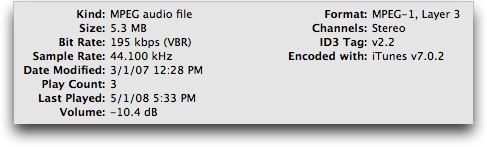
  Tiger. Affected tracks show an ID3 Tag field of v2.2 or earlier in
  the Summary pane of the Get Info window. The problem occurred only
  with songs that I ripped before mid-2007 using versions of iTunes
  prior to 7.3. (Tracks ripped using iTunes 7.0.2 suffer the problem;
  apparently I didn't rip anything using versions between 7.0.2 and
  7.3, so I can't quite tell when Apple stopped including ID3 tags in
  ripped tracks.)

<http://www.tidbits.com/resources/2008-07/iTunes-ID3-Tags.png>

  Unfortunately, the only solution for tracks that have been played or
  viewed in the Get Info window is to correct the artist and track
  names manually in iTunes. Once fixed, they'll stay fixed.

  Prevention is more important, and for that you'll want to select the
  tracks that contain accented characters in iTunes and then choose
  Advanced > Convert ID3 Tags > ID3 Tag Version > v2.4. Although I've
  seen a report that doing this deleted album artwork, that didn't
  happen in my testing. Don't mess with any of the other options in
  the Convert ID3 Tags dialog.

<http://www.tidbits.com/resources/2008-07/iTunes-Convert-ID3-Tags.png>

  The brute force approach to fixing the ID3 tags is to select
  everything in iTunes and then do the conversion. Be careful, though.
  Depending on how many tracks you have selected, it could take some
  time to modify all the files, especially if your music is stored on
  a server and accessed over a network. Also, because you're modifying
  each file, you will likely end up backing up all those files again,
  thus wasting a potentially large amount of space in your backup.

  For a more focused fix, search for and convert just those tracks
  that will be affected. Unfortunately, iTunes can't distinguish
  between accented and unaccented characters in its search, but
  there's a workaround. Using a text editor like Bare Bones Software's
  TextWrangler or BBEdit, open the iTunes Music Library.xml file
  that's in your iTunes folder. You can then search for various
  accented characters, and if you're not sure what they are, look near
  the end of this thread in the Apple Discussions for a list of common
  ones. You could also make a copy of that XML file, and then use
  BBEdit's Text > Zap Gremlins command to replace all accented
  characters with a bullet or other easily found character. Once
  you've identified the affected tracks in the XML file, return to
  iTunes to do the ID3 tag conversion.

<http://discussions.apple.com/thread.jspa?threadID=1593945>

  Of course, another option is simply to avoid playing any affected
  tracks until Apple fixes the bug in a future version of iTunes.
  There's no telling how long it will take for a fixed version to
  appear, if it ever does.


Google Gmail Adds Secure Session Option
----------------------------------------
  by Glenn Fleishman <[EMAIL PROTECTED]>
  article link: <http://db.tidbits.com/article/9710>

  Google has plugged one of the biggest security risks associated with
  using its free hosted Gmail mail service, still in beta after four
  years. You can now select an option in your account preferences to
  make every session require an encrypted Web connection. I wrote
  about a number of Gmail vulnerabilities that researchers had found
  in "Sidejack Attack Jimmies Open Gmail, Other Services," 2007-08-27.

<http://db.tidbits.com/article/9129>

  Gmail requires a secure connection for your login details,
  regardless of whether or not you start with the secure Gmail site
  address. However, if you start at the non-secure Gmail site, Google
  redirects you back to an unencrypted Web connection after login.
  That's always been a mistake on Google's part because your messages
  would pass in the clear. The sidejacking attack referenced above
  also proved that someone could intercept your Google session token
  and have full access to your Gmail account.

<https://mail.google.com/>

  Google explained in its Gmail blog that the service has added a
  Browser Connection option at the bottom of its Settings > General
  view that lets you select "Always use https," which is the protocol
  name for a URL that makes your browser start up a SSL/TLS encrypted
  connection with a Web server.

<http://gmailblog.blogspot.com/2008/07/making-security-easier.html>
<http://www.tidbits.com/resources/2008-07/gmail_always_secure.png>

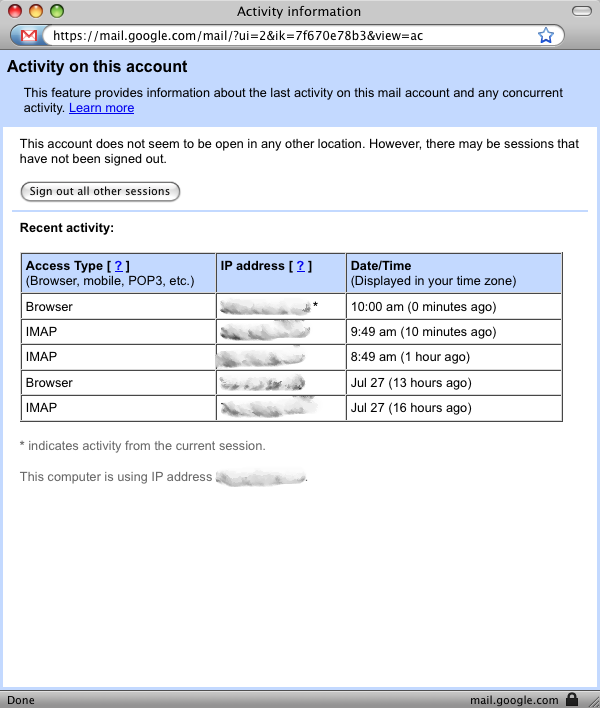
  The Google blog also noted a link that's now at the bottom of the
  inbox that provides account activity details, as well as a way to
  sign out sessions initiated from other machines. In my case, for
  instance, I see several recent sessions: a browser connection last
  night from home, and IMAP connections from my iPhone for retrieving
  recent email automatically. (Google is in the process of rolling
  this feature out, so it may not appear for you quite yet, as it
  didn't for Adam Engst).

<http://gmailblog.blogspot.com/2008/07/remote-sign-out-and-info-to-help-you.html>
<http://www.tidbits.com/resources/2008-07/gmail_recent_sessions.png>

  These two changes improve Gmail's security dramatically. I recommend
  you turn on the https setting immediately.


MobileMe Status Page Promises Updates, But Tone Rings Flat
-----------------------------------------------------------
  by Glenn Fleishman <[EMAIL PROTECTED]>
  article link: <http://db.tidbits.com/article/9709>

  Apple has finally responded to the criticism of their lack of
  disclosure about MobileMe problems in the last two weeks by
  providing a more detailed status page that they promise to update
  "every other day or so." The messages there as of 27-Jul-08 explain
  how the broken parts of MobileMe are still being fixed.

<http://www.apple.com/mobileme/status/>

  The most vexing issues for an apparently small number of MobileMe
  users - Apple consistently says it's 1 percent - was an inability to
  access email via me.com or an email client, as well as to send
  email, starting on 18-Jul-08.

  The first status message says that a temporary solution has been put
  in place that will let those affected users retrieve email sent
  since that date, receive new email, as well as send email. The
  message "regret[s] to report the loss" of about 10 percent of
  messages received between July 16th and 18th, too. (Apple could have
  offered to forward people's email as soon as the problem stretched
  more than a day, or helped people set up accounts at Gmail, for
  crying out loud.)

  The target is now August 1st for full access to mail stored or
  received before July 18th. The message implies that this is a
  rolling solution, with an ever-increasing number of affected users
  gaining access to their older mail before August 1st.

  There's not much of an apology in there; an attitude of passivity
  pervades the regrets, as in "One issue we encountered." That's not
  quite passive voice - "an issue was encountered by us" - but it's
  not in the spirit of acknowledging faults, either. This isn't an
  island previously unknown by humanity: it's a system you developed,
  Apple, and you didn't encounter the issue, it's an epiphenomenon of
  your design and transition choices.

  The message notes that the team "has fixed over 70 bugs," which
  confirms most users' impressions that MobileMe launched as an
  unofficial beta. We don't know the severity of all these bugs -
  Apple provides no transparency on these kinds of issues - so it's
  hard to evaluate fully and fairly.

  In Macworld, TidBITS editor Jeff Carlson reviewed the MobileMe
  service, and its synchronized integration with the iPhone and Mac OS
  X desktop. He gave the service a 3.5 mouse rating, and received
  oceans of criticism in the comments from folks for whom the service
  isn't working well, or who fall into the supposed 1 percent who had
  no MobileMe email.

<http://www.macworld.com/article/134622/2008/07/mobileme11.html>

  Macworld editorial director Jason Snell responded in comments to
  critics of the review, who accuse him, Jeff, and Macworld of
  accepting compensation from Apple in exchange for a "positive"
  review, which Jeff's hardly was. It's tricky to review a service
  that works perfectly fine for the vast majority of users, when the
  reviewer doesn't experience the problems other people report.

  (For the record, despite my indignation, MobileMe now works
  perfectly for me, except an inability to upgrade my account to a
  Family Pack, which Apple is aware of as a problem. Apple is
  overwhelmed with support requests, and after waiting 30 minutes to
  start a text chat via their support Web site, and another 15 or 20
  minutes to work through it with the rep, I was told that while it
  would be fixed, there was no way for Apple to notify me that a
  problem I'd reported was resolved. Which is, frankly, absurd; it's
  as if they don't track requests and resolutions.)

  The initial status message galls me somewhat because it's a pretense
  to accept responsibility for a problem without actually doing so.
  The tone of regret is flat and off-key. It's the tone of a
  restaurant server who doesn't actually care that they lost your
  order trying to pretend that he or she is sorry in order to not lose
  the tip.

  Even the introduction noting "Steve Jobs has asked me" rings flat:
  the note isn't signed. Who are _you_, anonymous MobileMe product
  manager? Suck it up, and own up! The second posting is signed "David
  G.," which is at least a step in the right direction, although not
  much of one, since signing the note "Zaphod Beeblebrox" would be
  equally as informative (or more so, since we'd at least know that
  the signer wasn't going to use his real name).

  Apple's level of secrecy around new products and services appears
  increasingly unwise, because the firm is losing the valuable
  services of private and public betas. As a reviewer, I've found
  numerous bugs in the shipping versions of nearly every Apple product
  I've tested, including show-stopping ones. Time Capsule was a
  notable case, shipping with widely experienced problems.

  Beta testing outside a company is a key step in most product
  development, and it prevents embarrassing omissions - things a
  company's employees don't think of testing, or perhaps even try to
  slide by as an edge case. I've found many of those problems, as I'm
  Mr. Edge Case; with MobileMe, many users found these problems.

  MobileMe is a special case in that it's hard to predict how
  applications will scale (although there are tools to test that).
  However, it's time to tell Apple that the wall of silence doesn't
  benefit you or your users. Mr. Jobs, tear down this wall.


Prepping Web Images with iWatermark
-----------------------------------
  by Neale Monks <[EMAIL PROTECTED]>
  article link: <http://db.tidbits.com/article/9707>

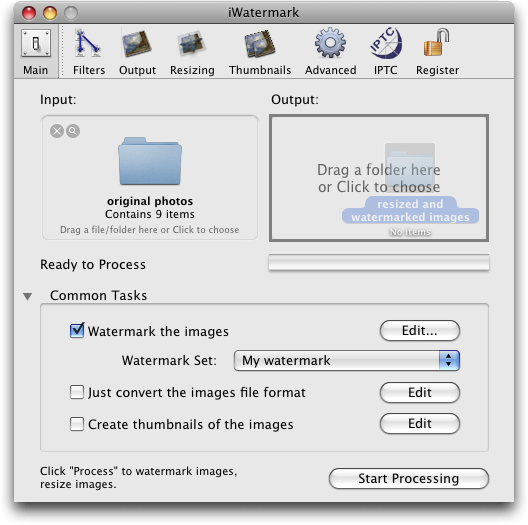
  Script Software's iWatermark is an application that adds a visible
  (as opposed to digital) watermark to images. While this task can be
  done in a traditional graphics application, iWatermark greatly
  speeds up the operation. The watermark design aspect is a breeze,
  and the interface is drag-and-drop aware, making it easy to work
  with entire batches of files.

<http://www.scriptsoftware.com/iwatermark/>
<http://www.tidbits.com/resources/2008-06/iWatermark-interface.png>


**Raison d'etre** -- A visible watermark is a clear statement that an
  image belongs to a person or organisation. As such, it is the first
  step in maintaining copyright. Of course, there is nothing to stop
  someone downloading an image and then editing out your watermark,
  and in itself that wouldn't be breaking any copyright laws.

  But should they then go on to sell that photo or a work based on it
  without obtaining your permission, then they have infringed your
  copyright and you may have grounds for legal action. Provided your
  statement of copyright was plainly asserted, they can't claim they
  were unaware of it. (For more information, see the U.S. and UK
  copyright pages.)

<http://www.copyright.gov/circs/circ1.html>
<http://www.ipo.gov.uk/copy.htm>

  This is where iWatermark comes in: it enables photographers and
  artists to add a textual or graphical watermark to an image quickly
  and easily, thus clearly asserting ownership of that image. But what
  makes iWatermark even more useful is that it also works well as a
  general purpose image prep tool that resizes, resamples, and
  reformats photos and artwork into versions better suited for use on
  Web pages.


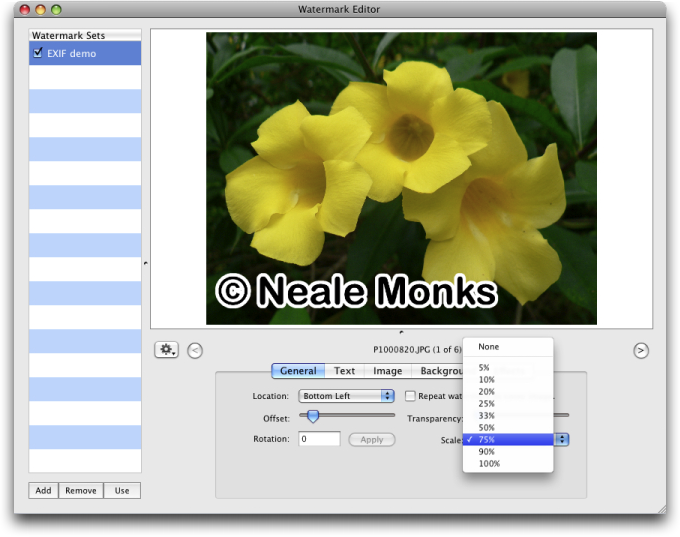
**Text-based Watermarks** -- You build watermarks in a Watermark
  Editor window. iWatermark can add one or both of two types of
  watermark, strings of text or user-selected graphics. You may enter
  text directly or drag it in from other files, though if text is
  copied in from a file with text formatting (like a word processor
  document) it retains its original formatting. This can be good or
  bad depending on the situation, but there's no question that
  iWatermark would benefit from a paste-without-formatting option. You
  can also add text via an Insert Special menu item, which lets you
  add data from the Address Book (like your name and email address)
  and EXIF and IPTC data from photos.

<http://www.tidbits.com/resources/2008-06/iWatermark-editor.png>

  Once you add the text, you can alter it in various ways, for example
  by moving it around the image, resizing it, or applying a graphical
  effect such as embossing.

  One annoying problem is the confusing way iWatermark scales text
  without altering its font size. You can of course format text in
  various ways by setting the font, style, and size, all in the Text
  tab of the Watermark Editor. But the Scale tool on the General tab
  further resizes text so that it spans a certain percentage of the
  image. It does this without changing the point size used for the
  text, so you end up with big but blurry text. Getting the text
  looking right requires fiddling about between the controls in the
  General and Text tabs.

  This is nonsense, and iWatermark should really scale the text up or
  down seamlessly, changing the point size as required to keep the
  watermark crisp and clear. In fact, a bit of playing about shows
  that the easiest thing is to set the type to the largest point size
  (288 points) and leave any resizing of the text watermark to the
  Scale tool.


**Graphical Watermarks** -- If you have a company logo or some other
  graphical device you want to use instead of a text caption,
  iWatermark can work with that, too. Drag the graphic you want to use
  as a logo to the Image panel to see the preview. You can then use
  the Scale tool to resize the graphic, and there's also a neat option
  to turn any white in the image transparent (useful for getting rid
  of backgrounds).

  You can combine graphical and textual watermarks on the same photo,
  but iWatermark locks them together to form one watermark rather than
  leaving them as two independent items. In other words, the location,
  scale, and other settings on the General tab apply to them as a
  group.


**Input Filtering** -- Although you can open a single file in
  iWatermark, the point of the program is to enable you to process a
  group of files quickly and automatically. For example, you can
  configure iWatermark to process only files of a certain format
  within a folder, or files that contain a certain string of
  characters in their names. This makes it easy to apply one sort of
  watermark to, say, GIF line art, and a different sort of watermark
  to JPEG photos. Or, by applying watermarks only to files above a
  certain size, you could watermark full-size photos while leaving
  scaled-down thumbnails untouched.

  Metadata searching is available too, though it sometimes seems to
  work inconsistently. For example, you can supposedly set iWatermark
  to process only files containing certain Spotlight comments, but in
  my testing iWatermark seemed to ignore this setting and processed
  all the files in the folder, not just those containing the relevant
  Spotlight comment.


**Output Options** -- An unexpected bonus to using iWatermark is that
  it goes well beyond adding watermarks; it also resizes and reformats
  images. For example, you can configure iWatermark to resize a batch
  of images to 640 by 480 pixels and then save them as JPEG files at
  80 percent quality. It can also change the file name, for example by
  adding a suffix such as "wtmk" that helps distinguish the
  watermarked graphic from the original.

  Note that iWatermark cannot export GIF files; it accepts GIF files
  for processing, but you must output them into one of the file
  formats that iWatermark does support.

  iWatermark can also produce thumbnails as separate files, a
  tremendously useful time saver for anyone who has to put together
  online galleries of images. Just as with the main batch of images
  produced, you can set the size of the thumbnails, the file names,
  and so on.

  Happily, you don't have to have all these different output options
  running simultaneously; you can toggle watermarking, file
  resizing/conversion, and thumbnails on and off as required for any
  particular task.

  Unfortunately, although you can configure as many watermarks as you
  want and apply them as required, iWatermark does not let you save
  complete workflows. So a Web designer working on different projects
  can easily apply different watermarks to different sets of images,
  but iWatermark's other functions must be set manually each time. I
  hope a future version will help users automate the entire image
  prepping process through saved workflows.


**Interface and Performance** -- The iWatermark interface is generally
  well-designed. For example, the File menu automatically links to
  your iPhoto albums, letting you work on them without having to open
  iPhoto itself. Your iPhoto albums appear as sub-menus, and by
  selecting them, all the photos in that album are added to the input
  pane of the interface window. Control-clicking the Input panel
  brings up a similar menu.

  Another great aspect of the application is its automatic backup
  feature: if you instruct iWatermark to overwrite a file (as opposed
  to creating a modified copy) it automatically makes a copy of the
  original file that it keeps in a time- and date-stamped folder in
  your account's Library folder.

  When it comes to processing files, iWatermark is sprightly and will
  doubtless prove to be a real time saver. For instance, I asked it to
  watermark, resize, and reformat to PNG an iPhoto album containing
  fifty JPEG photos, each about 600K in size. On my 1.83 GHz MacBook
  Pro, this took a mere 25 seconds.


**Close** -- Don't be too concerned about my minor gripes above. For a
  measly twenty bucks iWatermark can't be faulted; it does everything
  an image prep program needs to do with minimal fuss. Simply as a
  resizing and reformatting tool it would earn its keep; that it adds
  watermarks as well is icing on an already tasty cake.

  iWatermark 3.1.3 costs $20 and is an 8 MB download; a demo is
  available, as is a Windows version.


Apple Fails to Patch Critical Exploited DNS Flaw
-------------------------------------------------
  by Rich Mogull <[EMAIL PROTECTED]>, Glenn Fleishman <[EMAIL PROTECTED]>
  article link: <http://db.tidbits.com/article/9706>

  On 08-Jul-08, a massive security patch was released by dozens of
  vendors for a major vulnerability in DNS (Domain Name Service),
  discovered by security researcher Dan Kaminsky. DNS is one of the
  fundamental underpinnings of the Internet, translating domain names
  (like tidbits.com) into IP addresses (like 216.168.61.78). Because
  DNS is so core to the functioning of the Internet, this
  vulnerability is perhaps the most significant security problem to
  face the Internet in the last decade.

<http://www.kb.cert.org/vuls/id/800113>
<http://en.wikipedia.org/wiki/Domain_Name_System>

  All users who connect to Mac OS X-based servers for DNS lookups are
  at risk: Apple has not yet provided a patch, unlike dozens of other
  companies that make or distribute operating systems or DNS server
  software.

  Apple was clearly distracted by the largest set of launches in its
  history: the iPhone 3G, the iPhone 2.0 software, the
  .Mac-to-MobileMe transition, and the App Store. Nonetheless, their
  customers are now in danger and Apple needs to respond immediately.

  All companies that provide DNS service to their customers should
  have already updated their DNS servers. Many have not. You can
  determine whether your ISP is at risk by visiting Kaminsky's site
  and clicking the Check My DNS button. If the site says your DNS is
  at risk of being poisoned, contact your ISP or your company's IT
  department immediately.

<http://www.doxpara.com/>


**Poisoning the DNS Well** -- Kaminsky accidentally discovered a new
  technique attackers could use to compromise DNS servers, allowing
  ne'er-do-wells to convince servers to accept an incorrect IP address
  for a given domain name from a source other than the one that
  properly controls information for that particular domain. (This is
  called _cache poisoning_.) The attack doesn't affect the DNS server
  software - it doesn't compromise the software itself - but rather
  the attack changes the information the server stores, or caches, to
  provide answers about domain names that the server has retrieved
  from elsewhere.

  Thus, when you type www.tidbits.com into a Web browser's URL field,
  rather than your computer receiving back the correct IP address from
  its built-in DNS resolver - 216.168.61.78, in this case - an
  attacker would indirectly convince that resolver to believe the
  address was something else, like 172.31.0.16.

  Your browser would obligingly use that IP address to make a
  connection to a Web server while displaying www.tidbits.com in the
  address bar. That site could be - certainly would be - loaded with
  malware. This is a particular problem for Windows users, whose
  systems could be infected simply by visiting a site. With no active
  exploits for Mac OS X that currently result from visiting a Web
  page, Mac users are more likely to fall victim to social engineering
  after visiting a site and being told to re-enter a password or
  provide details that a trusted site doesn't normally ask for.

  DNS is distributed and can be recursive, meaning a server keeps
  working through a set of linked responses it gets from other DNS
  servers until it gets an authoritative answer. Your computer has a
  "stub" resolver, which knows to ask a full-blown DNS server for the
  name-to-number conversion. The full-blown DNS server is typically
  run by your ISP or the company you work for. That DNS server, in
  turn, asks root nameservers - run by a variety of organizations -
  where to find details about, say, .com.

  The root nameservers direct your ISP or company's DNS server to the
  server that has the lookups for that domain. This can go on and on
  for every dot-separated part in a domain name, but it typically
  follows this path: root server, top-level (such as .com) domain
  server, and corporate domain server.


**Weakening SSL/TLS, But Not Killing It** -- This attack does not
  directly disable secure Web connections, although it weakens the
  signals you rely on for trust, and requires that you be more alert.
  Secure Web connections use SSL/TLS (Secure Sockets Layer/Transport
  Layer Security), a mechanism that encrypts a connection and also
  relies on trust outside that connection to validate the connection.
  The digital certificates used as the basis of these connections
  require that a domain name match a particular IP address; but if
  your DNS has been poisoned, a bogus certificate becomes a much more
  serious risk.

  However, the outside trust element should save you. Certificates
  must be signed by third parties, known as certificate authorities,
  like Thawte or Comodo. These authorities are supposed to verify the
  identity of a party requesting a certificate before the authority
  signs their request. Authorities charge fees from tens to thousands
  of dollars depending on how much background checking and control
  over the certificate is asked for. Details about these authorities
  are pre-installed in browsers and operating systems completing the
  circle of trust: Your browser knows an authority's signature, which
  enables your system to validate the authority's approval of a Web's
  site certificate.

<http://en.wikipedia.org/wiki/Certificate_authority>

  If an attacker's fake site tries to present you with a certificate
  that alleges it's www.amazon.com, your browser will alert you that
  the certificate hasn't been signed or at least wasn't signed by a
  known certificate authority. That's always a reason to refuse a
  connection, unless you're connecting to a Web site run by a trusted
  party that's given you explicit information about the certificate
  they've chosen to use.


**A Coordinated Fix, Except for Apple** -- While cache poisoning has
  always been a problem for DNS, the technique Kaminsky discovered is
  faster and more effective than any previous known exploits.
  Kaminsky's flaw allows an attacker to overwrite existing DNS entries
  that a server has already cached - something never before possible.
  This vulnerability is a flaw with the protocol itself, and thus
  affects nearly every DNS implementation in use.

  After determining this flaw was legitimate and widespread, Kaminsky
  immediately contacted major vendors - operating system makers and
  DNS software developers - and other DNS experts who met secretly at
  a meeting hosted on the Microsoft campus in March 2008. In an
  unprecedented move, the vendors all agreed on a simultaneous release
  of fixes for their products, coordinated with the help of the United
  States Computer Emergency Response Team (US-CERT).

  To obfuscate the nature of the vulnerability, the companies all
  agreed to use a fix - port randomization - that didn't necessarily
  reveal the details of the flaw, thus slowing down the ability of bad
  guys to reverse engineer it and attack servers before organizations
  could patch. This lasted for 13 days, until the vulnerability was
  disclosed by a security researcher who accidentally published a
  draft blog post with all the details. By 24-Jul-08 exploit modules
  appeared in the popular Metasploit penetration testing tool,
  empowering any attacker capable of downloading the tool and using a
  web browser.

<http://www.metasploit.com/>

  (The brief explanation of the flaw is that by forcing a DNS server
  to look up certain domains by sending it requests, an attacker can
  take advantage of a predictable sequence of port numbers to send a
  massive number of fake answers to the DNS server. If just one of the
  fake answers gets through, the attacker "wins"; it's essentially a
  race in which the bad guy can have a million marathon runners and
  the good guy thinks they're off for a solo jog in the park. This can
  be accomplished in a couple of minutes with Metasploit. Randomizing
  the sequence of ports used in requests vastly increases the
  complexity of a bad guy winning. The general vulnerability of
  predictably used ports was understood in 2001 and built into the DNS
  server djbdns. The real answer to this problem is DNSSEC, which
  combines public-key cryptography with DNS, allowing only the
  legitimate domain owner to provide answers to DNS queries about its
  domain. DNSSEC has been bogged down for years, but a logjam broke in
  March 2008, and we're likely to see real use due to this basic DNS
  flaw being revealed.)

<http://cr.yp.to/djbdns.html>
<http://www.dnssec.net/>


**Apple Punts, Doesn't Patch Yet** -- Apple has yet to patch this
  vulnerability, which affects both the desktop version of Mac OS X
  and Mac OS X Server. While individual computers that look up DNS are
  vulnerable, servers are far more at risk due to the nature and scope
  of the attack.

  Apple uses the popular Internet Systems Consortium BIND DNS server
  which was one of the first tools patched, but Apple has yet to
  include the fixed version in Mac OS X Server, despite being notified
  of vulnerability details early in the process and being informed of
  the coordinated patch release date.

<http://www.isc.org/index.pl?/sw/bind/>

  All users of Mac OS X Server who use it for recursive DNS must
  immediately switch to an alternative or risk being compromised and
  traffic being redirected. Installing the above-mentioned BIND should
  be relatively trivial for anyone who can compile software at the
  command line. The Mac community could take this up if someone
  created a compiled version of BIND 9.0.5-P1 and distributed it for
  simpler installation.

  With active exploit code available in a common attack tool, it is
  imperative that Apple fix this vulnerability. Due to their
  involvement in the process and the ability of other vendors to fix
  their products in a timely fashion, it's hard to imagine any
  possible justification for Apple's tardy behavior.

  If you are unable to patch a server system with new code, you could
  reconfigure those servers to forward DNS requests to alternative
  platforms, such as BIND on Linux or Unix, or Microsoft servers,
  until Apple issues a patch. Ask your ISP or network provider for
  assistance.

  Although the desktop version of Mac OS X is also technically
  vulnerable, current attacks are directed at servers, so there's no
  need to panic.

  This is an extremely serious security issue and we hope Apple will
  act responsibly and address it immediately, despite their initial
  tardiness.

  [Author's note from Rich Mogull: I assisted Dan Kaminsky with the
  initial communications regarding the vulnerability and the
  coordinated release. Check out the initial executive summary.]

<http://securosis.com/2008/07/08/dan-kaminsky-discovers-fundamental-issue-in-dns-massive-multivendor-patch-released/>


TidBITS Watchlist: Notable Software Updates for 28-Jul-08
---------------------------------------------------------
  by Adam C. Engst <[EMAIL PROTECTED]>
  article link: <http://db.tidbits.com/article/9702>

* AirPort Extreme Update 2008-002 from Apple reportedly "improves the
  reliability of AirPort connections" on Intel-based Macs. It would be
  great if it would solve the problem my MacBook sometimes has with
  frequently dropping wireless connections despite strong signal
  strength; the last time I ran into that, connecting the power
  adapter instead of running on battery power solved the problem.
  (Free, 1.96 MB)

<http://www.apple.com/support/downloads/airportextremeupdate2008002.html>

* Several components of iLife '08 receive minor updates that Apple
  doesn't deign to describe in detail. iLife Support 8.3 (10 MB)
  updates system software components used by all the members of the
  iLife '08 suite, improving overall stability and addressing a number
  of other minor issues. iPhoto Update 7.1.4 (74 MB) adds new holiday
  greeting card and postcard themes, "addresses general compatibility
  issues, improves overall stability, and addresses a number of other
  minor issues." For iWeb 2.0.4 (35 MB) and iMovie 7.1.4 (38 MB), just
  replay that quoted clause again in your head. (Free update)

<http://www.apple.com/support/downloads/ilifesupport83.html>
<http://www.apple.com/support/downloads/iphoto714.html>
<http://www.apple.com/support/downloads/iweb204.html>
<http://www.apple.com/support/downloads/imovie714.html>

* Skype 2.7.0.330 from Skype Limited enhances the Internet telephony
  software with support for NAT-PMP and uPNP, presumably improving
  Skype's ability to work behind NAT gateways. The new version also
  fixes a number of bugs, including things like a freeze with more
  than 3,000 contacts, crashes when applying changes in the Edit
  Profile window, and chats losing their topics. (Free, 34.5 MB)

<http://www.skype.com/download/skype/macosx/>

* Keyboard Maestro 3.3 from Stairways Software adds a number of
  features to the rapidly developed macro utility. Foremost among them
  is a global status menu and the capability to trigger macros from
  the status menu, but this version also adds the capability to enable
  and disable individual actions within a macro for testing purposes,
  a Fast User Switch action, a Comment action that does nothing but
  help document a macro, and a preference to save and restore the
  clipboard history. Also new is the capability to cut, copy, paste,
  and duplicate macros, triggers, and actions, making it easier to
  make macros similar to those you've already created. ($36 new, free
  update, 6.3 MB)

<http://www.keyboardmaestro.com/>

* PDFpen 3.5 (and PDFpen Pro 3.5) from SmileOnMyMac updates the PDF
  editing and manipulation utility to support PDFs that follow newer
  specifications and non-standard PDFs, improves the Correct Text
  feature, and fixes numerous minor bugs. ($49.95/$94.95 new, free
  update for 3.x users, 5.3 MB)

<http://www.smileonmymac.com/PDFpen/>

* Typinator 3.1 from Ergonis Software brings to the auto-typing and
  text expansion utility improved compatibility with programs like
  Coda, VMware Fusion, Butler, Zend Studio, Lotus Notes, OpenOffice,
  NeoOffice and more. It also integrates the recently released HTML
  Snippet Set, offers a redesigned menu bar icon, provides an option
  to turn off the menu bar icon entirely to save space on the menu
  bar, and fixes a variety of minor bugs. (19 euros new, free update
  for copies purchased in the last 2 years, 1.8 MB)

<http://www.ergonis.com/products/typinator/>

* Default Folder X 4.0.7 from St. Clair Software is a minor
  compatibility update for the Open and Save dialog enhancer, fixing
  problems with Word 2008 and with the "Open in Terminal" and "Click
  to copy a filename" features. ($34.95 new, free update for purchases
  before 01-Jun-07 or $14.95 otherwise, 9.2 MB)

<http://www.stclairsoft.com/DefaultFolderX/>

* Firefox 3.0.1 from the Mozilla Foundation fixes several security
  problems, addresses stability issues, and fixes a problem that could
  miss printing parts of a page. Note that Firefox add-ons may need to
  be updated to work with 3.0.1, so if you rely on a particular
  add-on, it's worth checking its compatibility before updating
  Firefox itself. (Free, 17.2 MB)

<http://www.mozilla.com/en-US/firefox/>


Hot Topics in TidBITS Talk/28-Jul-08
------------------------------------
  by Jeff Carlson <[EMAIL PROTECTED]>
  article link: <http://db.tidbits.com/article/9711>

**iPhone 3G car accessories** -- Which accessories work with the
  iPhone 3G? Some items that worked with the previous iPhone don't
  function properly with the new model. (8 messages)

<http://emperor.tidbits.com/TidBITS/Talk/2101>


**MobileMe Fails to Work** -- Readers who are having trouble with
  MobileMe share their experiences. (3 messages)

<http://emperor.tidbits.com/TidBITS/Talk/2102>


**Vanity Spreads to Top-Level Domain Names** -- Don't expect to see a
  .engst domain name anytime soon. (3 messages)

<http://emperor.tidbits.com/TidBITS/Talk/2105>


**TidBITS Watchlist: Notable Software Updates for 28-Jul-08** -- The
  latest update to iWeb resolves a long-standing bug. (2 messages)

<http://emperor.tidbits.com/TidBITS/Talk/2106>


**iPhone sync problems** -- If you're seeing problems syncing
  contacts, one solution is to restore Address Book from a backup and
  try again. (4 messages)

<http://emperor.tidbits.com/TidBITS/Talk/2107>


**Configuration suggestions for 3 500 gig drives?** With 1.5 TB of
  storage on the way, a reader solicits suggestions for the best ways
  to set up the hard drives. (16 messages)

<http://emperor.tidbits.com/TidBITS/Talk/2108>


**Ideas for TCo Your iPhone update** -- As Ted Landau looks to update
  his Take Control of Your iPhone title, what areas of the new iPhone
  3G and iPhone 2.0 software are most important to include? (4
  messages)

<http://emperor.tidbits.com/TidBITS/Talk/2109>


**iTunes 7.7 Corrupts Accented Artist and Track Names** -- Readers
  share their experiences with this problem in iTunes 7.7. (5
  messages)

<http://emperor.tidbits.com/TidBITS/Talk/2110>


**Syncing cell phones with Macs** -- What options are available for
  synchronizing non-iPhone cell phones? (1 message)

<http://emperor.tidbits.com/TidBITS/Talk/2111>


**iPhone/Windows Password Management** -- It makes sense to have a
  secure copy of important passwords at the ready, but which programs
  are capable of offering that, especially under Windows? (1 message)

<http://emperor.tidbits.com/TidBITS/Talk/2113>


**Stolen Laptop** -- After a reader's MacBook Pro is stolen, he
  wonders whether his data is accessible to the thief, even with
  password-protection turned on. (4 messages)

<http://emperor.tidbits.com/TidBITS/Talk/2114>


$$

This is TidBITS, a free weekly technology newsletter providing timely
news, insightful analysis, and in-depth reviews to the Macintosh and
Internet communities. Feel free to forward to friends; better still,
please ask them to subscribe!

Non-profit, non-commercial publications and Web sites may reprint or
link to articles if full credit is given. Others please contact us. We
do not guarantee accuracy of articles. Caveat lector. Publication,
product, and company names may be registered trademarks of their
companies. TidBITS ISSN 1090-7017.

Copyright 2008 TidBITS: Reuse governed by Creative Commons license.

Contact us at:    <[EMAIL PROTECTED]>
TidBITS Web site: <http://www.tidbits.com/>
License terms:    <http://www.tidbits.com/terms/>
Full text search: <http://www.tidbits.com/search/>
Subscriptions:    <http://www.tidbits.com/about/list.html>
Account help:     <http://www.tidbits.com/about/account-help.html>


--
If you want to unsubscribe or change your address, use this link
http://emperor.tidbits.com/webx?unsub@@.3c557dc4!u=306a67f9