TidBITS#939/04-Aug-08
=====================
  Issue link: <http://db.tidbits.com/issue/939>
  Has Apple finally gotten too secretive for its own good? The company
  at last addressed the DNS security hole that remained open for
  months after the company was alerted to it, but its silence on the
  issue has damaged its reputation. And, despite the fix, Mac users
  may still be vulnerable to attack, as Glenn Fleishman details. There
  are other examples too: the lingering MobileMe mail problems have
  supposedly been resolved, but iTunes 7.7.1 was released with the
  barest of release notes (Adam manages to track down some of what was
  fixed). In other news this week, Matt Neuburg looks at how Panorama
  Enterprise provides an unusual but highly useful approach to sharing
  databases across the Internet, and Adam notes the releases of VMware
  Fusion 2 Beta 2 and The Missing Sync for Symbian, as well as the
  capability in Google Maps to display walking directions. In the
  TidBITS Watchlist, we note the appearance of Adobe Photoshop
  Lightroom 2, Aperture 2.1.1, and Lexmark Printer Driver 1.1.

Articles
    Five iTunes 7.7.1 Bug Fixes Detailed
    Apple Claims MobileMe Mail Fully Restored
    Apple Finally Fixes DNS Flaw and ARDAgent Vulnerability
    DNS Clients Have Small Vector of Risk after Patch
    Google Maps Adds Walking Directions
    VMware Fusion 2 Beta 2 Adds Significant Features
    Missing Sync for Symbian Offers Proximity Sync
    Panorama Enterprise Offers Internet Database Synchronization
    TidBITS Watchlist: Notable Software Updates for 04-Aug-08
    Hot Topics in TidBITS Talk/04-Aug-08


------------ This issue of TidBITS sponsored in part by: --------------

* READERS LIKE YOU! Support TidBITS with a contribution today!
  <http://www.tidbits.com/about/support/contributors.html>
  Special thanks this week to Norman Taylor, K. Robert Kramer,
  Brian D. Vesley, and Foo Chik Chuan for their generous support!

* Fetch Softworks: With Fetch 5.3, FTP and SFTP are simpler
  than ever. Use it on Mac OS X to upload, download, mirror,
  and manage your Web site, eBay images, and data sets.
  Download your free trial version! <http://fetchsoftworks.com/>

* WebCrossing Neighbors Creates Private Social Networks
  Create a complete social network with your company or group's
  own look. Scalable, extensible and extremely customizable.
  Take a guided tour today <http://www.webcrossing.com/tour>

* MARK/SPACE, INC: Take it with you! The Missing Sync makes
  it easy to synchronize contacts, calendars, notes, photos
  and more from your Mac to your BlackBerry, Palm OS, or
  Windows Mobile phone. <http://www.markspace.com/bits>

* VMware Fusion. The most seamless way to run Windows on your Mac.
  Backed by nearly a decade of proven virtualization technology.
  Try VMware Fusion today for free, or order online for only $79.
  Visit: <http://www.tidbits.com/about/support/vmware-fusion.html>

* Microsoft's MacBU: Supporting Mac users with Office 2008.
  Is your Office up-to-date? Make sure you're running the latest
  versions of Word, Excel, PowerPoint, and Entourage by choosing
  Check for Updates from the Help menu of any Office application!

---------- Help support TidBITS by supporting our sponsors ------------


Five iTunes 7.7.1 Bug Fixes Detailed
------------------------------------
  by Adam C. Engst <[EMAIL PROTECTED]>
  article link: <http://db.tidbits.com/article/9718>

  Apple has released iTunes 7.7.1 with criminally terse release notes
  saying that it includes "fixes to improve stability and
  performance." As a result, it's nearly impossible to figure out what
  has changed, although some trawling through Apple's discussion
  forums yielded additional information. Two of the bug fixes below
  were noted by an pseudonymous Apple employee, which gives them a
  certain imprimatur, but for the rest, the best we can do is to offer
  user reports that have only anecdotal support.

* A comment from Apple employee "iTunes Mike" states that iTunes 7.7.1
  fixes the bug that caused accented characters in artist and track
  names to be corrupted (see "iTunes 7.7 Corrupts Accented Artist and
  Track Names," 2008-07-24). That post also confirms that the bug
  affected only versions of Mac OS X prior to Leopard, and only MP3
  files (not AAC or Lossless).

<http://discussions.apple.com/message.jspa?messageID=7759172#7759172>
<http://db.tidbits.com/article/9705>

* Another post from iTunes Mike indicates that iTunes 7.7.1 should
  also fix a bug that prevented audio CDs from being ejected while
  iTunes was running.

<http://discussions.apple.com/message.jspa?messageID=7550414#7550414>

* Other users report that iTunes 7.7.1 appears to solve a problem that
  prevented attached iPods from being recognized quickly; some claimed
  that it was taking many minutes (reports ranged from 4 minutes to
  over 40 minutes) for iTunes to realize that an iPod was connected.

<http://discussions.apple.com/thread.jspa?messageID=7760703#7760703>

* At least some people are reporting that iPhone backups that were
  taking an extremely long time (many hours) are now faster, although
  it's unclear as yet if the problem has been solved entirely, or for
  all users.

<http://discussions.apple.com/thread.jspa?messageID=7760835#7760835>

* On the Windows side, iTunes 7.7.1 appears to fix a problem syncing
  information from Outlook with the iPhone.

<http://discussions.apple.com/thread.jspa?messageID=7760565#7760565>

  iTunes 7.7.1 is a 48 MB download available via Software Update or
  from the iTunes download page.

<http://www.apple.com/itunes/download/>


Apple Claims MobileMe Mail Fully Restored
-----------------------------------------
  by Glenn Fleishman <[EMAIL PROTECTED]>
  article link: <http://db.tidbits.com/article/9715>

  Apple's mysterious David G., apparently a member of the MobileMe
  product team (and possibly a relative of saxophonist Kenny G), tells
  us in a post last week that the 1 percent of MobileMe users stranded
  without access to archived mail since 18-Jul-08 - but with the
  ability to send and receive new mail since 25-Jul-08 - should all be
  back in action.

<http://www.apple.com/mobileme/status/>

  Mr. G. says that any remaining email problems should be unrelated to
  this issue. Apple established a chat line for remaining mail
  problems, but says it should only be used for these problems. Their
  regular chat line, which I used last week, has a 30-minute wait
  time.

<http://www.apple.com/support/mobileme/mailchat>

  I've critiqued Apple about the MobileMe launch fiasco a number of
  times in the last few weeks; how would I have handled it? I've been
  in situations with much smaller numbers of customers or clients
  where outages have occurred, and worked with firms that have gone
  through such outages (as a customer or client).

  1. MobileMe's launch should have been delayed. Steve Jobs clearly
  told the team it needed to be ready for the 11-Jul-08 launch; it was
  not. They probably knew this. No one said, "We need to delay
  MobileMe."

  2. MobileMe's launch should have been staged. First, iPhone 3G
  owners should have had access when signing up for new accounts. Then
  iPhone 3G and original iPhone owners with existing .Mac accounts or
  who wanted new accounts should have been given access. Then a slow
  transition for users who weren't interested in the sync changes
  could have happened over weeks.

  3. When the outage affecting 1 percent of users was discovered,
  Apple should have realized that the problem was likely to take
  longer than a few hours to resolve, and acknowledged the critical
  nature of email to people's businesses and personal lives.

  4. Apple should have immediately posted a page for affected users -
  and distributed information through Mac news sources - where users
  could enter a forwarding address to receive email during the outage.
  They should also have offered to set up clean new accounts on either
  MobileMe or even a competing service to handle email for the
  duration of the outage.

  5. Once the outage was over, Apple could have worked with their
  customers to merge their two separate archives of email messages,
  let people import old mail archives, or what have you. It wouldn't
  have been pretty, but it would have been better than a week without
  access to new email or outgoing email.

  Essentially, Apple waited a week to provide fresh, identically named
  accounts for those without email, restoring email from that missing
  week. Over the last week, they merged archived messages into those
  new accounts. They could have made that decision earlier and been
  seen as very responsive, saving thousands of people days of
  frustration.

  By refusing to acknowledge the problems in public for as long as
  they did, Apple has instead annoyed numerous customers (to put it
  mildly) and come off as arrogant and incompetent.


Apple Finally Fixes DNS Flaw and ARDAgent Vulnerability
-------------------------------------------------------
  by Glenn Fleishman <[EMAIL PROTECTED]>, Adam C. Engst <[EMAIL PROTECTED]>
  article link: <http://db.tidbits.com/article/9720>

  Twenty-four days after the rest of the industry mobilized to patch a
  serious flaw in the domain name system (DNS) protocol that's core to
  the functioning of the Internet, Apple has at long last released
  Security Update 2008-005, which includes its fix for the regular and
  server flavors of Mac OS X 10.4 Tiger and 10.5 Leopard. If 24 days
  doesn't sound like a long time, note that Apple was notified
  privately on 05-May-08, nearly 3 months ago, and this is for a
  vulnerability with significant exposure that had the potential to be
  disastrous for Apple's business and hosting customers, as amply
  described in an opinion piece for Macworld by Mac system
  administrator John Welch.

<http://support.apple.com/kb/HT2647>
<http://www.macworld.com/article/134793/2008/07/apple_dns.html>

  This update also repairs the ARDAgent flaw first reported 18-Jun-08
  that enables someone either with access to a computer as a regular
  user, or who could convince someone to download and run software
  containing a Trojan horse, to gain root privileges on the system.

  (For details on the DNS flaw and Apple's delayed response, see
  "Apple Fails to Patch Critical Exploited DNS Flaw," 2008-07-24. For
  more about how the ARDAgent vulnerability could be exploited, see
  "How to Protect Yourself from the New Mac OS X Trojans,"
  2008-06-25.)

<http://db.tidbits.com/article/9706>
<http://db.tidbits.com/article/9665>

  You can download Security Update 2008-005 via Software Update (the
  easiest approach), or as standalone downloads for all versions of
  Mac OS X 10.5 Leopard (65 MB), for the desktop versions of Mac OS X
  10.4.11 Tiger for PowerPC (88 MB) and Intel (143 MB), and for Mac OS
  X 10.4.11 Tiger Server for PowerPC (135 MB) and Intel (180 MB).
  While the Leopard update doesn't explicitly state it works with
  Leopard Server, we checked Software Update on TidBITS's Xserve
  running 10.5.4 Leopard Server and were prompted to install the
  same-sized and -named update as on a MacBook that uses Leopard's
  10.5.4 desktop release.

<http://www.apple.com/support/downloads/securityupdate2008005leopard.html>
<http://www.apple.com/support/downloads/securityupdate2008005ppc.html>
<http://www.apple.com/support/downloads/securityupdate2008005intel.html>
<http://www.apple.com/support/downloads/securityupdate2008005serverppc.html>
<http://www.apple.com/support/downloads/securityupdate2008005serverintel.html>


**DNS Flaw Fixed** -- Those of you operating DNS servers via any
  version of Tiger or Leopard should immediately back up your current
  systems, make sure they have a good point to revert to in the case
  of failure, and install this security update. The same goes (with
  fewer potential repercussions) for all other Tiger and Leopard
  users.

  Although we haven't tested this update in a production situation
  where we're answering DNS queries from servers all over the
  Internet, the update seems to have worked just fine on all the
  systems we've updated, including Leopard Server and a regular
  Leopard installation. Apple's security updates have a generally good
  track record in performing as expected and not introducing new
  complications.

  Tiger users will see Internet Security Consortium BIND (the DNS
  software Apple relies on) updated to 9.3.5-P1, and Leopard systems
  will move to 9.4.2-P1. The latest version of BIND software is
  9.5.0-P1, but Apple hasn't incorporated this update into Leopard.

  Owners of systems running Mac OS X 10.3 Panther or earlier releases
  are still vulnerable, whether the systems are acting as recursive
  DNS servers that handle lookups from queries on the same computer or
  others, or merely as clients. The flaw is likely to be exploited on
  servers, but clients are still vulnerable. Servers can, at least,
  turn off recursion and forward requests to patched DNS servers,
  dramatically reducing the current risk profile. We'll write more
  about this as we understand the scope of the concern for ordinary
  users of Panther and earlier systems. While there may not be many
  such people - The Omni Group's operating system statistics show 57
  percent of their users on Tiger, 42 percent on Leopard, and a
  vanishingly small 0.3 percent using other versions of Mac OS X - the
  last thing the Mac community needs is a small group of older systems
  being used as a springboard for new types of malware.

<http://update.omnigroup.com/>


**ARDAgent and Other Flaws Fixed** -- Security Update 2008-005 repairs
  a number of other serious-sounding flaws in Tiger and Leopard that
  don't appear to have been exploited yet. As noted earlier, the
  update closes a hole that allowed the Apple Remote Desktop (ARD)
  daemon software, even when not running, to be used as a conduit to
  run a script that would allow a local user or malicious software
  installed by a local user to gain root access to a system.

  The fix for ARDAgent (and similar programs) involves a change in the
  Open Scripting Architecture that prevents programs with system-level
  privileges from loading scripting additions, thus stopping attackers
  from using such software as a wedge for gaining system control.

  The update also fixes a Disk Utility error that happens when you use
  Repair Permissions in 10.4.11. The terminal-based text editor emacs
  would be granted root privileges after permissions were repaired.
  The fix restores the correct controls within Disk Utility, but Apple
  doesn't state whether you should re-run the repair operation. We
  imagine you should, if you have other local users on a system that's
  running 10.4.11.

  Also noteworthy is that Security Update 2008-005 installs PHP
  version 5.2.6 to address security flaws in the 5.2.5 release that
  was previously available in Leopard. PHP is widely used to power Web
  sites. Other potentially concerning but less-known problems were
  also fixed.


**Serious Reputation Hit** -- As usual, we'll never quibble with Apple
  releasing a security update, particularly one that fixes such
  serious vulnerabilities. But put bluntly, Apple blew it on this one
  - this update should have been released on 08-Jul-08 when the rest
  of the industry released their patches. Yes, Apple was busy with the
  iPhone 3G, iPhone software 2.0, and App Store launches, along with
  the .Mac-to-MobileMe transition (which itself turned into a
  debacle). It doesn't matter - Apple had plenty of time and all they
  had to do was package up and perform normal stress testing of new
  versions of BIND. The BIND installation shows a creation date of
  25-Jul-08, meaning that Apple didn't finalize its update for testing
  until just a week ago.

  Trust takes time to acquire, but it can be lost quickly. Apple has
  made much of Mac OS X's security and, after a slightly rocky initial
  start with the earliest versions of Mac OS X, has been doing a
  generally good job of responding in a reasonably timely fashion to
  security threats. But to delay the release of the fix for such an
  important vulnerability was simply negligent, and it both infuriated
  Macintosh system administrators and damaged Apple's reputation in
  the enterprise market.


DNS Clients Have Small Vector of Risk after Patch
-------------------------------------------------
  by Glenn Fleishman <[EMAIL PROTECTED]>
  article link: <http://db.tidbits.com/article/9721>

  The SANS Institute installed and tested out Apple's fix for the
  underlying flaw in the domain name system (DNS) protocol, and found
  that a patched copy of Mac OS X 10.5 Leopard (the desktop version,
  _not_ Leopard Server) still suffers from the risky technique that
  makes DNS vulnerable to exploitation.

<http://db.tidbits.com/article/9720>
<http://isc.sans.org/diary.html?storyid=4810>

  This exploitation, so far, seems _extremely unlikely_, but we won't
  know how unlikely until security researcher Dan Kaminsky, the
  discoverer of this flaw, provides full disclosure on 06-Aug-08 in
  his Black Hat conference talk, "Black Ops 2008: Its (sic) the End of
  the Cache as We Know It."

<http://www.blackhat.com/html/bh-usa-08/bh-usa-08-schedule.html>

  As Rich Mogull and I noted in "Apple Fails to Patch Critical
  Exploited DNS Flaw" (2008-07-24), servers are at a high risk from
  this DNS vulnerability. The flaw allows an attacker to send tens of
  thousands of fake responses for a DNS query to a server, which then
  _poisons_ the server's DNS entries if the attacker matches the right
  pattern with their forged information before the legitimate response
  arrives from the DNS server for the domain that's being queried.

<http://db.tidbits.com/article/9706>

  However, computers used by individuals without DNS server software
  in operation are also vulnerable to this flaw in DNS; we just don't
  know yet quite how vulnerable. With servers rapidly being patched
  worldwide, it's likely that the low-hanging fruit has largely
  disappeared, and attacks would then turn to clients - if clients are
  readily exploitable, too. Clients use _stub resolvers_, which
  forward requests for DNS answers to a full-blown, or _recursive_,
  DNS server run by their company, ISP, network provider, or
  co-location facility.

  These clients pass their requests along, and it seems unlikely that
  they could be attacked directly unless an attacker had a computer on
  the same local network segment as the exposed system. In that case,
  the attacker would have a panoply of other network information
  poison available, and could disrupt DNS in a more efficient manner.

  The DNS flaw relies on predictability in how ports are assigned to
  outbound requests for domain name lookups in a DNS query. An
  attacker forces a DNS server to look up a domain using a DNS server
  the attacker controls, and from that obtains the current port number
  being used for requests. If the ports are sequential - each query
  increments by one the port number used for each subsequent request -
  then the attacker starts sending forged requests using ports
  numbered just above the one it sniffed.

  This is part of the question about client vulnerability: it's very
  hard to force a client to look up an evil domain to prime the pump
  because clients don't answer DNS queries to begin with, and
  typically aren't running mail servers which can be gamed when an
  attacker sends incoming email with an evil domain in the return
  address.

  By increasing entropy - choosing a random port for each request - a
  patched DNS server prevents attackers from producing enough packets
  quickly enough to win the race with the legitimate DNS server, such
  that they cannot - statistically speaking - poison the DNS cache.
  (This is a _patch_, not a _fix_, actually; DNS itself must be
  overhauled to remove the fundamental weakness.)

  I checked out my updated Leopard desktop system, and, sure enough, I
  saw precisely what SANS reported: sequential UDP ports returned in
  response to outbound requests, regardless of what this entails.

  If you'd like to duplicate the SANS experiment, follow these steps:

  1. Launch Applications > Utilities > Terminal.

  2. Type the following, entering your administrative password when
  prompted.

    sudo tcpdump | grep domain

  3. Open another Terminal window, and in it, type the following,
  press Return, and then press up arrow and Return a few more times to
  enter the command repeatedly:

    dig tidbits.com

  4. In the window with tcpdump running, you should see a series of
  lines that look like the following.

    15:06:53.900835 IP 192.168.1.16.49229 > yourDNSserver.com.domain: 5228+
PTR? 16.1.168.192.in-addr.arpa. (43)
    15:06:53.947838 IP 192.168.1.16.49230 > yourDNSserver.com.domain: 48400+
PTR? 11.1.168.192.in-addr.arpa. (43)
    15:06:55.003628 IP 192.168.1.16.49231 > yourDNSserver.com.domain: 15730+
PTR? 7.34.232.205.in-addr.arpa. (43)

  5. Press Control-C (not Command-C) to stop tcpdump from running.

  (If you don't see any results in step 4, you need to specify the
  network adapter with the tcpdump command. You can try en1, en2, en3,
  and so forth as in the following command.)

    sudo tcpdump -i en1 | grep domain

  In the example above, you'll notice 49229, 49230, and 49231 after
  "192.168.1.16". Those are the port numbers used for each request,
  and the fact that they're sequential shows that Leopard is still
  vulnerable as a DNS client.

  We're not back where we started, because clients are enormously
  harder to attack. But it's still a hole that needs to be filled. We
  just won't know how deep a hole until next week.


Google Maps Adds Walking Directions
------------------------------------
  by Adam C. Engst <[EMAIL PROTECTED]>
  article link: <http://db.tidbits.com/article/9713>

  Though relatively late to the mapping game, Google Maps has become
  one of the top sites for viewing maps, getting driving directions,
  and more. Now the Google geeks have added walking directions to
  Google Maps, eliminating the logic that routes cars the correct way
  down one-way streets and taking into account pedestrian-only
  pathways when possible.

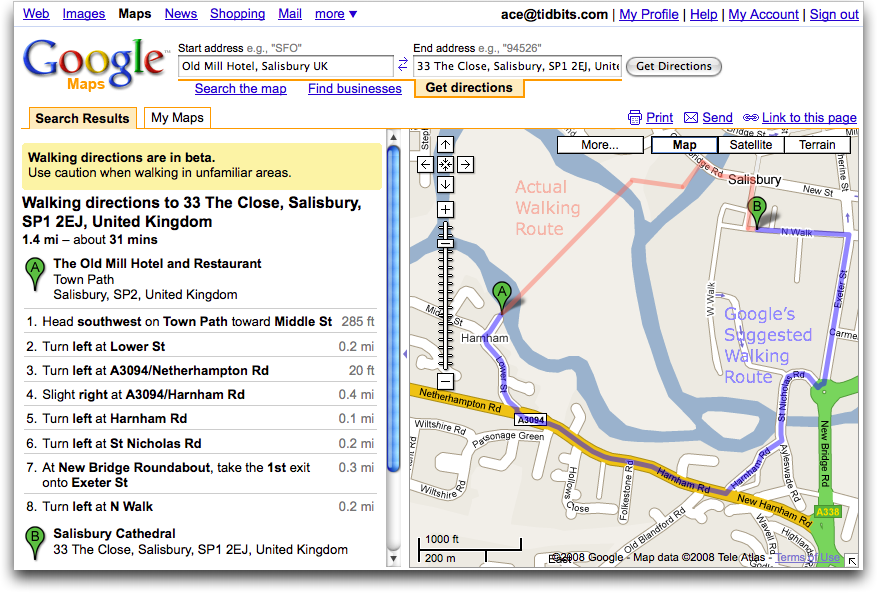
  Since we were just travelling in England, I asked for walking
  directions from the Old Mill Hotel (built in about 1500, where we
  stayed for a night in Salisbury) to the Salisbury Cathedral. When we
  were there, Google Maps had outlined a 1.4 mile walk that seemed
  somewhat excessive, and indeed, the nice people at the hotel pointed
  us to the Town Path, a pleasant little walkway across the water
  meadows that connects to the rest of the city. Alas, even Google's
  new walking directions knew nothing of the Town Path, and suggested
  a much longer route along city streets. Compare the red actual
  walking route to Google's suggested route in the screenshot.

<http://www.tidbits.com/resources/2008-07/Google-Maps-walking-directions.png>

  Similarly, when I asked Google Maps for directions from the hotel we
  stayed at in Portsmouth to the Portsmouth Historic Dockyards where
  we saw HMS Victory, HMS Warrior, and the Mary Rose, Google stuck to
  roads, ignoring Portsmouth's Millennium Promenade, which provides a
  far more enjoyable stroll along the shore.

  Google is aware that there are many pedestrian walkways that they
  don't know about, and they're working on ways of collecting new data
  about them and soliciting feedback from those with their feet on the
  ground about the best routes. Of course, I hope that Google
  acknowledges that the "best" route isn't always the most efficient;
  walking along the Millennium Promenade in Portsmouth very well may
  not have been the fastest way to our destination, but it was well
  worth an extra 5 or 10 minutes for the ocean views, and to avoid car
  fumes, intersections, and worrying about whether our 9-year-old was
  paying sufficient attention to which direction the cars would be
  coming whenever we crossed a road.

<http://google-latlong.blogspot.com/2008/07/pound-pavement.html>


VMware Fusion 2 Beta 2 Adds Significant Features
------------------------------------------------
  by Adam C. Engst <[EMAIL PROTECTED]>
  article link: <http://db.tidbits.com/article/9719>

  Upping the ante in the ongoing virtualization competition with
  Parallels, VMware has released the second public beta of VMware
  Fusion 2. The beta, available for free download, adds features to
  the Unity Mac-Windows integration technology, virtual machine
  snapshots to protect against problems, enhanced video capabilities
  and performance, and more. You can read more about it and view a
  demo video on VMware's Team Fusion blog.

<http://www.vmware.com/communities/content/beta/fusion/fusion2_beta2.html>
<http://blogs.vmware.com/teamfusion/2008/07/safer-stronger.html>

  The most obvious changes in VMware Fusion 2 Beta 2 appear with Unity
  2.0, which now enables application sharing between the Mac and
  Windows, thus letting you launch any Mac file with a Windows
  application. Unity 2.0 also goes beyond simple folder sharing by
  mirroring key folders between the two environments, such that
  Windows uses Mac OS X's Desktop, Documents, Music, and Pictures
  folders as the Desktop, My Documents, My Music, and My Pictures
  folders, respectively. Other Unity 2.0 improvements include custom
  keyboard and mouse mapping between the two environments, better
  reliability with shared folders, and improved copy and paste that
  can handle up to 4 MB of data, including styled text. Additional
  usability improvements include support for Leopard's Quick Look,
  glowing icons to indicate activity, better keyboard compatibility
  with Quicken and Google Earth, and better integration with Boot
  Camp's support for 64-bit Windows Vista.

  Since many Windows virtual machines are used for testing, VMware
  added the capability to take, save, and manage multiple snapshots,
  making it easier to restore a virtual machine to a pre-damaged
  state. Plus, Fusion 2 can now back up virtual machines automatically
  at specified intervals with AutoProtect snapshots.

  Video support has been improved, with support for 1080p high
  definition video in Windows XP and Vista, better 3D support, and the
  capability to switch in and out of full screen view while playing
  games.

  Now that Apple has eased the licensing restrictions on Mac OS X
  Server (see "Apple to Allow Virtualization of Leopard," 2007-10-31),
  you can create a virtual machine containing Mac OS X Server 10.5.
  The beta also includes support for Ubuntu 8.04 Hardy Heron, provides
  Unity view in Linux, and offers a Linux Easy Install that can
  install VMware Tools for a number of popular Linux distributions.
  You can also now resize virtual disks. Finally, this public beta
  provides experimental support for up to 4 virtual CPUs in a virtual
  machine and offers a command-line interface for scripting VMware
  Fusion.

<http://db.tidbits.com/article/9277>

  Keep in mind that this is beta software and should not be used for
  mission-critical tasks. When Fusion 2 is finally released, it will
  be a free downloadable upgrade for all Fusion 1.x users.


Missing Sync for Symbian Offers Proximity Sync
----------------------------------------------
  by Adam C. Engst <[EMAIL PROTECTED]>
  article link: <http://db.tidbits.com/article/9716>

  Mark/Space has made a name for themselves by providing tools for
  synchronizing data between the Mac and a wide variety of mobile
  devices. Their latest is the $39.95 The Missing Sync for Symbian,
  the smartphone operating system used extensively by Nokia, and less
  so by Sony Ericsson, Motorola, and Samsung. Symbian was recently
  acquired by Nokia (see "Symbian Smartphone Platform Goes Free,
  Partly Open Source," 2008-06-24).

<http://www.markspace.com/products/symbian/ms-overview-mac.php>
<http://db.tidbits.com/article/9666>

  The Missing Sync for Symbian, like other versions of The Missing
  Sync, enables users to synchronize contacts, calendars, and tasks
  with Apple's Address Book and iCal, and with Sync Services-savvy
  applications such as Microsoft Entourage and Market Circle's
  Daylite. It can also synchronize music, photos, and videos in both
  directions, making it possible to upload new photos or videos from
  the phone into iPhoto, and to download photos from iPhoto into the
  phone. You can even synchronize documents such that you can view and
  edit them with compatible handheld applications. The Missing Sync
  for Symbian also lets you archive text messages and call logs (on
  only Nokia smartphones) to the Mac for searching or for billing
  purposes.

  But where The Missing Sync for Symbian stands out from other
  versions of The Missing Sync, and from Apple's iPhone, is with its
  new Proximity Sync technology. Instead of connecting your phone to
  your Mac via USB, Proximity Sync enables the phone to sync data
  automatically via Bluetooth whenever it comes within roughly 30 feet
  of your Mac. That's certifiably clever, and if a phone could add
  wireless inductive charging, we could be rid of all these stupid
  cables for power and communication with our mobile devices.

<http://www.markspace.com/products/symbian/ms-proximity-sync-mac.php>
<http://en.wikipedia.org/wiki/Inductive_charging>

  Should the iPhone add proximity syncing? Purely from a technology
  standpoint, the answer is yes - it's a cool feature and other phones
  have been able to sync via Bluetooth for some time. Joe Kissell
  tells me that he has even used proximity as a trigger with the
  ProximitySync action suite for the Salling Clicker remote-control
  software. But Bluetooth doesn't make nearly as much sense for iPhone
  syncing as it might for other phones. The quantity of data being
  synced is the main issue, given that the iPhone backs itself up on
  every sync and will often be synchronizing hefty podcasts and video
  files. At best, Bluetooth 2.0+EDR offers 3 Mbps of throughput, which
  is peanuts compared with USB 2.0's 480 Mbps, so syncs could take
  hours instead of minutes. Also, from a practical standpoint, the
  battery life on the iPhone is sufficiently short that it will need
  to be plugged in every day, making Apple's approach of combining
  recharging and synchronization an easy choice.

<http://www.braddolman.com/proximitysync/ProximitySync.html>
<http://www.salling.com/Clicker/mac/>


Panorama Enterprise Offers Internet Database Synchronization
------------------------------------------------------------
  by Matt Neuburg <[EMAIL PROTECTED]>
  article link: <http://db.tidbits.com/article/9717>

  ProVUE Panorama is a remarkable database application that we've been
  following in TidBITS for over 15 years. You may already know from my
  in-depth description (in "Seeing the Light with Panorama",
  2001-11-19) that Panorama keeps all its data loaded into memory, so
  searches and other data manipulations are fast (because RAM access
  is fast) and safe (because nothing changes on disk unless you
  explicitly save). Also, Panorama lets you create fancy windows for
  accessing data, using text fields and buttons and scrolling lists
  and menus and so on - indeed, with its massive built-in programming
  language, Panorama is no less than a database software construction
  kit, reminiscent of HyperCard or REALbasic - and yet at the same
  time, Panorama remains easy to use because you can always just view
  your data in an Excel-like grid.

<http://db.tidbits.com/article/6641>

  In other past articles, TidBITS publisher Adam Engst has told how
  Panorama became his database of choice for managing Take Control
  financials (see "When You Need a Panoramic View", 2005-03-14), and
  has described an interesting ad hoc use of Panorama (see "An Unusual
  Use for Panorama", 2005-04-11). Indeed, "ad hoc" is one of Adam's
  favorite phrases to describe Panorama. You don't have to plan out
  your database's scheme in advance. There's always your data in that
  grid, so you can always just grow the data and use the grid, add
  another database with another grid and hook them together, and worry
  later about any specialized ways of accessing or manipulating that
  data using windows and the programming language. Just this morning,
  in fact, I fired up Twitterrific and there was Adam saying: "Phew -
  finished [Take Control] royalties finally! Had to tweak databases
  around for resellers and shared editor percentages. Getting
  complicated... But I love working in Panorama for this sort of
  thing, since it's easy to create new databases and enhance them
  slowly as I need more stuff." In short, Panorama keeps us going, in
  more than one sense: we rely on it, but also it encourages use.

<http://db.tidbits.com/article/8018>
<http://db.tidbits.com/article/8058>
<http://db.tidbits.com/article/9228>

  This notice is to report that with its latest version, 5.5.1,
  Panorama has broken through into an entirely new world, called
  Panorama Enterprise. After years of development, and supported by
  lots of user beta testing, Panorama now operates over a network. I
  haven't actually tried this yet, but after surveying the
  documentation and talking with developer Jim Rea, here's how I
  understand it. You have a Panorama database, and multiple copies of
  Panorama. One copy of Panorama sits on a network, either locally
  where it can be accessed through Bonjour, or remotely where it can
  be accessed through a static IP address, and is designated the
  server - meaning that it is the keeper of the master copy of the
  database. Other copies of Panorama on other machines also have a
  copy of the database, and let the master copy know when they make
  changes.

  That's a somewhat unusual architecture for a database - and therein
  lies its brilliance. Most client-server databases have just one copy
  of the database, the master copy. It sits off remotely on some
  computer, and when you want to see the data, or search it, or change
  it, you talk to the remote computer. You are, in effect, merely
  using your local computer as a dumb terminal for the remote
  computer; the remote computer is where all the work actually takes
  place. Not so with Panorama. Panorama is more like... well, it's
  more like the Subversion version control software, which we use here
  at TidBITS for cooperative editing of articles. Remotely, there's a
  master copy of the database, being maintained in memory so it's
  fast; and meanwhile on your local computer there's a local copy of
  the database, also being maintained in memory so it's fast too. To
  search the database, you just search your local copy, which is as
  fast as it gets. At the same time, your local copy is always up to
  date, because it constantly hears about any changes that are made to
  the master copy.

<http://subversion.tigris.org/>

  And how are changes communicated to the master copy? Well, if user A
  starts editing a piece of data in his local copy of the database,
  the master copy hears about this and "locks" that piece of data
  momentarily so that user B will be warned off if he tries to edit
  the very same piece of data in _his_ local copy of the database;
  when user A is done editing, the change is copied up to the master
  copy, and the lock is taken down. (Again, this is like Subversion -
  at least, it's like the way we at TidBITS use Subversion.) But does
  this mean that user A can't edit the database unless he's connected
  to the network? Typically, yes; but if he really wants to, user A
  can edit his copy offline, and when he comes back online, his
  changes will be synchronized up to the master copy. (Of course, if
  user B has meanwhile changed the same data in the master copy,
  there's a conflict; Panorama will inform user A of this, and can let
  him reconcile the problem by hand. Boy, this really does remind me
  of Subversion!)

  However, a Panorama database consists of more than just data: it
  also has "forms" (windows where the user can view and edit data
  through a graphical user interface) and code (e.g., what happens
  when the user presses a certain button in a certain form window). We
  don't want it to be necessary to design and freeze all of that ahead
  of time; rather, the database should be free to evolve and be
  developed over time in the ad hoc manner favored by Adam. And that's
  just what happens. The Panorama programmer develops and tests the
  new functionality on his own copy of the database and then, when
  everything is ready, he instructs his copy to mirror itself up to
  the server. Database sharing users who connect to the server after
  that point then receive a new copy of the database with all the new
  functionality. Obviously that takes more time than just sending
  individual cells of data back and forth, but it's likely to be a far
  rarer occurrence, and an occasional automatic download of this type
  is a small price to pay for being able to inherit the database's
  yummy new functionality.

  Okay, so Panorama's server-client architecture lets a database be
  distributed among multiple Panorama users. And the master copy of
  Panorama works over the Internet by sitting behind a Web server
  (Apache, included in Mac OS X). So now you're probably thinking to
  yourself: "Hey! Panorama should be able to do more than just share a
  database; it should be able to serve Web pages, too." Well, it can!
  Thus, instead of coming along with another copy of Panorama, someone
  can come along with nothing but a Web browser, and can potentially
  view and edit data in the master copy of the database. Of course,
  it's up to you to program into the database the rules for whether
  and how it should respond to Web browser requests. In other words
  (drum roll, please), Panorama is now not only a software
  construction kit, it's also a Web application construction kit.

  If this sounds exciting to you, as well it should, your next step
  should be to head for ProVUE's newly revamped Web site to learn
  more. Check out the page of quotes from businesses that have been
  beta testers during the development of the server-client
  ("Enterprise") Panorama architecture - including the tale of how
  Panorama was used to manage the visual effects for the 2007 movie
  "300." The best way to become familiar with what Panorama is and to
  start imagining how you might use it is to watch the screencasts;
  then download the whole thing and peruse the extensive and
  gorgeously rewritten documentation. The download, by the way, is a
  free 45-day trial, extended to 101 days if you use coupon code
  TIDBITS8722. The trial works for both Panorama and a 2-user version
  of Panorama Enterprise with Web publishing capabilities.

<http://provue.com/>
<http://provue.com/Panorama/reviews/enterprise/>
<http://provue.com/Enterprise/300/>
<http://provue.com/Screencasts/>
<http://provue.com/Downloads/>

  Panorama requires Mac OS X 10.4 Tiger or later. Pricing can be a bit
  complicated, as it often is with powerful multi-user databases, but
  let's see if I can summarize coherently.

  The bottom-of-the-line product is called Panorama Direct; it can
  search and manipulate and edit and add data in a Panorama database,
  but it has no authoring capabilities - you can't use it to write
  Panorama code or create window-based forms for viewing the data
  through a graphical user interface. It costs $129.95. For authoring
  capabilities, you need a copy of full-fledged Panorama itself, which
  costs $299. So you may imagine that in some small company you might
  have one copy of full-fledged Panorama, for your database
  programmer, and everyone else gets a copy of Panorama Direct.

  For distributed database sharing, you need a server copy of
  Panorama. Pricing here is governed by how many copies of Panorama
  can be connected to the server _simultaneously_. For example, a
  server that lets up to three copies of Panorama connect to it
  simultaneously is $399; then there's a six-copy server, and a
  twelve-copy server, all the way up to a server that lets an
  unlimited number of copies of Panorama connect to it simultaneously,
  which is $1,999. It's important to stress here that Panorama Direct
  can be a database sharing client! So, again, our small company might
  get by with a 3-connection server, a single copy of full-fledged
  Panorama for development, and a bunch of copies of Panorama Direct;
  the worst that can happen is that while three Panorama Direct users
  are using a shared database, a fourth might try to connect to the
  server and be turned away temporarily.

  What if you want your Panorama server to serve Web pages? That's
  $899, and includes the ability to share a database with _one_ user
  simultaneously (essential, since otherwise the data and programming
  could not be modified on the server side). If you combine this
  ability with database sharing, you start to get some discounting,
  plus there are various volume discounts for multiple copies of
  Panorama. All of this may sound pricey if you haven't been paying
  attention to the cost of commercial database sharing software, but
  it turns out to be considerably cheaper than parallel functionality
  for, say, FileMaker or 4D.

<http://www.filemaker.com/>
<http://www.4d.com/>


TidBITS Watchlist: Notable Software Updates for 04-Aug-08
---------------------------------------------------------
  by TidBITS Staff <[EMAIL PROTECTED]>
  article link: <http://db.tidbits.com/article/9712>

* Adobe Photoshop Lightroom 2.0 introduces a number of welcome new
  features to Adobe's professional photo management application. Chief
  among them are 64-bit processing support and a new local adjustment
  brush, which enables you to apply edits selectively instead of to an
  entire image. Other improvements include support for multiple
  monitors and third-party editing plug-ins, improved sharpening when
  outputting images, and more. A particularly intriguing feature is
  automatic suggestion of keywords based on other keywords to make
  tagging images easier. ($299 new, $99 upgrade, 33.6 MB)

<http://www.adobe.com/products/photoshoplightroom/>

* Aperture 2.1.1 from Apple reinforces the company's secret plan to
  make journalists stop covering its software updates by providing no
  meaningful information about them. The update "supports general
  compatibility issues, improves overall stability, and addresses a
  number of other minor issues," according to Apple. Fortunately, a
  little more information is available by choosing Late Breaking News
  from Aperture's Help menu, or simply viewing the Late Breaking News
  PDF. That document reveals the 2.1.1 update as providing MobileMe
  compatibility and lists 16 areas of the program that have been
  affected (but not details on what's changed), including
  auto-stacking, preview generation, the Dodge & Burn plug-in, and
  others. Aperture 2.1.1 is available via Software Update or as a
  standalone download. (Free, 48 MB)

<http://www.apple.com/support/downloads/aperture211.html>
<http://manuals.info.apple.com/en_US/Aperture_2.0_lbn_z.pdf>

* Lexmark Printer Driver 1.1 from Apple includes the latest drivers
  for Lexmark printers. As usual, Apple isn't saying whether there are
  changes to existing drivers or just drivers for new Lexmark printer
  models. (Free, 72 MB)

<http://www.apple.com/support/downloads/lexmarkprinterdriver11.html>


Hot Topics in TidBITS Talk/04-Aug-08
------------------------------------
  by Jeff Carlson <[EMAIL PROTECTED]>
  article link: <http://db.tidbits.com/article/9722>

**Finder problem** -- The Finder won't honor the preference to open
  new folders in one window (instead of in new windows). (3 messages)

<http://emperor.tidbits.com/TidBITS/Talk/2115>


**MobileMe Status Page Promises Updates, But Tone Rings Flat** -- Is
  me.com being run by a company outside Apple? (2 messages)

<http://emperor.tidbits.com/TidBITS/Talk/2116>


**AppleTV vs. Tivo?** In an effort to cut costs, a reader is paring
  his expensive cable television and Internet services. (7 messages)

<http://emperor.tidbits.com/TidBITS/Talk/2117>


**Extracting Images from PDFs** -- Several options are available for
  pulling images out of PDF files. (5 messages)

<http://emperor.tidbits.com/TidBITS/Talk/2118>


**Secure Your DNS Since Apple Hasn't** -- Even if your Mac is safely
  updated against the latest DNS poisoning vulnerability, a large
  number of other providers have yet to patch the problem. (2
  messages)

<http://emperor.tidbits.com/TidBITS/Talk/2119>


**iTunes 7.7.1** -- The recent iTunes update still seems to have
  problems with iPhone syncing and handling iPhone applications. (2
  messages)

<http://emperor.tidbits.com/TidBITS/Talk/2120>


**Fixes for DNS Flaw, ARDAgent Exploit Released by Apple** -- Readers
  note the various security fixes included in Security Update
  2008-005. (3 messages)

<http://emperor.tidbits.com/TidBITS/Talk/2122>


**iPhone Google map problems** -- The Maps program on the iPhone
  appears to be delivering different map information than Google Maps
  on the Web. (4 messages)

<http://emperor.tidbits.com/TidBITS/Talk/2123>


**Upgrading Methods** -- Some people believe that performing a direct
  upgrade to Leopard will cause problems, but is that actually the
  case? (5 messages)

<http://emperor.tidbits.com/TidBITS/Talk/2125>


**Using Time Machine Across Network** -- Attempting to back up a Mac
  across the network leads to problems with multiple user accounts on
  two machines. (3 messages)

<http://emperor.tidbits.com/TidBITS/Talk/2126>


$$

This is TidBITS, a free weekly technology newsletter providing timely
news, insightful analysis, and in-depth reviews to the Macintosh and
Internet communities. Feel free to forward to friends; better still,
please ask them to subscribe!

Non-profit, non-commercial publications and Web sites may reprint or
link to articles if full credit is given. Others please contact us. We
do not guarantee accuracy of articles. Caveat lector. Publication,
product, and company names may be registered trademarks of their
companies. TidBITS ISSN 1090-7017.

Copyright 2008 TidBITS: Reuse governed by Creative Commons license.

Contact us at:    <[EMAIL PROTECTED]>
TidBITS Web site: <http://www.tidbits.com/>
License terms:    <http://www.tidbits.com/terms/>
Full text search: <http://www.tidbits.com/search/>
Subscriptions:    <http://www.tidbits.com/about/list.html>
Account help:     <http://www.tidbits.com/about/account-help.html>


--
If you want to unsubscribe or change your address, use this link
http://emperor.tidbits.com/webx?unsub@@.3c557dc4!u=306a67f9