TidBITS#940/11-Aug-08
=====================
  Issue link: <http://db.tidbits.com/issue/940>
  After two weeks of vacation, Adam is still catching up, but he
  clears several items from his to-do list by reviewing the Garmin
  255W car navigation GPS and writing about how he backed up 10 GB of
  photos while traveling. He also looks through the top 100 iPhone
  apps in the App Store to see how many are likely to be useful,
  rather than pure entertainment, and reports on the latest MobileMe
  Mail outage, which was shared by Google's Gmail. Glenn Fleishman
  takes advantage of Sky Dayton stepping down from the board of
  EarthLink to look the companies Dayton has founded in the Internet,
  Wi-Fi hotspot, and cell phone industries. In the TidBITS Watchlist
  this week, we look briefly at the iPhone 2.0.1 software (Apple's
  release notes hit a new low with "Bug fixes") and Nisus Writer
  Express 3.1.

Articles
    MobileMe Mail and Gmail Go Down Simultaneously
    iPhone Apps That Go Beyond Entertainment
    Backing up Photos While Traveling
    Sky Dayton Steps Down from EarthLink
    Garmin nuvi 255W Focuses on Navigation
    TidBITS Watchlist: Notable Software Updates for 11-Aug-08
    Hot Topics in TidBITS Talk/11-Aug-08


------------ This issue of TidBITS sponsored in part by: --------------

* READERS LIKE YOU! Support TidBITS with a contribution today!
  <http://www.tidbits.com/about/support/contributors.html>
  Special thanks this week to Knut S. Vikor, Miles Anderson,
  Tom Farrell, and Michael A. Alderete for their generous support!

* Fetch Softworks: Fetch 5.3 makes FTP and SFTP easy!
  Upload, download, mirror, and manage your Web site. Dozens of
  new features to make file transfers easier and more reliable.
  Get your free trial version at <http://fetchsoftworks.com/>!

* WebCrossing Neighbors Creates Private Social Networks
  Create a complete social network with your company or group's
  own look. Scalable, extensible and extremely customizable.
  Take a guided tour today <http://www.webcrossing.com/tour>

* Bare Bones Software's BBEdit 8.7 -- Latest version offers a
  major interface overhaul, new prefs, text clippings, improved
  JavaScript, new Ruby/SQL/YAML/Markdown support, code folding.
  Over 160 new features in all! <http://www.barebones.com/>.

* MARK/SPACE, INC: If you have a smartphone, we can sync it!
  Sync your address book, calendar, notes, music, pictures, and
  more from your BlackBerry, Windows Mobile or Palm OS mobile
  phone to your Mac. <http://www.markspace.com/bits>

* VMware Fusion. The most seamless way to run Windows on your Mac.
  Backed by nearly a decade of proven virtualization technology.
  Try VMware Fusion today for free, or order online for only $79.
  Visit: <http://www.tidbits.com/about/support/vmware-fusion.html>

* Microsoft's MacBU: Supporting Mac users with Office 2008.
  Straighten up your Office with the latest updates to Word,
  Excel, PowerPoint, and Entourage. Update today at Mactopia!
  <http://www.microsoft.com/mac/downloads.mspx>

---------- Help support TidBITS by supporting our sponsors ------------


MobileMe Mail and Gmail Go Down Simultaneously
----------------------------------------------
  by Adam C. Engst <[EMAIL PROTECTED]>
  article link: <http://db.tidbits.com/article/9729>

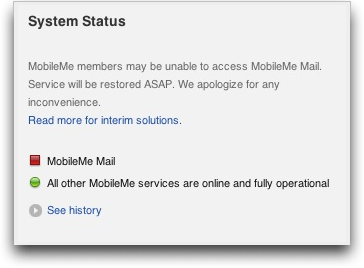
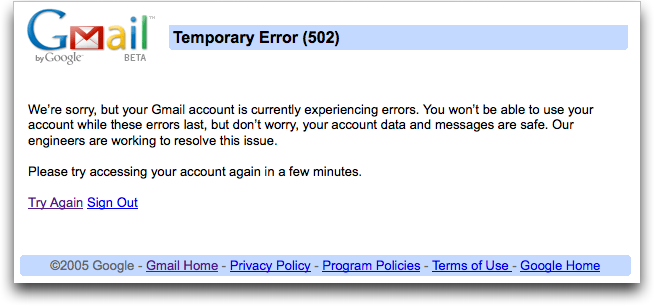
  For a period of several hours on 11-Aug-08, both MobileMe Mail and
  Google's Gmail were both inaccessible for many users, although Gmail
  reportedly remained accessible for those retrieving email via IMAP
  and a standalone email client. MobileMe's outage was not accompanied
  by any acknowledgment of the problem on the status page, and after a
  few hours, access returned. If Apple is going to be serious about
  providing a status page, they should at least put the effort into
  updating it promptly (see "MobileMe Status Page Promises Updates,
  But Tone Rings Flat," 2008-07-26). We'll see if Google provides any
  more explanation than Apple when the dust settles.

<http://www.tidbits.com/resources/2008-07/MobileMe-down.png>
<http://www.tidbits.com/resources/2008-07/Gmail-down.png>
<http://db.tidbits.com/article/9709>

  Other MobileMe and Google services were unaffected, as far as I've
  seen, but it's distressing that MobileMe continues to suffer outages
  even after Apple claimed to have fixed the initial problems after
  the .Mac-to-MobileMe transition. Steve Jobs dissected the MobileMe
  launch in an internal email message, coming to essentially the same
  conclusions as Glenn Fleishman did in "Apple Claims MobileMe Mail
  Fully Restored" (2008-07-30).

<http://arstechnica.com/journals/apple.ars/2008/08/05/steve-jobs-on-mobileme-the-full-e-mail>
<http://db.tidbits.com/article/9715>

  I haven't tracked Gmail outages separately, but for the most part, I
  haven't heard complaints about frequent problems. Although there are
  no guarantees with any email service (heck, my server has been
  inaccessible for my few local users every so often too), people
  relying on email for mission-critical services would do well to
  maintain alternate accounts in case of trouble.


iPhone Apps That Go Beyond Entertainment
----------------------------------------
  by Adam C. Engst <[EMAIL PROTECTED]>
  article link: <http://db.tidbits.com/article/9726>

  Not being someone with bits of extra time before meetings or while
  commuting or standing in line, I haven't come wholeheartedly to the
  iPhone revolution, and in fact, I've had to make a conscious effort
  to find time to use my iPod touch. Until the release of the 2.0
  software, that was nearly impossible, since there was nothing the
  iPod touch could do that one of my Macs couldn't do better. But now
  that I can download software from the App Store, the iPod touch has
  become more useful.

  However, I noticed something interesting recently, while browsing
  the lists of top paid and free applications: they're nearly all
  games or in some way related to entertainment. Scanning through the
  list of the top 100 paid apps, I currently see about 36 that
  increase the functionality of the iPhone or in some way promise to
  make your life easier. But even that number may be deceptive, since
  that list includes at least four voice recorders, three conversion
  utilities, three programs that use the accelerometer to measure
  angles of incline, two password managers, a couple of calorie
  counters, and several location-aware apps that help you find nearby
  restaurants or other services. A few that would seem to provide
  unique capabilities include:

* Teleport: This $24.99 app provides a VNC client for the iPhone or
  iPod touch that enables you to control any Mac or PC running a VNC
  server.

<http://phobos.apple.com/WebObjects/MZStore.woa/wa/viewSoftware?id=286470485&mt=8>

* TouchTerm: Talk about backwards compatibility! This $2.99 app gives
  you an SSH-savvy terminal program for logging into Unix machines (or
  the Unix underpinnings of your Mac).

<http://phobos.apple.com/WebObjects/MZStore.woa/wa/viewSoftware?id=286623227&mt=8>

* Files and FileMagnet: These two apps ($7.99 and $4.99, respectively)
  seem similar in that they let you copy files to your iPhone or iPod
  touch from your Mac (Files also works with Windows), and view (but
  not edit) common file types.

<http://phobos.apple.com/WebObjects/MZStore.woa/wa/viewSoftware?id=285578660&mt=8>
<http://phobos.apple.com/WebObjects/MZStore.woa/wa/viewSoftware?id=284797161&mt=8>

* Picoli: Although it's not exactly Photoshop, the $4.99 Picoli lets
  you retouch photos on the iPhone itself (it also works with photos
  synced from your Mac, if you have only an iPod touch).

<http://phobos.apple.com/WebObjects/MZStore.woa/wa/viewSoftware?id=286056016&mt=8>

* MagicPad: This notebook app goes beyond the built-in one by adding
  rich-text editing with fonts, colors, and styles, and by adding
  perhaps the most-requested iPhone feature: copy and paste.

<http://phobos.apple.com/WebObjects/MZStore.woa/wa/viewSoftware?id=286616920&mt=8>

* Distance Meter: Like a full-fledged GPS, the $2.99 Distance Meter
  can tell you how far you've travelled and at what speed, and it
  provides GPS coordinates and altitude information as well. Works
  only with the iPhone 3G.

<http://phobos.apple.com/WebObjects/MZStore.woa/wa/viewSoftware?id=286133117&mt=8>

  On the free side, only 28 of the top 100 apps would seem to be
  useful in some form or fashion, and once again, they tend to clump,
  with a few apps providing ad-supported views onto Web-based news, a
  couple of flashlight apps that turn the screen a single bright
  color, and a few more location-based service finders. Still, some
  that stand out from the crowd include:

* WritingPad: This notebook app offers an unusual text-entry approach
  where you trace word shapes on a keyboard, rather than tapping each
  key individually.

<http://phobos.apple.com/WebObjects/MZStore.woa/wa/viewSoftware?id=285484703&mt=8>

* YouNote: Another note-taking application, YouNote lets you record
  audio notes, make notes from photos, draw notes with your fingers,
  capture a Web page as a note, and even compose text with the
  keyboard.

<http://phobos.apple.com/WebObjects/MZStore.woa/wa/viewSoftware?id=284969305&mt=8>

* Flashlight: An app that just turns the screen a single bright color
  is silly, I know, but my teenage-girl-cell-phone from Virgin Mobile
  has a built-in LED flashlight, and I use it all the time.

<http://phobos.apple.com/WebObjects/MZStore.woa/wa/viewSoftware?id=285281827&mt=8>

* Epocrates Rx: This drug reference is probably useful primarily to
  healthcare professionals, but given that it's free, I could see it
  being of interest to anyone taking a number of medications. (It
  requires that you set up a free account online.)

<http://phobos.apple.com/WebObjects/MZStore.woa/wa/viewSoftware?id=281935788&mt=8>

* WeatherBug: The default Weather app from Apple is pretty weak, but
  WeatherBug goes much further with more current weather conditions,
  full text forecasts, a zoomable radar map, and photos from nearby
  weather cameras.

<http://phobos.apple.com/WebObjects/MZStore.woa/wa/viewSoftware?id=281940292&mt=8>

  Don't get me wrong - I have nothing against playing games on the
  iPhone, or doing puzzles, or whatever, and I do all those things, on
  occasion. But for many of us, free time is sufficiently scarce (and
  the iPhone is sufficiently expensive) that iPhone apps need to help
  create leisure time rather consuming it.


Backing up Photos While Traveling
---------------------------------
  by Adam C. Engst <[EMAIL PROTECTED]>
  article link: <http://db.tidbits.com/article/9728>

  Our recent trip to Wales and England involved a lot of photos, taken
  not just by me, but also by Tristan, who, at 9, is old enough to use
  a real digital camera. He takes pretty good pictures too (scroll
  down to the end of the article for some snaps of us in castles!),
  and since I didn't want to share my Canon PowerShot SD870 IS, we
  bought him a somewhat less expensive PowerShot SD850 IS for the
  trip. Our choice of models was extremely intentional, because both
  cameras could share the same USB cable, SD cards, extra battery, and
  battery charger, reducing packing weight and complexity. Plus,
  Tristan is already familiar with the Canon interface, and image
  stabilization is a big help for him. The end result was extremely
  positive, since he was able to dash around the Welsh castles
  non-stop, taking pictures and telling us all about what we were
  seeing. He ended up with nearly 1,000 photos, even after we
  encouraged him to cull bad ones in the camera, and I took roughly
  the same number during the 10 days we were traveling.

  But that's nearly 10 GB of data, and while I didn't know in advance
  how many photos we would take, I was pretty sure it would be a lot.
  In thinking about the possible problems, I decided the most
  important way to protect our photos was to have at least two copies
  of each photo in devices that were seldom, if ever, in the same
  physical location.

  I first considered Internet backup, but after some thought, I
  decided - correctly, as it turned out - that it would be too
  troublesome to try to find Wi-Fi every day. Even when we did have
  Internet access, we didn't necessarily have enough time to upload
  hundreds of megabytes of photos. (Remember that upload throughput is
  often much less than download throughput.) If you were certain you
  could find high-speed Internet access regularly and would have time
  to fuss with it every day, uploading to Flickr or to a server you
  control could be a decent backup strategy.

<http://www.flickr.com/>

  I then thought about storing photos on an iPod, but none of our
  iPods have much free space on them normally, and although one could
  certainly have been wiped for the trip, it didn't seem as though it
  would be that easy to move photos from the cameras to the iPod.
  Apple's iPod Camera Connector is only $29, but it's reportedly slow,
  eats batteries for lunch, doesn't support raw format photos, and is
  compatible with only a few iPod models. (Belkin used to make two
  products that would enable you to store photos on an iPod, but
  neither appears to be available any more.) Besides, I was planning
  to bring my MacBook anyway, so I didn't see any particular advantage
  of copying photos to an iPod instead of the MacBook. If you were
  traveling sans laptop and with a supported iPod, it might be worth a
  look.

<http://store.apple.com/us/product/M9861G/C>
<http://support.apple.com/kb/HT2211>

  What I really wanted, but was unable to find, is a very small device
  that would clone one SD card to another. Since SD cards are so small
  and inexpensive, it would be easy to have backups of each active
  card and to store those backups separately from the cards still in
  the cameras. But if such a device is available, I couldn't find it
  among all the services that mass-duplicate flash cards.

  So I settled on a simple scheme that you can replicate as long as
  you bring a laptop on your trip. Every night, Tristan and I would
  cull the obviously bad or duplicate photos from our cameras, and
  then I'd connect each one in turn to my MacBook, downloading photos
  into individual iPhoto libraries. (Remember, hold down the Option
  key when launching iPhoto to create a new library or switch to a
  different one.) Since I'm using iPhoto '08, which has selective
  import and can hide already imported photos, I didn't delete the
  photos after importing. I'd chosen 4 GB SD cards for both our
  cameras, and I had another 4 GB card for mine and a secondary 2 GB
  card for Tristan's. Thanks to some large movies, I filled up my card
  about 7 days into the trip, whereas Tristan never filled up his
  card.

  The end result was that by backing up the photos to iPhoto every
  night, we had one copy of every picture on the MacBook, which was
  usually locked in our car or hotel room during the day, and another
  on our cameras, which we had with us whenever we were out and about.
  Once my first 4 GB card filled up, I gave it to Tonya to carry in
  her purse, which she wore around her waist the entire time.

  Had the MacBook been stolen from our car or hotel room, we wouldn't
  have lost any photos, and had one or both of our cameras been stolen
  or damaged during the day, we would have lost only the photos taken
  that day. The whole scheme took only a few extra minutes each night,
  which was extremely welcome while on vacation, and as an added
  bonus, it was easy to send a couple of images back to our families
  via email every few days using iPhoto's email capabilities.

  Here are a few photos of us on the trip (Tristan took the first
  three; I took the fourth):

  Adam and Tonya in front of the portcullis at Castell Coch

<http://www.tidbits.com/resources/2008-07/Adam-and-Tonya-at-Castell-Coch.jpg>

  Tonya on the walls of the medieval town of Conwy

<http://www.tidbits.com/resources/2008-07/Tonya-at-Conwy.jpg>

  Adam in the ruins of the castle at Rhuddlan (and be sure to check
  out our buddy Jeff Porten's Photoshop riff on it too)

<http://www.tidbits.com/resources/2008-07/Adam-at-Rhuddlan.jpg>
<http://www.jeffporten.com/?p=875>

  Tristan in a doorway on the walls of Conwy

<http://www.tidbits.com/resources/2008-07/Tristan-at-Conwy.jpg>


Sky Dayton Steps Down from EarthLink
------------------------------------
  by Glenn Fleishman <[EMAIL PROTECTED]>
  article link: <http://db.tidbits.com/article/9723>

  We at TidBITS have long known Sky Dayton, the founder of EarthLink -
  one of the earliest firms to grow large providing dial-up Internet
  access to the masses. EarthLink has announced that Sky will step
  down from his remaining role at the firm, as a member of its board
  of directors, 14 years after starting the company.

<http://www.prnewswire.com/cgi-bin/stories.pl?ACCT=109&STORY=/www/story/08-01-2008/0004860355>

  We thought we'd take a look at Sky's and EarthLink's history, as Sky
  has been involved in a number of pivotal events in connecting
  average people to the Internet through three separate revolutions:
  dial-up, Wi-Fi hotspots, and cellular networks.


**SLIPping a Disk** -- A year before Sky founded EarthLink, TidBITS
  publisher Adam Engst wrote a massive tome, the "Internet Starter Kit
  for Macintosh" (see, aptly, "The Internet Starter Kit for
  Macintosh," 1993-09-27). The book was among the first guides to
  using the Internet, and was certainly among the most popular.

<http://db.tidbits.com/article/2401>

  For the book's second edition in 1994, Adam included a 1.4 MB floppy
  disk, sporting a pile of Mac software that makes my heart ache to
  name: Anarchie, MacTCP, InterSLIP, MacPPP, and TurboGopher, among
  others (see "Internet Starter Kit for Macintosh, Second Edition,"
  1994-10-24). EarthLink Network (its first name) is noted in the
  announcement article for having purchased a customized version of
  the book with an installer that configured a Mac for their network.

<http://db.tidbits.com/article/1783>

  Adam later noted - in "EarthLink Network Sponsoring TidBITS,"
  1996-03-25 - that he was partly responsible for Sky founding
  EarthLink, because he talked Sky out of starting a software firm to
  create an integrated program for accessing the Internet. A few
  companies were working on that at the time: America Online,
  CompuServe, Prodigy, and others had integrated software for their
  walled gardens; there was also The Pipeline, a New York City dial-up
  provider founded by writer James Gleick and a technical partner.

<http://db.tidbits.com/article/1078>
<http://www.wired.com/wired/archive/2.11/gleik.html>

  Sky opted to start EarthLink instead and began a pattern that
  persisted through three unique companies he founded. At EarthLink,
  he bucked the trend of installing banks of modems at telephone
  company points of presence and dealing with the insanity of
  maintaining a constantly failing and hard-to-manage infrastructure.
  Instead, he leased capacity on existing networks that were built to
  handle credit-card verification and other transactions.

  That proved a wise move. Over time, except for a few large local
  ISPs, every dial-up firm moved to leasing space on one of a handful
  of national networks, or buying part of such a provider, such as
  Microsoft did with UUNET. (UUNET was the first commercial Internet
  provider in 1990; it was later purchased by MFS, which was in turn
  bought by Worldcom, which merged with MCI, became MCI Worldcom,
  bought CompuServe and AOL's network divisions, collapsed amid fraud
  and mismanagement, was renamed MCI, and was then sold to Verizon.)

<http://en.wikipedia.org/wiki/UUNET>


**Aggregate, Don't Build** -- In 2000, Sky quietly raised money and,
  independent of EarthLink, started Boingo Wireless, a firm that
  aggregated disparate hotspot networks for a seamless,
  single-account, single-price service. Boingo was initially more of a
  software company with a service attached, because the firm had to
  write an application that could deal with the myriad ways of logging
  into a Wi-Fi hotspot.

  I first wrote about Boingo when they emerged from stealth mode in
  December 2001 at my nascent Wi-Fi Networking News site (then called
  802.11b Networking News) in "Public Space Wi-Fi's Transforming
  Event." Boingo started with 750 U.S. hotspots; it now has 60,000
  locations under contract in the United States, and 100,000 total
  worldwide, with flat-rate plans for just the United States or all
  locations.

<http://wifinetnews.com/archives/001133.html>

  Boingo introduced the concept of flat-rate hotspot pricing, was an
  early participant in the 24-hour, single-price network pass, and was
  the first hotspot aggregator of any scale that I'm aware of.
  Previous efforts to build bigger hotspot networks focused on
  roaming, in which one network allowed users of another to log in -
  for no fee in the United States, typically - using the same
  credentials that got them onto their home network. Aggregation is
  fundamentally different, with the aggregator taking on the burden of
  making deals to expand the network's reach, all while packaging
  login as a simple act for a user to accomplish.

  In 2006, Sky became the chief executive of a new venture, Helio, a
  so-called mobile virtual network operator (MVNO), since the company
  sold handsets and cell access but owned no network of its own. MVNOs
  - like Boingo and Wi-Fi aggregators - resell access to other
  networks to their customers. Sky wanted to bring advanced South
  Korean handsets to the United States to compete against the blander
  offerings in a pre-iPhone, pre-BlackBerry Pearl world.

  Helio was a joint venture of SK Telecom and EarthLink, each
  contributing 50 percent of the seed capital, and that required Sky
  to leave his chairman role at EarthLink to avoid conflicts of
  interest over the direction of Helio - as a regular EarthLink
  director, he could step away when Helio was on the table - although
  he remained chairman at Boingo, a role he still occupies.

  EarthLink's Helio partnership and an effort to build
  metropolitan-area Wi-Fi networks that I covered extensively - many
  said relentlessly - on Wi-Fi Networking News both came to naught,
  unfortunately. The municipal division started up in 2005 and had the
  plug pulled in 2007 (with a graduated rolldown until August 2008)
  because of a combination of political, technical, and timing issues.
  Helio was recently sold to Virgin Mobile, the largest MVNO in the
  United States, after EarthLink substantially reduced its ownership
  stake.

  EarthLink's current business is in some trouble. Dial-up revenue is
  still a cash cow, but is in decline. The company's efforts to move
  into DSL and cable hit roadblocks from judicial decisions,
  regulatory moves, and laws that kept independent firms from gaining
  non-discriminatory access to the final mile - phone company lines
  and cable connections into people's homes. (EarthLink's access
  varies, but DSL is typically wholesaled by telcos at a price above
  their discounted rates to retail customers.)

  Without being able to sell an EarthLink-flavored Internet service
  over DSL or cable while paying a reasonable wholesale rate,
  EarthLink's ability to keep its customers when they moved on from
  dial-up and gain new customers was limited. Hence, their moves into
  cell service and metro-scale Wi-Fi, neither of which caught fire,
  were critical bets.

  It's a shame, but EarthLink's recent history is a kind of memorial
  to the notion that Ma Bell and the large cable operators could
  actually tolerate competition. Judges, regulators, and legislators
  all paid lip service to the notion of a level playing field while
  digging ruts and dropping stones.


**Linked Up and Out** -- Adam and I have spoken and corresponded with
  Sky many times over the years, and we've both met him on occasion.
  He's charismatic, technically savvy, and whip-sharp on the marketing
  side. I have no idea what his next move will be, but if past
  performance is any indication, it will be clever, appealing, and
  reliant on other firms running the backhoes and stringing the wire.


Garmin nuvi 255W Focuses on Navigation
--------------------------------------
  by Adam C. Engst <[EMAIL PROTECTED]>
  article link: <http://db.tidbits.com/article/9725>

  As I've reviewed more car navigation GPS units (see our "Find
  Yourself with GPS" series), it has become clear that the
  manufacturers have succumbed to feature creep - just because you
  have a device with a color LCD screen and a speaker doesn't mean you
  should shoehorn photo slideshow and MP3 player capabilities into the
  unit. And similarly, even though every GPS is essentially a tiny
  computer, giving the user the ability to customize nearly every
  option isn't always desirable - geeks might like it, but many other
  people will be confused and simply stick with the defaults.

<http://db.tidbits.com/series/1264>

  My latest test unit, Garmin's $349.95 nuvi 255W, sits near the low
  end of the company's product line but does a bang-up job of
  providing just the features necessary for a successful car
  navigation device, eschewing many inessential items on the feature
  checklists in favor of a lower price and simpler usage. As a result,
  this unit ranks highly among the units I've used so far.

<https://buy.garmin.com/shop/shop.do?pID=13431>
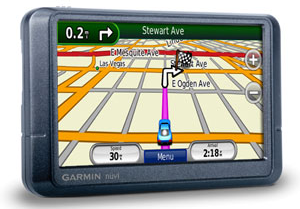
<http://www.tidbits.com/resources/2008-07/Garmin-nuvi-255W.png>


**Simple Hardware** -- The elegance of the 255W begins with its
  hardware, although such simple designs are more common now than some
  years ago, when physical buttons overwhelmed the case. There's only
  a single slider on the top-left of the case, used for turning the
  unit on and off. Cleverly, it slides to the left to turn the unit on
  or off, and latches to the right to lock the unit off (or if it's
  on, to lock the screen). This slider worked exactly as I expected,
  unlike the TomTom Go 720's power switch, which constantly irritated
  me (see "Back in the Saddle with the TomTom Go 720 GPS,"
  2008-05-27).

<http://db.tidbits.com/article/9628>

  An SD card slot on the left edge offers the opportunity to add more
  maps (Garmin sent me a unit with maps of North America pre-loaded,
  along with an SD card that contained maps of Europe, since much of
  my testing took place in the UK). If an SD card contains JPEG
  images, the 255W can display them via its picture viewer
  application, though it's sluggish with high-megapixel images. In
  theory, you can set any image to appear at startup, but a 2.7 MB
  photo flummoxed it entirely.

  The only other thing on the case is a USB jack that you use to
  connect the 255W to the car power charger or to a computer (where it
  charges as well). Connecting it to my MacBook caused it to mount
  like any other external disk, and I was able to copy a 28K JPEG to
  the appropriate folder and set it as the startup image. When
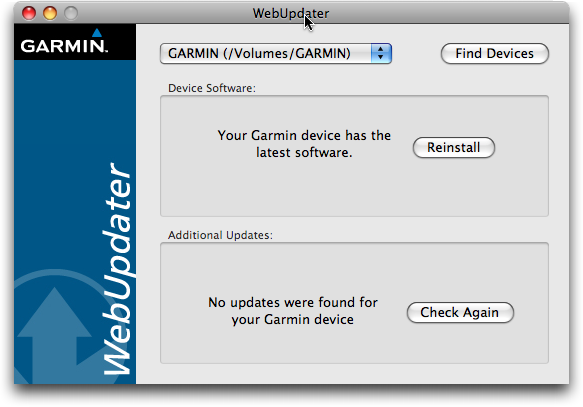
  connected via USB, you can also use Garmin's downloadable WebUpdater
  software to install updates and, I presume, new maps, though my
  unit's maps were up to date. I did this successfully to update my
  unit's firmware. WebUpdater was easy to use, although, as with the
  TomTom Home software, WebUpdater doesn't tell you to eject the unit
  once it has finished updating; instead it merely tells you to
  disconnect from the computer. It should be more explicit.

<http://www.garmin.com/products/webupdater/>
<http://www.tidbits.com/resources/2008-07/Garmin-WebUpdater.png>

  With so few physical controls, you use the 255W's color touchscreen
  for everything. It's a 4.3-inch widescreen display showing 480 by
  272 pixels, and it's quite readable in bright sunlight, which hasn't
  universally been true with other units. The touchscreen was quite
  responsive, although I typed more quickly than the 255W's audio
  feedback could keep up with, a trivial annoyance.

  The 255W has a built-in lithium-ion battery. Although Garmin claims
  "up to 4 hours" of battery life, it achieved only about 3 hours in
  my real-world testing, similar to the TomTom Go 720. That's fine for
  most uses, and since the 255W is thinner than many other GPS models,
  it's easy to slide into your pocket or purse and carry with you
  while walking, something we did a few times when hiking around towns
  in Wales after parking the car.

  Garmin also did a good job with the car hardware, providing a mount
  into which the 255W snaps, and a separate suction cup with a ball
  joint for the mount. I had no trouble attaching the suction cup
  wherever I wanted on the windshields of several different cars, and
  it was both adjustable and stable. You can easily snap the 255W out
  of its mount when you're leaving the car; the only improvement
  (which would have added manufacturing complexity, of course), would
  have been to put the power jack on the mount, so you could leave the
  mount plugged in whenever you removed the 255W. Instead, I had to
  unplug the power cable whenever I left the car and plug it back in
  when I returned, a minor annoyance that I often avoided if the
  255W's battery power was likely to be sufficient for the rest of the
  trip.


**Focused Interface** -- Where the 255W really stood out from the
  TomTom Go 720, though, was in its focused interface. The TomTom's
  interface has innumerable screens of controls and options, and a
  one-way method of navigation. In contrast, the 255W has only five
  notable screens: the main screen, the map, Where To?, Tools, and
  Settings.

  The main screen provides big buttons for Where To? and View Map, and
  smaller buttons for the less-commonly used Tools and Volume (the
  latter of which does what you'd expect in adjusting the volume). The
  main screen also shows a graph of GPS signal strength, battery
  level, and the current time (which you can press for quick access to
  the Time settings screen). If you're in the middle of navigating,
  the main screen also includes convenient Stop and Detour buttons.
  It's hard to get lost in the interface, since Garmin always provides
  a Back button and up/down arrows for navigating between screens with
  multiple options.

  The Tools button provides access to the Settings screens, along with
  a variety of utilities, such as a world clock, a calculator, and the
  picture viewer, though, thankfully, no MP3 player. Actually helpful
  was the unit converter that we used to convert liters into U.S.
  gallons when figuring out just how wildly expensive fuel was in the
  UK (roughly US$10 per U.S. gallon for diesel). But the most useful
  of the utilities is Where Am I?, which displays a screen showing
  your location, the nearest address, the nearest intersection, and
  three buttons for finding the closest hospitals, police stations,
  and gas stations - we used the latter option several times quite
  successfully. You can also save your current location to your
  favorites, making it easy to set ad hoc destinations from places you
  visit.

  Settings are what you'd expect, and Garmin does a good job of
  providing access to settings most people would want without going
  overboard. There are only seven settings screens, for the system,
  navigation, display, time, language, map, and security. Notable
  settings include the capability to switch among automobile, bicycle,
  and pedestrian modes (which seems primarily to change the arrival
  time estimates, although it can also provide different routes,
  albeit with a strange algorithm I couldn't figure out), the choice
  of QWERTY or ABCDE keyboard layouts, and a wide variety of languages
  (including eight English voices with American, British, and
  Australian accents). In the UK, we of course chose the British
  Serena voice and found that we preferred it even after returning
  home. Garmin's main nod to the level of customizability that TomTom
  offers is that you can choose among seven icons for your car, and
  you can download more from Garmin's Web site. You can also choose
  what sorts of roads (unpaved, highways, toll roads, carpool lanes,
  etc.) to avoid, although it still happily routed us on Welsh "roads"
  that, though paved, were so narrow as to beg the definition. The
  mattress at our first hotel competed with some of the nearby roads
  in width.

<http://www.garmin.com/vehicles/>


**Navigating** -- The 255W's Where To? screen provides ten different
  ways of starting navigation. You can navigate to your home location,
  to a specific address, points of interest, recently found locations,
  favorites, intersections, extras, cities, latitude/longitude
  coordinates, and graphically by browsing the map. If you're not in
  your destination city, a Near button lets you change where the GPS
  starts searching for addresses and points of interest, and it
  remembers that location as long as you stay in the Where To? screen;
  once you leave, it resets to your current location.

  As is common with these devices, the 255W ranged from brilliant to
  stupid in finding destinations, simply because its data isn't always
  complete or doesn't match with other sources. Sometimes an address
  would turn out to be in a nearby city instead of the one we
  anticipated, and we had trouble finding Salisbury in England until
  we realized that the 255W (correctly) thinks of Wales and England as
  different countries. Similarly, its point-of-interest database was
  either spot on or entirely useless, and since castles in Wales don't
  always have addresses, per se, a few were slightly tricky to find.
  (It turns out that they're nearly always on Castle Street, amusingly
  enough.) In the UK, the 255W can search not just by address, but
  also by postal codes, which are _much_ more specific than ZIP codes
  in the United States.

  Once you start navigating to a location, the 255W displays its map
  screen, which you can switch from 3D to 2D; although I far prefer
  the 3D look where ahead of me is always up on the screen, people who
  have a lot of map reading familiarity seem to prefer the 2D view
  that keeps north up.

  The map screen is relatively uncluttered, with a bar at the top
  showing the direction and name of the next turn, plus and minus
  buttons for zooming the view, and a little controller at the bottom
  that shows your current speed, a menu button, and the arrival time.
  Pressing the bar at the top reveals a turn-by-turn list of your
  route, and you can also see an overview map of the entire route from
  that screen. Pressing the current speed on the controller shows the
  trip computer, with average speed, time in motion, and other
  details. The menu button returns you to the main screen, and
  pressing the arrival time does nothing; it would be nice if it
  toggled between arrival time and time remaining to the destination.

  Pressing anywhere else on the map provides a draggable view of the
  map in 2D mode so you can see your general locale. Pressing a spot
  on the map moves the cursor to that point, and pressing the Go
  button afterwards lets you change your destination or add the new
  location as a via point. It's all very usable and quite intuitive.
  (You can also use the Where To? screen at any time to find locations
  and add them as via points that will be taken into account when
  calculating your route.)

  Unique among the GPS units I've seen so far is a little icon on the
  left that shows you the speed limit of the road you're driving on,
  making it easy to tell if you're going too fast. It was mostly
  accurate in our testing in the United States, only occasionally
  failing to reflect a reduced speed limit in a town or on a back road
  (I presume this information is in its database, so it's actually an
  error in the data). In the UK, however, it only knew the 70
  mile-per-hour speed limit on "dual carriageways" (divided highways)
  and just hid the icon on 60 MPH "single carriageways" (two-lane
  roads) and in 30 MPH built-up areas. This was too bad, since speed
  limit signs are uncommon in the UK unless the speed limit deviates
  from one of those three standards. Amusingly, before I realized the
  UK still uses miles instead of kilometers, I switched the 255W to
  kilometers, but the speed limit icon didn't have room for the
  three-digit 110 KPH. Garmin fixed this bug in a firmware update.

  Although the 255W performed very well - with no insanely incorrect
  routes in areas we know nor obviously incorrect directions - it
  wasn't quite perfect. Most notably, because it lacks the ping that
  Magellan units have when you're at a turn, it was possible to miss a
  turn if you weren't paying sufficient attention at the correct
  moment. This was particularly true because the 255W seemed to be the
  least chatty of all the voice-based GPSes we've tested; it didn't
  pipe up to tell you to go straight through confusing intersections
  or past freeway exits, for instance. Overall that was good, but
  sometimes a bit more reinforcement that we were driving correctly
  would have been nice.


**A Choice Package** -- Although the Garmin nuvi 255W doesn't offer
  every feature or customization option under the sun, I found that to
  be an advantage. I never got lost in its interface or found later
  that I'd been missing some important setting, and it was fast and
  fluid to work with while on the road. Its actual navigation was as
  good as or better than any other unit I've used, and its voices read
  turning directions and street names with aplomb. (Proper
  pronunciation is always an unknown, of course, though in Wales, we
  were happy to go with the 255W's rendition of some street and town
  names, since it was likely to pronounce the Welsh words as well as
  we could. For a sense of how Welsh is pronounced, d is "d," dd is
  "th," f is "v," ff is "f," and w can be either a consonant or a
  vowel; when it's a vowel, it's pronounced either "uhh" or "ooo."
  There will be a quiz.)

<http://www.cs.cf.ac.uk/fun/welsh/Lesson01.html>

  The main thing I keep wanting in a GPS is a community-supported
  points-of-interest database. All the GPS devices I've used do a fine
  job of finding nearby restaurants, for instance, but I'd like the
  unit to give more information, such as user reviews, that would help
  me differentiate between different eateries. Similarly, it would be
  nice to be able to add comments to points of interest so you could
  note, for instance, how expensive a particular museum might be to
  prevent people from being surprised when they arrive. We have so
  much of this information available via the Web now that it's a shame
  not to have it embedded in a GPS on the road.

  Actually, I do have one other minor request. When on a long trip, if
  you need gas, you can ask the GPS for the nearest gas stations. The
  255W even lists them with arrows pointing in their general
  directions, and with how far away they are. But that's not all I
  want to know. I'm mostly interested in gas stations that will add
  the least overall time to my trip, so even if a particular gas
  station is close, if it's in the wrong direction, it's of less
  interest to me than one that will be closer shortly, and that will
  require less of a detour to reach.

  But these minor gripes and wishlist items aside, the Garmin nuvi
  255W performed admirably, and with a list price of $349.95, is more
  the kind of thing I can recommend over units that have longer
  feature checklists and significantly higher prices. You might also
  compare it to the now-less-expensive nuvi 260W (about $250 at
  Amazon), which I believe is a slightly older model that lacks the
  255W's Where Am I? feature and the capability to switch between
  QWERTY and ABCDE keyboard layouts (I can't tell which it uses), and
  may take longer to acquire satellites.

<http://www.amazon.com/dp/B0015EWMX8/?tag=tidbitselectro00>
<https://buy.garmin.com/shop/compare.do?cID=137&compare=compare&compareProduct=13431&compareProduct=13381>
<http://www.amazon.com/dp/B0011ULQNI/?tag=tidbitselectro00>


TidBITS Watchlist: Notable Software Updates for 11-Aug-08
---------------------------------------------------------
  by TidBITS Staff <[EMAIL PROTECTED]>
  article link: <http://db.tidbits.com/article/9724>

* Nisus Writer Express 3.1 from Nisus Software adds to the low-end
  word processor a Go To Page feature, an option to control the
  thickness of the caret pointer, a Page Borders palette, and an
  option to ignore rich text formatting when opening HTML files as
  plain text. Numerous bugs have also been fixed, a number of which
  should improve performance in Mac OS X 10.5 Leopard. ($45 new, free
  upgrade, 47.2 MB)

<http://www.nisus.com/Express/>

* iPhone 2.0.1 from Apple includes "bug fixes" - that's the extent of
  the release notes, although a separate document in Apple's
  KnowledgeBase describes the security vulnerabilities (mostly in
  Safari and WebKit) fixed by this update. It's available via iTunes.
  (Free, 242 MB)

<http://www.apple.com/support/iphone/>
<http://support.apple.com/kb/HT2351>


Hot Topics in TidBITS Talk/11-Aug-08
------------------------------------
  by Jeff Carlson <[EMAIL PROTECTED]>
  article link: <http://db.tidbits.com/article/9727>

**Accelerometer quirks** -- A message about holding the iPhone wrong
  looks like something added by a game developer, not the iPhone
  operating system. (2 messages)

<http://emperor.tidbits.com/TidBITS/Talk/2127>


**Mail PDF in print dialog** -- Readers discover how to make the Mail
  PDF command in the Print dialog use Entourage instead of Apple Mail.
  (5 messages)

<http://emperor.tidbits.com/TidBITS/Talk/2129>


**Backups self-destruct?** A reader's backup hard disk suddenly
  appears unformatted, but the data is most likely still there - just
  temporarily untouchable. (3 messages)

<http://emperor.tidbits.com/TidBITS/Talk/2130>


**Google Maps Adds Walking Directions** -- A few other mapping
  utilities include walking or other directions (such as public
  transportation). (2 messages)

<http://emperor.tidbits.com/TidBITS/Talk/2131>


**Phishing susceptibility** -- Following a Consumer Reports article
  recommending against using Safari for Web browsing, readers discuss
  how big a threat phishing is for Mac users. (6 messages)

<http://emperor.tidbits.com/TidBITS/Talk/2133>


$$

This is TidBITS, a free weekly technology newsletter providing timely
news, insightful analysis, and in-depth reviews to the Macintosh and
Internet communities. Feel free to forward to friends; better still,
please ask them to subscribe!

Non-profit, non-commercial publications and Web sites may reprint or
link to articles if full credit is given. Others please contact us. We
do not guarantee accuracy of articles. Caveat lector. Publication,
product, and company names may be registered trademarks of their
companies. TidBITS ISSN 1090-7017.

Copyright 2008 TidBITS: Reuse governed by Creative Commons license.

Contact us at:    <[EMAIL PROTECTED]>
TidBITS Web site: <http://www.tidbits.com/>
License terms:    <http://www.tidbits.com/terms/>
Full text search: <http://www.tidbits.com/search/>
Subscriptions:    <http://www.tidbits.com/about/list.html>
Account help:     <http://www.tidbits.com/about/account-help.html>


--
If you want to unsubscribe or change your address, use this link
http://emperor.tidbits.com/webx?unsub@@.3c557dc4!u=306a67f9