TidBITS#941/18-Aug-08
=====================
  Issue link: <http://db.tidbits.com/issue/941>
  It's editor versus editor at TidBITS, as Adam and Glenn square off
  over Eye-Fi wireless SD memory cards, with Adam excoriating the
  Eye-Fi Share and Glenn waxing rhapsodic about its Eye-Fi Explore big
  brother. Also in digital photography, readers offer great
  suggestions for storing and protecting photos while traveling, in
  response to Adam's article last week. In the news, Best Buy plans to
  sell the iPhone in the United States, becoming the only outlet other
  than AT&T and Apple; former Apple general counsel Nancy Heinen
  settles with the SEC over options backdating; and Microsoft releases
  security and performance updates to Office 2008 and Office 2004. In
  the Watchlist, we glance at releases of iPhone 2.0.2, Inquisitor
  3.2, WireTap Anywhere 1.0.1, TextExpander 2.4, and Airfoil for
  Windows 2.6.

Articles
    Best Buy to Sell iPhone in United States
    Apple's Former Top Lawyer Settles Options Charges
    Microsoft Office 2008 and 2004 Receive Updates
    More Photo Backup Options While Traveling
    Why I Hate the Eye-Fi Share Wireless SD Card
    Why I Like the Eye-Fi Explore Wireless SD Card
    TidBITS Watchlist: Notable Software Updates for 18-Aug-08
    Hot Topics in TidBITS Talk/18-Aug-08


------------ This issue of TidBITS sponsored in part by: --------------

* READERS LIKE YOU! Support TidBITS with a contribution today!
  <http://www.tidbits.com/about/support/contributors.html>
  Special thanks this week to Marc Fleisher, Jacobus Kats,
  John J. Howard, and Bill Freese for their generous support!

* GET FETCH 5 FOR FREE! Fetch Softworks makes Fetch, the original
  Macintosh FTP client, free for educational and charitable use.
  Fetch 5.3 includes a new look and Leopard technology support.
  Apply today at <http://fetchsoftworks.com/edapply>!

* WebCrossing Neighbors Creates Private Social Networks
  Create a complete social network with your company or group's
  own look. Scalable, extensible and extremely customizable.
  Take a guided tour today <http://www.webcrossing.com/tour>

* MARK/SPACE, INC: Take it with you! The Missing Sync makes
  it easy to synchronize contacts, calendars, notes, photos
  and more from your Mac to your BlackBerry, Palm OS, or
  Windows Mobile phone. <http://www.markspace.com/bits>

* VMware Fusion. The most seamless way to run Windows on your Mac.
  Backed by nearly a decade of proven virtualization technology.
  Try VMware Fusion today for free, or order online for only $79.
  Visit: <http://www.tidbits.com/about/support/vmware-fusion.html>

* Microsoft's MacBU: Supporting Mac users with Office 2008.
  Straighten up your Office with the latest updates to Word,
  Excel, PowerPoint, and Entourage. Update today at Mactopia!
  <http://www.microsoft.com/mac/downloads.mspx>

---------- Help support TidBITS by supporting our sponsors ------------


Best Buy to Sell iPhone in United States
----------------------------------------
  by Mark H. Anbinder <[EMAIL PROTECTED]>
  article link: <http://db.tidbits.com/article/9735>

  Multiple press reports reveal that retail chain Best Buy will begin
  selling Apple's popular iPhone for use with AT&T's wireless network
  on 07-Sep-08 at 970 full-size stores and 16 Best Buy Mobile stores
  in the United States. The Associated Press, Reuters, and other news
  outlets say Best Buy is adding the iPhone to its stores as part of
  their Best Buy Mobile division, a joint venture between Best Buy and
  the UK's Carphone Warehouse Group.

  As with Apple and AT&T retail outlets, customers will have to
  activate the iPhone on the AT&T network, with a two-year commitment,
  before leaving the store. We wouldn't expect any of the other Apple
  or AT&T policies about iPhone purchases to be different for phones
  bought at Best Buy.

  Best Buy has already been successful selling iPods, including the
  iPod touch, and has opened Apple-focused store-within-a-store
  "mini-shops" in 600 stores. In those locations, the iPhone will be
  available in the Apple mini-shop rather than at the cell phone
  counter.


Apple's Former Top Lawyer Settles Options Charges
-------------------------------------------------
  by Glenn Fleishman <[EMAIL PROTECTED]>
  article link: <http://db.tidbits.com/article/9736>

  The former general counsel at Apple, Nancy Heinen, agreed to settle
  civil charges with the Securities and Exchange Commission regarding
  her involvement in planning and issuing backdated stock options
  while at the company. She will pay $2.2 million, but neither admit
  nor deny wrongdoing.

<http://www.emailthis.clickability.com/et/emailThis?clickMap=viewThis&etMailToID=466149951&pt=Y>

  Heinen, along with former chief financial officer Fred Anderson,
  were sued by the SEC in April 2007 for their involvement with how
  certain grants of stock options were handled. The agency said Heinen
  created minutes for a board meeting that never occurred after the
  date on which it was alleged to have happened, as well as moved back
  the dates on which options were granted without properly recording
  or acknowledging either of those changes. Anderson settled
  immediately, also without admitting or denying any incorrect
  behavior.

  In December 2006, Apple released a report that essentially agreed
  that there were irregularities in stock option grants, raised
  "serious concerns regarding the actions of two former officers," and
  revised its past years' earning statements to include the hidden
  cost of the backdated grants. The Justice Department ended its
  criminal investigation into Apple's backdating in July 2008.

  You can read the long, involved history in our series, "Apple's
  Trouble with Backdated Stock Options."

<http://db.tidbits.com/series/1274>


Microsoft Office 2008 and 2004 Receive Updates
----------------------------------------------
  by Mark H. Anbinder <[EMAIL PROTECTED]>
  article link: <http://db.tidbits.com/article/9733>

  Microsoft released updates to both 2004 and 2008 versions of its
  flagship Microsoft Office for Mac, citing stability and performance
  improvements in both cases, as well as fixes for vulnerabilities in
  the applications. The updates are available immediately at the
  Microsoft Mactopia download page as well as via the Microsoft
  AutoUpdate utility (remember that each version of Office has its own
  version of Microsoft AutoUpdate).

<http://www.microsoft.com/mac/downloads.mspx>

  Microsoft's release notes say the Office 2004 for Mac 11.5.1 Update
  improves stability when opening Word documents that contain a
  numbered list and updates the Japanese postal code dictionary, in
  addition to fixing vulnerabilities that an attacker could use to
  overwrite the contents of your computer's memory with malicious
  code. The Office 2008 for Mac 12.1.2 Update fixes the same
  vulnerabilities, fixes an AppleScript issue that prevents running a
  script from the Script menu without restarting the Office
  application, speeds up opening the Word application for users with
  lots of fonts, improves the display of text in Word tables, fixes an
  issue opening Excel documents when some sheet names include invalid
  characters, improves number formatting in Excel for some
  international languages, fixes duplication of events between
  Entourage and iCal when syncing, and includes several other small
  changes.

<http://support.microsoft.com/kb/956343>
<http://support.microsoft.com/kb/956344>

  The Microsoft Office 2004 for Mac 11.5.1 Update is a 15 MB download,
  and the Microsoft Office 2008 for Mac 12.1.2 Update is a 160 MB
  download. Because both updates repair significant vulnerabilities in
  Microsoft Office that could leave your computer open to attack, we
  recommend updating your copy of Microsoft Office immediately.

  On the same day, Microsoft told us about a special promotion
  offering up to 30 percent off the price of Microsoft Office 2008
  (the discount depends on the selected edition) when purchased along
  with a Mac from participating resellers through 08-Sep-08. The press
  release implies the discount is available to students and educators,
  but a visit to the Amazon offer page linked from the Microsoft page
  suggests no such restrictions on eligibility.

<http://www.microsoft.com/mac/promotions/default.mspx>
<http://www.amazon.com/gp/feature.html?ie=UTF8&docId=1000249841&tag=tidbitselectro00>


More Photo Backup Options While Traveling
-----------------------------------------
  by Adam C. Engst <[EMAIL PROTECTED]>
  article link: <http://db.tidbits.com/article/9732>

  You're planning a big trip, and you know you'll be taking lots of
  photos with your digital camera. What's the best way to protect
  those photos while you're away from home and your normal backup
  gear?

  In "Backing up Photos While Traveling" (2008-08-11), I shared my
  thoughts about how to back up while traveling, including the
  following:

<http://db.tidbits.com/article/9728>

* Internet Backup: If you can be certain of finding an Internet
  connection with high-speed upload capabilities on a regular basis,
  uploading photos to a photo sharing site like Flickr or to a server
  you control is a great way to ensure that disaster cannot claim your
  photos.

* iPod Storage: Although it's slow and limited, Apple's $29 iPod
  Camera Connector could be a good solution if you happen to have a
  supported iPod model.

* Mac Storage: We settled on the blindingly obvious approach of
  copying photos from our cameras to my MacBook every night, leaving
  the photos on the 4 GB SD cards as well, so we had two copies in
  separate locations at all times. This worked well on this trip, but
  would have fallen down if we'd been gone much longer (since my
  MacBook didn't have much more free disk space) or if I hadn't wanted
  to take the MacBook at all.

  Ever-alert TidBITS readers immediately sent me email with several
  other solutions that they've employed over the years. Depending on
  your situation, one of these might be just what you need on your
  next trip.


**Recordable Disc** -- David Malin suggests bringing a number of
  recordable CDs or DVDs along with self-addressed envelopes. Then,
  whenever you have enough photos to fill up a CD or DVD, you burn a
  disc, pop it in the envelope, add postage, and mail it home. This
  approach would require bringing a laptop, of course, but it
  eliminates the disk space concern. Eric Watson worked around the
  need for the laptop by finding a shop down the street that would
  burn his photos to DVD for a few bucks. I'd be leery of depending on
  there always being such a shop down the street, though it could work
  if you're mostly staying in one place. I'd also be concerned about
  the effort of figuring out the necessary postage and mailbox
  locations, but even having the photos on disc would meet my goal of
  two copies in separate locations.


**Hard Disk-Based Photo Wallet** -- Lynette Kent and Rick Redfern
  enthusiastically recommended the PhotoSafe II and Picture Porter
  Elite from Digital Foci, and Dale Gould pointed me to what look like
  similar devices: the NexTo eXtreme ND2700 Portable Storage Unit and
  the Vosonic VP8860 Multimedia Viewer Recorder.

<http://www.digitalfoci.com/photo_safe.html>
<http://www.digitalfoci.com/picture_porter_elite.html>
<http://www.mydigitaldiscount.com/CategoryProductList.jsp?cat=Browse+By+Brand%3ANextTo:NexTo+eXtreme+ND-2700>
<http://www.mydigitaldiscount.com/CategoryProductList.jsp?cat=Browse+By+Brand%3AVosonic:Vosonic+VP8860+Multimedia+Viewer+Recorder>

  The PhotoSafe II and the NexTo Extreme basically let you copy memory
  cards to the device's internal hard disk; they have only small
  text-based LCD screens that provide feedback. In comparison, the
  more-capable Picture Porter Elite and Vosonic Multimedia Viewer
  Recorder provide color LCDs that are larger than those in cameras
  for viewing your photos; they can also play and record audio and
  video, play FM radio, and print directly to printers. All these
  devices have rechargeable lithium-ion batteries for use away from a
  computer. They can also connect to a Mac via USB 2.0, at which point
  they can act as memory card readers and as normal external hard
  drives. Prices depend on the size hard disk you want, ranging from
  about $130 to $500.

  I'd be hesitant to buy one of these devices for a single trip, but I
  like the fact that they can be used as battery-powered external hard
  drives as well, since that would make them more generally useful
  beyond travel. Lynette also said that the Picture Porter Elite can
  copy files back to memory cards, which would make it possible to
  create additional backups on inexpensive memory cards and mail those
  home for even more peace of mind.


Why I Hate the Eye-Fi Share Wireless SD Card
--------------------------------------------
  by Adam C. Engst <[EMAIL PROTECTED]>
  article link: <http://db.tidbits.com/article/9737>

  Wouldn't it be nice if every picture you took was automatically
  uploaded to your Mac - and to your Flickr account - without your
  having to do anything? That's the premise behind the Wi-Fi-enabled 2
  GB Eye-Fi Share SD card, and it was sufficiently compelling that I
  plunked down my money (it's $99.99 at Amazon; I've seen no
  discounts) for the opportunity to use it with my Canon PowerShot
  SD870 IS. Unfortunately, despite incredibly slick packaging and a
  generally well-considered interface, the Eye-Fi card made my
  standard workflow for importing photos into iPhoto slower and more
  confusing, to the point where I lost data several times, stopped
  using its wireless capabilities, and eventually moved to a larger,
  faster card.

<http://www.eye.fi/products/share/>
<http://www.amazon.com/dp/B000X27XDC/?tag=tidbitselectro00>

  The Eye-Fi Share is a new name for Eye-Fi's original card, which is
  actually what I have (and yes, I've updated its firmware and
  software so it's completely current). The company now also makes two
  other versions, the Eye-Fi Home ($79.99 at Amazon) that can upload
  only to your computer and the Eye-Fi Explore ($129.99 at Amazon),
  which can geotag photos and includes 1 year of access to Wayport
  hotspots (subsequent years cost $19). Glenn Fleishman recently
  reviewed the Eye-Fi Explore for his Wi-Fi Networking News site; his
  opinion differs fairly significantly from mine. He also wrote a
  summary for TidBITS along with some rebuttals to my points below in
  "Why I Like the Eye-Fi Explore Wireless SD Card," 2008-08-18.

<http://www.eye.fi/products/home/>
<http://www.amazon.com/dp/B001AD0TGQ/?tag=tidbitselectro00>
<http://www.eye.fi/products/explore/>
<http://www.amazon.com/dp/B001ACXHXE/?tag=tidbitselectro00>
<http://wifinetnews.com/archives/008418.html>
<http://db.tidbits.com/article/9738>


**Basic Setup and Usage** -- The Eye-Fi card is a normal-looking 2 GB
  SD card, but, through a feat of engineering magic, it also sports a
  Wi-Fi radio and an extremely tiny computer that enables it to
  communicate with wireless access points. Don't assume that it will
  promiscuously connect with just any open access point, though,
  stories about thieves being foiled by Eye-Fi uploads
  notwithstanding. You must set up your Eye-Fi card to connect to
  specific open wireless networks by name; the fact that I've
  configured mine to connect to my "TidBITS" network means that it
  can't, without further configuration, connect to any other wireless
  network unless it, too, is called "TidBITS". If the network in
  question has a password, the Eye-Fi won't connect to same-named
  networks that are open, either.

<http://www.engadget.com/2008/06/05/thief-steals-eye-fi-equipped-camera-proceeds-to-give-himself-aw/>

  (The Eye-Fi Explore has a different and worse setting: if you use
  the Wayport hotspots, which are intentionally available to you, you
  must also allow the Explore model to connect to any open hotspot it
  finds. This is a bad move, and may violate laws in certain cities,
  states, and countries.)

  Configuration of new networks requires that the Eye-Fi card be
  connected to your computer via USB; it comes with a little USB card
  reader for this purpose, which means you won't be able to connect to
  just any Wi-Fi network while you're out and about unless you also
  have a computer handy. WPA Personal and WPA2 Personal are both
  supported, as is WEP, though not the form of WEP used by Apple's
  AirPort base stations - but WEP is worthless anyway. The Eye-Fi
  Share card can't connect to any public hotspot that requires a
  Web-based login for obvious reasons, and even the Eye-Fi Explore
  shares this limitation.

  A tiny bit of software on your Mac provides a menu bar item and
  handles some aspects of communication with the Eye-Fi card; it also
  provides a menu item for accessing Eye-Fi Manager, an application
  that runs as a Web server on your computer, and which you control
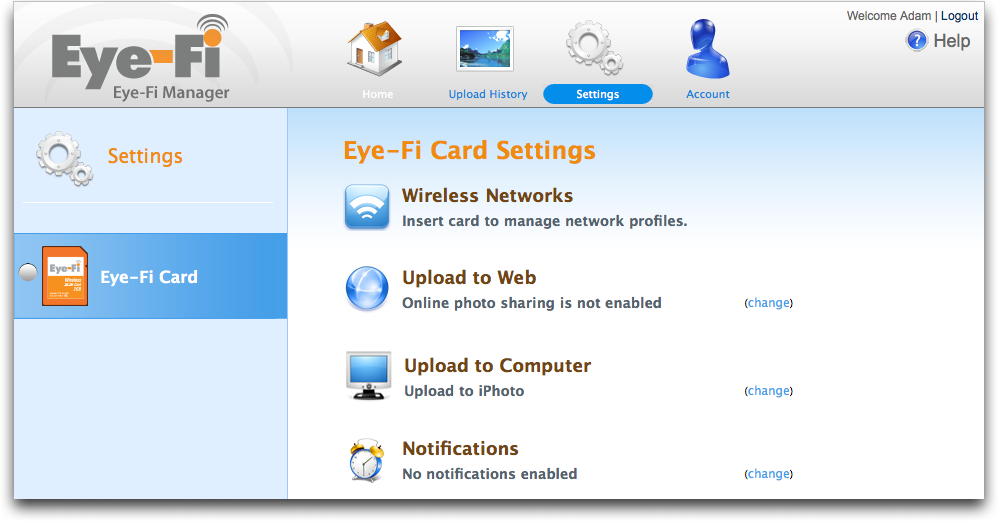
  via a Web browser. Eye-Fi Manager lets you configure wireless
  network profiles, choose which (if any) online file sharing services
  to upload to, choose whether or not to upload to iPhoto or a normal
  folder on your Mac, and turn on email or SMS text message
  notifications of when it starts and finishes uploading.

<http://www.tidbits.com/resources/2008-08/Eye-Fi-Manager-Web-interface.png>

  Once the card is configured, you can use your camera just as you
  always do, but as soon as the Eye-Fi senses that it is within range
  of a recognized wireless network, it starts uploading photos. The
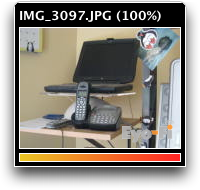
  Eye-Fi software on the Mac displays thumbnails of the photos as
  they're being received, and it automatically imports photos into
  iPhoto or into your specified folder in the Finder.

<http://www.tidbits.com/resources/2008-08/Eye-Fi-upload-progress.png>

  After the photos arrive on the Mac, they're then uploaded to your
  favorite photo sharing service, as long as it's not MobileMe.
  (Eye-Fi has cut deals with each photo-sharing, print-making, and
  social-networking service for uploads, and Apple doesn't have any
  outside deals with anyone.)

  Sounds good, doesn't it? Yes, but...


**Nice Idea, Annoying Reality** -- Don't take the criticisms that
  follow the wrong way. The Eye-Fi card is a miracle of engineering,
  and its creators have done incredible work in creating a piece of
  hardware that can work with any SD-capable camera.

  That said, no piece of hardware or software has irritated me more
  than the Eye-Fi in recent memory. Some updates have improved it; for
  instance, when I first got it, it couldn't send photos directly to
  iPhoto, which required another manual step or error-prone
  automation.

  The problems I've run into fall into two categories: limitations of
  the Eye-Fi software that could theoretically be fixed and basic
  conceptual conflicts with how I - and many other people - work with
  cameras and photos. Many of these latter problems could be addressed
  if the Eye-Fi could communicate bidirectionally with cameras. Only a
  single camera - a high-end model from Nikon - has been released
  since the Eye-Fi's introduction in late 2007 that allows
  communication between the camera's computer and the onboard process
  on the Eye-Fi.

  Camera makers have produced a series of consumer models with Wi-Fi
  built in that typically have far more severe limitations than the
  Eye-Fi, but there's no indication whether those manufacturers are
  interested in working more closely with Eye-Fi, pursuing their
  existing poor strategies, or improving their current Wi-Fi
  integration. (Glenn Fleishman wrote a detailed screed on this topic
  for a PC World blog.)

<http://www.pcworld.com/businesscenter/blogs/fleishman_on_hardware/144462/nikon_s52c_still_limits_transfers_over_wifi.html>


**Practical Limitations** -- As is so often the case, the devil is in
  the details, and for me, the Eye-Fi card fell down on the details.

* It can upload only JPEG images, which means that it ignores non-JPEG
  content such as movies or raw images. This forces an extra step
  where you must either plug your camera into your computer via USB or
  mount the Eye-Fi as a regular SD card through a card reader, and
  then transfer your movies and raw images. Otherwise, you could lose
  everything but your JPEGs. This isn't a hypothetical problem - I
  lost movies on more than one occasion because of this limitation,
  causing much swearing. Eye-Fi should fix this inexcusable problem by
  transferring everything to a target computer, even if they don't
  provide automated uploads or conversion for non-JPEGs. (Eye-Fi's
  hardware won't erase photos, but you will likely get into a rhythm
  of erasing your card in the camera after an Eye-Fi upload is
  complete.)

* When the Eye-Fi imports photos into iPhoto, it creates an event for
  every photo, requiring you to select all the events created during
  one import session and merge them. To solve this problem, the Eye-Fi
  software would have to upload all the images and only then send them
  all to iPhoto in one big import.

* The Eye-Fi also creates an album in iPhoto for every day's imports,
  but since you have to merge all the individual events anyway, the
  albums are utterly unnecessary and must be deleted manually. I
  presume this is just sloppy design or programming; the Eye-Fi
  software should import into iPhoto in an unobtrusive manner that
  doesn't create more work for the user.


**Conceptual Problems** -- Although Eye-Fi can and should address the
  above implementation details, the more serious problems relate to
  the Eye-Fi card's inability to communicate with its host camera and
  to be configured other than through a full-fledged Web browser
  running on a computer, and its all-or-nothing approach with photo
  sharing sites.

* Because uploading via Wi-Fi can take a number of minutes, depending
  on the number of pictures you've shot, you must disable your
  camera's capability to shut itself off after a period of inactivity.
  Perhaps others are better at remembering this than I am, but I
  frequently forgot to turn the camera off after the upload was
  finished, leaving me with a dead battery the next time I wanted to
  use the camera. (It's not that the Eye-Fi is using so much battery
  life, just that the camera drains its battery when it's left on for
  a long time.) Little irritates me more than finding my camera
  battery dead after I've left the house. This is an insurmountable
  problem unless camera manufacturers give Eye-Fi hooks to control
  power saving settings in the camera.

* Although the Eye-Fi can notify you when it's done uploading, it can
  do this only via email or SMS text messaging. This is key for the
  Eye-Fi Explore when uploading via a hotspot, since you'd have no
  other way of knowing when it was done. But for me, with the Eye-Fi
  Share, both are useless. I get email on my Mac when I check manually
  or every few hours (and certainly not every few minutes - I'd never
  get anything done!), so email notification would never arrive soon
  enough. Since I work at home, I don't have an active cell phone in
  my pocket at all times, and being cheap, I'd be offended at having
  to pay for each SMS text message. Collaboration with the camera
  manufacturers so the Eye-Fi could shut the camera off automatically
  would eliminate the need for notifications.

* Since the Eye-Fi starts uploading as soon as it senses a known
  network, you can't necessarily prevent it from uploading bad
  pictures by deleting them in the camera first. This isn't a huge
  problem if you'll be culling bad photos in a photo management
  program like iPhoto, but if you're working with an online photo
  sharing site in a Web browser, it will require more effort to weed
  out the bad images online. Without in-camera control over when the
  upload starts, there's no solution to this annoyance.

* Eye-Fi makes much of being able to upload to the photo-sharing
  sites, and while I initially thought I would like this feature and
  would use it to take more advantage of Flickr, I turned it off
  nearly instantly. Most troubling is the fact that you can't select
  which photos to upload. Thus, you'll need an unlimited service that
  can handle the gigabytes of photos; I maxed out my free Flickr
  account on the first upload. Since you can't cull photos in the
  camera reliably, you have to cull them online, which assumes that
  you don't use a program like iPhoto, or else you'll have to cull
  _both_ online and in iPhoto. You can set privacy options (dependent
  on the specific service), but it's an all-or-nothing situation,
  requiring manual intervention for every photo that might not fit
  your overall privacy setting (careful with those kid-in-the-pool or
  late-night photo shoots!). Finally, although the online services
  offer some editing tools, none that I've seen compare with even
  iPhoto, much less Photoshop Elements, so you're setting yourself up
  to share unedited photos.

* Although there are many networks whose names have remained at the
  default "linksys", the fact that the Eye-Fi Share must be configured
  to use every individual network (and works only with open networks
  that don't require Web-based login) means that it's essentially
  useless if you're in an unfamiliar area, and even more so if you
  didn't also bring a laptop. Of course, if you had a laptop, you
  could just copy photos from the camera to the laptop via USB. (Ad
  hoc, or computer-to-computer wireless networks are not supported.)
  One Wi-Fi firm, Devicescape, has client software that lets devices
  like the Eye-Fi communicate over most open, free, and for-fee
  networks to pull down new credentials for logins, as well as
  automatically "click" OK for standard terms of use at free hotspots.
  Eye-Fi would do well to incorporate something like that, where a Web
  site accessible from anywhere could be used to update the card's
  settings.


**So What's the Point?** It's clear that I'm not the target audience
  for the Eye-Fi card, and in fact, I've given up using it entirely in
  favor of a Transcend 4 GB SD card that's faster (helpful for
  recording longer movies; the Eye-Fi couldn't keep up after 1 to 4
  minutes) and costs less than $15 at Amazon. Eye-Fi won't say how
  fast the Eye-Fi cards are, but they seem to be on the slow side.
  Ironically, I quite like the little USB memory card reader that came
  with the Eye-Fi, and it works fine with the new Transcend card.
  (Eye-Fi chose to not offer cards larger than 2 GB capacity to avoid
  compatibility problems with older cameras that can't read the
  high-density SD format required for 4 GB and above.)

<http://www.amazon.com/dp/B000JMJWV2/?tag=tidbitselectro00>
<http://www.amazon.com/What-about-memory-speed/forum/Fx27I6EIEU3JEXW/Tx1XU8QDSROUGKS/1/ref=cm_cd_et_md_pl?_encoding=UTF8&cdMsgNo=5&cdItems=25&cdAnchor=B000X27XDC&store=electronics&cdSort=oldest&cdMsgID=MxE97EFDCIREIW#MxE97EFDCIREIW>

  So who is the Eye-Fi aimed at? Surely not professional
  photographers, or even serious amateurs, since it doesn't support
  raw images. That leaves casual photographers, but I count myself
  among that group, and the Eye-Fi did nothing but annoy me due to its
  awful integration with iPhoto, inability to handle movies, complete
  inability to communicate with a camera, and all-or-nothing approach
  to photo sharing sites.

  Hmm. That narrows it down. The Eye-Fi card could be great if you:

* Use an SD-capable camera - there are no Eye-Fi variants for other
  card formats, and Compact Flash adapters may not work well

* Are a casual photographer who never shoots raw images or movies

* Prefer to have photos uploaded to a folder (perhaps for use with a
  different photo management program) rather than into iPhoto, or
  don't like to keep photos on your computer at all

* Use an unlimited account on a photo sharing site other than MobileMe
  for all your photos

* Want the same privacy level for the vast majority of your shared
  photos

* Don't care to cull photos before uploading or to edit them on your
  Mac

* Can respond to email or SMS notifications of uploads, or can
  remember to shut your camera off when it's done uploading

* Have ready access to a predictably named open wireless network at
  appropriate times

  For me, it turns out that it's faster and easier to connect my
  camera via its USB cable or use a USB memory card reader to import
  into iPhoto, cull and edit photos there, and then upload select
  photos to MobileMe or Flickr. If you're like me, you can get a
  larger, faster SD card for a fraction of the price of the Eye-Fi
  Share. Or, if all of the bullet points just above are true of you,
  the Eye-Fi Share could be just perfect.


Why I Like the Eye-Fi Explore Wireless SD Card
----------------------------------------------
  by Glenn Fleishman <[EMAIL PROTECTED]>
  article link: <http://db.tidbits.com/article/9738>

  I fit into a category of photographer for whom the Eye-Fi Explore
  wireless SD card is a neat fit ($129.99 at Amazon). Adam Engst, our
  fearless publisher, has a different model - the Eye-Fi Share - that
  he excoriates in "Why I Hate the Eye-Fi Share Wireless SD Card,"
  2008-08-15. Oddly, I agree with most of Adam's points, but I have
  found over the last several weeks that the Eye-Fi Explore works
  quite well for me. (I wrote a longer, more technical review at Wi-Fi
  Networking News; you might enjoy this summary and quasi-rebuttal of
  Adam's thesis if you like it short and sweet.)

<http://www.eye.fi/products/explore/>
<http://www.amazon.com/dp/B001ACXHXE/?tag=tidbitselectro00>
<http://db.tidbits.com/article/9737>
<http://wifinetnews.com/archives/008418.html>


**Explore's Extras** -- The Eye-Fi Explore adds geotagging and hotspot
  uploads on top of features in the Share model. Its geotagging
  support inserts an approximate latitude and longitude into the
  metadata of pictures based on the Wi-Fi environment around you when
  the picture is snapped. Eye-Fi uses Skyhook Wireless's Wi-Fi
  positioning data, the same as is used for one component of the
  iPhone's location services, which means that it works best in cities
  and suburbs in industrialized countries. If you're taking photos out
  in the country, on the beach, or in small towns, you're unlikely to
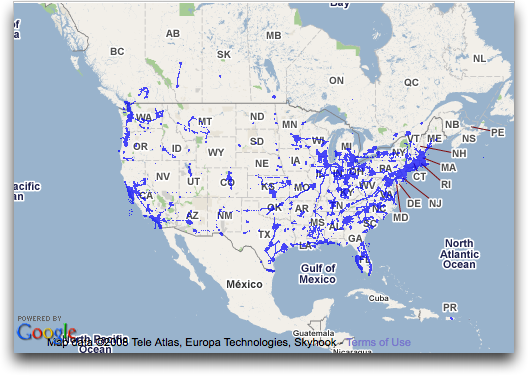
  pick up a recognized Wi-Fi signal and thus a match. (You can check
  Skyhook Wireless's coverage online; the map shown below gives you a
  sense of how much of the United States they've mapped.)

<http://www.skyhookwireless.com/howitworks/coverage.php>
<http://www.tidbits.com/resources/2008-08/Skyhook-coverage-map.png>

  I love the geotagging because it involves no effort, and puts two
  more dimensions onto photos, making it far easier to find and
  organize pictures. I'm hoping Eye-Fi figures out how to build a GPS
  radio into future models, or how to use an external GPS that pairs
  with their card.

  The hotspot feature is a bit more problematic. A one-year
  subscription to upload at any of about 10,000 Wayport-run Wi-Fi
  hotspots is included in the purchase; subsequent years cost $19.
  Wayport powers about 9,500 McDonald's restaurants and a scattering
  of several hundred hotels in the United States. This is fairly thin
  coverage if you don't frequent fast-food franchises, but dropping in
  for some food-like substance and an upload isn't horribly
  inconvenient, given McDonald's ubiquity.

  (Oddly, even though we perceive McDonald's is everywhere, they're
  spread rather thin in Seattle, with the nearest one to my house
  about a 10- to 15-minute drive away; Adam's in the same boat.
  McDonald's may make more sense as an upload location when you're
  traveling, where you would make a specific pit stop to upload
  pictures. Wayport has a map of their McDonald's and other
  locations.)

<http://wayport.know-where.com/wayport/>
<http://www.tidbits.com/resources/2008-08/Wayport-coverage-map.png>

  The Explore has a problematic setting: if you use the Wayport
  uploads, the card also demands to upload to _any_ open, login-free
  hotspot of any kind. I don't like that, as that behavior can get you
  into trouble; it should be a case-by-case and intentional choice on
  the user's part.


**Adam's Aggravations** -- Adam and I have a lot in common, but our
  attitudes and behavior around digital photography diverge mightily.

* Adam uses iPhoto; iDon't. I'm not a fan of iPhoto, and instead I use
  Microsoft Expression Media, which was once iView MediaPro, to
  organize my images without having to import them and deal with all
  of iPhoto's overhead and nonsense. The Eye-Fi's limitations with
  iPhoto don't affect me.

<http://www.microsoft.com/expression/products/overview.aspx?key=media>

* Notification doesn't work for Adam because he doesn't carry a cell
  phone all the time, doesn't check email every few minutes, and
  avoids email during off hours. My home computer, a laptop, sits on
  top of our entertainment cabinet, which is near our Wi-Fi hub, and
  it's where I place the camera when it's not in use. I also generally
  carry a cell phone. The Eye-Fi's visual upload and notification
  features work best in such a situation, so I don't have the problem
  Adam does with forgetting to turn off the camera after it's done
  uploading.

* Adam finds the Eye-Fi Wi-Fi upload sufficiently slow that he stops
  paying attention to the camera. I see 8 megapixel photos zoom into
  my computer, and it only takes at most a few minutes for even dozens
  of photos to transfer. My camera also seems to use an extremely
  small amount of battery charge to keep its display active; there's
  no control to turn off the display after a few minutes, so, as long
  as the camera is on, the display is active. This is an effective
  reminder for me to turn it off.

* I don't mind having my "bad" pictures uploaded and transferred.
  Although I'd prefer to sort through and discard bad or uninteresting
  photos on my computer before uploading to Flickr (my choice for an
  online photo-sharing service), the Eye-Fi makes it much more
  convenient to upload everything. I have a Flickr Pro account, which
  puts no constraints on uploads and storage, which was a problem for
  Adam using his free account. True, I have to sort pictures in two
  locations, but since I also treat Flickr as a kind of off-site
  backup for photos in addition to my other forms of archiving, it's
  only mildly inconvenient. (I'm also not polluting the public face of
  my Flickr photostream with bad pictures. When I upload, I typically
  set privacy so that only I, or only friends and family, can view the
  shots; I then sort photos into more public sets, if any.)

* The lack of support in Eye-Fi for raw images doesn't bother me; my
  camera doesn't offer that as an option, as it's more of a snapshot
  model. Eye-Fi's failure to transfer movies is more troubling,
  because, like Adam, I have to remember to insert the card into a USB
  reader to transfer movies before I erase the card. This irks me, and
  the company could fix this very easily.


**Neat, But Niche** -- The Eye-Fi Explore has fit right into my
  consumer workflow for taking pictures. This last weekend, my wife
  and I threw a birthday party for my older son, Ben, who turns four
  today. I took pictures like crazy over a couple hours, and because
  we had the party at the house, most of those photos were already on
  my computer and up at Flickr by the time the party was over. We
  didn't have to swap batteries - my camera uses two AA rechargeables
  - and we never had to think about uploading. Now, we still have to
  edit and cull, and we can do that locally on our media computer (for
  making prints, typically) or on Flickr (for sharing with family,
  friends, and the world).

  Future Eye-Fi models should factor in more of what Adam suggests,
  however, as the Eye-Fi remains a niche product, even if that niche
  is large, because it requires many shutterbugs change their behavior
  to match the card instead of having it meet their current needs.


TidBITS Watchlist: Notable Software Updates for 18-Aug-08
---------------------------------------------------------
  by TidBITS Staff <[EMAIL PROTECTED]>
  article link: <http://db.tidbits.com/article/9731>

* iPhone 2.0.2 includes "bug fixes," or perhaps bugs that have been
  fixed to prevent them from mating and creating new little bugs. As
  usual, Apple is utterly unhelpful in its release notes. We hope the
  update resolves issues with 3G reception in some phones and
  magically fixes everything. (Free via iTunes, 241.9 MB)

<http://www.apple.com/iphone/>

* Inquisitor 3.2 is the first update since the instant search
  enhancement for Safari was acquired by Yahoo. With Inquisitor
  installed, typing in Safari's Google search field provides a menu of
  instant results that you can either click to load or ignore to send
  the search to Google. New in 3.2 is support for Yahoo's open search
  Web services platform for faster performance and a slightly cleaner
  interface. It's also available in eight languages. (Free, 606K)

<http://www.inquisitorx.com/safari/>

* WireTap Anywhere 1.0.1 from Ambrosia Software is a new product that
  lets you route the audio output of any Macintosh application or
  hardware input device to any audio recording application, such as
  Ambrosia's own WireTap Studio. This would enable you, for instance,
  to record both sides of a Skype conversation and have music from
  iTunes recorded in the background as well. Even cooler, WireTap
  Anywhere can aggregate any combination of applications and devices
  into a single logical device. It also includes an Audio Unit
  generator. ($129 new, 13.1 MB)

<http://www.ambrosiasw.com/utilities/wta/>

* TextExpander 2.4 from SmileOnMyMac includes bug fixes and
  performance improvements for the utility that turns keystrokes into
  replacement insertions of text. The company says key among these is
  an instant drop-down of their snippet library menu even if you have
  a large array of snippets. Keyboard navigation of the menu was also
  added. ($29.95 new, free upgrade for 1.x and 2.x users, 4 MB)

<http://www.smileonmymac.com/TextExpander/>

* Airfoil 2.6 for Windows from Rogue Amoeba features an overhauled
  code base, more device support, and better integration with Apple
  TV. We don't typically mention Windows updates, but Airfoil and
  Airfoil Speakers (remote sound control) work with Mac OS X, Windows,
  and Linux, and integrate with AirPort Express and Apple TV. ($25
  new, free upgrade, 3 MB)

<http://www.rogueamoeba.com/airfoil/windows/>


Hot Topics in TidBITS Talk/18-Aug-08
------------------------------------
  by Jeff Carlson <[EMAIL PROTECTED]>
  article link: <http://db.tidbits.com/article/9740>

**iPhone Apps That Go Beyond Entertainment** -- Readers note that some
  iPhone applications can be purchased only from the U.S. App Store.
  (5 messages)

<http://emperor.tidbits.com/TidBITS/Talk/2134>


**Eudora folder merge?** How do you merge two Eudora folders prior to
  moving to a new email program? (3 messages)

<http://emperor.tidbits.com/TidBITS/Talk/2135>


**Odysseus, "Eudora style email client"** -- A query about a new email
  program brings up questions of how well REALbasic can be
  implemented. (11 messages)

<http://emperor.tidbits.com/TidBITS/Talk/2136>


**NetShare app on iPhone** -- NetShare, which enabled someone to get
  Internet access on a computer by using an iPhone as a tethered
  modem, was pulled from the App Store. For those who purchased it,
  will it be removed at the next sync? (2 messages)

<http://emperor.tidbits.com/TidBITS/Talk/2137>


**Garmin nuvi 255W Focuses on Navigation** -- Adam's review of this
  GPS device elicits comments about its performance, as well as that
  of other devices. (3 messages)

<http://emperor.tidbits.com/TidBITS/Talk/2138>


**Backing up Photos While Traveling** -- Readers suggest strategies
  for keeping one's digital photos secure while on the road. (10
  messages)

<http://emperor.tidbits.com/TidBITS/Talk/2139>


**[ANN] Apple Security Update blocks Microsoft's update process** --
  The latest Apple security update prevents Microsoft AutoUpdate from
  working under Mac OS X 10.5 Leopard. (1 message)

<http://emperor.tidbits.com/TidBITS/Talk/2140>


**MobileMe Mail and Gmail Go Down Simultaneously** -- Readers note
  issues with MobileMe and Gmail after both services experienced an
  interruption. (4 messages)

<http://emperor.tidbits.com/TidBITS/Talk/2141>


$$

This is TidBITS, a free weekly technology newsletter providing timely
news, insightful analysis, and in-depth reviews to the Macintosh and
Internet communities. Feel free to forward to friends; better still,
please ask them to subscribe!

Non-profit, non-commercial publications and Web sites may reprint or
link to articles if full credit is given. Others please contact us. We
do not guarantee accuracy of articles. Caveat lector. Publication,
product, and company names may be registered trademarks of their
companies. TidBITS ISSN 1090-7017.

Copyright 2008 TidBITS: Reuse governed by Creative Commons license.

Contact us at:    <[EMAIL PROTECTED]>
TidBITS Web site: <http://www.tidbits.com/>
License terms:    <http://www.tidbits.com/terms/>
Full text search: <http://www.tidbits.com/search/>
Subscriptions:    <http://www.tidbits.com/about/list.html>
Account help:     <http://www.tidbits.com/about/account-help.html>


--
If you want to unsubscribe or change your address, use this link
http://emperor.tidbits.com/webx?unsub@@.3c557dc4!u=306a67f9