TidBITS#942/25-Aug-08
=====================
  Issue link: <http://db.tidbits.com/issue/942>
  As has been the trend of late, this issue focuses on the iPhone and
  MobileMe, and aside from the fact that the iPhone is now available
  in 43 countries around the world, the news isn't entirely positive.
  For those for whom the iPhone 2.0 software doesn't allow independent
  apps to be loaded, we have direct confirmation from Steve Jobs that
  it's a bug that will be fixed in September. And on the MobileMe
  side, Rich Mogull looks at how the service's Web interface is
  insecure, but he verifies that other applications like Mail, iChat,
  and iCal do use secure communications. Apple also extended MobileMe
  memberships by another 60 days, but Adam notices that the company
  did this without actually apologizing for all the problems, so he
  compares Apple's handling of the MobileMess with the handling of
  Google's Gmail outage and Netflix's shipping problems. Changing
  gears, Charles Maurer looks for an application to help him track his
  wine collection, and ends up settling on FileMaker's Bento. In the
  Watchlist this week, we cover the releases of the important MacBook
  Air Update, Mactracker 5.0.4, and Keyboard Maestro 3.4.

Articles
    iPhone Now Available in 43 Countries
    Jobs Personally Acknowledges iPhone Bug and Upcoming Fix
    MobileMe Web Interface Insecure, But Other Apps Get It Right
    Comparing Apple's MobileMe Contrition with Google and Netflix
    Wine with Bento
    TidBITS Watchlist: Notable Software Updates for 25-Aug-08
    Hot Topics in TidBITS Talk/25-Aug-08


------------ This issue of TidBITS sponsored in part by: --------------

* READERS LIKE YOU! Support TidBITS with a contribution today!
  <http://www.tidbits.com/about/support/contributors.html>
  Special thanks this week to Karen Anderson, Lorenzo Kristov,
  Harro de Jong, and Pat Curran for their generous support!

* Fetch Softworks: Fetch 5.3 has a new look for Leopard,
  and new support for Leopard technologies. And you can
  upload with the oldest technology of all, Copy and Paste!
  Download your free trial version! <http://fetchsoftworks.com/>

* WebCrossing Neighbors Creates Private Social Networks
  Create a complete social network with your company or group's
  own look. Scalable, extensible and extremely customizable.
  Take a guided tour today <http://www.webcrossing.com/tour>

* Bare Bones Software's BBEdit 8.7 -- Latest version offers a
  major interface overhaul, new prefs, text clippings, improved
  JavaScript, new Ruby/SQL/YAML/Markdown support, code folding.
  Over 160 new features in all! <http://www.barebones.com/>.

* MARK/SPACE, INC: If you have a smartphone, we can sync it!
  Sync your address book, calendar, notes, music, pictures, and
  more from your BlackBerry, Windows Mobile or Palm OS mobile
  phone to your Mac. <http://www.markspace.com/bits>

* VMware Fusion. The most seamless way to run Windows on your Mac.
  Backed by nearly a decade of proven virtualization technology.
  Try VMware Fusion today for free, or order online for only $79.
  Visit: <http://www.tidbits.com/about/support/vmware-fusion.html>

* Microsoft's MacBU: Supporting Mac users with Office 2008.
  Straighten up your Office with the latest updates to Word,
  Excel, PowerPoint, and Entourage. Update today at Mactopia!
  <http://www.microsoft.com/mac/downloads.mspx>

---------- Help support TidBITS by supporting our sponsors ------------


iPhone Now Available in 43 Countries
------------------------------------
  by Adam C. Engst <[EMAIL PROTECTED]>
  article link: <http://db.tidbits.com/article/9746>

  Apple has launched the iPhone in 21 more countries, bringing the
  total to 43. Reuters reported that Russia will also get the iPhone
  in October 2008, and we're sure additional countries will come
  online as Apple negotiates deals with local carriers. Apple's plans
  for world domination are well underway.

<http://www.tuaw.com/2008/08/21/iphone-3g-rolling-worldwide-russia-coming-soon/>
<http://www.reuters.com/article/marketsNews/idINLL20791920080821?rpc=44>

  Much has been made about the fact that the iPhone will now be
  available to 660 million potential customers, but that's pure
  hyperbole - there's no way to know how it will sell in any given
  market or what deal Apple will strike with local carriers. What I'll
  find more interesting is the effect on sales in the App Store;
  increasing the iPhone installed base by even a million here or there
  could result in significantly more sales for individual apps.

<http://apple20.blogs.fortune.cnn.com/2008/08/22/iphone-3g-now-serving-660-million-potential-customers/>


Jobs Personally Acknowledges iPhone Bug and Upcoming Fix
--------------------------------------------------------
  by Jeff Carlson <[EMAIL PROTECTED]>
  article link: <http://db.tidbits.com/article/9743>

  Apple puts a lot of effort into being opaque, especially lately.
  Recent software updates, such as iPhone 2.0.2, provide only "Bug
  fixes" as their release notes, and problems with the MobileMe launch
  and extended email problems were either not acknowledged or done so
  halfheartedly. (See "Comparing Apple's MobileMe Contrition with
  Google and Netflix," 2008-08-19.)

<http://db.tidbits.com/article/9741>

  Perhaps that's why it's so surprising that a helpful back-channel of
  communication has emerged, one which provides straight answers that
  Apple's spokespersons can't offer: Apple CEO Steve Jobs.

  A TidBITS reader shared with us that she received a personal email
  reply from Jobs concerning an iPhone issue that some people are
  facing. After updating to the iPhone 2.0 software and iTunes 7.7.1,
  she was unable to load any third-party applications, and iTunes
  showed the iPhone's memory as being empty. Subsequent iPhone updates
  haven't resolved the issue. (For more customer reaction to the
  problem, see this Apple Support Discussion thread.)

<http://discussions.apple.com/thread.jspa?threadID=1644828&tstart=0>

  Jobs's single sentence reply to her email is direct and helpful,
  acknowledging the problem and providing a time frame for its
  resolution: "This is a known iPhone bug that is being fixed in the
  next software update in September." (We've seen email from Jobs
  before, and this telegraphic, direct style is his trademark. In
  January 2007, a reader shared a response from Jobs after the reader
  complained via email to the CEO about the odd $5 charge for a Draft
  N enabler to turn on a hidden Wi-Fi capability in many Mac models:
  "It's the law.")

<http://wifinetnews.com/archives/007320.html>

  Jobs clearly isn't bound by the secrecy he has imposed upon his
  employees, and, frankly, it's refreshing - not necessarily because a
  customer can email [EMAIL PROTECTED] and receive a reply, but because
  the reply is substantive. If he were to follow the current Apple
  modus operandi, Jobs could have replied with the type of
  non-reassuring fluff that comes from most companies: "Thank you for
  your email. Apple works hard to make its products the best they can
  be..." Blah blah blah.

  We hope Jobs will foster a more open level of communication at
  Apple. We understand the need for secrecy to protect unannounced
  products, but the company's recent stonewalling is
  counterproductive. Instead of projecting the image that no news is
  good news, the stubborn silence from Cupertino makes Apple's
  customers and those of us who follow it start to wonder just how bad
  things are behind the curtain.


MobileMe Web Interface Insecure, But Other Apps Get It Right
------------------------------------------------------------
  by Rich Mogull <[EMAIL PROTECTED]>
  article link: <http://db.tidbits.com/article/9745>

  Although the launch of MobileMe wasn't exactly one of Apple's high
  points in product releases, even the most acerbic of critics
  grudgingly admits that its Web interface is one of the more
  well-designed on the market. Unfortunately, MobileMe's Web
  application is also one of the least secure: Apple allows anyone to
  listen in to your communications, including the contents of email
  and calendar updates.

  AppleInsider, reporting on MobileMe on 15-Aug-08, attempted to
  assuage concerns that the MobileMe Web interface does not use SSL
  encryption to protect connections from malicious sniffing or
  hijacking. They stated SSL was unnecessary because:

<http://www.appleinsider.com/articles/08/08/15/inside_mobileme_web_3_and_web_client_server_apps.html&page=2>

    "Data transaction security in MobileMe's web apps is based upon
authenticated handling of JSON data exchanges between the self contained
JavaScript client apps and Apple's cloud, rather than the SSL web page
encryption used by HTTPS. The only real web pages MobileMe exchanges with the
server are the HTML, JavaScript, and CSS files that make up the application,
which have no need for SSL encryption following the initial user
authentication. This has caused some unnecessary panic among web users who have
equated their browser's SSL lock icon with web security. And of course,
Internet email is not a secured medium anyway once it leaves your server.

    "If Apple applied SSL encryption in the browser, it would only slow down
every data exchange without really improving security, and instead only provide
pundits with a false sense of security that distracts from real security
threats."

  This is, alas, patently false. Those of you who are Star Trek fans
  are familiar with the term "technobabble," the fictional,
  technology-laden lines uttered by actors to give the appearance of
  scientific accuracy. Just as "altering shield frequencies in
  harmonic resonance with the Klingon's tachyon beams" is a load of
  poppycock that sounds authentic, so is "Data transaction security in
  MobileMe's web apps is based upon authenticated handling of JSON
  data exchanges between the self contained JavaScript client apps and
  Apple's cloud." That just means that you log in, and JavaScript is
  used to handle communications with MobileMe; there's no security
  magic in there.

  As reported by Jens Alfke at the Thought Palace blog, although your
  initial login to MobileMe is encrypted, the rest of your session is
  transmitted in plain text. If anyone on your network decides they
  want to sniff your connection and read your email, there's nothing
  to stop them.

<http://mooseyard.com/Jens/2008/08/re-mobileme-webmail-security-there-is-none/>

  What AppleInsider's statement boils down to is, "Apple checks that
  you're a real user when you log in; everything else is sent in the
  clear between your browser and their servers; and we think SSL would
  bog down performance without improving security." They couldn't be
  more wrong about that last conclusion.


**You (Should) Get What You Pay For** -- To be fair, Yahoo Mail and
  Hotmail also fail to use SSL beyond your initial log in, while
  Google only recently added complete-session SSL to Gmail as an
  option. But that's no excuse for Apple's decision. Yahoo Mail and
  Hotmail are free services, while we pay $99 per year for MobileMe.
  Call me demanding, but I expect more from a commercial service.
  Google now offers SSL for free, and it's almost always an option (or
  default) for commercial Web services offering mail.

  There's also another subtle, but important, flaw in Apple's handling
  of user authentication. As noted by Alfke, the secure authentication
  page points to auth.apple.com while the rest of MobileMe uses the
  domain me.com. By breaking the bond between the digital certificate
  used by SSL to verify a domain, and the domain where most of the
  interaction takes place, users are vulnerable to redirection attacks
  as highlighted by the recent DNS vulnerability (see "Apple Fails to
  Patch Critical Exploited DNS Flaw", 2008-07-24). DNS can also be
  poisoned on a local network, where an attacker floods a network with
  responses for non-secure domains: say, a hotspot where you're
  logging in.

  A bad guy can hijack the me.com domain temporarily and redirect you
  to a malicious site without affecting your login experience, since
  you will still be authenticating to the unaffected apple.com domain.
  While I doubt many bad guys will completely replicate the MobileMe
  Web interface, a common attack method (and one I demonstrated using
  Wi-Fi at the recent DefCon hacker conference) is to redirect you to
  a malicious Web page, which quickly attacks your Mac and then
  forwards you back to the real me.com before you notice.

<http://db.tidbits.com/article/9706>

  Securing an entire session with SSL does not "slow down every data
  exchange without really improving security." Because MobileMe is a
  Web-based application, you're not waiting for page refreshes, but
  for very small amounts of data to pass back and forth. (The JSON
  mentioned in the gobbledygook paragraph earlier is a format for
  lightweight JavaScript objects, in fact.)

  (Apple does mark its authentication cookie, stored in the browser,
  with a secure flag. This token, which is used to maintain a
  persistent logged-in state, is only sent to auth.apple.com via SSL.
  This avoids sidejacking, a technique that formerly worked with Gmail
  and other Google services until the company wised up and made sure
  tokens were as protected as passwords. See "Sidejack Attack Jimmies
  Open Gmail, Other Services," 2007-08-27.)

<http://db.tidbits.com/article/9129>


**Good News, And Protecting Yourself** -- While there's a reasonable,
  if small, risk someone might sniff your connection when you are out
  in public, the odds of a redirection attack are extremely low. And
  although MobileMe's Web interface is essentially insecure, the other
  MobileMe services (except iDisk) are properly protected.

  When you set up your MobileMe email account, it defaults to a secure
  connection, and in testing iCal, I found both the push and manual
  synchronization process appears to use SSL. Using a sniffer on my
  own system, I was unable to access the contents of any synchronizing
  calendar entries or email. iChat authentication is also secure, and
  MobileMe installs digital certificates to enable secure chats with
  other iChat users - unlike AOL Instant Messenger and many other free
  instant messaging options. Note that if you use iChat with MobileMe
  encryption enabled, but you correspond with an insecure AIM user,
  that iChat connection is still insecure.

  Although I don't need to use it often, since I'm never far from my
  Mac or iPhone, I love the new MobileMe Web interface. But since I'm
  most likely to use it on insecure systems and networks, like
  Internet cafes when traveling internationally, I'll have to skip the
  convenience and stick with more secure options until Apple decides
  to support SSL properly.


Comparing Apple's MobileMe Contrition with Google and Netflix
-------------------------------------------------------------
  by Adam C. Engst <[EMAIL PROTECTED]>
  article link: <http://db.tidbits.com/article/9741>

  In email sent to MobileMe users late on 18-Aug-08, Apple announced
  that the company will be extending all accounts in the system by 60
  days. Any paid or trial account that was active as of midnight on
  19-Aug-08 receives two additional months. The 60-day extension will
  be given to subscribers who may already have received the 30-day
  extension Apple previously granted (See "MobileMea Culpa: Apple
  Apologizes and Explains Tiger Situation," 2008-07-16, for who
  qualified for that extension.) The 60-day extension will be applied
  to accounts within a few days.

<http://support.apple.com/kb/HT2826>
<http://support.apple.com/kb/HT2408>
<http://db.tidbits.com/article/9695>

  The full 90 days of membership extension add up to $24 for an
  individual subscriber who paid .Mac/MobileMe's full $99-per-year
  cost. (Tip: Buy boxed editions of MobileMe for new accounts or
  renewals to save money; Amazon sells the $149 MobileMe Family Pack
  for $109.99, for instance.) Although Apple hasn't published
  subscription numbers for MobileMe, two million users is regularly
  bandied about online. However, I heard that number from a source
  within Apple several years ago, so I'd expect the current user base
  to be larger, particularly given the role that MobileMe plays for
  the perhaps six million iPhone and iPod touch users out there. That
  means that Apple is forgoing at least $48 million in gross MobileMe
  membership fees, and perhaps quite a bit more.

<http://www.amazon.com/dp/B001BY0C2U/?tag=tidbitselectro00>

  That financial hit may account in part for why Apple doesn't quite
  seem apologetic about the MobileMe transition, which has been marked
  by lost email, service outages, syncing problems, and more.
  Internally, I'll bet that Apple feels that the service extensions
  make a loud statement because they add up to a lot of money for the
  company. Or rather, it's a lot of revenue to push into the future,
  since all it will really mean is that Apple will have to wait an
  additional 90 days for MobileMe renewal revenue to come in for
  current subscribers.

  But for any individual user, $24 isn't that much, and if you spent
  hours dealing with lost email or pulling your hair out with syncing
  problems, $24 doesn't begin to make up for it, especially when none
  of Apple's communications start with "We're sorry!" Apple has made
  several public statements about the situation that acknowledge that
  there were problems - though Steve Jobs's internal email was by far
  the most plain-spoken - but only one has used the word "apologize,"
  and only once.

<http://arstechnica.com/journals/apple.ars/2008/08/05/steve-jobs-on-mobileme-the-full-e-mail>

  That first email message to MobileMe users read, in part:

    "We want to apologize to our loyal customers and express our appreciation
for their patience by giving all current subscribers an automatic 30-day
extension to their MobileMe subscription free of charge."

  This was also the only public message to explain at all what was
  going on. All subsequent statements, including today's email, have
  asked for patience and made vague statements about the transition to
  MobileMe being rockier than hoped, but haven't repeated the apology
  or provided any details. From today's message:

    "We have already made many improvements to MobileMe, but we still have many
more to make. To recognize our users' patience, we are giving every MobileMe
subscriber as of today a free 60 day extension. This is in addition to the one
month extension most subscribers have already received. We are working very
hard to make MobileMe a great service we can all be proud of. We know that
MobileMe's launch has not been our finest hour, and we truly appreciate your
patience as we turn this around."

  As a writer, I'm struck by how Apple's statements seem to dance
  around the matter, and as a parent, I'm reminded instantly of that
  oft-repeated phrase to misbehaving children told to apologize to
  another, "Say it so he can hear you, and say it like you mean it."
  It may be instructive to compare with several other high-profile
  outages of late.

  Both MobileMe Mail and Google's Gmail went down on 11-Aug-08 for a
  few hours. Apple's recent email doesn't mention that outage as part
  of the rocky transition, and the only acknowledgment I could find of
  it was a pair of entries in the MobileMe System Status page
  (bookmark this page, folks!). There was no mention of the outage on
  the semi-anonymous MobileMe Status blog at all, with the most recent
  posting being from 29-Jul-08, claiming that lost email had been
  restored and promising (but not delivering) another post later in
  the week. Since I initially wrote this article, Apple has officially
  closed the MobileMe Status blog, perhaps recognizing that it had no
  credibility from the start.

<http://www.apple.com/support/mobileme/system_status_history.html>
<http://www.apple.com/mobileme/status/>

  Google, in contrast, quickly posted a highly apologetic message on
  the Official Gmail Blog titled "We feel your pain, and we're sorry."
  It outlines in reasonable detail what went wrong, why it happened,
  and what Google is doing to prevent the problem in the future. I
  don't know if Google offered paying subscribers to Google Apps
  Premier Edition (who are guaranteed 99.9 percent uptime) a credit,
  but since Gmail is free to most users, an apology is mostly what's
  warranted.

<http://gmailblog.blogspot.com/2008/08/we-feel-your-pain-and-were-sorry.html>

  For another example, look at how Netflix handled the communications
  surrounding their shipping system outage last week. Within two days,
  an email message arrived entitled "We're Sorry DVD Shipments Are
  Delayed." The first paragraph of the message explained what was
  happening, the second paragraph apologized and explained that
  Netflix would be recompensing users for the inconvenience, and the
  third paragraph apologized again and gave a customer service
  telephone number for anyone who needed further assistance. And this
  is for an entertainment service, not something like MobileMe or
  Gmail that is relied upon for business by at least some people.

  The next day saw a similar message from Netflix, "We're sorry your
  DVD shipment was delayed," which explained what had gone wrong and
  that systems were back up. It then went on to apologize several more
  times, and included this nicely crafted statement:

    "We pride ourselves in delighting you, and we've let you down. We
apologize, and we will issue a 15% credit to your account in the next few days.
You don't need to do anything. Your credit will automatically be applied to
your next billing statement."

  Netflix also did an excellent job of posting updates on the Netflix
  Community Blog to keep users apprised of the situation, starting on
  12-Aug-08 and including one or two posts per day until the situation
  was resolved on 15-Aug-08. Now that's contrition. Admitting
  mistakes, using apologetic language, and issuing credits within four
  days.

<http://blog.netflix.com/>

  Apple isn't denying problems or pretending the entire situation will
  just blow over, and that's good. But at least to my ears, the blog
  and email communications from Google and Netflix sound significantly
  more contrite - these people really are sorry for having
  inconvenienced me. I also find myself feeling more kindly towards
  the messages from real people - the postings on the Netflix blog in
  particular give a sense of just how hard Netflix's people were
  working to resolve the problem and how terrible they felt about the
  outage. Apple's anonymous and pseudonymous messages don't carry
  nearly the same weight.

  Plus, although there are some who may try to avoid apologies on the
  grounds that they can be seen as an admission of guilt or weakness,
  there is also a lot of evidence that sincere apologies can instead
  actually fend off lawsuits, since people often sue because of
  perceived stonewalling. It's well worth reading Sarah Kellogg's DC
  Bar article "The Art and Power of the Apology," and there's an
  entire Web site - Perfect Apology - devoted to learning the best
  ways to apologize and explaining why apologies are so useful.

<http://www.dcbar.org/for_lawyers/resources/publications/washington_lawyer/june_2007/apology.cfm>
<http://www.perfectapology.com/>

  Speaking not just as a commentator, but as someone who has messed up
  mailings to tens of thousands of TidBITS subscribers on more than
  one occasion in our 18-year history, the moral of the story is this:
  When you're faced with a problem that affects significant numbers of
  users, communicate the details of the situation quickly and clearly,
  have the message come from a real person, and, for goodness sake,
  say you're sorry so everyone involved can hear you!


Wine with Bento
---------------
  by Charles Maurer
  article link: <http://db.tidbits.com/article/9744>

  I enjoy wine. I might easily become a wine snob but for three
  impediments: I have too little money, too poor a memory for names
  and tastes, and - well, it's difficult to hold my nose in the air
  while a sommelier is giggling at my French.

  I cannot figure out anything to do about my French, but 20 years ago
  I did learn how to make my want of memory compensate partially for
  my want of money: I buy inexpensive wines and forget where I put
  them. After 5 or 10 years I bump into them again and find that they
  have become something nice.

  However, they do need to be the right sort of inexpensive wine. If
  you ferment good grape juice and know what you are doing, then you
  can make a quaffable wine. This wine is cheap to produce but nothing
  about it will improve with age. Alternatively, instead of bottling
  the wine immediately, you can store it for a year or two in small
  oak barrels. This adds a bit to the cost and when you finally bottle
  it, the wine will taste foul. That is the kind of wine to put away.
  The foul taste comes from tannins that have leached from the wood.
  Over the years those tannins will gradually oxidize. Combined with
  the grape juice, the products of that oxidation can become complex
  and enjoyable.

  Over the years my wife and I have built a cellar using this
  strategy. We buy cases of modestly priced wines that have been aged
  in oak, and set them behind other cases, so that we forget that they
  are there. A number of years later, we happen upon them. This lets
  us drink nicer wines than our budget would normally allow. However,
  we have no clue what wines we own. We don't even know how many
  bottles are in the cellar.

  This summer we decided that the time had come to sort out the mess -
  or rather, as such things tend to happen, my wife decided that the
  time had come for me to sort out the mess. Since organization is not
  my forte, I hoped to find some software that would help me.


**Commercial Varietals** -- To be really helpful, a computer would do
  more than just keep a list of our bottles, it would generate the
  list of bottles itself. A $199 combination of hardware and software
  is designed to do exactly this: IntelliScanner Wine Collector 250. A
  hand-held scanner reads the bar code that is imprinted on nearly
  every bottle nowadays, then an application reaches out over the
  Internet to look up the wine in a database. This sounded wonderful
  to me, so I wrote for one and tried it the minute that it came. I
  scanned 10 bottles from an assortment of countries. Alas, Wine
  Collector filled in some information for only two wines and found
  either no information or incorrect information for the rest. Paul
  Scandariato of IntelliScanner explained, "Although our database
  includes 67,000 wines, that's just a fraction of the number of wines
  available in the world."

<http://www.intelliscanner.com/products/wine/>

  If my Mac cannot generate a list of bottles, it can certainly serve
  as a sheet of ruled paper holding a list: a spreadsheet. However,
  that list must include a lot of text, and text in a spreadsheet is
  awkward to enter and awkward to read. For this reason, the Mac would
  usefully provide data-entry forms as well.

  This is what specialized wine-cellar applications do. Unfortunately,
  their forms provide space for many details that I do not care about
  and they always lack a field or two that I want. I get no joy from
  filling in a complicated form reflecting the way somebody else
  thinks about things, so I decided not to use a specialized
  application but to set up a simpler form using a general-purpose
  product. I might once have done this with the now-defunct
  AppleWorks, but I found an alternative in Bento, a $50 product from
  Apple's subsidiary FileMaker.

<http://www.filemaker.com/bento/>


**Bottling My Own** -- Bento provides a point-and-click dialog box
  that enabled me rapidly to define the kinds of information I want to
  keep track of - the columns in the spreadsheet or, in database
  jargon, the fields. After I defined my fields, I dragged them into a
  data-entry form and was ready to enter records. To create a list of
  wines I clicked a button labelled "Table" and then ticked off some
  checkboxes beside a list of fields. Each tick brought up that field
  as a column. I arranged the columns as I wanted, and then set up an
  equivalent of Spotlight to maintain "smart collections" like the
  Finder's smart folders. For some of these smart collections I
  customized the columns. Now I can enter information about wines in
  the way that I find the most sensible, and clicking on an icon shows
  me a convenient list of our two-star whites or three-star reds.

  Bento is advertised as a personal database but unlike FileMaker Pro,
  Bento is not designed to manage complex databases used in complex
  ways. Instead, Bento is designed to manage lists. The difference
  between database management and list management is subtle but
  profound. To store and manipulate complex information efficiently, a
  database manager needs to have that information broken down into the
  smallest possible elements, with uniform formatting and any
  redundancies excised. In contrast, a list manager does nothing but
  find and sort, so its information can be held in a natural form.
  What most people think of as database managers are actually list
  managers - Apple's Address Book, for example. That's why Address
  Book lets you enter a telephone number in any format you like. In
  contrast, a database managing phone numbers for a large corporation
  would require splitting a number into four separate fields: country
  code, area code, the number itself, and a PBX extension. (I ought to
  point out that under the hood, both Bento and Address Book actually
  use engines that are built to manage complex databases, but those
  engines are loafing along on only one cylinder.)

  Setting up a database manager requires a great deal of expertise and
  planning but setting up a list manager does not. All you need do is
  figure out how you want to be able to sort your list - by whether a
  wine is red or white, by price, etc. - and set out this information
  in separate fields. The remaining information you can divide into
  whatever chunks you find convenient.

  In theory, the process of setting up a list manager is this: you sit
  down with a paper and pencil, think about how you want to sort your
  list, decide upon the fields that you need, design a data-entry
  form, and then sit down at a computer and create it. In reality you
  think about the problem, work out what you need in front of the
  computer while making some tentative entries, and then discover that
  you forgot about some categories, while others turn out to be
  impractical. At that point you modify the fields and the form, enter
  some more data tentatively, and find that you allocated too much
  space here and too little there. After you change that, you notice
  other ways to make improvements. After a few more iterations you get
  everything right, but a week or a month later you decide to modify
  something else.

  Bento simplifies this process by providing a simple graphical
  interface that allows the user few choices. From the perspective of
  a database programmer, the choices are so limited as to be
  outrageous. (This accounts for Jeff Porten's opinions of the
  pre-release version of Bento; see "FileMaker's Bento: Undercooked
  and Slightly Fishy," 2007-11-14.) For example, you cannot require a
  field to be filled in. However, Bento manages simple lists for
  individuals, not complex data for companies. If I neglect to enter a
  vintage, when the list is displayed I will notice the omission and
  fill it in. I can quibble with some aspects of Bento - I
  particularly dislike being unable to delete a record while I am
  seeing it in a smart collection - but overall I find its limitations
  to be more helpful than restrictive, and the package to be well
  thought-out. In hardly any time it allowed me to make a wine-cellar
  application that looks and feels like a purpose-built product and
  that I prefer to any of the purpose-built products I have seen.

<http://db.tidbits.com/article/9313>

  If the day should ever come (don't hold your breath) that I decide
  to catalogue our books, I would use Bento for it. I would also use
  it for classical CDs, an inventory of hardware, or just about any
  other kind of collection whose descriptions cannot reliably be
  accessed programmatically over the Internet. (For movies on DVD,
  which are well described in Internet databases, I use Bruji's
  DVDpedia.) Since Bento can export files as comma-delimited text, it
  can also be used as a convenient adjunct to a spreadsheet for
  entering research data.

<http://www.bruji.com/dvdpedia/>

  I have noticed some minor bugs in Bento's user interface but the
  current release seems to be reasonably well polished and takes good
  advantage of the tools built into Mac OS X 10.5 Leopard. (It will
  not run under Tiger.) I could wish that it had a few more features,
  and I am sure that it would be easy for FileMaker to add them, but
  it would be even easier for FileMaker to kill Bento with
  feature-itis, so I shall not wish for them very hard. As it stands,
  Bento is not so simple that your grandmother will be able to start
  using it without help, but setting up and using a data-entry form in
  Bento is hardly more difficult than customizing and using Address
  Book and iCal. Since Address Book and iCal are purpose-built list
  managers, this is an impressive feat of design.


**Try My Wine Cellar File** -- If you happen to be looking for
  wine-cellar software, you are welcome to download an empty version
  of my Bento file, to see if it can serve you as a starting point.
  But note that this file is not a template - Bento will not import
  templates - it is an empty version of Bento's actual data file, the
  file "bento.bentodb" that Bento maintains in ~/Library/Application
  Support/Bento/. If you are already using Bento, you will need to be
  careful to protect your current data file and you will not be able
  to copy the forms from my file into yours; you will need to recreate
  them instead. Bento itself is available for a 30-day free trial.

<http://www.tidbits.com/resources/2008-08/bento.bentodb.zip>

  If you are unfamiliar with Bento and are trying it with my file, you
  might want to change two of Bento's settings. Bento will work with
  your address book and calendar, and it displays these by default,
  but displaying them adds some clutter and confusion. To hide them,
  go to the File menu, choose Address Book and iCal Setup, and then
  uncheck both boxes in the dialog that appears.

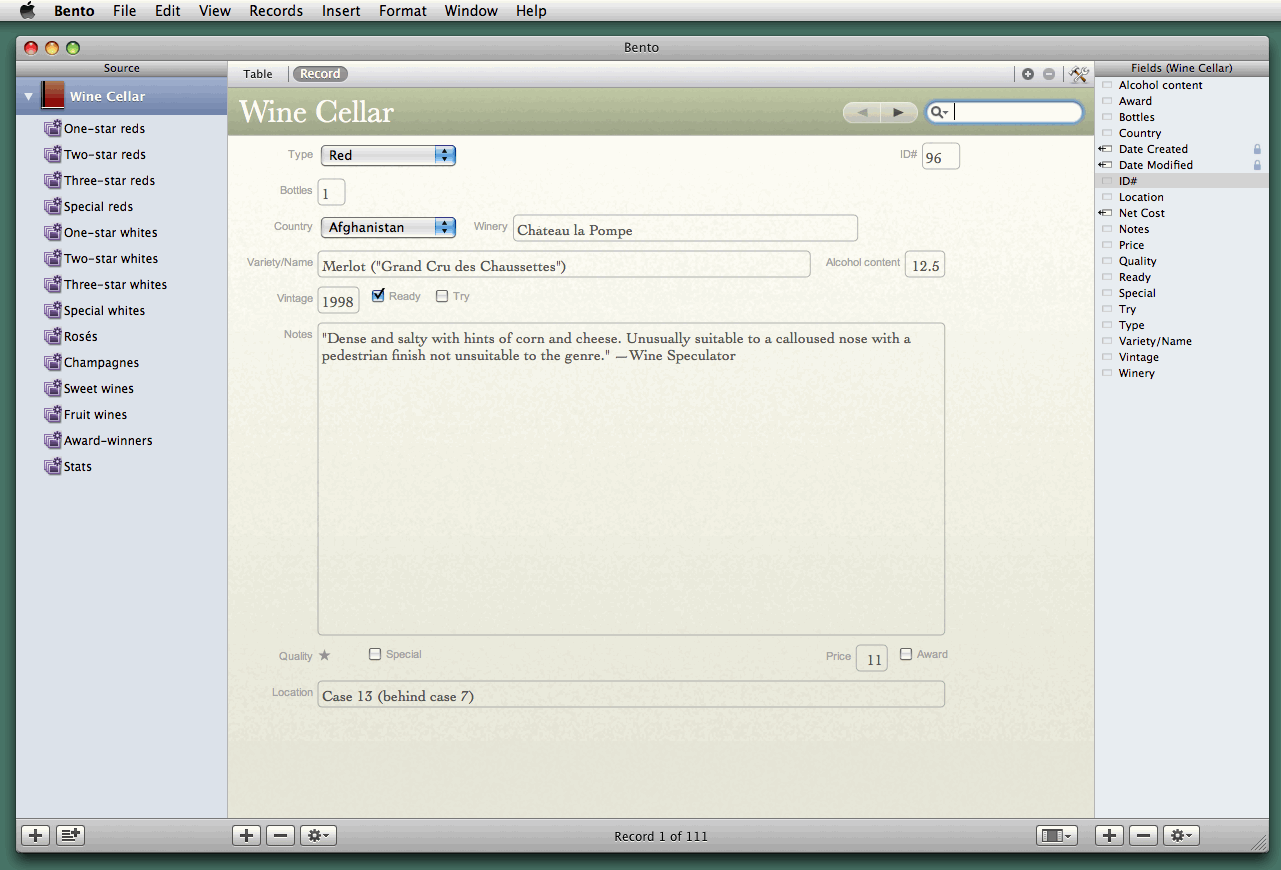
  Below are screenshots of my entry form and a listing form, plus
  explanations for some of the fields.

<http://www.tidbits.com/resources/2008-08/Bento-Entry-Form.gif>
<http://www.tidbits.com/resources/2008-08/Bento-Table.gif>

* ID#: For convenient reference each record is assigned a unique
  number.

* Variety/name: The variety is either the grape (Chardonnay, Merlot)
  or the region (Burgundy, Bordeaux), whichever makes more sense to me
  for the bottle at hand. The names and marketing labels I punctuate
  as shown, to keep things clear.

* Alcohol content: If dinner guests are coming from any distance, we
  choose wines with less alcohol.

* Notes: My own comments and/or some reviews picked off the Web from
  knowledgeable sources. However, I must admit to finding most wine
  reviews to be incomprehensible and numerical ratings to be
  ludicrous. People do not describe odours with a common vocabulary -
  each person uses his own idiosyncratic set of terms - and imagine
  numerical descriptions applied to other genres: "Hamlet" is a 95,
  "Macbeth" a 93, "Oliver Twist" is a 91, "David Copperfield" an 89.

* Quality: My wife and I feel able to distinguish only five levels of
  quality. The lowest and highest levels we do not buy, the one
  because it is too low - the jug wines served at student parties -
  and the other because we cannot afford them. That leaves three
  categories for the wines that we cellar: dull wines that are (or
  ought to be) cheap enough to serve at large parties, simple but
  flavourful wines to enjoy while eating, and complex wines to savour
  while dining. If the wine was a gift, so that we have only one
  bottle, or if we have not yet cracked the case, then I take a guess
  based on whatever information I can find over the Web.

* Special: Some wines I flag as special because they cost a lot, or
  because they come with an exceptional recommendation from a reliable
  source, or because they come from an unusual grape or place. These
  we keep for knowledgeable guests.

* Award: If a sticker says "Silver Medal, XYZ Wine World" - well, no
  competition will see more than a paltry proportion of the world's
  wines, and often many if not most of the entries will receive some
  kind of award. This wine's competitors may have been only a dozen
  within a sharply delimited class (e.g., Merlots from $11-$15), and
  20 percent of the entries may have received silver medals. We
  attribute little to awards but if we take a bottle as a gift to
  someone who does not know wines, a bottle labelled as winning an
  award will seem more special than a bottle that has not.


  [If you found Charles's article to be useful, he asks that you
  donate an amount equal to the cost of your average bottle of wine to
  Save the Children. See the bottom of the page for links to the
  organization in different countries.]

<http://www.savethechildren.net/alliance/>


TidBITS Watchlist: Notable Software Updates for 25-Aug-08
---------------------------------------------------------
  by Adam C. Engst <[EMAIL PROTECTED]>
  article link: <http://db.tidbits.com/article/9742>

* MacBook Air Update from Apple resolves an issue where one of the
  machine's two processors would turn off if the temperature rose to a
  certain point, a feature Apple calls "processor core idling." To
  quote the other sentence in release notes that are downright
  loquacious for Apple, "Third-party software that modifies processor
  operating characteristics such as frequency and voltage is not
  supported and should be removed before installing this update." In
  other words, if you've installed software to help work around the
  "processor core idling" bug, remove it before installing the update.
  The update also addresses unspecified video playback issues. (Free,
  368K)

<http://www.apple.com/support/downloads/macbookairupdate.html>


* Mactracker 5.0.4 from Ian Page updates the freeware utility that
  provides detailed technical information on a wide variety of Apple
  hardware with the latest information about the iPhone 3G, new fields
  for iTunes Version and Machine ID for iPhone models, and updated
  information for the support status of Apple's latest "vintage" and
  "obsolete" products. (Free, 20.7 MB)

<http://www.mactracker.ca/>


* Keyboard Maestro 3.4 from Stairways Software adds to the macro
  utility a Typed String trigger that executes actions whenever you
  type a particular sequence of characters, optionally deleting the
  typed characters as part of the process. Other changes are cosmetic,
  minor, or fix bugs. ($36 new, free update, 6.2 MB)

<http://www.keyboardmaestro.com/>


Hot Topics in TidBITS Talk/25-Aug-08
------------------------------------
  by Jeff Carlson <[EMAIL PROTECTED]>
  article link: <http://db.tidbits.com/article/9747>

**Leopard - Microsoft Office Issue** -- After running a system update,
  Leopard wants to run the demo version of Microsoft Office instead of
  the registered version. (6 messages)

<http://emperor.tidbits.com/TidBITS/Talk/2152>


**Archiving a Time Capsule** -- Archiving a Time Capsule drive seems
  to work fine at first, then becomes unbearably slow. What's the
  holdup? (2 messages)

<http://emperor.tidbits.com/TidBITS/Talk/2153>


**.Mac Slides are missing after iPhoto Update 7.1.4"** -- MobileMe no
  longer offers the capability to share photos with others as a screen
  saver, but existing .Mac slides still appear in screen savers. (14
  messages)

<http://emperor.tidbits.com/TidBITS/Talk/2154>


**More Photo Backup Options While Traveling** -- Readers share more
  thoughts about backing up digital photos. (2 messages)

<http://emperor.tidbits.com/TidBITS/Talk/2155>


**Why I Hate the Eye-Fi Share Wireless SD Card** -- Adam's experiences
  with the Eye-Fi Share card elicit one solution to a problem as well
  as other readers' experiences. (10 messages)

<http://emperor.tidbits.com/TidBITS/Talk/2160>


**Using an iPhone when I drive** -- A reader wants to talk with others
  on his iPhone while driving - without endangering himself, of
  course. TidBITS Contributing Editor Mark H. Anbinder covers some
  devices that are built into new Audis. (4 messages)

<http://emperor.tidbits.com/TidBITS/Talk/2161>


**iWeb and MobileMe question** -- Updating a Web site created on one
  machine proves tricky from a new laptop. (6 messages)

<http://emperor.tidbits.com/TidBITS/Talk/2163>


**iPhone Ver 2.0.2 "Bug Fix"** -- Who knows what the iPhone 2.0.2
  bug-fix release offers? Not us, which is why we can poke fun at
  Apple, as well as the "MobileMess" situation. (6 messages)

<http://emperor.tidbits.com/TidBITS/Talk/2165>


**Cleaning out IMAP mailboxes** -- What options are available for
  managing the size of IMAP mailboxes from Mail? (3 messages)

<http://emperor.tidbits.com/TidBITS/Talk/2166>


**Office 2008 updates won't install** -- Readers have trouble
  installing the latest Microsoft Office updates and discuss what's
  changed in the suite. (4 messages)

<http://emperor.tidbits.com/TidBITS/Talk/2167>


**Wine with Bento** -- Charles Maurer's article on managing his wine
  collection with Bento brings to the table discussion of tools to
  catalog other items such as books and music. (6 messages)

<http://emperor.tidbits.com/TidBITS/Talk/2168>


**MobileMe Web Interface Insecure, But Other Apps Get It Right** --
  Readers discuss the security aspects of MobileMe following Rich
  Mogull's article. (3 messages)

<http://emperor.tidbits.com/TidBITS/Talk/2172>


**Flash Problem** -- After years without fail, suddenly Flash refuses
  to work correctly on a reader's computer. JavaScript might be the
  culprit. (2 messages)

<http://emperor.tidbits.com/TidBITS/Talk/2173>


**I want to say goodbye to Outlook** -- It's hard to unshackle oneself
  from Outlook, but there are alternatives. (3 messages)

<http://emperor.tidbits.com/TidBITS/Talk/2176>


$$

This is TidBITS, a free weekly technology newsletter providing timely
news, insightful analysis, and in-depth reviews to the Macintosh and
Internet communities. Feel free to forward to friends; better still,
please ask them to subscribe!

Non-profit, non-commercial publications and Web sites may reprint or
link to articles if full credit is given. Others please contact us. We
do not guarantee accuracy of articles. Caveat lector. Publication,
product, and company names may be registered trademarks of their
companies. TidBITS ISSN 1090-7017.

Copyright 2008 TidBITS: Reuse governed by Creative Commons license.

Contact us at:    <[EMAIL PROTECTED]>
TidBITS Web site: <http://www.tidbits.com/>
License terms:    <http://www.tidbits.com/terms/>
Full text search: <http://www.tidbits.com/search/>
Subscriptions:    <http://www.tidbits.com/about/list.html>
Account help:     <http://www.tidbits.com/about/account-help.html>


--
If you want to unsubscribe or change your address, use this link
http://emperor.tidbits.com/webx?unsub@@.3c557dc4!u=306a67f9