TidBITS#963/02-Feb-09
=====================
  Issue link: <http://db.tidbits.com/issue/963>
  Google features heavily in TidBITS this week, thanks to Adam's look
  at the release of offline access support for Gmail and Doug McLean's
  article about the inclusion in Google Earth of ultra-high resolution
  versions of 14 masterpieces from the Prado Museum in Madrid. That's
  right, you can fly around a painting and zoom in far enough to see
  cracks in the paint. But don't let Google Earth distract you for too
  long - Doug anchors this issue with a far more practical article
  about programs you can use to get your work done while minimizing
  distractions. Adam also notes that Coinstar machines will turn loose
  coins into iTunes credit, and Joe Kissell relates how he managed to
  get one of his current email addresses mentioned in a song recorded
  10 years ago. Notable software releases this week include
  PersonalBrain 5.0.2, Typinator 3.4, iPhone 2.2.1 Software Update,
  Apple's iLife Media Browser Update, iDVD 7.0.3, HoudahSpot 2.4, and
  SpamSieve 2.7.3.

Articles
    Coinstar Machines Turn Change into iTunes Credit
    Google Earth's Virtual Prado Museum
    DealBITS Drawing: Win a Copy of MathMagic 6
    Gmail Gets Offline Access with Gears
    Log In to Me
    Minimize Desktop Distractions
    TidBITS Watchlist: Notable Software Updates for 02-Feb-09
    ExtraBITS for 02-Feb-09
    Hot Topics in TidBITS Talk for 02-Feb-09


------------ This issue of TidBITS sponsored in part by: --------------

* READERS LIKE YOU! Support TidBITS with a contribution today!
  <http://www.tidbits.com/about/support/contributors.html>
  Special thanks this week to Mike Vlasman, Tony Meyer,
  William A. Riski, and Erik Carlson for their generous support!

* Fetch Softworks: Fetch 5.3 has a new look for Leopard,
  and new support for Leopard technologies. And you can
  upload with the oldest technology of all, Copy and Paste!
  Download your free trial version! <http://fetchsoftworks.com/>

* WebCrossing Neighbors Creates Private Social Networks
  Create a complete social network with your company or group's
  own look. Scalable, extensible and extremely customizable.
  Take a guided tour today <http://www.webcrossing.com/tour>

* Bare Bones Software's BBEdit 9.1 -- A burly upgrade introducing new
  capabilities like Projects, non-modal Find and Multi-File Search,
  editing in browsers, text completion, Scratchpad, new Ruby module,
  better JavaScript, ObjC, Obj-C++, YAML <http://www.barebones.com/>

* MARK/SPACE, INC: If you have a smartphone, we can sync it!
  Sync your address book, calendar, notes, music, pictures, and
  more from your BlackBerry, Windows Mobile or Palm OS mobile
  phone to your Mac. <http://www.markspace.com/bits>

* VMware Fusion. The most seamless way to run Windows on your Mac.
  Backed by nearly a decade of proven virtualization technology.
  Try VMware Fusion today for free, or order online for only $79.
  Visit: <http://www.tidbits.com/about/support/vmware-fusion.html>

* Microsoft's MacBU: Supporting Mac users with Office 2008.
  Straighten up your Office with the latest updates to Word,
  Excel, PowerPoint, and Entourage. Update today at Mactopia!
  <http://www.microsoft.com/mac/downloads.mspx>

* ConceptDraw Office adds real business power to Microsoft Office
  and Apple's iWork. Whether you need project management, business
  graphics, or mind mapping, it's all easily created on your Mac!
  Buy today for only $499! <http://www.conceptdraw.com/tb>

* Speak up with MacSpeech Dictate! Get the all-new MacSpeech
  Dictate with spelling and phrase training. Speech recognition
  so good, about the only thing it can't do is speak for you.
  Learn more: <http://www.tidbits.com/about/support/macspeech.html>

---------- Help support TidBITS by supporting our sponsors ------------


Coinstar Machines Turn Change into iTunes Credit
------------------------------------------------
  by Adam C. Engst <[email protected]>
  article link: <http://db.tidbits.com/article/10009>

  You know those machines that count your piles of loose change and
  spit out a voucher you can convert into cash? At least around here,
  most supermarkets have the machines, but I've never used one, since
  they charge nearly 10 percent for the coin counting service.

  Until, that is, I walked by a Coinstar machine at a local grocery
  store and noticed that it would waive the transaction fee entirely
  if I was willing to take my money in the form of a gift card or
  certificate to one of a number of major retailers, including iTunes.
  That's perfect, since my $46.24 might not seem like all that much
  were I to spend it at Amazon or one of the other included stores,
  but when used for songs and iPhone apps, it will provide a
  significant amount of entertainment. (This is, of course, not news,
  since the service has been around for some time, but if you pay as
  little attention to machines in supermarkets as I do, it may be news
  to you.)

<http://www.coinstar.com/us/womanEcertificateLarger.jpg>
<http://www.coinstar.com/US/Webdocs/A1-0-3-1#itunes>

  Apple presumably pays Coinstar the 8.9 percent fee that Coinstar
  would normally deduct from such transactions. That's a small price
  to pay for spreading the iTunes meme even more broadly than before,
  and in areas that might be noticed by people who don't normally
  think much about Apple.

  According to Coinstar's Web site, most U.S. families have about $90
  in change around the house, which implies there is about $9.5
  billion sitting around in jars and under couch cushions. Apple may
  not be in need of a federal bailout, but I'm sure the company will
  be happy to get its hands on some of that petty cash.

  If you aren't sure where there's a Coinstar machine near you, the
  company's Web site offers a locator service that shows you the
  nearest machines in the United States, Canada, the UK, and Ireland.
  Not all machines offer the gift card/certificate option, so pay
  attention to the details when locating a nearby machine.

<http://locator.coinstar.com/>


Google Earth's Virtual Prado Museum
-----------------------------------
  by Doug McLean <[email protected]>
  article link: <http://db.tidbits.com/article/10038>

  Madrid's Prado Museum has long been a destination for art lovers. In
  the company of the Uffizi Gallery in Florence, the Louvre Museum in
  Paris, and the Metropolitan Museum of Art in New York, the Prado is
  home to countless masterpieces of western art. Unfortunately, the
  options for viewing its contents have always been either hopping a
  plane to Madrid or thumbing through printed reproductions that pale
  in comparison to the original works. Luckily, there's now a third
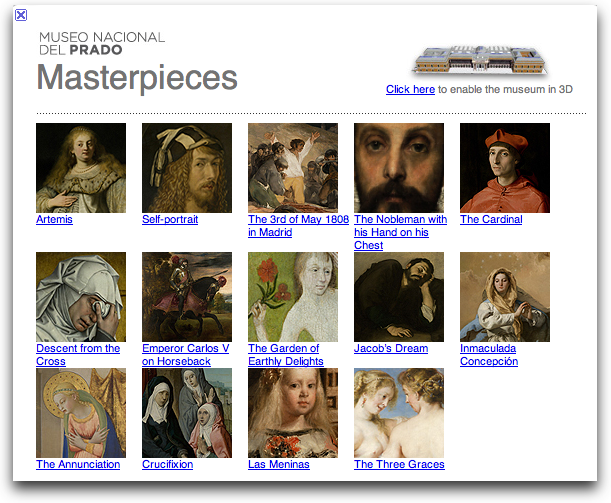
  option with Google Earth's Prado Museum feature, which offers ultra
  high resolution photos of 14 of the museum's masterpieces.

<http://www.museodelprado.es/en/ingles/>
<http://www.google.com/intl/en/landing/prado/>

  While the project isn't an acceptable substitute for seeing the
  works in person, it is an exceptional upgrade to the sorts of
  reproductions to which we've become accustomed. The images of the 14
  works, which include Velázquez's _Las Meninas_, Goya's _The Third
  of May 1808_, Hieronymus Bosch's _The Garden of Earthly Delights_,
  and Fra Angelico's _Annunciation_, are 14,000 million pixels in size
  - that's 1,400 times larger than an image that could be captured by
  a standard 10 megapixel camera! The extreme resolution enables
  viewers to see not only every stroke of paint, but even the weave of
  the canvas and cracks in the varnish.

<http://www.tidbits.com/resources/2009-02/Google-Earth-Prado2.png>

  To produce these exceptional images, technicians at the Prado took
  over 8,200 photographs of each work over the course of three months
  (Google apparently footed the bill, whose total remains
  undisclosed.) The photos were then connected and layered using the
  same technology Google uses to create the incredibly detailed
  satellite maps for Google Earth.

  Unfortunately, Rodriguez Zapatero, the general manager of Google
  Earth Spain, has said there are no immediate plans to add additional
  paintings from the Prado, or expand the project to other museums.
  Hopefully these reproductions will be enough of a hit to encourage
  Google to help make more of the world's great artworks available in
  ultra high resolution.

  To view the works, you must first download the Google Earth
  application. After launching the program, select the 3D buildings
  layer on the bottom left panel, then enter "Prado Masterpieces" in
  the search bar. When the Prado Museum result appears, click it to
  fly to the museum, where a white tile appears. Click that to view
  the paintings. If nothing else, it's astonishing to zoom into a
  picture and not have it pixelate or get fuzzy until you're so far in
  that you can't tell what you're looking at anyway. (The screenshot
  is an eyeball from Rogier van der Weyden's _Descent of Christ from
  the Cross_, the full painting of which measures 7.2 by 8.6 feet (220
  by 262 cm)!)

<http://earth.google.com/>
<http://www.tidbits.com/resources/2009-02/Prado-Eyeball2.png>


DealBITS Drawing: Win a Copy of MathMagic 6
-------------------------------------------
  by Adam C. Engst <[email protected]>
  article link: <http://db.tidbits.com/article/10042>

  Do you need to create mathematical equations for papers, reports, or
  other publications? If so, you'll want to enter this week's DealBITS
  drawing to win one of three copies of the $89.95 MathMagic Personal
  Edition 6, which enables you to create complex equations and export
  them in PDF, MathML, LaTeX, EPS, GIF, JPEG, and PICT format for use
  with word processors, presentation programs, and graphics software.
  MathMagic can also read MathML, TeX, MathType, and wiki equations
  for importing work done in other programs. Entrants who aren't among
  our lucky winners will receive a discount on MathMagic Personal
  Edition, so be sure to enter at the DealBITS page. All information
  gathered is covered by our comprehensive privacy policy. Remember
  too, that if someone you refer to this drawing wins, you'll receive
  the same prize as a reward for spreading the word.

<http://www.mathmagic.com/product/pe.html>
<http://www.tidbits.com/dealbits/mathmagic3/>
<http://www.tidbits.com/about/privacy.html>


Gmail Gets Offline Access with Gears
------------------------------------
  by Adam C. Engst <[email protected]>
  article link: <http://db.tidbits.com/article/10036>

  While I've been laid up in bed, I've taken the opportunity to set up
  Google's Gmail to retrieve a copy of every message I receive at my
  main email address via POP, leaving the messages in place so I can
  also retrieve them via Eudora as I do normally. I wanted to give
  Gmail a real-world test, and since I can also configure Eudora to
  access my Gmail account via IMAP, I can manually sync up work done
  in one place with work done in the other if I decide to move
  entirely to Gmail or to refocus on Eudora. Of course, my other goal
  was to be able to access my email on the iPhone.

  But even in the short time I've been testing Gmail, I've been
  annoyed to see its "Still working" status banner appear when, for
  some reason or another, my browser couldn't connect with Gmail. The
  problem has always resolved quickly enough, but there are plenty of
  times when I'm in an airport, on a plane, or just somewhere where
  there isn't Internet access. (I realize this may come as news to
  those who live in large cities, but in most of the world by area,
  Wi-Fi connectivity is difficult or impossible to find, and even
  cellular connectivity is often flaky or nonexistent.) In such
  situations, Gmail has been, well, completely useless. It can't work
  for more than a moment or two without contact with the mother ship.

  Luckily, Google has at long last announced Gears support for Gmail
  via a Gmail Labs feature called Offline. Google Gears is a
  technology that enables Web applications like Gmail and Google Docs
  (and apps from other companies too) to operate offline, storing
  changes locally and then resynchronizing them once you reconnect to
  the Internet (see "How to Use Google Docs Offline in Safari",
  2008-09-01); Offline ties Gmail into Gears.

<http://gmailblog.blogspot.com/2009/01/new-in-labs-offline-gmail.html>
<http://db.tidbits.com/article/9752>

  Offline should now be available in the Gmail Labs tab for everyone.
  Needless to say, Google calls this "experimental" support, so it may
  not work flawlessly. Then again, Google hardly ever takes anything
  out of beta, so the fact that it's public at all means they think
  it's sufficiently functional.

<https://mail.google.com/mail/#settings/labs>

  Gears, which requires a separate install, needs at least Safari
  3.1.1 or Firefox 1.5 running on Mac OS X 10.4.11 or later. Although
  that's an entirely reasonable requirement, it will likely pose at
  least short-term problems for people who use a site-specific browser
  like Fluid or Prism, or the Gmail-specific Mailplane client, which
  I'm also testing. That said, while researching Mailplane's
  compatibility with Gears, I heard via Twitter that the developer has
  created a theoretically Gears-savvy build of Mailplane, so hopefully
  he'll be able to add Gears support to the shipping version of
  Mailplane without much difficulty.

<http://gears.google.com/>
<http://fluidapp.com/>
<http://labs.mozilla.com/2007/10/prism/>
<http://mailplaneapp.com/>

  Now that Offline has appeared in my Gmail Labs tab, I've had a
  chance to give it a try. The installation process works as you'd
  expect. Assuming you have Gears already installed in Safari or
  Firefox, you click the Offline link in the upper right corner of the
  Gmail page. What's next is interesting - Gmail evaluates your email
  volume and tells you how much recent mail it will download.

<http://www.tidbits.com/resources/2009-01/Gmail-offline.png>

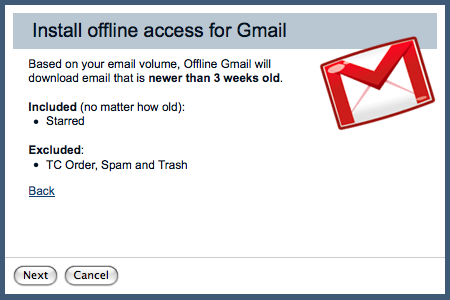
  In my case, it told me that it would bring in mail received in the
  last three weeks (which is about as long as I've been using this
  account) but it wouldn't synchronize my Spam or Trash mailboxes,
  reasonably enough. Nor would it synchronize mail to which I'd
  applied the TC Orders label - lots and lots of Take Control ebook
  order notification messages from eSellerate. There's no control over
  what you can and can't synchronize as far as I can see, and it's
  clear that this makes offline access worthless as any kind of a
  serious local backup of your mail.

  Once you've given Gears permission to store and access information
  on your computer (do this only on a computer you own, for obvious
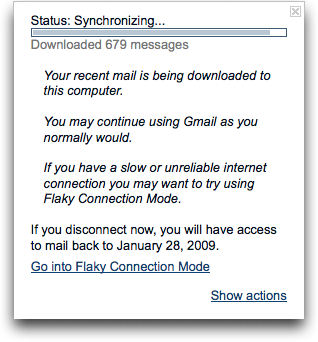
  reasons), it starts the synchronization process. That can take a few
  minutes, but once it's done, you can disconnect from the network and
  use Gmail much as you normally would, but with the addition of a
  little icon in the upper right that tells you your connection
  status: online, synchronizing, offline, and "flaky connection mode."
  Synchronization takes place continually in the background, making it
  easy go offline any time you want.

<http://www.tidbits.com/resources/2009-01/Gmail-synchronization.png>

  Flaky connection mode is interesting - you enter it manually by
  clicking the status icon and clicking Go Into Flaky Connection Mode.
  Once in that mode, mail will be read from your local database even
  if you're online, which provides better performance if you have a
  slow or flaky connection. Gmail will continue to synchronize mail in
  the background when it can, and if it can't, it will switch into
  offline mode entirely.

  Not all things work the same offline. Most notably, there are no ads
  along the right side of the page, and certain Gmail Labs add-ons,
  like Canned Responses, don't work, presumably because they load data
  only when needed. Many settings, such as filters, are also
  unavailable while you're offline. But for the most part, I was able
  to read, write, and search through my email with no apparent loss in
  capability while offline, and other Gmail Labs add-ons, like the
  Quick Link box that stores frequently accessed searches, continued
  to work properly.

  We'll see how Gmail's offline support continues to work in
  real-world usage, but for now it appears as though it will provide
  access to the messages and capabilities that most people need while
  working offline, if not one's full email archive.


Log In to Me
------------
  by Joe Kissell <[email protected]>
  article link: <http://db.tidbits.com/article/10002>

  I'd like to tell you how I retroactively got my email address
  mentioned in a song that was recorded 10 years ago, and
  simultaneously saved a Canadian band from having committed an
  egregious grammatical and/or technical error. I'm rather proud of
  this feat, though I realize the only people who will genuinely think
  it's cool are Canadian MobileMe members who listened to the music of
  an obscure comedy folk trio a decade ago. To both of you: yes, I
  rock.

<http://www.me.com/>

  The Arrogant Worms have been recording funny songs since 1992. Some
  of their best-known hits (and I use the term loosely) are "Carrot
  Juice Is Murder" (iTunes - lyrics), "The Last Saskatchewan Pirate"
  (lyrics), "Jesus' Brother Bob" (iTunes - lyrics), and "The Mounted
  Animal Nature Trail" (lyrics). Morgen turned me on to them way back
  when, and we went to two or three of their concerts during the years
  we were living in Vancouver.

<http://arrogant-worms.com/>
<http://itunes.apple.com/WebObjects/MZStore.woa/wa/viewAlbum?i=256331593&id=256331570&s=143441>
<http://artists.letssingit.com/arrogant-worms-lyrics-carrot-juice-is-murder-sdnfw88>
<http://artists.letssingit.com/arrogant-worms-lyrics-the-last-saskatchewan-pirate-c73bzxw>
<http://itunes.apple.com/WebObjects/MZStore.woa/wa/viewAlbum?i=256331580&id=256331570&s=143441>
<http://artists.letssingit.com/arrogant-worms-lyrics-jesus-brother-bob-7s7jpk9>
<http://artists.letssingit.com/arrogant-worms-lyrics-mounted-animal-nature-trail-t43ssm5>

  On their 1999 album _Dirt_ was a track called "Log In to You"
  (iTunes - lyrics), a goofy love song consisting mainly of mildly
  suggestive computer terms. A few weeks ago, I was lying in bed
  trying to go to sleep, and for some reason I couldn't get that song
  out of my head. You know how it is. In particular, I kept thinking
  about the following sequence of words that's repeated several times
  in the song:

<http://www.maplemusic.com/product.asp?dept%5Fid=1201&pf%5Fid=1200%2D06>
<http://itunes.apple.com/WebObjects/MZStore.woa/wa/viewAlbum?i=256331608&id=256331570&s=143441>
<http://artists.letssingit.com/arrogant-worms-lyrics-log-into-you-3t89pjn>

    www.love
    [email protected]

  Naturally, you can't _hear_ the line break, so even though there's a
  beat between the two parts, it's not clear whether they were
  intended to be thought of as a single unit or as two units.

  When the album came out, I read a number of complaints about that
  part of the song, to the effect that it made the band sound
  computer-illiterate. The sequence "www.love" sounds like the
  beginning of a Web URL, but there being no .love top-level domain,
  it's sort of left hanging. It sounds weirdly incomplete, like
  someone saying "www.apple" with nothing following it.

  The second part, "[email protected]," could of course be a valid email
  address. But given the proximity to the "www.love" bit, listeners
  were forced to draw one of two conclusions. Either the two parts
  were intended to be understood as disconnected (in which case you
  get the incomplete-URL problem) or the two parts were intended to be
  understood as a whole unit (in which case you have an awkward blend
  of the start of a Web URL with the end of an email address that
  doesn't make any sense). One way or another, it was clear that the
  song had problems. Some fans even suggested that the "@" was
  actually "and," which would have made the whole string
  "www.loveyouandme.com" - a reasonable interpretation if true, but
  careful listening proves without a doubt that it's pronounced "at"
  and not "and."

  Well, as I was wrestling with insomnia that night, I realized a few
  things. First, anything ending in @me.com is theoretically available
  as a MobileMe email address. Second, the string "www.loveyou" is a
  perfectly well-formed email user name that could go in front of the
  @me.com part. And third, as a MobileMe user I can add up to five
  free aliases that point to my main me.com address. What are the
  chances, I wondered, that I could actually add the alias
  "www.loveyou" to my me.com account? I had to find out, so I got out
  of bed, logged in, and 30 seconds later, the deed was done.

<http://www.tidbits.com/resources/2009-01/loggedin.png>

  Shockingly, I've received not a single spam message at that address
  yet. (Don't feel obligated to be the first, either. Really.) But I'm
  proud to say that, as of now, if anyone were to listen to that song
  and type those two lines into their email client as a single literal
  email address, it would not only work, it would go to me, a bona
  fide computer geek and Arrogant Worms fan. (And, to answer the
  obvious question, of _course_ I tried to get "[email protected]" too, but
  unsurprisingly, it wasn't available.)

  So, Worms: you're welcome. No charge. That's nothing for nothing!

<http://artists.letssingit.com/arrogant-worms-lyrics-no-sale-no-store-4x7j8jw>

  (Everyone else: Buy my book on MobileMe. Ten bucks, and well worth
  it!)

<http://www.takecontrolbooks.com/mobileme.html>


Minimize Desktop Distractions
-----------------------------
  by Doug McLean <[email protected]>
  article link: <http://db.tidbits.com/article/9908>

  I've always been an easily distracted person. In college I
  discovered the glory of the engineering library's basement: a pseudo
  fallout shelter whose bare bulbs dangled over solitary study cells,
  with nary a distraction in sight for an aspiring art major. Even the
  bookshelves lining those monastic spaces were unable to tempt me
  given their investigations of geological dullness and computational
  obscurity (subjects, I'm sure, that would titillate a more
  scientifically inclined mind).

  It was only there, in the bowels of the university, that I was able
  to get any serious writing done. So where did I find myself a few
  months ago? On the TidBITS editorial team, with news to research,
  articles to write, and a desktop full of wildly entertaining time
  bandits. I was in serious need of intervention.

  I decided to search for tools I could utilize to reduce
  distractions. I should note that, as an artist, I'm principally a
  visual person: I learn best by looking at pictures, and I work most
  sluggishly when there's too much in my line of sight. If I see an
  email message enter my Inbox, an iChat window pop up, or a Twitter
  account update, I simply must check it out. According to a 2005
  study conducted by the research firm Basex, I'm not alone:
  interruptions now consume 2.1 hours a day, or 28 percent of the
  average person's workday. What I needed was a way to reduce the
  amount of visual noise I was exposing myself to, and to transform my
  desktop and screen into a more Zen-like state.

  I also considered taking measures to block my Internet roaming - a
  principal offender in my time wasting - but decided I'd probably
  ignore anything that told me how much time I was wasting or turn off
  whatever was keeping me from where I wanted to go. The problem for
  me isn't so much that I don't know when I'm wasting time, or that a
  certain site is zapping productive energy, it's that I get off track
  in the first place. Thus, I needed to figure out how to induce
  tunnel vision to the task at hand.


**Word Processing circa 1987** -- Writing being my main occupation, I
  began my search by trying to find a minimalist word processor. I
  discovered two very similar programs: JDarkRoom from Code Alchemists
  (freeware) and Hog Bay Software's WriteRoom ($24.95). Both programs
  reduce your screen view to just a solid colored background with the
  text and cursor on top.

<http://www.codealchemists.com/jdarkroom/>
<http://www.hogbaysoftware.com/products/writeroom>

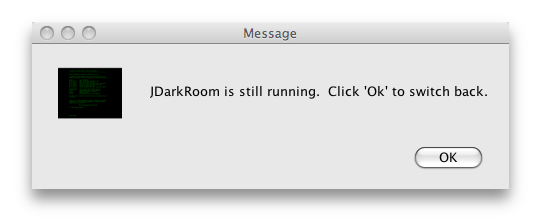
  Both programs also have normal window modes, to enable users to
  switch to other applications without having to quit first. However,
  when you leave JDarkRoom's fullscreen view, only a small dialog
  asking you to click OK when you want to reenter remains visible,
  while with WriteRoom the document appears in what looks exactly like
  a TextEdit window.

<http://www.tidbits.com/resources/2008-11/JDark-Minimized.png>

  WriteRoom's approach is more useful if you need to work between
  programs simultaneously, though presumably if you're using WriteRoom
  or JDarkRoom it's precisely because you want to reduce multitasking.
  Still, being able to copy and paste from multiple documents before
  returning to fullscreen mode to edit would be useful; in JDarkRoom
  to do the same thing you have to copy text, enter fullscreen mode,
  paste, then exit fullscreen mode to do it again. All that back and
  forth is a pain in the butt.

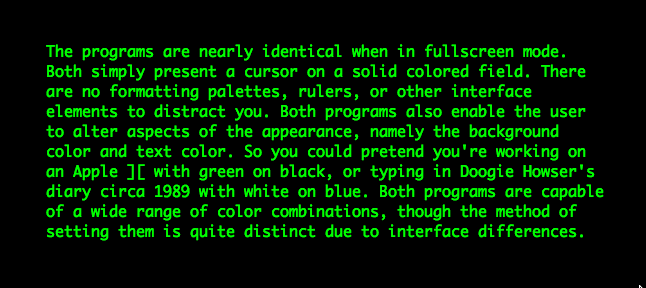
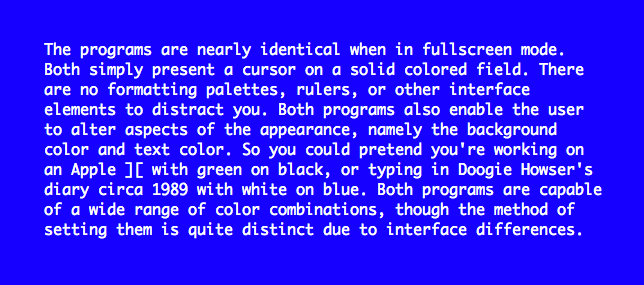
  The programs are nearly identical when in fullscreen mode. Both
  simply present a cursor on a solid colored field. There are no
  formatting palettes, rulers, or other interface elements to distract
  you. Both programs also let you alter aspects of the appearance,
  namely the background color and text color. So you could pretend
  you're working on an Apple ][ with green on black, or typing in
  Doogie Howser's diary circa 1989 with white on blue. Both programs
  are capable of a wide range of color combinations.

<http://www.tidbits.com/resources/2008-11/green-on-black.png>
<http://www.tidbits.com/resources/2008-11/white-on-blue.png>

  The main difference between JDarkRoom and WriteRoom is the user
  interface. JDarkRoom, while only slightly less flexible than
  WriteRoom, initially appears to be extremely basic due to the lack
  of any menu bar or friendly graphical interface. Instead its menus
  are key-activated: F5 brings up the Help menu, F6 brings up the
  Preferences window, and so on. At first, I admit, I wanted my
  familiar drop-down menus, but soon I became accustomed to the
  key-based menu and command system, and even came to appreciate the
  speed it offered.

  WriteRoom, on the other hand, has a typical menu bar with drop-down
  menus and an attractive and easy-to-navigate Preferences window. I
  found WriteRoom's controls and menus to be more intuitive. Also,
  WriteRoom is slightly more flexible than JDarkRoom, enabling a
  little more customization and control over appearances and layout.
  However, while the difference between what the programs are capable
  of is small, the difference in how to activate those capabilities is
  significant.

  To change your font in WriteRoom, you go to the Preferences window
  and pick your font from a list, as you would in Microsoft Word or
  TextEdit. In contrast, JDarkRoom's font list contains only four
  standard fonts; to add more you must make adjustments in a
  configuration file (bleh!).

  The only other major difference between the two programs may not be
  in place for much longer. WriteRoom has a feature called Edit in
  WriteRoom, which acts as a system-wide plug-in that places the Edit
  in WriteRoom feature in the Edit menu of other applications. Thus,
  when working in Apple Mail, BBEdit, or other programs, you are
  supposed to be able to export that text, work and edit in WriteRoom,
  and then import back into the original program. Such a feature would
  be a real advantage over copying and pasting from the other
  applications.

  This would give WriteRoom a big leg up on JDarkRoom, but it doesn't
  work in Mac OS X 10.5 Leopard. Jesse Grosjean, head of Hog Bay
  Software, says that Leopard users should instead use the replacement
  program QuickCursor (freeware) to perform similar tasks.

<http://www.hogbaysoftware.com/products/quickcursor/>

  QuickCursor, like Edit in WriteRoom, is a system-wide application
  that enables users to edit text in their favorite text editor.
  However, what's interesting here is that the QuickCursor development
  page says, "In future releases you will be able to change you
  preferred editor from WriteRoom to BBEdit, TextMate, Smultron, or
  any other text editor that supports the ODB Editor Suite." Does this
  mean that QuickCursor could eventually support JDarkRoom? If so that
  would eliminate one of the few major differences between the
  freeware JDarkRoom and the $24.95 WriteRoom.

  Either way, both programs work well to reduce visual distractions
  and keep your focus on your writing. I would recommend JDarkRoom if
  you're on a budget and don't mind a little less overall control,
  key-activated menus, and somewhat annoying configuration commands;
  and WriteRoom if a more standard user interface, slightly extended
  controls and options, current access to QuickCursor, and overall
  ease of use are worth $25 to you.

  If you're not quite ready for the supreme minimalism of JDarkRoom or
  WriteRoom, check out the free Writer from QI Software. The program
  doesn't limit visual distractions as fully as the other two, but
  instead dims all applications running in the background and utilizes
  a simple interface. My favorite features are the two easy-to-access
  buttons; one for muting all of your computer's sounds, and another
  for blocking your network activity.

<http://supertart.com/qisoftware/Writer.html>


**A More Flexible Focus** -- While these word processors worked well
  and were fun and easy to use, I still needed something that I could
  apply when I wanted to work in another program such as Mail or
  BBEdit. Enter Isolator and Menu Eclipse (both freeware).

<http://willmore.eu/software/isolator/>
<http://www.xybernic.com/>

  Isolator works on the same principles as WriteRoom and JDarkRoom,
  minimizing your Desktop's visual noise to create a kind of tunnel
  vision. However, instead of turning your screen into a diving bell,
  Isolator maintains the appearance of the program you're working in
  and just blocks everything else out.

  When activated, Isolator pushes the application you're working in to
  the foreground, either reducing everything else to minimal visual
  noise or completely obscuring it. Isolator's strength is the degree
  to which you can control what happens to these background programs.

  Within the preferences of the current development version - 3.40beta
  - Isolator lets you choose the background color and its transparency
  level, ranging from faint to opaque. Choosing opaque with a tint of
  black results in the foremost application being surrounded by a
  solid black background.

  However, that kind of curtaining can be too extreme for some tasks.
  Sometimes you may need to move between several different programs at
  once, in which case it makes sense to use a fainter tint. Beyond
  tinting you can also apply a filter.

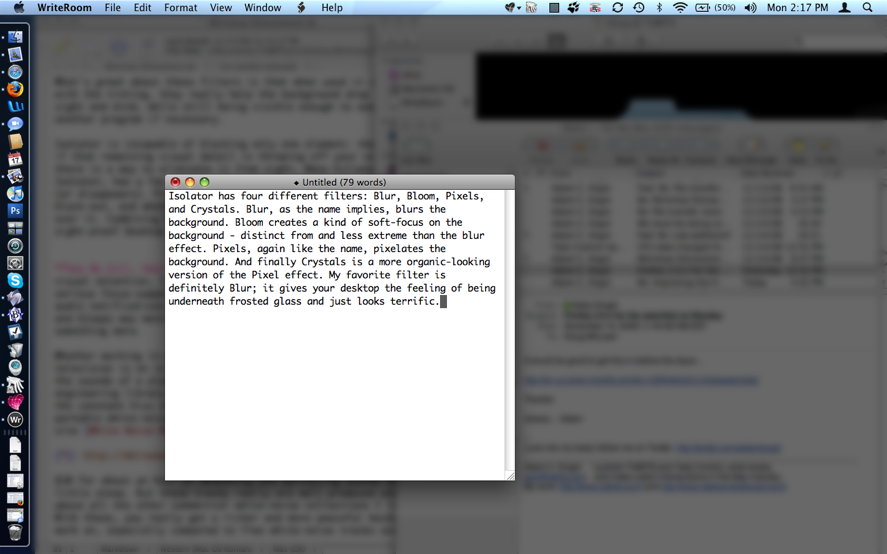
  Isolator has four different filters: Blur, Bloom, Pixels, and
  Crystals. Blur, as the name implies, blurs the background. Bloom
  creates a kind of soft focus on the background, distinct from and
  less extreme than the blur effect. Pixels, again like the name,
  pixelates the background. And finally Crystals is a more
  organic-looking version of the Pixel effect. My favorite filter is
  definitely Blur; it gives your desktop the feeling of being
  underneath frosted glass and just looks terrific.

<http://www.tidbits.com/resources/2008-11/Isolator-blur.png>

  What's great about these filters is that, when used in combination
  with the tinting, they cause the background to drop away from sight
  and mind, while still remaining visible enough to jump into another
  program easily if necessary.

  Isolator is incapable of blocking only one element: the menu bar.
  So, if that remaining visual detail is throwing off your
  concentration, there is a way to eliminate it from sight. Menu
  Eclipse, like Isolator, has a few options and controls for how the
  menu bar appears (or disappears). Primarily, you can set the level
  of tint or blackout, and whether or not the menu bar will appear
  when you mouse over it. Combining Menu Eclipse with Isolator
  produces a fully focused Desktop - the perfect place to get some
  work done.


**See No Evil, Hear No Evil** -- Once I figured out how to focus my
  visual attention, I realized I was still contending with another
  serious focus-zapper: auditory distraction. Even after disabling
  audio notifications in both Apple Mail and iChat (hearing those
  bleeps and bloops was more distracting than I realized), I still
  craved more silence.

  Whether working in a coffee shop, bus terminal, or at home when the
  television is on in the other room, I find myself derailed by the
  sounds of a place. The belly of the beast that was the engineering
  library always had the gentle hum of air conditioning or the
  constant hiss of the heating system. I realized I needed some
  portable white noise. Some searching revealed the White Noise MP3s
  Web site.

<http://whitenoisemp3s.com/>

  Spending $10 for about an hour of whooshing and sprinkling sounds
  might seem a little steep. But these tracks really are well produced
  and stand above all the other commercial white-noise collections I
  looked into. With these, you really get a richer and more peaceful
  backdrop to work within, especially compared to free white-noise
  tracks available online.

  The track descriptions on the site read a little bit like J.
  Peterman meets a wise-ass ninth grader, and although the latter
  personality is a bit off-putting, the products deliver. I downloaded
  and have been listening to Dreamstorm; its description was merely
  "DUDE." The site also provides fairly long sample clips of the
  tracks so you can get a good sense of them before purchasing.


**Distraction-Free, or at Least Distraction-Reduced** -- As I type
  this article I have Isolator tinting and blurring my background
  applications, Menu Eclipse obscuring my menu bar, and Dreamstorm
  playing in my ears. While of course distractions still abound - a
  couple of squirrels are playing tag outside my window - I am
  definitely working in a more focused state.

  Good luck with these applications, and let me know if there's
  anything out there I've missed or should know about.


TidBITS Watchlist: Notable Software Updates for 02-Feb-09
---------------------------------------------------------
  by Doug McLean <[email protected]>
  article link: <http://db.tidbits.com/article/10035>

  PersonalBrain 5.0.2 from TheBrain Technologies is the latest update
  to the visual information manager that comes in Free, Core, and Pro
  versions. This minor update offers increased speed and improved
  memory usage. Specific bugs have also been addressed, including one
  that causes non-responsive bookmark importing, one that causes
  re-linked thoughts to lose their link labels, and one that prevents
  a closed brain from opening without a different brain being opened
  first. (Free/$149.95/$249.95 new, free update, 26 MB)

<http://www.thebrain.com/#-47>

  Typinator 3.4 from Ergonis Software is the latest update to the
  popular auto-typing and auto-correcting utility. New features
  include options to suspend Typinator temporarily and maintain the
  height of the set list when the window size changes, and the
  capability to expand text in floating windows such as Spotlight's.
  The latest version also includes several minor enhancements and bug
  fixes, such as resolving a bug that caused the software's memory
  usage to increase over time. (19.99 euros, free update, 2.7 MB)

<http://www.ergonis.com/products/typinator/>

  iPhone 2.2.1 Software Update from Apple provides bug fixes and
  specifically addresses two issues with the iPhone's operating
  system. Overall stability of Safari has been improved, and an issue
  where images saved from Mail do not appear correctly in the Camera
  Roll is fixed. The update is available from within iTunes when the
  iPhone is connected. (Free update, 245.7 MB)

<http://www.apple.com/iphone/>

  iDVD 7.0.3 and the iLife Media Browser Update, both from Apple,
  "improve overall stability and address a number of other minor
  issues." Unfortunately, that's all the concrete information Apple
  has provided, although we've since learned that the iLife Media
  Browser Update fixes some problems with Spotlight. The iLife Media
  Browser enables users to access their photos, music, and videos from
  Aperture, iLife, and iWork and is thus recommended for users of
  those programs working in Mac OS X 10.5.6 Leopard or later. The iDVD
  update is most likely related to the recent QuickTime 7.6 update, as
  the former relies heavily on the latter. Both updates are available
  via Software Update, or from Apple's Support Downloads page. (Free
  updates, 27.4/2.6 MB)

<http://support.apple.com/downloads/iDVD_7_0_3>
<http://support.apple.com/downloads/iLife_Media_Browser_Update>
<http://support.apple.com/downloads/>

  HoudahSpot 2.4 from Houdah Software is an update to the file search
  tool that provides an alternate front end to Spotlight. This version
  adds a new feature called Text Preview, which provides a dedicated
  preview feature for text files. Within this preview, search strings
  are automatically highlighted for more efficient searching. It is
  also possible to search the text preview itself. ($25 new, free
  update, 2.6 MB)

<http://www.houdah.com/houdahSpot/>

  SpamSieve 2.7.3 from C-Command Software is a maintenance update to
  the powerful Bayesian spam filtering software. Changes include a
  rewritten manual intended to make setup and troubleshooting easier,
  improved Entourage capacity for handling uncertain mail, refined
  blocklist rules for enhanced accuracy, and a more robust Apple Mail
  plug-in installer. The update also fixes several bugs including one
  that makes parsing multipart messages difficult, one that sorts in
  rules windows, and one that marks incoming Entourage messages as
  Junk. ($30 new, free update, 5.7 MB)

<http://c-command.com/spamsieve/>


ExtraBITS for 02-Feb-09
-----------------------
  by TidBITS Staff <[email protected]>
  article link: <http://db.tidbits.com/article/10043>

**Details of iPhoto '09's Flickr Support** -- Frasier Speirs, who
  develops the FlickrExport plug-in for iPhoto and doesn't pretend to
  be unbiased, offers a detailed look at just what iPhoto '09's Flickr
  support provides in this blog post. Our take: iPhoto's built-in
  support will be sufficient for basic uses, but serious Flickr users
  will stick with Fraser's FlickrExport or one of the competing
  plug-ins. (Posted 2009-02-02)

<http://speirs.org/2009/01/30/on-the-flickr-support-in-iphoto-09/>


**Alternatives to MobileMe** -- Joe Kissell wrote the book on
  MobileMe, but also knows it's not the best solution for everyone. In
  this Macworld article, Joe explores other ways of getting a similar
  range of features. (Posted 2009-01-30)

<http://www.macworld.com/article/138481/2009/01/mobilemealternatives.html>


**Choose Individual iTunes Tracks to Upgrade to Plus** -- Apple has
  changed its iTunes Plus upgrade policy, allowing you to pick
  individual tracks and albums to upgrade and remove digital rights
  management protection for songs you bought with DRM enabled.
  Upgrades are still $0.30 per song and $3.00 per album in the U.S.
  market. (Posted 2009-01-29)

<http://www.macworld.com/article/138508/2009/01/itunesplusalacarte.html>


**iPhone Apps for Designers** -- The App Store really does contain
  more than just games and novelty programs. Jeff Carlson spotlights
  eight applications that designers will find helpful in this article
  at CreativePro.com. (Posted 2009-01-28)

<http://www.creativepro.com/article/iphone-apps-designers>


Hot Topics in TidBITS Talk for 02-Feb-09
----------------------------------------
  by Jeff Carlson <[email protected]>
  article link: <http://db.tidbits.com/article/10044>

**DVI/HDMI adapter confusion** -- Trouble with an HDMI to DVI cable
  points to an issue with HDCP content-protection mechanisms. (8
  messages)

<http://emperor.tidbits.com/TidBITS/Talk/2419>


**Reading SMART status on external hard disks** -- Is there a Mac OS X
  application for reading SMART diagnostic information from external
  hard drives? (6 messages)

<http://emperor.tidbits.com/TidBITS/Talk/2421>


**Diagnosing weird hard disk problems** -- Apple's Hardware Test
  (accessible from a Mac OS X installation disc) could provide a clue
  about whether a hard disk is salvageable. (2 messages)

<http://emperor.tidbits.com/TidBITS/Talk/2422>


**Opening OneFile files** -- The Opera Web browser may be able to open
  this file type, but a better approach is probably to ask the sender
  to create a PDF file instead. (2 messages)

<http://emperor.tidbits.com/TidBITS/Talk/2424>


**The Mac Turns 25: Best Mac Ever?** Readers debate Adam's contention
  that the Mac SE/30 was Apple's best Mac. (12 messages)

<http://emperor.tidbits.com/TidBITS/Talk/2425>


**The Mac Turns 25: Our First Macs** -- We shared the stories of our
  first Macs. What was the first Macintosh (or other computer) you
  owned? (2 messages)

<http://emperor.tidbits.com/TidBITS/Talk/2426>


**iLife 09 caused Spotlight issues** -- Readers discuss an issue with
  Spotlight and iLife '09, as well as general impressions of the
  suite. (7 messages)

<http://emperor.tidbits.com/TidBITS/Talk/2428>


**Yet Another Reason Not to Pirate Software** -- News of Trojans
  embedded in pirated copies of Mac software leads to discussions of
  online security and the difficulty of managing passwords. (28
  messages)

<http://emperor.tidbits.com/TidBITS/Talk/2429>


**Geolocation in searching** -- Is there a way to specify that search
  results (and other Web destinations) be limited to a single country?
  (4 messages)

<http://emperor.tidbits.com/TidBITS/Talk/2430>


**Unpacking the old tarball** -- Installing Python 3 requires Xcode,
  as one reader discovered when trying to decipher a cryptic set of
  installation instructions. (6 messages)

<http://emperor.tidbits.com/TidBITS/Talk/2431>


**Worst Apple Products** -- Adam's Macworld article on Apple's worst
  products in the Mac's 25 year history spurs suggestions of other
  unworthy products. (22 messages)

<http://emperor.tidbits.com/TidBITS/Talk/2432>


**Google v Apple, cloud v local** -- As more data is floated in "the
  cloud," are we expecting better service, security, and reliability?
  Or does a traditional local (on your computer) model work better?
  (27 messages)

<http://emperor.tidbits.com/TidBITS/Talk/2433>


**Apple Drive Modules for Xserve RAID?** Now that Apple no longer
  offers the Xserve RAID, it seems nearly impossible to buy
  replacement drives. Any workarounds that you know of? (8 messages)

<http://emperor.tidbits.com/TidBITS/Talk/2435>


**Partitioning large drives** -- Does it make sense to partition a
  large (1.5 TB) hard disk, or leave it as one volume? Readers also
  discuss combining large drives in RAID arrays. (12 messages)

<http://emperor.tidbits.com/TidBITS/Talk/2436>


**iPhoto Faces** -- Readers comment on their experiences with the
  Faces feature of iPhoto '09. (4 messages)

<http://emperor.tidbits.com/TidBITS/Talk/2437>


$$

This is TidBITS, a free weekly technology newsletter providing timely
news, insightful analysis, and in-depth reviews to the Macintosh and
Internet communities. Feel free to forward to friends; better still,
please ask them to subscribe!

Non-profit, non-commercial publications and Web sites may reprint or
link to articles if full credit is given. Others please contact us. We
do not guarantee accuracy of articles. Caveat lector. Publication,
product, and company names may be registered trademarks of their
companies. TidBITS ISSN 1090-7017.

Copyright 2009 TidBITS: Reuse governed by Creative Commons license.

Contact us at:    <[email protected]>
TidBITS Web site: <http://www.tidbits.com/>
License terms:    <http://www.tidbits.com/terms/>
Full text search: <http://www.tidbits.com/search/>
Subscriptions:    <http://www.tidbits.com/about/list.html>
Account help:     <http://www.tidbits.com/about/account-help.html>


--
If you want to unsubscribe or change your address, use this link
http://emperor.tidbits.com/webx?unsub@@.3c557dc4!u=306a67f9