TidBITS#965/16-Feb-09
=====================
  Issue link: <http://db.tidbits.com/issue/965>
  When you go on vacation, don't you wish you could leave your laptop
  at home? Oliver Habicht reviews the compact Photo Safe II, which
  stores photos and videos from your camera without a portable
  computer. Elsewhere in this issue, Rich Mogull looks at what has
  changed in Apple's recent important security updates, Adam
  highlights a problem in the Finder that could lead to data loss and
  notes free POP3 Hotmail access in the United States, Glenn informs
  us about the new Web-based collaborative text editor EtherPad, and
  Joe Kissell examines the long-delayed capability to share files from
  one's MobileMe iDisk. By the way, what were you doing on Friday the
  13th? Adam has declared every Friday the 13th (another one is coming
  up in March) as International Verify Your Backups Day. We also note
  the release of Ted Landau's "Take Control of Your iPhone, Second
  Edition" and a pair of new Macworld Superguides. This week's TidBITS
  Watchlist includes Simon 2.5, PasswordWallet 4.4.4, VMware Fusion
  2.0.2, Chax 2.2, and Nisus Writer Express 3.2.

Articles
    Apple Releases Wide-Ranging Security Updates
    Apple Adds iDisk Sharing Feature to MobileMe
    International Verify Your Backups Day
    Free Hotmail POP3 Access Now Available in U.S. Too
    'Take Control of Your iPhone, Second Edition' Offers Key Advice
    New Macworld Superguides Cover Mac Security and Mobile Computing
    Finder Inconsistency Could Lead to Data Loss
    Photo Safe II Offers Worry Free Travel Backups
    EtherPad Brings Simultaneous Writing to the Web
    TidBITS Watchlist: Notable Software Updates for 16-Feb-09
    ExtraBITS for 16-Feb-09
    Hot Topics in TidBITS Talk for 16-Feb-09


------------ This issue of TidBITS sponsored in part by: --------------

* READERS LIKE YOU! Support TidBITS with a contribution today!
  <http://www.tidbits.com/about/support/contributors.html>
  Special thanks this week to Peter Mitchell, Kenneth Russell,
  Tom Robinson, and Marc Shipman-Mueller for their generous support!

* Fetch Softworks: With Fetch 5.3, FTP and SFTP are simpler
  than ever. Use it on Mac OS X to upload, download, mirror,
  and manage your Web site, eBay images, and data sets.
  Download your free trial version! <http://fetchsoftworks.com/>

* WebCrossing Neighbors Creates Private Social Networks
  Create a complete social network with your company or group's
  own look. Scalable, extensible and extremely customizable.
  Take a guided tour today <http://www.webcrossing.com/tour>

* Bare Bones Software's BBEdit 9.1 -- A burly upgrade introducing new
  capabilities like Projects, non-modal Find and Multi-File Search,
  editing in browsers, text completion, Scratchpad, new Ruby module,
  better JavaScript, ObjC, Obj-C++, YAML <http://barebones.com/>

* MARK/SPACE, INC: If you have a smartphone, we can sync it!
  Sync your address book, calendar, notes, music, pictures, and
  more from your BlackBerry, Windows Mobile or Palm OS mobile
  phone to your Mac. <http://www.markspace.com/bits>

* 25% off VMware Fusion 2, the preferred way to run Windows on
  your Mac. Now only $59.99 when you enter "FusionSpring09"
  at checkout. Offer valid through 11:59PM PT on March 31, 2009.
  Visit: <http://www.tidbits.com/about/support/vmware-fusion.html>

* Microsoft's MacBU: Supporting Mac users with Office 2008.
  Straighten up your Office with the latest updates to Word,
  Excel, PowerPoint, and Entourage. Update today at Mactopia!
  <http://www.microsoft.com/mac/downloads.mspx>

* ConceptDraw Office adds real business power to Microsoft Office
  and Apple's iWork. Whether you need project management, business
  graphics, or mind mapping, it's all easily created on your Mac!
  Buy today for only $499! <http://www.conceptdraw.com/tb>

* It's time to speak up with MacSpeech Dictate! Get the all-new
  MacSpeech Dictate with spelling and phrase training. Speech
  Recognition so good, the only thing it can't do is speak for you.
  Learn more at <http://tidbits.com/about/support/macspeech.html>

---------- Help support TidBITS by supporting our sponsors ------------


Apple Releases Wide-Ranging Security Updates
--------------------------------------------
  by Rich Mogull <[email protected]>
  article link: <http://db.tidbits.com/article/10069>

  Apple has released the first general Mac OS X security update of
  2009, patching a series of serious vulnerabilities that could allow
  an attacker to take over your Mac. Security Update 2009-001 affects
  both Mac OS X client and server, and all users are advised to update
  their systems immediately. A complete list of changes is found in
  the official security note on Apple's support site. Apple also
  released a separate security update for Java for Mac OS X, and a
  standalone update for Safari for Windows.

<http://support.apple.com/kb/HT3438>

**Safari RSS Fix** -- The most notable vulnerability patched (although
  not necessarily the most serious) is a flaw in how Safari handled
  links for RSS feeds that could allow an attacker to run arbitrary
  code on your system. Programmer Brian Mastenbrook initially
  disclosed the nature of this vulnerability on his blog without
  exposing the details (see my article "Protect Yourself from the
  Safari RSS Vulnerability," 2009-01-14). Mastenbrook provided some
  initial workarounds to help users protect themselves that turned out
  to be ineffective, and then posted a more complex workaround that
  was both problematic for most users to implement, and sometimes
  resulted in system problems.

<http://db.tidbits.com/article/10003>

  Mastenbrook has now posted further information on his blog
  describing why he released his workaround before Apple issued a
  patch. Mastenbrook stated he notified Apple six months before making
  aspects of the flaw public, and revealed the information out of
  concern that Apple was not patching the flaw and that the
  vulnerability would be easy for someone else to discover and
  exploit. The nature of the flaw does appear to be straightforward,
  and his release of minimal information and a workaround likely
  resulted in reduced risk for Safari users.

<http://brian.mastenbrook.net/display/28>

  The Safari fix is included in Security Update 2009-001 for Mac OS X
  users, and is available as a separate download for users of Safari
  on Windows.


**Other Fixes** -- Security Update 2009-001 also patches a mix of
  other security issues, including a few that potentially allow an
  attacker to run any code on your system, or escalate their rights to
  an administrative user (circumventing an important security feature
  of Mac OS X). Some of these vulnerabilities are remotely exploitable
  over the Web should you visit a malicious Web site.

  This update also includes some important fixes for users of Mac OS X
  Server. One vulnerability, in the ClamAV package used by Mac OS X to
  filter viruses out of email, could allow a remote attacker to
  execute arbitrary code on the server (which is security-speak for
  "take over your server").

  As with many Apple security updates, the fixes apply to a range of
  Apple software and open source tools that are included in Mac OS X,
  such as ClamAV, file sharing servers, and programming languages.


**Getting the Update** -- There are three separate updates: one for
  Mac OS X, another for Java for Mac OS X, and a third for Safari 3.2
  for Windows.

  Security Update 2009-001 is available via Software Update or as a
  standalone download for Mac OS X 10.4.11 and Mac OS X 10.5.6 client
  and server. Separate downloads are available for Mac OS X Server
  10.4.11 Universal (213 MB), Mac OS X Server 10.4.11 PowerPC (141.76
  MB), Mac OS X Server 10.5.6 (46.54 MB), Mac OS X 10.4.11 PowerPC (74
  MB) and Intel (164.23 MB), and Mac OS X 10.5.6 (43.4 MB).

<http://support.apple.com/downloads/Security_Update_2009_001__Server_Universal_>
<http://support.apple.com/downloads/Security_Update_2009_001__Server_Tiger_PPC_>
<http://support.apple.com/downloads/Security_Update_2009_001__Server_Leopard_>
<http://support.apple.com/downloads/Security_Update_2009_001__Tiger_PPC_>
<http://support.apple.com/downloads/Security_Update_2009_001__Tiger_Intel_>
<http://support.apple.com/downloads/Security_Update_2009_001__Leopard_>

  The Java update is also available via Software Update or as
  downloads for Java for Mac OS X 10.4, Release 8 (1.6 MB) and Java
  for Mac OS X 10.5 Update 3 (3 MB).

<http://support.apple.com/downloads/_Java_for_Mac_OS_X_10_4__Release_8>
<http://support.apple.com/downloads/Java_for_Mac_OS_X_10_5_Update_3_>

  Safari 3.2.2 for Windows is also available as a direct download.

<http://www.apple.com/safari/download/>


Apple Adds iDisk Sharing Feature to MobileMe
--------------------------------------------
  by Joe Kissell <[email protected]>
  article link: <http://db.tidbits.com/article/10070>

  Apple has announced, through their MobileMe News blog, a new iDisk
  feature that had been demonstrated, but then pulled, before the
  release of MobileMe in July 2008. You can now easily share any file
  on your iDisk with others, via email or the Web, with just a few
  clicks. I complained about the absence of this feature on page 80 of
  "Take Control of MobileMe," so it's nice to see that it has finally
  appeared.

<http://www.apple.com/mobileme/news/2009/02/sharing-large-files-with-idisk.html>
<http://www.takecontrolbooks.com/mobileme?pt=TB965>

  The example Apple gives to explain why this feature is interesting
  is when you need to send a large file via email. If you want to send
  someone a file larger than a few megabytes, you have to determine
  whether both your email provider and the recipient's provider can
  accommodate such large attachments - and even if they do, you might
  worry because some email programs choke on large files. (MobileMe
  limits email attachments to a maximum of 20 MB, and anything over 5
  MB may have trouble getting through to other ISPs.) The old way of
  working around this problem using MobileMe was to put the file in
  your iDisk's Public folder and then email the recipient instructions
  on how to access it there - a multi-step process even for Mac users,
  and slightly more complicated on Windows. (Of course, there have
  always been other ways to accomplish this without MobileMe - for
  example, using the free Pando service or others of its ilk.)

<http://www.pando.com/>

  With the new sharing feature, here's what you do instead. First, put
  the file you want to share anywhere on your iDisk - it need not be
  in your Public folder. Next, log in to your account at www.me.com
  and click the iDisk icon to display all the files on your iDisk in
  your Web browser. Select the file you want to share and click the
  new Share File button. MobileMe generates a unique, private URL
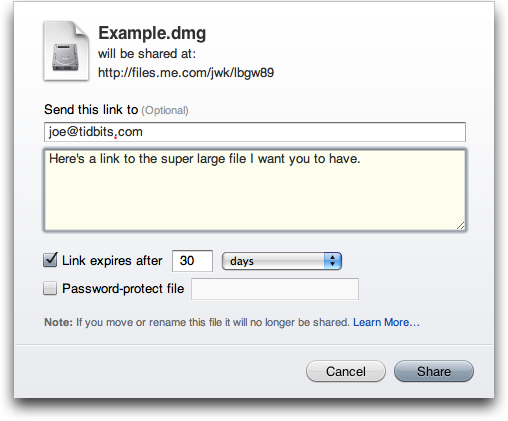
  pointing to that file and displays it in a dialog. In this same
  dialog you can optionally fill in one or more email addresses and a
  message to send the URL to others; you can also choose whether the
  URL expires after a period of time (the default is 30 days) and add
  a password if you want. Click Share, and the file becomes available
  at the new URL. (You can also, after the fact, modify the file's
  expiration and password settings.) A Web-based tutorial walks you
  through the whole process, but it's pretty self-explanatory.

<http://www.me.com/>
<http://www.tidbits.com/resources/2009-02/iDisk-Sharing.png>
<http://www.apple.com/mobileme/tutorials/#idisk-share>

  If, during the sharing process, you opted to send an email
  announcement, the recipient gets a message showing the file's name,
  icon, and size, with a large, friendly Download button that
  downloads the file in the user's default Web browser.

  As a number of commentators have already pointed out, with varying
  levels of cynicism, Dropbox already offers the same capability, only
  easier (see "Dropbox: A Collaborator's Dream," 2009-02-03), as does
  SugarSync (see "SugarSync Sweetens Online Syncing," 2008-08-30). So
  one way of looking at Apple's announcement is that they're once
  again behind the curve in their online service offerings, only
  belatedly (and partially) catching up with competitors that have
  long since surpassed MobileMe in other respects.

<http://www.getdropbox.com/>
<http://db.tidbits.com/article/10048>
<http://www.sugarsync.com/>
<http://db.tidbits.com/article/9751>

  What's my take on it? I'm happy to see that Apple has finally made
  good on an earlier promise, and I hope this signals that the company
  is serious about expanding and enhancing MobileMe. For people who
  already use MobileMe - especially those who don't want to bother
  signing up for yet another service or installing another piece of
  software - this new feature is huge. It will make a common activity
  easier, more reliable, and less of a hassle. Could it be easier
  still? Absolutely. (In particular, I sure wish I could do this
  sharing directly from the Finder, without having to log in to my
  account in a Web browser - and I wish I could share an entire folder
  in this way, not just individual files.) But I can say for sure that
  I'll use this feature often - in fact, it's likely to become my
  default method for sending drafts of Take Control books to my
  editors.


International Verify Your Backups Day
-------------------------------------
  by Adam C. Engst <[email protected]>
  article link: <http://db.tidbits.com/article/10071>

  I'm not a superstitious sort, though I admit to preferring a
  particular jersey and shorts when I'm racing. But for many people,
  Friday the 13th is an inauspicious day, long reputed to be unlucky.

<http://en.wikipedia.org/wiki/Friday_the_13th>

  So I propose that we fight back against both superstition and the
  forces of entropy that constantly tear down all those works we labor
  so hard at creating.

  The best defense against entropy is a good backup strategy. To quote
  a long-ago ad campaign from backup software maker Dantz Development,
  "To go forward, you must back up."

  But as those of us who have had to rely on our backups in the past
  know, the act of backing up is only the first small step in the full
  equation - it's being able to _restore_ that really matters.

  Some psychiatrist friends with their own practice once ran afoul of
  this in a serious way. Their bookkeeper had religiously been making
  backups of all their invoicing and billing records as she worked,
  but she had never tried restoring from those backups until her hard
  disk died. When she went to restore from her carefully prepared
  backups, she was aghast to discover that they hadn't been working.
  Months of data was lost, and it was a huge problem both for the
  bookkeeper and for my friends.

  Therefore, I humbly submit that Friday the 13th, whenever it rolls
  around, should be considered International Verify Your Backups Day.
  (The United Nations is welcome to make this official, and if someone
  wants to add it to the Wikipedia page linked above, that would
  undoubtedly help spread the word.) In 2009, Friday the 13th arrives
  in February, March, and November. If you're reading this article on
  some other day, I'd encourage you to verify your backups right away
  and then continue with the Friday the 13th schedule.

  Take a few minutes to identify some critical files and see if you
  can restore them successfully from your backups. If a bootable
  backup is part of your backup strategy, make sure you can actually
  boot from it. (If you don't have a good backup from which you can
  restore right now, allow me to recommend two of our most popular
  ebooks, Joe Kissell's "Take Control of Mac OS X Backups" or "Take
  Control of Easy Backups in Leopard.")

<http://www.takecontrolbooks.com/backup-macosx?pt=TB965>
<http://www.takecontrolbooks.com/leopard-easy-backup?pt=TB965>

  That's it. No costumes are necessary, there's no obligatory
  greeting, and you aren't expected to make a special meal. If you
  feel the need to honor your successful verification, well, a little
  celebratory imbibing of your favorite beverage is never
  inappropriate.

  But do tell your friends, relatives, and colleagues about
  International Verify Your Backups Day. Because losing data is not a
  question of _if_, but of _when_, and good backups from which you can
  restore reliably will protect you from unexpected losses small and
  large alike.


Free Hotmail POP3 Access Now Available in U.S. Too
--------------------------------------------------
  by Adam C. Engst <[email protected]>
  article link: <http://db.tidbits.com/article/10063>

  Thanks to Tech Night Owl Live host Gene Steinberg for alerting me to
  the fact that Hotmail (officially known as Windows Live Hotmail) is
  now offering POP3 access for free. That may seem
  oh-so-twentieth-century, but for the gazillions of Hotmail
  subscribers, it's a welcome way to read messages sent to Hotmail in
  a desktop email client like Apple Mail, Microsoft Entourage,
  Mailsmith, PowerMail, or Eudora. More interestingly, POP3 access to
  Hotmail lets you combine multiple Webmail accounts (since you could
  have Gmail pick up email from Hotmail via POP, for instance), or it
  could let you access Hotmail via your iPhone's or Blackberry's
  native mail client.

  Until recently, POP3 access was limited to paying Hotmail Plus
  subscribers. But on 14-Jan-09, Microsoft announced the phased
  rollout of free POP3 access for Hotmail users in the UK, Canada,
  Australia, France, Japan, Spain, Germany, Italy, and the
  Netherlands. Support for POP3 access in the United States and other
  countries was promised for future phases, but no dates were given.

<http://windowslivewire.spaces.live.com/Blog/cns!2F7EB29B42641D59!32413.entry>

  Gene noticed that POP3 access worked in his U.S.-based Hotmail
  account, and when I signed up for a Hotmail account and tested it,
  it worked fine for me as well. It may not be universally available
  yet, but it's also likely that Microsoft simply hasn't pushed out an
  announcement. If POP3 access isn't yet available for your account,
  you can reportedly fool Hotmail into enabling it by changing your
  country temporarily.

<http://www.mydigitallife.info/2009/01/22/hack-to-enable-hotmail-pop3-and-smtp-support-instantly-for-all-countries/>

  Two notes. I'm sure Microsoft's Web services take an insane level of
  attack, but the CAPTCHA required to sign up for a Hotmail account is
  the least readable one I've ever seen. It took me multiple tries to
  get one I could even guess at correctly. Also, when I configured
  Apple Mail to pick up mail from Hotmail, it marked as spam the only
  two messages in the account - the welcome message from Hotmail and a
  simple test message I'd sent myself. I recommend additional
  attention to your spam filter while it learns about the kind of mail
  that comes in through Hotmail.

  Although the basics of setting up POP3 access to Hotmail in your
  email client are easy, be careful when entering the settings. I
  couldn't connect until I realized I was supposed to use the full
  Windows Live email address as my user name. The configuration
  details are:

* Incoming Mail Server: pop3.live.com (Port 995)
* POP SSL Required? Yes
* User Name: Your Windows Live ID, for example, [email protected]
* Password: The password you usually use to sign in to Hotmail or
  Windows Live
* Outgoing Mail Server: smtp.live.com (Port 25)
* Authentication Required? Yes (use your POP user name and password)
* SSL/TLS Required? Yes

  Although Hotmail isn't represented nearly as highly on the TidBITS
  subscription list as MobileMe (over 7,000 mac.com addresses, only
  about 150 me.com addresses), Gmail (over 2,700 entries), AOL (over
  2,200), EarthLink (over 2,100), Yahoo (1,800), Comcast (1,700), or
  Road Runner (1,000), we still have over 800 Hotmail subscribers.

  Oh, and before you ask, I tried setting up IMAP access and pointing
  my account at imap.live.com, but no luck.


'Take Control of Your iPhone, Second Edition' Offers Key Advice
---------------------------------------------------------------
  by Adam C. Engst <[email protected]>
  article link: <http://db.tidbits.com/article/10068>

  It's been a while since we've announced a new ebook, but we've been
  hard at work and are pleased to let you know that Ted Landau's "Take
  Control of Your iPhone, Second Edition" is now available, and it is
  up-to-date for the latest iPhone 2.2.1 software release. Ted's a
  writing machine, and he has pumped out a 183-page compendium (plus
  additional online resources) of the most useful information about
  the iPhone, with a particular focus on helping you work more
  effectively, avoid trouble, and fix any existing problems. The book
  normally costs $15, but as a limited time introductory discount, you
  can get it for $10 with this link (follow the link, click the Buy
  Ebook button, and your discount should appear in the first screen of
  the shopping cart).

<http://www.takecontrolbooks.com/iphone?cp=CPN005590211DIS&pt=TB965>
<http://www.takecontrolbooks.com/iphone?cp=CPN005590211DIS&pt=TB965>

  Taking the Murphy's Law approach that if something can go wrong, it
  probably will, Ted explains how your iPhone figures out where in the
  world it is, how it connects to the Internet and cellular data
  networks, and how it communicates with your Mac. You'll learn key
  details of syncing with iTunes and via MobileMe, how to manage your
  apps, and ways you can share files with your Mac. The ebook helps
  you get the most life from your iPhone battery and connect a
  Bluetooth headset, and it provides tricks for typing more quickly
  and accurately. You'll find a cornucopia of advice for making the
  most of the main built-in iPhone apps, including iPod, Phone, Mail,
  Maps, and Safari. But that's not all - extensive problem-solving
  sections help you solve network problems, resolve sync conflicts,
  avoid crashes, and, if necessary, restore an ailing iPhone from
  backup.

  The ebook covers the iPhone from a Macintosh point of view, though
  most of the information is useful even if you connect your iPhone to
  a Windows PC. The ebook also covers the iPod touch; we just couldn't
  figure out a clever way to work "iPod touch" into the title.

  For those who have the preview version of the second edition "Take
  Control of Your iPhone," click the Check for Updates button on the
  cover to access your free update. And if you own the first edition
  of the ebook, also use Check for Updates to look for a
  50-percent-off discount on the upgrade. We've also sent email to
  these groups with details.


New Macworld Superguides Cover Mac Security and Mobile Computing
----------------------------------------------------------------
  by Adam C. Engst <[email protected]>
  article link: <http://db.tidbits.com/article/10067>

  Keeping up with our own Take Control authors is hard enough, but
  with our friends at Macworld putting together Superguides too, well,
  we fell behind in the end-of-year crunch in 2008. We now have
  Macworld's two most recent Superguides in our catalog. The "Macworld
  Mac Security Superguide" is particularly interesting, thanks to its
  real-world advice to help you maintain your privacy online, protect
  your sensitive data, and keep your Mac safe from both malicious
  software and intruders. The ebook also helps you lock down your home
  wireless network, set up a firewall, and secure your data when
  computing in public. $9.99

<http://www.takecontrolbooks.com/mw-security?pt=TB965>

  And for those who are ditching the desk chair for a
  coffeehouse-based office for the first time, taking that first
  laptop to college, or switching to a job that requires tons of
  travel, the "Macworld Mobile Mac Superguide" helps you pick the best
  laptop for your needs, find Internet connectivity wherever you go,
  share files with your Macs at home, keep your data backed up while
  on the road, and work through common problems when you can't easily
  call anyone for help. $9.99

<http://www.takecontrolbooks.com/mw-mobile-mac?pt=TB965>

  The author lists for these ebooks again include numerous TidBITS and
  Take Control contributors - yes, it's a small industry, and we work
  with the best.


Finder Inconsistency Could Lead to Data Loss
--------------------------------------------
  by Adam C. Engst <[email protected]>
  article link: <http://db.tidbits.com/article/10062>

  Consultant Scott Rose has isolated a potentially dangerous problem
  in Mac OS X 10.5 Leopard that could cause data loss for people who
  rely on the Dock or the Apple menu's Recent Items submenu as a
  launcher for in-progress documents. The steps to reproduce the
  problem aren't likely to bite careful users, but it's easy enough to
  see someone accidentally stumbling into the situation, as did one of
  Scott's clients.


**The Problem** -- Assume you drag frequently used documents to the
  Dock for quick access, and once in the Dock, you use those Dock
  aliases exclusively for opening documents. Or, imagine that you use
  the Apple menu's Recent Items submenu or applications' Open Recent
  submenus to access your in-progress documents. Further assume that
  for some reason, perhaps accidentally, you move one of these
  important files to the Trash.

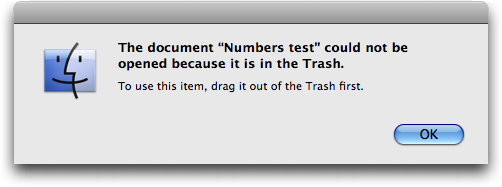
  Normally, if you double-click a file in the Trash, the Finder
  refuses to open it, telling you to remove it from the Trash first.
  The warning makes perfect sense, since it would be all too easy to
  empty the Trash while working and lose your file.

<http://www.tidbits.com/resources/2009-02/Finder-Trash-warning.png>

  However, if you open a trashed document via the Dock, the Recent
  Items submenu, or an application's Open Recent submenu, some
  applications allow you to open the document, make changes, and save
  your changes, all without the slightest warning. Were you to empty
  the Trash, your data would be lost, and you'd be left with no
  recourse short of a therapeutic bout of cursing. (And yes, this
  would definitely fall into the category of "user error," but if
  Apple is going to prevent people from double-clicking files in the
  Trash, the least they can do is be consistent about other ways of
  opening files in the Trash.)

  In a quick spot check of applications I use, programs that allowed
  editing of files in the Trash include Microsoft Word 2004 (but not
  2008), Microsoft Excel 2008, and BBEdit 9.1.1. Scott Rose also tells
  me that he's verified the problem in FileMaker Pro (any version),
  Quicken 2007, and Final Draft 7.

  On the other side of the spectrum, Apple's own TextEdit, Preview,
  Pages '09, and Numbers '09 alert you that the file is stored in the
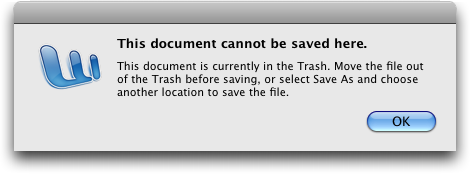
  Trash and require you to save it elsewhere. Microsoft Word 2008
  presents a clear dialog telling you to move the document out of the
  Trash or use Save As. Adobe Photoshop CS3 lets you open the file and
  make changes, but when you try to save, it forces a Save As without
  any explanation. On my first test with Adobe InDesign CS3, it
  crashed; subsequent tests merely closed the document without warning
  or explanation as soon as I opened it.

<http://www.tidbits.com/resources/2009-02/Word-2008-save-warning.png>

  Testing would be required to determine how any given program will
  react to this situation, so if you rely on the Dock, Recent Items,
  or Open Recent as a launcher for in-progress documents, you may wish
  to check the applications you use. I haven't tested Mac OS X 10.4
  Tiger with regard to opening trashed documents, but I'd guess that
  the problem exists in that version as well.

  Exacerbating the problem is the fact that Leopard's Time Machine
  doesn't back up files once they're in the Trash. It may have a
  backup of the file before it was moved to the Trash, but that could
  be significantly out of date, were you to empty the Trash and then
  look to Time Machine to restore the most recent backup.


**Who's Responsible?** From the varying results in my testing, it's
  clear that responsibility _currently_ lies with application
  developers to notice that an open file is located in the Trash and
  to prompt the user appropriately. Apple's own programs appear to do
  that, and I strongly encourage developers to perform that check on
  either open or save, preferably open.

  More generally, though, and the reason I think Apple should modify
  Mac OS X to eliminate this possibility of data loss, is that the
  Finder and the Dock behave differently in exactly the same
  situation, and the Finder itself displays inconsistent behavior.
  Double-click a file in the Trash, and the Finder forces you to move
  it before opening it. The Finder also warns you appropriately if you
  put a document in the sidebar or toolbar, trash the file, and then
  try to open it. But open a trashed file by clicking it in the Dock
  or from the Recent Items submenu, and... it just works (which is a
  bad thing, in this case).

  For the sake of both consistency and safety, the Dock, the Recent
  Items submenu, and the Open Recent submenu in applications should
  refuse to open any file that's stored in the Trash. And, ideally,
  the Finder should offer to move the offending file to the user's
  Desktop, rather than just presenting an error dialog. That would
  just be polite.

  Plus, although fixing this bug would address the issue of opening
  files in the Trash, I believe that Time Machine _should_ back up the
  contents of the Trash, just like everything else, since it's all too
  easy to create a file and trash it within the hour-long time frame
  that Time Machine operates, thus preventing Time Machine from ever
  seeing that file.

  I've reported this problem to Apple, and with luck, it will be
  addressed in Snow Leopard.


  [Thanks to reader Matt Strange for suggesting that I investigate the
  behavior of Recent Items and Open Recent as well. Based on those
  results, I recast the article so it doesn't focus so much on the
  Dock, since the problem obviously exists in other areas of Mac OS X
  as well. -Adam]


Photo Safe II Offers Worry Free Travel Backups
----------------------------------------------
  by Oliver Habicht <[email protected]>
  article link: <http://db.tidbits.com/article/10064>

  Recently my family took a three-week vacation overseas, and having
  left my computer at home (hey, it was a family vacation!), I needed
  a convenient way to store all the photos and videos that we were
  taking. Adam had written about this topic a few months ago (see
  "Backing up Photos While Traveling", 2008-08-11 and "More Photo
  Backup Options While Traveling", 2008-08-12) and since he had
  received a Digital Foci Photo Safe II for review after those
  articles appeared, he asked me to give it a real-world test.

<http://db.tidbits.com/article/9728>
<http://db.tidbits.com/article/9732>
<http://www.digitalfoci.com/photo_safe.html>

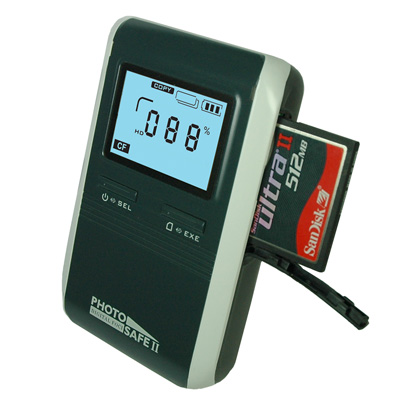
  The Photo Safe II is a lightweight (0.6 lb/272 g) portable photo
  storage device and memory card reader, and it proved a welcome
  traveling companion. With it, I was able to back up all our photos
  and videos as the trip progressed, copying them from our camera's
  memory card every few days. I even had enough storage space to back
  up all the photos taken by the relatives who were traveling with us.
  And, although I didn't use it to add data in this way, it can also
  work as a normal USB external hard disk (that's how you move data
  from it to your Mac).

<http://www.tidbits.com/resources/2009-02/Photo-Safe-II.jpg>

  The Photo Safe II offers nearly foolproof backups. This is due to a
  variety of features, and assisted by the excellent Quick Start Guide
  which provides well written instructions, useful diagrams, and
  anticipates many user questions. Perhaps the most important of its
  features is that you can only delete photos from the device when
  it's connected to a computer, effectively eliminating the risk of
  accidentally wiping out your entire trip's pictures with the push of
  a button.

  Further lessening that risk is the fact the Photo Safe II has only
  two buttons. One turns it on or off when held down, or, when pressed
  and released, toggles between pre-selecting the copy and delete
  functions. The second button then executes either copying (all)
  files from memory card to the device, or deleting (all) files from
  the memory card. The latter action is somewhat safeguarded by
  requiring you to hold down the button for three seconds. And again,
  once photos are loaded onto the Photo Safe II, there's no way to
  delete them using only the device's controls.

  Complicating things just a bit is the fact that the two buttons
  offer a few other context-dependent functions. These include
  recalculating the available space and displaying information (the
  number of files copying and the target folder number) following a
  copy. The former is clearly displayed, making it easy to know just
  how much room you have left. That said, depending on how you're
  using the Photo Safe II, you may find you don't need to check it
  often. With the (now-discontinued) 80 GB model, even after I copied
  several thousand photos and short videos to it, it still had over 56
  GB available at the end of my trip. Of course, if you're also using
  the device as an external hard disk, a more capacious model might be
  required.

  It's important to realize that each time you ask the Photo Safe II
  to copy a memory card, it does a _complete_ copy of the card and
  puts the data in a completely new, top-level, sequentially numbered
  directory, prefaced with the card type. Also important to realize is
  that the copy action copies everything, not just photos and videos,
  but all directory structures as well.

  If you have one memory card, and you choose to make backups during
  your trip without deleting files from the card, the last file copy
  will contain the entire contents of your card. You can then ignore
  all the previous copies.

  However, if you're copying more than one memory card of the same
  type, you need to compare the contents of the device's sequentially
  numbered folders to make sure you get the correct data (since
  they'll all have similar folder names). Apparently it's possible to
  pre-create partitions on the device's hard drive, thus permitting
  you to separate the data coming from different cards of the same
  type, though I didn't try this.

  However, I did successfully use the Photo Safe II with a wide
  variety of point-and-shoot and SLR cameras that utilized the
  following memory cards: SD (normal and HC), Sony Memory Stick Pro
  MagicGate (High-speed), xD, and Compact Flash. The Photo Safe II
  also has slots for many other types, such as CF Type I (including
  Sandisk Extreme III, IV), MMC, SD/HC, miniSD, MS, MS PRO, MS Duo, MS
  PRO Duo, and xD.

  During the trip, I connected the Photo Safe II to a PC running
  Windows Vista (someone else's, of course) and it performed admirably
  as an external hard drive. In fact, I even took the opportunity to
  make a full copy of all our card copies to create yet one more
  backup of everyone's photos and videos!

  The Photo Safe II can also copy data from MS/SD/MMC/xD memory cards
  to a Compact Flash card. This would allow the risk-averse to create
  yet another level of backup. One could perhaps then mail full
  Compact Flash cards back home, or simply have enough peace of mind
  to delete the photos on the camera's primary memory card.

  The Photo Safe II can be powered with its included rechargeable
  battery, via the included AC adapter (sporting a small and
  lightweight wall plug that's compatible with 100 to 250 volt power
  mains), or via USB. Additionally, both the AC adapter and USB can be
  used to recharge the battery within the unit, something that's
  lacking in most cameras (sorry, just a pet peeve there). Included in
  the package is an unusual forked USB cable. One end has a mini-USB
  connector for connecting to the Photo Safe II, and the other end has
  a both normal USB connector for transferring data to a computer, and
  a second USB connector for delivery of even more power to the
  device, presumably to speed charging. Ingenious!

  After a lengthy opportunity to explore the Photo Safe II, I'm left
  with only a handful of quibbles: When the device was connected to my
  Mac, I couldn't see the data within the inserted memory cards, only
  the data on the device's hard drive itself. However, according to
  the documentation, it's supposed to function as a memory card
  reader.

  Also, when powered by AC, I couldn't get it to recognize the memory
  card. I had to pull the AC, turn it on with battery power, insert
  the memory card which would be recognized, and only then could I
  plug the AC in again and be fine thereafter.

  Finally, and perhaps this was just an anomaly, at one point the
  device's power indicator showed a single flashing bar when I was
  using just the battery, indicating a low battery. When I turned it
  off, and then back on, it indicated a full charge for quite some
  time.

  Despite these minor quirks or aberrations, I highly recommend the
  Photo Safe II as the worry free means of backing up on the go. The
  Photo Safe II is currently available in 160 GB ($149), and 250 GB
  ($199) models, and can be purchased from Digital Foci's Web site.

<http://www.digitalfoci.com/>


  [Oliver B. Habicht is an IT director in the Cornell University
  Library. He's still looking for a tiny and quick point-and-shoot
  digital camera that can charge via USB.]


EtherPad Brings Simultaneous Writing to the Web
-----------------------------------------------
  by Glenn Fleishman <[email protected]>
  article link: <http://db.tidbits.com/article/9869>

  I like to write with others just about as much as I like to write by
  myself. SubEthaEdit has long been one of our primary tools at
  TidBITS for collaborating simultaneously among editors and writers.
  The program lets us write in the same virtual document while seeing
  each other type. We can quickly produce a lot of text and edit each
  other's work, all the while checking in (sometimes through an iChat
  backchannel) on changes as we make them.

<http://www.codingmonkeys.de/subethaedit/>

  Simultaneous writing might seem like the authorial equivalent of the
  four-way intersection car crash in Steve Martin's "L.A. Story."
  Instead, we find it makes it possible for us to write faster
  (especially under deadline during real-time events) and to speed up
  editing, as well.

<http://www.imdb.com/title/tt0102250/>

  EtherPad treads on SubEthaEdit's turf. The software, now available
  for general use, is a free, hosted Web application with many of
  SubEthaEdit's key collaboration features, while also being freed
  from many of SubEthaEdit's desktop application constraints.
  (EtherPad was originally released in a form of public beta, which
  went private due to so much use. It opened on 03-Feb-09 to all
  comers.)

<http://etherpad.com/>

  Let's take a look at the two.


**Compare and Contrast, in Real Time** -- SubEthaEdit (from Coding
  Monkeys, 30-day trial, 29 euros or US$38) requires one writer to
  host a document and others to connect over the Internet or using
  Bonjour on a local network. Once the document has been announced and
  unlocked, other writers who have been given read/write permission
  are automatically assigned a unique color, and can begin editing at
  once. Text appears color-coded by author as soon as a character is
  typed or deleted on all participants' open copies of the document.
  (Deletions aren't shown or retained. You can use Undo to revert back
  through your own edits, however.)

<http://www.codingmonkeys.de/subethaedit/images/sessionbig.png>

  EtherPad (from AppJet, free) does away with many of these
  constraints, although its first release is nowhere near as mature as
  SubEthaEdit. But let's be fair: SubEthaEdit has been under
  development for years, and EtherPad is just as impressive as
  SubEthaEdit (then called Hydra, for obvious reasons) was when it
  first showed up as something close to a student programming project
  in 2003.

<http://etherpad.com/static/img/oct/pageshot.png>
<http://blog.appjet.com/>
<http://en.wikipedia.org/wiki/Lernaean_Hydra>
<http://en.wikipedia.org/wiki/SubEthaEdit>

  EtherPad opens up editing to any platform with support for one of
  several major browsers: Internet Explorer (version 6 or later),
  Safari (3 or later), and Firefox (2 or later). Other browsers may
  also work. This means that iPhone users can (tediously) participate
  as well as our friends suffering through Windows or enjoying their
  own unique blend of GNU/Linux.

  Because the service is hosted as a Web application, EtherPad does
  away with the requirement for one user to have a publicly reachable
  IP address. This has bedeviled us many times, sometimes requiring us
  to open a SubEthaEdit document on a Mac OS X Server system to all
  who participate. Many features, like color coding of each
  participant's changes, will be familiar to SubEthaEdit users.

  EtherPad provides revision saving coupled with restoration from
  stored versions, something not found in SubEthaEdit. EtherPad also
  centralizes storage of the current document and revisions on
  AppJet's servers. Both editors lack auto-save, a feature we've
  wanted for years, but EtherPad's capability to save a version trumps
  SubEthaEdit's simple Save command, which overwrites the previously
  stored version. (You can use third-party programs to add an
  automatic saving option and version tracking to SubEthaEdit, but
  this should be a piece of core functionality, especially considering
  that one of the authors of SubEthaEdit, Martin Ott, puts together
  the Mac OS X installer of the Subversion version control system.)

  Centralized storage means that any participant always has access to
  the current state of the document or previous revisions. With
  SubEthaEdit, users other than the host can save a copy at any point,
  but aren't assured of having the last version of the document unless
  they save and the host immediately closes before any other edits
  take place.

  SubEthaEdit was designed, in part, for Extreme Programming, which
  includes the principle of pairing programmers to work on the same
  code at the same time. Some studies have shown that multi-person
  programming actually improves efficiency by reducing errors and
  producing more readable code in fewer lines.

<http://en.wikipedia.org/wiki/Extreme_Programming>

  As such, SubEthaEdit includes a long list of syntax coding options
  for popular programming languages, where code elements are colored
  for better recognition and to avoid making errors in spelling a
  name. Help in ensuring paired, nested parentheses and braces is also
  found in SubEthaEdit. (Nearly all non-collaborative SubEthaEdit
  features appear in BBEdit.)

<http://www.barebones.com/products/bbedit/>

  Only JavaScript syntax coding appears in this first EtherPad
  release, which isn't odd given the developers. The folks who wrote
  EtherPad developed AppJet, a JavaScript-driven Web application
  engine that they had to revise substantially to make EtherPad work.

<http://etherpad.com/ep/blog/posts/etherpad-and-appjet>

  EtherPad even throws in chat among participants in a document,
  providing chronological archived discussion alongside the live space
  in which everyone is editing. This works remarkably well, since
  there's often backchannel discussion about what's being written that
  doesn't belong in the document itself.


**Competition Improves Collaboration** -- I look forward both to more
  developments in EtherPad, and the response from Coding Monkeys. For
  many years, I've wanted to have a tool that's a bit easier to use -
  especially freed from the storage and public IP requirement - for
  less-technical friends and colleagues. And Windows users have
  previously been left out in the cold.

  Competition should help spark innovation, but EtherPad will
  certainly allow more unfettered communication. We know from history,
  more communication either leads to better understanding or a
  complete breakdown. I hope for the former.


TidBITS Watchlist: Notable Software Updates for 16-Feb-09
---------------------------------------------------------
  by Doug McLean <[email protected]>
  article link: <http://db.tidbits.com/article/10066>

  Simon 2.5 from Dejal Systems is a significant update to the Internet
  monitoring tool. Changes include an SMS notifier plugin that enables
  Simon notifications to be sent as text messages to your mobile
  phone. The update also adds SMART Status and Drive Status services
  that monitor the health of local hard disks. Minor bugs have also
  been repaired, including one that could cause new default services
  and notifiers to disappear after relaunching if no changes were made
  manually after updating. The full list of changes is available via
  Dejal's Web site. ($29.95 to $195, free update, 11.7 MB)

<http://www.dejal.com/simon/>
<http://www.dejal.com/simon/release/>

  PasswordWallet 4.4.4 from Selznick Scientific Software is a minor
  update to the longstanding password protection utility. The update
  "simplifies iPhone synchronization for new users, adds Japanese
  translation, and addresses some usability issues." The company has
  also released Password Wallet 4.4.5 for the iPhone with a number of
  cosmetic and usability tweaks. ($20, free update, 5.0 MB)

<http://www.selznick.com/products/passwordwallet/>
<http://www.selznick.com/products/passwordwallet/iphone/>

  VMware Fusion 2.0.2 from VMware is a maintenance update to the
  popular Windows virtualization software. New to this version is the
  capability to import Windows virtual machines from both Parallels
  Desktop 4.0 and Parallels Server for Mac, support for mounting
  unencrypted .dmg files as CD/DVD disk images, support for Mac OS X
  10.5.6 as a host operating system, support for Ubuntu 8.10 as a
  guest operating system, and more. ($79.99, free update, 286 MB)

<http://www.vmware.com/download/fusion/>
<http://www.vmware.com/support/fusion2/doc/releasenotes_fusion_202.html>

  Chax 2.2 from Kent Sutherland is a minor update to the iChat
  enhancement and extension utility. Changes include a new Send Camera
  Snapshot feature that enables users to send pictures from their
  cameras as inline images, support for multi-touch gestures capable
  of switching chat tabs, an added option to confirm before ending AV
  chats, and improved display options for the Message History. The
  update also fixes several minor bugs. (Free, 1.3 MB)

<http://www.ksuther.com/chax/>

  Nisus Writer Express 3.2 from Nisus Software is the latest version
  of the streamlined word processor. The update features added backup
  options, editable document properties, and the capability to select
  the default file format for new documents. Also new is a Services
  menu that enables users to create a Nisus Writer document from
  selected content in another application. Numerous bugs have also
  been fixed, all of which are listed, along with other smaller
  changes and features, within the extensive release notes. ($45 new,
  free upgrade, 59 MB)

<http://nisus.com/Express/>
<http://nisus.com/Express/releasenotes.php>


ExtraBITS for 16-Feb-09
-----------------------
  by TidBITS Staff <[email protected]>
  article link: <http://db.tidbits.com/article/10075>

**10 Ways Microsoft's Retail Stores Will Differ from Apple's** -- PC
  World offers this tongue-in-cheek countdown of 10 ways that
  Microsoft's forthcoming retail stores will differ from Apple's. Our
  favorite: "Stores will be named Microsoft Live Retail Store with PC
  Services for Digital Lifestyle Enthusiasts." (Posted 2009-02-13)

<http://www.pcworld.com/article/159521/10_ways_microsofts_retail_stores_will_differ_from_apple_stores.html>


**Jeff Carlson Talks iMovie '09 with Macworld** -- Jeff Carlson chats
  with Chris Breen on this week's Macworld Podcast to talk about what
  he likes and dislikes about iMovie '09, and whether it's worth
  upgrading or if people should jump to Final Cut Express instead.
  (Posted 2009-02-11)

<http://www.macworld.com/article/138772/2009/02/mwpodcast153.html>


**John Siracusa Examines Past, Present, and Future of Ebooks** -- John
  Siracusa at Ars Technica turns his attention to ebooks in this
  lengthy piece, bemoaning the slow state of adoption at the
  mainstream level and making the oft-missed distinction between
  ebooks and ebook readers. (Posted 2009-02-11)

<http://arstechnica.com/gadgets/news/2009/02/the-once-and-future-e-book.ars>


Hot Topics in TidBITS Talk for 16-Feb-09
----------------------------------------
  by Jeff Carlson <[email protected]>
  article link: <http://db.tidbits.com/article/10074>

**Steve Wozniak** -- Fire up the TiVo, because Apple co-founder Steve
  Wozniak is going to be a contestant on "Dancing with the Stars"! (3
  messages)

<http://emperor.tidbits.com/TidBITS/Talk/2450>


**File Sharing** -- A reader wants to create a file that can be shared
  with multiple people but edited only by one. Is Google Docs the
  answer? (4 message)

<http://emperor.tidbits.com/TidBITS/Talk/2451>


**More Ebooks Available for the iPhone/iPod touch** -- If Amazon were
  to sell ebooks for the iPhone, would that channel run counter to
  Apple's developer guidelines? (4 messages)

<http://emperor.tidbits.com/TidBITS/Talk/2452>


**Google Sync for the iPhone** -- Google announced the capability to
  sync contacts and events to the iPhone, but what's the benefit of
  doing so? (1 message)

<http://emperor.tidbits.com/TidBITS/Talk/2453>


**Dock Bug Could Lead to Data Loss** -- Readers debate the severity
  and likelihood that someone could fall prey to a bug in the Mac OS X
  10.5 Leopard Dock. (10 messages)

<http://emperor.tidbits.com/TidBITS/Talk/2454>


**The Phoenix Lander on Mars tweets** -- The Phoenix Lander (or, more
  accurately, someone at NASA who communicated in the first person)
  used Twitter to send out regular updates while it was active. (7
  messages)

<http://emperor.tidbits.com/TidBITS/Talk/2455>


**Mouse-click via AppleScript?** It's possible to use AppleScript to
  create a mouse click, though not straightforward. The question is,
  why? (11 messages)

<http://emperor.tidbits.com/TidBITS/Talk/2456>


**Multiple boot versions of OS X?** For testing purposes, a reader
  wants to know the best way to keep multiple versions of Mac OS X at
  hand. Separate hard drive partitions? Virtualization? (5 messages)

<http://emperor.tidbits.com/TidBITS/Talk/2461>


**24" iMac Solid Gray** -- A problematic external hard drive or bad
  RAM could be the cause for a new iMac to display only a solid gray
  screen. (5 messages)

<http://emperor.tidbits.com/TidBITS/Talk/2462>


**Dropbox: A Collaborator** -- Should Apple buy Dropbox and
  incorporate it into MobileMe? Its features seem more advanced than
  Apple's offerings. (3 messages)

<http://emperor.tidbits.com/TidBITS/Talk/2463>


**Alternatives to iDisk** -- What other options exist for backing up
  critical data online? (13 messages)

<http://emperor.tidbits.com/TidBITS/Talk/2464>


**Apple Adds iDisk Sharing Feature to MobileMe** -- Apple's newest
  iDisk feature invites comparisons to Dropbox, and suffers from the
  fact that you can share only a file, not a folder. (2 messages)

<http://emperor.tidbits.com/TidBITS/Talk/2466>


**Gmail Adds Move To and Label Menus to Toolbar** -- Want to know how
  to tell if your ISP is filled with incompetent monkeys? Read on. (2
  messages)

<http://emperor.tidbits.com/TidBITS/Talk/2468>


**Macs and AVCHD files** -- A reader wants information about HD
  camcorders that shoot AVCHD format, and how that's edited on the
  Mac. (4 messages)

<http://emperor.tidbits.com/TidBITS/Talk/2469>


$$

This is TidBITS, a free weekly technology newsletter providing timely
news, insightful analysis, and in-depth reviews to the Macintosh and
Internet communities. Feel free to forward to friends; better still,
please ask them to subscribe!

Non-profit, non-commercial publications and Web sites may reprint or
link to articles if full credit is given. Others please contact us. We
do not guarantee accuracy of articles. Caveat lector. Publication,
product, and company names may be registered trademarks of their
companies. TidBITS ISSN 1090-7017.

Copyright 2009 TidBITS: Reuse governed by Creative Commons license.

Contact us at:    <[email protected]>
TidBITS Web site: <http://www.tidbits.com/>
License terms:    <http://www.tidbits.com/terms/>
Full text search: <http://www.tidbits.com/search/>
Subscriptions:    <http://www.tidbits.com/about/list.html>
Account help:     <http://www.tidbits.com/about/account-help.html>


--
If you want to unsubscribe or change your address, use this link
http://emperor.tidbits.com/webx?unsub@@.3c557dc4!u=306a67f9