TidBITS#971/30-Mar-09
=====================
  Issue link: <http://db.tidbits.com/issue/971>
  Major announcements this week come from unexpected sources: Skype
  and IDG World Expo. Skype is releasing an iPhone app, perhaps by the
  time you read this, and IDG World Expo has moved Macworld Expo from
  its traditional early January dates to the middle of February. In
  other news, we released "Take Control of the Mac Command Line with
  Terminal" for those who want to know more about the Mac's Unix
  command line, Jeff Carlson reveals some of the changes that Apple
  refuses to tell us about in iMovie '09 8.0.1, Matt Neuburg explains
  how the latest version of KeyCue shows both application and global
  keyboard shortcuts, David Blatner makes the most of a bad situation
  by explaining what he learned from having his laptop stolen, and
  Adam goes deep to learn exactly what Apple puts inside an Xserve's
  Apple Drive Module. Other software releases this week include
  Firefox 3.0.8, iLife Support 9.0.2, iWeb Update 3.0.1, iPhoto Update
  8.0.2, iMovie Update 8.0.1, iWork '09 Update 1 9.0.1, MacBook Pro
  Graphics Firmware Update 1.0, Sandvox 1.6, TextExpander 2.6 and
  Carbon Copy Cloner 3.2.

Articles
    Take Control News: Get Comfortable on the Mac's Unix Command Line
    Macworld Expo Moves to Mid-February
    Skype Coming to iPhone
    iMovie '09 8.0.1 Update Brings More than Just Bug Fixes
    KeyCue's Keyboard Shortcut Cheat Sheet Goes Global
    What I Learned from Having My Laptop Stolen
    Going Deep Inside Xserve Apple Drive Modules
    TidBITS Watchlist: Notable Software Updates for 30-Mar-09
    ExtraBITS for 30-Mar-09
    Hot Topics in TidBITS Talk for 30-Mar-09


------------ This issue of TidBITS sponsored in part by: --------------

* READERS LIKE YOU! Support TidBITS with a contribution today!
  <http://www.tidbits.com/about/support/contributors.html>
  Special thanks this week to Steve Meyer, David Teplow,
  Bruce Stephenson, and Joel Ness for their generous support!

* Fetch Softworks: Fetch 5.3 makes FTP and SFTP easy!
  Upload, download, mirror, and manage your Web site. Dozens of
  new features to make file transfers easier and more reliable.
  Get your free trial version at <http://fetchsoftworks.com/>!

* WebCrossing Neighbors Creates Private Social Networks
  Create a complete social network with your company or group's
  own look. Scalable, extensible and extremely customizable.
  Take a guided tour today <http://www.webcrossing.com/tour>

* Bare Bones Software's BBEdit 9.1 -- A burly upgrade introducing new
  capabilities like Projects, non-modal Find and Multi-File Search,
  editing in browsers, text completion, Scratchpad, new Ruby module,
  better JavaScript, ObjC, Obj-C++, YAML <http://barebones.com/>

* MARK/SPACE, INC: If you have a smartphone, we can sync it!
  Sync your address book, calendar, notes, music, pictures, and
  more from your BlackBerry, Windows Mobile or Palm OS mobile
  phone to your Mac. <http://www.markspace.com/bits>

* 25% off VMware Fusion 2, the preferred way to run Windows on
  your Mac. Now only $59.99 when you enter "FusionSpring09"
  at checkout. Offer valid through 11:59PM PT on March 31, 2009.
  Visit: <http://www.tidbits.com/about/support/vmware-fusion.html>

* Microsoft's MacBU: Supporting Mac users with Office 2008.
  Straighten up your Office with the latest updates to Word,
  Excel, PowerPoint, and Entourage. Update today at Mactopia!
  <http://www.microsoft.com/mac/downloads.mspx>

* ConceptDraw Office adds real business power to Microsoft Office
  and Apple's iWork. Whether you need project management, business
  graphics, or mind mapping, it's all easily created on your Mac!
  Buy today for only $499! <http://www.conceptdraw.com/tb>

* It's time to speak up with MacSpeech Dictate! Get the all-new
  MacSpeech Dictate with spelling and phrase training. Speech
  Recognition so good, the only thing it can't do is speak for you.
  Learn more at <http://tidbits.com/about/support/macspeech.html>

---------- Help support TidBITS by supporting our sponsors ------------


Take Control News: Get Comfortable on the Mac's Unix Command Line
-----------------------------------------------------------------
  by Adam C. Engst <[email protected]>
  article link: <http://db.tidbits.com/article/10168>

  For years now, Take Control readers have been requesting a basic
  ebook on how to use the Mac's command line, and we've finally done
  it. "Take Control of the Mac Command Line with Terminal," written by
  the award-winning Joe Kissell and edited by Geoff Duncan, distills
  both Joe's own expertise and many suggestions from savvy geeks into
  111 pages about getting more out of your Mac from the command line.
  Written entirely from a Mac user's point of view, the ebook starts
  with the fundamentals and walks you through more advanced topics as
  your knowledge increases. And to help you put new-found skills to
  use, you'll also find 40 real-life "recipes" for tasks that are best
  done from the command line.

<http://www.takecontrolbooks.com/command-line?pt=TB971>

  Put simply, if you've ever thought you should learn how to use the
  Mac's command line, or worried about doing something wrong while
  following command-line-related instructions from the Web, this $10
  ebook will give you the skills and confidence you need to make your
  Mac even more capable than ever before.


Macworld Expo Moves to Mid-February
-----------------------------------
  by Adam C. Engst <[email protected]>
  article link: <http://db.tidbits.com/article/10176>

  Much as Macworld Expo has been a linchpin in the Macintosh industry
  since the earliest days of the Mac, one aspect of it has long caused
  grief for attendees and exhibitors alike: the dates. The San
  Francisco show has traditionally occurred in early January, usually
  the first full week of the month; an awkward time of year for most
  people. Now, thankfully, IDG World Expo has announced that the 2010
  Macworld Expo in San Francisco will take place roughly a month
  later, from Tuesday, February 9th, through Saturday, February 13th.

  Paul Kent, General Manager for Macworld Conference & Expo, told me,
  "Our goal with the date change is to make the show better meet the
  needs of both attendees and exhibitors. This is just the first step
  in a story that's going to evolve over the next 11 months."

  Along with the date change, Macworld Conference & Expo 2010 (note
  the new official title, reflecting the shared emphasis on conference
  sessions with floor exhibits) will be the first time in memory that
  a Saturday has been included in the schedule. Although many people
  who work in downtown San Francisco can drop in on the show briefly
  during the work day, the weekday-only schedule of the past has
  prevented many consumers and educators from attending.

  Macworld's conference sessions will take place in Moscone West for
  all five days, whereas the show floor will only be open in Moscone
  North the last three days, from 11-Feb-10 through 13-Feb-10.

  For some exhibitors, the date change will relieve the pressure on
  finalizing products to ship at the show, a task that has in the past
  tended to coincide with the holiday season. Readying software - not
  just the coding, but also preparing marketing materials and booth
  space - for the show becomes all the harder as employees start
  preparing for the holidays, taking time off to be with family and
  friends, and generally collapsing in exhaustion from the year's
  exertions.

  Eric Ullman, Director of Product Management in the Retrospect group
  at EMC, said, "Product schedules are always difficult, but having a
  delivery date in the first full week of the year complicates things
  significantly. It's best to have the project wrapped up before the
  holidays, but that almost never happens, at least not with software.
  You work up to the last minute, and for Macworld Expo, that has
  traditionally included - and sometimes ruined - the holidays."

  Welcome though it is, the date change on its own isn't likely to
  cause many developers to decide to exhibit at Macworld Expo. Rich
  Siegel, CEO of Bare Bones Software, said, "I think it's very hard
  for anyone to call a 'yes/no' decision based on the date change
  alone, but as both a visitor and a potential exhibitor, there are
  definitely some upsides in the date change."

  That said, 90 exhibitors have signed letters of intent to exhibit at
  Macworld Expo 2010 already, and Kent said that IDG World Expo is
  trying to reduce the price of exhibiting. IDG has cut the cost of
  booth space by 20 percent, to $43 per square foot, and they're
  working with the vendors that exhibitors rely on for booth services
  to cut costs as well.

  Early January can also be a difficult time for attendees who have to
  travel longer distances to San Francisco, since the show often comes
  uncomfortably close on the heels of other holiday travel. Plus,
  although airfares and hotel rates vary widely, the middle of
  February is generally an off-season, so it's possible that these
  services will be a bit cheaper for both attendees and exhibitors
  alike. That's especially true for exhibitors, who often need to
  travel several days in advance of the show, which in early January
  can easily result in higher holiday-induced travel costs.

  Although Kent said that the date change had nothing to do with
  avoiding the massive Consumer Electronics Show in Las Vegas, which
  generally coincides with Macworld Expo, large exhibitors and members
  of the press will appreciate not having to undertake two trade shows
  nearly simultaneously.

  On a personal note, the date change makes life a bit easier for
  Tonya and me, since Macworld Expo has conflicted with our son
  Tristan's early January birthday each year. And although travelling
  home on Valentine's Day wouldn't be ideal, maybe we'll just stay an
  extra day and do something like the San Francisco Gourmet Chocolate
  Tour, weather permitting. (Though we've lucked out in recent years
  in January, San Francisco weather is usually slightly warmer and
  drier in February, another plus.)

<http://www.gourmetwalks.com/html/chocolate_tour.html>

  The reason why the earliest Macworld Expos took place in early
  January remains shrouded in history. I've heard speculation that the
  first Macworld Expo would have been scheduled on relatively short
  notice (for the trade show world, where dates are locked up well in
  advance) and thus only the undesirable first week in January was
  available. I've also heard that, in the early days, Apple had a
  sales conference for its sales reps in early January, making it
  convenient for all parties that Macworld Expo occur at roughly the
  same time. Whatever the reason, most people I've spoken with are
  extremely happy about the change.

  For anyone interested in presenting at Macworld Expo 2010, IDG World
  Expo has opened an online call for papers page.

<http://155.212.3.174/survey/247180/3adf/>


Skype Coming to iPhone
----------------------
  by Adam C. Engst <[email protected]>
  article link: <http://db.tidbits.com/article/10175>

  The Wall Street Journal is reporting that eBay's Skype unit will
  release a version of its voice-over-IP Internet phone software for
  the iPhone on 31-Mar-09. The software, which also works on the
  second-generation iPod touch when outfitted with a microphone, will
  enable users to call other Skype users on computers or other mobile
  phones for free. Skype users can also call normal phones for a fee,
  typically 2.1 cents per minute within the United States and many
  other countries. Rates vary by country, but are lower than those
  charged by phone companies.

<http://online.wsj.com/article/SB123836849558067525.html>
<http://www.skype.com/prices/callrates/>

  Apple limits VoIP apps to working over Wi-Fi, preventing VoIP calls
  from being made while the phone is using the 3G cellular data
  network. This is likely an effort to reduce excessive usage of the
  unlimited data plan associated with the iPhone in at least the
  United States, and to prevent users from avoiding the lucrative -
  some would say usurious - cellular calling rates enjoyed by the
  carriers. (Don't get us started on the insane rates charged for SMS
  messages, which are at least four times as expensive as
  communicating with the Hubble Space Telescope!)

<http://www.latimes.com/business/la-fi-lazarus8-2009mar08,0,879700,full.column>
<http://www.physorg.com/news129793047.html>

  Apple said in the recent iPhone 3.0 software announcement that it
  would be adding VoIP-related APIs to the iPhone 3.0 software (see
  "Apple Previews iPhone 3.0 Software," 2009-03-17). It's not yet
  known what enhancements will become possible with these new APIs,
  but it's good to see that Apple is at least paying some attention to
  the burgeoning VoIP market.

<http://db.tidbits.com/article/10144>

  The entrance of Skype into the iPhone world is a big deal. Skype
  claims 405 million users around the world, and many people now
  conduct much of their voice communications via Skype. In addition to
  the Mac and Windows software, Skype offers versions of its software
  for Windows Mobile-based smartphones, for the Android G1, and for
  the Nokia Internet Tablets. Versions for the BlackBerry and for
  Nokia mobile phones are slated to appear later this year.

<http://about.skype.com/2009/02/skype_and_nokia_partner_to_int.html>

  Interestingly, although other VoIP software that enables free calls
  to Skype members, such as Truphone and Fring, is currently available
  for the iPhone, we haven't noticed it gaining significant traction
  among Skype users. According to the New York Times, other software
  that works with Skype doesn't offer all of the service's features.

<http://www.truphone.com/>
<http://www.fring.com/>
<http://www.nytimes.com/2009/03/30/technology/internet/30skype.html>

  Bernard Lunn on ReadWriteWeb has an interesting analysis of why
  Skype deserves more respect than it gets. In short, Skype has become
  a mainstream company that's not running on the fumes of venture
  capital funding, has turned a real profit, and is growing fast due
  in part to the economic downturn.

<http://www.readwriteweb.com/archives/skype_biggest_winner_from_web_20_era.php>

  We now use Skype for all of our staff calls, and it has also become
  the standard for podcast interview recording in our circles.
  Although Skype is far from perfect, our experience is that it both
  is more reliable and offers higher audio quality than iChat. And
  while Skype's reliability is much worse than normal phone calls, the
  quality is often better, due to higher bandwidth, sophisticated
  codecs, and better equipment. Landline calls are limited to 56 Kbps
  of bandwidth, whereas Skype could use much more, though it
  apparently restricts itself to between 3 and 16 Kbps most of the
  time. And most normal phone microphones and speakers can't compete
  with even an inexpensive USB headset, much less a high-quality
  headset like the Sennheiser PC 166 USB Stereo Multimedia Gaming
  Headset that I use.

<http://support.skype.com/en_US/faq/FA151/How-much-bandwidth-does-Skype-use-while-I-m-in-a-call>
<http://www.amazon.com/dp/B000H0IDUW/?tag=tidbitselectro00>

  I'll be interested to test the Skype iPhone app against Skype on my
  Mac, and against Truphone and Fring, to see how it all compares.


iMovie '09 8.0.1 Update Brings More than Just Bug Fixes
-------------------------------------------------------
  by Jeff Carlson <[email protected]>
  article link: <http://db.tidbits.com/article/10173>

  Apple released updates to iLife '09 and iWork '09 this week, as
  usual providing no useful information about what's changed other
  than, in the case of iMovie 8.0.1 for example, "improves overall
  application stability as well as addressing minor issues related to
  usability."

  But the changes are seldom that uninteresting, and I wish Apple
  would get off its terse horse and provide at least a little more
  information. I'm biased here, I fully acknowledge, because the
  following changes mean more immediate, unexpected work. I'm
  currently updating my book iMovie '09 & iDVD Visual QuickStart
  Guide, and I also updated the iMovie section of Jim Heid's upcoming
  title The Macintosh iLife '09.

<http://www.amazon.com/dp/0321601327/?tag=tidbitselectro00>
<http://www.amazon.com/dp/0321601343/?tag=tidbitselectro00>

  The undocumented changes below require that I go back and edit
  material and take new screenshots. That's fine, it's my job. But
  what irks me is that I need to spend a lot of time poking through
  the program looking for changes and searching online for information
  from people who are doing the same.

  I understand that Apple isn't creating its products for writers, and
  it can (and does) change features whenever it wants. The updates
  here are great for iMovie users. But since the development teams
  must keep internal lists of what's changed anyway, is it really so
  hard to spend an hour and turn those into useful release notes?

  With that off my chest, here are five things I've discovered that
  are different in iMovie '09 8.0.1.


**Split Clip Keyboard Shortcut** -- This is a minor but welcome
  change. You can now split a clip by pressing Command-Shift-S instead
  of accessing the command from the Edit menu. What makes it more
  helpful is that you can split a clip without making a selection:
  just position the playhead over the frame you want to slice, and
  press the keys. Previously, you could do that only by accessing
  Split Clip from the contextual menu.


**Interlacing Bug Fixed** -- Here's something I think Apple would want
  to trumpet loudly. It fixed a bug where 1080i (interlaced) footage
  would appear combed when exported to QuickTime or iDVD. Prior to the
  fix, getting a clean HD picture required that you process the
  footage in other applications after exporting. Now, the bug is
  fixed.

<http://discussions.apple.com/thread.jspa?threadID=1935296&tstart=0>
<http://www.macworld.com/article/139124/2009/03/export720pimovie09.html>

  But there's an interesting side note to exporting interlaced
  footage. If you export at 1920 x 1080 to AIC (Apple Intermediate
  Codec) or Apple ProRes format, and you haven't performed any
  operations which scale, crop, or otherwise change the size or speed
  of any of your clips, then interlaced 1920 x 1080 footage is passed
  through unchanged.


**Enter Coordinates for New Map Locations** -- The world is a big
  place, and it's likely you may want to make an interactive map with
  a city or other location that's not included in iMovie's built-in
  database. In my article "10 Secrets of iMovie '09" (2009-02-06), I
  described a way to add a custom map destination by editing the
  WorldLocations.txt file in iMovie's application package.

<http://db.tidbits.com/article/10052>

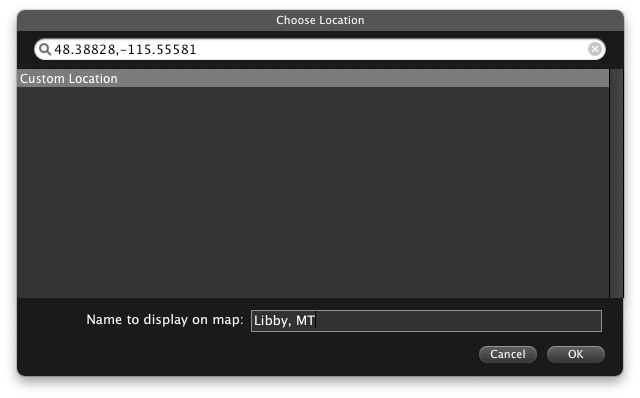
  Now, you don't need to go to so much trouble. If you know the
  latitude and longitude coordinates, you can plug them into the
  Choose Location dialog when creating a map and iMovie sets the
  destination. (iTouchmap.com and Get Lat Lon are good sources for
  that information.)

<http://www.tidbits.com/resources/2009-03/imovie_map_coords.gif>
<http://itouchmap.com/latlong.html>
<http://www.getlatlon.com/>

  Be sure that when you paste the coordinates into the field, you're
  adding just the numbers. I ended up in the Pacific Ocean once
  because I had copied a carriage return or some other invisible
  character.


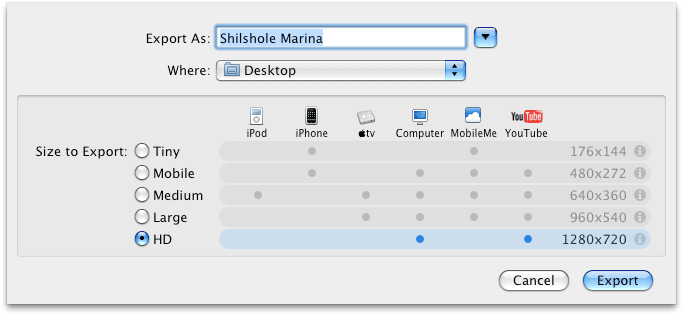
**HD Export Options** -- With YouTube and other sites now accepting HD
  video, it was only a matter of time before iMovie gained the
  capability to output it. When sharing to YouTube or choosing Share >
  Export, a new HD option is available that creates a 720p (1280 by
  720) movie with a bitrate of 10 Mbps. The option doesn't appear at
  all in the iTunes or MobileMe Gallery options.

<http://www.tidbits.com/resources/2009-03/imovie_hd_export.gif>


**Transitions in Split Clips** -- If you split a clip and then put a
  transition at the split, the two halves of the clip now overlap each
  other (maintaining overall duration). This allows you to, for
  example, add a video effect to one portion of a clip and use a cross
  dissolve to fade the effect in or out.

  That's it so far. Have you noticed anything different about iMovie
  '09 8.0.1 that I haven't covered here? Email me at
  [email protected].

<mailto:[email protected]>


KeyCue's Keyboard Shortcut Cheat Sheet Goes Global
--------------------------------------------------
  by Matt Neuburg <[email protected]>
  article link: <http://db.tidbits.com/article/10164>

  First, the bad news: When I'm using even a relatively simple
  application like TextEdit, there are over 75 possible keyboard
  shortcuts I could press. I'm including here not just menu commands
  belonging to TextEdit itself, but shortcuts inserted into the
  Services menu by applications scattered all over my hard disk, plus
  system-wide global keyboard shortcuts enabled by the system and by
  various preference panes and faceless background applications.

  Who on earth can memorize 75 keyboard shortcuts? How is anyone
  supposed to deal with this? And of course, things change radically
  each time I switch from one application to another. Some
  applications have literally hundreds of keyboard shortcuts! As a
  result, I find myself resorting to menus much more than to keyboard
  shortcuts; and even then, I'm frequently confused when I do try a
  keyboard shortcut and some utterly unexpected, surprising thing
  happens (typically because I got it wrong, and some service or
  global shortcut responded).

  Okay, now the good news: Ergonis Software's KeyCue 4.4 now knows
  about most of these keyboard shortcuts. You remember KeyCue, right?
  I reviewed it when it first came out (see "Ergonis's KeyCue Offers
  Keyboard Shortcut Cheat Sheet", 2004-06-04). KeyCue lets me specify
  a modifier-key combination which, when held down for a while, causes
  a reminder list of currently available keyboard shortcuts to appear,
  without my having to hunt through any menus. Then I can proceed to
  choose one. Not only do I rapidly acquire a muscle-memory for those
  keyboard shortcuts I use most, but also I learn about keyboard
  shortcuts I probably wouldn't even have discovered otherwise.

<http://www.ergonis.com/products/keycue/>
<http://db.tidbits.com/article/7690>

  In that original review, I wrote: "What I really want is a cheat
  sheet that lets me see and choose from all of an application's menu
  items, whether or not they have shortcuts, and I'd also like a cheat
  sheet showing all the global hot keys that various applications have
  installed." Ergonis has now responded to the second wish on that
  list. KeyCue 4.4 knows about at least some global hotkeys. I say
  "some" because it is easy to find global hotkeys of which KeyCue
  knows nothing. For example, on my machine, Command-Control-Option-T
  toggles KeyClick on and off, and Command-Control-Option-W summons
  the Witch window list; but KeyCue's cheat sheet doesn't list those.
  Still, the improvement in this version, together with the previous
  version which introduced user customization of the modifier
  key-combination that activates the KeyCue window, is palpable and
  very welcome.

<http://www.sustworks.com/site/prod_keyclick_overview.html>
<http://www.manytricks.com/witch/>

  A single-machine KeyCue license is 19.99 euros. It requires Mac OS X
  10.4 Tiger or later, and there's a 1.1 MB trial download.

<http://www.ergonis.com/downloads/>


What I Learned from Having My Laptop Stolen
-------------------------------------------
  by David Blatner <[email protected]>
  article link: <http://db.tidbits.com/article/10165>

  Someday, somewhere, somehow your computer will be gone. It will be
  stolen, or the hard drive will self-destruct, or it will be hit by a
  meteor. While the latter would at least provide you with an
  excellent story, assuming you weren't using it at the time, having
  your laptop stolen, as mine was recently, just plain sucks. However,
  I did manage to learn a few things in the wake of disaster, and
  wanted to take the opportunity to share them with you here.

  Three things are lost with a computer's theft: hardware, data, and
  privacy. I'll let others deal with the emotional aspects of loss,
  and instead focus on the practical ones.


**Hardware** -- The loss of the hardware is, in many ways, the least
  of your problems. Sure, it's money out the door, but as my mom once
  told me, you can always make more money. That said, I do encourage
  you to make sure your computer is insured. Many homeowner insurance
  policies do not cover computers that are used primarily for work, or
  those that are stolen offsite (like from a car). Be sure to check
  your policies carefully. Safeware offers independent computer
  insurance, if necessary.

<http://www.safeware.com/>

  I would also recommend installing tracking software on your
  computer. Of the various options on the market, I picked MacTrak  by
  GadgetTrak for my replacement computer based on several factors: I
  liked the company's owner, whom I met at his Macworld booth; I don't
  like the idea of a third-party company being the mediator between me
  and the tracking data (as other companies do); and I like the
  relatively simple and straightforward approach the software takes.

<http://www.gadgettrak.com/products/mac/>

  If my new laptop is stolen, I log into the GadgetTrak Web site and
  report it missing. The next time my computer pings their server, it
  sees the status and starts occasionally taking pictures (with the
  built-in iSight camera) and reporting its location (based on
  whatever Wi-Fi address the thief is using). Those photos and data go
  directly to me, and it's up to me to give that information to law
  enforcement.

  There are a number of other products and companies that can track
  your Mac including LoJack and Undercover. While both programs have
  some interesting features (Undercover in particular does some things
  I'd like to see incorporated into a future version of MacTrak, such
  as taking screenshots as the thief works and simulating a hardware
  failure to force the thief into bringing the machine in for repair),
  evaluating them should be saved for another article.

<http://www.lojackforlaptops.com/>
<http://www.orbicule.com/undercover/ >


**Data** -- So tracking helps protect against the loss of hardware,
  but what about the loss of data? This was my biggest concern at
  first, considering I kept everything on my laptop and was not that
  conscientious about backing it up. Lucky for me I had two things in
  my favor. First, I had been using SuperDuper about once a month to
  back up the whole laptop to an external hard drive. It's easy,
  cheap, and painless to back up a complete copy of a computer, or
  make incremental backups regularly.

<http://www.shirt-pocket.com/SuperDuper/ >

  Second, I had installed a copy of CrashPlan a year or so earlier.
  CrashPlan is one of several programs on the market that sits in the
  background and backs up your hard drive to either an external drive,
  another computer (on your local network or one connected to the
  internet) that has the software, or to a central location (see
  "CrashPlan: Backups Revisited," 2007-02-26). I chose to store my
  data at CrashPlan's bank vault in Minneapolis for about $5 per
  month.

<http://www.crashplan.com/>
<http://db.tidbits.com/article/8882>

  About two hours before my laptop was stolen, I had stopped in at
  Glenn Fleishman's and Jeff Carlson's office to say hello and check
  my email. While there, CrashPlan quietly backed up a few more files
  without me even knowing it. Thanks to those few minutes of being
  online, I was later able to recover about 95 percent of my data. The
  only significant data I lost was the previous month's worth of
  photos in iPhoto (which I had for some reason instructed CrashPlan
  to ignore).

  Some of you may be asking, "But what about Time Machine?" Well, to
  be honest, it didn't work for me at first, and after 5 minutes of
  troubleshooting I got tired of it and gave up. For those still
  curious as to how CrashPlan sizes up to Time Machine, you can find a
  comparison of the two options on CrashPlan's Web site.

<http://www.crashplan.com/consumer/features-timemachine.html>


**Privacy** -- My next overwhelming sense of loss (and that which
  stays with me to this day) was the loss of privacy. I did use a
  program called KeePass to protect my passwords and some other
  private information (I now use 1Password, which offers far more
  features, such as autofill in login screens). But what about my
  Quicken files? Or photos of my family? Contracts and other business
  documents? Suddenly all of that was in someone else's hands.

<http://keepass.info/>
<http://agilewebsolutions.com/products/1Password>

  After about 5 days, I logged into the CrashPlan Central server and
  saw that all the files it was backing up had been deleted from my
  laptop. Or at least, it simply couldn't find them anymore. That was
  a small relief, but ultimately I don't really know what happened to
  the data, which leaves me with a bad taste in my mouth.

  So here's how I'm doing it differently on my new laptop. First, in
  the Security pane of System Preferences, I turned on the checkboxes
  labeled "Require password to wake this computer from sleep or screen
  saver" and "Disable automatic login."

  Next, I created a new Guest Account in System Preferences. In the
  guest account, I set up Parental Controls so a user can't really do
  much beyond log in, use iLife, surf the Web, and so on. More
  importantly, behind the scenes, I have granted MacTrak permission to
  run quietly. The idea is that a thief, not being able to log into my
  account, will find that they can log into the Guest account, which
  will enable me to capture their whereabouts. It may be a long shot,
  but it's better than nothing.

  On top of that, I have used Firmware Password Utility to lock my
  firmware, stopping anyone from reformatting the hard drive,
  launching from an external disk, or even starting the laptop up as
  an external FireWire drive. (For more information, see Apple's
  support article about setting up a firmware password.) I'm sure that
  the firmware password is surmountable, but hopefully any future
  thief won't know how.

<http://support.apple.com/kb/HT1352>


**Going Further** -- I've implemented two other security options on my
  new computer. First, before leaving for a recent overseas trip, I
  dug out an old Kensington cable lock that I bought about a decade
  ago but never got around to using. Being able to lock my laptop to a
  table gives me a little extra peace of mind.

<http://us.kensington.com/html/1434.html>

  Second, here at home, I also have two fireproof media safes for
  backup DVDs and CDs. Note that I said "media safes" - regular safes
  may be fireproof for paper, but electronic media will melt in them.
  I had to get two because the space inside is tiny (the majority of
  the safe is concrete or some other heavy and thick material).

  There are still plenty of other security options I could choose to
  utilize. For example, I know Mac OS X has FileVault, but the fact
  that it encrypts my entire home folder (including gigabytes of
  photos and videos) puts me off. Yes, I could move photos and videos
  out of my home folder, but I'm still not wild about FileVault.

  Ultimately, I feel that the measures I've taken are relatively
  inexpensive, easy to implement, and leave me with a comfortable
  sense of security. Sure, the NSA could crack it, and yes, a meteor
  could still do some serious damage, but if some jerk steals my
  computer again I won't hyperventilate or panic. It'll be okay.

  [David Blatner is arguably the world's most-recognized authority on
  Adobe InDesign and the co-host of the site InDesign Secrets.]

<http://indesignsecrets.com/>


Going Deep Inside Xserve Apple Drive Modules
--------------------------------------------
  by Adam C. Engst <[email protected]>
  article link: <http://db.tidbits.com/article/10166>

  About a year ago, we bought an Intel-based Xserve with a pair of 80
  GB SATA drives to act as our primary Web server. When the boot drive
  went flaky on us in October 2008, we were able to recover from the
  backup on the second drive and off-site backups, if a little shakily
  (see "TidBITS Outage Causes Editors Outrage", 2008-10-07). But
  although we were able to bring the machine back online, we didn't
  trust the drive that had failed. Since the Xserve has three drive
  bays, the obvious solution was to purchase another drive. Sounds
  simple, doesn't it? Not so much.

<http://db.tidbits.com/article/9802>

  You cannot buy a bare hard drive and insert it into an Xserve, as
  you can with a Mac Pro (and having just added a drive to my new Mac
  Pro, I can say that Apple did a stunningly nice job in making it
  easy to add drives, especially in comparison to the awful approach
  they used in the Power Mac G5). Instead, Xserves require Apple Drive
  Modules, which are custom carriers containing drives.

  For users accustomed to buying inexpensive hard drives, Apple's
  pricing on the Apple Drive Modules comes as a bit of a shock. An 80
  GB SATA ADM costs $200 from Apple, and a 1 TB SATA ADM costs $450.
  In comparison, a bare 80 GB SATA drive can be purchased for a measly
  $35, and a 1 TB drive is only about $100. That would seem to point
  toward buying a new SATA drive and swapping it into the bad drive's
  ADM. However, when I started down that path, a number of problems
  arose, such that I bailed on a quick solution and simply purchased a
  new 80 GB SATA ADM to replace the bad one.

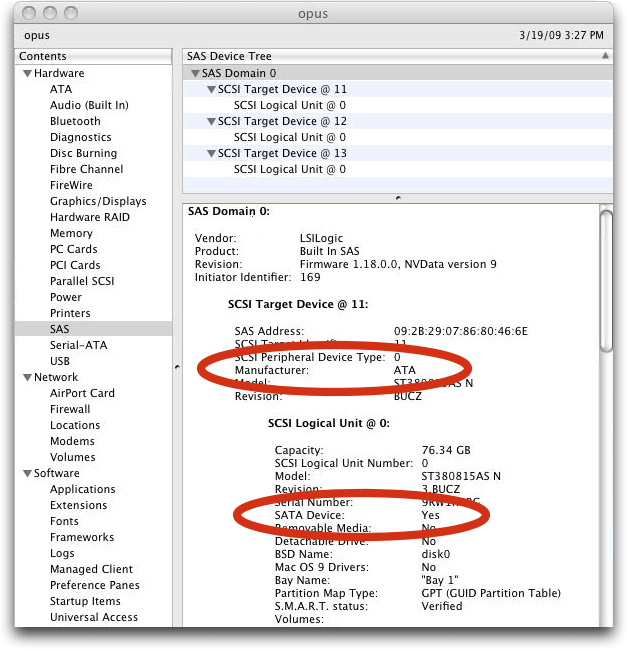
  First, I wasn't sure whether my Xserve had SATA drives, as I
  thought, because System Profiler on the Xserve shows nothing on the
  SATA bus, instead including all drives on the SAS bus. (SAS stands
  for Serial Attached SCSI, and is a high-performance data transfer
  technology that supports fast SCSI drives and is downward compatible
  with SATA drives.) After some discussion with knowledgeable folks on
  the MacEnterprise list and careful reading of the drive details in
  the SAS section of System Profiler, it became clear that both SAS
  and SATA drives are shown in the SAS section, with SATA drives
  having "ATA" as the Manufacturer, and showing "Yes" in the SATA
  Device line.

<http://www.tidbits.com/resources/2009-03/System-Profiler-SAS-report.png>

  Second, once I knew that I had SATA drives in my ADMs, I started
  investigating if there were any gotchas involved in replacing the
  drives. There turned out to be surprisingly little hard information
  about this, with some people having replaced an ADM's drive with no
  trouble and others experiencing performance or reliability issues. I
  did find a few discussions about how replacing drives isn't
  recommended, but giving no solid sources.

  Confused, I contacted Apple to discuss why ADMs are so expensive in
  comparison to bare drives, exactly what an ADM does, what Apple
  recommends users do with failing ADMs, and whether or not replacing
  a drive in one is a good idea. That conversation revealed a great
  deal of interesting information about the ADM and shed some light on
  what people with flaky ADM drives should do.


**Drive Selection** -- The most important fact to know about ADMs is
  that Apple doesn't use just any drives. We've all benefited from the
  amazingly low cost of storage. But whenever manufacturers compete on
  price, they cut corners every way they can to reduce costs. Although
  drive reliability is generally good, everyone who buys bare drives
  regularly has a drive vendor they refuse to patronize due to bad
  experiences in the past. (As is often the case, these people all
  hate different vendors, depending on which one was having a bad run
  at any given time.)

  Since the Xserve is designed to be in constant use - 24 hours a day,
  7 days a week, for years at a time - Apple doesn't use the least
  expensive drives available, since those drives are designed for more
  normal duty cycles in desktop computers - 8 to 10 hours per day,
  with variable use during that time. Instead, Apple works closely
  with drive manufacturers to select drives with more durable
  components, going so far as to pick specific head and media
  combinations. This is commonplace in the industry - other sources
  told me that drives sourced by manufacturers like Apple, Dell, and
  HP have generally better reliability than off-the-shelf retail
  drives.

  Apple calls these beefier models "server-class" drives; you may also
  see terms like "RAID edition" used to differentiate them from
  low-margin retail hard drives. Apple generally considers
  server-class drives to be high-end SATA drives, in comparison with
  "enterprise-class" drives, which are the highest performance drives
  (Fibre Channel and high-end SCSI in the recent past, now 15,000 RPM
  SAS) with the highest mean time between failure ratings.

  So the first reason not to slap an off-the-shelf SATA drive into an
  ADM is that the drive may simply not be able to handle the constant
  use.


**Custom Firmware** -- Another reason to avoid off-the-shelf SATA
  drives for ADMs in production servers is that Apple works closely
  with drive manufacturers to customize the firmware in drives
  destined for the Xserve. Details vary by drive, but the bulk of the
  firmware changes involve tuning the drive for performance and
  thermal behavior.

  According to Apple, most drive firmware is, not surprisingly, tuned
  for optimal performance with Windows, which reportedly reads and
  writes relatively small data blocks. In contrast, Mac OS X works
  with larger blocks. Tuning the firmware's caching algorithms to
  match with the size of Mac OS X's desired blocks can improve
  performance. This is a non-trivial task, since there are a number of
  different caches involved, between the drive and the operating
  system, and tuning them all for optimal performance is an art.

  The main other area where firmware tuning helps is with thermal
  behavior. Today's large drives use a technology called
  "perpendicular recording" and I was told that these drives go into a
  "read-after-write" mode at certain temperatures to ensure data
  reliability. Having to read every bit written reduces performance,
  so Apple tweaks the firmware of drives used in the Xserve's ADMs to
  reduce the likelihood that the drive will go into this mode. Apple
  can do this because the ranges of the Xserve's normal operating
  temperatures are known, whereas retail drives have to assume a
  worst-possible thermal environment. Thus, it's much more likely that
  an off-the-shelf drive will drop into read-after-write mode more
  quickly than a drive in an Xserve.

  Other industry sources confirmed that it's common for computer
  manufacturers to work with drive vendors to tune drive firmware for
  performance, but several went further, noting that computer
  manufacturers put drives under consideration through serious
  testing, which can reveal problems in how drive firmware handles
  error conditions. Some firmware changes are designed to reduce the
  likelihood of data corruption.

  It's difficult to learn much about hard drive firmware online, since
  drive manufacturers guard their firmware closely to reduce the
  likelihood that the firmware will be hacked. That can be
  counterproductive, since additional public scrutiny could reduce the
  likelihood of bugs like the one that generated the recent debacle
  surrounding Seagate drives. A firmware bug could cause a number of
  Seagate drive models to become inoperable after being powered off.
  If that wasn't bad enough, the fixed firmware reportedly caused
  additional problems for some of the affected drives.

<http://forums.seagate.com/stx/board/message?board.id=ata_drives&thread.id=9258>
<http://www.channelregister.co.uk/2009/01/21/seagate_firmware_fix_breaks_barracudas/>

  A final fact to realize about the custom firmware in ADM drives is
  that the Xserve's Server Monitor software is designed to monitor
  about a dozen variables reported by the drive's firmware and report
  pre-failure warnings if those variables stray outside acceptable
  limits. Using an unsupported drive may prevent Server Monitor from
  being able to report on the drive's health.


**Smart Carrier** -- Part of the explanation for why an ADM costs
  significantly more than a bare retail drive revolves around the ADM
  carrier itself. It's not just a physical sled, but also includes a
  controller board, temperature sensor, and a pair of LEDs that report
  on both drive activity and drive status. The ADM's temperature
  sensor integrates with the Xserve's cooling system to increase
  airflow to drives that are getting too hot.

  Apple also told me that the rubber grommets that hold the drive to
  the ADM carrier are chosen specifically to match each drive's
  vibrational characteristics. Different drives use different types of
  rubber in an attempt to reduce vibration as much as possible. I
  gather this is a bit more important with the 15,000 RPM SAS drives,
  given their very high rotational speed.


**Extensive Testing** -- Most electronics exhibit what's called a
  "bathtub curve" of failures. That means that the likelihood of
  failure is rather high early in the lifetime of a drive, then drops
  and levels out for its useful lifespan, and then rises back up as
  the hardware simply wears out. From a user perspective, you want to
  avoid drives that will die early on. (There's no way to avoid the
  eventual death of a drive, but given the speed with which data and
  disk capacity grows, the hope is you'll want to replace a drive with
  a larger one before it fails on its own out of old age.)

<http://en.wikipedia.org/wiki/Bathtub_curve>

  To reduce the likelihood of drive infant mortality and other
  early-life problems, Apple subjects every drive shipped in an Xserve
  or ADM to 48 to 60 hours of non-stop testing. That's usually enough
  to weed out drives that will fail immediately.

  Apple also rejects any drives that show _any_ hard or soft errors
  during the testing. Even though drives automatically map out such
  errors, statistically speaking, if a drive experiences any hard or
  soft errors during the initial burn-in testing, it's more likely to
  fail. One source told me that a number of the hardware RAID chipsets
  will refuse to work with drives whose firmware has mapped out bad
  blocks. He found that drives rejected by a RAID worked fine in a
  Drobo, which apparently is happy to accept a drive with mapped-out
  blocks.

  Obviously, this sort of testing benefits both customers, who are
  less likely to suffer drive failures, and Apple, in reducing
  warranty repairs, but there's no question that it has associated
  costs that Apple will pass on to the customer in the form of higher
  ADM prices.


**The Practical Upshot** -- After researching this topic, I'm
  convinced that although replacing a dead drive in an ADM is possible
  - Apple explicitly does not prevent it - it's not a good idea if the
  Xserve in question is a production server. If you do decide to go
  this route, I strongly recommend that you get a drive that's
  designed for RAID or server use. Also, note that Apple makes both
  SAS and SATA ADMs, and drives are not interchangeable between the
  two. So if you have a SAS ADM, you must put a SAS drive in it.

  As I thought about my initial reactions to my drive's flakiness, I
  realized that the problem is that Apple is essentially selling
  enterprise-level hardware to Mac users accustomed to mass-market
  products. I'm certainly familiar with running server software, but
  before the Xserve was released, I used standard Macs as servers -
  heck, for a long time, one of our servers was a Performa 6400.
  There's nothing wrong with repurposing a Mac designed for everyday
  use as a server, as long as you realize that it's not designed with
  server tasks in mind, and could suffer from performance or
  reliability problems when put into that role.

  In other words, the belief that replacing a drive in an ADM is a
  no-brainer is thinking like a Mac _user_, not like a _system
  administrator_ managing a production server. A sysadmin would prefer
  to avoid cheap hardware that's likely to cause future problems in
  such a situation because it's a false economy. But since moving from
  a hand-me-down desktop Mac to an Xserve is an easy jump to make,
  Apple has essentially attracted a class of customers who don't yet
  think like sysadmins when it comes to production servers. And since
  Apple's focus is so strongly on the consumer market, the company
  doesn't make a significant effort to educate Xserve customers about
  what they're getting into.

  (There is one instance where bare drives are required for ADMs:
  Apple's now-discontinued Xserve RAID. It takes older ATA-based ADMs,
  which aren't readily available new, forcing those who own Xserve
  RAIDs to replace bare drives with whatever they can find to maintain
  RAID integrity in the face of failed drives. This is non-trivial,
  since all the RAID drives must be the same size, but the investment
  in an Xserve RAID is high enough that owners are justifiably going
  to great lengths to keep them active.)

<http://support.apple.com/kb/HT1219>

  With that in mind, I went looking to see how much comparable drive
  modules for HP and Dell servers would cost. Ignoring the fact that
  it took ages to sort out what servers might be comparable to the
  Xserve, when I finally found rack-mounted servers with hot-swappable
  drive modules, the prices from HP and Dell turned out to be even
  higher than Apple's. Admittedly, Apple offers only four options - 80
  GB and 1 TB SATA ADMs for $200 and $450, and 73 GB and 300 GB SAS
  ADMs for $300 and $650 - whereas HP and Dell offer a full range of
  sizes and won't even go as low as 80 GB for SATA drives. But HP's
  and Dell's prices are either comparable (for the 73 GB SAS drive) or
  $200 to $250 higher (for the 1 TB SATA and 300 GB SAS drives).

  To sum up, there are multiple good reasons why ADMs cost more than
  bare retail drives of the same size, it's possible but not
  recommended to replace the drive in one, and Apple is in no way
  charging an unusual premium for ADMs.


TidBITS Watchlist: Notable Software Updates for 30-Mar-09
---------------------------------------------------------
  by Doug McLean <[email protected]>
  article link: <http://db.tidbits.com/article/10161>

  Firefox 3.0.8 from Mozilla is a security and stability update to the
  popular Web browser that addresses two critical vulnerabilities. Two
  security researchers, working independently, discovered ways to
  exploit crashes stemming from XLS stylesheets and XUL tree elements
  to run arbitrary code on a victim's computer. The update addresses
  both of these issues, and fixes a handful of minor bugs as well.
  (Free update, 17.2 MB)

<http://www.mozilla.com/en-US/firefox/personal.html>
<http://www.mozilla.org/security/known-vulnerabilities/firefox30.html#firefox3.0.8>

  iLife Support 9.0.2 from Apple provides unspecified bug fixes for
  iLife '09, iWork '09, and Aperture. At the same time, the company
  updated many of the iLife applications, available as separate
  downloads and described with the same lack of useful detail: iWeb
  Update 3.0.1, iPhoto Update 8.0.2, and iMovie Update 8.0.1. Lastly,
  the oddly numbered iWork '09 Update 1 version 9.0.1 is also
  recommended for iWork '09 users. The iLife Support update requires
  that you restart your Mac. (Free updates, various sizes)

<http://support.apple.com/downloads/iLife_Support_9_0_2>
<http://support.apple.com/downloads/iWeb_3_0_1>
<http://support.apple.com/downloads/iPhoto_8_0_2_Update>
<http://support.apple.com/downloads/iMovie_8_0_1>
<http://support.apple.com/downloads/iWork_09_9_0_1>

  MacBook Pro Graphics Firmware Update 1.0 from Apple addresses the
  appearance of vertical lines and distortions in the display of some
  17-inch MacBook Pros produced in early 2009. More information
  regarding the update, including installation steps, can be found on
  Apple's Web site. The update is available via Software Update or
  from the Apple Support Downloads page. (Free update, 770 KB)

<http://support.apple.com/downloads/MacBook_Pro_Graphics_Firmware_Update_1_0>
<http://support.apple.com/kb/HT3498>

  Sandvox 1.6 from Karelia Software is a significant update to the
  template-based Web site creation tool. The update adds a plug-in
  discovery feature that enables users to view a list of third party
  plug-ins from within Sandvox. Other changes include the capability
  to customize the site's window title and meta description for each
  page individually, and added support for blog commenting systems
  such as Disqus, IntenseDebate and JS-Kit. ($57 Regular/$97 Pro, free
  update, 26.3 MB)

<http://www.karelia.com/sandvox/>

  TextExpander 2.6 from SmileOnMyMac updates the typing shortcut
  utility with new expansion options. Abbreviations can now be set to
  expand when preceded by any character including letters, numbers,
  and common punctuation (in previous versions, abbreviations could
  only expand when preceded by a space). Also added is the capability
  to specify the Clipboard-restore-delay and the words-per-minute rate
  that are used to calculate how much time is saved by using
  TextExpander. ($29.95 new, free update, 3.6 MB)

<http://www.smileonmymac.com/TextExpander/>

  Carbon Copy Cloner 3.2 from Bombich Software updates the
  long-standing backup and disk cloning utility with a variety of
  performance improvements. Absent since version 3.0, the capability
  to delete items at the root level of a target volume, even when
  those items were not present on the source volume, has been
  restored. Other changes include added filter support for remote
  source volumes, support for non-HFS formatted volumes in the source
  and target lists, updated documentation, and a slew of minor bug
  fixes. A full list of changes is available via Bombich Software's
  Web site. (Free, 2.8 MB)

<http://www.bombich.com/software/ccc.html>
<http://bombich.com/software/docs/CCCHelp/CCCHelp.html?page=history>


ExtraBITS for 30-Mar-09
-----------------------
  by TidBITS Staff <[email protected]>
  article link: <http://db.tidbits.com/article/10174>

**John Gruber Tells It Like It Is: Obsession Times Voice** -- "If you
  build it, they will come." You can't intentionally compose a hit
  song, build the next Google, or even make the next top blog. But you
  can communicate about your passions and your obsessions, and if you
  do it consistently and compellingly, it could become your living.
  That's the secret to Internet publishing, and it has worked for us
  with TidBITS and Take Control. (Posted 2009-03-27)

<http://daringfireball.net/2009/03/obsession_times_voice>


**Apple Announces WWDC 2009 Dates** -- Apple has announced that the
  annual Worldwide Developers Conference (WWDC) will be held 08-Jun-09
  through 12-Jun-09 in San Francisco. It's certain that developers
  will be treated to details of Snow Leopard and the iPhone 3.0
  software; the question is if Apple will use WWDC to launch one or
  both, as many anticipate. (Posted 2009-03-26)

<http://developer.apple.com/wwdc/>


**Adam Discusses iPhone 3.0 Software on MacNotables** -- Adam returns
  to the MacNotables podcast to discuss the recently announced iPhone
  3.0 software and how it plays into Apple's goal of having apps sold
  through the App Store be the golden handcuffs that ensure iPhone
  user loyalty. (Posted 2009-03-26)

<http://www.macnotables.com/wordpress/macnotables-908-adam-engst-on-how-iphone-30-advances-the-platform-his-new-production-enhancements/>


**iTunes Genius Sidebar Now Recommends Video** -- Ars Technica is
  reporting that Apple has flipped the switch on the Genius sidebar
  for videos, activating the feature after an almost two-week delay,
  but without requiring that users download a new version of iTunes.
  The feature had been cited in Apple's release notes for iTunes 8.1
  and on their iTunes Web pages, but didn't appear at release. The
  Genius sidebar will now recommend videos to buy from the iTunes
  Store based on anonymous user information that's uploaded to Apple
  and compared to the purchases of other iTunes customers. Like the
  Genius sidebar for music, this feature can be toggled on or off.
  (Posted 2009-03-25)

<http://arstechnica.com/apple/news/2009/03/apple-flips-the-switch-on-genius-sidebar-for-moviestv.ars>


**17-inch iMac Available for Schools** -- To remain competitive in the
  financially strapped education market, Apple is keeping an old iMac
  available for schools. Apple's March 2009 eNews for Education
  newsletter states, "The white 17-inch iMac continues to be offered
  starting at $899." That model fell out of the mainstream iMac line
  in 2007. This is not the first time Apple has offered systems only
  to schools; the eMac was originally produced for the education
  market, and was made more generally available only later. (Posted
  2009-03-24)

<http://www.apple.com/education/enews/0309/>


Hot Topics in TidBITS Talk for 30-Mar-09
----------------------------------------
  by Jeff Carlson <[email protected]>
  article link: <http://db.tidbits.com/article/10177>

**iPod iPhoto syncing through iTunes fails with error -50** -- Adam
  suggests a solution to fix photo syncing, but it's risky. (5
  messages)

<http://emperor.tidbits.com/TidBITS/Talk/2547>


**Memory stick drivers for Mac G5** -- Reformatting a USB memory drive
  could be the solution to an odd problem. (7 messages)

<http://emperor.tidbits.com/TidBITS/Talk/2548>


**What I Learned from Having My Laptop Stolen** -- Readers share
  solutions for protecting the data on laptops. (11 messages)

<http://emperor.tidbits.com/TidBITS/Talk/2550>


**Latest version of Java** -- Here's how to determine which version of
  Java is installed. (8 messages)

<http://emperor.tidbits.com/TidBITS/Talk/2553>


**"Extend" vs "Join" network** -- A reader explains the difference
  between extending and joining AirPort networks. (2 messages)

<http://emperor.tidbits.com/TidBITS/Talk/2554>


**Going Deep Inside Xserve Apple Drive Modules** -- Does the Time
  Capsule use the same type of server-grade hard drive as the Xserve?
  (2 messages)

<http://emperor.tidbits.com/TidBITS/Talk/2556>


**iMovie (iLife) Updates** -- Apple's terseness about release notes
  extends to developer documentation, too. (4 messages)

<http://emperor.tidbits.com/TidBITS/Talk/2557>


$$

This is TidBITS, a free weekly technology newsletter providing timely
news, insightful analysis, and in-depth reviews to the Macintosh and
Internet communities. Feel free to forward to friends; better still,
please ask them to subscribe!

Non-profit, non-commercial publications and Web sites may reprint or
link to articles if full credit is given. Others please contact us. We
do not guarantee accuracy of articles. Caveat lector. Publication,
product, and company names may be registered trademarks of their
companies. TidBITS ISSN 1090-7017.

Copyright 2009 TidBITS: Reuse governed by Creative Commons license.

Contact us at:    <[email protected]>
TidBITS Web site: <http://www.tidbits.com/>
License terms:    <http://www.tidbits.com/terms/>
Full text search: <http://www.tidbits.com/search/>
Subscriptions:    <http://www.tidbits.com/about/list.html>
Account help:     <http://www.tidbits.com/about/account-help.html>


--
If you want to unsubscribe or change your address, use this link
http://emperor.tidbits.com/webx?unsub@@.3c557dc4!u=306a67f9