TidBITS#972/01-Apr-09
=====================
  Issue link: <http://db.tidbits.com/issue/972>
  Apple just doesn't stop. Hot on the heels of last week's iLife and
  iWork updates, the company released General Support Update 2009-001.
  The company has also launched SecurityCare, a new service-based
  program that guarantees subscribers a worry-free computing
  experience. Plus, speculation abounds about a possible meeting
  between Steve Jobs and ex-Microsoft executive Charles Simonyi. In
  the iPhone world, it appears that Apple has started purging poorly
  performing apps from the App Store, though we're sure that the new
  Invisibility, which alerts you to the presence of unwanted people,
  will make the cut. In other news, Glenn Fleishman reports on the end
  of 802.11b, Adam looks at the announcement of a "green" printer from
  Epson and finds some potential privacy concerns within iPhoto '09,
  and Jeff Carlson reports on the separate ventures of the
  now-estranged SmileOnMyMac founders. We also note the release of
  OmniWeb 5.9.2.

Articles
    Apple Releases General Support Update 2009-001
    OmniWeb 5.9.2 Adds Gopher Support
    Space Meeting between Steve Jobs and Charles Simonyi?
    Underperforming Apps to be Purged From App Store
    Wi-Fi 802.11b Standard Expires
    Epson's "Green" Printer Debuts for Earth Day
    Invisibility App for iPhone Helps You Avoid Undesirables
    iPhoto's Faces and Places Designed to Track Terrorists?
    Apple Launches SecurityCare
    FrownOnMyMac Fills New Mac Niches


------------ This issue of TidBITS sponsored in part by: --------------

* READERS LIKE YOU! Support TidBITS with a contribution today!
  <http://www.tidbits.com/about/support/contributors.html>
  Special thanks this week to Steve Meyer, David Teplow,
  Bruce Stephenson, and Joel Ness for their generous support!

* Fetch Softworks: Fetch 5.3 makes FTP and SFTP easy!
  Upload, download, mirror, and manage your Web site. Dozens of
  new features to make file transfers easier and more reliable.
  Get your free trial version at <http://fetchsoftworks.com/>!

* WebCrossing Neighbors Creates Private Social Networks
  Create a complete social network with your company or group's
  own look. Scalable, extensible and extremely customizable.
  Take a guided tour today <http://www.webcrossing.com/tour>

* Bare Bones Software's BBEdit 9.1 -- A burly upgrade introducing new
  capabilities like Projects, non-modal Find and Multi-File Search,
  editing in browsers, text completion, Scratchpad, new Ruby module,
  better JavaScript, ObjC, Obj-C++, YAML <http://barebones.com/>

* MARK/SPACE, INC: If you have a smartphone, we can sync it!
  Sync your address book, calendar, notes, music, pictures, and
  more from your BlackBerry, Windows Mobile or Palm OS mobile
  phone to your Mac. <http://www.markspace.com/bits>

* 25% off VMware Fusion 2, the preferred way to run Windows on
  your Mac. Now only $59.99 when you enter "FusionSpring09"
  at checkout. Offer valid through 11:59PM PT on March 31, 2009.
  Visit: <http://www.tidbits.com/about/support/vmware-fusion.html>

* Microsoft's MacBU: Supporting Mac users with Office 2008.
  Straighten up your Office with the latest updates to Word,
  Excel, PowerPoint, and Entourage. Update today at Mactopia!
  <http://www.microsoft.com/mac/downloads.mspx>

* ConceptDraw Office adds real business power to Microsoft Office
  and Apple's iWork. Whether you need project management, business
  graphics, or mind mapping, it's all easily created on your Mac!
  Buy today for only $499! <http://www.conceptdraw.com/tb>

* It's time to speak up with MacSpeech Dictate! Get the all-new
  MacSpeech Dictate with spelling and phrase training. Speech
  Recognition so good, the only thing it can't do is speak for you.
  Learn more at <http://tidbits.com/about/support/macspeech.html>

---------- Help support TidBITS by supporting our sponsors ------------


Apple Releases General Support Update 2009-001
----------------------------------------------
  by Matt Neuburg <[email protected]>
  article link: <http://db.tidbits.com/article/10182>

  Apple today released General Support Update 2009-001. According to
  the predictably terse release notes, the 401.9 MB download "provides
  various usability and compatibility improvements and fixes several
  minor issues." This is the only information we have at this time as
  to what this update may do; there is no word on whether it affects
  certain aspects of the system, the system as a whole, or particular
  Apple-installed applications. Nor are we told what improvements it
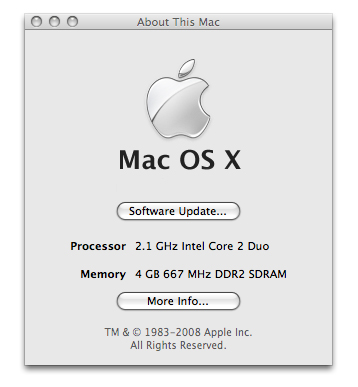
  includes or what issues it fixes. Some have speculated that it could
  in fact be a new version of Mac OS X, but we're not sure, since the
  About This Mac window no longer shows version information after you
  apply the update.

<http://www.tidbits.com/resources/2009-04/About-This-Mac.jpg>

  Apple describes the update as "Recommended for all users," so we
  suggest that everyone obediently download and install it like good
  little boys and girls, and leave the thinking to the higher life
  forms at Apple. The update is available via Software Update and
  should be on the Apple Support Downloads page later today.

<http://support.apple.com/downloads/>


OmniWeb 5.9.2 Adds Gopher Support
---------------------------------
  by Adam C. Engst <[email protected]>
  article link: <http://db.tidbits.com/article/10188>

  The Omni Group announced today that OmniWeb 5.9.2 adds support for a
  revolutionary Internet protocol called Gopher. Developed at the
  University of Minnesota, Gopher eschews the free-form nature of the
  Web in favor of a strongly hierarchical organization, simplifying
  browsing of categorized information. For a list of Gopher servers,
  see the Floodgap list.

<http://www.omnigroup.com/applications/omniweb/>
<http://en.wikipedia.org/wiki/Gopher_(protocol)>
<gopher://gopher.floodgap.com/1/new>

  Although Mozilla browsers like Firefox and Camino also offer Gopher
  support, OmniWeb is the first WebKit-based browser to support the
  Gopher protocol.

  OmniWeb 5.9.2 is available now and is a free download with no
  licensing restrictions (see "OmniWeb and OmniSiblings Run Free,"
  2009-02-25).

<http://db.tidbits.com/article/10094>


Space Meeting between Steve Jobs and Charles Simonyi?
-----------------------------------------------------
  by Matt Neuburg <[email protected]>
  article link: <http://db.tidbits.com/article/10185>

  In a surprise announcement that caught reporters completely
  off-guard, NASA and Apple have issued a curt joint announcement
  revealing that a bat clinging to the hull was not the only stowaway
  on board the STS-119 Discovery space shuttle mission, which
  successfully returned to Earth on 28-Mar-09. With the mission
  complete, it has been revealed that Apple CEO Steve Jobs was
  secretly a passenger on board. The news is particularly surprising
  in light of the fact that Jobs is completely absent from crew
  photographs, including the video conference with President Obama.

<http://www.nasa.gov/mission_pages/shuttle/shuttlemissions/sts119/launchbat.html>
<http://anon.nasa-global.edgesuite.net/anon.nasa-global/ccvideos/pres_conference_main.asx>

  Wealthy celebrities traveling to space is nothing new, but the
  reason for the secrecy of Jobs's presence on this space flight, and
  his purpose for partaking of it during a time when he is supposedly
  recovering from health problems, remain mysteries. Perhaps he just
  wanted the thrill of being in space, for which, it should be added,
  he can well afford to pay.

  However, it has also been noted that Charles Simonyi, former
  Microsoft Application Software Group head, was a passenger on the
  Soyuz TMA-14 Expedition 19, which lifted off 26-Mar-09 and is
  scheduled to stay until 07-Apr-09 at the International Space
  Station. Since the STS-119 was visiting the International Space
  Station to deliver improved solar arrays, this means that Jobs and
  Simonyi could have held a secret meeting... in space. Speculation is
  rife! Might this indicate a pending Microsoft-Apple detente? Even
  more alarming, might this be part of an elaborate hush-hush plan for
  Simonyi to take over at Apple should Jobs step down? Speculation
  remains just that, however, since all parties involved have declined
  to comment further.

<http://www.charlesinspace.com/index.cfm?fuseaction=blog.welcome>


Underperforming Apps to be Purged From App Store
------------------------------------------------
  by Doug McLean <[email protected]>
  article link: <http://db.tidbits.com/article/10181>

  Customers and developers alike often complain of the overly
  sprawling collection of apps in the iPhone App Store. With countless
  applications, many of which offer the same basic features, it's
  becoming increasingly difficult for truly useful and original apps
  to stand out, and for customers to purchase them. Apple, in step
  with a handful of previous App Store policy revisions (see "App
  Store Reviews Now Distinguish Versions," 2009-03-12), has decided to
  do a bit of spring cleaning - implementing a new app purging policy.

<http://db.tidbits.com/article/10135>

  Effective 01-Apr-09, Apple is selectively removing from the App
  Store apps that fail to meet a new set of criteria for active
  in-store status. While an Apple spokesperson said the company would
  not be making the specifics of its criteria public, he did note it
  would be generally taking into account an app's number of downloads,
  customer ratings, and whether Apple feels the app "contributes to or
  detracts from the App Store's overall mission."

  We also expect that the company may limit the number of similar
  products in a category. While this might reduce the app count from
  its current 25,000 to as few as 2,500, the long-tail applications
  represent less than .01 percent of all App Store downloads.

  Some developers are concerned that their apps could be unexpectedly
  removed by this murky set of criteria. Fraser Speirs, author of the
  Flickr viewing and uploading app Darkslide, is currently waiting for
  a title to be approved. "I submitted an app four months ago," he
  said. "I'm afraid it will finally be approved and then yanked on the
  same day." After some prodding, Speirs revealed the app to be
  FartLighter, which combines two of the App Store's most popular
  utilities into one.

<http://connectedflow.com/darkslide/>

  However, many developers are happy to see Apple taking steps to
  improve the app store experience. Craig Hockenberry of Iconfactory,
  makers of Twitterrific and Frenzic apps, said, "I know none of my
  apps will be affected, so I think it's a wise and overdue move on
  Apple's part. It's time we give these underachievers the boot."

<http://iconfactory.com/software/twitterrific/>
<http://frenzic.com/>

  Overall, we're pleased to see Apple continuing to enhance the App
  Store environment, and feel confident the company will make sound
  decisions regarding the deservedness of aspiring apps.


Wi-Fi 802.11b Standard Expires
------------------------------
  by Glenn Fleishman <[email protected]>
  article link: <http://db.tidbits.com/article/10158>

  As everyone knows, all technology industry standards come with a
  built-in expiration date, a kind of "terminator gene" intended to
  prevent protocols from functioning indefinitely. Such old
  technologies can, if allowed to continue, result in security
  breaches and prevent the sale of improved hardware and software. The
  final day of operation for IEEE 802.11b, the earliest flavor of the
  trade group certified Wi-Fi standard, was 31-Mar-09.

<http://en.wikipedia.org/wiki/Terminator_seeds>

  You might think you can work around this problem by setting your
  device's clock to a date preceding the protocol expiration, but this
  usually won't do the trick. Many hardware devices contain a simple
  clock that does rough tracking to ensure that the expiration
  mechanism isn't bypassed.

  If you own a pre-2003 Macintosh, you might have woken up this
  morning and found that you couldn't connect to the network. If
  you're running Mac OS X 10.4 Tiger or 10.5 Leopard, you should see a
  dialog explaining that your AirPort Card will no longer work, and
  advising a trip to the Apple Store. A $99 AirPort Express can be
  used to connect a Mac to an 802.11g or a newer network via its
  built-in Ethernet port.

<http://www.tidbits.com/resources/2009-04/airport_80211b_expired.png>

  The AirPort Extreme, starting in 2003, contains 802.11g technology,
  which isn't slated to expired until midnight on 31-Mar-11.

  While disabling hardware just because a certain date has passed
  might seem harsh, if you read the fine print of the license
  agreement on the box, you'll see that you agreed to this policy when
  you purchased the equipment.


Epson's "Green" Printer Debuts for Earth Day
--------------------------------------------
  by Adam C. Engst <[email protected]>
  article link: <http://db.tidbits.com/article/10183>

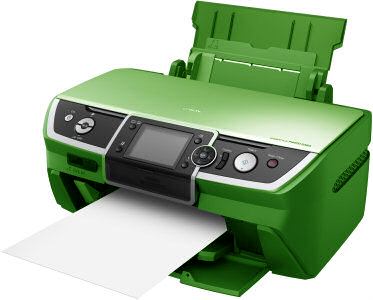
  Just in time for Earth Day on 22-Apr-09, Epson today announced a new
  "green" printer that's cleverly decked out in a green casing: the
  GR-401. The monochrome laser printer (black-and-white, not
  green-and-white, thankfully!) is designed to meet the needs of homes
  and small offices while reducing its environmental footprint in
  numerous ways. It's Energy Star-certified for the lowest power use
  in its class, and features a sleep mode that draws less than 0.5
  watts of power while idle. The printer also employs a kind of
  regenerative braking - it recaptures some energy from the rollers'
  inertia after power is used to initiate the gripping and feeding
  process. You can also attach an optional crank to spin up its
  internal motor, and reduce power further.

<http://www.tidbits.com/resources/2009-04/greenprinter.jpg>

  The printer also includes built-in Wi-Fi, so it can support multiple
  computers, thus eliminating the need for each computer to have its
  own printer, and it uses toner cartridges that were explicitly
  designed to be refilled up to 10 times. It can also print in duplex,
  using both sides of the paper automatically to reduce unnecessary
  paper use. The printer driver also automatically switches fonts to
  their Ecofont equivalent, reducing toner use by as much as 20
  percent per character.

<http://www.ecofont.eu/ecofont_en.html>

  Most important, though, is Epson's innovative recycle mode that
  reuses both toner and paper. Epson spokesman Isaac "Prince" Daley
  told us in a briefing that Epson's research showed that nearly 80
  percent of all printouts are recycled within 7 days of being
  printed. In response, Epson has developed a technology that strips
  the printer's specially formulated toner particles from previously
  printed pages, leaving the paper clean and ready to be printed on
  again. All you do is stack previously printed pages in a top-mounted
  sheet feeder, and set whether the printer should print with virgin
  paper and toner or use recycled paper and toner, if available.
  Epson's Daley said that although the recycled printouts are pretty
  good, they're not quite as crisp as those using new paper and toner,
  hence the user option to switch.

  Cool as it is, the recycling process isn't perfect. Paper that has
  been written on can't be put back through the printer, since pen ink
  and pencil graphite could contaminate the recycled toner. The
  printer automatically detects foreign substances and discards
  suspect toner and pages into a hopper. (A warning light lets you
  know the hopper is full.) And although small bends or crimps from
  paperclips aren't problematic, paper that has been too crumpled
  could cause jams in the printer's sheet feeder. Lastly,
  reformulating the recycled toner particles so they can be re-fused
  onto paper requires some energy, though Epson is justifiably proud
  of the fact that no additional chemicals are involved in the
  process, only water. Unfortunately, you can't use tap water, due to
  unpredictable mineral concentrations.

  Epson estimates that toner and paper usage will be reduced by 50 to
  75 percent, since the only losses to the system are from pages that
  are either sent out or treated in such a way that they can't be fed
  through the printer again. Unsurprisingly, this reduction in
  consumables means that the "razor blade" business model used for so
  long by printer manufacturers won't work, so the printer is priced
  at $3,999. Epson will sell the special mineral-free water, produced
  using a patented thermal vaporization system, for $19.99 per liter
  bottle, enough for 200 pages. Toner refills will cost $39.99 for
  enough toner to print 3,000 pages, and replacement toner cartridges
  (pre-filled with toner) will cost $299. Both bottles and toner
  cartridges can be returned to Epson for recycling.

  Although the GR-401 is the first printer to use Epson's new
  recycling technology, the company has high hopes for it and is
  looking at introducing a large-scale variant that could be used to
  print and recycle newsprint, which could be a boon to the ailing
  newspaper industry, beset as it is by spiraling print costs.


Invisibility App for iPhone Helps You Avoid Undesirables
--------------------------------------------------------
  by Glenn Fleishman <[email protected]>
  article link: <http://db.tidbits.com/article/10167>

  We all have people we want to avoid. Sometimes for a few minutes or
  hours ("Damn, the boss is coming, and I'm not done with the
  report!") and sometimes for the rest of your life ("Not that psycho
  ex-boyfriend - please don't let him see me!"). Invisibility for the
  iPhone aims to solve that problem with, you guessed it, technology!

<http://itunes.apple.com/WebObjects/MZStore.woa/wa/viewAlbum?id=163960464&s=143441>

  The name is related to the Invisible option added to iChat in
  Leopard, where you can see buddies but they can't see you.
  Invisibility's developers typically write network-intrusion
  software, and have released this product separately under the
  company name Invisible Inc.

  The Invisibility app relies on the information that iPhones and
  other devices emit whether they're idle or in use, coupled with the
  enormous amount of personal data that we all spew into the Internet
  via social networking services. It can't actually make you
  invisible, of course, but it can help you avoid uncomfortable
  situations by alerting you to the presence of unwanted people.

  The app costs $79, which is extremely high for an iPhone app, but
  through 01-Apr-10, purchases of Invisibility include a lifetime
  subscription to the required Invisibility service, which is slated
  to cost $24.99 per year.

  Invisibility works by creating a profile of each person you want to
  avoid, using a variety of inputs. You can give the program access to
  email that's received on your iPhone, and it can scan for inbound
  messages. Using IP lookups and likely travel time estimates, the
  software tries to determine where that person was when he sent the
  email and where he is now, relative to your current location. The
  tracking screen uses Google Maps to show you the current location
  (if known) of anyone you've profiled, along with a circle of
  probability and a timestamp. This is useful when you're taking a
  stroll and want to make sure the coast is clear.

<http://www.tidbits.com/resources/2009-04/invisibility_tracking.jpg>

  Invisibility can also use Bluetooth and Wi-Fi signals to identify
  someone's cell phone within a range of 30 to 100 feet. To do this,
  you put the app into a sniffing mode, in which it grabs MAC
  addresses and other wireless identifiers out of the air when you're
  near the person in question. If Invisibility "hears" those
  identifiers in the future, it uses that information along with other
  data to trigger a proximity alarm. These alarms can be customized
  for each person, so, for instance, you might want to be alerted via
  email and a loud warning sound when your ex-spouse appears anywhere
  in your neighborhood, whereas your boss moving within 100 feet of
  you might necessitate only a discreet vibration.

  The program can also tap into Facebook messages, Flickr geotagging
  information, Skyhook Wireless location updates, Twitter, Dopplr
  travel logging, Blogger posts, and all kinds of other public and
  private (once you've connected it to your accounts) social media and
  buddy services. By adding someone's Flickr account to their profile,
  for instance, Invisibility can use RSS to determine when a new photo
  is added, then extract the geotag information to see where that
  person was when the photo was taken, and calculate a possible
  current location for them. Since Invisibility reports your own
  location back to the company's servers as well, it can use that for
  highly accurate location reporting for anyone who's trying to avoid
  you.

  While Invisibility is impressive, Invisible Inc. isn't promising
  100-percent success. However, since the system works largely by
  correlating vast quantities of data, the developers promise that it
  will improve in the future, as a surveying mechanism built into the
  app will enable users to report on failures. And, of course, the
  more people who use Invisibility, the more accurate it becomes, if
  only among Invisibility users.

  The company calls this _asocial networking_, something the founders
  believe is a growing trend as people tire of being expected to be in
  a state of constant availability to an increasingly wide range of
  friends and acquaintances. Eventually, Invisible Inc. hopes to tie
  Invisibility into a new system with the working title of
  "Effacebook."


iPhoto's Faces and Places Designed to Track Terrorists?
-------------------------------------------------------
  by Adam C. Engst <[email protected]>
  article link: <http://db.tidbits.com/article/10184>

  At Macworld Expo in January, Apple made much of the two big new
  features in iPhoto '09, Faces and Places. Faces is face detection
  and recognition technology, and Places both reads GPS information
  stored with photos and enables you to add it yourself. Currently,
  Faces is the more successful of the two, since although it's
  relatively easy to add geotags to photos in iPhoto, most photos
  won't be geotagged until GPS chips are commonplace in cameras.

  However, a programmer friend spelunking through the text strings
  stored in the iPhoto application binary made a rather unsettling
  discovery. There's an IP address deep in the bowels of iPhoto that
  points at a machine within a range of IP addresses controlled by the
  U.S. Department of Homeland Security. Users running Little Snitch
  haven't reported any unexpected traffic leaving iPhoto for the
  destination address, so whatever it is, it's not currently active.

<http://www.obdev.at/products/littlesnitch/>

  Needless to say, Apple had no comment on the discovery. If forced to
  speculate, therefore, all I can think of is that there is some code
  in iPhoto with the capability of phoning home to the DHS. It
  wouldn't make sense to transfer entire photos most of the time,
  since massive data transfers would be obvious. But, if there were
  some way to transfer just the facial recognition data at a trickle
  rate, the DHS could compile it all and cross-reference it against
  facial characteristics of known terrorists. That may not be all that
  helpful on its own, but what if the facial recognition data was
  accompanied by geotags and date stamp information? If the DHS - or
  another government agency - could pinpoint when and where known
  terrorists were, even in the past, that could prove a huge aid in
  preventing further acts of terrorism and bringing them to justice.

  The problem, of course, is that were such a feature to exist within
  iPhoto, it would be a massive privacy breach on an unparalleled
  scale. I can't see Apple, of all companies, going along with this
  sort of thing. However, over the past few years the U.S. government
  has been single-minded in its quest to capture terrorists, and I
  wouldn't be at all surprised if there was some super secret way the
  government could compel a private company to act in a way that
  protected the interests of national security. Of course, this isn't
  out of line with some previous secret government programs, such as
  all color laser printers putting a nearly invisible pattern of
  yellow dots on every page that includes the printer model and serial
  number, along with a date stamp.

<http://w2.eff.org/Privacy/printers/docucolor/>

  Our request for information from the Department of Homeland Security
  was turned down, not surprisingly, although the spokesman did say
  that all projects begun under the previous administration were
  "under review." This is certainly one I'd like to see go under the
  axe, for if the DHS relies on iPhoto for its reconnaissance, it's
  anyone's guess who will end up under the magnifying glass, given
  pictures like this one.

<http://www.tidbits.com/resources/2009-04/iPhoto-unknown-face.jpg>


Apple Launches SecurityCare
---------------------------
  by Rich Mogull <[email protected]>
  article link: <http://db.tidbits.com/article/10186>

  Recently, Apple has come under criticism for its handling of a
  series of security issues. Apple is also known for maintaining a
  stoic silence in the face of public outcry, then releasing a new
  product or update to wipe away the world's concerns. So we shouldn't
  be surprised to see Apple announce a major new security initiative:
  Apple SecurityCare.

  Similar to AppleCare, SecurityCare is an add-on service available
  with the purchase of any new Mac, AirPort Extreme, AirPort Express,
  or Time Capsule. All new Macs and AirPort base stations come with 90
  days of free coverage, with 3 years of extended protection
  available. As with AppleCare, prices vary based on the particular
  Mac. While tiered pricing makes perfect sense for AppleCare, it's
  hard to see the same correlation justified for security issues, and
  we suspect the move is to maintain consistency in the product lines.

  Although not yet available for the iPhone or iPod touch, Apple
  stated that SecurityCare will be available with the iPhone/iPod
  touch 3.0 release later this year. Normal iPods won't be covered,
  since there is essentially no security risk for them. For Macs,
  SecurityCare is available only for those running Mac OS X 10.5
  Leopard or later.

  Apple describes SecurityCare as a "premier security service,
  offering unparalleled, personalized security support." Breaking out
  of the traditional paradigm of subscription-based security products
  such as antivirus software, SecurityCare is instead a full service
  offering that doesn't require additional software. Covered devices
  will be securely configured by a SecurityCare specialist to minimize
  the risk of a successful attack.

  This includes proper user account and firewall configuration,
  software updates, setting up secure sharing and wireless, and
  locking down other system settings. It also includes proper
  configuration of Time Machine backups, assuming the customer has (or
  purchases) a Time Capsule or external hard drive. MobileMe
  subscribers gain additional support, including spam filtering,
  email-based antivirus filtering (on the MobileMe servers), and Back
  to my Mac configuration support. Apple also states that the
  SecurityCare specialist activates certain parts of Leopard's
  Parental Controls and Apple Remote Desktop to increase security and
  support remote security management. After the initial configuration,
  Apple will remotely monitor these systems for any signs of security
  lapses.

  An Apple spokesperson stated, "With SecurityCare we are changing how
  people think of security. Rather than relying on limited software,
  Apple SecurityCare provides ongoing, proactive support that takes
  security concerns out of the hands of Apple customers. Users
  shouldn't have to become technical security experts, and Apple now
  provides customers with a worry-free computing experience." Apple
  guarantees an immediate response if any security problems are
  detected, and complete remediation. "Our SecurityCare Specialists
  won't rest until your Apple product is completely restored and safe
  to use by the entire family."

  As part of the announcement, Apple also revealed that it is
  dramatically expanding its security team to more proactively manage
  potential security issues, saying, "Apple's new Security Response
  Center redefines the industry standard for managing product
  security. Our team not only responds to security issues, but works
  proactively to prevent them from occurring in the first place."

  Although Apple is sparse on details about what exactly SecurityCare
  entails, information is slowly leaking from some pre-release
  SecurityCare testers. "I thought I might have accidentally
  downloaded a Trojan Horse program," said one tester, who asked to
  remain anonymous, "so I posted a question in an online forum. Within
  minutes this shiny silver sports car pulled into my driveway, and
  two guys wearing jeans, black turtlenecks, and ski masks walked
  right into my house, pulled my mouse out of my hand, and fixed
  everything. I couldn't believe how fast and efficient they were!"

  Another SecurityCare tester stated, "It was wild. I'd taken my Mac
  to the Apple Store to get a printing problem resolved, but they
  totally locked down my computer before I left, for free. Then, when
  I went to a local Starbucks and connected to the wireless network,
  an aluminum sports car pulled up, an antenna popped out of the roof,
  and next thing I know my wireless connection was locked down.
  Although I think they may have also deleted all my porn."

  Other testers report similar incidents... once they encounter a
  potentially risky security situation, a brushed aluminum sports car
  that many believe is a customized all-electric Tesla appears, and a
  pair of Apple security experts resolve the situation. Some people
  complained about the aggressive, yet efficient, nature of these
  encounters. "I know they're supposed to keep me secure, but did they
  really have to cut my Internet connection with wire clippers?" one
  source asked. Another tester explained, "There I was, just engaging
  in a little late night file sharing, when in the reflection of my
  new glossy-screen iMac I saw someone standing behind me. He said,
  'Sir, put the mouse down,' took over my computer, and now I can't
  get to BitTorrent anymore".

<http://www.teslamotors.com/>

  A source within Apple also revealed SecurityCare subscribers will
  soon be offered a Pro upgrade that will come with a personal
  bodyguard to protect you in line at Apple Stores during Apple
  product launches.

  [Editor's Note: In what we hope is unrelated news, security
  researchers Charlie Miller and Dino Dai Zovi have not been seen
  since shortly after the release of their new book, "The Mac Hackers
  Handbook," which includes a foreword by TidBITS Security Editor Rich
  Mogull. Mr. Mogull filed this article from an undisclosed location
  via carrier pigeon.]

<http://www.amazon.com/dp/0470395362/?tag=tidbitselectro00>


FrownOnMyMac Fills New Mac Niches
---------------------------------
  by Jeff Carlson <[email protected]>
  article link: <http://db.tidbits.com/article/10187>

  The smile at SmileOnMyMac isn't as broad as it used to be. Following
  a contentious disagreement between founders Philip Goward and Greg
  Scown (apparently over whether the sound made by TextExpander is a
  "bloop" or a "pop"), the pair have parted ways. Goward remains in
  charge of the SmileOnMyMac stable of utilities such as DiscLabel and
  TextExpander, while Scown is branching out with a new spinoff
  company named FrownOnMyMac.

<http://www.smileonmymac.com/>
<http://www.frownonmymac.com/>

  Scown's initial lineup of programs is based on early code for which
  he still owns the rights. "I wanted to hit the ground running with
  applications ready for sale right away," he said. The lineup
  includes the following applications, which are available
  immediately. Because of the age of the code, all three work under
  Mac OS 9, or in Mac OS X in the Classic environment (and thus aren't
  compatible with Mac OS X 10.5 Leopard).


**TextRedactor 1.2** -- Billed as "the perfect tool for any serious
  writer," TextRedactor encourages you to write the best prose you can
  manage. As writers we can attest that we often delete more words
  than we write during the revision process. TextRedactor takes that
  one step further, automatically deleting poorly written sentences
  once you've typed them. When you write a good sentence,
  TextRedactor's proprietary language algorithm identifies it and
  keeps it onscreen for three minutes, during which time pressing
  Command-Option-Ctrl-7-P-M prevents the sentence from being erased.
  (A LazyType option in the program's preferences can also
  automatically keep your fifth, tenth, or thirtieth try without
  invoking the algorithm.)

<http://www.frownonmymac.com/textredactor/>

  New in version 1.2 is the capability to specify fonts other than
  Helvetica, the option to play a sound ("Splonk," added to your Mac
  during installation) when the software does its redacting, and,
  anticipating popular request, a full-screen view for eliminating
  distractions. TextRedactor costs $41.09.


**FaxPen PRO 1.0.2** -- SmileOnMyMac's PDFpen utility has been a
  godsend for anyone who needs to edit or view a PDF and can't handle
  the overhead and feature bloat of Adobe's Acrobat Pro. However, PDFs
  weren't yet in wide use when Scown first developed FaxPen Pro.

<http://www.frownonmymac.com/faxpenpro/>

  FaxPen Pro takes existing PDFs, with their precise formatting and
  aligned text, and converts them into low-resolution TIFF images
  suitable for faxing. You can accept the software's default values,
  or expand a sidebar to reveal sliders that control the amount of
  Text Alignment, Image Loss, Crumpledness, and even Cutoff (where the
  bottom of the sheet is excised). Scown also revealed a tip: when you
  hold the Option key, the Image Loss slider becomes the Coffee Stain
  slider, which controls the darkness of a random coffee stain applied
  to the image.

  FaxPen Pro is ideal for computer-literate users who are in the midst
  of refinancing a mortgage, sending forms to the government, or
  engaging in other similar activities where the only acceptable
  format is fax. The software costs $41.09 for a single-user license,
  or $2,300 for organizations of 50 or more employees. An optional
  1200 bps USB modem for directly faxing from your computer (Mac OS X
  10.0 or later) is $1.08 plus shipping.


**DisKLabel 1.0.1.3** -- The last item in the FrownOnMyMac lineup is
  DisKLabel, an easy-to-use utility for printing attractive dot-matrix
  floppy disk labels. "We all have lots of floppy disks stored away,"
  said Scown, "typically with no scheme for cataloging or even
  identifying what's on them."

<http://www.frownonmymac.com/disklabel/>

  DisKLabel reads the contents of a floppy disk (provided, of course,
  that you're able to mount it using an external USB floppy disk
  reader) and creates a label listing the top six items (or eight
  items if you set the label font to Very Tiny) that can be applied to
  the surface of any 3.5-inch floppy. A separate sheet of paper
  contains the rest of the disk's contents, and includes prominent
  marks to indicate where to fold the paper so that it matches the
  disk's physical size.

  DisKLabel is also compatible with HP's advanced label-burning
  technology built into the latest generation of USB floppy drive
  readers. It uses a low-powered laser to etch the plastic on a
  diskette without a label attached. A typical label takes 150 minutes
  to burn.

  New in version 1.0.1.3 is backwards compatibility for 5.25-inch
  floppies (provided you can find a way to read them) and support for
  two-color printing. Through the end of 01-Apr-09, you can also
  download a bonus package that lets you also print labels for Zip
  disks. Like the rest of FrownOnMyMac's programs, DisKLabel costs
  $41.09.


**Why So Serious?** So, what's the story behind the dour company name?
  I caught up with Jean MacDonald, the now-professionally-bipolar
  marketing and PR contact for both SmileOnMyMac and FrownOnMyMac for
  more information. She replied via Twitter (she's @macgenie):

    The name is just poking fun at Greg's old company, there's no - well, not
much - malice behind it. We thought FrownOnMyMac embodies the spi

  After reaching Twitter's 140-character limit, MacDonald declined to
  comment further.


$$

This is TidBITS, a free weekly technology newsletter providing timely
news, insightful analysis, and in-depth reviews to the Macintosh and
Internet communities. Feel free to forward to friends; better still,
please ask them to subscribe!

Non-profit, non-commercial publications and Web sites may reprint or
link to articles if full credit is given. Others please contact us. We
do not guarantee accuracy of articles. Caveat lector. Publication,
product, and company names may be registered trademarks of their
companies. TidBITS ISSN 1090-7017.

Copyright 2009 TidBITS: Reuse governed by Creative Commons license.

Contact us at:    <[email protected]>
TidBITS Web site: <http://www.tidbits.com/>
License terms:    <http://www.tidbits.com/terms/>
Full text search: <http://www.tidbits.com/search/>
Subscriptions:    <http://www.tidbits.com/about/list.html>
Account help:     <http://www.tidbits.com/about/account-help.html>


--
If you want to unsubscribe or change your address, use this link
http://emperor.tidbits.com/webx?unsub@@.3c557dc4!u=306a67f9