TidBITS#973/06-Apr-09
=====================
  Issue link: <http://db.tidbits.com/issue/973>
  The news was a bit light this week, allowing us to focus on
  more-practical topics. Glenn Fleishman reports on the new VeriSign
  Identify Protection app for the iPhone, Matt Neuburg passes on ten
  somewhat unusual tasks he performs with BBEdit, and guest
  contributor Jeff Merron explains the utility of the iBagz to anyone
  who worries about rain damaging an iPod or iPhone. Also this week,
  Doug McLean continues on his search for utilities to help him avoid
  distraction, this week focusing on SelfControl, which blocks entire
  Internet domains for a user-specified amount of time. In the TidBITS
  Watchlist, we look briefly at the releases of iTunes 8.1.1, Default
  Folder X 4.2, VMware Fusion 2.0.3, Camino 1.6.7, NeoOffice 3.0,
  Fetch 5.3.1, WireTap Studio 1.0.9, and Panorama 5.5.2.

Articles
    SelfControl Blocks Internet Time Bandits
    VeriSign Brings Authentication Tokens to iPhone
    iBagz Keeps Your iPod Dry
    Ten Surprising Uses of BBEdit
    TidBITS Watchlist: Notable Software Updates for 06-Apr-09
    ExtraBITS for 06-Apr-09
    Hot Topics in TidBITS Talk for 06-Apr-09


------------ This issue of TidBITS sponsored in part by: --------------

* READERS LIKE YOU! Support TidBITS with a contribution today!
  <http://www.tidbits.com/about/support/contributors.html>
  Special thanks this week to Jim Banks, Scott D. McKinley,
  Simon Watson, and Jacques Therrien for their generous support!

* GET FETCH 5 FOR FREE! Fetch Softworks makes Fetch, the original
  Macintosh FTP client, free for educational and charitable use.
  Fetch 5.3 includes a new look and Leopard technology support.
  Apply today at <http://fetchsoftworks.com/edapply>!

* WebCrossing Neighbors Creates Private Social Networks
  Create a complete social network with your company or group's
  own look. Scalable, extensible and extremely customizable.
  Take a guided tour today <http://www.webcrossing.com/tour>

* MARK/SPACE, INC: Take it with you! The Missing Sync makes
  it easy to synchronize contacts, calendars, notes, photos
  and more from your Mac to your BlackBerry, Palm OS, or
  Windows Mobile phone. <http://markspace.com/bits>

* VMware Fusion. The most seamless way to run Windows on
  your Mac. Backed by nearly a decade of proven virtualization
  technology. Try VMware Fusion today for only $59.99.
  Visit: <http://www.tidbits.com/about/support/vmware-fusion.html>

* Microsoft's MacBU: Supporting Mac users with Office 2008.
  Is your Office up-to-date? Make sure you're running the latest
  versions of Word, Excel, PowerPoint, and Entourage by choosing
  Check for Updates from the Help menu of any Office application!

* ConceptDraw Office adds real business power to Microsoft Office
  and Apple's iWork. Whether you need project management, business
  graphics, or mind mapping, it's all easily created on your Mac!
  Buy today for only $499! <http://www.conceptdraw.com/tb>

* Speak up with MacSpeech Dictate! Get the all-new MacSpeech
  Dictate with spelling and phrase training. Speech recognition
  so good, about the only thing it can't do is speak for you.
  Learn more: <http://www.tidbits.com/about/support/macspeech.html>

---------- Help support TidBITS by supporting our sponsors ------------


SelfControl Blocks Internet Time Bandits
----------------------------------------
  by Doug McLean <[email protected]>
  article link: <http://db.tidbits.com/article/10192>

  Many of us rely on the Internet for work, and are at the same time
  incredibly distracted by it. Sometimes it's not enough to promise
  yourself you'll stay away from your favorite blogs  or social
  networking sites - sometimes you need an intervention.

  As a fairly distractible person, I'm big on applications that help
  focus my attention (see "Minimize Desktop Distractions",
  2008-12-04). You may recall me writing in that article:

<http://db.tidbits.com/article/9908>

    I also considered taking measures to block my Internet roaming - a
principal offender in my time wasting - but decided I'd probably ignore
anything that told me how much time I was wasting or turn off whatever was
keeping me from where I wanted to go.

  I still agree with this statement. The trouble with many Internet
  blocking programs and methods is twofold. First, there's the typical
  all-or-nothing ideology: I constantly need to check Web sites,
  gather information, and fact-check my work. So implementing a
  blanket no-Internet solution, such as disabling my AirPort
  connection, inevitably results in my needing to abandon it and get
  back online, and thus back in the realm of distraction. This brings
  us to the second issue: given the capability to disable whatever is
  keeping me off the Internet, I will almost inevitably do so. What I
  need is a flexible program that enables me to select the sites I can
  block, and then prevents me from turning it off.

  Thankfully, this is exactly what SelfControl, a new customizable
  domain-blocking application designed by artist Steve Lambert and
  developed by Charlie Stigler, does. Recently, I had begun following
  Lambert on Twitter, interested mainly in his tweets in regards to
  contemporary art. (Lambert is also responsible for the popular
  Add-Art Firefox plug-in which replaces Internet ads with art.) Thus,
  it was a delight to discover that he also develops extremely useful
  real-world apps like SelfControl.

<http://visitsteve.com/work/selfcontrol/>
<http://visitsteve.com/>
<http://www.charliestigler.com/>
<http://visitsteve.com/work/add-art-art-replaces-ads/>
<http://www.tidbits.com/resources/2009-04/SC_interface.png>

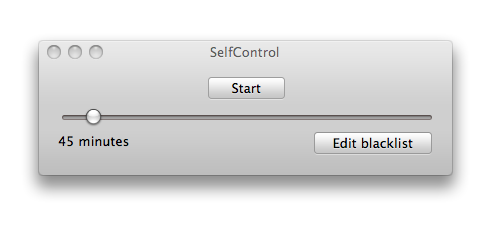
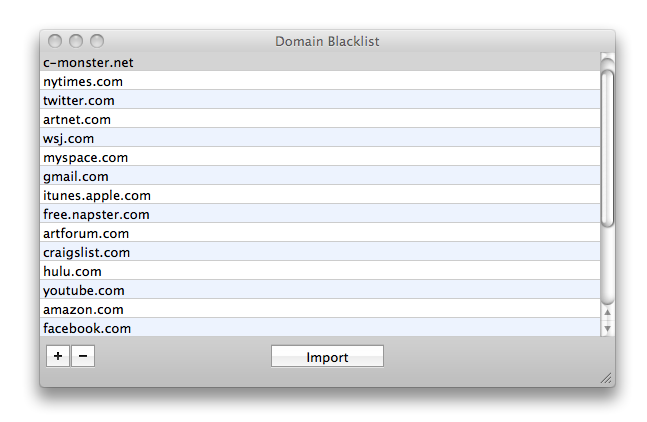
  The open-source SelfControl is a streamlined application with a
  simple but effective interface and set of controls. Launching the
  application brings up an interface displaying a slider that sets the
  amount of time your blacklisted domain names will be blocked (you
  can block access for anywhere between 1 minute and 12 hours), a
  button that enables you to edit and view your blacklist, and a
  button that begins the blocking. Blacklisting domain names blocks
  access to them through your Web browser (both Firefox and Safari are
  supported), as well as through applications that communicate with
  the sites directly. For example, blacklisting twitter.com prevents
  Twitterrific from receiving updates or allowing me to post through
  it.

<http://www.tidbits.com/resources/2009-04/Blacklist.png>

  Clicking SelfControl's Start button brings up an authorization
  prompt - requiring the user account password (a much-appreciated
  feature that shows forethought on the part of the developers -
  picture your friend repaying that April Fools prank with a 12-hour
  embargo on Internet access). A timer displays the remaining time you
  have left before access is restored.

<http://www.tidbits.com/resources/2009-04/Timer.png>

  Once begun there is no easy way to disable SelfControl. Even
  quitting the application, switching user accounts, or rebooting the
  Mac will not disable the domain blocking, since SelfControl works
  its magic by using Mac OS X's built-in firewall to block traffic to
  the desired sites at the system level. It might be possible to
  disable SelfControl's domain-blocking by tweaking firewall rules
  manually, but it's probably easier simply to let the timer expire
  than to delve into the guts of ipfw configuration files.

  SelfControl does have some kinks. Sometimes you need to relaunch
  your Web browser after initiating SelfControl to activate the domain
  blocking. Also, some sites seem more resistant to being blocked than
  others, and it may take a few minutes before access to them is
  denied, due to caching. Finally, on a couple occasions my blocked
  access has continued for a minute or two past the timer's duration.
  Hopefully, we'll see these issues ironed out in future versions.

  All in all, SelfControl is an excellent little tool for blocking out
  Internet distractions without sacrificing access to sites on which
  you rely. I highly recommend that anyone wrestling with Internet
  time bandits try it out. SelfControl 1.1 requires Mac OS X 10.4 or
  later, and is a 1.7 MB download.


VeriSign Brings Authentication Tokens to iPhone
-----------------------------------------------
  by Glenn Fleishman <[email protected]>
  article link: <http://db.tidbits.com/article/10180>

  VeriSign has released an iPhone app that lets you supplement a user
  name and password login at several Web sites with a well-regarded
  and cryptographically robust method of confirming your identity.
  AOL, eBay, and PayPal are notable among current sites supporting the
  system.

  The free VIP Access for Mobile application relies on a unique
  credential created for your iPhone based on its phone number, and
  confirmed with an SMS message sent to that number. Once the
  credential is confirmed with this looped-back process, the program
  generates a unique 6-digit token every 30 seconds using an algorithm
  that's uniquely derived from the credential. (VIP stands for
  VeriSign Identity Protection.)

<http://itunes.apple.com/WebObjects/MZStore.woa/wa/viewSoftware?id=307658513&mt=8>
<http://www.tidbits.com/resources/2009-03/verisign_vip.png>

  iPod touch devices can't use VIP Access because of the lack of an
  out-of-band method of confirming a unique identity, at least in the
  current system design. VeriSign has released this application
  previously only for mobile phones, including the BlackBerry and
  other platforms.

  When using this system you're much less likely to experience account
  theft, even if there's a breach of login data at a Web site or if
  you're scammed out of your login credentials. Because VeriSign
  separately controls and authenticates its own tokens, a cracker
  can't get in, even if he has your user name and password. A site
  would have to suffer an internal security flaw that allowed token
  entry to be disabled or bypassed. (Passwords are always encrypted
  and protected at any well-designed site, but a data breach could
  allow crackers to pair account information with commonly guessed
  passwords or passwords assembled from other sources that are then
  matched up by email or other data.)

<https://vipdeveloper.verisign.com/vip/home.jsp>

  At sites that support VeriSign's system, you log in the first time
  with your current user name and password, and then enter the
  credential from VIP Access to activate two-factor authentication
  (one factor is your regular login; the other, the token). From then
  on, you must have the phone and the current token to supplement your
  regular login to use that site.

<http://en.wikipedia.org/wiki/Two-factor_authentication>

  The convenience of having this second factor on your phone can't be
  overstated: we iPhone users generally have our phones with us most
  of the time, and when we're using a computer, it's likely on our
  person or nearby. And it's a single device that many Web sites can
  support. I currently have key fobs from eBay/PayPal and Etrade. I
  use those sites regularly but not frequently, and I'm always rooting
  around to find the key fob.

  The security of a second factor is that a thief needs two parts to
  abuse your information, and it's hard to obtain both parts at once.
  If someone obtains your credential number, the current token can't
  be reverse engineered from it. If someone glances at your current
  token or obtains it in some other fashion, it's no good after less
  than 30 seconds. Note that I include a token in the screen capture
  above from my iPhone, which was good for only 30 seconds from when I
  took it.

  Even if a thief steals your phone, as long as you haven't stored
  your account names and passwords for sites you're using with VIP
  Mobile, having the token generator won't do the thief any good.

  A phishing attack is still possible. Imagine that you are convinced
  you are visiting a secure site that uses a VIP token, and enter your
  login name, password, and the current token. If the site is
  malicious and enters the same credentials at the real site within a
  few seconds, a phisher could gain access.

  This makes it extra important that you note tell-tale signs that the
  secure site you think you are at is actually the correct site: check
  the domain name, look for _https_ in the URL (location field), and
  make sure a lock icon appears in the browser - Safari in the upper
  right, and Firefox in the lower right.

  Participating sites pay what the New York Times reported is $3 to
  $10 per year per customer to gain this login with extra confirmation
  of a user's identity; customers pay nothing.

<http://bits.blogs.nytimes.com/2009/03/31/whats-the-password-only-your-iphone-knows/>

  This is a great deal on both sides. Customers get the assurance that
  their accounts are safe at the price of a little inconvenience -
  although most of us are always carrying our phones with us. And site
  operators get the additional security of not having to deal with the
  cost and complexity of having accounts hacked.


iBagz Keeps Your iPod Dry
-------------------------
  by Jeff Merron <[email protected]>
  article link: <http://db.tidbits.com/article/10149>

  One afternoon after school, back in the pre-Gore-Tex days, my friend
  Tim and I set off on what we thought would be an easy six-mile run.
  Nothing but a routine maintenance workout on a relatively mild New
  Jersey day. Chilly - maybe 40 degrees - very cloudy, and with just a
  little drizzle, so we were wearing standard school-issue sweats.

  At the two-mile mark, the drizzle turned to rain. We figured it
  wouldn't get worse, so we kept on. At mile three, our halfway point,
  the skies opened. Within minutes, our shoes were soaked through and
  our sweats had become noticeably heavier. Our typical constant
  chatter had come to a halt. We were running on a heavily trafficked
  back road with no shoulder, so we focused entirely on avoiding both
  puddles and cars. It was a true loop, so the fastest way back was to
  finish the course. By the fourth mile, I remember my sweatpants
  sinking lower and lower, as the sheer weight of the water began to
  drag them down. My socks and shoes had devolved into unified
  spongeballs.

  We slogged our way back to the locker room, and were able to joke
  about the experience for weeks to come, but I had no idea that it
  would become an unforgettable episode, a lifelong cautionary tale.
  It had been - and remains - the worst training run I've ever taken.
  Worse than running in 26 degrees below zero, one winter Wisconsin
  morning. Worse than a foot of unplowed snow (that was actually kind
  of fun). In the 30 years since, even as Gore-Tex and spandex have
  made bad-weather running much more comfortable, the only kind of
  weather that can genuinely alter my workout routine is cold rain. I
  hate it, hate it, hate it.

  Meanwhile, over the past six or seven years, I've become reliant on
  my iPod as a training partner. Music and the measurement
  capabilities of the Nike+iPod system eventually evolved from valued
  companion to necessity. Some days the first five "American Idiot"
  tracks get me through a quick workout I never really wanted to do.
  Other days, the prospect of listening to an entire Beatles album
  uninterrupted inspires me to set off on a longer run.

  Cold rain, my old nemesis, attacked me again about a year ago. I was
  about two miles away from home and running with an iPod nano
  protected with a silicon skin. But that thin covering was no match
  for the heavy, windswept sheets that arrived suddenly and continued
  until I reached home. My iPod stopped playing near the end of the
  run, and although I hoped it would dry out and recover, it never
  did.

  This past weekend in North Carolina we've received an uninterrupted
  drenching of cold rain. Between the caution with which I now treat
  an iPod in the wet weather, and my own reluctance to run in these
  conditions, I've had every excuse to stay home and give my legs a
  rest.

  But, about three months ago, I ordered a hard plastic case for my
  new iPod touch. And for some reason, the online store I bought it
  from offered an iFrogz iBagz for only an extra buck or two (it
  normally retails for $11.99). The iBagz is a thick plastic pouch
  with plenty of space for an iPhone or iPod touch. But it's not just
  a glorified baggie. Running through a seal in the pouch is a
  headphone connector; on the inside is the male end, which plugs
  perfectly into my iPod's headphone jack. On the outside is the
  female end, which seals solidly with my Koss SportaPro headphones.

<http://ifrogz.com/products/bagz.php>
<http://www.koss.com/koss/kossweb.nsf/p?openform&pc^pt^SportaPro>

  Thanks to this connector, I can completely seal my iPod inside the
  waterproof and transparent iBagz. Near the top of the iBagz, there
  are three Ziploc-style seals that close with a reassuring snap
  sound. The top of the bag then folds down, three times, after which
  you secure the enclosure with a strip of Velcro.

  This may sound like a clunky, heavy, and perhaps overly complex
  solution, but here's the thing: it's not. It's easy to see your iPod
  after it's sealed in the bag, and almost equally easy to access all
  of the iPod's controls, both on the exterior and on the touch
  screen.

  After a few short light-rain trial runs with the iBagz, from which I
  emerged with a perfectly dry iPod, I began to have real trust in it.
  Yesterday, after two days and two runs that I delayed and cut short
  because of cold rain (I used the iBagz both times and it performed
  flawlessly), I decided to give the iBagz its toughest test yet: an
  hour of running on a muddy trail in a constant downpour.

  I wanted to run, but I was unenthused, to put it mildly. So I
  promised myself to take it long, slow, and relaxing - no pressure. I
  put on the Beatles' compilation album "Love," and I ran. There was
  no way around some of the puddles, which resembled nascent fishing
  ponds, and my socks and shoes were soaked through within 15 minutes.
  While my water-resistant gear made the hour-long outing immensely
  more comfortable than my unforgettable sweatsuit slog of decades
  past, it couldn't prevent me from becoming mud-splattered and
  drenched by the midway point.

  But the Beatles - protected, without any worry on my end, by the
  iBagz - kept me keeping on. There was a stretch in my run when I had
  a chance to cut it short. I was passing by my car, which I had
  driven to the trail. I was faced with about two miles to finish the
  run I had planned, or two minutes to be ensconced in complete warmth
  and dryness. And then "Help" kicked in - the symbolism didn't escape
  me.

  Neither did the great dependability and utility of the iBagz. After
  my soggy struggle, as I plugged my iPod in to sync, I put the
  plastic pouch next to my iBook and promised myself that I would
  write about it. "An ode to a plastic bag," I thought. Silly, in a
  way, but it's helped me through some tough workouts, and if you like
  to exercise while listening to your iPod, and have avoided doing so
  because of rain, I highly recommend you try it. Even if you aren't a
  runner, the iBagz would be worthwhile for anyone who spends enough
  time outside to risk a soaking, perhaps at a summer festival or
  while walking home from work. The iBagz may be one of the simplest
  iPod accessories I own, but it's also the one I treasure most.


  [Jeff Merron is a freelance writer and editor. He lives in North
  Carolina.]


Ten Surprising Uses of BBEdit
-----------------------------
  by Matt Neuburg <[email protected]>
  article link: <http://db.tidbits.com/article/10142>

  Although BBEdit, from Bare Bones Software, is not my primary text
  editor, I've recently observed myself using it a great deal anyway
  for various tasks, some which don't have all that much to do with
  editing text. Here, in no particular order, are the ten primary
  things that I do with BBEdit.

<http://www.barebones.com/products/bbedit/>

  1. Search for text in multiple files. BBEdit can do batch file text
  searches; in particular, you can designate a folder and tell BBEdit
  to search inside all text files within that folder, at any depth.
  This arises especially when I'm programming. I remember that I've
  used a particular function before, but I can't remember where. All
  my code is in just a few folders, so BBEdit can search it all for
  me, very quickly. It totally beats Spotlight, which indexes only
  individual words, can't do regular expression searches, and (on
  Tiger) doesn't even index code files.

  2. Change text file encoding. I receive a text file containing
  non-ASCII characters, but it's in Windows encoding. This means that
  most Mac OS X applications, which default to opening text files as
  UTF-8 or MacRoman, can't interpret the file correctly. With BBEdit,
  I can open the file, switch it to Unicode encoding (and fix the line
  endings), and save it again.

  3. Edit invisible or privileged text files. Mac OS X is Unix, and
  Unix is chock full of configuration files. When you want to change
  one, it can be a big pain, because the file is invisible or hidden
  in a package or a folder whose contents the Finder doesn't display,
  or because the file is protected by special privileges and can be
  edited only by the superuser. For example, let's say I want to
  change the Leopard Help Viewer to be a normal application (so that I
  can switch to it and away from it using Command-Tab). Instead of
  issuing a bunch of tricky Terminal commands, I use BBEdit's Open
  Hidden command to open the relevant file and edit it directly;
  BBEdit asks for my password when I open the file, and maintains the
  correct ownership and privileges when I save it.

<http://www.macosxhints.com/article.php?story=20080601072810282>

  4. Edit remote files. I maintain several Web sites. Let's say I want
  to tweak a file at one of these sites. I could download the file,
  edit it, and upload it again; but BBEdit lets me do this so
  transparently that it looks like I'm editing the file in place,
  remotely, within its Web site. I can use BBEdit's Open from FTP
  Server command, or I can enlist the aid of another of my favorite
  utilities, Interarchy. Either way, the file opens for editing in
  BBEdit, and when I save, the changes are automatically propagated
  right up to the remote file on the Web.

<http://www.nolobe.com/interarchy/>

  5. Compare text files. I maintain various text files cooperatively:
  that is, I edit them, but someone else gets to edit them too. (This
  has mostly to do with code that I maintain together with some other
  programmer, but TidBITS articles also work this way.) So, in one of
  these text files, what did the other person change since the last
  time I edited it? BBEdit has a wonderful Find Differences command
  that displays both versions of the file and a list of places where
  they differ.

  6. Use remote version control. Text files that I work on are often
  maintained on a remote computer that serves them through a version
  control system such as CVS or SVN. BBEdit has CVS and SVN menus that
  permit me to work with these systems. For example, TidBITS articles
  live in a remote Articles folder, so I choose Update Working Copy
  from BBEdit's SVN menu and presto, my copy of the Articles folder is
  updated to match it. Also, this feature is integrated with the
  previous one. Perhaps I want to compare versions of a file, before
  and after someone else edited it, to see what changes were made. To
  do so, I don't need physical copies of the file; BBEdit puts up a
  Compare Revisions dialog that lets me select versions from the
  remote version control server, and then it downloads them
  transparently and presents its text file comparison interface.

  7. Compare entire folders. This is an even more powerful take on
  file comparison. I maintain the online documentation for several
  applications. The documentation is effectively a Web site, a folder
  full of interlinked HTML and CSS files. I send this off to the
  application developers, and they make changes and send it back to
  me. What changes did they make? To find out, I point BBEdit at my
  version of the folder and at the version of the folder that the
  developers just sent back to me, and use the Find Differences
  command. BBEdit tells me whether one folder has files that the other
  lacks, and also tells me which files are in both but differ; in the
  latter case, the interface becomes the "compare text files"
  interface and I can easily see exactly what was changed.

  8. Check HTML validity. I maintain several Web sites as well as
  online documentation that takes the form of a Web site (did I
  mention this already?). I generate such a Web site, either editing
  by hand or using some cool Web site generation tool, and now I want
  to make sure the HTML is valid. BBEdit's Markup menu has a Check
  Document Syntax command that lets me validate a single file, and a
  Check Folder Syntax command that lets me validate all the files in a
  site folder.

<http://www.apeth.com/RubyFrontierDocs/>

  9. Wrangle individual characters. From the massive world of entire
  Web sites, let's jump down to the miniature world of individual
  characters. BBEdit provides a number of utilities that assist me
  when things go mysteriously wrong with characters. For example, as a
  programmer, I copy some sample code from a Web page, paste it into a
  text file, try to run it, and it fails with a weird error message.
  The code looks right, but something seems to be wrong with the text.
  BBEdit helps me find out what's up. For example, its Hex Dump
  command lets me examine the file not as text but as numeric codes;
  sometimes this reveals that the file contains "null" characters,
  zero bytes that are completely invisible and undetectable in a text
  editor, but which wreck the code's ability to execute, or shows that
  it has the wrong kind of end-of-line characters. Or, BBEdit's Show
  Invisibles command can reveal the presence of incorrect whitespace
  characters, such as a non-breaking space (Option-Space). Or, I can
  select an individual character and use BBEdit's ASCII Table palette
  window to ask, "Just what character is this?" Also helpful when
  reformatting text copied from some other source is BBEdit's Convert
  to ASCII command.

  10. Rewrap lines. Finally, from the sublime to the mundane. Line
  wrapping: how boring is that? But it comes up a lot. Email often has
  hard-wrapped lines, so if you want to paste an email message into a
  word processing context, you need to turn those into true
  paragraphs. Just the other way round, sometimes I want to paste
  email-style "quoted text" into a text field in my browser (when
  posting to an online forum, for example), so I need to take
  continuous text, break it up into shorter lines, and put a
  greater-than sign in front of each line. BBEdit has simple commands
  that make all of those things a snap.

  There are undoubtedly other ways to do any or all of these things;
  all I'm reporting here is that I've noticed myself reaching for
  BBEdit to do them, even though, as I say, BBEdit isn't my choice for
  editing text. At $125, BBEdit is pricey for just these tasks, and
  I'm not recommending a purchase for these reasons alone. But if you
  _do_ have it, some of these uses might not have occurred to you.

  Finally, note that BBEdit's freeware little brother, TextWrangler,
  gives you almost all the same abilities. It can't do #6 (it has no
  version control interface), but you can use its text file comparison
  interface as an SVN external "diff" helper. It also can't do #8 (it
  has no Markup menu), but there are other perfectly acceptable
  validators (such as Robert Crews's freeware Validator).

<http://www.barebones.com/products/textwrangler/>
<http://homepage.mac.com/rcrews/software/validator/>


TidBITS Watchlist: Notable Software Updates for 06-Apr-09
---------------------------------------------------------
  by Doug McLean <[email protected]>
  article link: <http://db.tidbits.com/article/10189>

  iTunes 8.1.1 from Apple "adds support for renting HD movies and
  provides a number of bug fixes, including addressing issues with
  VoiceOver and syncing with iPhone or iPod touch." (Free, 68 MB)

<http://support.apple.com/downloads/iTunes_8_1_1_for_Mac>

  Default Folder X 4.2 from St. Clair Software is a maintenance and
  stability update to the Open and Save dialog-enhancement utility.
  Changes include support for OpenMeta tags in the Spotlight window
  below Save As dialogs and in the Info window below Open dialogs, a
  new AppleScript command that clears the list of recently used
  folders from the currently active folder set, added compatibility
  with the development builds of Mac OS X Snow Leopard, and a number
  of minor bug fixes. A full list of changes is available from St.
  Clair Software's Web site. ($34.95 new, free update, 10.2 MB)

<http://www.stclairsoft.com/DefaultFolderX/>
<http://www.stclairsoft.com/DefaultFolderX/release.html>

  VMware Fusion 2.0.3 from VMware is a maintenance update to the
  popular Windows virtualization software. The latest version
  reinstates support for driverless printer sharing, a feature that
  had stopped working for users who had installed Security Update
  2009-001 while running Mac OS X 10.5.6. Plus, the update provides
  experimental support for Mac OS X Snow Leopard Server as a guest
  operating system. ($79.99, free update, 284 MB)

<http://www.vmware.com/products/fusion/>

  Camino 1.6.7 from The Camino Project is a security and stability
  update to the Mac-focused, Gecko-based Web browser. Changes include
  the addition of the latest Mozilla Gecko rendering engine, which
  brings with it critical security and stability fixes, improved ad
  blocking, and a bug fix that stops cookies without valid names from
  preventing the display of stored cookies. Also fixed are two
  crashing bugs, one related to quitting Camino while the pop-up
  blocker is visible and the other to selecting an item from a context
  menu after its window has closed. (Free, 15.3 MB for English-only or
  18.7 MB for multilingual)

<http://caminobrowser.org/releases/1.6.7/>

  NeoOffice 3.0 from NeoOffice updates the open-source productivity
  suite with features aimed at better mimicking the functionality of
  OpenOffice.org, the program on which NeoOffice is based. The latest
  version now includes almost all of OpenOffice.org's features (with
  the exception of Mac OS X Universal Access support), as well as some
  additional ones such as support for the Media Browser, trackpad
  gesture support, image import capabilities for scanners and cameras,
  floating tool windows, and grammar checking under Mac OS X 10.5
  Leopard. A full list of new features is available on the NeoOffice
  Web site. (Free update, 160 MB)

<http://www.neooffice.org/>
<http://www.openoffice.org/>
<http://www.neooffice.org/neojava/en/features.php>

  Fetch 5.3.1 from Fetch Softworks is a minor update to the
  longstanding file transfer software. According to the company's Web
  site, "This is a minor update that fixes a few bugs in the check for
  update and purchasing code." Fetch Softworks has also reduced the
  price for upgrading from Fetch 4 to Fetch 5. The upgrade is now $10,
  down from $15. ($25 new, free update, 16 MB)

<http://fetchsoftworks.com/>

  WireTap Studio 1.0.9 from Ambrosia Software is a maintenance update
  to the tool for recording and editing audio on your Mac. The update
  fixes issues with LivePreview playback performance, Editor playback
  controls such as playback needle-tracking and file management, and
  settings being lost during recording. AAC recording stability has
  also been enhanced.  ($69 new, free update, 30.8 MB)

<http://www.ambrosiasw.com/utilities/wiretap/>

  Panorama 5.5.2 from ProVUE is a minor update to the company's
  flagship database application, fixing a number of undisclosed minor
  bugs. In addition to the update, ProVUE has also developed a new
  credit card gateway for use from directly within the application.
  The gateway collects credit card information within Panorama and
  securely transmits it to Authorize.Net, and can be set up as an
  automated or button-activated process. ($299 new, updates from
  $89.99, 17.2 MB)

<http://www.provue.com/Panorama/Update55/>


ExtraBITS for 06-Apr-09
-----------------------
  by TidBITS Staff <[email protected]>
  article link: <http://db.tidbits.com/article/10191>

**Monoprice Offers Mini DisplayPort to HDMI Adapter** -- Looking for a
  way to hook up your Mini DisplayPort-equipped Mac to an HDTV? Ars
  Technica reports that accessories wholesaler Monoprice is offering a
  $14 Mini DisplayPort to HDMI Adapter. Most interestingly, the
  HDCP-compliant adapter enables playback of protected HD content on
  your Mac - such as you might buy from the iTunes Store - to be
  displayed on an HDTV, something that isn't possible on many
  monitors. (Posted 2009-04-06)

<http://arstechnica.com/apple/news/2009/03/mini-displayport-to-hdmi-adapter-available-hdcp-compliant.ars>


**Stanford's iPhone Development Class Available Online** -- Want to be
  an iPhone developer but don't know where to start? You can now sit
  in on the Stanford University School of Engineering's iPhone
  development class for free. Stanford will be posting all 10 weeks of
  the course's lectures on iTunes U, as well as on the CS 193P course
  Web page. The class, taught by several Apple employees, is normally
  harder to get into than Studio 54, with 150 students competing for
  only 60 spots this semester. (Posted 2009-04-06)

<http://www.stanford.edu/class/cs193p/>


**Peter Cohen Tees off on MacHeist Twitter Spam** -- Peter Cohen of
  Macworld does an excellent job laying out the case for why MacHeist
  inducing their customers to tweet an ad for the MacHeist software
  bundle constitutes spamming. Twitter Commandment #7: Thou shalt not
  tweet in my name. (Posted 2009-04-03)

<http://www.macworld.com/article/139830/2009/04/macheist.html>


Hot Topics in TidBITS Talk for 06-Apr-09
----------------------------------------
  by Jeff Carlson <[email protected]>
  article link: <http://db.tidbits.com/article/10190>

**Apple's release notes** -- Would submitting bug reports to Apple
  about the lack of information in release notes actually help? (3
  messages)

<http://emperor.tidbits.com/TidBITS/Talk/2559>


**App Store's effect on pricing** -- The App Store is driving down
  prices for iPhone apps, but is this an indication of a sweeping
  change in software pricing? (3 messages)

<http://emperor.tidbits.com/TidBITS/Talk/2560>


**Macworld Expo Moves to Mid-February** -- Readers react to the news
  that Macworld Conference and Expo will take place next February
  instead of January. (19 messages)

<http://emperor.tidbits.com/TidBITS/Talk/2561>


**iMovie New Features** -- The Apple TV can play 720p HD video, but
  only at 24 frames per second, which means iMovie's new HD export
  feature is constrained with typical 30 fps video. (4 messages)

<http://emperor.tidbits.com/TidBITS/Talk/2562>


**Mobile Me sync problems** -- A reader is experiencing duplicated
  messages and other problems syncing to MobileMe. (2 messages)

<http://emperor.tidbits.com/TidBITS/Talk/2563>


**Skype coming to iPhone** -- Readers discuss difficulties with
  Skype's for-pay options. (2 messages)

<http://emperor.tidbits.com/TidBITS/Talk/2564>


**Apple Releases General Support Update 2009-001** -- Maybe Apple will
  release the update next year. (7 messages)

<http://emperor.tidbits.com/TidBITS/Talk/2567>


**OmniWeb 5.9.2 Adds Gopher Support** -- Seriously, The Omni Group did
  add Gopher support to OmniWeb. And you thought everything posted on
  April 1st was suspect. (4 messages)

<http://emperor.tidbits.com/TidBITS/Talk/2570>


**Time Machine Backup Over a Network** -- Although making a network
  Time Machine backup (compared to using a Time Capsule) is possible,
  performance seems to vary widely in real-world use. (6 messages)

<http://emperor.tidbits.com/TidBITS/Talk/2573>


**Safari 4 Beta problem** -- The SnapBack button in the Address Bar is
  gone in the latest Safari beta, but there's a way to get it back.
  Will Apple remove it for good in the release version? (4 messages)

<http://emperor.tidbits.com/TidBITS/Talk/2574>


**Whatever happened to... FWB Software?** A question about a shuttered
  software company elicits an insider's look at the software industry
  in the 1980s and 1990s. (2 messages)

<http://emperor.tidbits.com/TidBITS/Talk/2575>


**Keyboards** -- Readers join Matt Neuburg in singing the praises of
  Unicomp keyboards. (2 messages)

<http://emperor.tidbits.com/TidBITS/Talk/2576>


$$

This is TidBITS, a free weekly technology newsletter providing timely
news, insightful analysis, and in-depth reviews to the Macintosh and
Internet communities. Feel free to forward to friends; better still,
please ask them to subscribe!

Non-profit, non-commercial publications and Web sites may reprint or
link to articles if full credit is given. Others please contact us. We
do not guarantee accuracy of articles. Caveat lector. Publication,
product, and company names may be registered trademarks of their
companies. TidBITS ISSN 1090-7017.

Copyright 2009 TidBITS: Reuse governed by Creative Commons license.

Contact us at:    <[email protected]>
TidBITS Web site: <http://www.tidbits.com/>
License terms:    <http://www.tidbits.com/terms/>
Full text search: <http://www.tidbits.com/search/>
Subscriptions:    <http://www.tidbits.com/about/list.html>
Account help:     <http://www.tidbits.com/about/account-help.html>


--
If you want to unsubscribe or change your address, use this link
http://emperor.tidbits.com/webx?unsub@@.3c557dc4!u=306a67f9