TidBITS#983/22-Jun-09
=====================
  Issue link: <http://db.tidbits.com/issue/983>
  Unsurprisingly, the iPhone nearly monopolizes this issue with our
  news coverage of the release of the iPhone OS 3.0 and the iPhone
  3GS, AT&T's improvements and clarifications of upgrade pricing, the
  iPhone 3GS's initial sales figures, Glenn Fleishman's in-depth look
  at how the new Find My iPhone feature works, and Adam's gleeful
  reporting of the iPhone 3GS's name change. On the Mac side of the
  fence, Jeff Carlson reviews the ViBook monitor adapter for adding a
  display via USB, we announce the release of Sharon Zardetto's "Take
  Control of Safari 4" book, and we open a DealBITS drawing for free
  copies of SmileOnMyMac's DiscLabel. And just for a little variety,
  Glenn reports on the letter sent by a Who's Who of security experts
  to Google about improving the security of Google services. In the
  TidBITS Watchlist, we look at Apple's Bluetooth Firmware Update 2.0,
  Sync'Em 1.30, DiscLabel 6.0.1, and Safari 4.0.1.

Articles
    iPhone 3GS and iPhone OS 3.0 Now Available
    AT&T Improves and Clarifies iPhone Upgrade Eligibility
    iPhone 3GS Sells One Million Units in Its First Weekend
    Security Experts Urge Google to Secure All Sessions
    "Take Control of Safari 4" Guides Readers Beyond Basic Browsing
    DealBITS Drawing: Win a Copy of DiscLabel 6
    Ding, Dong, the iPhone 3GS Space Is Dead
    Find Your Lost iPhone or iPod touch with iPhone OS 3.0
    My Three Screens, via ViBook
    TidBITS Watchlist: Notable Software Updates for 22-Jun-09
    ExtraBITS for 22-Jun-09
    Hot Topics in TidBITS Talk for 22-Jun-09


------------ This issue of TidBITS sponsored in part by: --------------

* READERS LIKE YOU! Support TidBITS with a contribution today!
  <http://www.tidbits.com/about/support/contributors.html>
  Special thanks this week to Garth Fletcher, Abdulkarim Alzuhair,
  Andrew James, and Heinz Jose Gattringer for their generous support!

* Fetch Softworks: Fetch 5.5 has WebView, the easy way
  to view files in a browser and copy web addresses from Fetch.
  Also Quick Look support, droplet shortcuts, and more.
  Download your free trial version! <http://fetchsoftworks.com/>

* WebCrossing Neighbors Creates Private Social Networks
  Create a complete social network with your company or group's
  own look. Scalable, extensible and extremely customizable.
  Take a guided tour today <http://www.webcrossing.com/tour>

* THE MISSING SYNC: Take it with you! The Missing Sync makes
  it easy to synchronize contacts, calendars, notes, photos
  and more from your Mac to your BlackBerry, HTC, Treo,
  iPhone and other phones. <http://www.markspace.com/bits>

* VMware Fusion. The most seamless way to run Windows on
  your Mac. Backed by nearly a decade of proven virtualization
  technology. Try VMware Fusion today for only $79.99.
  Visit: <http://www.tidbits.com/about/support/vmware-fusion.html>

* Microsoft's MacBU: Supporting Mac users with Office 2008.
  Is your Office up-to-date? Make sure you're running the latest
  versions of Word, Excel, PowerPoint, and Entourage by choosing
  Check for Updates from the Help menu of any Office application!

* Think it. Speak it. Create it with the all-new MacSpeech
  Dictate 1.5. It better, faster, stronger with improved recognition,
  new regional accents, vocabulary editor with word training.
  Learn more: <http://www.tidbits.com/about/support/macspeech.html>

---------- Help support TidBITS by supporting our sponsors ------------


iPhone 3GS and iPhone OS 3.0 Now Available
------------------------------------------
  by Jeff Carlson <[email protected]>
  article link: <http://db.tidbits.com/article/10358>

  Apple overhauled its mobile computing offerings last week, making
  the iPhone OS 3.0 software available on 17-Jun-09 and then releasing
  the iPhone 3GS two days later on 19-Jun-09.

  The iPhone 3GS release didn't create the same lengthy waits as last
  year, when some people stood in line for hours. (I spent 8 hours at
  the Apple Store University Village to buy an iPhone 3G for my wife;
  see "iPhone 3G: On the Line in Seattle," 2008-07-13.) Purchasers
  this year were able to pre-order models and have them shipped for
  delivery on the 19th or for pickup at an Apple Store; iPhone 3G
  buyers needed to activate the phones in person at an Apple Store or
  AT&T retail location.

<http://db.tidbits.com/article/9691>

  Supplies seem to be plentiful, with shipping estimates from the
  online Apple Store quoting 2-4 business days.

  Today, Apple announced that it had sold 1 million iPhone 3GS units
  during the opening weekend, an impressive feat considering the new
  model was introduced in just eight countries; the iPhone 3G, which
  also sold a million units in its first weekend, debuted in 24
  countries. Apple also reported 6 million copies of the iPhone OS 3.0
  software were downloaded in the same time period.

<http://www.apple.com/pr/library/2009/06/22iphone.html>


**iPhone OS 3.0** -- The iPhone OS 3.0 Software Update is a free
  update for owners of all existing iPhone models. Owners of all iPod
  touch models can purchase the update for $9.95 (the pricing is
  required because of how Apple reports iPod revenue). For details on
  what's new, see "Apple Previews iPhone 3.0 Software" (2009-03-17)
  and "iPhone OS 3.0 Ships 17-Jun-09" (2009-06-08).

<http://www.apple.com/iphone/softwareupdate/>
<http://db.tidbits.com/article/10144>
<http://db.tidbits.com/article/10334>

  To get the update, connect your iPhone or iPod touch to your
  computer, launch iTunes, and let it synchronize and back up the
  device. Next, click the device's name in the sidebar and click the
  Check for Update button. iTunes downloads the software
  (approximately 230 MB, depending on the model of device you're
  updating) and applies the update. It will take some time to download
  and install, so don't do this if you expect to need your phone
  within the next hour or so.


**Activation Troubles, Again** -- Although not as rocky an
  introduction as the iPhone 3G and iPhone OS 2.0 last year, the
  launch still taxed Apple's resources.

  When the iPhone 3G and iPhone OS 2.0 software were released on the
  same day in July last year, the launch was severely marred by the
  overwhelming flood of activation requests to Apple's servers, which
  left many people with unactivated devices. The load was compounded
  by the introduction of MobileMe, which replaced Apple's .Mac
  service. (See "MobileMe Fails to Launch Well, but Finally Launches,"
  2008-07-12; and "MobileMea Culpa: Apple Apologizes and Explains
  Tiger Situation," 2008-07-16.)

<http://db.tidbits.com/article/9689>
<http://db.tidbits.com/article/9695>

  This year's release was better, but activation woes still bedeviled
  new iPhone owners and upgraders. According to a report posted to
  AppleInsider, some customers were alerted in iTunes that the
  activation process could take up to 48 hours. My new iPhone 3GS
  (white, 32 GB) had no cellular access for about 3 hours on Friday;
  my original iPhone was also offline during that time.

<http://www.appleinsider.com/articles/09/06/19/apple_warns_iphone_3g_s_activations_may_take_up_to_2_days.html>

  According to Ars Technica, Apple is offering $30 iTunes Store
  credits to people who were affected by the activation delays. It's
  not yet clear who will receive the credits - I presume there's a
  minimum wait time - but email messages with the offer are due to be
  sent from Apple today.

<http://arstechnica.com/apple/news/2009/06/new-iphone-users-with-activation-headaches-get-itunes-credit.ars>


AT&T Improves and Clarifies iPhone Upgrade Eligibility
------------------------------------------------------
  by Glenn Fleishman <[email protected]>
  article link: <http://db.tidbits.com/article/10357>

  With the release of the iPhone 3GS, AT&T has clarified and changed
  some of the most confusing policies around which existing customers
  qualify for the cheapest upgrade prices. Many existing iPhone 3G
  customers can now pay $199 or $299 (16 GB or 32 GB) for a new iPhone
  3GS - the same as a new AT&T customer. Before 17-Jun-09, they were
  told it would cost them an additional $200.

<http://www.att.com/gen/press-room?pid=13745>

  TidBITS editor Rich Mogull wrote about these policies and his
  analysis of how they work last week in "Call AT&T for the Best
  iPhone Upgrade Price," 2009-06-15. The condensed version is that
  AT&T said most subscribers who had a subsidized phone, whether an
  iPhone 3G or otherwise, under a 2-year plan would likely be eligible
  for the cheapest upgrade between 12 and 18 months into their
  contract period.

<http://db.tidbits.com/article/10350>

  The latest change is that iPhone 3G owners who would be eligible for
  new-customer pricing in July, August, or September 2009 will be
  offered that lower upgrade price starting 18-Jun-09. AT&T will
  update whether a customer is eligible or not in that person's
  account on that date as well.

  In the announcement, AT&T revealed what Rich and others had
  inferred: the more you spend, the sooner AT&T will sell you another
  phone at below its cost. In the release, AT&T says that subscribers
  who spent $99 or more per line per month are the people who are
  eligible between 12 and 18 months in a 2-year contract.

  While this change still doesn't explain some of the scenarios Rich
  explored, it's a welcome change for early iPhone 3G buyers who
  already pay AT&T a lot of money per month. Such customers felt that
  AT&T had already recouped the difference between what AT&T pays
  Apple and what the subscriber paid for the phone, and that the
  telecom giant was losing a lot of good will, along with another
  2-year commitment, from its most dedicated customers.


iPhone 3GS Sells One Million Units in Its First Weekend
-------------------------------------------------------
  by Doug McLean <[email protected]>
  article link: <http://db.tidbits.com/article/10369>

  Apple has announced that one million iPhone 3GS units were sold
  during the phone's first three days of availability. Interestingly,
  this is the exact amount of time it took the iPhone 3G, released on
  11-Jul-08, to clear one million units. The iPhone 3GS also launched
  in just eight countries, compared to 24 countries for the iPhone 3G
  launch. Despite the incredible anticipation and memorable images of
  lines spilling out of Apple retail stores, the original iPhone
  didn't hit the one million mark until 74 days after its release on
  29-Jun-07.

<http://www.apple.com/pr/library/2009/06/22iphone.html>
<http://www.apple.com/pr/library/2008/07/14iphone.html>
<http://www.apple.com/pr/library/2007/09/10iphone.html>

  Although it's interesting to compare these numbers, we have to take
  a number of factors into account, especially when considering the
  time it took the original iPhone to hit the one million mark. While
  the subsidized prices for the iPhone 3G 8 GB and 16 GB models were
  the same as for the iPhone 3GS 16 GB and 32 GB models - $199 and
  $299 respectively - the original iPhone's 4 GB and 8 GB models were
  priced at $499 and $599 (without subsidies). Selling at roughly
  double the cost and under first-generation scrutiny and skepticism,
  the original iPhone's 74-day wait to sell one million units is
  easily understandable.

  It's also worth considering that since the original iPhone's debut,
  Apple has opened more retail stores, and a wider population has
  caught on to the iPhone phenomenon and even the concept of owning a
  smartphone. Additional years of marketing, positive reviews, and
  awards should also be acknowledged when considering the tremendous
  reduction in time it took both the iPhone 3G and 3GS to hit the one
  million milestone.

  But how should we think about the apparently identical sales
  statistic for the iPhone 3G and iPhone 3GS? Some factors point to
  lowered expectations, such as the dour economy (the major bank
  failures that signaled the most serious phase of the economic crisis
  came after the release of the iPhone 3G in July 2008). Plus, at
  least in the United States, AT&T's fumbling of the iPhone 3GS
  upgrade pricing must have caused some people to hold off on
  upgrading (see "Call AT&T for the Best iPhone Upgrade Price",
  2009-06-15, and "AT&T Improves and Clarifies iPhone Upgrade
  Eligibility", 2009-06-17). While AT&T eventually improved its
  wayward upgrade policy to be more friendly to loyal customers,
  initial reporting may still have negatively affected the first
  weekend of sales.

<http://db.tidbits.com/article/10350>
<http://db.tidbits.com/article/10357>

  On the opposite end of the spectrum, the iPhone 3GS could have
  exceeded the sales of its predecessor, given the additional year of
  marketing and press, and an improved list of specs for the same
  price points. This year's model also had the benefit of online
  pre-orders, with devices shipped free for arrival or available for
  pickup at an Apple Store on launch day. The iPhone 3G required
  in-person sales and activation at the beginning of its run.

  Which generation's one-million-sold mark is the greater
  accomplishment is thus a difficult question to answer - but quite
  the enjoyable problem to have if you're Apple. Meanwhile, the
  demographics of who partook in this first weekend's shopping spree
  will likely remain unknown, though this year it likely contained a
  slew of generation-jumping owners of the original iPhone, a healthy
  dash of iPhone 3G upgraders, and likely some wide-eyed newcomers
  too.


Security Experts Urge Google to Secure All Sessions
---------------------------------------------------
  by Glenn Fleishman <[email protected]>
  article link: <http://db.tidbits.com/article/10364>

  Google has been name-checked on security. A letter sent on 16-Jun-09
  to Google CEO Eric Schmidt strongly urges the company to make a
  secure connection the default method for Web applications. Among the
  38 signatories to the letter are a host of well-known security
  experts, researchers, and advocates, including Ronald Rivest (the R
  of RSA), Bruce Schneier, Jon Callas, Eugene Spafford, Peter G.
  Neumann, William Cheswick, and Steven Bellovin.

<http://www.cloudprivacy.net/letter/>

  Two years ago, Google's use of unsecured connections came to the
  fore with the discovery of sidejacking, a technique for grabbing the
  authentication cookies that Google uses to identify users during an
  unsecured session and inserting them into a browser under the
  sidejacker's control. Sidejacking can be performed anywhere there's
  an open Wi-Fi hotspot or an untrusted Ethernet network in which
  traffic is mingled and sniffable. (See "Sidejack Attack Jimmies Open
  Gmail, Other Services," 2007-08-27.)

<http://db.tidbits.com/article/9129>

  Google has taken some steps to derail sidejacking, including marking
  the Gmail authentication cookie with a secure flag that should keep
  it from being sent without encryption even if https isn't used.
  Google also added an option to require https (SSL/TLS secured)
  connections for Gmail. (See "Google Gmail Adds Secure Session
  Option," 2008-07-28.) The researchers noted that other services,
  like Google Docs and Google Calendar, support https as well,
  although there's no way to set that level of security as a default.

<http://db.tidbits.com/article/9710>

  The letter sent to Google claims that acquiring a Google
  authentication cookie from Docs or Calendar would allow access to
  Gmail, but one of Google's security team members, Alma Whitten, said
  in a blog entry  that it wouldn't be possible for such a cookie to
  be intercepted.

<http://googleonlinesecurity.blogspot.com/2009/06/https-security-for-web-applications.html>

  The security experts urge that https sessions become the default for
  all Web-based services. The letter acknowledges that this lack is a
  widespread problem, and is even worse at Microsoft Hotmail, Yahoo
  Mail, Facebook, and MySpace because those services don't offer a
  secure option. We expect that the security experts are starting with
  Google because of Google's existing optional support for secure
  connections, and if they can convince Google to make the switch,
  they'll move on to these other companies.

  They note that because Google apps are designed to work
  asynchronously, queuing and performing tasks at the server and then
  updating the browser without a page reload, any latency introduced
  by the additional user or server computational load for encryption
  won't make the experience of using these applications worse.

  Google's response, in Whitten's blog entry, is that Google remains
  concerned that there's not enough known about whether specific
  computer configurations, networks, or parts of the world would
  suffer far worse performance in an all-https world. Whitten also
  said that Google is planning a trial that moves small sets of Gmail
  customers who haven't explicitly requested https-only sessions to
  that option.


"Take Control of Safari 4" Guides Readers Beyond Basic Browsing
---------------------------------------------------------------
  by Adam C. Engst <[email protected]>
  article link: <http://db.tidbits.com/article/10345>

  We've just released "Take Control of Safari 4," a new book by
  long-time Mac author Sharon Zardetto. We've had many requests for a
  thorough explanation of Apple's Safari Web browser, and the beta of
  Safari 4 inspired Sharon to comb through the program, documenting
  exactly how it works for those who would like to learn a few
  non-obvious features so they can get more out of the program. If, to
  pick just a few of the topics covered, you've been slacking off on
  learning how to organize your bookmarks into a highly useful
  bookmarks bar, if you've never bothered to learn the keyboard
  shortcuts for working with tabs efficiently, or if you've always
  wanted to read RSS feeds but never quite figured them out, this
  92-page book is for you. It's available in both PDF ($10) and print
  ($19.99) formats.

<http://www.takecontrolbooks.com/safari?pt=TB983>

  In "Take Control of Safari 4," you'll learn about new features like
  Top Sites and searching the page content of your bookmarks and
  history, and you'll get answers to questions like these:

* How do I load six Web pages at once?

* Now that I've loaded six pages, how do I best work with them?

* What are all the keyboard shortcuts for working with tabs?

* How do I bookmark a page I want to return to?

* How do I import Firefox bookmarks?

* I have 1,042 bookmarks. Is there a sensible way to search or
  organize them?

* What are the default keyboard shortcuts for the bookmarks bar?

* Can I search for text on the currently active Web page?

* How do I erase my history to prevent someone from snooping through
  it?

* Where does Safari store Web site user names and passwords?

* Help! However Safari stored my password, it doesn't work any more!

* How do I use Safari to read RSS headlines from different sites?

* How do I "snip" a Web page to make it into a Dashboard widget?

  Needless to say, if you already consider yourself sufficiently
  expert in Safari and other Web browsers, you probably won't learn
  that much from the book, but you might consider picking up a copy,
  skimming it for new tips and tricks, and then giving it to a friend
  or relative whose Web browsing techniques drive you crazy (you know,
  your buddy who insists on typing out every URL in its entirety, or
  your family member who hasn't picked up the utility of
  Command-clicking links).


DealBITS Drawing: Win a Copy of DiscLabel 6
-------------------------------------------
  by Adam C. Engst <[email protected]>
  article link: <http://db.tidbits.com/article/10367>

  Whenever I'm making Take Control Library CDs as door prizes for Mac
  user group meetings (which is, honestly, the main reason I burn CDs
  of any sort), I've taken to using the Dymo DiscPainter to label
  them, in conjunction with DiscLabel from SmileOnMyMac (see "Print
  Classy Discs with the Dymo DiscPainter," 2008-12-01). There are
  other disc labeling programs out there, several of which I have, but
  DiscLabel floated to the top when I needed to label a CD.

<http://www.smileonmymac.com/DiscLabel/>
<http://db.tidbits.com/article/9892>

  The recently released DiscLabel 6 makes creating labels easier than
  before, thanks to a streamlined interface for creating new designs
  and an inspector that simplifies editing object, image, and text
  properties. Image importing has been improved, so imported images
  can now be added to all label and packaging design elements
  simultaneously, and a new montage tool lets you create montages from
  multiple photos. SmileOnMyMac also added 80 professionally designed
  template sets for those who just want to add some text or import
  track lists from iTunes, iPhoto, iDVD, the Finder, or Toast.

  All entrants (and only entrants!) will receive a discount on
  DiscLabel 6, so be sure to enter at the DealBITS page. All
  information gathered is covered by our comprehensive privacy policy.
  Remember too, that if someone you refer to this drawing wins, you'll
  receive the same prize as a reward for spreading the word.

<http://www.tidbits.com/dealbits/disclabel/>
<http://www.tidbits.com/about/privacy.html>


Ding, Dong, the iPhone 3GS Space Is Dead
----------------------------------------
  by Adam C. Engst <[email protected]>
  article link: <http://db.tidbits.com/article/10370>

  Call me obsessive, call me retentive, but just don't call me on an
  "iPhone 3G S," since Apple has quietly started changing the new
  iPhone's name to "iPhone 3GS," removing the space before the
  trailing S.

  As I said in "New iPhone 3GS Boosts Power, Performance, and More"
  (2009-06-08), "Technically, it's 'iPhone 3G S' - with a space before
  the S - but those of us who spend our lives writing about these
  products have to draw the line somewhere, and a standalone S is
  untenable in running prose." Aside from just looking awkward, a
  standalone S makes it even harder to form plurals and possessives
  than it would be with an S at the end of the word.

<http://db.tidbits.com/article/10333>

  (One person on Twitter pointed out that "Mac OS X" should also
  suffer from the same problems, but it never set off my warning bells
  because X is such an unusual character, because it's pronounced
  "ten," and because the entire name is short enough to be read as a
  single unit.)

  Although I subsequently caved to staff concerns about our articles
  looking incorrect in comparison with those from other publications,
  and we wrote around the awkward "iPhone 3G S" construction all last
  week, I was ecstatic to see this morning that not only had Apple
  started following my construction in the press release announcing
  the iPhone 3GS's excellent initial sales, but that the company had
  also retroactively edited the press release announcing the iPhone
  3GS to avoid the spaced-out name. For a few hours, that initial
  release's headline link on the main Apple PR page still used the old
  name, but I now see that even that headline has been fixed.

<http://www.apple.com/pr/library/2009/06/22iphone.html>
<http://www.apple.com/pr/library/2009/06/08iphone.html>
<http://www.apple.com/pr/>

  I expect it will take some time before Apple can make this name
  change consistent across the entire site. For instance, a useful
  KnowledgeBase page that calls out which iPhone OS 3.0 features work
  on which iPhone models still uses the old name. That's OK - I was
  mostly interested in guidance from Apple for those of us who are
  likely to be writing about the iPhone 3GS on a regular basis for the
  next few years. Plus, losing that space will make Ted Landau's next
  edition of "Take Control of Your iPhone" shorter and less prone to
  awkward orphans.

<http://support.apple.com/kb/HT3630>
<http://www.takecontrolbooks.com/iphone?pt=TB983>
<http://en.wikipedia.org/wiki/Orphan_(typesetting)>

  I also don't see Apple changing the graphical branding of the iPhone
  3GS, which actually has the S using a different font style and in a
  box. It's also wroth noting that on the iPhone 3GS itself, the only
  identifying text at all says simply "iPhone". I'm fine with that.

<http://www.tidbits.com/resources/2009-06/iPhone-3G-boxS.png>


Find Your Lost iPhone or iPod touch with iPhone OS 3.0
------------------------------------------------------
  by Glenn Fleishman <[email protected]>
  article link: <http://db.tidbits.com/article/10359>

  Darn it - where's my iPhone? My iPod touch? My keys? Okay, my keys
  are in my hand, but I have no idea where the other two are. Ow! Now
  I remember where I left the barbells. I'd better find my Mac - I
  know where that is, at least - and fire up MobileMe.

  Let's see, go to me.com, enter username and password, click the
  Account icon at the top, re-enter my password (for what reason is
  beyond me), and then click Find My iPhone. Ah ha! It's in my house
  according to the map. I'll click Display a Message, and have a sound
  play, too.

  Under the couch cushions. How typical.


**Pairing Location with MobileMe** -- Find My iPhone, which works with
  both the iPhone and the iPod touch, is a nifty feature that Apple
  added to iPhone OS 3.0. It requires a MobileMe account to work
  (accounts start at $99 per year), but has no other cost attached.
  The service is intended to help with both misplaced and stolen
  phones; it lets you trigger a message on the device or erase all the
  data on it.

<http://www.apple.com/mobileme/whats-new/>

  With location services built into the iPhone, it's trivial for an
  iPhone to send its current coordinates at any given time. The
  original iPhone uses a combination of Wi-Fi and cell tower
  locations; the iPhone 3G and 3GS add GPS to the mix (see "iPhone and
  iPod touch Become Self-Aware," 2008-01-15). The iPod touch must
  connect to a Wi-Fi network to both find and update its location. An
  iPhone needs a connection to either a Wi-Fi network or a cell data
  network to send the small amount of data necessary.

<http://db.tidbits.com/article/9404>

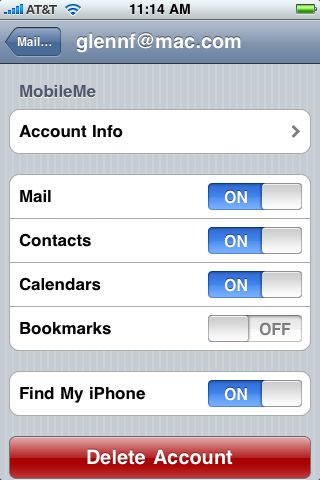
  You enable Find My iPhone via the Settings application on the iPhone
  or iPod touch. It's hidden in the Mail, Contacts, Calendars section
  under your MobileMe account. You don't have to sync calendars and
  contacts if you don't want to, as those options can be turned off.
  The Find My iPhone/iPod touch item is at the bottom; merely slide
  the switch to On.

<http://www.tidbits.com/resources/2009-06/findmy_iphone_enable.jpg>

  After enabling the option, use a browser to log into MobileMe, as I
  describe in my bumbling steps at the start of this article. The
  Account tab in MobileMe has added ever more options since launch,
  with Find My iPhone being the latest. (Apple inconsistently calls
  this Find My iPhone for both the iPhone and the iPod touch in some
  places, and in others uses the specific device type.)

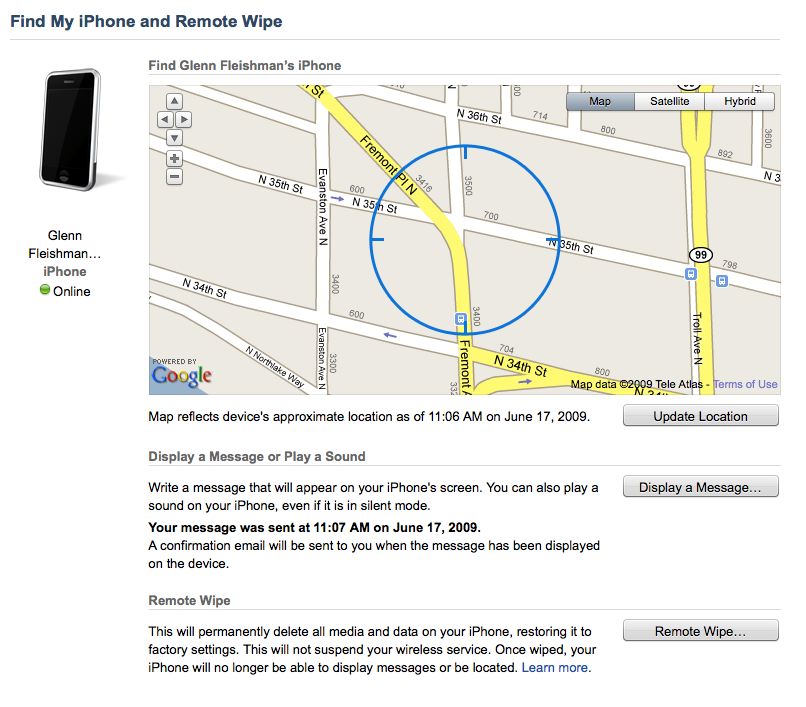
  The Find My iPhone page shows one entry for each device. I have both
  an iPhone and an iPod touch, both of which are set to be found, and
  I can scroll to see both. When the page first comes up, the last
  known position is shown, along with the date and time the device
  last checked in. MobileMe then - I presume - sends a push message to
  the phone to update that data. An Update Location button appears
  after MobileMe is satisfied that it has the best location.

<http://www.tidbits.com/resources/2009-06/findmy_general_overview.jpg>

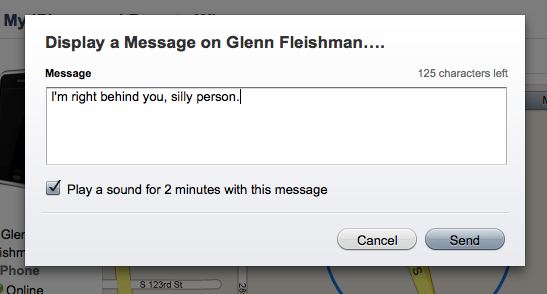
  As long as the device is online - indicated by a green dot and the
  text "Online" - you have the option to send a message, a beeping
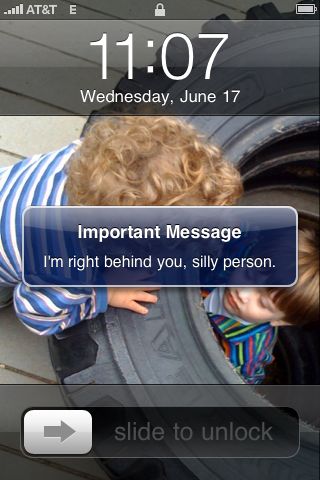
  alert, or both to the device. Any message you send to the device is
  also sent to you via your MobileMe mail account.

<http://www.tidbits.com/resources/2009-06/findmy_message.jpg>
<http://www.tidbits.com/resources/2009-06/findmy_message_appears.jpg>

  If you use the Display a Message dialog's Play a Sound for 2 Minutes
  option, your iPhone or iPod touch will sound an alarm even if you
  have turned off all audio notifications. That's a nifty option both
  to freak out a thief and to find your phone when it's hidden away in
  a car or your home.

  When I described Find My iPhone to my wife, the owner of an original
  iPhone, she was initially slightly appalled. She thought this would
  become known as the cheating-spouse or stalker feature, because
  anyone with access to someone's MobileMe account - which could be a
  spouse or partner or an ex - would also have live access to
  someone's position.

  That's worth considering, references to current and prior
  relationships aside, if you're not the only person with your
  MobileMe account password. MobileMe partitions multiple accounts
  with separate passwords and account features in a family pack ($149
  per year), so that shouldn't be a concern.

<http://www.apple.com/mobileme/pricing/>


**When Your Phone Goes Missing** -- As someone who has become rather
  aware lately of laptop theft - see my friend David Blatner's account
  of his PowerBook being ripped off in "What I Learned from Having My
  Laptop Stolen" (2009-03-24) - I had wondered how recovery software
  companies might work around the "one program runs at a time" limit
  in iPhone software.

<http://db.tidbits.com/article/10165>

  Apple skirted that issue by building in such a feature at the system
  level and bundling it with its own service. Laptop recovery software
  costs run from about $40 as a one-time fee to $40 to $60 per year,
  depending on the firm. The addition of Find My iPhone improves
  MobileMe's value and utility more than just a little for me.

  Find My iPhone isn't designed just for dealing with the possibility
  of theft, but the Remote Wipe feature certainly is. Click the Remote
  Wipe button in MobileMe to reset the device to its factory setting,
  and your iPhone or iPod touch will delete all your personal data,
  files, and applications.

  It will be interesting to see how this finding feature is used with
  a stolen phone, because law enforcement doesn't always take an
  interest in items that are worth less than a few thousand dollars,
  even if you have a picture of the alleged thief and his or her
  address. However, with a live map, perhaps that would improve your
  odds. (For the first heart-warming story of how Find My iPhone
  reunited a geek and his iPhone, read this post from the blog The
  Intermittent Kevin.)

<http://happywaffle.livejournal.com/5890.html>

  Ken Westin, the head of GadgetTrak, which makes recovery software
  for laptops and smartphones, said he was pleased that Apple has
  added this feature, especially the remote data wipe option; he calls
  it a "greatly needed service." But, he noted, a lot more than a pin
  on a map could be done.

  Westin's firm gives away GadgetTrak for iPhone that, when active,
  looks just like a Safari window. This requires that you launch and
  leave the app up whenever you're not using your phone. GadgetTrak
  can't do more because that would require having a constantly running
  monitor program.

<http://www.gadgettrak.com/products/iphone/>

  Westin said that in his experience with smartphone theft, thieves
  typically remove SIM cards - the authentication module used on GSM
  networks worldwide - as soon as possible. Although the iPhone and
  iPod touch can connect to Wi-Fi networks to report location, thieves
  might be clever enough to prevent that, and to turn off the Find My
  iPhone switch.

  He also pointed out the double-edged sword of pairing a MobileMe
  account with Find My iPhone's service: if you don't wipe your phone,
  a thief has access to anything on the phone provided by MobileMe,
  possibly including your calendar and address book, and the
  capability to send and receive email. (Setting a passcode
  significantly improves your odds of keeping your data safe.) The
  moment you wipe the phone, you're secure, but your ability to locate
  the phone disappears.

  Westin also noted that even with a map in hand, Apple isn't
  providing assistance to go to law enforcement, something GadgetTrak
  and other laptop recovery software developers offer.


**A Base on Which to Grow** -- Apple has certainly provided a baseline
  here for both misplaced and stolen devices, but the company usually
  then relies on third parties to fill in the missing pieces in its
  own offerings.

  That's impossible at the moment, but I would suspect that with tens
  of millions of these devices out there, and the high resale value of
  both iPhone and the iPod touch, Apple could allow some developers
  inside the kimono eventually.

  At least I know where my equipment is at the moment. Now, if I could
  only find my glasses.


My Three Screens, via ViBook
----------------------------
  by Jeff Carlson <[email protected]>
  article link: <http://db.tidbits.com/article/10308>

  A few years ago, I finally gave in to peer pressure (namely, from
  Adam Engst and Geoff Duncan) and bought a secondary display to
  attach to my laptop. Although I was skeptical at first, having
  drastically more screen real estate does make a big difference in
  productivity. (See our series of articles about multiple monitors;
  or, take a different tack and see how Jeff Porten uses two laptops
  to accomplish the same thing in "Build Your Own 23-inch MacBook,"
  2007-02-05.)

<http://db.tidbits.com/series/1033>
<http://db.tidbits.com/article/8849>

  Now, when I'm working in my office, I use a 20-inch Dell display as
  my main monitor and my MacBook Pro's 15-inch built-in screen as a
  secondary monitor. I typically put iChat, Tweetie, and Skype on the
  laptop's screen, along with Screen Sharing, Activity Monitor, and
  other applications that I need to reference occasionally. The Dell
  display handles applications I use more actively, like Web browsers,
  word processors, and email.

  Even so, I still end up with lots of window overlap. Wouldn't it be
  great to add a third display to the mix and spread out more? I
  already own another 20-inch Dell (formerly attached to an old Power
  Mac), but my main computer is a laptop with just one video-out port,
  not a tower that accommodates multiple graphics cards.

  However, a pesky port shortage was no reason to give up. Village
  Tronic clearly buys into the advantages of using multiple monitors.
  The company's $499 ViDock Gfx is essentially an external PCI Express
  graphics card that connects to a MacBook Pro via an ExpressCard/34
  card. (I looked at the ViDock Gfx for Macworld as part of an
  overview of ExpressCard/34 devices.) While that's a fine solution
  for owners of the supported generations of the MacBook Pro who don't
  mind a loud fan attached to their Macs, it doesn't help if you're
  the owner of a MacBook, MacBook Air, iMac, or Mac mini.

<http://www.villagetronic.com/>
<http://www.villagetronic.com/vidock/>
<http://www.macworld.com/article/134707/2008/08/expresscard34.html>

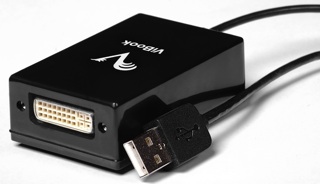
  Instead, I've been testing Village Tronic's ViBook, a small $129
  device with a DVI port on one end that plugs into the computer via
  USB. It supports up to 1680 by 1050 pixel resolution widescreen, or
  1600 by 1200 resolution for a conventional display at the 4:3 aspect
  ratio. You can connect up to four external displays using one ViBook
  for each monitor (and a USB hub, depending on the number of open USB
  ports on your Mac); under Windows, you can connect up to six ViBooks
  and monitors.

<http://www.vibook.it/eng/>
<http://www.tidbits.com/resources/2009-05/vibook.jpg>

  The ViBook includes a DVI-to-VGA cable if you want to connect a VGA
  display, a DVI adapter for connecting via DVI, and a mounting
  bracket for optionally attaching the ViBook to the back of a
  monitor.

  After I installed an included video driver, the ViBook was ready to
  go. (The ViBook driver software requires Mac OS X 10.4.11 or Mac OS
  X 10.5.5 or higher running on an Intel-based Mac.)

  Plugging the USB cable into my MacBook Pro made Mac OS X see the new
  monitor and let me begin using it; I didn't need to restart the
  computer. The most work on my part was going into the Displays
  preference pane and configuring the arrangement of my three screens.
  In no time, I had nearly 2 million more pixels at my disposal.


**Stutters and Limitations** -- Whether those pixels are actually
  helpful depends on how you plan to use them.

  The Read Me file included with the driver software (version 1.1, the
  most recent available at the time of this writing) notes two
  significant issues:

* No 3D (OpenGL/Quartz) acceleration, which means you'll run into
  problems if you try to do something that relies on graphics
  hardware, such as playing an iPhoto slideshow or a Keynote
  presentation. This limitation didn't prevent me from running iPhoto
  on that monitor, but starting a slideshow made the monitor
  unresponsive. I also discovered that iMovie '08 and iMovie '09,
  which rely heavily on graphics hardware, refused to launch at all,
  even if I didn't plan on using the application on the
  ViBook-connected display.

* A ViBook-enabled display can't be color-managed or calibrated, which
  rules out that screen for use as a photo or video monitor, or for
  doing serious work in an image editor such as Photoshop. The ViBook
  doesn't distort colors, but if you've already adjusted your other
  monitors, the colors likely won't match among the displays.

  As a result of these limitations, you need to remember which
  applications need to be quarantined away from the ViBook screen.

  The Read Me file also includes a list of nearly two dozen known
  issues, many of which boil down to problems running the ViBook
  display as the Mac's main display.

  (An aside: I applaud Village Tronic for including this level of
  detail in its release notes, but I don't like that the two main
  issues - 3D acceleration and color calibration - are listed only in
  the Read Me file distributed with the driver software. A disclosure,
  perhaps on the Tech Specs page of the ViBook Web site, should make
  it clear the software is limited in these respects. Otherwise you
  must either buy the product and install the software, or download
  the software before purchase and review the release notes there,
  which is unlikely to happen.)

  Ignoring those issues for a moment, a ViBook-enabled display suffers
  from reduced drawing performance overall. When moving a Finder
  window, for example, the motion stutters as the ViBook redraws the
  screen, giving the impression that it's operating at a reduced frame
  rate. Playing videos in QuickTime Player and iTunes similarly
  lagged, with the audio and video drifting out of sync after 30
  seconds or so. (So that rules out using a ViBook display as a
  dedicated screen for watching movies or TV shows.) I also can't
  imagine it would work at all for fast-action gaming.


**The ViBook Upside** -- Despite the shortcomings, I think the ViBook
  has a lot to offer. I mentioned earlier that its usefulness depends
  on how you want to use a third (or fourth, or fifth...) display. If
  you just want to stretch out and view more data, the ViBook works
  quite well. For example, while doing some Web design work, it was
  great to preview site iterations (ignoring the colors) and
  experiment with style sheets in CSSEdit on the ViBook display while
  I used BBEdit for coding and Photoshop CS4 for images on my primary
  display.

  I also used the extra screen to monitor remote computers using
  Screen Sharing, to push iTunes off my main display, and to keep
  several OmniOutliner documents open to refer to notes without having
  to sort through layers of document windows belonging to various
  applications.

  I can imagine that people who need quick access to broad sets of
  information, such as real-time stock market data, would benefit from
  chaining several monitors to one machine. I was able to test just
  one extra monitor on my setup (having only one ViBook at my
  disposal), and it was like stepping out of a crowded room to an
  adjacent courtyard. After years of working with layers of hidden
  windows, spreading them out is refreshing.

  Is using the ViBook the same as connecting a second or third monitor
  to a hardware graphics card in a Mac Pro? No, and early this year,
  Adam actually bought a Mac Pro expressly so he could run a pair of
  matched 24-inch monitors at 1900 by 1200 resolution (larger than the
  ViBook supports) and without worrying about Quartz-accelerated
  applications, slow redraws, or color weirdness. But depending on
  what you're expecting out of it, the ViBook can provide more room to
  work in programs that don't require the level of performance you'd
  get (and have to pay for) with a Mac Pro.


TidBITS Watchlist: Notable Software Updates for 22-Jun-09
---------------------------------------------------------
  by Doug McLean <[email protected]>
  article link: <http://db.tidbits.com/article/10361>

  Bluetooth Firmware Update 2.0 from Apple comes with brief release
  notes saying only that the update "provides bug fixes and better
  compatibility with the Apple Wireless Mighty Mouse and Apple
  Wireless Keyboard." Apple also notes that the update should be
  installed on any Macintosh system whose Bluetooth support is based
  on the Broadcom chipset. To find the manufacturer of your Mac's
  Bluetooth chipset, run System Profiler, click Bluetooth under
  Hardware in the sidebar, and check the Manufacturer line. The update
  is available via Software Update and from the Apple Support
  Downloads page. (Free, 1.78 MB)

<http://support.apple.com/downloads/Bluetooth_Firmware_Update_2_0>

  Sync'Em 1.30 from Derman Enterprises is an update to the
  multi-platform syncing utility. Changes include a new setup
  assistant with a simplified interface, the capability to relaunch
  the Sync'Em Engine if it fails, improved handling of corrupt SQLite
  database files, and the capability to handle contact notes that are
  too large for Google to accept. Also, several issues have been
  resolved, including one that prevented Exchange from accepting
  certain iCal alarm conditions, and one that prevented Sync'Em from
  recovering from lost Exchange EWS IDs.

<http://www.syncem.com/>

  DiscLabel 6.0.1 from SmileOnMyMac is a bug fix update following a
  major upgrade of the CD and DVD label design software. Changes in
  DiscLabel 6.0 include 80 new template sets, a redesigned interface,
  an improved image import palette, a new inspector palette, a new
  montage tool that enables users to create montages and add them to
  design elements, an enhanced random design generator, and support
  for automatic software updating via Sparkle. ($35.95 new, free
  update, 12.7 MB)

<http://smileonmymac.com/DiscLabel/>

  Safari 4.0.1 from Apple is a maintenance update to the recently
  updated browser which "...addresses incompatibilities between Safari
  4.0 and certain features in iPhoto '09, including Places and
  Facebook publishing." The update is available via Software Update or
  from the Safari download page. (Free, 43.5 MB)

<http://www.apple.com/safari/download/>


ExtraBITS for 22-Jun-09
-----------------------
  by TidBITS Staff <[email protected]>
  article link: <http://db.tidbits.com/article/10365>

**John Gruber Opines about WSJ Liver Transplant Article Sourcing** --
  Late on 19-Jun-09, The Wall Street Journal published a surprising
  article about Steve Jobs having a liver transplant, but even more
  surprisingly, cited no sources for the information. John Gruber of
  Daring Fireball follows the threads to suggest that perhaps the
  source was a member of Apple's Board of Directors. (Posted
  2009-06-22)

<http://daringfireball.net/2009/06/wsj_steve_jobs_liver_transplant>


**New Hotspot Handling in iPhone 3.0** -- The new iPhone 3.0 software
  includes a better way of handling recurring hotspot logins by
  capturing the gateway login page information that you enter and
  re-joining the network automatically. This new method also
  introduced some bugs in existing Wi-Fi connection managers. Glenn
  Fleishman explains all at Macworld. (Posted 2009-06-18)

<http://www.macworld.com/article/141219/2009/06/iphone_3_wifi_hot_spots.html>


**Apple Kills Q&A at WWDC App Store Session** -- Marco Arment is
  reporting a surprisingly dismissive gesture by Apple at WWDC. After
  the final developer session about publishing on the App Store, Apple
  cut, without notice or explanation, the standard Q&A segment that
  provides developers a crucial opportunity to go beyond the presented
  content. Apple's refusal to allow questions raises another one: What
  is Apple afraid of hearing from iPhone developers? (Posted
  2009-06-16)

<http://www.marco.org/122990476>


**Adam Looks More at WWDC on the Tech Night Owl Live** -- If you just
  can't get enough WWDC coverage, don't miss Adam's recent podcast
  appearance on the Tech Night Owl Live to discuss all of Apple's
  announcements with Gene Steinberg. (Posted 2009-06-16)

<http://www.techbroadcasting.com/podcast/june-10-2009-adam-engst-lance-ulanoff-justin-sanderson-and-lee-givens/>


Hot Topics in TidBITS Talk for 22-Jun-09
----------------------------------------
  by Jeff Carlson <[email protected]>
  article link: <http://db.tidbits.com/article/10371>

**Click to Flash and YouTube** -- Click to Flash can automatically
  display the H.264 QuickTime version of YouTube videos, as can some
  other utilities. (5 messages)

<http://emperor.tidbits.com/TidBITS/Talk/2711>


**iPhone running software** -- Readers discuss which iPod and iPhone
  models include support for the Nike+ software and hardware. (8
  messages)

<http://emperor.tidbits.com/TidBITS/Talk/2712>


**Upgrade to iPod Touch** -- With the iPhone updated, readers turn to
  speculation about what the next revision of the iPod touch will
  bring, as well as a discussion of getting Internet access at Wi-Fi
  hotspots. (24 messages)

<http://emperor.tidbits.com/TidBITS/Talk/2714>


**The Art of iPhone Photography** -- The iPhone's built-in camera gets
  the TidBITS Talk scrutiny. (8 messages)

<http://emperor.tidbits.com/TidBITS/Talk/2716>


**Unable to upgrade RAM in dual G5** -- After repeated failure to
  upgrade RAM in a Power Mac G5, the question of that model's
  durability comes up. (9 messages)

<http://emperor.tidbits.com/TidBITS/Talk/2718>


**Java update** -- Readers report problems when installing the recent
  Java update that fixes a security vulnerability. (9 messages)

<http://emperor.tidbits.com/TidBITS/Talk/2719>


**Call AT&T for the Best iPhone Upgrade Price** -- The $99 iPhone 3G
  is somewhat misleading when you factor the cost of ongoing cellular
  service. (7 messages)

<http://emperor.tidbits.com/TidBITS/Talk/2720>


**Clever address field parsing in Web browsers** -- Adam likes
  Firefox's smart suggestions based on what's typed in the address
  field, although LaunchBar can bring some of the same capabilities to
  other browsers. (2 messages)

<http://emperor.tidbits.com/TidBITS/Talk/2722>


**Some observations about the new iPhone/iPod Touch OS** -- Readers
  start sharing their impressions of the iPhone OS 3.0 software. (4
  messages)

<http://emperor.tidbits.com/TidBITS/Talk/2723>


**Upgrading from iPod Touch to iPhone** -- What's the best way to move
  one's data from an iPod touch to an iPhone? Is it just a matter of
  plugging in the new device? (1 message)

<http://emperor.tidbits.com/TidBITS/Talk/2725>


**AirPort Express Query** -- Can you access more than one printer from
  an AirPort Express if you attach a USB hub? (2 messages)

<http://emperor.tidbits.com/TidBITS/Talk/2726>


**Switching to Safari 4: plugins?** After switching to Safari 4, a
  reader looks for utilities that replicate the functionality of many
  Firefox plug-ins. (4 messages)

<http://emperor.tidbits.com/TidBITS/Talk/2727>


$$

This is TidBITS, a free weekly technology newsletter providing timely
news, insightful analysis, and in-depth reviews to the Macintosh and
Internet communities. Feel free to forward to friends; better still,
please ask them to subscribe!

Non-profit, non-commercial publications and Web sites may reprint or
link to articles if full credit is given. Others please contact us. We
do not guarantee accuracy of articles. Caveat lector. Publication,
product, and company names may be registered trademarks of their
companies. TidBITS ISSN 1090-7017.

Copyright 2009 TidBITS: Reuse governed by Creative Commons license.

Contact us at:    <[email protected]>
TidBITS Web site: <http://www.tidbits.com/>
License terms:    <http://www.tidbits.com/terms/>
Full text search: <http://www.tidbits.com/search/>
Subscriptions:    <http://www.tidbits.com/about/list.html>
Account help:     <http://www.tidbits.com/about/account-help.html>


--
If you want to unsubscribe or change your address, use this link
http://emperor.tidbits.com/webx?unsub@@.3c557dc4!u=306a67f9