TidBITS#984/29-Jun-09
=====================
  Issue link: <http://db.tidbits.com/issue/984>
  Once you've checked out the big Take Control sale this week, we have
  oodles of other articles for you. Glenn Fleishman was busy,
  explaining why it's unlikely that we'll see another U.S. iPhone
  carrier any time soon, testing the new push notification-capable AIM
  for iPhone, and covering the new Adobe BrowserLab service for
  comparing how Web pages render in different browsers. Not to be left
  out, Jeff Carlson reviews four programs for recovering accidentally
  deleted photos from a memory card, and Matt Neuburg explains the
  best way to format a new hard disk. Notable software releases this
  week include Tinderbox 4.7.0, Airfoil 3.3.1, Apple TV 2.4, Missing
  Sync for iPhone 2.0.2, Time Capsule and AirPort Base Station
  Firmware Update 7.4.2, Final Cut Pro 6.0.6, Camino 1.6.8, BBEdit
  9.2.1 and the MacBook Pro EFI Firmware Update 1.7.

Articles
    Take Control Sale: 50% Off All Ebooks
    TidBITS Mail Hub Change: Check Your Filters
    DealBITS Winners for DiscLabel 6
    AIM for iPhone Adds Push Notification
    Why AT&T Has a Lock on the iPhone
    How to Reformat a New External Hard Disk
    Adobe Tests Fast Browser Previewing for Designers
    Recover Erased Photos from a Memory Card
    TidBITS Watchlist: Notable Software Updates for 29-Jun-09
    ExtraBITS for 29-Jun-09
    Hot Topics in TidBITS Talk for 29-Jun-09


------------ This issue of TidBITS sponsored in part by: --------------

* READERS LIKE YOU! Support TidBITS with a contribution today!
  <http://www.tidbits.com/about/support/contributors.html>
  Special thanks this week to Daniel P. Richardson, Bob Arnold,
  Leonard D. Schloff, and Bill Chaloupka for their generous support!

* Fetch Softworks: With Fetch 5.5, FTP and SFTP are simpler
  than ever. Use it on Mac OS X to upload, download, mirror,
  and manage your Web site, images, videos, and data sets.
  Download your free trial version! <http://fetchsoftworks.com/>

* WebCrossing Neighbors Creates Private Social Networks
  Create a complete social network with your company or group's
  own look. Scalable, extensible and extremely customizable.
  Take a guided tour today <http://www.webcrossing.com/tour>

* Bare Bones Software's BBEdit 9.2 -- A burly upgrade with new
  Sleep command, LassoScript support, plus enhancements to Projects
  and core features like Find and Multi-File Search windows,
  editing in browsers, and text completion. <http://barebones.com/>

* THE MISSING SYNC FOR iPHONE: Sync notes, tasks, files and
  documents between your iPhone or iPod touch and a Mac. The
  Missing Sync for iPhone provides two-way syncing over Wi-Fi.
  Learn more - <http://www.markspace.com/bits>

* VMware Fusion. The most seamless way to run Windows on
  your Mac. Backed by nearly a decade of proven virtualization
  technology. Try VMware Fusion today for only $79.99.
  Visit: <http://www.tidbits.com/about/support/vmware-fusion.html>

* Microsoft's MacBU: Supporting Mac users with Office 2008.
  Straighten up your Office with the latest updates to Word,
  Excel, PowerPoint, and Entourage. Update today at Mactopia!
  <http://www.microsoft.com/mac/downloads.mspx>

* MacSpeech Dictate -- unleash the power of your voice with
  award-winning speech recognition solutions for the Mac.
  It's so easy to use - just talk! Now with spelling and
  phrase training. <http://tidbits.com/about/support/macspeech.html>

---------- Help support TidBITS by supporting our sponsors ------------


Take Control Sale: 50% Off All Ebooks
-------------------------------------
  by Tonya Engst <[email protected]>
  article link: <http://db.tidbits.com/article/10382>

  Learn more for less! We're having a 50%-off sale on all Take Control
  ebooks and Macworld Superguides through 07-Jul-09, so you can expand
  your library with our highly practical ebooks about Macs, Mac OS X,
  iLife '09, AirPort networking, and much more. To take advantage of
  this limited-time sale, visit our catalog using this coupon-loaded
  link, select the titles you want, and click the Buy Selected Ebooks
  button. You'll see the coupon code and the discount on the first
  screen of our shopping cart.

<http://www.takecontrolbooks.com/catalog-alpha?cp=CPN90629J4TH&pt=TB984>


**Macs & Mac OS X** -- In our catalog, you'll find new and updated
  titles that help you operate your Mac more effectively:

* "Take Control of the Mac Command Line with Terminal": Joe Kissell
  shows you how to release your inner Unix geek!

* "Take Control of Maintaining Your Mac, Second Edition": Keep your
  Mac running smoothly with an easy maintenance program!

* "Take Control of Troubleshooting Your Mac": Learn how to solve any
  Mac problem with Joe Kissell's expert advice!

* "Take Control of Running Windows on a Mac, Third Edition": Find
  essential advice for running Windows on your Intel-based Mac.

* "Macworld Mac Gems Superguide": Browse through 240+ reviews of
  inexpensive software to improve your Mac experience.

* "Macworld Mac Security Superguide": Protect your Mac from bad guys,
  malicious software, thieves, snoops, and other pesky problems.


**Applications** -- Make the most of your apps, whether you want to
  work creatively in iLife '09 or get going in style with the new
  Safari 4:

* "Take Control of iWeb '09": Learn how to make useful, attractive Web
  sites with iWeb '09.

* "iPhoto '09: Visual QuickStart Guide": Master every aspect of iPhoto
  '09 with step-by-step, visual instructions from Take Control
  publisher Adam Engst.

* "Take Control of Recording with GarageBand '09": Learn how to record
  complete songs with drums, keyboards, bass, strings, even
  horns...even if all you have is a beat-up electric guitar!

* "Take Control of Making Music with GarageBand '09": Get creative and
  make music with the built-in loops in GarageBand '09.

* "Take Control of Safari 4": Sharon Zardetto helps you make the most
  of Apple's Safari, a deceptively powerful Web browser with many
  hidden and under-appreciated features.


**AirPort Networking** -- You'll also find a pair of up-to-date ebooks
  from Glenn Fleishman about AirPort/Wi-Fi networking:

* "Take Control of Your 802.11n AirPort Network": Make your
  802.11n-based AirPort network fast, reliable, and secure! Updated
  for 2009 models.

* "Take Control of Your Wi-Fi Security": Learn how to keep intruders
  out of your wireless network and protect your sensitive
  communications.

  Thanks to everyone who has supported the Take Control series with
  purchases, feedback, and enthusiasm!


TidBITS Mail Hub Change: Check Your Filters
-------------------------------------------
  by Adam C. Engst <[email protected]>
  article link: <http://db.tidbits.com/article/10385>

  Late last week, as part of our continual upgrade plans, I threw the
  switch on an infrastructure change with our servers. In an attempt
  to reduce the effects of the constant onslaught of spam and to start
  removing myself from the never-ending task of administering email
  accounts for local users, I'm now routing incoming mail through a
  different server.

  The practical upshot of this change is that the server we use to
  send the TidBITS, TidBITS Talk, and Take Control mailing lists may
  now identify itself explicitly as emperor.tidbits.com instead of
  just tidbits.com in various email headers. As a result, if you
  filter or whitelist email from tidbits.com, you may need to adjust
  things to pick up emperor.tidbits.com as well as tidbits.com.

  Sorry for any inconvenience this causes!


DealBITS Winners for DiscLabel 6
--------------------------------
  by Adam C. Engst <[email protected]>
  article link: <http://db.tidbits.com/article/10381>

  Congratulations to Terrell Hall of mac.com, Tom Powers of zoran.com,
  and Larry Weakly of foxinternet.com, whose entries were chosen
  randomly in the last DealBITS drawing and who received a copy of
  DiscLabel 6, worth $35.95. Entrants to this drawing all received a
  20-percent-off discount on DiscLabel 6 (hey, sometimes you have to
  participate to get the discount!). Thanks to the 427 people who
  entered this DealBITS drawing, and we hope you'll continue to
  participate in the future!

<http://db.tidbits.com/article/10367>
<http://www.smileonmymac.com/DiscLabel/>


AIM for iPhone Adds Push Notification
-------------------------------------
  by Glenn Fleishman <[email protected]>
  article link: <http://db.tidbits.com/article/10374>

  AOL has pushed out a version of AIM (AOL Instant Messenger) for
  iPhone that features push notification of new messages. The program
  comes in two versions: free with ads, or $2.99 without ads. Both
  versions work with iPhone OS 2.0 software, but require iPhone OS 3.0
  to display alerts of new responses from chat partners when you're
  using other apps.

<http://itunes.apple.com/WebObjects/MZStore.woa/wa/viewSoftware?id=281704574&mt=8>
<http://itunes.apple.com/WebObjects/MZStore.woa/wa/viewSoftware?id=306610781&mt=8>

  The addition of push is the only major change to the iPhone AIM
  client, and it's a big one. (The other, minor, addition is typing in
  the landscape orientation.) You have to launch AIM and sign in to
  activate push. All programs that feature push have to be launched at
  least once to register their intent to push, even if there's no
  account configuration required.

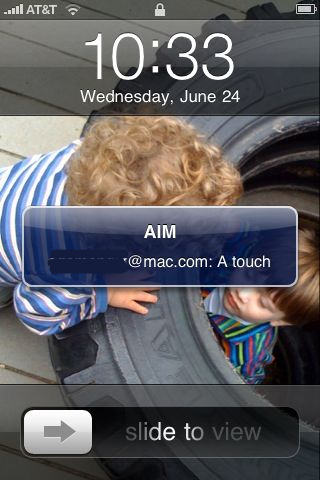
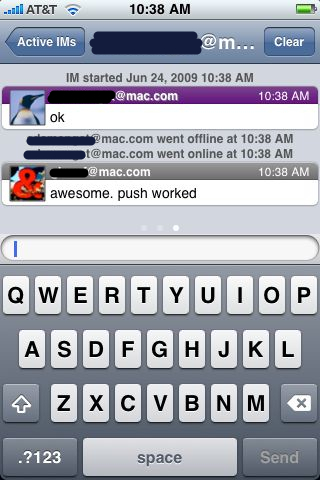
  Once you're signed in to AIM, the software lets you remain signed in
  for 24 hours, during which time incoming messages are displayed as
  push notifications if your iPhone is sleeping or if you're using
  other apps. If the iPhone's display is active and you're using AIM,
  messages are shown inline.

<http://www.tidbits.com/resources/2009-06/iphone_aim_push.jpg>
<http://www.tidbits.com/resources/2009-06/iphone_aim_scrn.jpg>

  The iPod touch receives notifications only if it's connected to a
  Wi-Fi network; while awake (display active), it shows messages
  instantly, and while sleeping, it checks every 15 minutes. The
  iPhone uses Wi-Fi only if a cellular connection isn't available, and
  Apple's developer guidelines says those messages are shown only if
  the iPhone is plugged in or awake. This appears to be either an
  inconsistency in how the iPhone and iPod touch handle push, or an
  error in one of Apple's documents.

<http://support.apple.com/kb/HT3576>

  AIM can work from multiple locations at once, which means you could
  be signed into iChat on one or more Macs and signed into AIM for
  iPhone. However, in testing, Adam Engst and I found that if you and
  your partner have encryption enabled in iChat, messages and sessions
  initiated in iChat don't generate push notifications. If you start
  responding to the same person in AIM for iPhone, encryption is
  disabled on iChat, and push notifications start up.

  You can disable iChat encryption (Preferences > Accounts > your
  account > Security), or make sure you're logged out of iChat on all
  machines if you want push notifications to work in AIM for iPhone.

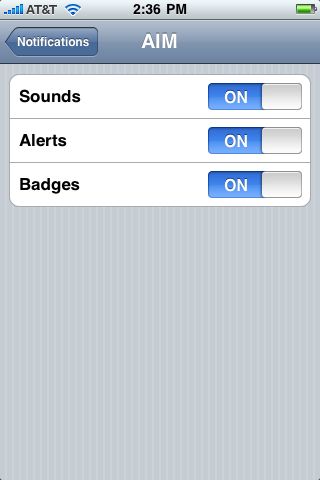
  Push notification behavior for an iPhone or iPod touch can be set
  through a new Notifications item that appears in the Settings app
  only after you've installed at least one program that uses push.
  There's a global setting to turn notification on or off, and then
  program-specific options. AIM offers the choice of disabling sound,
  alerts, and badges. (A badge is the number that appears on an app
  icon showing a quantity of something associated with the app.)

<http://www.tidbits.com/resources/2009-06/iphone_aim_notifications.jpg>

  The addition of push should be part of the inevitable decline of
  text messaging (also known as SMS). As I wrote in "When iPhone
  Pushes, Text Message Fees Fall" (2009-04-09), a text message might
  cost a carrier a fraction of a cent to handle, while the firms
  charge customers up to 25 cents per message.

<http://db.tidbits.com/article/10203>

  As far as the details that Apple has provided explain, push
  notification doesn't cost the customer or the software developer
  anything, and, in the United States, iPhones come with unlimited
  data plans. Push notifications are tiny, and even thousands of
  notifications should add up to no more than a megabyte per month,
  which shouldn't be a problem even in countries that cap data plan
  usage.

  Unlike SMS, push notification is best effort - Apple tells
  developers that "delivery of push notifications is not guaranteed."
  For instance, Apple's "quality of service" description says that
  notifications that can't be delivered are stored for a "limited
  period" before being deleted, and that only one notification per app
  is cached if a device isn't immediately reachable.

  SMS is designed to be more robust, and while there is also no
  guarantee, SMS text messages are almost always delivered unless a
  cell phone is either out of range or turned off for an extended
  period of time.

  SMS's key advantage is universality across carriers and countries,
  even though cross-border SMS is even more expensive than the
  ridiculous in-country charges. But AIM has tens of millions of
  users, and it's free to get an AIM account that works with iChat as
  well, so you could encourage anyone with whom you frequently text
  message and who has an iPhone or iPod touch to set up an AIM account
  for use with the iPhone client.

  That said, AIM can't yet replace SMS. The 24-hour sign-in limit
  might be AOL's way of reducing load or Apple's requirement to avoid
  damaging relationships with carriers. Still, I could see checking in
  to see if someone were on AIM before using SMS - and if not, sending
  an SMS message for them to log into AIM.


Why AT&T Has a Lock on the iPhone
---------------------------------
  by Glenn Fleishman <[email protected]>
  article link: <http://db.tidbits.com/article/10376>

  When AT&T mishandled public relations around the iPhone for the Nth
  time recently - in having no formulated or ostensibly correct answer
  about upgrade fees for existing subscribers - I heard plenty of
  folks counting the days until AT&T was no longer the exclusive U.S.
  carrier for Apple's iPhone. (See "Call AT&T for the Best iPhone
  Upgrade Price," 2009-06-15.)

<http://db.tidbits.com/article/10350>

  I don't want to say that it ain't gonna happen, because we all know
  that where there's a business will, there's a technology way. But
  there are a few big bars in the way.


**Cellular Standards** -- The foremost bar is that AT&T uses the GSM
  cellular standard, over which the vast majority of mobile phones
  operate worldwide. T-Mobile USA uses GSM as well. Verizon Wireless
  and Sprint Nextel long ago opted for CDMA, which is used by hundreds
  of millions of people in the United States and elsewhere, but has no
  future as a standard, as I'll explain.

<http://en.wikipedia.org/wiki/GSM>
<http://en.wikipedia.org/wiki/Cdma>

  Verizon has been much mentioned as a replacement or supplemental
  partner for Apple. But many folks forget that the iPhone simply
  can't operate on Verizon's network today. There is no technical
  reason why Apple cannot create a modified version of the iPhone that
  works on Verizon's current 2G and 3G networks.

  Except that Apple's mobile chip provider is still reportedly
  Infineon, and Infineon has no CDMA technology in its portfolio, only
  GSM. (If you read Infineon's site you'll see that the company
  supports WCDMA, which is connected only in underlying theory to
  CDMA. WCDMA is an encoding standard used in UMTS, the slowest 3G
  flavor used on GSM networks.)

<http://www.infineon.com/cms/en/product/channel.html?channel=ff80808112ab681d0112ab6ad7560649>

  That means Apple would have to switch chip providers or add another
  one, which would be difficult given Apple's penchant for secrecy and
  how closely the company has reportedly worked with Infineon.
  Infineon could develop its own CDMA chips, but Qualcomm owns an
  enormous number of patents related to CDMA (which it invented), and
  it would be a complex, long-term project for Infineon to obtain the
  rights. That all makes it highly unlikely in the short run.

<http://www.qualcomm.com/news/releases/1999/press458.html>

  Infineon also has one software-defined product, where software can
  reshape the radio standards supported in the chip, but CDMA isn't on
  the list of supported standards.

  Further, it's hard to see why Apple would start down the CDMA path
  at this moment, because Verizon Wireless and Sprint Nextel have both
  abandoned the CDMA roadmap for their 4G networks, and Qualcomm has
  discontinued development on its 4G standard. Verizon and Sprint use
  Qualcomm's 3G standard, EVDO, but both have committed to different
  fourth-generation network standards. (EVDO doesn't allow data and
  voice at the same time, which would seemingly be a non-starter for
  Apple.)

<http://en.wikipedia.org/wiki/EVDO>

  Of course, T-Mobile currently uses the same GSM standard as AT&T.
  However, T-Mobile was late to the spectrum game, and has deployed 3G
  only in limited cities. Further, T-Mobile acquired some spectrum
  that hasn't been used before for 3G in the United States, nor in
  other countries. T-Mobile's 3G phones support a different set of
  spectrum bands than those sold by AT&T for international use, and
  the iPhone doesn't include the band required for some of T-Mobile's
  3G spectrum.


**What about LTE and WiMax?** AT&T, T-Mobile, and Verizon will all use
  LTE (Long Term Evolution), which is considered a GSM-evolved
  protocol - the standard has come from the GSM worldwide trade group
  - and has emerged to be the dominant next-generation or 4G mobile
  standard. LTE will have a top throughput of 50 to 200 Mbps,
  depending on how wide a frequency range is assigned by carriers to
  channels. In the United States, a real per-user speed could hit 4 to
  8 Mbps in routine use, and peak at much higher rates in bursts.
  Companies working on LTE phones and telecom analysts don't expect
  handsets with LTE built in for a while - 2011 will likely be the
  earliest, but it could even be 2012.

<http://en.wikipedia.org/wiki/3GPP_Long_Term_Evolution>
<http://www.gsmworld.com/>

  Sprint has opted for WiMax, because the firm wanted to get a 4G
  network deployed faster for competitive reasons, and wasn't sold on
  LTE when it made the call. Sprint merged its holdings with
  Clearwire, of which it now owns a majority, and has put WiMax in
  four major cities so far (Atlanta, Baltimore, Las Vegas, and
  Portland, Oregon). Sprint's choice of WiMax makes it unlikely to
  work as an Apple partner, and Sprint was also the exclusive debut
  carrier for the Palm Pre, as well. (Again, WiMax could be added to
  an iPhone at some point, but the future worldwide market for WiMax
  seems extremely small compared to current LTE plans.)

<http://en.wikipedia.org/wiki/Wimax>
<http://www.clearwire.com/>

  Clearwire expects to have WiMax built out to pass 120 million people
  by the end of 2010, but Verizon and AT&T likely won't hit that
  population with LTE until well into 2011 or even 2012 with currently
  announced plans. After that, however, LTE will likely surpass WiMax
  by a vast margin.

  I could see Apple taking one of two paths. One would be to stick
  entirely with the GSM roadmap, upgrading new iPhone models with
  faster HSPA standards as they appear, and adding LTE to a future
  iPhone as AT&T starts to deploy that standard in earnest in about
  two years. That buys the iPhone access to 4G networks worldwide,
  including Verizon's, although only for LTE.

  This strikes me as most likely because it's a simple, effective plan
  that encompasses the majority of advanced-network users worldwide
  now and over the next decade. The latest reports put worldwide GSM
  users at 4 billion and CDMA at 500 million, roughly, although a good
  portion of those subscribers don't have faster than 2G network
  access.

  The second path, which seems more fussy and thus less likely, would
  be for Apple to wait for both AT&T and Verizon to have significant
  LTE deployments that are backed up by slower and more robust
  CDMA/EVDO and GSM/EDGE/3G networks where LTE coverage is
  unavailable.

  At that point, Apple could produce an iPhone that could support all
  those standards. The reason that Apple would need to add at least
  CDMA (and possibly EVDO) to work on Verizon's network is that
  Verizon will continue to operate its slowest 2G voice networks using
  CDMA for some time, perhaps another decade. First-generation analog
  voice service was discontinued only last year, many years after 2G
  voice was fully deployed. It's unlikely a Verizon customer would
  tolerate an LTE-only phone.

  Currently, AT&T has about 80 million and Verizon about 90 million
  U.S. subscribers, and both carriers will continue to grow. It does
  seem odd for Apple to forego a potential large hunk of users in the
  United States, but looked at worldwide, focusing on GSM and LTE is a
  simpler course of action.

  It's still possible that Apple has a card up its sleeve, but I don't
  see how that's possible without bringing in another chip maker, and
  firing up operations that would be highly specific to the U.S.
  market. Never say never with Apple, but I believe that AT&T is where
  the iPhone will remain for the next couple of years.


How to Reformat a New External Hard Disk
----------------------------------------
  by Matt Neuburg <[email protected]>
  article link: <http://db.tidbits.com/article/10307>

  Reformatting a new external hard disk? You wouldn't think this would
  constitute any challenge, would you? You start up Disk Utility, you
  select the external disk, you switch to the Erase panel, and you
  take a deep breath and click Erase, right? Wrong.

  It happens that, perhaps because of the changing economics of
  external hard disk acquisition (fancy talk for "they've gotten a lot
  cheaper lately"), I've recently had to reformat several new external
  hard disks. These include a shirt-pocket sized Maxtor Mini for
  taking my compressed music collection along on airplane trips, a
  larger Maxtor OneTouch that I made a friend buy when I discovered
  that his wife's compulsive ripping of The Prisoner episodes from the
  local library had filled up her iMac's internal disk, an AcomData to
  serve as my mother's iMac's Time Machine backup, and most recently a
  whopping 1 TB Fantom GreenDrive, a rugged, cool, silent machine that
  I picked up for less than $100 at Buy.com. In every case I started
  by trying to use Disk Utility's Erase panel, and in every case I
  encountered some sort of initial failure. In the case of the Fantom
  drive, there were even printed instructions saying to do this, and
  they were wrong. Wrong, I tell you!

  So, since experience has taught me the _right_ way (repeatedly,
  because I so readily forget what experience has taught me), I'm
  going to give you the benefit thereof and put this canard to rest
  once and for all. This is what you do:

  Launch Disk Utility. Plug the new external drive into your computer,
  provide it with power as needed, and switch it on. When the new disk
  appears in Disk Utility, select its _top-level_ icon. (I stress this
  because the disk is represented by two icons, one for the physical
  disk, as it were, and one for the single volume it contains.) Now
  switch, not to Erase, but to Partition.

  On the Partition pane, everything will appear to be greyed out, as
  if you had encountered a brick wall. That's because before you can
  do anything, you have to change the partition arrangement, using the
  Volume Scheme pop-up menu. You have to do this even if you don't
  actually want to change the number of partitions. So, the Volume
  Scheme pop-up menu starts out saying Current. Change that. The
  minimal change is to 1 Partition. I'm not going to tell you that you
  need any more partitions than one, or how big they should be; that's
  up to you, and depends on how this disk will be used.

  Now stop. Stop! I know you think the next thing to do is give the
  drive a name and assign it a format - probably Mac OS Extended
  (Journaled), the default (and rightly so). But don't do it yet. See
  the Options button below the rectangular graphic depicting your
  partition scheme? Click it. Click it! _This_ is the key,
  all-important step. From this one step stems all the trouble or
  goodness, the success or failure that your reformatting of this new
  external hard disk will be met with.

  Why? Because there are three possible _partition schemes_, and many
  disks come with Master Boot Record, which is absolutely wrong for a
  Mac. You must choose between GUID Partition Table and Apple
  Partition Map. The latter is the most universal for use with Macs;
  you can't go wrong this way, _unless_ you want to use the disk as a
  startup disk. If you do, then your choice here depends on what kind
  of Mac you want to start up from this disk. Intel-based Macs prefer
  GUID Partition Table; they can boot from disks partitioned using
  Apple Partition Map, but won't let you install Leopard to such disks
  directly (you must clone a copy of Leopard from a GUID-partitioned
  disk to get this to work), and will prevent you from installing
  firmware updates on your Mac while you're booted from such a disk.
  On the other hand, PowerPC-based Macs can boot only from an Apple
  Partition Map disk. (See Jonathan "Wolf" Rentzsch's "Booting an
  Intel iMac from an External Drive," 2006-01-30.) Apple also cautions
  that the same distinction applies if the disk is to be used as a
  Time Machine backup, though I'm not entirely certain why.

<http://db.tidbits.com/article/8405>
<http://support.apple.com/kb/TS1550>

  So choose your partition scheme and click OK. _Now_ enter a volume
  name and a format, and click Apply. Presto! The disk is reformatted
  in the twinkling of an eye, and is ready for use.


Adobe Tests Fast Browser Previewing for Designers
-------------------------------------------------
  by Glenn Fleishman <[email protected]>
  article link: <http://db.tidbits.com/article/10356>

  Yours truly has been cursing at Web browsers since 1994. That gives
  me some pedigree in suggesting that Adobe BrowserLab is the finest
  method I've seen over 15 years in checking whether a Web page you've
  designed will look the way you want on browsers used by the majority
  of Internet users. (The service is currently in a limited-user
  preview stage.)

<https://browserlab.adobe.com/>

  Why test? Because no two browsers appear capable of rendering the
  same Web page in precisely the same way. The further you go back in
  time with browser versions, the greater the disparity among
  rendering and the more errors that show up with perfectly valid
  code. But even the latest releases of major browsers still have
  peculiarities that require tweaking.

  BrowserLab lets you enter a URL and rapidly see the resulting Web
  page as it appears in the seven most popular browser versions
  currently in use: Firefox 2.0 (Windows XP and Mac OS X), Firefox 3.0
  (XP and Mac OS X), Internet Explorer 6 and 7 (XP), and Safari 3 (Mac
  OS X). BrowserLab requires Flash 10, but no additional plug-ins.

  What makes BrowserLab different from services like BrowserCam or
  BrowserShots is that it's intended to be nearly interactive, rather
  than just a screenshot service. Enter a URL and within a few
  seconds, the results are shown. Different views let you look at two
  browser previews against each other, too.

<http://www.browsercam.com/>
<http://browsershots.org/>

  The idea behind BrowserLab is quite simple: "Making sure you have
  design integrity, and you have easy access to cross-browser
  previewing," said Scott Fegette, an Adobe Dreamweaver product
  manager.

  Fegette sees BrowserLab as an extension of Dreamweaver's ability to
  "find problems and help you fix them" as you design or tweak pages.
  But he also said Dreamweaver designers need the context of "real
  browsers." BrowserLab has a light layer of integration with
  Dreamweaver CS4 via a palette, but can be used entirely
  independently as well.

  Fegette said that Adobe wanted to design a service that had a very
  short wait time for previews to be generated. Other browser capture
  services - many of which feature an inordinate number of browsers
  and platforms - take minutes or tens of minutes to generate
  screenshots, which have to be downloaded and viewed. "Designers
  couldn't work iteratively," Fegette said.

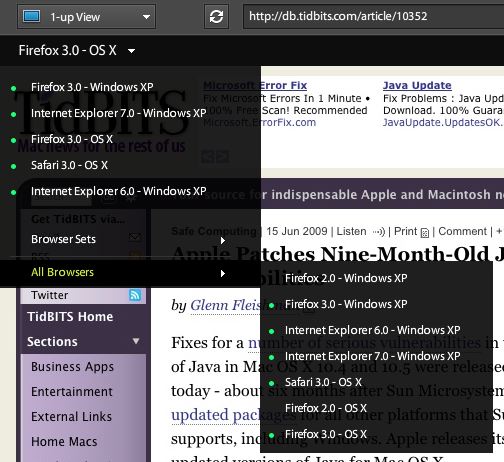
  BrowserLab loads screen captures within the Flash frame from the
  seven supported  browsers noted above. You can also create one or
  more "browser sets," which is handy if you're testing only against,
  say, Firefox 3 and IE 7, but not Safari 3 and Firefox 2.

<http://www.tidbits.com/resources/2009-06/browserlab_browsersets.jpg>

  While pages load, the site displays a little spinner animation to
  show which browsers are still loading and which have completed.
  That's a nice bit of feedback. On the backend, Adobe uses a
  combination of virtualized and dedicated servers to create page
  previews.

  You can view browser captures in one of three ways: 1 up, 2 up, and
  onion skin. The 1-up mode is obvious: it shows a single capture,
  selected from a pop-up menu at the upper left. The 2-up view lets
  you compare captures side by side, selecting the browsers from menus
  on the left and right. Scrolling horizontally or vertically moves
  both captures in lockstep. (The screen captures are created with
  some depth, so you can see a reasonable way down a page.)

  Onion skin overlays two browser views with transparency to help
  designers create pixel-identical layouts (or at least layouts close
  to that) in every browser; it's an easier solution than the common
  approach of bringing screenshots into a Photoshop document and
  putting them in separate layers. A slider lets you adjust the
  relative transparency levels of each browser.

<http://www.tidbits.com/resources/2009-06/browserlab_onionskin.jpg>

  Assisting in any mode, but especially useful in onion skinning, is a
  zoom function from 75 percent to 200 percent. The site also has a
  set of hot keys for switching among browsers (arrow up and down),
  zooming (+ and -), switching among views (1 for 1 Up, 2 for 2 Up,
  and 3 for Onion Skin), and adjusting onion skin transparency (left
  and right arrows).

  Internet Explorer 6 was continually mentioned both by Fegette and
  myself (and fellow TidBITS editor Jeff Carlson, also in on the
  interview). IE 6 continues to have relatively high use on
  general-purpose Web sites, and is often the only browser in which a
  given site is broken. Fegette said that Dreamweaver designers might
  fix a problem that the program said would cause IE 6 rendering
  issues, but then not be able to preview that page in IE 6. (Windows
  doesn't like having multiple versions of IE installed, although you
  can cajole it.)

  Fegette said that Adobe has many plans for future iterations of
  BrowserLab, based on the response to the preview. More browsers will
  obviously be added, with the top items being IE 8, Safari for
  Windows, and Google Chrome. Fegette didn't mention Safari 4 in
  particular, which was still in beta when we talked.

  He also said that the initial response was so strong and positive
  that he can see a lot of room for expansion. Mobile browsers,
  previewing how a page would look in a cell phone browser, is also
  high on Adobe's list. The iPhone is of keen interest, but even
  designers who aren't specifically creating sites for mobile phones
  want to start preparing for it.

  However, Fegette noted that mobile browsers are a challenge because,
  although the majority of smartphone operating systems - Symbian,
  Android, and iPhone - are standardizing on WebKit, "they're all
  using different builds."

  BrowserLab is currently in preview release, opening for use by
  additional people at irregular intervals as Adobe scales resources
  and tweaks the site. When BrowserLab was opened for use on
  03-Jun-09, Fegette said the plan was to allow 3,500 people on a
  first-come, first-served basis. By 9:00 AM on the launch day, the
  team had accepted 8,300 people, and had to shut down enrollment.

  Broader enrollment is planned for July, but until then you can
  follow the project on Twitter to get updates when Adobe accepts new
  small contingents. You can use an existing Adobe ID, or you can
  create a new account.

<http://twitter.com/adobebrowserlab>

  The preview of BrowserLab is free, but the service will ultimately
  cost money. How much hasn't yet been decided, Adobe said. BrowserCam
  costs $60 per month or $400 per year for unlimited use. BrowserShots
  is free with best-efforts results, or $30 per month for expedited,
  unlimited requests with support.

  Fegette echoed my feelings about a service that he was instrumental
  in creating: "I really wish I had this 10 years ago."


Recover Erased Photos from a Memory Card
----------------------------------------
  by Jeff Carlson <[email protected]>
  article link: <http://db.tidbits.com/article/10320>

  Yes, I did that bone-headed memory card thing: I erased one of my
  camera's SD cards before I transferred the photos to my Mac. After
  performing the requisite forehead slapping, I went in search of
  software that would get my pictures back.

  Notice that I didn't panic. When a camera or computer typically
  erases a memory card, the images aren't actually deleted. The blocks
  on the memory are marked as recordable, so new data writes over the
  old. In this case, I was confident I could get the photos, since I
  hadn't shot any new images since erasing the card. Some cameras can
  optionally perform a low-level format of a card, which overwrites
  all the card's data. Camera manufacturers don't make the distinction
  easier, since some models, such as my Nikon D90, refer to erasing
  the card as "formatting," but the photos are still recoverable.

  If you're reading this article because you just accidentally erased
  a card and searched the Web for a solution, take a breath and know
  that it's highly likely you'll get your photos back. Remove the card
  from the camera so you don't shoot any more pictures that could
  overwrite your "erased" ones, and read on.


**Data Rescue II** -- First, I checked to see if I already owned
  something that could do the job. Prosoft Engineering's Data Rescue
  II is designed to search through hard disks and recover their data.
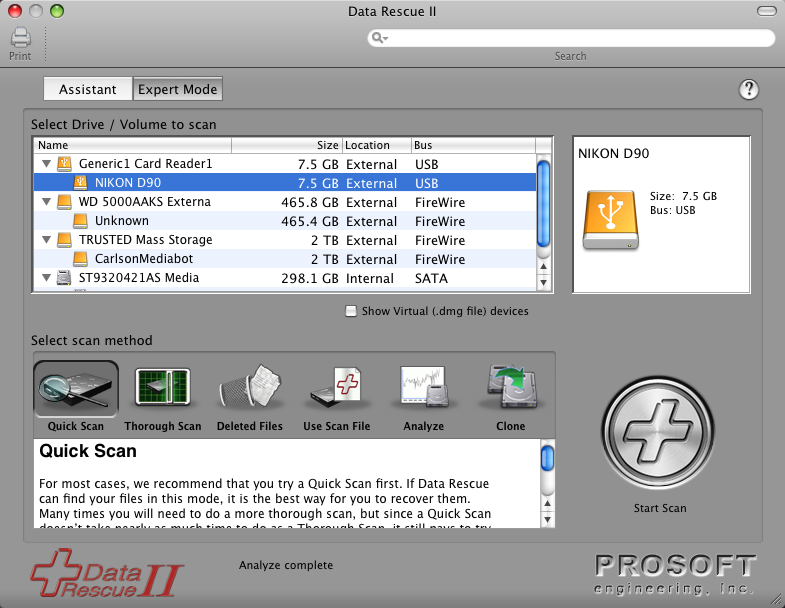
  Using the program's Assistant mode, I performed a Thorough Scan,
  which looked at every block on the card. Scanning the 8 GB card took
  about 15 minutes on my 2.33 GHz MacBook Pro.

<http://prosoftengineering.com/products/data_rescue.php>
<http://www.tidbits.com/resources/2009-06/data_rescue_ii.png>

  The downside to using Data Rescue for this purpose is that it
  assumes you're searching for file names, not images. I could see
  that the file T4352x2868-00387.nef could be recovered, but I didn't
  know what image the file contained. The scan revealed every file it
  could, which included photos I'd already imported into Aperture.

  At the time, I wasn't choosy (so I may have panicked a little when I
  saw that my photos were gone), so I was happy to recover all 5 GB
  worth of them. I would have to sort through them later, but at least
  the images were safe.

  Data Rescue II costs $99 and requires Mac OS X 10.2.4 or later. A
  demo version is available as a 14.2 MB download.


**Klix** -- I imagine someone at Prosoft Engineering must have erased
  a media card at some point and run into the same issues I did,
  because the company's JoeSoft division offers Klix, a $29.95 utility
  specifically designed to grab erased media.

<http://www.joesoft.com/products/klix.php>

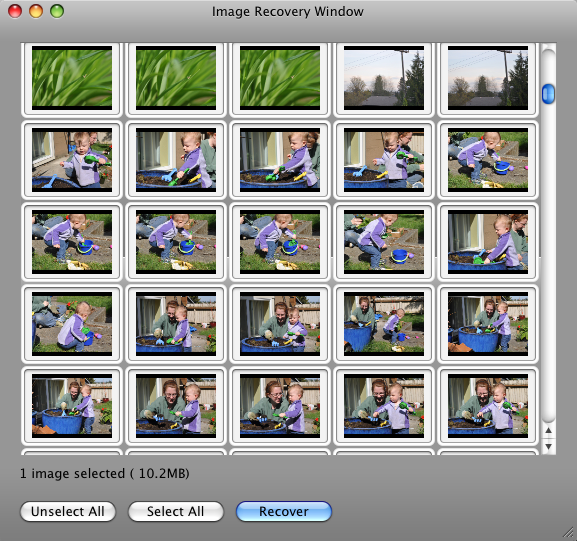
  The Klix interface is simple: one window where you select your media
  card and start scanning, and an Image Recovery window where you
  preview the images Klix locates.

  The software first copies the entire contents of a card to your hard
  disk for backup (an option that can be turned off in the program's
  preferences). Depending on the card's capacity, expect to wait
  several minutes and watch a progress bar creep across the screen.
  This temporary duplicate is deleted when you quit the program.

  After copying, Klix scans the card for media (more waiting, about 20
  minutes for my 8 GB card), and then displays the images in the Image
  Recovery window. I could select all images or just the ones I was
  missing, then click the Recover button to copy them to a folder of
  my choosing on my hard disk.

<http://www.tidbits.com/resources/2009-06/klix_recovery_window.png>

  Having thumbnails of the card's images, which Data Rescue doesn't
  offer, makes a huge difference. I was able to choose just the
  missing shots and recover them. That said, the thumbnails are small
  and are just one size; you can't zoom in to see more detail. And,
  for some reason, the Image Recovery window can be expanded in
  height, but the width is limited to five pictures across.

  I want to also mention an annoyance. When the application first
  launches, it asks if you'd like to check for updates - a completely
  reasonable feature. You can click Yes or No to perform the check,
  but there's also a box marked "Check for updates on launch."
  Clicking Yes to check for the update opens another modal dialog that
  notes you have the latest version; you must click OK to get rid of
  it. The problem is that it's not an automatic option: the same
  dialog appears every time you open the program. Just let me
  authorize a quick online check at startup once, make it happen in
  the background, and bother me only if there's an actual update.

  Those quibbles aside, the end result is that I was able to recover
  just the photos I wanted (about 1 GB worth) instead of everything on
  the card thanks to Klix's image previews.

  Klix costs $29.95. A free demo version can scan and locate images on
  a card, but is limited to recovering one file of any size. The
  software is a 2 MB download and requires Mac OS X 10.2.4 or later.


**Photo Recovery for Mac 3.5** -- Another utility, AppleXsoft's Photo
  Recovery for Mac, offers more granularity for locating erased
  images. While Klix locates all media files, Photo Recovery for Mac
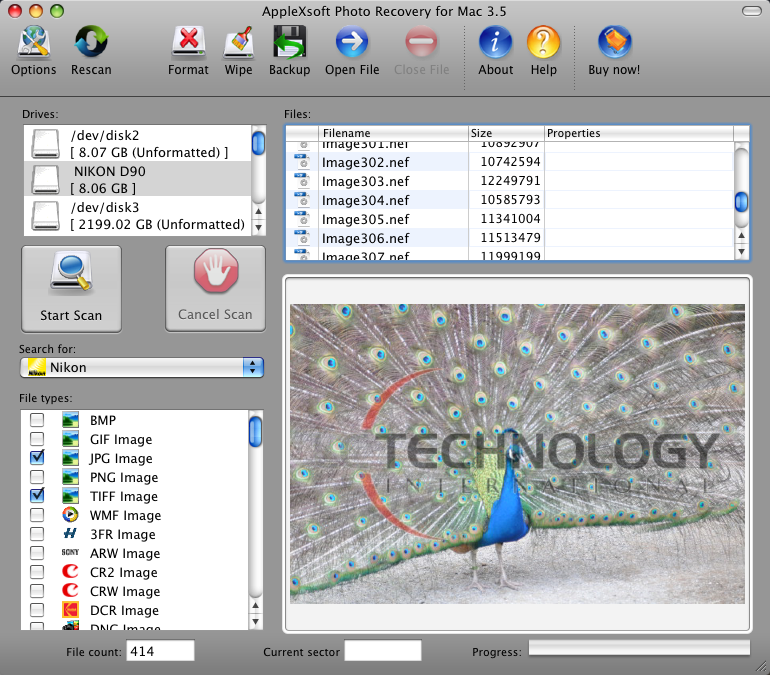
  can search for just the file types you know (or suspect) are on the
  card. Choosing Nikon from the Search pop-up menu selected JPG Image,
  TIFF Image, and NEF Image (the latter being Nikon's raw file
  format). In fact, Photo Recovery doesn't limit itself to just photos
  and videos; there are options to locate Excel and PowerPoint files,
  Zip archives, audio formats, and more.

<http://www.applexsoft.com/mac-photo-recovery-for-digital-media.html>
<http://www.tidbits.com/resources/2009-06/photo_recovery.png>

  What also impressed me, at first, was the capability to start
  previewing photos while Photo Recovery performed its scan,
  displaying a selected file in a large preview area that scales with
  the application's window. This feature let me start looking for the
  batch of missing pics right away.

  However, that turned out to be something of a trick: I wasn't
  actually previewing and selecting photos, because Photo Recovery was
  _performing the recovery_ during the scan, copying all the files it
  found to my hard disk. That did allow me to open a file and edit it
  if I wanted, but I didn't need to wait for the time Photo Recovery
  took to retrieve those I didn't want.

  I should point out something important, but not thoroughly tested. I
  discovered that none of my applications - including Adobe Photoshop
  CS4 and Nikon Capture NX 2 - could open the NEF images Photo
  Recovery created. The AppleXsoft Web site notes that the "saving
  option" is disabled in the evaluation version, so I'm assuming that
  Photo Recovery may be deliberately mangling file data in the demo
  version, which is what I was using.

  The free demo is available as a 4.8 MB download. Photo Recovery for
  Mac costs $49.99 and requires Mac OS X 10.3 or later.


**Image Rescue 3** -- I remembered that a Lexar memory card I bought
  at one point included a free version of Lexar Image Rescue, but the
  software had long ago been sacrificed to the evil mound that is the
  cluttered top of my desk; also, I think it was distributed on a mini
  CD, which can't be used with any of my slot-loading Macs. The
  company's Image Rescue 3.0 came highly recommended from some of my
  contacts, however, and I can see why.

<http://en.wikipedia.org/wiki/Mini_CD>
<http://store.lexar.com/?category=25&subcategory=46>

  Image Rescue 3 boasts the friendliest interface of the lot, with
  step-by-step sections that explain what is happening and what will
  happen next. Like Photo Recovery, Image Rescue can narrow the list
  of file types to search, with camera presets to search for
  compatible formats. It also allowed me to preview the images before
  copying them to my hard disk.

<http://www.tidbits.com/resources/2009-06/image_rescue_types.png>

  Image Rescue 3 costs $28.99, and Lexar does not offer a demo
  version. If you've purchased a Lexar card, look for a URL in the
  card's documentation that points to a free download on the Lexar Web
  site.


**Putting a Price on Memory** -- Each application I've mentioned here
  also includes features for erasing memory cards, including low-level
  formats that can help remove drive corruption issues. Image Rescue 3
  can also test a card to help identify potential problems, and it can
  burn images to a CD or DVD.

  I'd like to think that I've learned my lesson and this will be the
  last time I use any of these utilities. That's why I initially
  thought the programs were priced too high; why pay $30 or $50 for an
  application you're going to use infrequently? But the answer came
  off the card in the form of the photos, digital captures of moments
  that can't be repeated. And honestly, I can't rule out future
  bone-headed memory card moments in my future.


TidBITS Watchlist: Notable Software Updates for 29-Jun-09
---------------------------------------------------------
  by Doug McLean <[email protected]>
  article link: <http://db.tidbits.com/article/10373>

  Tinderbox 4.7.0 from Eastgate Systems is a significant update to the
  personal content assistant. Maps and charts receive a slew of new
  features including added shapes, fill materials, and support for
  Dashboard. Also, new smart adornments help manage and organize your
  maps by automatically gathering, sorting, and arranging notes and
  then extracting pertinent information, setting or removing tags, or
  even posting messages on Twitter. Finally, the update brings a new
  Chart view, improved handling of link labels, and a speed bump for
  agents, actions, and rules. ($229 new, free updates for purchases
  within the last year or $90 otherwise, 28.7 MB)

<http://www.eastgate.com/Tinderbox/>

  Airfoil 3.3.1 from Rogue Amoeba is a minor maintenance update to the
  audio distribution tool. The update provides compatibility with
  AirPort Express 7.4.2 firmware and Apple TV 2.4 firmware; the
  auto-transmit checkbox under Preferences now works correctly with
  speakers that disappear; and Airfoil no longer sends initial fake
  timing packets to work around firewalls. Also, several issues have
  been addressed including multiple Video Player problems related to
  dragging in a new movie and one with deadlocked speaker threads.
  ($25 new, free upgrade, 11.3 MB)

<http://www.rogueamoeba.com/airfoil/mac/>

  Apple TV 2.4 is an update to Apple's home media center. Most
  notably, the latest version includes support for the iPhone/iPod
  touch Remote app, enabling users to control an Apple TV with finger
  gestures. The update also adds Flickr search capabilities, new View
  categories, and enhanced transport and chapter modes. The update is
  available via Apple TV's Software Update menu.

<http://support.apple.com/kb/HT3187>

  The Missing Sync for iPhone 2.0.2 from Mark/Space updates the
  Mac-to-smartphone syncing software to add voicemail and voice memo
  archiving and transfer capabilities, and provides full support for
  iPhone OS 3.0. A bug that could prevent syncing in Mac OS X 10.4
  Tiger has been fixed, as has one that could cause a crash when
  syncing Notes with Entourage. Note that encrypting backup files in
  iTunes 8.2 (set on the Summary tab for the iPhone in iTunes)
  prevents The Missing Sync from being able to read data from the
  iPhone. This update is downloaded automatically by The Missing Sync.
  ($39.95, $29.95 crossgrade, free update)

<http://www.markspace.com/iphone/mac/>

  Time Capsule and AirPort Base Station Firmware Update 7.4.2 from
  Apple is a maintenance update that fixes a handful of minor bugs.
  Issues addressed include unspecified problems with connecting to
  extended networks, connectivity issues with third-party devices, an
  unspecified issue that occurs when the base station is configured
  for PPPoE, and Back to My Mac support for third-party routers. Apple
  suggests that AirPort Utility 5.4.2 or later be installed before
  upgrading to firmware version 7.4.2. The update can be downloaded
  via AirPort Utility > Check for Updates. (Free)

<http://www.apple.com/downloads/macosx/apple/firmware_hardware/timecapsuleandairportbasestationfirmwareupdate742.html>

  Final Cut Pro 6.0.6 from Apple is a minor maintenance and
  compatibility update to the professional video editing software. The
  update fixes issues with real-time playback for users working with
  early 2009 Mac Pro and Xserve models. (Free, 19.15 MB)

<http://support.apple.com/downloads/Final_Cut_Pro_6_0_6>

  Camino 1.6.8 from The Camino Project is a security and stability
  update to the Mac-focused, Gecko-based Web browser. Improvements
  include an upgrade to the Mozilla Gecko rendering engine version
  1.8.1.22, which contains a handful of security fixes, and enhanced
  ad blocking. Also, the stored cookie list now displays despite the
  presence of invalid cookies, the Downloads window now remains open
  when the Customize Toolbar dialog is visible, and typing to select
  an item now works correctly in SELECT controls with OPTGROUP
  elements. (Free, 15.3 MB for English-only or 19 MB for multilingual)

<http://caminobrowser.org/>

  BBEdit 9.2.1 from Bare Bones Software is a maintenance and stability
  update to the powerful text editor. Four crashing bugs have been
  fixed, including one that occurred when dragging items into a
  project list, one that could happen when opening the Find window
  from the scripting interface, one that appeared when an SFTP server
  returned invalid UTF-8 file names, and one that popped up when using
  the Open with Finder action from project and browser lists. Plus, a
  bug that prevented users from setting a Sleep key command has been
  fixed, the Replace commands now properly update the search history,
  and a progress dialog now appears when upgrading the Application
  Support folder contents. ($125 new, free update, 15.4 MB)

<http://www.barebones.com/products/bbedit/>

  MacBook Pro EFI Firmware Update 1.7  from Apple addresses an
  unspecified issue affecting a small number of users using 3 Gbps
  SATA drives in June 2009 MacBook Pros. Apple clarifies: "While this
  update allows drives to use transfer rates greater than 1.5 Gbps,
  Apple has not qualified or offered these drives for Mac notebooks
  and their use is unsupported." The download is available via
  Software Update or via the Apple Support Downloads page. To update
  your firmware, follow the instructions located in the updater
  application which launches after the installer closes
  (/Applications/Utilities/MacBook Pro EFI Firmware Update.app).
  (Free, 3.35 MB)

<http://support.apple.com/downloads/MacBook_Pro_EFI_Firmware_Update_1_7_>


ExtraBITS for 29-Jun-09
-----------------------
  by TidBITS Staff <[email protected]>
  article link: <http://db.tidbits.com/article/10379>

**Buying Bogus iTunes Gift Cards May Cost You** -- Next time you're
  about to buy an iTunes gift card on eBay or Craigslist you may want
  to think twice. There's a chance the card was purchased with a
  stolen credit card or hacked, and, as Macworld reports, Apple is
  cracking down on these fraudulent gift cards by permanently
  disabling user accounts that redeem them. (Posted 2009-06-29)

<http://www.macworld.com/article/141326/2009/06/itunescard.html>


**Jeff Carlson Talks iMovie '09 with MacVoices** -- Jeff Carlson chats
  with Chuck Joiner on MacVoices about undocumented features in the
  latest iMovie '09 releases, and unexpectedly delivers a short Video
  Encoding 101 course when explaining the new Optimize Video feature.
  (Posted 2009-06-22)

<http://www.macvoices.com/wordpress/macvoices-980-jeff-carlson-discusses-quickstarting-with-imovie-09-and-idvd-and-undocumented-imovie-features/>


**First iPhone Recovered via Find My iPhone?** -- A Lego Brickworld
  conference attendee writes up his Jack Bauer-like recovery of an
  iPhone that was nicked at a sketchy bar. (Posted 2009-06-22)

<http://happywaffle.livejournal.com/5890.html>


Hot Topics in TidBITS Talk for 29-Jun-09
----------------------------------------
  by Jeff Carlson <[email protected]>
  article link: <http://db.tidbits.com/article/10378>

**iTunes stops podcast downloads** -- If you don't open a new podcast
  episode within five days, iTunes stops downloading new episodes. Is
  there a way to change this behavior? (2 messages)

<http://emperor.tidbits.com/TidBITS/Talk/2731>


**My Three Screens, via ViBook** -- The ViBook lets you add another
  monitor via a USB connection, but iMovie '09 won't launch with one
  attached. (2 messages)

<http://emperor.tidbits.com/TidBITS/Talk/2732>


**Mac OS X shutdown vs sleep mode** -- Is it advisable to shut down a
  Mac periodically, or can you just put it to sleep? The consensus is:
  sleep. (6 messages)

<http://emperor.tidbits.com/TidBITS/Talk/2734>


$$

This is TidBITS, a free weekly technology newsletter providing timely
news, insightful analysis, and in-depth reviews to the Macintosh and
Internet communities. Feel free to forward to friends; better still,
please ask them to subscribe!

Non-profit, non-commercial publications and Web sites may reprint or
link to articles if full credit is given. Others please contact us. We
do not guarantee accuracy of articles. Caveat lector. Publication,
product, and company names may be registered trademarks of their
companies. TidBITS ISSN 1090-7017.

Copyright 2009 TidBITS: Reuse governed by Creative Commons license.

Contact us at:    <[email protected]>
TidBITS Web site: <http://www.tidbits.com/>
License terms:    <http://www.tidbits.com/terms/>
Full text search: <http://www.tidbits.com/search/>
Subscriptions:    <http://www.tidbits.com/about/list.html>
Account help:     <http://www.tidbits.com/about/account-help.html>


--
If you want to unsubscribe or change your address, use this link
http://emperor.tidbits.com/webx?unsub@@.3c557dc4!u=306a67f9