I might regret this, but I'm going to attempt to help you JWHoneycutt.

NoteSelf does not work like TiddlyWiki even though it is built on top of
TiddlyWiki.
NoteSelf stores all of your content online on a server. The server in
question uses the Apache CouchDB server software. There is a service
provider called Cloudant that hosts that software and offers use of it for
free provided you stay below some limits they have defined. Because of the
nature of NoteSelf, it is almost impossible for a single person using a
single NoteSelf to actually go over those limits.

The NoteSelf html file that Danielo says to download is a collection of
HTML, CSS, and Javascript that implements a front-end to the CouchDB server
and provides the same functionality as TiddlyWiki. But, unlike TiddlyWiki,
it doesn't save your changes locally. Instead it saves them to the server.
To speed things up for you NoteSelf also stores a copy in the browser's
local data (more on this later). This also means that if you use your
NoteSelf when you are unable to connect to the CouchDB server, your changes
get stored in the browser and sync to the server the next time that browser
on that computer is used and connected to the server.

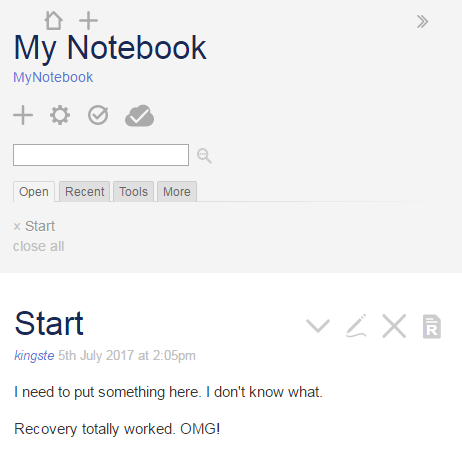
In order for the browser to be connected to the server, you need to log-in
to the server. That is where the cloud/offline button comes in. If it shows
offline, then you need to log-in. If it shows the cloud, then you are
logged in and it will try to sync.


Here is a picture of a sample NoteSelf that is successfully connected to
the CouchDB server, note the cloud icon:

<https://lh3.googleusercontent.com/-enVx4XJqkpc/WW9XWslIOFI/AAAAAAAAAGE/uyjZzHXPomAzB3QTfmDEUR8WCSUdf1EVQCLcBGAs/s1600/noteself-example.PNG>
Here is a chopped up screenshot of the browser locally stored data that
Noteself created and uses: You can see yours (on Chrome) :
1 in the Chrome Menu (3 vertical dots) -> More Tools -> Developer Tools
2 open Noteself
3 in the developer tools window (mine is on the right side of the browser
window) choose Application (menu near the top of the developer tools area)

<https://lh3.googleusercontent.com/-7fEmyWpddM4/WW9YTdq4OJI/AAAAAAAAAGI/JNRESwfVf4w2CD89ihk8D59xdsPyX_wJgCLcBGAs/s1600/noteself-local-storage.PNG>

And, the same information also exists on the CouchDB server. Here is a cut
of a screenshot of the couchdb management interface showing the database
that stores the data for the above NoteSelf:'

<https://lh3.googleusercontent.com/-M6A_YgPZ9ig/WW9Ypy9r7jI/AAAAAAAAAGM/drY1ohA8vkMU3SqntAnU8KpTZNLodWazACLcBGAs/s1600/noteself-couchdb.PNG>
finally, the actual contents of the Start Tiddler in CouchDB:

<https://lh3.googleusercontent.com/-h7huZ5spJnM/WW9Y6HtJw7I/AAAAAAAAAGQ/smKWcda4z7QCzP-5r7LrOfX4TVYbldv7QCLcBGAs/s1600/Noteself-couchdb-tiddler.PNG>

Did that help or make things even more confusing?


On Saturday, June 24, 2017 at 6:40:13 PM UTC-4, Danielo Rodríguez wrote:
>
> Hello everyone,
>
> New weekend and new version of NoteSelf. I'm proud to announce that we
> have fixed several bugs and also added a couple of modest features.
>
> Bug Fixes
>
>    - There was a bug preventing any kind of tiddler exportation, instead
>    a JSON representation of the database was exported. This bug has been
> fixed
>    and now you can export any tiddler in any format as usual
>    - Now it is possible to properly save the wiki in html.
>       -  Previously, because the synchronous nature of the saving
>       mechanism (and the async one of the syncer module) you may end with
>       incomplete files (not containing all your tiddlers).
>       - Now when you save the wiki we make sure that all the tiddlers are
>       loaded
>       - Please note that for some reason this only works on the offline
>       version. *IT WILL NOT WORK ON THE ONLINE ONE*
>    - Palettes and palette tiddler have been added to the list of startup
>    tiddlers. No more colors suddenly appearing after startup!!
>
> New features
>
>
>    - Better login flow. Now if the browser has a cookie it will be picked
>    automatically. This will save you unnecessary login typing!!
>       - This is also way more secure than the basic authentication used
>       before.
>    - Synchronization changes are (almost) reflected instantly. Check it
>    out this small GIFbetween two browsers simulating this situation
>       - This feature is somewhat experimental, and may benefit from
>       performance improvements in the future
>
>
> <https://lh3.googleusercontent.com/-s3zrSRf2AD8/WU7oAso0tPI/AAAAAAAAXh4/AHa5h0P4p3ItQAEQNrFgpftW8P4_QCJvACLcBGAs/s1600/instant_sync.gif>
>
>
>
>    - From the previous GIF you may have noticed that different tiddlers
>    were open, that's because StoryList is not synced anymore between
> devices!!
>    - This should allow a better multi user experience.
>       - However editing conflicts between the same tiddlers are not
>       guaranteed to be satisfactory
>    - The Save config button from the control panel has been renamed to Save
>    empty, which IMO is more correct
>       - This button now works and does something: it downloads the wiki
>       empty, with all the plugins and configurations, but without ANY TIDDLER
>       - For some reason, *THIS DOES NOT WORK NEITHER ON THE ONLINE
>       VERSION*, only on the offline one. So if you want to bake some
>       plugins in your own copy, go for the offline version
>
>
> Hope you enjoy this new features and bugfixes, and enjoy even more using
> NoteSelf.
>
> Suggestions, questions, pull requests... everything is welcome!
>
> Regards
>

--
You received this message because you are subscribed to the Google Groups
"TiddlyWiki" group.
To unsubscribe from this group and stop receiving emails from it, send an email
to [email protected].
To post to this group, send email to [email protected].
Visit this group at https://groups.google.com/group/tiddlywiki.
To view this discussion on the web visit
https://groups.google.com/d/msgid/tiddlywiki/d065605a-9f71-4d7b-82d7-3cb5da878f8a%40googlegroups.com.
For more options, visit https://groups.google.com/d/optout.