Wow. "NoteSelf - The Missing Manual"
On Wednesday, July 19, 2017 at 8:05:27 AM UTC-5, Lost Admin wrote:
>
> I might regret this, but I'm going to attempt to help you JWHoneycutt.
>
> NoteSelf does not work like TiddlyWiki even though it is built on top of
> TiddlyWiki.
>
> NoteSelf stores all of your content online on a server. The server in
> question uses the Apache CouchDB server software. There is a service
> provider called Cloudant that hosts that software and offers use of it for
> free provided you stay below some limits they have defined. Because of the
> nature of NoteSelf, it is almost impossible for a single person using a
> single NoteSelf to actually go over those limits.
>
> The NoteSelf html file that Danielo says to download is a collection of
> HTML, CSS, and Javascript that implements a front-end to the CouchDB server
> and provides the same functionality as TiddlyWiki. But, unlike TiddlyWiki,
> it doesn't save your changes locally. Instead it saves them to the server.
> To speed things up for you NoteSelf also stores a copy in the browser's
> local data (more on this later). This also means that if you use your
> NoteSelf when you are unable to connect to the CouchDB server, your changes
> get stored in the browser and sync to the server the next time that browser
> on that computer is used and connected to the server.
>
> In order for the browser to be connected to the server, you need to log-in
> to the server. That is where the cloud/offline button comes in. If it shows
> offline, then you need to log-in. If it shows the cloud, then you are
> logged in and it will try to sync.
>
>
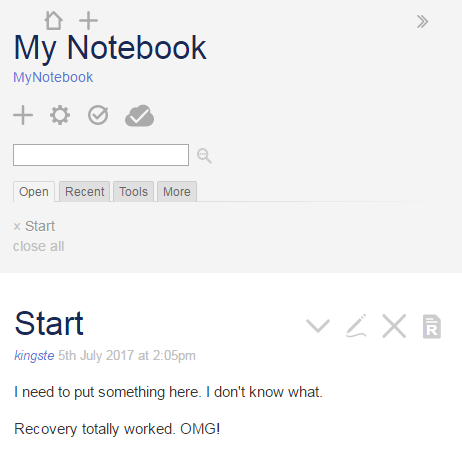
> Here is a picture of a sample NoteSelf that is successfully connected to
> the CouchDB server, note the cloud icon:
>
>
> <https://lh3.googleusercontent.com/-enVx4XJqkpc/WW9XWslIOFI/AAAAAAAAAGE/uyjZzHXPomAzB3QTfmDEUR8WCSUdf1EVQCLcBGAs/s1600/noteself-example.PNG>
> Here is a chopped up screenshot of the browser locally stored data that
> Noteself created and uses: You can see yours (on Chrome) :
> 1 in the Chrome Menu (3 vertical dots) -> More Tools -> Developer Tools
> 2 open Noteself
> 3 in the developer tools window (mine is on the right side of the browser
> window) choose Application (menu near the top of the developer tools area)
>
>
> <https://lh3.googleusercontent.com/-7fEmyWpddM4/WW9YTdq4OJI/AAAAAAAAAGI/JNRESwfVf4w2CD89ihk8D59xdsPyX_wJgCLcBGAs/s1600/noteself-local-storage.PNG>
>
> And, the same information also exists on the CouchDB server. Here is a cut
> of a screenshot of the couchdb management interface showing the database
> that stores the data for the above NoteSelf:'
>
>
> <https://lh3.googleusercontent.com/-M6A_YgPZ9ig/WW9Ypy9r7jI/AAAAAAAAAGM/drY1ohA8vkMU3SqntAnU8KpTZNLodWazACLcBGAs/s1600/noteself-couchdb.PNG>
> finally, the actual contents of the Start Tiddler in CouchDB:
>
>
> <https://lh3.googleusercontent.com/-h7huZ5spJnM/WW9Y6HtJw7I/AAAAAAAAAGQ/smKWcda4z7QCzP-5r7LrOfX4TVYbldv7QCLcBGAs/s1600/Noteself-couchdb-tiddler.PNG>
>
> Did that help or make things even more confusing?
>
>
> On Saturday, June 24, 2017 at 6:40:13 PM UTC-4, Danielo Rodríguez wrote:
>>
>> Hello everyone,
>>
>> New weekend and new version of NoteSelf. I'm proud to announce that we
>> have fixed several bugs and also added a couple of modest features.
>>
>> Bug Fixes
>>
>>    - There was a bug preventing any kind of tiddler exportation, instead
>>    a JSON representation of the database was exported. This bug has been
>> fixed
>>    and now you can export any tiddler in any format as usual
>>    - Now it is possible to properly save the wiki in html.
>>       -  Previously, because the synchronous nature of the saving
>>       mechanism (and the async one of the syncer module) you may end with
>>       incomplete files (not containing all your tiddlers).
>>       - Now when you save the wiki we make sure that all the tiddlers
>>       are loaded
>>       - Please note that for some reason this only works on the offline
>>       version. *IT WILL NOT WORK ON THE ONLINE ONE*
>>    - Palettes and palette tiddler have been added to the list of startup
>>    tiddlers. No more colors suddenly appearing after startup!!
>>
>> New features
>>
>>
>>    - Better login flow. Now if the browser has a cookie it will be
>>    picked automatically. This will save you unnecessary login typing!!
>>       - This is also way more secure than the basic authentication used
>>       before.
>>    - Synchronization changes are (almost) reflected instantly. Check it
>>    out this small GIFbetween two browsers simulating this situation
>>       - This feature is somewhat experimental, and may benefit from
>>       performance improvements in the future
>>
>>
>> <https://lh3.googleusercontent.com/-s3zrSRf2AD8/WU7oAso0tPI/AAAAAAAAXh4/AHa5h0P4p3ItQAEQNrFgpftW8P4_QCJvACLcBGAs/s1600/instant_sync.gif>
>>
>>
>>
>>    - From the previous GIF you may have noticed that different tiddlers
>>    were open, that's because StoryList is not synced anymore between
>> devices!!
>>    - This should allow a better multi user experience.
>>       - However editing conflicts between the same tiddlers are not
>>       guaranteed to be satisfactory
>>    - The Save config button from the control panel has been renamed to Save
>>    empty, which IMO is more correct
>>       - This button now works and does something: it downloads the wiki
>>       empty, with all the plugins and configurations, but without ANY TIDDLER
>>       - For some reason, *THIS DOES NOT WORK NEITHER ON THE ONLINE
>>       VERSION*, only on the offline one. So if you want to bake some
>>       plugins in your own copy, go for the offline version
>>
>>
>> Hope you enjoy this new features and bugfixes, and enjoy even more using
>> NoteSelf.
>>
>> Suggestions, questions, pull requests... everything is welcome!
>>
>> Regards
>>
>

--
You received this message because you are subscribed to the Google Groups
"TiddlyWiki" group.
To unsubscribe from this group and stop receiving emails from it, send an email
to [email protected].
To post to this group, send email to [email protected].
Visit this group at https://groups.google.com/group/tiddlywiki.
To view this discussion on the web visit
https://groups.google.com/d/msgid/tiddlywiki/4916101f-ed92-434d-9c7b-a6245a08a76a%40googlegroups.com.
For more options, visit https://groups.google.com/d/optout.