Using the install as you've been doing and taking Magic Banana's suggestion
to target the GRUB install to /dev/sdc is probably the easiest way to fix
your problem. I've personally not run into this issue but if you feel that it
isn't installing properly because your target disk isn't /dev/sda, change
it's position.
Another thing I would mention is that OS' sometimes tend to have funky issues
when something is re-installed over top without erasing the prior data
sometimes. I have no idea why but that has been my experience. I've always
found a simple overwrite of zeros to be effective in fixing these errors.
For most implementations your /boot will never be encrypted. You can encrypt
it and I recommend you read more if you feel it's necessary. In simplistic
terms, the information the bootloader leaks is which OS you have installed,
et cetera and when that information is important to keep hidden is really
when you need /boot encrypted as well.
You could also do all of your partitioning and encrypting ahead of time
(assuming you are comfortable with the command line because if you aren't, I
wouldn't recommend it). The Arch wiki is an extremely good source of
information related to full disk encryption, file-system encryption and so
on. Even if you don't go this path it's still a good place to pick up
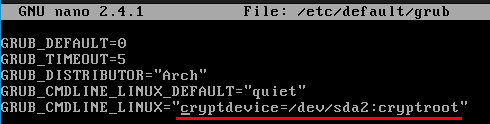
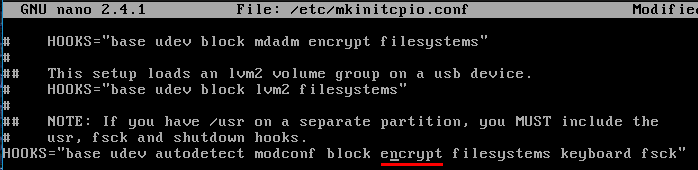
knowledge. Lastly, you will likely need to add a kernel parameter and the
encrypt hook if you want it to prompt you for password on boot. The last part
sounds way more complicated than it is:
https://www.howtoforge.com/images/arch_linux_disk_encryption/big/kern-param.png
https://www.howtoforge.com/images/arch_linux_disk_encryption/big/mkinitcpio-hook.png
Best of luck