On 5:03:02 pm 05/04/06 "Shakthi Kannan" <[EMAIL PROTECTED]> wrote:
[...]
> >  What does
> >  "fc-list :lang=ta" show you?
>
> Where do I check this?
>From a command prompt in a terminal, i.e., start up a terminal from
the Accessories menu, and type this at the prompt (without the quotes).
However, as you have already resolved this issue, you do not need to do
this.

> >  I am sorry. I am unable to read Tamil, and cannot pinpoint the
> >  problem here. If you can provide us a short UTF-8 Tamil file, a
> >  screenshot showing the incorrect rendering,
>
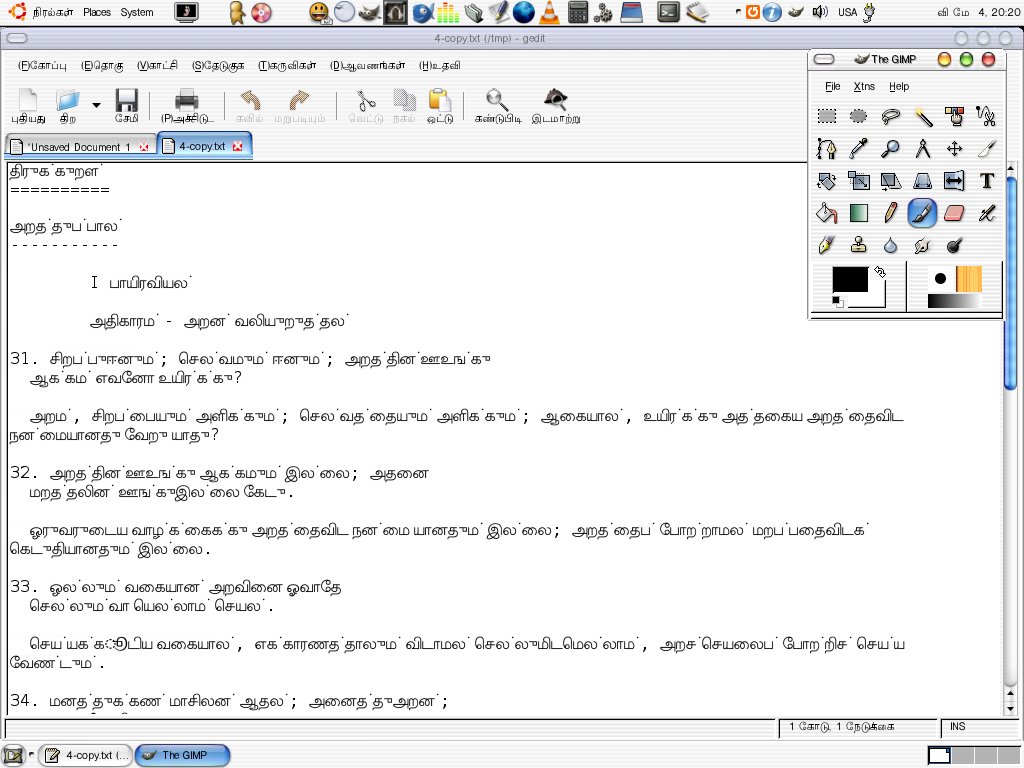
> Now with the correct font selection, and incorrect display of a UTF-8
> text file:
>
> http://www.shakthimaan.com/downloads/tamil/input-error.jpg

I am guessing by looking at the picture, as I cannot read Tamil and tell
what is wrong with the rendering. However, what is probably happening
is that gedit is still using Sans, or some other font with only partial
coverage of Tamil. Changing System->Preferences->Font changes it only
for the user interface. If you want to do this only for gedit, change
the gedit font under the "Font & Colors" tab in the Edit > Preferences
menu.
  It is probably a better idea to make sure that Lohit Tamil is preferred
for all applications using fontconfig. To do that, edit
/etc/fonts/fonts.conf, using sudo and your favourite editor. Look
for entries like:
        <alias>
                <family>serif</family>
                <prefer>
                        <family>DejaVu Serif</family>
                        <family>Bitstream Vera Serif</family>
                ...
                        <family>Baekmuk Batang</family>
                </prefer>
        </alias>
and, add <family>Lohit Tamil</family> at the beginning of the list, i.e.,
the changed entry should look like:
        <alias>
                <family>serif</family>
                <prefer>
                        <family>Lohit Tamil</family>
                        <family>DejaVu Serif</family>
                        <family>Bitstream Vera Serif</family>
                ...
                        <family>Baekmuk Batang</family>
                </prefer>
        </alias>
Do this for all the classes that you would like to change, i.e., serif,
sans-serif, etc.

Regards,
Gora


--
ubuntu-in mailing list
[email protected]
https://lists.ubuntu.com/mailman/listinfo/ubuntu-in