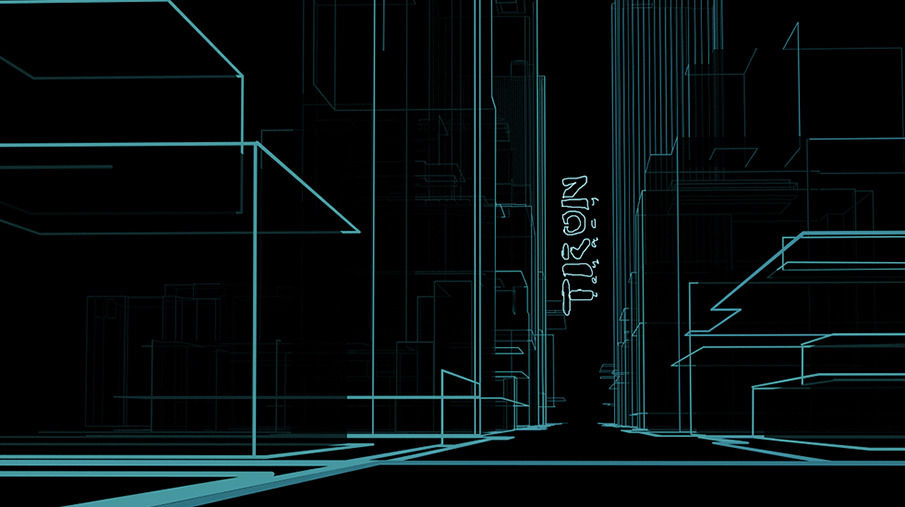
>no receding thickness or fading with distance

There is a tutorial, I thought it was in the Manual, that had perspective
thickness added to outline work. Vesa sorted it from memory.
> but also show hidden lines

The image you supply does not how all working lines. I do not know how to
show all working lines but some working lines can be hidden from a render
by using an identifier - I currently run a half dozen identifier materials
(each with a different value) in my materials library but there are faster
ways of applying these identifiers under object properties.

To show some working lines that might be occluded by foreground objects for
example, I would need to run several passes and comp the results -
excluding selected foreground objects successively of course.

Neico.


On Tue, Oct 14, 2014 at 9:07 AM, Amir Ansari <[email protected]> wrote:

> Dear List
>
> I'm trying to render outlines similar to this image:
> http://payload.cargocollective.com/1/0/2995/1190820/061.TRONOT.17_905.JPG
>
> Outline rendering produces only 2-dimensional lines (no receding thickness
> or fading with distance, as in the above image). I also tried nurbs curves,
> but the corners don't have sharply defined right-angles.
>
> So, two questions:
>
> - Is there any other way to go about producing this style of image?
> - How can I render an image using outline rendering (as detailed in the
> manual), but also show hidden lines (similar to real-time rendering)?
>
> Thanks!
>
> Amir
>
> _______________________________________________
> User-list mailing list
> [email protected]
> http://realsoft.com/mailman/listinfo/user-list_realsoft.com
>
>
_______________________________________________
User-list mailing list
[email protected]
http://realsoft.com/mailman/listinfo/user-list_realsoft.com