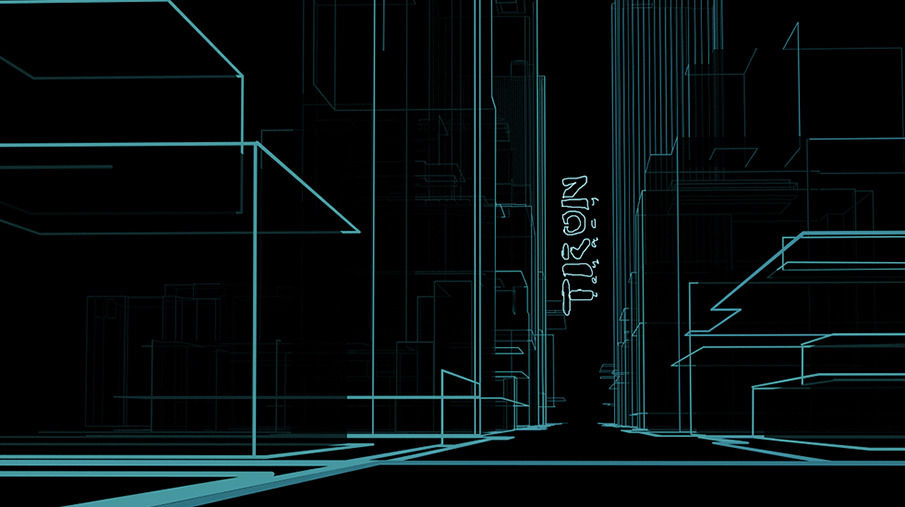
Aha, got it!

My problem was that I was creating a NURBS mesh, then using the curve
extraction ('Curves') tool. This is great for proper curves, but not for sharp
edges.
What I *should* have done was to convert the mesh to NURBS curves ('ToCurves').
I'd forgotten that, by default, NURBS curves are invisible in photo-realistic
rendering. Setting each one to 'visible' solves the problem of obtaining a
wireframe image. To get uniform shading, simply add an ambient light source and
set the intensity to 1. (There are probably other ways to do this, but it's a
start.)

However, I'm still curious how to render a pure wireframe image in the same way
as the real-time rendering window.

Anyway, Neil and Jean-Sebastien, thanks for your help!

Amir


On Tue, 14 Oct 2014 14:16:38 +1300
Neil Cooke <[email protected]> wrote:

> >no receding thickness or fading with distance
>
> There is a tutorial, I thought it was in the Manual, that had perspective
> thickness added to outline work. Vesa sorted it from memory.
>
> > but also show hidden lines
>
> The image you supply does not how all working lines. I do not know how to
> show all working lines but some working lines can be hidden from a render
> by using an identifier - I currently run a half dozen identifier materials
> (each with a different value) in my materials library but there are faster
> ways of applying these identifiers under object properties.
>
> To show some working lines that might be occluded by foreground objects for
> example, I would need to run several passes and comp the results -
> excluding selected foreground objects successively of course.
>
> Neico.
>
>
> On Tue, Oct 14, 2014 at 9:07 AM, Amir Ansari <[email protected]> wrote:
>
> > Dear List
> >
> > I'm trying to render outlines similar to this image:
> > http://payload.cargocollective.com/1/0/2995/1190820/061.TRONOT.17_905.JPG
> >
> > Outline rendering produces only 2-dimensional lines (no receding thickness
> > or fading with distance, as in the above image). I also tried nurbs curves,
> > but the corners don't have sharply defined right-angles.
> >
> > So, two questions:
> >
> > - Is there any other way to go about producing this style of image?
> > - How can I render an image using outline rendering (as detailed in the
> > manual), but also show hidden lines (similar to real-time rendering)?
> >
> > Thanks!
> >
> > Amir
> >
> > _______________________________________________
> > User-list mailing list
> > [email protected]
> > http://realsoft.com/mailman/listinfo/user-list_realsoft.com
> >
> >

_______________________________________________
User-list mailing list
[email protected]
http://realsoft.com/mailman/listinfo/user-list_realsoft.com